park assist VOLVO S60 2017 Owner´s Manual
[x] Cancel search | Manufacturer: VOLVO, Model Year: 2017, Model line: S60, Model: VOLVO S60 2017Pages: 398, PDF Size: 9.46 MB
Page 241 of 398
DRIVER SUPPORT
* Option/accessory, for more information, see Introduction.239
The sensors must be cleaned regularly to ensure that they work properly. Clean them with waterand a suitable car washing detergent.
Related information
•
Park Assist Pilot (PAP)
* – introduction
(p. 235)
• Park Assist Pilot (PAP)
* – function (p. 235)
• Park Assist Pilot (PAP)
* – operation (p. 236)
• Park Assist Pilot (PAP)
* – symbols and mes-
sages (p. 239)
• Park assist – introduction (p. 231)
• Rear Park Assist Camera (PAC) – introduc-tion (p. 240)
Park Assist Pilot (PAP)
* – symbols
and messages
Various PAP-related combinations of symbols, graphics and text messages are displayed in theinstrument panel and sometimes also includesuitable actions. A text message can be erased by pressing briefly on the OK button on the turn signal lever.
Contact a Volvo retailer or a trained and qualified Volvo service technician If a message indicatingthat PAP is not functioning properly is displayed.
Related information
• Park Assist Pilot (PAP)
* – introduction
(p. 235)
• Park Assist Pilot (PAP)
* – function (p. 235)
• Park Assist Pilot (PAP)
* – operation (p. 236)
• Park Assist Pilot (PAP)
* – limitations (p. 238)
• Park assist – introduction (p. 231)
• Rear Park Assist Camera (PAC) – introduc-tion (p. 240)
Park assist – troubleshooting
Faults in the systemIf the information symbol illuminates and Park
assist syst Service required is shown on the
information display, this indicates that the system is not functioning properly and has been disen-gaged. Consult a trained and qualified Volvo serv-ice technician.
CAUTION
In certain circumstances, the park assist sys- tem may give unexpected warning signalsthat can be caused by external sound sourcesthat use the same ultrasound frequencies asthe system. This may include such things asthe horns of other vehicles, wet tires onasphalt, pneumatic brakes, motorcycleexhaust pipes, etc. This does not indicate afault in the system.
Related information
• Park assist – introduction (p. 231)
• Park assist – limitations (p. 234)
• Park assist – function (p. 231)
• Park assist – operation (p. 233)
• Rear Park Assist Camera (PAC) – function (p. 240)
Page 242 of 398
DRIVER SUPPORT
240
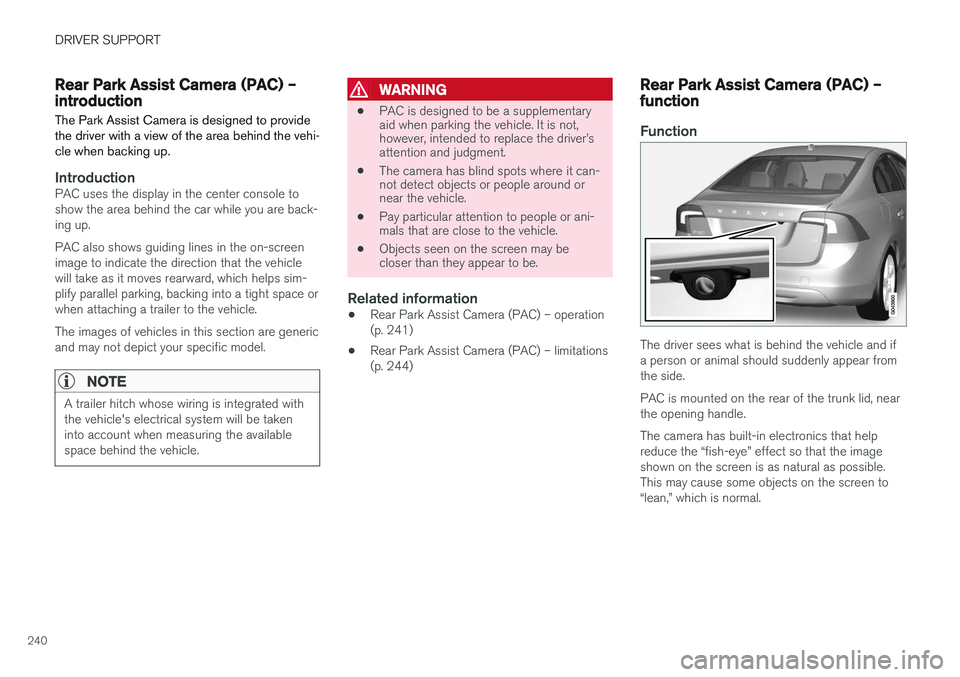
Rear Park Assist Camera (PAC) – introductionThe Park Assist Camera is designed to provide the driver with a view of the area behind the vehi-cle when backing up.
IntroductionPAC uses the display in the center console to show the area behind the car while you are back-ing up. PAC also shows guiding lines in the on-screen image to indicate the direction that the vehiclewill take as it moves rearward, which helps sim-plify parallel parking, backing into a tight space orwhen attaching a trailer to the vehicle. The images of vehicles in this section are generic and may not depict your specific model.
NOTE
A trailer hitch whose wiring is integrated with the vehicle's electrical system will be takeninto account when measuring the availablespace behind the vehicle.
WARNING
• PAC is designed to be a supplementary aid when parking the vehicle. It is not,however, intended to replace the driver
Page 243 of 398

DRIVER SUPPORT
}}
241
Ambient lighting conditions
The camera automatically monitors the ambient lighting conditions behind the vehicle and con-stantly adjusts sensitivity to light. This may causethe brightness and quality of the image on thescreen to vary slightly. Sensitivity to light isincreased in dark conditions or in bad weather,which may affect image quality. If the image on the screen seems too dark, brightness can be increased with the thumbwheel on the lighting panel.
NOTE
In order to function properly, the camera lens should always be kept clean. This is particu-larly important in bad weather. Keep the lensfree of dirt, ice or snow.
Related information
•Rear Park Assist Camera (PAC) – introduc- tion (p. 240)
• Rear Park Assist Camera (PAC) – operation(p. 241)
• Rear Park Assist Camera (PAC) – limitations(p. 244)
Rear Park Assist Camera (PAC) – operation
Activation
PAC is activated when the gear selector is moved to
R if the system is selected in the MY CAR
menu system or by pressing the CAM button in
the center console. See My Car – introduction (p. 71) for a description of the menu system. If PAC is not activated when the gear selector is moved to R, press the CAM button on the center
console. PAC will automatically override the view currently on the screen and will display the camera's viewbehind the vehicle.
Trailer hitchesThe camera can be useful when attaching atrailer. With the camera zoomed in on the trailer hitch, a guiding line showing the hitch's pathtoward the trailer will be projected. The guiding lines for the wheels and for the trailer hitch cannot be displayed at the sametime. To select a view: 1.
Press OK/MENU when a camera view is dis-
played.
2. Turn TUNE to scroll to
Tow bar trajectory
guide line.
3. Confirm by pressing OK/MENU and press
EXIT .
Zoom
When necessary, the camera view can be zoomed:
• Press
CAM or turn TUNE. Pressing or turn-
ing again returns you to normal view.
If there are additional alternatives, press/turnuntil the desired camera view is displayed.
Automatic zoom
Automatic zoom is a feature that is available on
models equipped with a trailer hitch and the optional (p. 231)Park assist system. With thisalternative selected, the camera will zoom in onthe trailer hitch automatically if the vehicleapproaches an object/trailer. See also the "Settings" section below.
Page 244 of 398
||
DRIVER SUPPORT
242
DeactivationMove the gear selector from R to another gear.
The camera remains active for approx. 5 seconds after the gear selector has been moved from R or
until the vehicle's forward speed exceeds 6 mph/10 km/h (21 mph/35 km/h in reverse).The screen will then revert to the view that was displayed before R was selected.
NOTE
If any button on the center console control panel is pressed, the camera image will disap- pear from the display. Pressing CAM will
return the camera image to the display.
SettingsBy default, PAC is set to activate when the gear selector is moved to R
To change PAC settings when a camera view is displayed: 1. Press OK/MENU when a camera view is on
the screen. A menu will be displayed.
2. Turn TUNE to scroll to the desired setting.
3. Press OK/MENU to make the setting and
exit the menu by pressing EXIT.
Summary
•Pressing
CAM will activate the camera even
if the gear selector is not in Reverse.
• Toggle between normal view and zoom by pressing
CAM or by turning TUNE.
Related information
•Park assist – introduction (p. 231)
• Park assist – function (p. 231)
• Park assist – troubleshooting (p. 239)
• Park assist – limitations (p. 234)
• Rear Park Assist Camera (PAC) – introduc- tion (p. 240)
Rear Park Assist Camera (PAC) – guiding and marker lines
Guiding lines
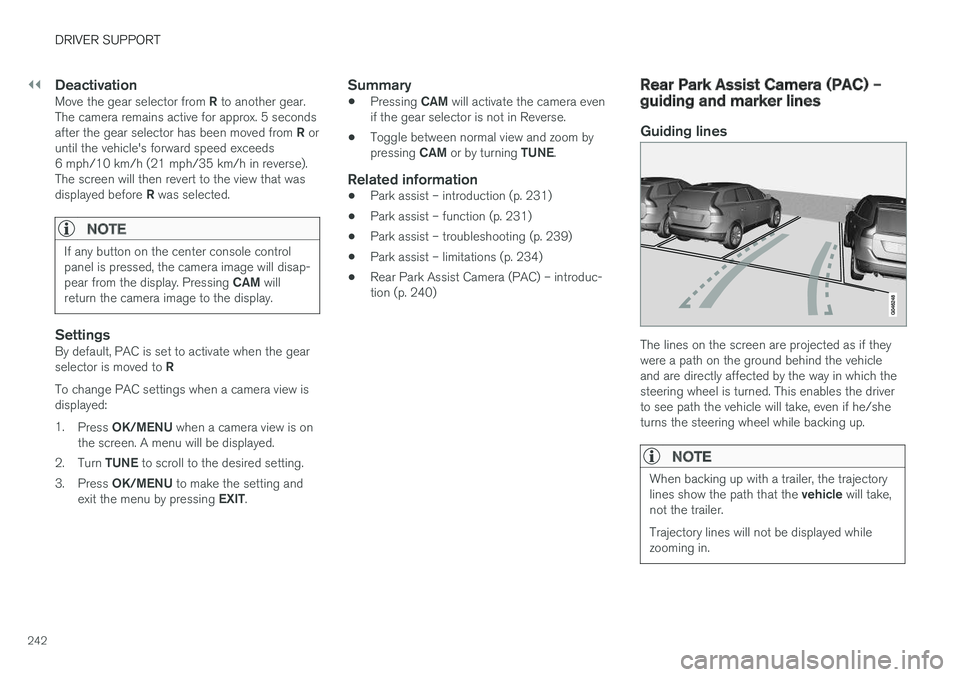
The lines on the screen are projected as if they were a path on the ground behind the vehicleand are directly affected by the way in which thesteering wheel is turned. This enables the driverto see path the vehicle will take, even if he/sheturns the steering wheel while backing up.
NOTE
When backing up with a trailer, the trajectory lines show the path that the
vehicle will take,
not the trailer. Trajectory lines will not be displayed while zooming in.
Page 245 of 398
DRIVER SUPPORT
243
WARNING
Keep in mind that the image on the screen only shows the area behind the vehicle. Thedriver must always watch for people, animals,other vehicles, etc., near the sides of the vehi-cle when turning while backing up.
Marker lines
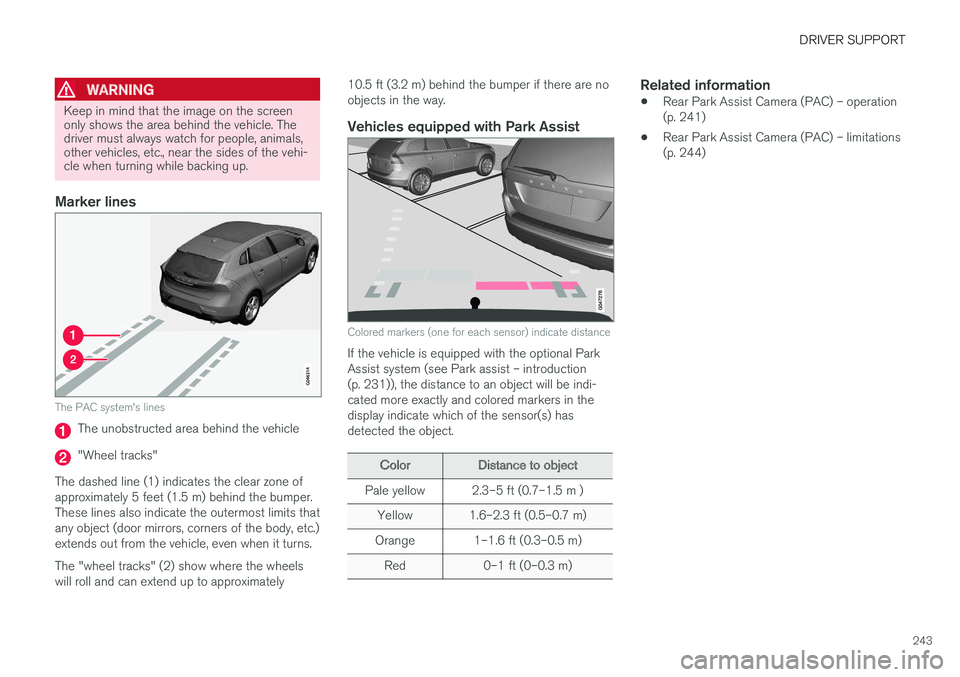
The PAC system's lines
The unobstructed area behind the vehicle
"Wheel tracks"
The dashed line (1) indicates the clear zone of approximately 5 feet (1.5 m) behind the bumper.These lines also indicate the outermost limits thatany object (door mirrors, corners of the body, etc.)extends out from the vehicle, even when it turns. The "wheel tracks" (2) show where the wheels will roll and can extend up to approximately 10.5 ft (3.2 m) behind the bumper if there are noobjects in the way.
Vehicles equipped with Park Assist
Colored markers (one for each sensor) indicate distance
If the vehicle is equipped with the optional Park Assist system (see Park assist – introduction(p. 231)), the distance to an object will be indi-cated more exactly and colored markers in thedisplay indicate which of the sensor(s) hasdetected the object.
ColorDistance to object
Pale yellow2.3–5 ft (0.7–1.5 m )
Yellow1.6–2.3 ft (0.5–0.7 m)
Orange1–1.6 ft (0.3–0.5 m)
Red0–1 ft (0–0.3 m)
Related information
•
Rear Park Assist Camera (PAC) – operation (p. 241)
• Rear Park Assist Camera (PAC) – limitations(p. 244)
Page 246 of 398
DRIVER SUPPORT
* Option/accessory, for more information, see Introduction.
244
Rear Park Assist Camera (PAC) – limitations
LimitationsEven if a fairly small section of the screen image appears to be obstructed, this may mean that arelatively large area behind the vehicle is hiddenand objects there may not be detected until theyare very near the vehicle.
NOTE
Bicycle carriers or other accessories mounted on the trunk may obstruct the camera's fieldof view.
Keep in mind
• Keep the camera's lens free of dirt, ice and snow. Remove ice and snow carefully toavoid scratching the lens.
• Clean the lens regularly with warm water anda suitable car washing detergent.
Related information
•
Rear Park Assist Camera (PAC) – introduc-tion (p. 240)
• Rear Park Assist Camera (PAC) – operation(p. 241)
• Park assist – introduction (p. 231)
BLIS
* – introduction
The Blind Spot Information System (BLIS) is an information system that indicates the presenceof another vehicle moving in the same directionas your vehicle on roads with several lanes.
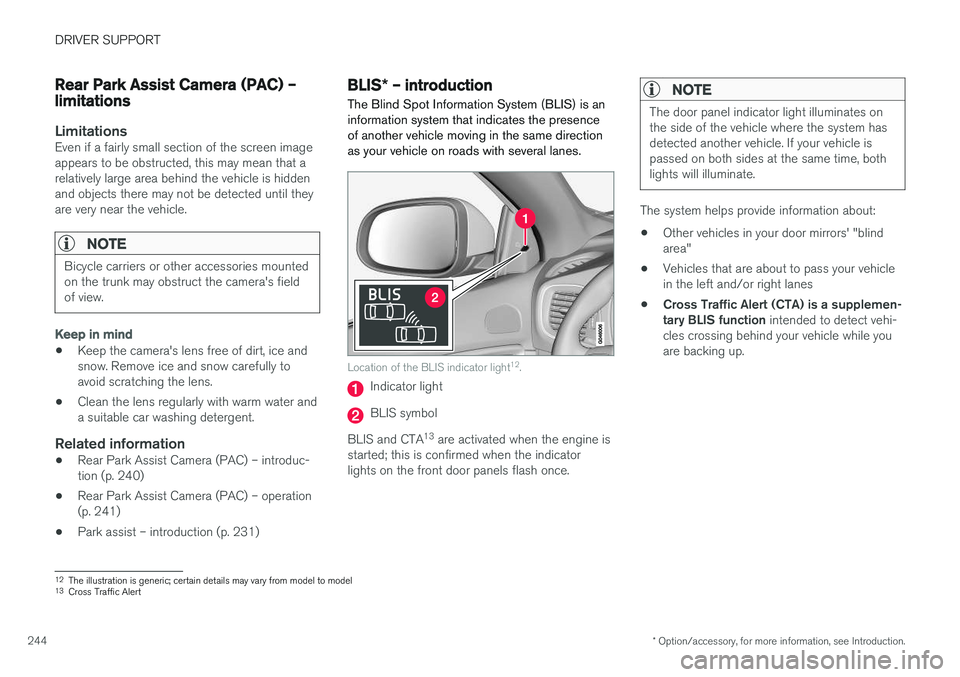
Location of the BLIS indicator light 12
.
Indicator light
BLIS symbol
BLIS and CTA 13
are activated when the engine is
started; this is confirmed when the indicator lights on the front door panels flash once.
NOTE
The door panel indicator light illuminates on the side of the vehicle where the system hasdetected another vehicle. If your vehicle ispassed on both sides at the same time, bothlights will illuminate.
The system helps provide information about:
• Other vehicles in your door mirrors' "blind area"
• Vehicles that are about to pass your vehiclein the left and/or right lanes
• Cross Traffic Alert (CTA) is a supplemen-tary BLIS function
intended to detect vehi-
cles crossing behind your vehicle while youare backing up.
12 The illustration is generic; certain details may vary from model to model
13 Cross Traffic Alert
Page 249 of 398
DRIVER SUPPORT
}}
* Option/accessory, for more information, see Introduction.247
BLIS* – Cross Traffic Alert (CTA)
Cross Traffic Alert (CTA) is a supplementary BLIS 15
function intended to detect vehicles
crossing behind your vehicle while you are back- ing up.
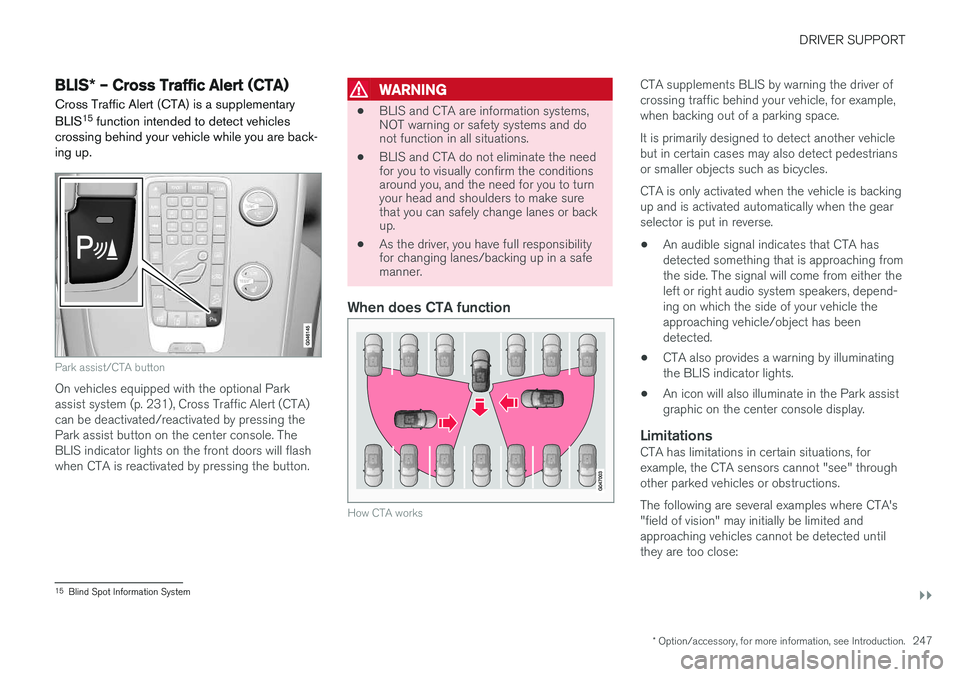
Park assist/CTA button
On vehicles equipped with the optional Park assist system (p. 231), Cross Traffic Alert (CTA)can be deactivated/reactivated by pressing thePark assist button on the center console. TheBLIS indicator lights on the front doors will flashwhen CTA is reactivated by pressing the button.
WARNING
• BLIS and CTA are information systems, NOT warning or safety systems and donot function in all situations.
• BLIS and CTA do not eliminate the needfor you to visually confirm the conditionsaround you, and the need for you to turnyour head and shoulders to make surethat you can safely change lanes or backup.
• As the driver, you have full responsibilityfor changing lanes/backing up in a safemanner.
When does CTA function
How CTA works
CTA supplements BLIS by warning the driver of crossing traffic behind your vehicle, for example,when backing out of a parking space. It is primarily designed to detect another vehicle but in certain cases may also detect pedestriansor smaller objects such as bicycles. CTA is only activated when the vehicle is backing up and is activated automatically when the gearselector is put in reverse.
• An audible signal indicates that CTA hasdetected something that is approaching fromthe side. The signal will come from either theleft or right audio system speakers, depend-ing on which the side of your vehicle theapproaching vehicle/object has beendetected.
• CTA also provides a warning by illuminatingthe BLIS indicator lights.
• An icon will also illuminate in the Park assistgraphic on the center console display.
LimitationsCTA has limitations in certain situations, forexample, the CTA sensors cannot "see" throughother parked vehicles or obstructions. The following are several examples where CTA's "field of vision" may initially be limited andapproaching vehicles cannot be detected untilthey are too close:
15
Blind Spot Information System
Page 258 of 398
||
STARTING AND DRIVING
2563. Fold back the cover over the positive (+) ter-
minal on your vehicle's battery (2), marked with a "+" sign, located under a folding cover.
4. Connect the black jumper cable to the auxili- ary battery's negative (–) terminal (3) and tothe ground point in your vehicle's enginecompartment (right engine mount at the top,on the outer screw) (4).
5. Start the engine in the assisting vehicle, then start the engine in the vehicle with dead bat-tery.
6. After the engine has started, first remove the negative (–) terminal jumper cable (black).Then remove the positive (+) terminal jumpercable (red).
WARNING
PROPOSITION 65 WARNING! Battery posts, terminals, and related accesso- ries contain lead and lead compounds, chemi-cals known to the state of California to causecancer and reproductive harm. Wash handsafter handling.
CAUTION
Connect the jumper cables carefully to avoid short circuits with other components in theengine compartment.
WARNING
• Do not connect the jumper cable to any part of the fuel system or to any movingparts. Avoid touching hot manifolds.
• Batteries generate hydrogen gas, whichis flammable and explosive.
• Battery fluid contains sulfuric acid. Do notallow battery fluid to contact eyes, skin,fabrics or painted surfaces. If contactoccurs, flush the affected area immedi-ately with water. Obtain medical helpimmediately if eyes are affected.
• Never expose the battery to open flameor electric spark.
• Do not smoke near the battery.
• Failure to follow the instructions for jumpstarting can lead to injury.
Related information
• Starting the engine (p. 252)
Transmission – general information The transmission automatically shifts between the various forward gears, based on the level ofacceleration and speed.
G021351
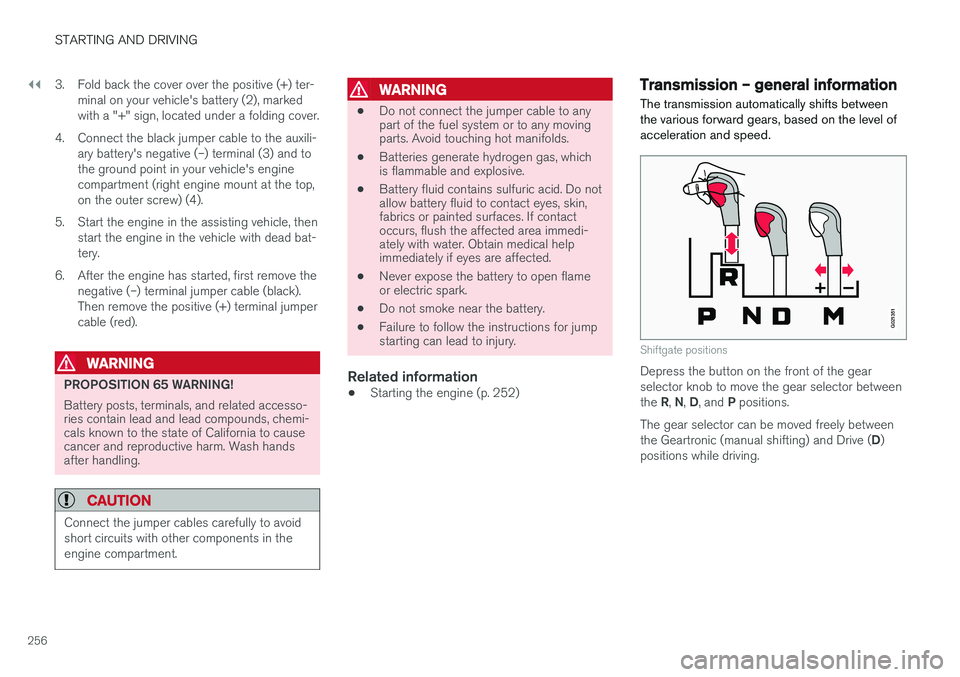
Shiftgate positions
Depress the button on the front of the gear selector knob to move the gear selector between the
R, N , D , and P positions.
The gear selector can be moved freely betweenthe Geartronic (manual shifting) and Drive ( D)
positions while driving.
Page 263 of 398
STARTING AND DRIVING
261
Transmission – shiftlock override
If the vehicle cannot be driven, for example because of a dead battery, the gear selectormust be moved from the P position before the
vehicle can be moved 8
.
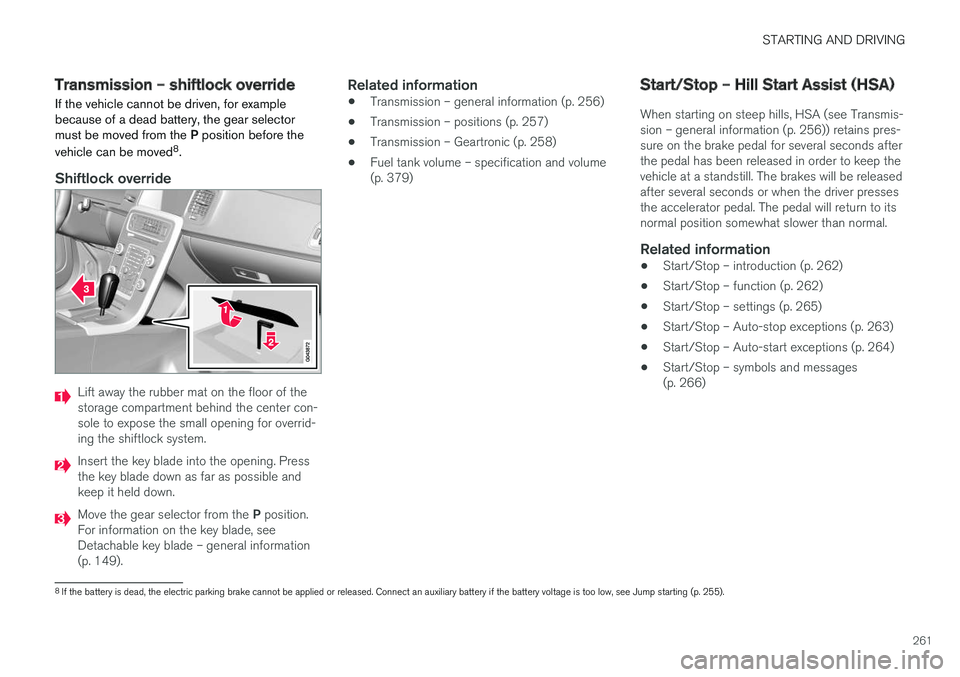
Shiftlock override
Lift away the rubber mat on the floor of the storage compartment behind the center con-sole to expose the small opening for overrid-ing the shiftlock system.
Insert the key blade into the opening. Press the key blade down as far as possible andkeep it held down.
Move the gear selector from the P position.
For information on the key blade, see Detachable key blade – general information(p. 149).
Related information
• Transmission – general information (p. 256)
• Transmission – positions (p. 257)
• Transmission – Geartronic (p. 258)
• Fuel tank volume – specification and volume(p. 379)
Start/Stop – Hill Start Assist (HSA)
When starting on steep hills, HSA (see Transmis- sion – general information (p. 256)) retains pres-sure on the brake pedal for several seconds afterthe pedal has been released in order to keep thevehicle at a standstill. The brakes will be releasedafter several seconds or when the driver pressesthe accelerator pedal. The pedal will return to itsnormal position somewhat slower than normal.
Related information
• Start/Stop – introduction (p. 262)
• Start/Stop – function (p. 262)
• Start/Stop – settings (p. 265)
• Start/Stop – Auto-stop exceptions (p. 263)
• Start/Stop – Auto-start exceptions (p. 264)
• Start/Stop – symbols and messages(p. 266)
8
If the battery is dead, the electric parking brake cannot be applied or released. Connect an auxiliary battery if the battery voltage is too low, see Jump starting (p. 255).
Page 273 of 398
STARTING AND DRIVING
271
Related information
•Parking brake – general information (p. 273)
• Emergency Brake Assistance (EBA) (p. 272)
• Brakes – general (p. 269)
• Anti-lock braking system (ABS) (p. 271)
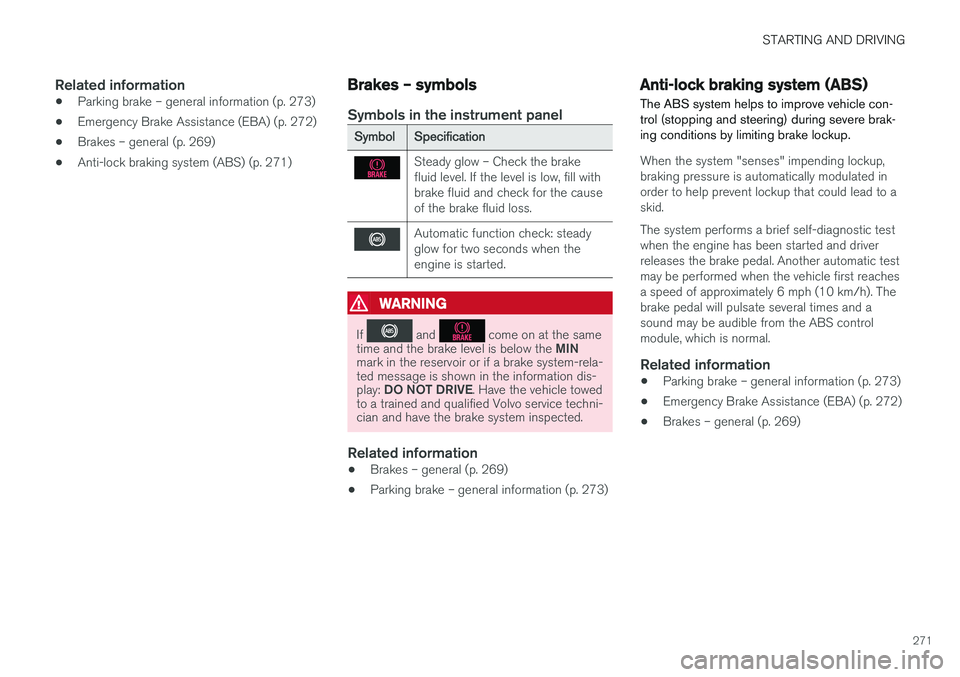
Brakes – symbols
Symbols in the instrument panel
SymbolSpecification
Steady glow – Check the brake fluid level. If the level is low, fill withbrake fluid and check for the causeof the brake fluid loss.
Automatic function check: steady glow for two seconds when theengine is started.
WARNING
If and come on at the same
time and the brake level is below the MIN
mark in the reservoir or if a brake system-rela- ted message is shown in the information dis- play: DO NOT DRIVE . Have the vehicle towed
to a trained and qualified Volvo service techni- cian and have the brake system inspected.
Related information
• Brakes – general (p. 269)
• Parking brake – general information (p. 273)
Anti-lock braking system (ABS) The ABS system helps to improve vehicle con- trol (stopping and steering) during severe brak-ing conditions by limiting brake lockup.
When the system "senses" impending lockup, braking pressure is automatically modulated inorder to help prevent lockup that could lead to askid. The system performs a brief self-diagnostic test when the engine has been started and driverreleases the brake pedal. Another automatic testmay be performed when the vehicle first reachesa speed of approximately 6 mph (10 km/h). Thebrake pedal will pulsate several times and asound may be audible from the ABS controlmodule, which is normal.
Related information
• Parking brake – general information (p. 273)
• Emergency Brake Assistance (EBA) (p. 272)
• Brakes – general (p. 269)