trunk VOLVO S60 2017 Owner´s Manual
[x] Cancel search | Manufacturer: VOLVO, Model Year: 2017, Model line: S60, Model: VOLVO S60 2017Pages: 398, PDF Size: 9.46 MB
Page 153 of 398
LOCKS AND ALARM
}}
151
G021084
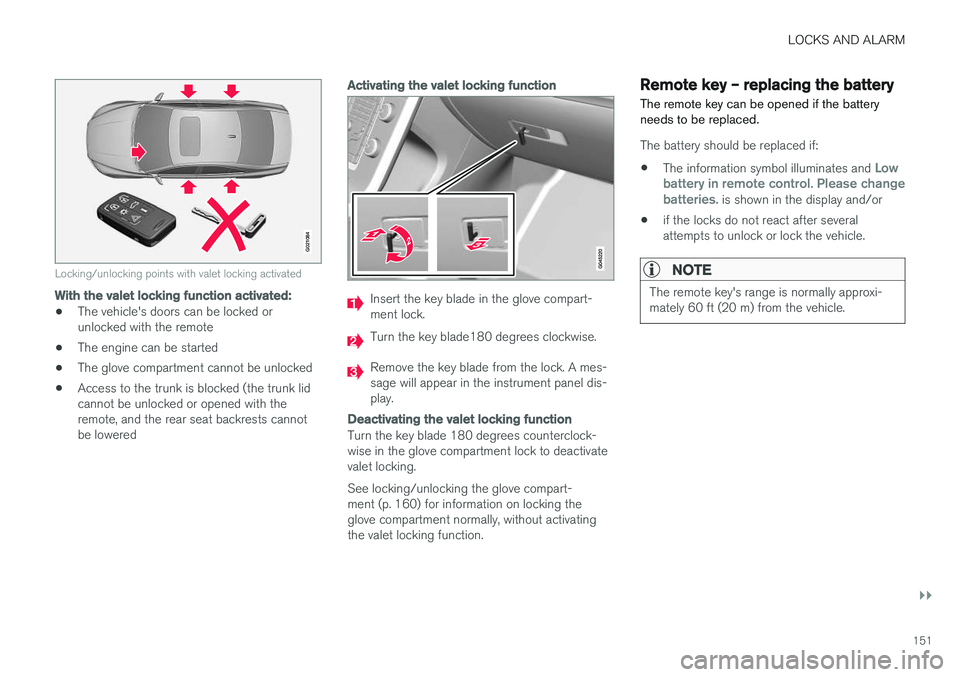
Locking/unlocking points with valet locking activated
With the valet locking function activated:
•The vehicle's doors can be locked or unlocked with the remote
• The engine can be started
• The glove compartment cannot be unlocked
• Access to the trunk is blocked (the trunk lidcannot be unlocked or opened with theremote, and the rear seat backrests cannotbe lowered
Activating the valet locking function
Insert the key blade in the glove compart- ment lock.
Turn the key blade180 degrees clockwise.
Remove the key blade from the lock. A mes- sage will appear in the instrument panel dis-play.
Deactivating the valet locking function
Turn the key blade 180 degrees counterclock- wise in the glove compartment lock to deactivatevalet locking. See locking/unlocking the glove compart- ment (p. 160) for information on locking theglove compartment normally, without activatingthe valet locking function.
Remote key – replacing the battery The remote key can be opened if the battery needs to be replaced.
The battery should be replaced if:
• The information symbol illuminates and
Low
battery in remote control. Please change batteries.
is shown in the display and/or
• if the locks do not react after several attempts to unlock or lock the vehicle.
NOTE
The remote key's range is normally approxi- mately 60 ft (20 m) from the vehicle.
Page 155 of 398
LOCKS AND ALARM
}}
* Option/accessory, for more information, see Introduction.153
Keyless drive*– locking/unlocking
This system makes it possible to unlock and lock the vehicle without having to press any buttonson the remote key. It is only necessary to have akeyless drive remote key in your possession tooperate the central locking system.
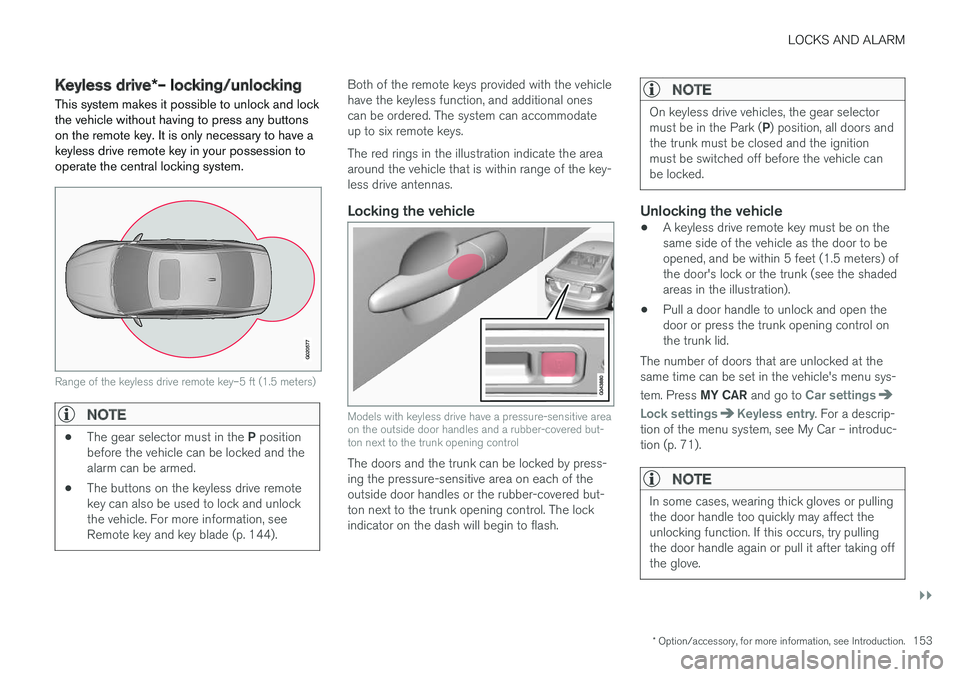
G020577
Range of the keyless drive remote key–5 ft (1.5 meters)
NOTE
• The gear selector must in the
P position
before the vehicle can be locked and the alarm can be armed.
• The buttons on the keyless drive remotekey can also be used to lock and unlockthe vehicle. For more information, seeRemote key and key blade (p. 144).
Both of the remote keys provided with the vehicle have the keyless function, and additional onescan be ordered. The system can accommodateup to six remote keys. The red rings in the illustration indicate the area around the vehicle that is within range of the key-less drive antennas.
Locking the vehicle
Models with keyless drive have a pressure-sensitive area on the outside door handles and a rubber-covered but-ton next to the trunk opening control
The doors and the trunk can be locked by press- ing the pressure-sensitive area on each of theoutside door handles or the rubber-covered but-ton next to the trunk opening control. The lockindicator on the dash will begin to flash.
NOTE
On keyless drive vehicles, the gear selector must be in the Park (
P) position, all doors and
the trunk must be closed and the ignition must be switched off before the vehicle canbe locked.
Unlocking the vehicle
• A keyless drive remote key must be on the same side of the vehicle as the door to beopened, and be within 5 feet (1.5 meters) ofthe door's lock or the trunk (see the shadedareas in the illustration).
• Pull a door handle to unlock and open thedoor or press the trunk opening control onthe trunk lid.
The number of doors that are unlocked at thesame time can be set in the vehicle's menu sys- tem. Press MY CAR and go to
Car settings
Lock settingsKeyless entry. For a descrip-
tion of the menu system, see My Car – introduc- tion (p. 71).
NOTE
In some cases, wearing thick gloves or pulling the door handle too quickly may affect theunlocking function. If this occurs, try pullingthe door handle again or pull it after taking offthe glove.
Page 159 of 398
LOCKS AND ALARM
* Option/accessory, for more information, see Introduction.157
WARNING
People with implanted pacemakers should not allow the pacemaker to come closer than9 inches (22 cm) to any of the keyless drivesystem's antennas. This is to help preventinterference between the pacemaker and thekeyless drive system.
Related information
•Keyless drive
*– locking/unlocking (p. 153)
Locking/unlocking – from the outside
The remote key (p. 144) is used to lock/unlock all of the doors and the trunk at the same time.Different settings for unlocking the vehicle canbe selected, see Remote key – functions(p. 147). Before the vehicle can be locked from the out- side with the remote key, the driver's door mustbe closed. If the trunk or any other door is open,it will be locked and the alarm will be armed.
NOTE
Be sure the remote key is outside of the vehi- cle before the other doors/trunk are closed tohelp avoid locking the remote inside the vehi-cle.
If the vehicle is equipped with the optional key- less drive system, all doors/trunk must be closedbefore the vehicle can be locked. The first press on the unlock button unlocks the driver's door and a second press unlocks theother doors and the trunk (see also remote keyand key blade (p. 144)). This setting can be changed in the menu system. See MY
CAR (p. 71) for a description.
If the locks repeatedly do not react when the unlock button is pressed, it may be necessary toreplace the battery in the remote, see Remote key – replacing the battery (p. 151). In this casethe vehicle can be unlocked with the detachablekey blade (p. 150).
Related information
•
Locking/unlocking – from inside (p. 158)
Page 160 of 398
LOCKS AND ALARM
158
Manual locking
In certain situations (e.g., if there is no electrical current in the vehicle), the doors can be lockedmanually.
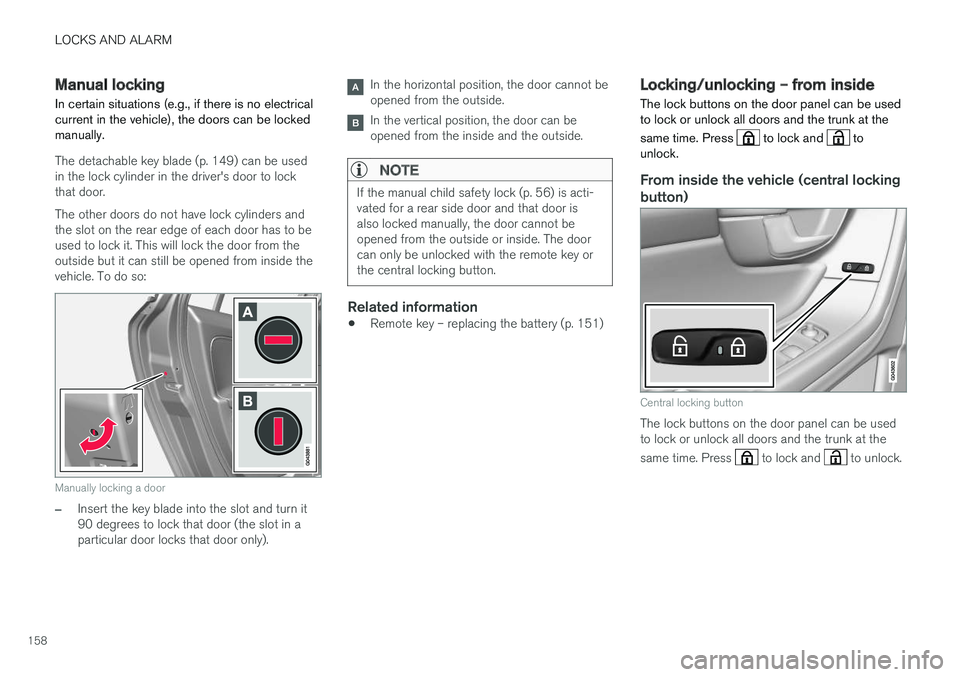
The detachable key blade (p. 149) can be used in the lock cylinder in the driver's door to lockthat door. The other doors do not have lock cylinders and the slot on the rear edge of each door has to beused to lock it. This will lock the door from theoutside but it can still be opened from inside thevehicle. To do so:
Manually locking a door
–Insert the key blade into the slot and turn it 90 degrees to lock that door (the slot in aparticular door locks that door only).
In the horizontal position, the door cannot be opened from the outside.
In the vertical position, the door can be opened from the inside and the outside.
NOTE
If the manual child safety lock (p. 56) is acti- vated for a rear side door and that door isalso locked manually, the door cannot beopened from the outside or inside. The doorcan only be unlocked with the remote key orthe central locking button.
Related information
• Remote key – replacing the battery (p. 151)
Locking/unlocking – from inside
The lock buttons on the door panel can be used to lock or unlock all doors and the trunk at the same time. Press
to lock and to
unlock.
From inside the vehicle (central locking
button)
Central locking button
The lock buttons on the door panel can be used to lock or unlock all doors and the trunk at the same time. Press
to lock and to unlock.
Page 161 of 398
LOCKS AND ALARM
159
Unlocking
The vehicle can be unlocked from inside the vehi- cle in two ways:• By pressing the unlock button
.
• The
front doors can be unlocked and
opened by pulling the door handle once. The rear doors can be unlocked by pulling the
door handle once and opened by pulling the handle again.
Locking
• Press the lock button after the front
doors have been closed.
• Press the lock button
: all of the doors
that are closed will lock.
• Each door can be locked individually with the lock button on the respective doors. The doormust be closed first.
Indicator light in the lock buttons
There are two versions of the central locking sys- tem that affect the indicator light in the driver'sdoor central locking button. If
only the driver's door has a central locking but-
ton:
• If the light is on, this indicates that all of the doors are locked.
If there are central locking buttons in both front
doors and electric lock buttons in the rear sidedoors: •
If a light is on in one of the buttons, thismeans that only that door is locked. Whenthe lights are on in all of the buttons, all ofthe doors are locked.
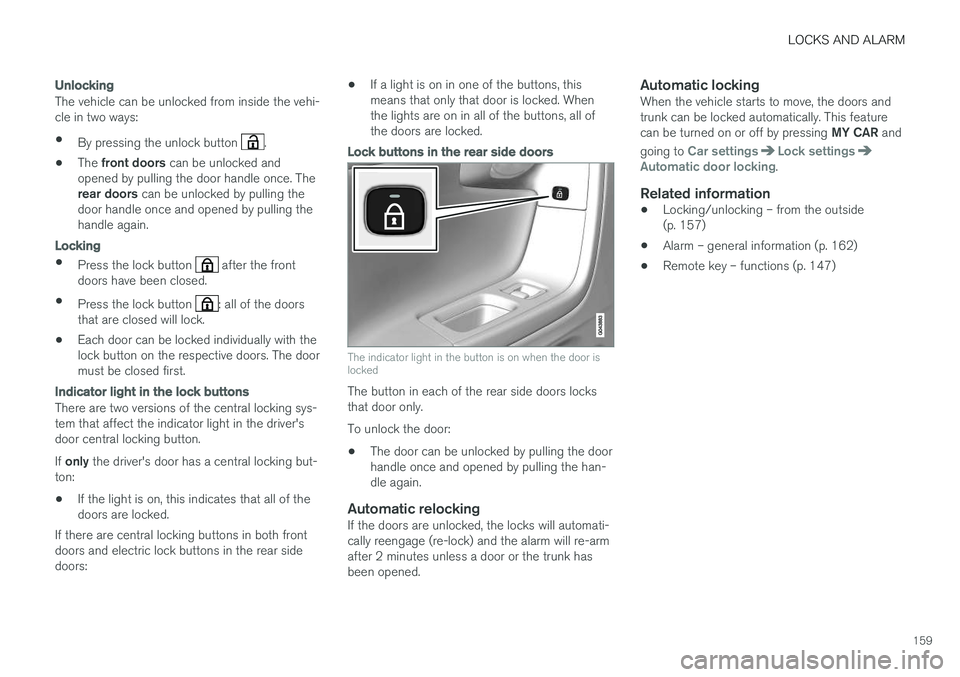
Lock buttons in the rear side doors
The indicator light in the button is on when the door is locked
The button in each of the rear side doors locks that door only. To unlock the door:
• The door can be unlocked by pulling the door handle once and opened by pulling the han-dle again.
Automatic relockingIf the doors are unlocked, the locks will automati-cally reengage (re-lock) and the alarm will re-armafter 2 minutes unless a door or the trunk hasbeen opened.
Automatic lockingWhen the vehicle starts to move, the doors andtrunk can be locked automatically. This feature can be turned on or off by pressing
MY CAR and
going to
Car settingsLock settingsAutomatic door locking.
Related information
• Locking/unlocking – from the outside (p. 157)
• Alarm – general information (p. 162)
• Remote key – functions (p. 147)
Page 162 of 398
LOCKS AND ALARM
160
Locking/unlocking – glove compartment
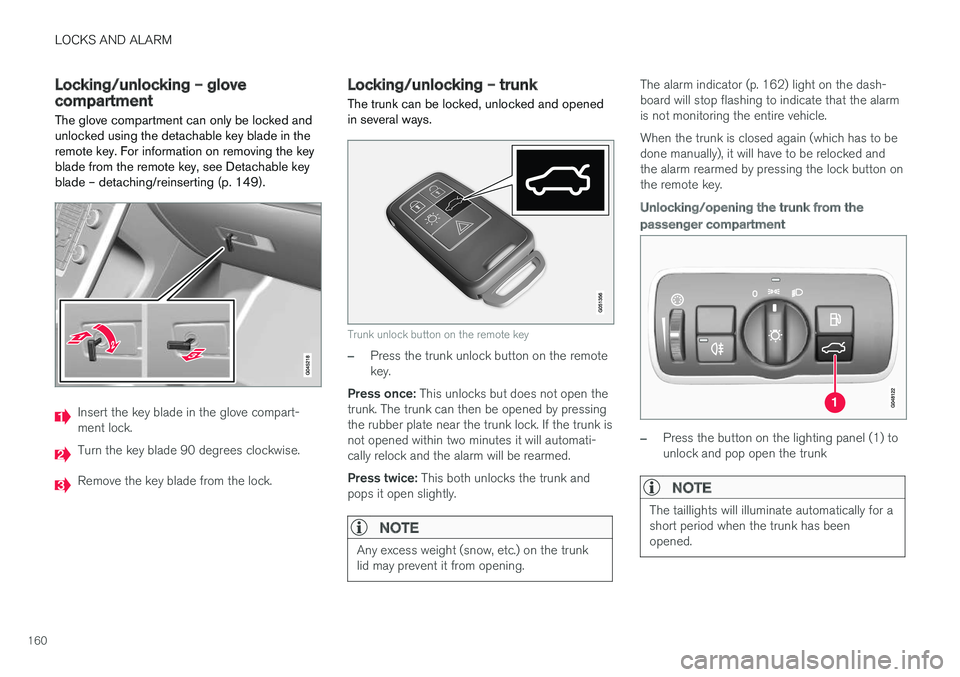
The glove compartment can only be locked and unlocked using the detachable key blade in theremote key. For information on removing the keyblade from the remote key, see Detachable keyblade – detaching/reinserting (p. 149).
Insert the key blade in the glove compart- ment lock.
Turn the key blade 90 degrees clockwise.
Remove the key blade from the lock.
Locking/unlocking – trunk The trunk can be locked, unlocked and opened in several ways.
Trunk unlock button on the remote key
–Press the trunk unlock button on the remote key.
Press once: This unlocks but does not open the
trunk. The trunk can then be opened by pressingthe rubber plate near the trunk lock. If the trunk isnot opened within two minutes it will automati-cally relock and the alarm will be rearmed. Press twice: This both unlocks the trunk and
pops it open slightly.
NOTE
Any excess weight (snow, etc.) on the trunk lid may prevent it from opening.
The alarm indicator (p. 162) light on the dash- board will stop flashing to indicate that the alarmis not monitoring the entire vehicle. When the trunk is closed again (which has to be done manually), it will have to be relocked andthe alarm rearmed by pressing the lock button onthe remote key.
Unlocking/opening the trunk from the passenger compartment
–Press the button on the lighting panel (1) to unlock and pop open the trunk
NOTE
The taillights will illuminate automatically for a short period when the trunk has beenopened.
Page 163 of 398

LOCKS AND ALARM
161
Opening the trunk manually
The trunk is held closed by an electronic locking mechanism. To open:
1. Press lightly on the rubberized plate underthe handle to release the lock.
2. Lift the handle to open the trunk lid.
CAUTION
• When pressing the rubberized plate, only light pressure is necessary to release thetrunk's electronic locking mechanism.
• When opening the trunk lid, pull it upusing the handle. Too much pressure onthe rubberized plate can damage its elec-trical connections.
Locking the trunk with the remote key
–Press the lock button on the remote key. The alarm indicator on the dashboard will begin flashing to show that the vehicle is locked andthat the alarm has been armed.
NOTE
•
If the doors are locked while the trunk is open, the trunk will remain unlocked untilthe vehicle is relocked by pressing theLock button on the remote key.
• On keyless drive vehicles, the gear selec- tor must be in the Park (
P) position, all
doors and the trunk must be closed and the ignition must be switched off beforethe vehicle can be locked.
Opening the trunk from the inside (U.S. models only)
The vehicle is equipped with a florescent handle on the inside of the trunk lid, which can be usedin an emergency situation to open the trunk fromthe inside. Pull the handle down to release thetrunk lid. After use, the handle must be pushedback into its original position before the trunk canbe closed. This handle is not intended to be used to anchor the trunk lid when long loads are being transpor-ted.
WARNING
• Keep vehicle doors and trunk locked and keep keys out of a child
Page 164 of 398

LOCKS AND ALARM
162
Alarm – general information
The alarm system provides a warning if an attempt is made to break into the vehicle. The alarm is automatically armed (p. 163) whenever the vehicle is locked with the remotekey. When armed, the alarm continuously monitors a number of points on the vehicle. The followingconditions will trigger the alarm:
• The hood is forced open.
• The trunk is forced open
• A door is forced open.
• The ignition slot is tampered with.
• An attempt is made to start the vehicle with a non-approved key (a key not coded to thecar's ignition).
• The battery is disconnected (while the alarmis armed).
• The siren is disconnected when the alarm isdisarmed.
A message will appear in the information displayif a fault should occur in the alarm system. Con-tact a trained and qualified Volvo service techni-cian.
NOTE
Do not attempt to repair any of the compo- nents in the alarm system yourself. This couldaffect the insurance policy on the vehicle.
Related information
• Alarm – turning off (p. 164)
• Alarm signal (p. 163)
• Alarm indicator (p. 162)
Alarm indicator
The status of the alarm system is indicated by the red indicator light on the dashboard (seeillustration):
• Indicator light off: the alarm is not armed (p. 163)
• The indicator light flashes at one-secondintervals: the alarm is armed
• The indicator light flashes rapidly before theremote key is inserted in the ignition slot and the ignition is put in mode
I: the alarm has
been triggered.
Related information
• Alarm – general information (p. 162)
• Alarm – turning off (p. 164)
• Alarm signal (p. 163)
Page 166 of 398
LOCKS AND ALARM
164
Alarm – turning off
The alarm system provides a warning if an attempt is made to break into the vehicle.
If the alarm is sounding, it can be stopped by pressing the Unlock button on the remote key orby inserting the remote key in the ignition slot.Two short flashes from the car's turn signals con-firm that the alarm has been turned off.
Related information
• Alarm indicator (p. 162)
• Alarm – arming/disarming (p. 163)
• Remote key – replacing the battery (p. 151)
Alarm-related functions
The following is general information regarding the alarm system in your vehicle.
Automatic re-armingIf the doors are unlocked, the locks will automati- cally re-engage (re-lock) and the alarm will re-arm after 2 minutes unless a door or the trunkhas been opened.
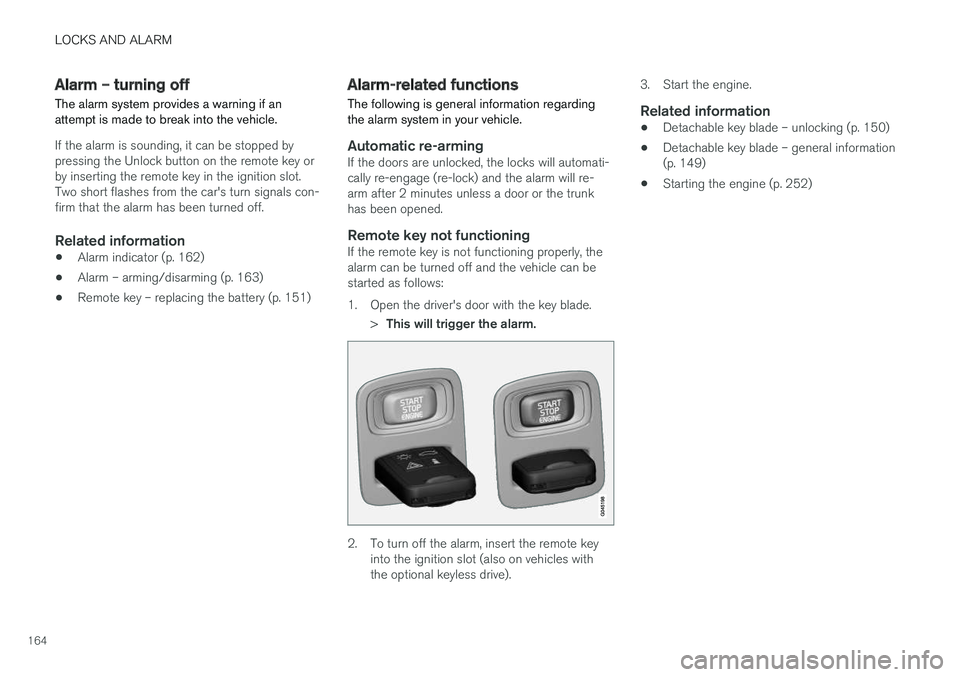
Remote key not functioningIf the remote key is not functioning properly, thealarm can be turned off and the vehicle can bestarted as follows:
1. Open the driver's door with the key blade.
>This will trigger the alarm.
2. To turn off the alarm, insert the remote key
into the ignition slot (also on vehicles with the optional keyless drive). 3. Start the engine.
Related information
•
Detachable key blade – unlocking (p. 150)
• Detachable key blade – general information(p. 149)
• Starting the engine (p. 252)
Page 246 of 398
DRIVER SUPPORT
* Option/accessory, for more information, see Introduction.
244
Rear Park Assist Camera (PAC) – limitations
LimitationsEven if a fairly small section of the screen image appears to be obstructed, this may mean that arelatively large area behind the vehicle is hiddenand objects there may not be detected until theyare very near the vehicle.
NOTE
Bicycle carriers or other accessories mounted on the trunk may obstruct the camera's fieldof view.
Keep in mind
• Keep the camera's lens free of dirt, ice and snow. Remove ice and snow carefully toavoid scratching the lens.
• Clean the lens regularly with warm water anda suitable car washing detergent.
Related information
•
Rear Park Assist Camera (PAC) – introduc-tion (p. 240)
• Rear Park Assist Camera (PAC) – operation(p. 241)
• Park assist – introduction (p. 231)
BLIS
* – introduction
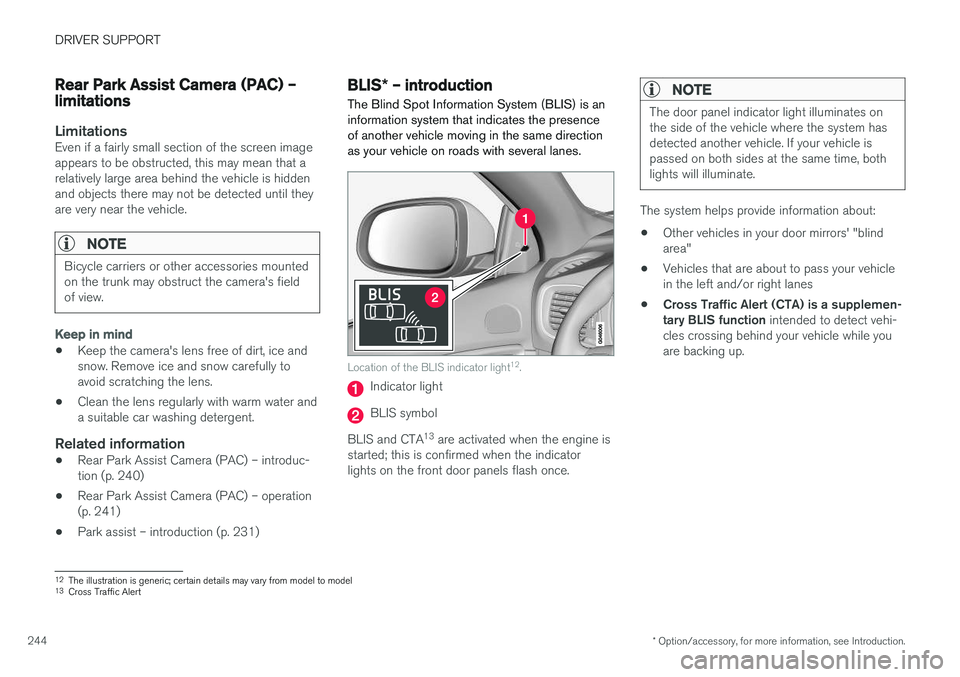
The Blind Spot Information System (BLIS) is an information system that indicates the presenceof another vehicle moving in the same directionas your vehicle on roads with several lanes.
Location of the BLIS indicator light 12
.
Indicator light
BLIS symbol
BLIS and CTA 13
are activated when the engine is
started; this is confirmed when the indicator lights on the front door panels flash once.
NOTE
The door panel indicator light illuminates on the side of the vehicle where the system hasdetected another vehicle. If your vehicle ispassed on both sides at the same time, bothlights will illuminate.
The system helps provide information about:
• Other vehicles in your door mirrors' "blind area"
• Vehicles that are about to pass your vehiclein the left and/or right lanes
• Cross Traffic Alert (CTA) is a supplemen-tary BLIS function
intended to detect vehi-
cles crossing behind your vehicle while youare backing up.
12 The illustration is generic; certain details may vary from model to model
13 Cross Traffic Alert