key VOLVO S60 2017 Owner´s Manual
[x] Cancel search | Manufacturer: VOLVO, Model Year: 2017, Model line: S60, Model: VOLVO S60 2017Pages: 398, PDF Size: 9.46 MB
Page 159 of 398
LOCKS AND ALARM
* Option/accessory, for more information, see Introduction.157
WARNING
People with implanted pacemakers should not allow the pacemaker to come closer than9 inches (22 cm) to any of the keyless drivesystem's antennas. This is to help preventinterference between the pacemaker and thekeyless drive system.
Related information
•Keyless drive
*– locking/unlocking (p. 153)
Locking/unlocking – from the outside
The remote key (p. 144) is used to lock/unlock all of the doors and the trunk at the same time.Different settings for unlocking the vehicle canbe selected, see Remote key – functions(p. 147). Before the vehicle can be locked from the out- side with the remote key, the driver's door mustbe closed. If the trunk or any other door is open,it will be locked and the alarm will be armed.
NOTE
Be sure the remote key is outside of the vehi- cle before the other doors/trunk are closed tohelp avoid locking the remote inside the vehi-cle.
If the vehicle is equipped with the optional key- less drive system, all doors/trunk must be closedbefore the vehicle can be locked. The first press on the unlock button unlocks the driver's door and a second press unlocks theother doors and the trunk (see also remote keyand key blade (p. 144)). This setting can be changed in the menu system. See MY
CAR (p. 71) for a description.
If the locks repeatedly do not react when the unlock button is pressed, it may be necessary toreplace the battery in the remote, see Remote key – replacing the battery (p. 151). In this casethe vehicle can be unlocked with the detachablekey blade (p. 150).
Related information
•
Locking/unlocking – from inside (p. 158)
Page 160 of 398
LOCKS AND ALARM
158
Manual locking
In certain situations (e.g., if there is no electrical current in the vehicle), the doors can be lockedmanually.
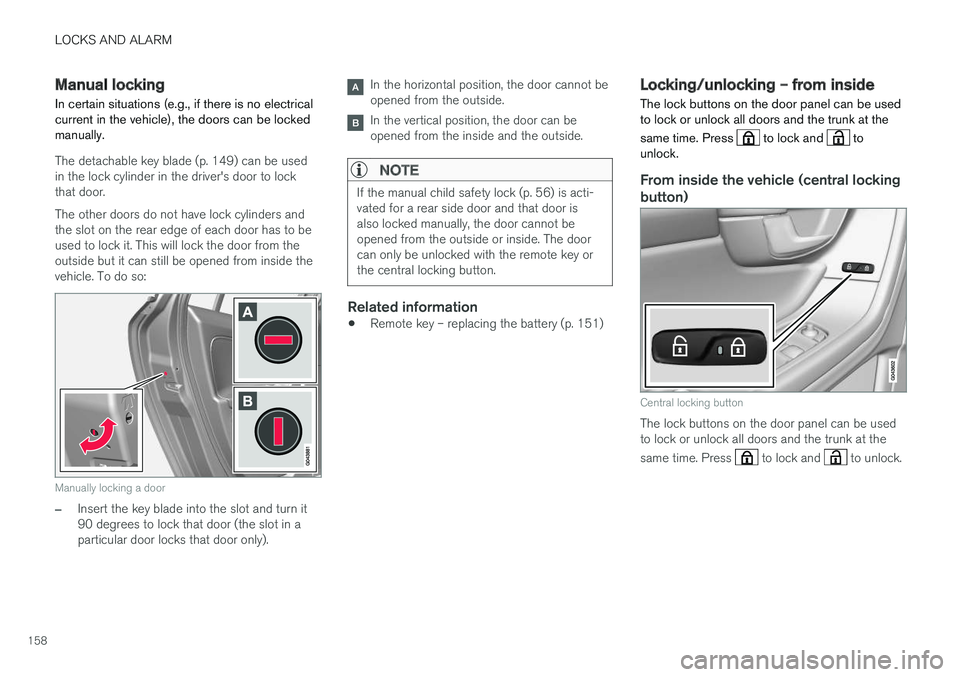
The detachable key blade (p. 149) can be used in the lock cylinder in the driver's door to lockthat door. The other doors do not have lock cylinders and the slot on the rear edge of each door has to beused to lock it. This will lock the door from theoutside but it can still be opened from inside thevehicle. To do so:
Manually locking a door
–Insert the key blade into the slot and turn it 90 degrees to lock that door (the slot in aparticular door locks that door only).
In the horizontal position, the door cannot be opened from the outside.
In the vertical position, the door can be opened from the inside and the outside.
NOTE
If the manual child safety lock (p. 56) is acti- vated for a rear side door and that door isalso locked manually, the door cannot beopened from the outside or inside. The doorcan only be unlocked with the remote key orthe central locking button.
Related information
• Remote key – replacing the battery (p. 151)
Locking/unlocking – from inside
The lock buttons on the door panel can be used to lock or unlock all doors and the trunk at the same time. Press
to lock and to
unlock.
From inside the vehicle (central locking
button)
Central locking button
The lock buttons on the door panel can be used to lock or unlock all doors and the trunk at the same time. Press
to lock and to unlock.
Page 161 of 398
LOCKS AND ALARM
159
Unlocking
The vehicle can be unlocked from inside the vehi- cle in two ways:• By pressing the unlock button
.
• The
front doors can be unlocked and
opened by pulling the door handle once. The rear doors can be unlocked by pulling the
door handle once and opened by pulling the handle again.
Locking
• Press the lock button after the front
doors have been closed.
• Press the lock button
: all of the doors
that are closed will lock.
• Each door can be locked individually with the lock button on the respective doors. The doormust be closed first.
Indicator light in the lock buttons
There are two versions of the central locking sys- tem that affect the indicator light in the driver'sdoor central locking button. If
only the driver's door has a central locking but-
ton:
• If the light is on, this indicates that all of the doors are locked.
If there are central locking buttons in both front
doors and electric lock buttons in the rear sidedoors: •
If a light is on in one of the buttons, thismeans that only that door is locked. Whenthe lights are on in all of the buttons, all ofthe doors are locked.
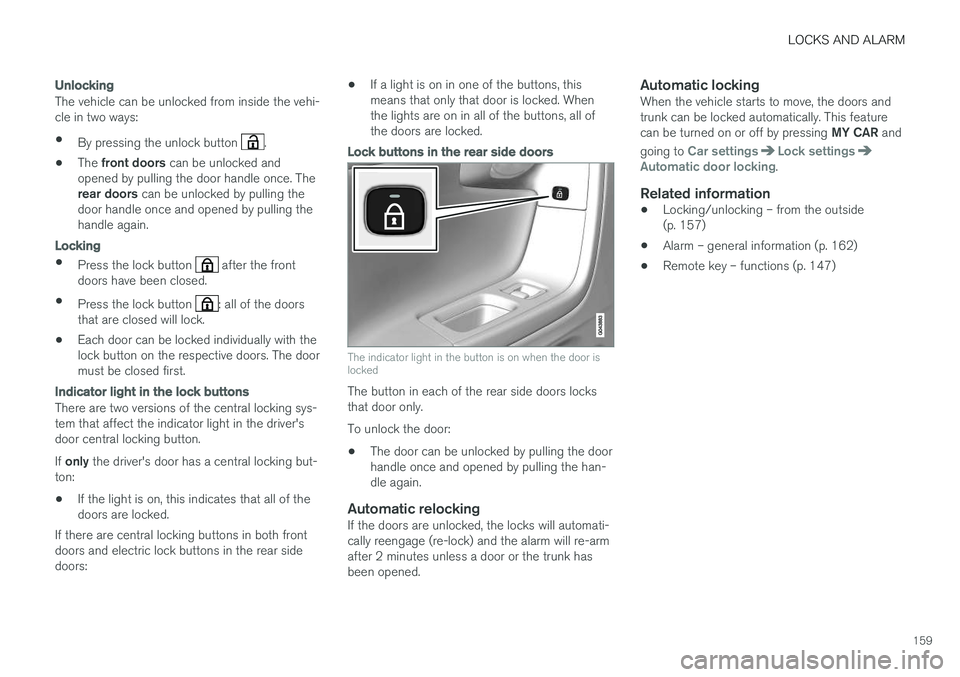
Lock buttons in the rear side doors
The indicator light in the button is on when the door is locked
The button in each of the rear side doors locks that door only. To unlock the door:
• The door can be unlocked by pulling the door handle once and opened by pulling the han-dle again.
Automatic relockingIf the doors are unlocked, the locks will automati-cally reengage (re-lock) and the alarm will re-armafter 2 minutes unless a door or the trunk hasbeen opened.
Automatic lockingWhen the vehicle starts to move, the doors andtrunk can be locked automatically. This feature can be turned on or off by pressing
MY CAR and
going to
Car settingsLock settingsAutomatic door locking.
Related information
• Locking/unlocking – from the outside (p. 157)
• Alarm – general information (p. 162)
• Remote key – functions (p. 147)
Page 162 of 398
LOCKS AND ALARM
160
Locking/unlocking – glove compartment
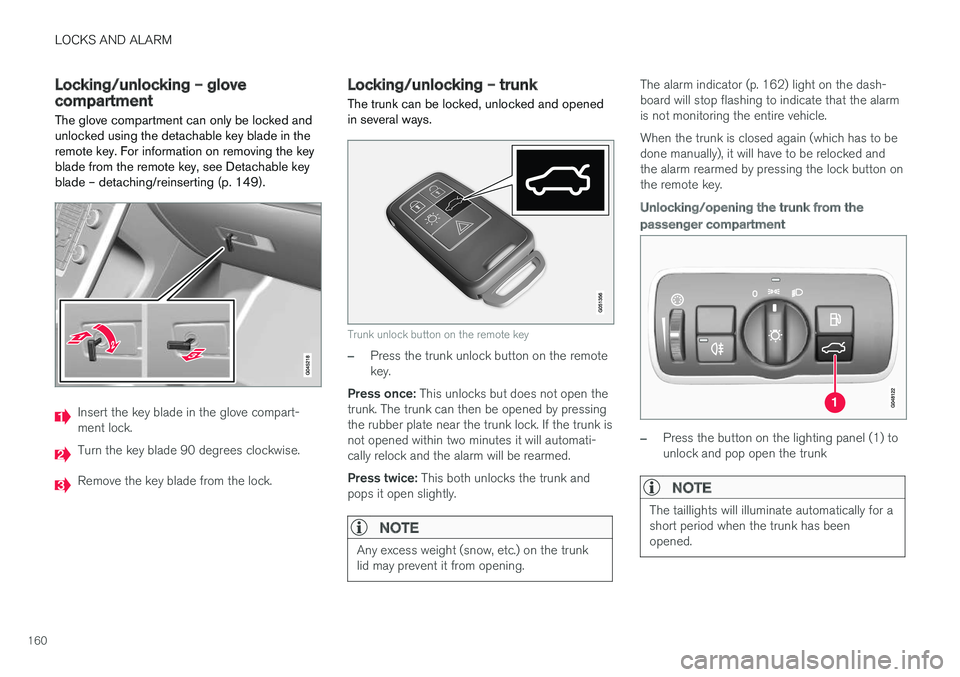
The glove compartment can only be locked and unlocked using the detachable key blade in theremote key. For information on removing the keyblade from the remote key, see Detachable keyblade – detaching/reinserting (p. 149).
Insert the key blade in the glove compart- ment lock.
Turn the key blade 90 degrees clockwise.
Remove the key blade from the lock.
Locking/unlocking – trunk The trunk can be locked, unlocked and opened in several ways.
Trunk unlock button on the remote key
–Press the trunk unlock button on the remote key.
Press once: This unlocks but does not open the
trunk. The trunk can then be opened by pressingthe rubber plate near the trunk lock. If the trunk isnot opened within two minutes it will automati-cally relock and the alarm will be rearmed. Press twice: This both unlocks the trunk and
pops it open slightly.
NOTE
Any excess weight (snow, etc.) on the trunk lid may prevent it from opening.
The alarm indicator (p. 162) light on the dash- board will stop flashing to indicate that the alarmis not monitoring the entire vehicle. When the trunk is closed again (which has to be done manually), it will have to be relocked andthe alarm rearmed by pressing the lock button onthe remote key.
Unlocking/opening the trunk from the passenger compartment
–Press the button on the lighting panel (1) to unlock and pop open the trunk
NOTE
The taillights will illuminate automatically for a short period when the trunk has beenopened.
Page 163 of 398

LOCKS AND ALARM
161
Opening the trunk manually
The trunk is held closed by an electronic locking mechanism. To open:
1. Press lightly on the rubberized plate underthe handle to release the lock.
2. Lift the handle to open the trunk lid.
CAUTION
• When pressing the rubberized plate, only light pressure is necessary to release thetrunk's electronic locking mechanism.
• When opening the trunk lid, pull it upusing the handle. Too much pressure onthe rubberized plate can damage its elec-trical connections.
Locking the trunk with the remote key
–Press the lock button on the remote key. The alarm indicator on the dashboard will begin flashing to show that the vehicle is locked andthat the alarm has been armed.
NOTE
•
If the doors are locked while the trunk is open, the trunk will remain unlocked untilthe vehicle is relocked by pressing theLock button on the remote key.
• On keyless drive vehicles, the gear selec- tor must be in the Park (
P) position, all
doors and the trunk must be closed and the ignition must be switched off beforethe vehicle can be locked.
Opening the trunk from the inside (U.S. models only)
The vehicle is equipped with a florescent handle on the inside of the trunk lid, which can be usedin an emergency situation to open the trunk fromthe inside. Pull the handle down to release thetrunk lid. After use, the handle must be pushedback into its original position before the trunk canbe closed. This handle is not intended to be used to anchor the trunk lid when long loads are being transpor-ted.
WARNING
• Keep vehicle doors and trunk locked and keep keys out of a child
Page 164 of 398

LOCKS AND ALARM
162
Alarm – general information
The alarm system provides a warning if an attempt is made to break into the vehicle. The alarm is automatically armed (p. 163) whenever the vehicle is locked with the remotekey. When armed, the alarm continuously monitors a number of points on the vehicle. The followingconditions will trigger the alarm:
• The hood is forced open.
• The trunk is forced open
• A door is forced open.
• The ignition slot is tampered with.
• An attempt is made to start the vehicle with a non-approved key (a key not coded to thecar's ignition).
• The battery is disconnected (while the alarmis armed).
• The siren is disconnected when the alarm isdisarmed.
A message will appear in the information displayif a fault should occur in the alarm system. Con-tact a trained and qualified Volvo service techni-cian.
NOTE
Do not attempt to repair any of the compo- nents in the alarm system yourself. This couldaffect the insurance policy on the vehicle.
Related information
• Alarm – turning off (p. 164)
• Alarm signal (p. 163)
• Alarm indicator (p. 162)
Alarm indicator
The status of the alarm system is indicated by the red indicator light on the dashboard (seeillustration):
• Indicator light off: the alarm is not armed (p. 163)
• The indicator light flashes at one-secondintervals: the alarm is armed
• The indicator light flashes rapidly before theremote key is inserted in the ignition slot and the ignition is put in mode
I: the alarm has
been triggered.
Related information
• Alarm – general information (p. 162)
• Alarm – turning off (p. 164)
• Alarm signal (p. 163)
Page 165 of 398
LOCKS AND ALARM
163
Alarm – arming/disarming The alarm system provides a warning if an attempt is made to break into the vehicle.
Arming the alarm
–Press the Lock button on the remote key. One long flash of the turn signals will confirmthat the alarm (p. 162) is armed.
Alarm confirmation settings can be changed in MY CAR , under
Car settingsLock settings
Keyless entry. For a description of the menu
system, see My Car – introduction (p. 71).
USA FCC ID: MAYDA 5823(3) This device complies with part 15 of the FCC rules. Operation is subject to the following condi-tions: (1) This device may not cause harmfulinterference, and (2) this device must accept anyinterference received, including interference thatmay cause undesired operation.
Canada IC: 4405A-DA 5823(3)
This device is subject to the following conditions:(1) this device may not cause interference, and(2) this device must accept any interference,including interference that may cause undesiredoperation of the device.
Disarming the alarm
–Press the Unlock button on the remote key.
> Two short flashes from the car's direction indicators confirm that the alarm has been deactivated and that all doors areunlocked.
Related information
• Alarm indicator (p. 162)
• Alarm signal (p. 163)
• Alarm – turning off (p. 164)
• Alarm-related functions (p. 164)
Alarm signal
An audible (p. 162) signal is given by a battery powered siren. The alarm cycle lasts for 30 sec-onds.
The visual alarm signal is given by flashing all turn signals for approximately 5 minutes or untilthe alarm is turned off.
Related information
• Alarm indicator (p. 162)
• Alarm – arming/disarming (p. 163)
• Alarm – turning off (p. 164)
Page 166 of 398
LOCKS AND ALARM
164
Alarm – turning off
The alarm system provides a warning if an attempt is made to break into the vehicle.
If the alarm is sounding, it can be stopped by pressing the Unlock button on the remote key orby inserting the remote key in the ignition slot.Two short flashes from the car's turn signals con-firm that the alarm has been turned off.
Related information
• Alarm indicator (p. 162)
• Alarm – arming/disarming (p. 163)
• Remote key – replacing the battery (p. 151)
Alarm-related functions
The following is general information regarding the alarm system in your vehicle.
Automatic re-armingIf the doors are unlocked, the locks will automati- cally re-engage (re-lock) and the alarm will re-arm after 2 minutes unless a door or the trunkhas been opened.
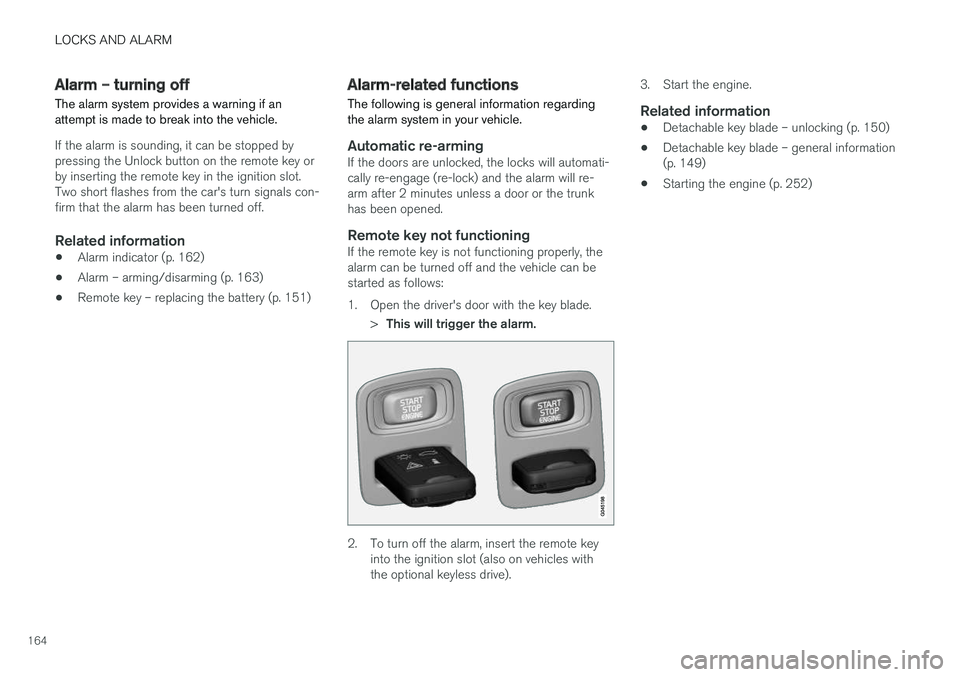
Remote key not functioningIf the remote key is not functioning properly, thealarm can be turned off and the vehicle can bestarted as follows:
1. Open the driver's door with the key blade.
>This will trigger the alarm.
2. To turn off the alarm, insert the remote key
into the ignition slot (also on vehicles with the optional keyless drive). 3. Start the engine.
Related information
•
Detachable key blade – unlocking (p. 150)
• Detachable key blade – general information(p. 149)
• Starting the engine (p. 252)
Page 184 of 398
||
DRIVER SUPPORT
182
WARNING
The vehicle may accelerate quickly after has been pressed if its current speed is con- siderably lower than the set speed.
Standby mode due to action by the driver
ACC is temporarily deactivated and put in standby mode:• if the brakes are applied
• if the gear selector is moved to
N
• if the driver drives faster than the set speed for more than
1 minute.
In this happens, the driver will have to regulate
the vehicle's speed.
NOTE
If the accelerator pedal is only depressed for a short time, such as when passing anothervehicle, ACC is deactivated temporarily and isreactivated when the pedal is released.
Automatic standby modeACC is linked to other systems such as the sta- bility system. If this system is not functioningproperly, ACC will switch off automatically. In the event of automatic deactivation, an audible signal will sound and the message
Cruise control Cancelled
is shown in the instrument
panel. The driver must then intervene and adapt the vehicle's speed to the surrounding traffic andregulate the distance to the vehicle ahead. An automatic switch to standby mode may be caused if:
• engine speed (rpm) is too high/low
• The driver's door is opened
• The driver unbuckles his/her seat belt
• the vehicle's speed goes below 18 mph(30 km/h)
• the wheels lose traction
• brake temperature is high
• the radar sensor is obstructed by, for exam-ple, wet snow or rain.
Resuming the set speedIf ACC is in standby mode, it can be reactivated by pressing the
button on the steering wheel
keypad. The vehicle will return to the most recently set speed.
WARNING
The vehicle may accelerate quickly after has been pressed if its current speed is con- siderably lower than the set speed.
Turning ACC off completely
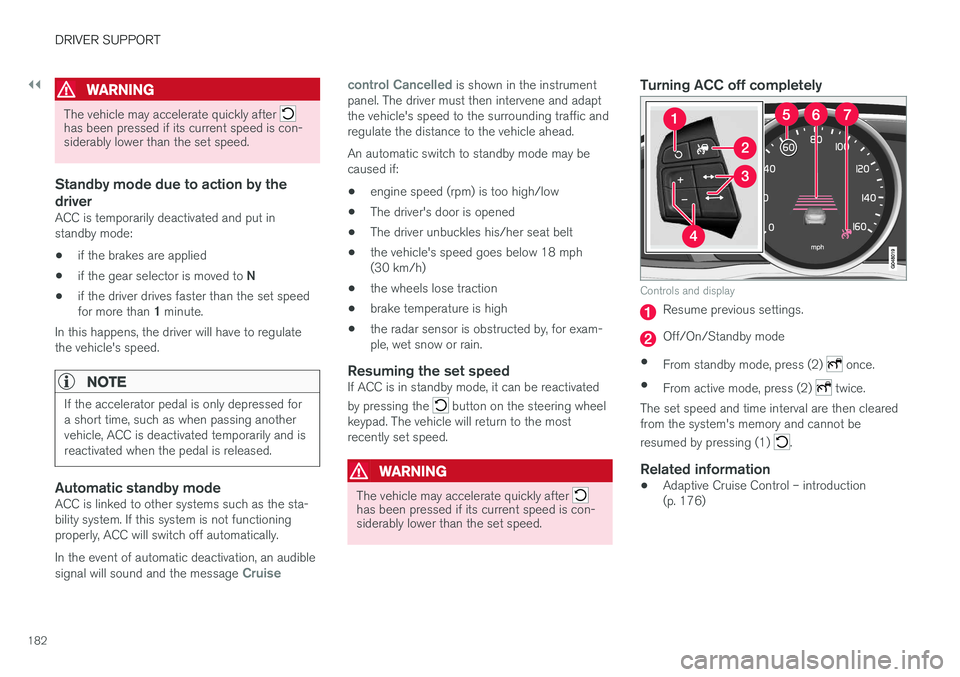
Controls and display
Resume previous settings.
Off/On/Standby mode
• From standby mode, press (2)
once.
• From active mode, press (2)
twice.
The set speed and time interval are then cleared from the system's memory and cannot be resumed by pressing (1)
.
Related information
• Adaptive Cruise Control – introduction (p. 176)
Page 254 of 398
STARTING AND DRIVING
* Option/accessory, for more information, see Introduction.
252
Starting the engine
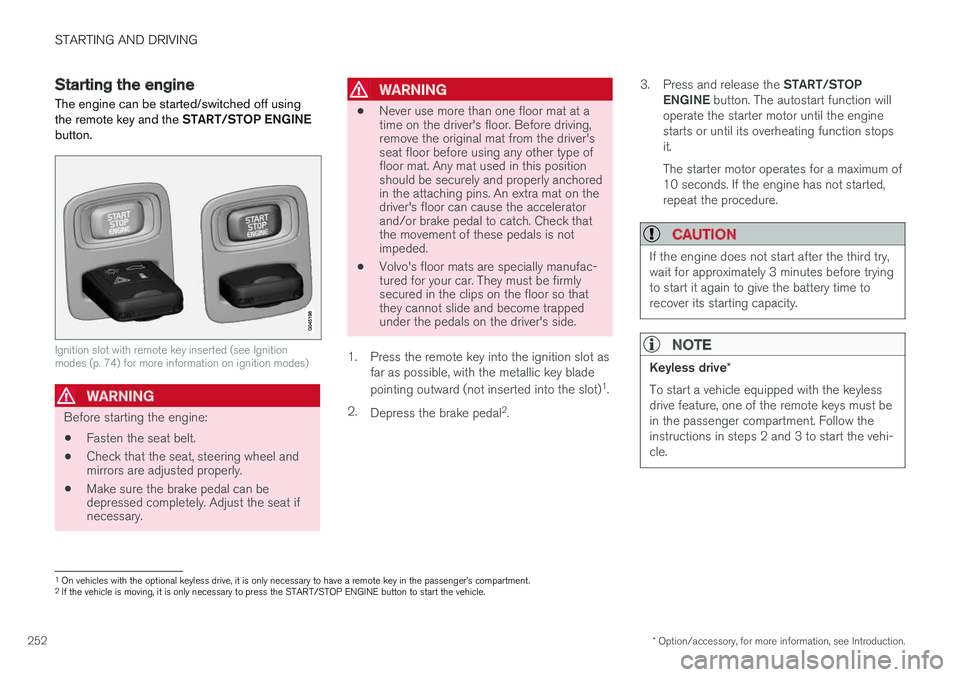
The engine can be started/switched off using the remote key and the START/STOP ENGINE
button.
Ignition slot with remote key inserted (see Ignition modes (p. 74) for more information on ignition modes)
WARNING
Before starting the engine:
• Fasten the seat belt.
• Check that the seat, steering wheel and mirrors are adjusted properly.
• Make sure the brake pedal can bedepressed completely. Adjust the seat ifnecessary.
WARNING
•Never use more than one floor mat at a time on the driver's floor. Before driving,remove the original mat from the driver'sseat floor before using any other type offloor mat. Any mat used in this positionshould be securely and properly anchoredin the attaching pins. An extra mat on thedriver's floor can cause the acceleratorand/or brake pedal to catch. Check thatthe movement of these pedals is notimpeded.
• Volvo's floor mats are specially manufac-tured for your car. They must be firmlysecured in the clips on the floor so thatthey cannot slide and become trappedunder the pedals on the driver's side.
1. Press the remote key into the ignition slot as far as possible, with the metallic key blade pointing outward (not inserted into the slot) 1
.
2. Depress the brake pedal 2
. 3.
Press and release the START/STOP
ENGINE button. The autostart function will
operate the starter motor until the engine starts or until its overheating function stopsit. The starter motor operates for a maximum of 10 seconds. If the engine has not started,repeat the procedure.
CAUTION
If the engine does not start after the third try, wait for approximately 3 minutes before tryingto start it again to give the battery time torecover its starting capacity.
NOTE
Keyless drive *
To start a vehicle equipped with the keyless drive feature, one of the remote keys must bein the passenger compartment. Follow theinstructions in steps 2 and 3 to start the vehi-cle.
1 On vehicles with the optional keyless drive, it is only necessary to have a remote key in the passenger