instrument panel VOLVO S60 2017 Owner´s Manual
[x] Cancel search | Manufacturer: VOLVO, Model Year: 2017, Model line: S60, Model: VOLVO S60 2017Pages: 398, PDF Size: 9.46 MB
Page 248 of 398
||
DRIVER SUPPORT
* Option/accessory, for more information, see Introduction.
246
WARNING
• BLIS does not function in sharp curves.
• BLIS does not function when your vehicle is backing up.
Related information
•
BLIS
* – introduction (p. 244)
• BLIS
* – operation (p. 246)
• BLIS
* – Cross Traffic Alert (CTA) (p. 247)
• BLIS
* – limitations (p. 248)
• BLIS
* – messages (p. 249)
BLIS * – operation
Activating/deactivating BLIS
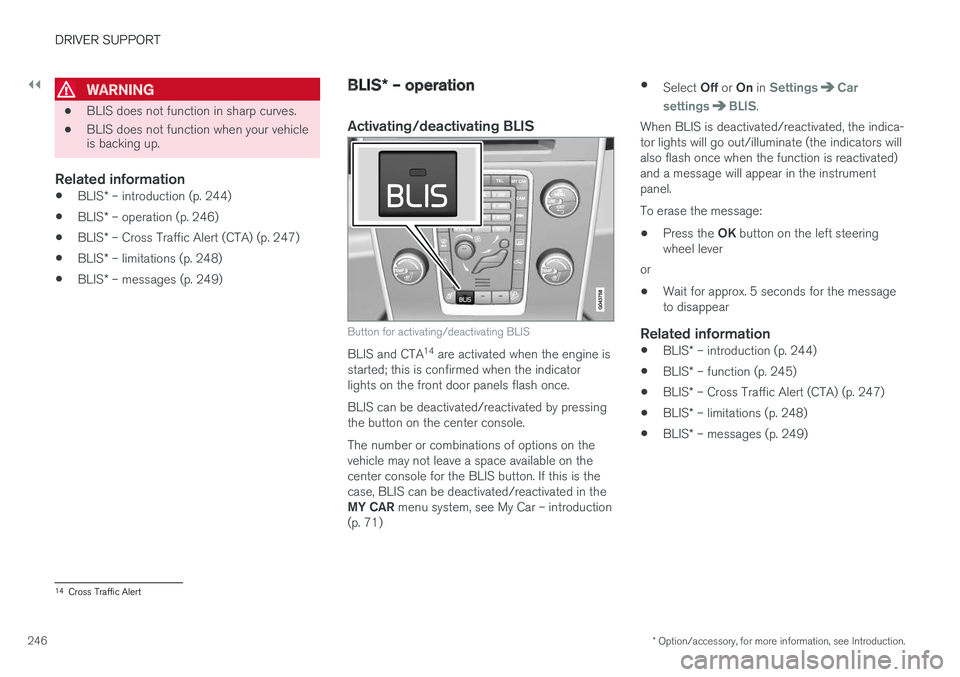
Button for activating/deactivating BLIS
BLIS and CTA 14
are activated when the engine is
started; this is confirmed when the indicator lights on the front door panels flash once. BLIS can be deactivated/reactivated by pressing the button on the center console. The number or combinations of options on the vehicle may not leave a space available on thecenter console for the BLIS button. If this is thecase, BLIS can be deactivated/reactivated in the MY CAR menu system, see My Car – introduction
(p. 71) •
Select Off or On in
SettingsCar
settings
BLIS.
When BLIS is deactivated/reactivated, the indica- tor lights will go out/illuminate (the indicators willalso flash once when the function is reactivated)and a message will appear in the instrumentpanel. To erase the message:
• Press the
OK button on the left steering
wheel lever
or
• Wait for approx. 5 seconds for the message to disappear
Related information
•
BLIS
* – introduction (p. 244)
• BLIS
* – function (p. 245)
• BLIS
* – Cross Traffic Alert (CTA) (p. 247)
• BLIS
* – limitations (p. 248)
• BLIS
* – messages (p. 249)
14
Cross Traffic Alert
Page 251 of 398
DRIVER SUPPORT
* Option/accessory, for more information, see Introduction.249
The BLIS/CTA
16
sensors are located on the
inside of the rear fenders/bumper. The surfaces in front of the sensors must be kept clean for the system to function optimally.
CAUTION
Repairs to the BLIS/CTA systems and/or repainting the rear bumper should only bedone by a trained and qualified Volvo servicetechnician.
Related information
• BLIS
* – introduction (p. 244)
• BLIS
* – function (p. 245)
• BLIS
* – operation (p. 246)
• BLIS
* – Cross Traffic Alert (CTA) (p. 247)
• BLIS
* – messages (p. 249)
BLIS * – messages
If BLIS/CTA 17
are not functioning normally, a
symbol will illuminate in the instrument panel and a text message will be displayed. Follow anyinstructions that may be provided. These messages include:
MessageSystem status
CTA OFFCTA has been switched off manually. BLIS remains active.
BLIS and CTA OFFTrailerattachedBLIS and CTA are temporarily deactivated because a trailer'swiring has been connected tothe vehicle's electrical system.
BLIS and CTA ServicerequiredBLIS and CTA are not func- tioning normally.
• If this message recurs,the systems should beinspected by a trainedand qualified Volvo serv-ice technician.
Messages can be erased by pressing the
OK
button on the left steering wheel lever.
Related information
• BLIS
* – introduction (p. 244)
• BLIS
* – function (p. 245)
• BLIS
* – operation (p. 246)
• BLIS
* – Cross Traffic Alert (CTA) (p. 247)
• BLIS
* – limitations (p. 248)
16
Cross Traffic Alert
17 Cross Traffic Alert
Page 257 of 398
STARTING AND DRIVING
}}
* Option/accessory, for more information, see Introduction.255
1. The turn signals will flash several times.
2. The engine will start.
3. The turn signals will illuminate for 3 seconds
to indicate that the engine has started.
After the engine has started, the vehicle remains locked but the alarm is disarmed.
Active functions
When the engine is started with ERS, the follow- ing functions are activated: • The climate control system
• The infotainment system.
• Approach lighting
Deactivated functions
When the engine is started with ERS, the follow- ing functions are deactivated: •
Headlights
• Parking lights
• License plate lights
• Windshield wipers
Related information
•
Engine Remote Start (ERS)
* – switching off
the engine (p. 255)
• Engine Remote Start (ERS)
* – introduction
(p. 254)
Engine Remote Start (ERS) * –
switching off the engine
Any of the following will switch off the engine if it has been started with ERS: • Pressing the lock button (1) or the unlock button (2) on the remote key
• Unlocking the vehicle
• Opening a door
• Depressing the accelerator or brake pedal
• Moving the gear selector from the
P position
• If there are less than approx. 2.5 gallons(10 liters) of fuel in the tank
• More than 15 minutes have elapsed.
If the engine has been started with ERS andswitches off, the turn signals will illuminate for3 seconds.
Message in the instrument panel display
If ERS is interrupted, a text message will be dis- played in the instrument panel.
Related information
• Engine Remote Start (ERS)
* – introduction
(p. 254)
• Engine Remote Start (ERS)
* – starting the
engine (p. 254)
Jump starting
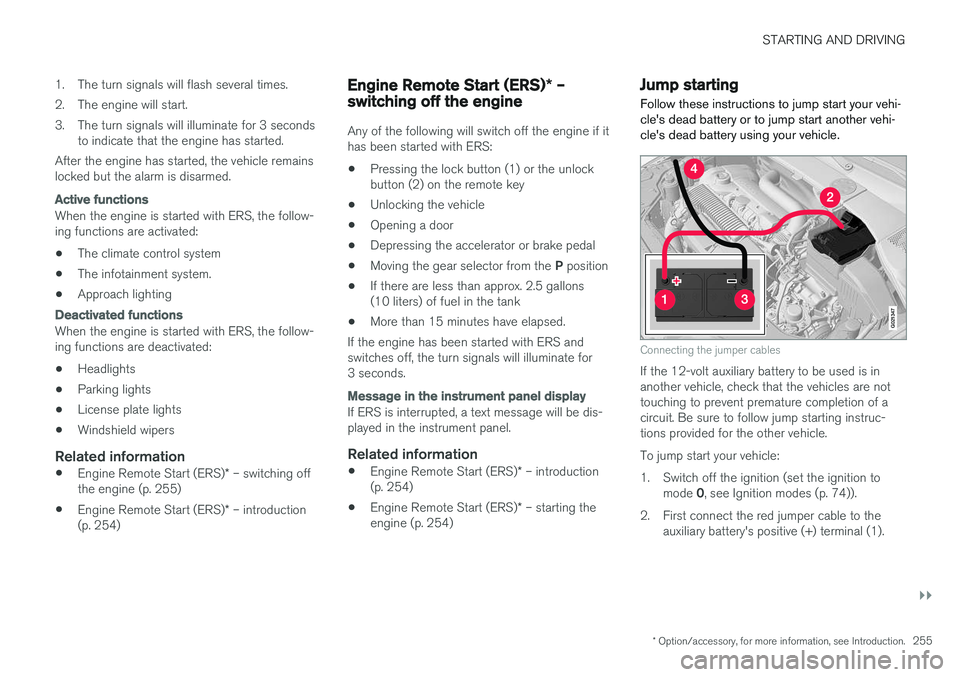
Follow these instructions to jump start your vehi- cle's dead battery or to jump start another vehi-cle's dead battery using your vehicle.
G021347
Connecting the jumper cables
If the 12-volt auxiliary battery to be used is in another vehicle, check that the vehicles are nottouching to prevent premature completion of acircuit. Be sure to follow jump starting instruc-tions provided for the other vehicle. To jump start your vehicle:
1. Switch off the ignition (set the ignition to mode 0, see Ignition modes (p. 74)).
2. First connect the red jumper cable to the auxiliary battery's positive (+) terminal (1).
Page 260 of 398
||
STARTING AND DRIVING
* Option/accessory, for more information, see Introduction.
258
Neutral: position NNo gear is engaged and the engine can be started with the gear selector in this position.Apply the parking brake if the vehicle is stationary with the gear selector in position N. In order to
move the gear selector from the N position, the
brake pedal must be depressed and the ignitionmust be in at least mode II.
Drive: position DD is the normal driving position. The car automat-
ically shifts between the various forward gears, based on the level of acceleration and speed.The car must be at a standstill when shifting from position R to position D.
Related information
• Transmission – general information (p. 256)
• Transmission – Geartronic (p. 258)
• Transmission – shiftlock override (p. 261)
• Fuel tank volume – specification and volume (p. 379)
Transmission – Geartronic
Geartronic allows you to manually shift among your vehicle's forward gears. The manual posi-tion ( +S–) can be selected at any time.
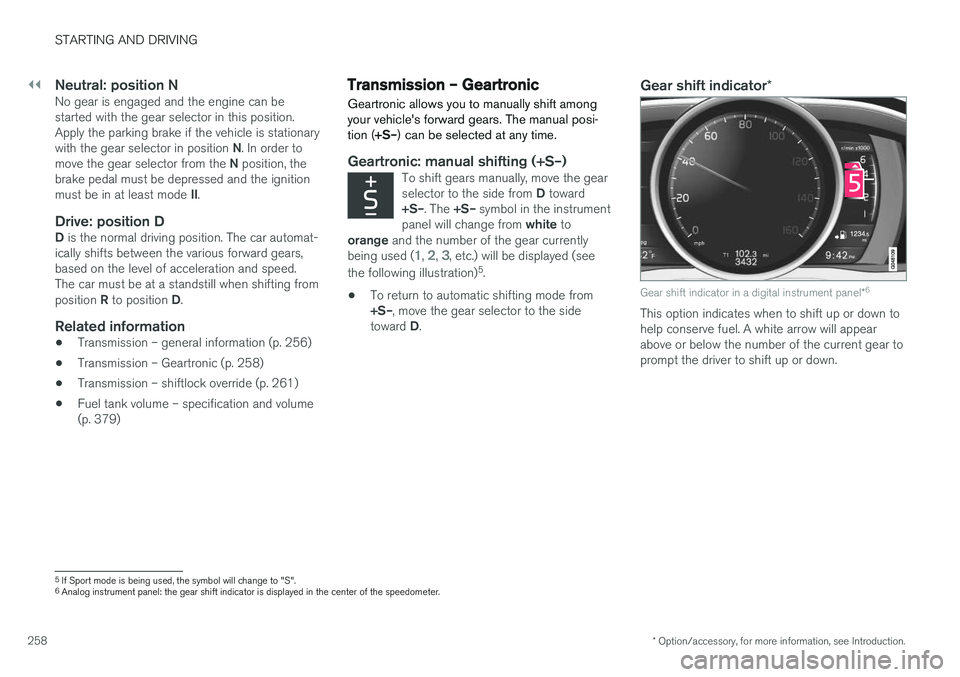
Geartronic: manual shifting (+S–)To shift gears manually, move the gear selector to the side from D toward
+S– . The +S– symbol in the instrument
panel will change from white to
orange and the number of the gear currently
being used (
1, 2, 3, etc.) will be displayed (see
the following illustration) 5
.
• To return to automatic shifting mode from +S–
, move the gear selector to the side
toward D.
Gear shift indicator *
Gear shift indicator in a digital instrument panel *6
This option indicates when to shift up or down to help conserve fuel. A white arrow will appearabove or below the number of the current gear toprompt the driver to shift up or down.
5
If Sport mode is being used, the symbol will change to "S".
6 Analog instrument panel: the gear shift indicator is displayed in the center of the speedometer.
Page 261 of 398
STARTING AND DRIVING
}}}}
* Option/accessory, for more information, see Introduction.259
While driving
•If you select the manual shifting position while driving, the gear that was being used inthe Drive position will also initially beselected in the manual shifting position.
• Move the gear selector forward (toward
+) to
shift to a higher gear or rearward (toward –)
to shift to a lower gear.
• If you hold the gear selector toward "
–", the
transmission will downshift one gear at atime and will utilize the braking power of theengine. If the current speed is too high forusing a lower gear, the downshift will notoccur until the speed has decreased enoughto allow the lower gear to be used.
• If you slow to a very low speed, the transmis-sion will automatically shift down.
Shiftlock: Neutral (N)
If the gear selector is in the
N position and the
vehicle has been stationary for at least 3 seconds (irrespective of whether the engine is running)then the gear selector is locked. In order to move the gear selector from N to
another gear position, the brake pedal must be depressed and the ignition must be in at least position II, see Ignition modes (p. 74).
Geartronic : steering wheel paddles *
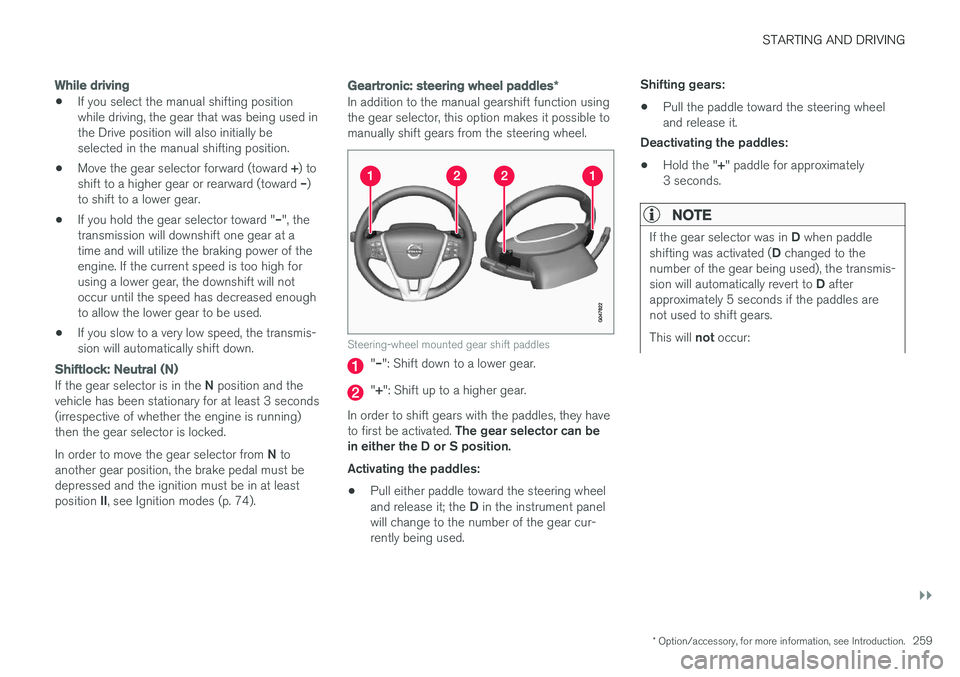
In addition to the manual gearshift function using the gear selector, this option makes it possible tomanually shift gears from the steering wheel.
Steering-wheel mounted gear shift paddles
"– ": Shift down to a lower gear.
"+ ": Shift up to a higher gear.
In order to shift gears with the paddles, they have to first be activated. The gear selector can be
in either the D or S position. Activating the paddles:
• Pull either paddle toward the steering wheel and release it; the
D in the instrument panel
will change to the number of the gear cur- rently being used. Shifting gears:
• Pull the paddle toward the steering wheeland release it.
Deactivating the paddles:
• Hold the "
+" paddle for approximately
3 seconds.
NOTE
If the gear selector was in D when paddle
shifting was activated ( D changed to the
number of the gear being used), the transmis- sion will automatically revert to D after
approximately 5 seconds if the paddles are not used to shift gears. This will not occur:
Page 262 of 398
||
STARTING AND DRIVING
260
•during active driving (e.g., on a winding road, while accelerating, etc)
• if the gear selector was in
S when the
paddles were activated
If the transmission reverts to D, the paddles
will have to be reactivated (pull either paddletoward the steering wheel and release it)before they can be used to shift gears again. The paddles can also be manually deactivated by pulling both paddles toward the steeringwheel and holding them until the gear num-ber shown in the instrument panel changes to D .
Geartronic : Sport mode ( S)7
This transmission mode provides sportier shifting characteristics and enables a more active drivingstyle by making it possible to drive at higher rpmin each gear before shifting up. The engine alsoresponds faster when the accelerator pedal ispressed. To access Sport mode from Drive (
D), move the
gear selector to the left. The transmission will not switch to manual shifting mode until the gearselector is moved forward or rearward toward +or –. Sport mode can be selected any time.
NOTE
• On vehicles equipped with Sport mode, the transmission symbol in the main instrument panel will change from
D to S
when the gear selector is moved to the manual shifting mode. If the gear selectoris moved toward "+" or "-", the number ofthe gear currently being used will be dis-played, see Information displays – intro-duction (p. 63).
• Please be aware that using Sport modemay result in a slight decrease in fuel economy. Driving in
D can help improve
fuel economy.
Geartronic : starting on slippery surfaces
Selecting 3rd gear in Geartronic
Page 264 of 398
STARTING AND DRIVING
* Option/accessory, for more information, see Introduction.
262
Start/Stop – introduction
Start/Stop is a function that temporarily switches off the engine when the vehicle is not moving,for instance in heavy traffic or at a traffic light tohelp reduce fuel consumption.
Start/Stop is available with certain engines/ transmissions.
Related information
• Start/Stop – function (p. 262)
• Start/Stop – settings (p. 265)
• Start/Stop – Auto-stop exceptions (p. 263)
• Start/Stop – Auto-start exceptions (p. 264)
• Start/Stop – Hill Start Assist (HSA) (p. 261)
• Start/Stop – symbols and messages(p. 266)
Start/Stop – function
Function and use
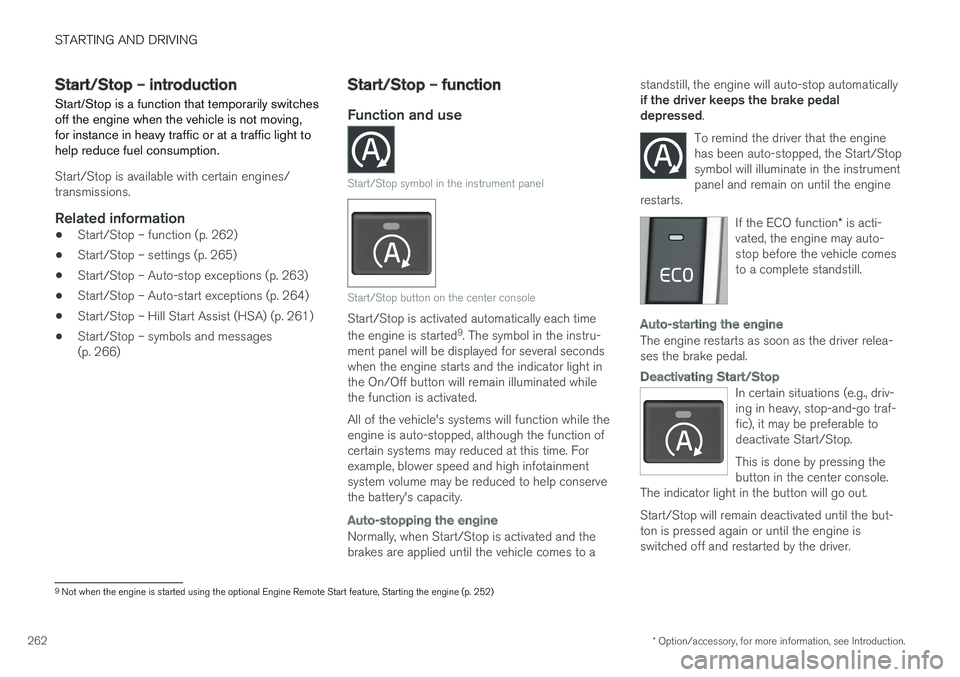
Start/Stop symbol in the instrument panel
Start/Stop button on the center console
Start/Stop is activated automatically each time the engine is started 9
. The symbol in the instru-
ment panel will be displayed for several seconds when the engine starts and the indicator light inthe On/Off button will remain illuminated whilethe function is activated. All of the vehicle's systems will function while the engine is auto-stopped, although the function ofcertain systems may reduced at this time. Forexample, blower speed and high infotainmentsystem volume may be reduced to help conservethe battery's capacity.
Auto-stopping the engine
Normally, when Start/Stop is activated and the brakes are applied until the vehicle comes to a standstill, the engine will auto-stop automatically if the driver keeps the brake pedal depressed
.
To remind the driver that the enginehas been auto-stopped, the Start/Stopsymbol will illuminate in the instrumentpanel and remain on until the engine
restarts.
If the ECO function * is acti-
vated, the engine may auto- stop before the vehicle comesto a complete standstill.
Auto-starting the engine
The engine restarts as soon as the driver relea- ses the brake pedal.
Deactivating Start/Stop
In certain situations (e.g., driv- ing in heavy, stop-and-go traf-fic), it may be preferable todeactivate Start/Stop. This is done by pressing the button in the center console.
The indicator light in the button will go out. Start/Stop will remain deactivated until the but- ton is pressed again or until the engine isswitched off and restarted by the driver.
9 Not when the engine is started using the optional Engine Remote Start feature, Starting the engine (p. 252)
Page 268 of 398
STARTING AND DRIVING
266
Start/Stop – symbols and messages
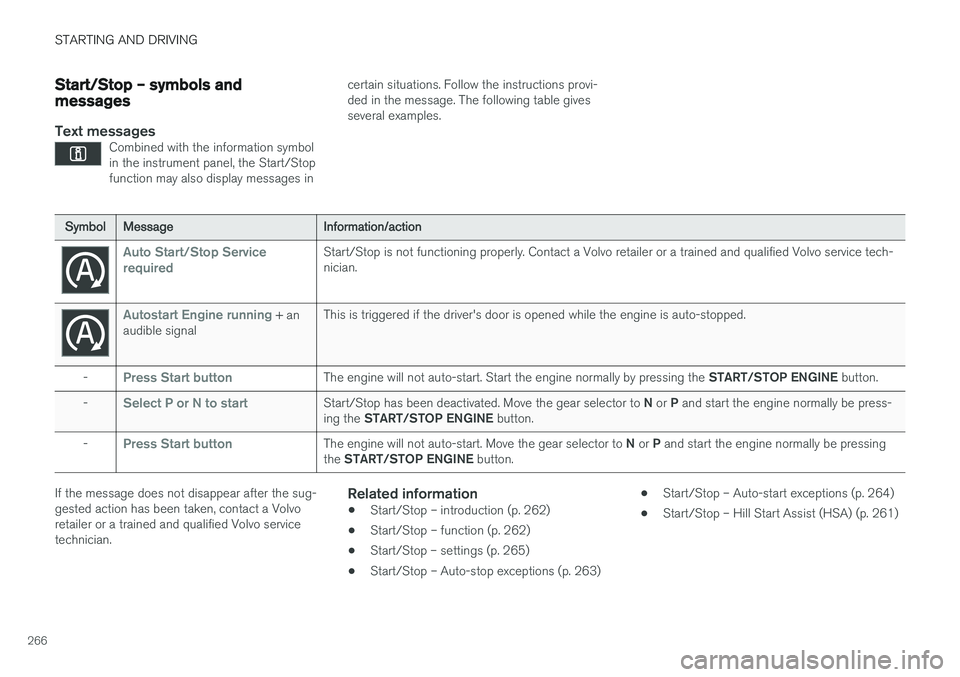
Text messagesCombined with the information symbol in the instrument panel, the Start/Stopfunction may also display messages in
certain situations. Follow the instructions provi- ded in the message. The following table givesseveral examples.
SymbolMessageInformation/action
Auto Start/Stop Service requiredStart/Stop is not functioning properly. Contact a Volvo retailer or a trained and qualified Volvo service tech- nician.
Autostart Engine running + an
audible signalThis is triggered if the driver's door is opened while the engine is auto-stopped.
-Press Start buttonThe engine will not auto-start. Start the engine normally by pressing the START/STOP ENGINE button.
-Select P or N to startStart/Stop has been deactivated. Move the gear selector to N or P and start the engine normally be press-
ing the START/STOP ENGINE button.
-Press Start buttonThe engine will not auto-start. Move the gear selector to N or P and start the engine normally be pressing
the START/STOP ENGINE button.
If the message does not disappear after the sug- gested action has been taken, contact a Volvoretailer or a trained and qualified Volvo servicetechnician.Related information
•Start/Stop – introduction (p. 262)
• Start/Stop – function (p. 262)
• Start/Stop – settings (p. 265)
• Start/Stop – Auto-stop exceptions (p. 263) •
Start/Stop – Auto-start exceptions (p. 264)
• Start/Stop – Hill Start Assist (HSA) (p. 261)
Page 269 of 398
STARTING AND DRIVING
}}
* Option/accessory, for more information, see Introduction.267
ECO*
Eco is a function 10
developed by Volvo to give
the driver the opportunity to actively drive more economically and to help reduce fuel consump-tion.
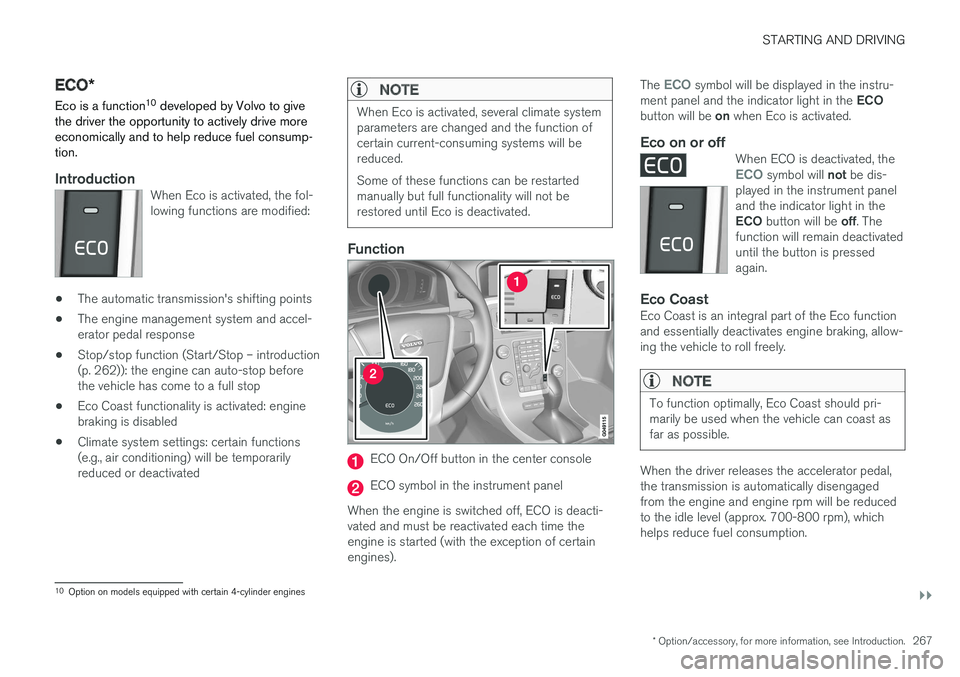
IntroductionWhen Eco is activated, the fol- lowing functions are modified:
• The automatic transmission's shifting points
• The engine management system and accel- erator pedal response
• Stop/stop function (Start/Stop – introduction(p. 262)): the engine can auto-stop beforethe vehicle has come to a full stop
• Eco Coast functionality is activated: enginebraking is disabled
• Climate system settings: certain functions(e.g., air conditioning) will be temporarilyreduced or deactivated
NOTE
When Eco is activated, several climate system parameters are changed and the function ofcertain current-consuming systems will bereduced. Some of these functions can be restarted manually but full functionality will not berestored until Eco is deactivated.
Function
ECO On/Off button in the center console
ECO symbol in the instrument panel
When the engine is switched off, ECO is deacti- vated and must be reactivated each time theengine is started (with the exception of certainengines). The
ECO symbol will be displayed in the instru-
ment panel and the indicator light in the ECO
button will be on when Eco is activated.
Eco on or offWhen ECO is deactivated, theECO symbol will not be dis-
played in the instrument panel and the indicator light in the ECO button will be off. The
function will remain deactivated until the button is pressedagain.
Eco CoastEco Coast is an integral part of the Eco function and essentially deactivates engine braking, allow-ing the vehicle to roll freely.
NOTE
To function optimally, Eco Coast should pri- marily be used when the vehicle can coast asfar as possible.
When the driver releases the accelerator pedal, the transmission is automatically disengagedfrom the engine and engine rpm will be reducedto the idle level (approx. 700-800 rpm), whichhelps reduce fuel consumption.
10 Option on models equipped with certain 4-cylinder engines
Page 271 of 398
STARTING AND DRIVING
}}
269
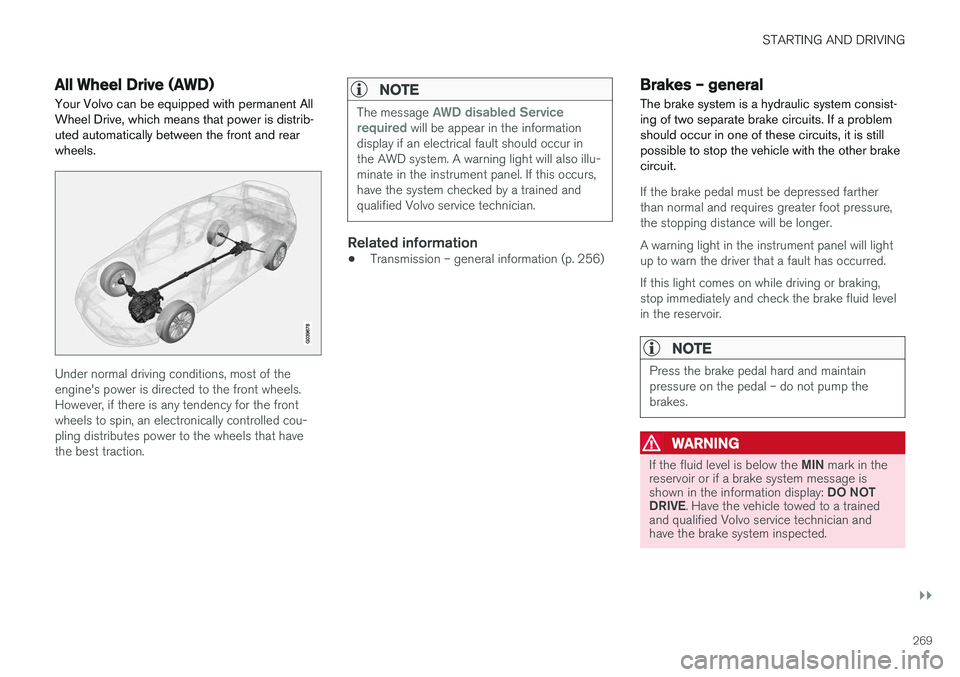
All Wheel Drive (AWD)Your Volvo can be equipped with permanent All Wheel Drive, which means that power is distrib-uted automatically between the front and rearwheels.
Under normal driving conditions, most of the engine's power is directed to the front wheels.However, if there is any tendency for the frontwheels to spin, an electronically controlled cou-pling distributes power to the wheels that havethe best traction.
NOTE
The message AWD disabled Service
required will be appear in the information
display if an electrical fault should occur in the AWD system. A warning light will also illu-minate in the instrument panel. If this occurs,have the system checked by a trained andqualified Volvo service technician.
Related information
• Transmission – general information (p. 256)
Brakes – general The brake system is a hydraulic system consist- ing of two separate brake circuits. If a problemshould occur in one of these circuits, it is stillpossible to stop the vehicle with the other brakecircuit.
If the brake pedal must be depressed farther than normal and requires greater foot pressure,the stopping distance will be longer. A warning light in the instrument panel will light up to warn the driver that a fault has occurred. If this light comes on while driving or braking, stop immediately and check the brake fluid levelin the reservoir.
NOTE
Press the brake pedal hard and maintain pressure on the pedal – do not pump thebrakes.
WARNING
If the fluid level is below the
MIN mark in the
reservoir or if a brake system message is shown in the information display: DO NOT
DRIVE . Have the vehicle towed to a trained
and qualified Volvo service technician and have the brake system inspected.