brakes VOLVO S60 2018 Owner´s Manual
[x] Cancel search | Manufacturer: VOLVO, Model Year: 2018, Model line: S60, Model: VOLVO S60 2018Pages: 396, PDF Size: 9.4 MB
Page 197 of 396
DRIVER SUPPORT
195
•
City Safety – symbols and messages (p. 199)
• City Safety – Laser sensor (p. 200)
City Safety – function
Function
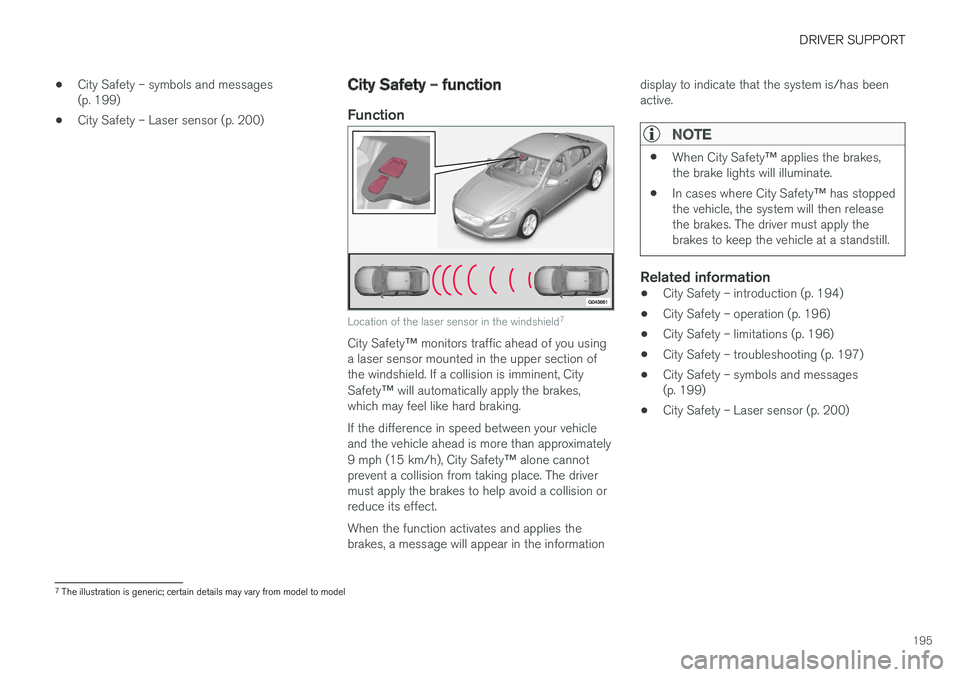
Location of the laser sensor in the windshield 7
City Safety
™ monitors traffic ahead of you using
a laser sensor mounted in the upper section of the windshield. If a collision is imminent, City Safety ™ will automatically apply the brakes,
which may feel like hard braking. If the difference in speed between your vehicle and the vehicle ahead is more than approximately 9 mph (15 km/h), City Safety ™ alone cannot
prevent a collision from taking place. The driver must apply the brakes to help avoid a collision orreduce its effect. When the function activates and applies the brakes, a message will appear in the information display to indicate that the system is/has beenactive.
NOTE
•
When City Safety
™ applies the brakes,
the brake lights will illuminate.
• In cases where City Safety
™ has stopped
the vehicle, the system will then release the brakes. The driver must apply thebrakes to keep the vehicle at a standstill.
Related information
• City Safety – introduction (p. 194)
• City Safety – operation (p. 196)
• City Safety – limitations (p. 196)
• City Safety – troubleshooting (p. 197)
• City Safety – symbols and messages (p. 199)
• City Safety – Laser sensor (p. 200)
7
The illustration is generic; certain details may vary from model to model
Page 201 of 396
DRIVER SUPPORT
199
City Safety – symbols and messages
Symbols and messages in the display
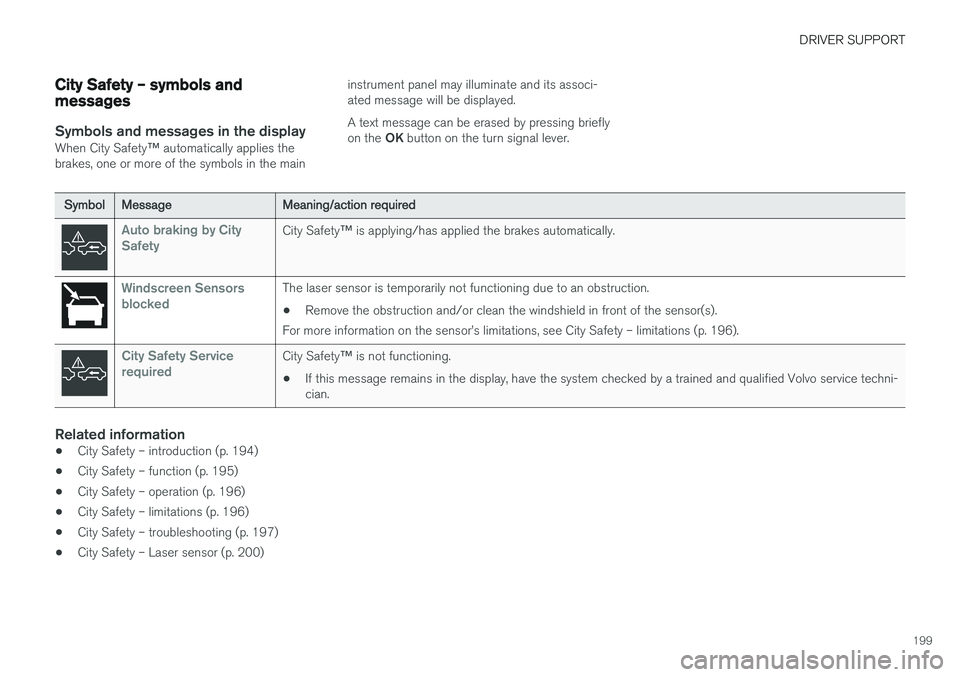
When City Safety™ automatically applies the
brakes, one or more of the symbols in the main instrument panel may illuminate and its associ- ated message will be displayed. A text message can be erased by pressing briefly on the
OK button on the turn signal lever.
Symbol Message Meaning/action required
Auto braking by City SafetyCity Safety™ is applying/has applied the brakes automatically.
Windscreen Sensors blockedThe laser sensor is temporarily not functioning due to an obstruction.
• Remove the obstruction and/or clean the windshield in front of the sensor(s).
For more information on the sensor
Page 203 of 396
DRIVER SUPPORT
}}
201
•
City Safety – operation (p. 196)
• City Safety – limitations (p. 196)
• City Safety – troubleshooting (p. 197)
• City Safety – symbols and messages (p. 199)
Collision warning – introduction Pedestrian and Cyclist Detection with Full Auto Brake is designed to assist the driver if there is arisk of a collision with a pedestrian, a cyclist, avehicle ahead that is at a standstill or one that ismoving in the same direction as your vehicle.
This system consists of the following three func- tions:
• Collision Warning
warns the driver of a
potential collision situation.
• Brake Support
helps the driver brake effi-
ciently in a critical situation.
• Auto-brake
brakes the vehicle automatically
if a collision with a pedestrian, a cyclist oranother vehicle cannot be avoided and thedriver does not apply the brakes in time orsteer around the person/vehicle. Auto-brakecan help prevent a collision or reduce thespeed at which a collision occurs.
Since Pedestrian and Cyclist Detection with FullAuto Brake is activated in circumstances wherethe driver should have begun braking muchsooner, the system will not be able to assist thedriver in all situations. This system is designed to activate as late as possible to help avoid unnecessary intervention. The system should not be used in such a way that the driver changes his/her way of operatingthe vehicle. If the driver relies entirely on the sys- tem, the chances of an accident eventually occur-ring increase considerably. The Pedestrian and Cyclist Detection with Full Auto Brake and City Safety
™ systems supple-
ment each other. See City Safety – introduction (p. 194) for detailed information about City Safety ™.
WARNING
No automatic system can be guaranteed to function 100% correctly in all situations. Forthat reason, never test the Auto-brake systemby driving toward a person or object. Thiscould result in serious injury or death.
Page 204 of 396
||
DRIVER SUPPORT
* Option/accessory.
202
WARNING
• Pedestrian and Cyclist Detection with Full Auto Brake does not work in all driving,traffic, weather and road conditions. Itdoes not react to vehicles not traveling inthe same direction as your vehicle.
• Pedestrian and Cyclist Detection with FullAuto Brake does not react to animals.
• Warnings are only provided when the riskof collision is high. The "Function" sectionprovides information about limitations thatthe driver must be aware of before usingCollision Warning.
• Pedestrian and Cyclist Detection with FullAuto Brake will not provide a warning orbrake the vehicle for pedestrians orcyclists at speeds above 50 mph(80 km/h).
WARNING
•
Pedestrian and Cyclist Detection with Full Auto Brake will not provide a warning orbrake the vehicle for pedestrians in dark-ness or in tunnels, even if there is streetlighting in the area.
• The auto-brake function can help preventa collision or reduce the speed at impactbut the driver should always apply thebrakes for the best possible brakingeffect, even if auto-brake is actively apply-ing the brakes.
• Never wait for a collision warning. Thissystem is designed to be a supplemen-tary driving aid. It is not, however,intended to replace the driver's attentionand judgement. The driver is responsiblefor maintaining a safe distance andspeed, even when the collision warningsystem is in use.
• Maintenance of the Pedestrian andCyclist Detection with Full Auto Brakesystem's components must only be per-formed by a trained and qualified Volvotechnician.
Related information
•
Collision warning
* – function (p. 203)
• Collision warning
* – operation (p. 204) •
Collision warning
* – Pedestrian detection
(p. 206)
• Collision warning
* – Cyclist detection
(p. 205)
• Collision warning
* – limitations (p. 207)
• The camera
Page 205 of 396
DRIVER SUPPORT
* Option/accessory.203
Collision warning * – function
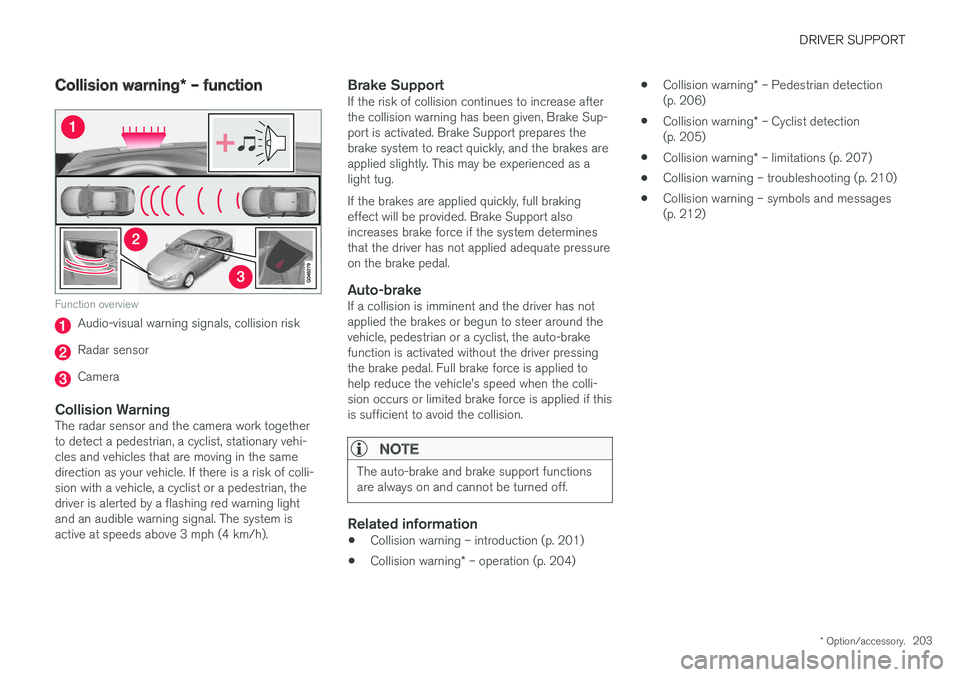
Function overview
Audio-visual warning signals, collision risk
Radar sensor
Camera
Collision WarningThe radar sensor and the camera work together to detect a pedestrian, a cyclist, stationary vehi-cles and vehicles that are moving in the samedirection as your vehicle. If there is a risk of colli-sion with a vehicle, a cyclist or a pedestrian, thedriver is alerted by a flashing red warning lightand an audible warning signal. The system isactive at speeds above 3 mph (4 km/h).
Brake SupportIf the risk of collision continues to increase afterthe collision warning has been given, Brake Sup-port is activated. Brake Support prepares thebrake system to react quickly, and the brakes areapplied slightly. This may be experienced as alight tug. If the brakes are applied quickly, full braking effect will be provided. Brake Support alsoincreases brake force if the system determinesthat the driver has not applied adequate pressureon the brake pedal.
Auto-brakeIf a collision is imminent and the driver has notapplied the brakes or begun to steer around thevehicle, pedestrian or a cyclist, the auto-brakefunction is activated without the driver pressingthe brake pedal. Full brake force is applied tohelp reduce the vehicle
Page 236 of 396
DRIVER SUPPORT
* Option/accessory.
234
Park Assist Pilot (PAP) * –
introduction
The Park Assist Pilot provides assistance when parallel parking by measuring the parking spaceand turning the steering wheel.
Introduction
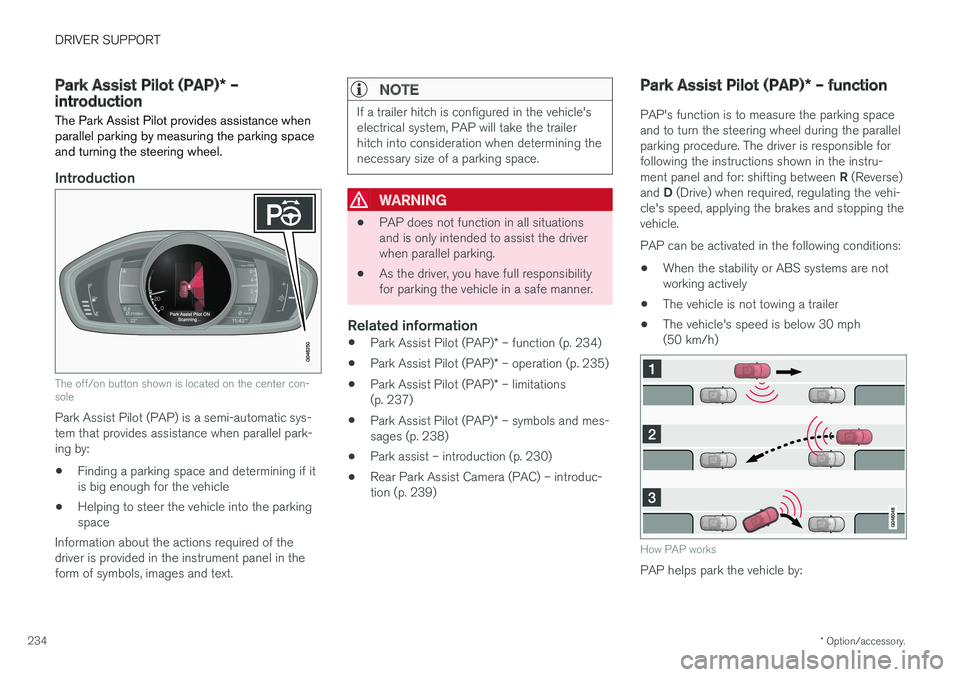
The off/on button shown is located on the center con- sole
Park Assist Pilot (PAP) is a semi-automatic sys- tem that provides assistance when parallel park-ing by:
• Finding a parking space and determining if itis big enough for the vehicle
• Helping to steer the vehicle into the parkingspace
Information about the actions required of thedriver is provided in the instrument panel in theform of symbols, images and text.
NOTE
If a trailer hitch is configured in the vehicle's electrical system, PAP will take the trailerhitch into consideration when determining thenecessary size of a parking space.
WARNING
• PAP does not function in all situations and is only intended to assist the driverwhen parallel parking.
• As the driver, you have full responsibilityfor parking the vehicle in a safe manner.
Related information
•
Park Assist Pilot (PAP)
* – function (p. 234)
• Park Assist Pilot (PAP)
* – operation (p. 235)
• Park Assist Pilot (PAP)
* – limitations
(p. 237)
• Park Assist Pilot (PAP)
* – symbols and mes-
sages (p. 238)
• Park assist – introduction (p. 230)
• Rear Park Assist Camera (PAC) – introduc-tion (p. 239)
Park Assist Pilot (PAP)
* – function
PAP's function is to measure the parking space and to turn the steering wheel during the parallelparking procedure. The driver is responsible forfollowing the instructions shown in the instru- ment panel and for: shifting between R (Reverse)
and D (Drive) when required, regulating the vehi-
cle's speed, applying the brakes and stopping the vehicle. PAP can be activated in the following conditions:
• When the stability or ABS systems are not working actively
• The vehicle is not towing a trailer
• The vehicle's speed is below 30 mph(50 km/h)
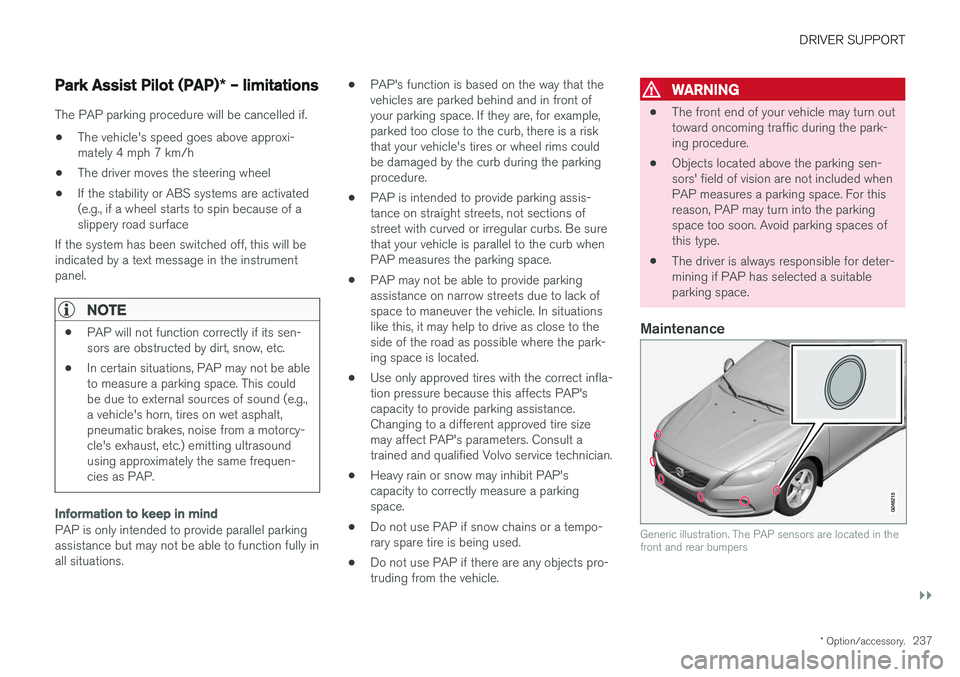
How PAP works
PAP helps park the vehicle by:
Page 239 of 396
DRIVER SUPPORT
}}
* Option/accessory.237
Park Assist Pilot (PAP) * – limitations
The PAP parking procedure will be cancelled if.
• The vehicle's speed goes above approxi- mately 4 mph 7 km/h
• The driver moves the steering wheel
• If the stability or ABS systems are activated(e.g., if a wheel starts to spin because of aslippery road surface
If the system has been switched off, this will beindicated by a text message in the instrumentpanel.
NOTE
• PAP will not function correctly if its sen- sors are obstructed by dirt, snow, etc.
• In certain situations, PAP may not be ableto measure a parking space. This couldbe due to external sources of sound (e.g.,a vehicle's horn, tires on wet asphalt,pneumatic brakes, noise from a motorcy-cle's exhaust, etc.) emitting ultrasoundusing approximately the same frequen-cies as PAP.
Information to keep in mind
PAP is only intended to provide parallel parking assistance but may not be able to function fully inall situations. •
PAP's function is based on the way that thevehicles are parked behind and in front ofyour parking space. If they are, for example,parked too close to the curb, there is a riskthat your vehicle's tires or wheel rims couldbe damaged by the curb during the parkingprocedure.
• PAP is intended to provide parking assis-tance on straight streets, not sections ofstreet with curved or irregular curbs. Be surethat your vehicle is parallel to the curb whenPAP measures the parking space.
• PAP may not be able to provide parkingassistance on narrow streets due to lack ofspace to maneuver the vehicle. In situationslike this, it may help to drive as close to theside of the road as possible where the park-ing space is located.
• Use only approved tires with the correct infla-tion pressure because this affects PAP'scapacity to provide parking assistance.Changing to a different approved tire sizemay affect PAP's parameters. Consult atrained and qualified Volvo service technician.
• Heavy rain or snow may inhibit PAP'scapacity to correctly measure a parkingspace.
• Do not use PAP if snow chains or a tempo-rary spare tire is being used.
• Do not use PAP if there are any objects pro-truding from the vehicle.
WARNING
• The front end of your vehicle may turn out toward oncoming traffic during the park-ing procedure.
• Objects located above the parking sen-sors' field of vision are not included whenPAP measures a parking space. For thisreason, PAP may turn into the parkingspace too soon. Avoid parking spaces ofthis type.
• The driver is always responsible for deter-mining if PAP has selected a suitableparking space.
Maintenance
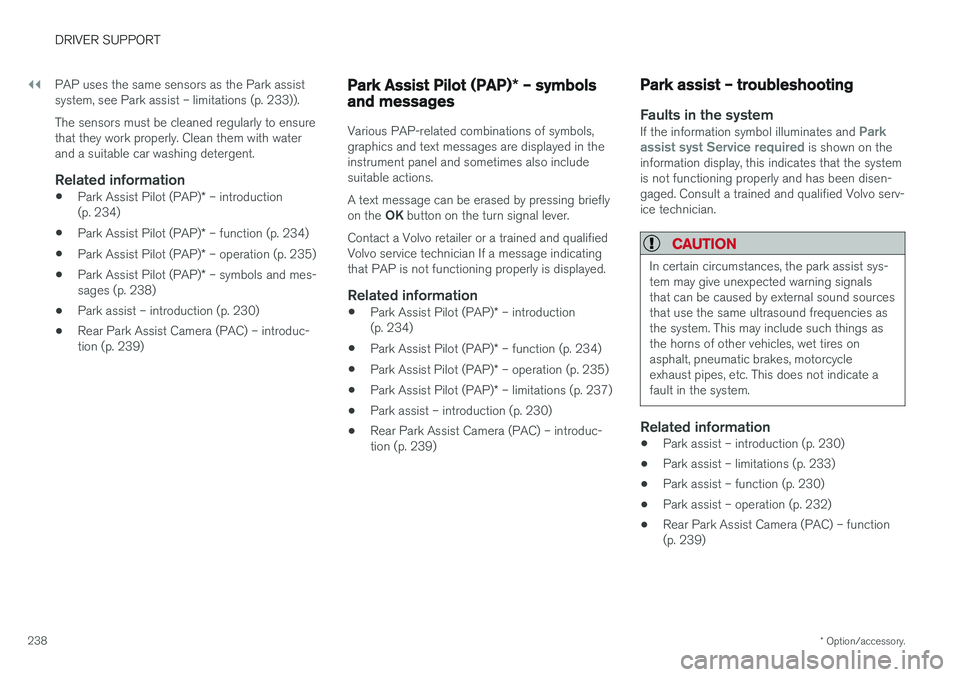
Generic illustration. The PAP sensors are located in the front and rear bumpers
Page 240 of 396
||
DRIVER SUPPORT
* Option/accessory.
238 PAP uses the same sensors as the Park assist system, see Park assist – limitations (p. 233)). The sensors must be cleaned regularly to ensure that they work properly. Clean them with waterand a suitable car washing detergent.
Related information
•
Park Assist Pilot (PAP)
* – introduction
(p. 234)
• Park Assist Pilot (PAP)
* – function (p. 234)
• Park Assist Pilot (PAP)
* – operation (p. 235)
• Park Assist Pilot (PAP)
* – symbols and mes-
sages (p. 238)
• Park assist – introduction (p. 230)
• Rear Park Assist Camera (PAC) – introduc-tion (p. 239)
Park Assist Pilot (PAP)
* – symbols
and messages
Various PAP-related combinations of symbols, graphics and text messages are displayed in theinstrument panel and sometimes also includesuitable actions. A text message can be erased by pressing briefly on the OK button on the turn signal lever.
Contact a Volvo retailer or a trained and qualified Volvo service technician If a message indicatingthat PAP is not functioning properly is displayed.
Related information
• Park Assist Pilot (PAP)
* – introduction
(p. 234)
• Park Assist Pilot (PAP)
* – function (p. 234)
• Park Assist Pilot (PAP)
* – operation (p. 235)
• Park Assist Pilot (PAP)
* – limitations (p. 237)
• Park assist – introduction (p. 230)
• Rear Park Assist Camera (PAC) – introduc-tion (p. 239)
Park assist – troubleshooting
Faults in the systemIf the information symbol illuminates and Park
assist syst Service required is shown on the
information display, this indicates that the system is not functioning properly and has been disen-gaged. Consult a trained and qualified Volvo serv-ice technician.
CAUTION
In certain circumstances, the park assist sys- tem may give unexpected warning signalsthat can be caused by external sound sourcesthat use the same ultrasound frequencies asthe system. This may include such things asthe horns of other vehicles, wet tires onasphalt, pneumatic brakes, motorcycleexhaust pipes, etc. This does not indicate afault in the system.
Related information
• Park assist – introduction (p. 230)
• Park assist – limitations (p. 233)
• Park assist – function (p. 230)
• Park assist – operation (p. 232)
• Rear Park Assist Camera (PAC) – function (p. 239)
Page 262 of 396
||
STARTING AND DRIVING
260
Move the gear selector from the P position.
For information on the key blade, see Detachable key blade – general information(p. 149).
Related information
• Transmission – general information (p. 255)
• Transmission – positions (p. 255)
• Transmission – Geartronic (p. 257)
• Fuel tank volume – specification and volume(p. 377)
Start/Stop – Hill Start Assist (HSA)
When starting on steep hills, HSA (see Transmis- sion – general information (p. 255)) retains pres-sure on the brake pedal for several seconds afterthe pedal has been released in order to keep thevehicle at a standstill. The brakes will be releasedafter several seconds or when the driver pressesthe accelerator pedal. The pedal will return to itsnormal position somewhat slower than normal.
Related information
•
Start/Stop – introduction (p. 260)
• Start/Stop – function (p. 261)
• Start/Stop – settings (p. 263)
• Start/Stop – Auto-stop exceptions (p. 262)
• Start/Stop – Auto-start exceptions (p. 262)
• Start/Stop – symbols and messages(p. 264)
Start/Stop – introduction
Start/Stop is a function that temporarily switches off the engine when the vehicle is not moving,for instance in heavy traffic or at a traffic light tohelp reduce fuel consumption.
Start/Stop is available with certain engines/ transmissions.
Related information
• Start/Stop – function (p. 261)
• Start/Stop – settings (p. 263)
• Start/Stop – Auto-stop exceptions (p. 262)
• Start/Stop – Auto-start exceptions (p. 262)
• Start/Stop – Hill Start Assist (HSA) (p. 260)
• Start/Stop – symbols and messages(p. 264)
Page 263 of 396
STARTING AND DRIVING
* Option/accessory.261
Start/Stop – function
Function and use
Start/Stop symbol in the instrument panel
Start/Stop button on the center console
Start/Stop is activated automatically each time the engine is started 9
. The symbol in the instru-
ment panel will be displayed for several seconds when the engine starts and the indicator light inthe On/Off button will remain illuminated whilethe function is activated. All of the vehicle's systems will function while the engine is auto-stopped, although the function ofcertain systems may be reduced at this time. Forexample, blower speed and high infotainmentsystem volume may be reduced to help conservethe battery's capacity.
Auto-stopping the engine
Normally, when Start/Stop is activated and the brakes are applied until the vehicle comes to a standstill, the engine will auto-stop automatically if the driver keeps the brake pedal depressed
.
To remind the driver that the enginehas been auto-stopped, the Start/Stopsymbol will illuminate in the instrumentpanel and remain on until the engine
restarts.
If the ECO function * is acti-
vated, the engine may auto- stop before the vehicle comesto a complete standstill.
Auto-starting the engine
The engine restarts as soon as the driver relea- ses the brake pedal.
Deactivating Start/Stop
In certain situations (e.g., driv- ing in heavy, stop-and-go traf-fic), it may be preferable todeactivate Start/Stop. This is done by pressing the button in the center console.
The indicator light in the button will go out. Start/Stop will remain deactivated until the but- ton is pressed again or until the engine isswitched off and restarted by the driver.
Related information
• Start/Stop – introduction (p. 260)
• Start/Stop – settings (p. 263)
• Start/Stop – Auto-stop exceptions (p. 262)
• Start/Stop – Auto-start exceptions (p. 262)
• Start/Stop – Hill Start Assist (HSA) (p. 260)
• Start/Stop – symbols and messages (p. 264)
9
Not when the engine is started using the optional Engine Remote Start feature, Starting the engine (p. 250)