tow VOLVO S60 2018 Owner´s Manual
[x] Cancel search | Manufacturer: VOLVO, Model Year: 2018, Model line: S60, Model: VOLVO S60 2018Pages: 396, PDF Size: 9.4 MB
Page 87 of 396
INSTRUMENTS AND CONTROLS
}}}}
* Option/accessory.85
Active high beams (AHB) *
AHB uses a camera at the upper edge of the windshield to detect the headlights of oncomingvehicles or the taillights of a vehicle directlyahead. When this happens, the headlights willautomatically switch from high beams to lowbeams. When the camera no longer detects theheadlights/taillights of other vehicles, your head-lights will switch back to high beams after sev-eral seconds.
To activate AHB:
• Turn the headlight control to the
posi-
tion.
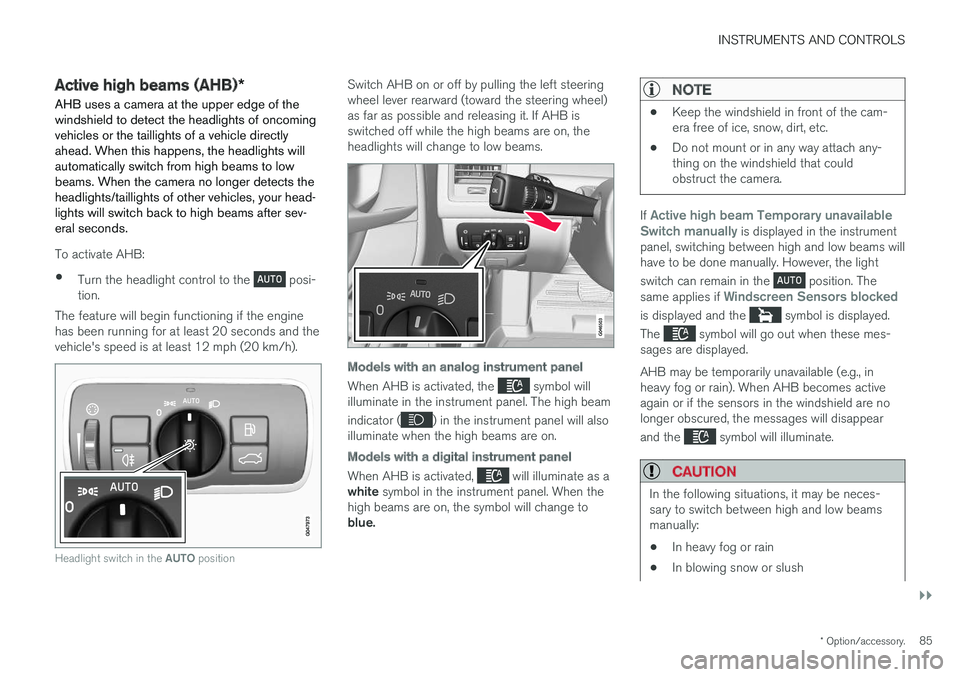
The feature will begin functioning if the engine has been running for at least 20 seconds and thevehicle's speed is at least 12 mph (20 km/h).
Headlight switch in the AUTO position
Switch AHB on or off by pulling the left steering wheel lever rearward (toward the steering wheel)as far as possible and releasing it. If AHB isswitched off while the high beams are on, theheadlights will change to low beams.
Models with an analog instrument panel
When AHB is activated, the symbol will
illuminate in the instrument panel. The high beam indicator (
) in the instrument panel will also
illuminate when the high beams are on.
Models with a digital instrument panel
When AHB is activated, will illuminate as a
white symbol in the instrument panel. When the
high beams are on, the symbol will change to blue.
NOTE
• Keep the windshield in front of the cam- era free of ice, snow, dirt, etc.
• Do not mount or in any way attach any-thing on the windshield that couldobstruct the camera.
If Active high beam Temporary unavailable
Switch manually is displayed in the instrument
panel, switching between high and low beams will have to be done manually. However, the light switch can remain in the
position. The
same applies if Windscreen Sensors blocked
is displayed and the symbol is displayed.
The
symbol will go out when these mes-
sages are displayed. AHB may be temporarily unavailable (e.g., in heavy fog or rain). When AHB becomes activeagain or if the sensors in the windshield are nolonger obscured, the messages will disappear and the
symbol will illuminate.
CAUTION
In the following situations, it may be neces- sary to switch between high and low beamsmanually:
• In heavy fog or rain
• In blowing snow or slush
Page 94 of 396
INSTRUMENTS AND CONTROLS
92
Rear interior lighting
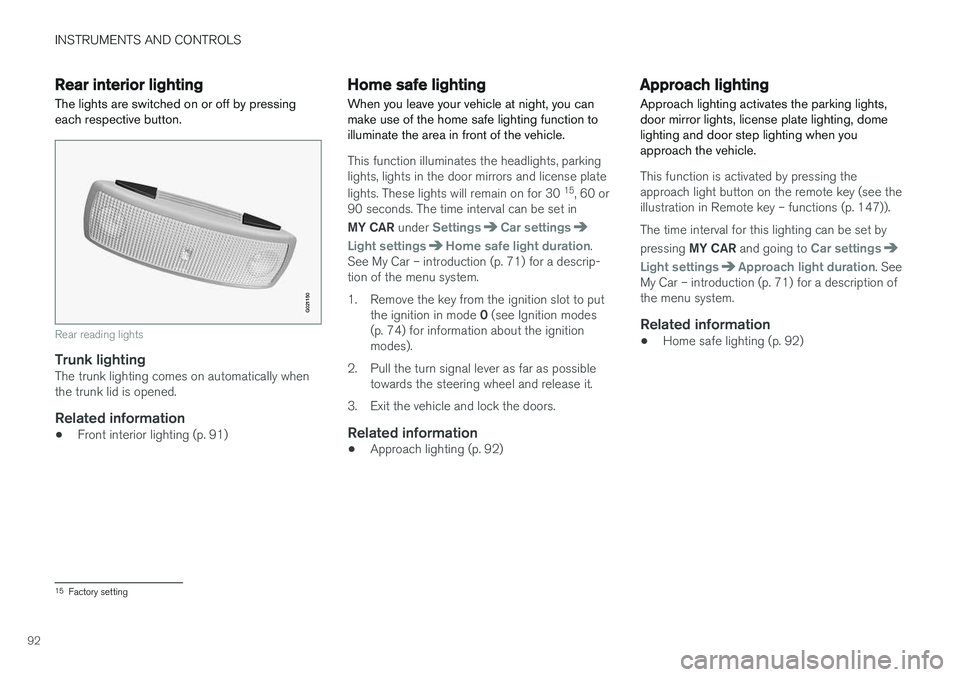
The lights are switched on or off by pressing each respective button.
G021150
Rear reading lights
Trunk lightingThe trunk lighting comes on automatically when the trunk lid is opened.
Related information
• Front interior lighting (p. 91)
Home safe lighting
When you leave your vehicle at night, you can make use of the home safe lighting function toilluminate the area in front of the vehicle.
This function illuminates the headlights, parking lights, lights in the door mirrors and license plate lights. These lights will remain on for 30 15
, 60 or
90 seconds. The time interval can be set in MY CAR under
SettingsCar settings
Light settingsHome safe light duration.
See My Car – introduction (p. 71) for a descrip- tion of the menu system.
1. Remove the key from the ignition slot to put
the ignition in mode 0 (see Ignition modes
(p. 74) for information about the ignition modes).
2. Pull the turn signal lever as far as possible towards the steering wheel and release it.
3. Exit the vehicle and lock the doors.
Related information
• Approach lighting (p. 92)
Approach lighting
Approach lighting activates the parking lights, door mirror lights, license plate lighting, domelighting and door step lighting when youapproach the vehicle.
This function is activated by pressing the approach light button on the remote key (see theillustration in Remote key – functions (p. 147)). The time interval for this lighting can be set by pressing MY CAR and going to
Car settings
Light settingsApproach light duration. See
My Car – introduction (p. 71) for a description of the menu system.
Related information
• Home safe lighting (p. 92)
15
Factory setting
Page 95 of 396
INSTRUMENTS AND CONTROLS
* Option/accessory.93
Windshield wipers Move the lever toward the steering wheel to start the windshield and headlight washers. After thelever is released the wipers make several extrasweeps.
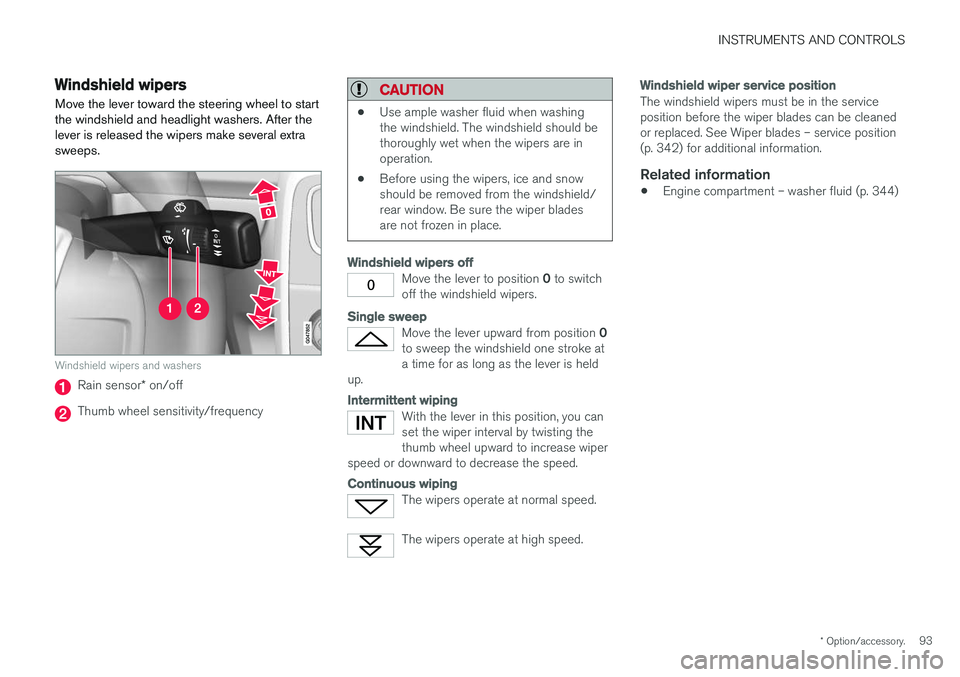
Windshield wipers and washers
Rain sensor* on/off
Thumb wheel sensitivity/frequency
CAUTION
• Use ample washer fluid when washing the windshield. The windshield should bethoroughly wet when the wipers are inoperation.
• Before using the wipers, ice and snowshould be removed from the windshield/rear window. Be sure the wiper bladesare not frozen in place.
Windshield wipers off
Move the lever to position
0 to switch
off the windshield wipers.
Single sweep
Move the lever upward from position 0
to sweep the windshield one stroke at a time for as long as the lever is held
up.
Intermittent wiping
With the lever in this position, you can set the wiper interval by twisting thethumb wheel upward to increase wiper
speed or downward to decrease the speed.
Continuous wiping
The wipers operate at normal speed.
The wipers operate at high speed.
Windshield wiper service position
The windshield wipers must be in the service position before the wiper blades can be cleanedor replaced. See Wiper blades – service position(p. 342) for additional information.
Related information
• Engine compartment – washer fluid (p. 344)
Page 96 of 396
INSTRUMENTS AND CONTROLS
* Option/accessory.
94
Rain sensor *
The rain sensor automatically regulates wiper speed according to the amount of water on thewindshield.
The sensitivity of the rain sensor can be adjusted moving the thumb wheel up (the wipers willsweep the windshield more frequently) or down(the wipers will sweep the windshield less fre-quently).
NOTE
The wipers will make an extra sweep each time the thumb wheel is adjusted upward.
When the rain sensor is activated, the symbol
will illuminate in the instrument panel.
Activating and setting the sensitivity
When activating the rain sensor, the vehicle must be running or in ignition mode II and the wind-
shield wiper lever must be in position 0 or in the
single sweep position. Activate the rain sensor by pressing the button
. The windshield wipers will make one
sweep. Press the lever up for the wipers to make an extra sweep. The rain sensor returns to activemode when the stalk is released back to position 0 .
Deactivating
Deactivate the rain sensor by pressing the button
or press the lever down to another wiper
position. The rain sensor is automatically deactivated when the key is removed from the ignition slot or fiveminutes after the ignition has been switched off.
CAUTION
The rain sensor should be deactivated when washing the car in an automatic car wash, etc.If the rain sensor function is left on, the wip-ers will start inadvertently in the car wash andcould be damaged.
Windshield washer
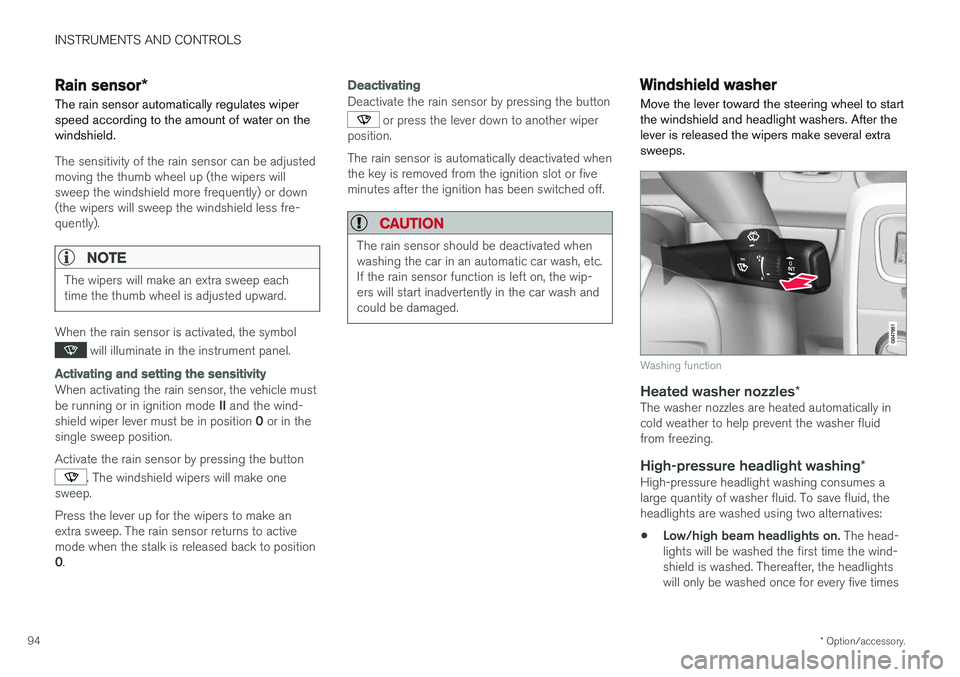
Move the lever toward the steering wheel to start the windshield and headlight washers. After thelever is released the wipers make several extrasweeps.
Washing function
Heated washer nozzles *The washer nozzles are heated automatically in cold weather to help prevent the washer fluidfrom freezing.
High-pressure headlight washing *High-pressure headlight washing consumes alarge quantity of washer fluid. To save fluid, theheadlights are washed using two alternatives:
• Low/high beam headlights on.
The head-
lights will be washed the first time the wind-shield is washed. Thereafter, the headlightswill only be washed once for every five times
Page 125 of 396
CLIMATE
}}
123
Climate – menu settings
The default settings for four of the climate sys-
tem's (p. 120) functions can be changed in themenu system.
• Blower speed (p. 127) in automatic mode (p. 127).
• Recirculation timer (p. 130) for passengercompartment air.
• Automatic rear window defrosting (p. 99).
• The optional Interior Air Quality Sys-tem (p. 122) (IAQS).
The functions can also be returned to factory set-tings in the menu system. See My Car – introduction (p. 71) for a descrip- tion of the menu system.
Related information
• Electronic climate control (ECC) (p. 125)
Air distribution – general
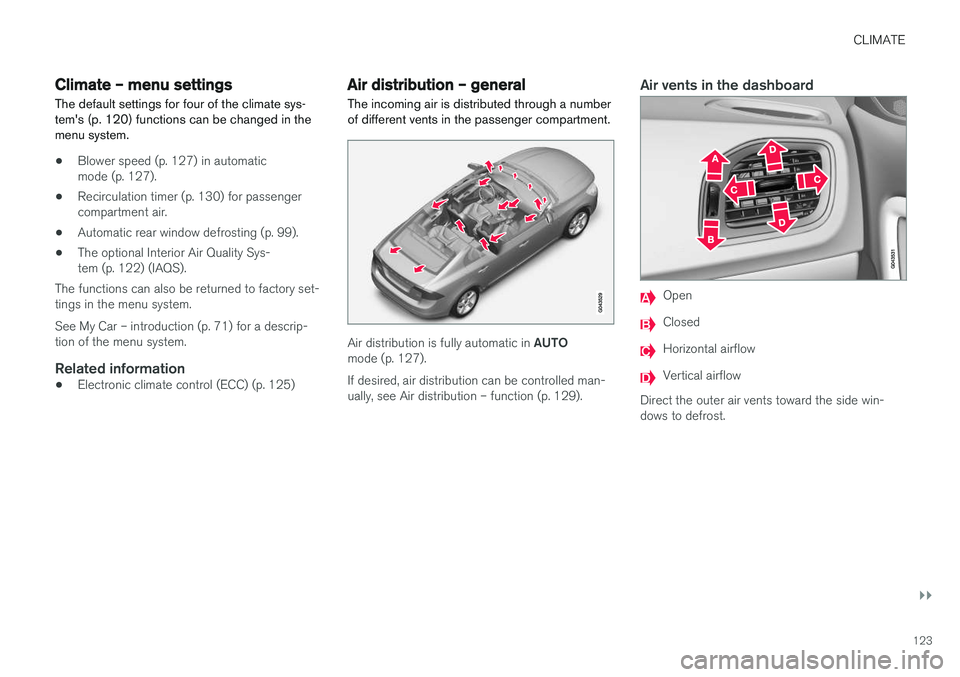
The incoming air is distributed through a number of different vents in the passenger compartment.
Air distribution is fully automatic in AUTO
mode (p. 127). If desired, air distribution can be controlled man- ually, see Air distribution – function (p. 129).
Air vents in the dashboard
Open
Closed
Horizontal airflow
Vertical airflow
Direct the outer air vents toward the side win- dows to defrost.
Page 126 of 396
||
CLIMATE
* Option/accessory.
124
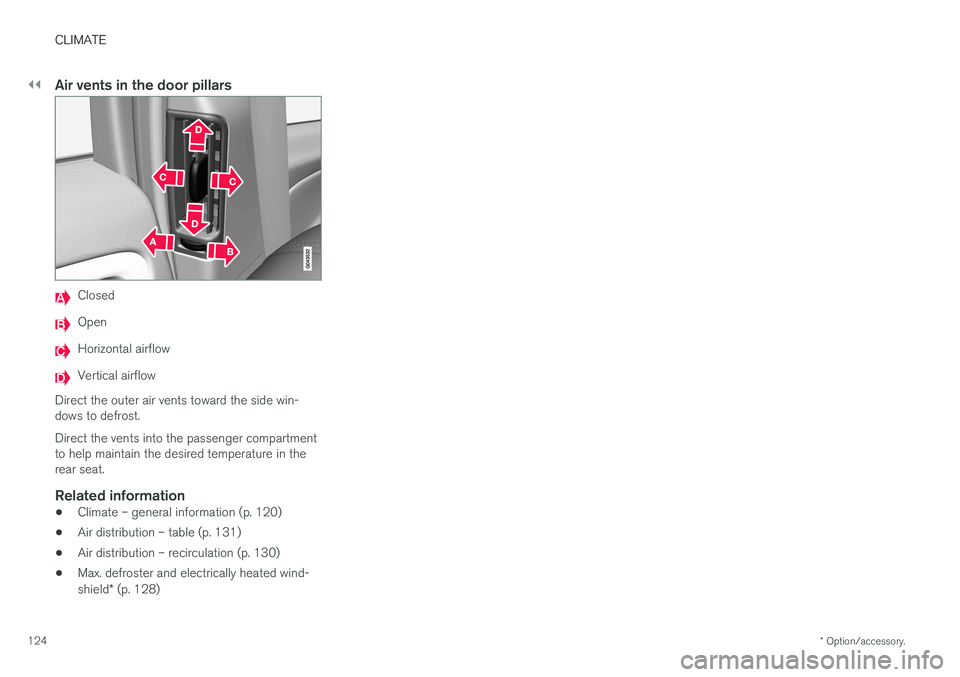
Air vents in the door pillars
Closed
Open
Horizontal airflow
Vertical airflow
Direct the outer air vents toward the side win- dows to defrost. Direct the vents into the passenger compartment to help maintain the desired temperature in therear seat.
Related information
• Climate – general information (p. 120)
• Air distribution – table (p. 131)
• Air distribution – recirculation (p. 130)
• Max. defroster and electrically heated wind- shield
* (p. 128)
Page 168 of 396
DRIVER SUPPORT
166
Stability system – introduction The Electronic Stability Control (ESC) system consists of a number of functions designed tohelp reduce wheel spin, counteract skidding andto generally help improve directional stability.
A pulsating sound will be audible when the system is actively operating and isnormal. Acceleration will also beslightly slower than normal.
WARNING
•The stability system (ESC) is intended to help improve driving safety but cannotdeal with all situations, or traffic, road andweather conditions. Speed and drivingstyle should always be adapted to thecurrent driving situation.
• ESC supplements, but can never replace,the driver's judgment and responsibilitywhen operating the vehicle. The driver isalways responsible for operating the vehi-cle in a safe manner in accordance withapplicable traffic regulations.
ESC consists of the following functions:
• Traction control
• Spin control
• Active Yaw Control
• Engine Drag Control •
Corner Traction Control
Traction Control (TC)
This function is designed to help reduce wheel spin at low speeds by transferring power from adrive wheel that begins to lose traction to thewheel on the opposite side of the vehicle (on thesame axle).
Spin Control (SC)
The SC function is designed to help prevent the drive wheels from spinning while the vehicle isaccelerating.
Active Yaw Control (AYC)
This function helps maintain directional stability, for example when cornering, by braking one ormore of the wheels if the vehicle shows a ten-dency to skid or slide laterally.
Corner Traction Control (CTC)
CTC compensates for understeering and helps provide additional stability when acceleratingthrough a curve by preventing the inside wheelfrom spinning. This is particularly useful whenaccelerating on a curving highway on-ramp. CTC is most effective if the stability system's Sport
mode is selected. See the section about
Sport mode.
Engine Drag Control (EDC)
EDC helps keep the engine running if the wheels show a tendency to lock, e.g., when shifting downin the Geartronic manual shifting mode or whileusing the engine's braking function on a slipperysurface. If the engine were to stop, power steer- ing would not function, making the vehicle moredifficult to steer.
Trailer Stability Assist (TSA)
The TSA helps stabilize a vehicle that is towing a trailer when the vehicle and trailer have begun tosway. See Trailer Stability Assist (TSA) (p. 285)for more information. This system is automatically deactivated if the driver selects
Sport mode.
Related information
•Stability system – operation (p. 167)
• Stability system – symbols and messages (p. 168)
• Trailer Stability Assist (TSA) (p. 285)
Page 180 of 396
||
DRIVER SUPPORT
* Option/accessory.
178
WARNING
The brake pedal moves when the adaptive cruise control system modulates the brakes.Do not rest your foot under the brake pedal.
The ACC system is designed to smoothly regu- late speed. However, the driver must apply thebrakes in situations that require immediate brak-ing. This applies when there are great differencesin speed between vehicles, or if the vehicle aheadbrakes suddenly.
WARNING
Due to limitations in the radar sensor, braking may occur unexpectedly or not at all, seeAdaptive Cruise Control – limitations (p. 185).
Adaptive Cruise Control can be put in active mode at any permitted speed. However, if thevehicle's speed falls below 18 mph (30 km/h) orif engine speed (rpm) becomes too low, ACC dis-engages (goes into standby mode) and will nolonger modulate the brakes. The driver will thenhave to maintain a safe distance to the vehicleahead.
WARNING
When Adaptive Cruise Control is in standby mode or is switched off completely, thebrakes will not be modulated automatically.The driver must assume full control over thevehicle.
Warning light—driver braking requiredAdaptive Cruise Control can exert brake force that is equivalent to approximately 40% of thevehicle's total braking capacity. In situationsrequiring more brake force than ACC can provideand if the driver does not apply the brakes, anaudible signal from the Collision Warning systemwill sound and warning light will illuminate (see Collision warning * – function (p. 203)) in the
windshield to alert the driver to react.
NOTE
Strong sunlight, reflections, extreme light con- trasts, the use of sunglasses, or if the driver isnot looking straight ahead may make thewarning symbol in the windshield difficult tosee.
WARNING
Adaptive Cruise Control only warns of vehicles detected by the radar sensor, see AdaptiveCruise Control – limitations (p. 185). In somecases there may be no warning or the warn-ing may be delayed. The driver should alwaysapply the brakes when necessary.
Steep inclines and/or heavy loadsACC is primarily intended for use on fairly level roads. The system may have difficulty maintainingthe correct distance to a vehicle ahead on steepinclines, if the vehicle is carrying a heavy load oris towing a trailer. In these situations, the drivershould always be prepared to apply the brakes ifnecessary.
Related information
• Adaptive Cruise Control – introduction(p. 175)
Page 192 of 396
DRIVER SUPPORT
190
Distance Alert – introduction
Distance Alert is part of Adaptive Cruise Control and is a function that provides information aboutthe time interval to the vehicle ahead.
IntroductionDistance Alert is active at speeds above approxi- mately 18 mph (30 km/h). Time interval informa-tion is only given for a vehicle that is drivingahead of your vehicle in the same direction. Noinformation is provided for vehicles driving towardyou, moving very slowly, or at a standstill.
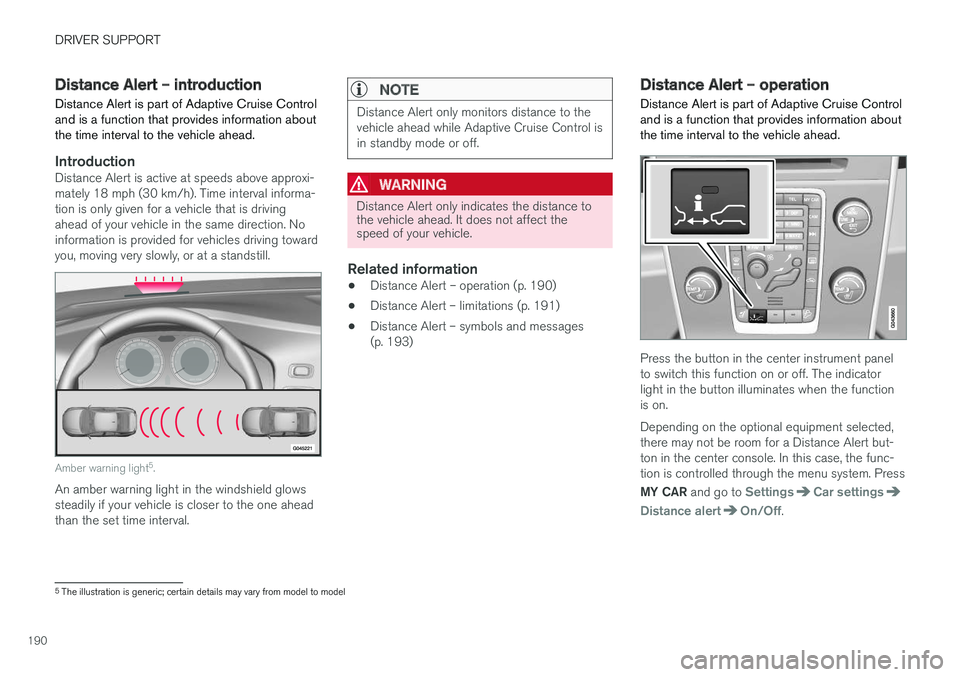
Amber warning light 5
.
An amber warning light in the windshield glows steadily if your vehicle is closer to the one aheadthan the set time interval.
NOTE
Distance Alert only monitors distance to the vehicle ahead while Adaptive Cruise Control isin standby mode or off.
WARNING
Distance Alert only indicates the distance to the vehicle ahead. It does not affect thespeed of your vehicle.
Related information
• Distance Alert – operation (p. 190)
• Distance Alert – limitations (p. 191)
• Distance Alert – symbols and messages (p. 193)
Distance Alert – operation
Distance Alert is part of Adaptive Cruise Control and is a function that provides information aboutthe time interval to the vehicle ahead.
Press the button in the center instrument panel to switch this function on or off. The indicatorlight in the button illuminates when the functionis on. Depending on the optional equipment selected, there may not be room for a Distance Alert but-ton in the center console. In this case, the func-tion is controlled through the menu system. Press MY CAR and go to
SettingsCar settings
Distance alertOn/Off.
5
The illustration is generic; certain details may vary from model to model
Page 203 of 396
DRIVER SUPPORT
}}
201
•
City Safety – operation (p. 196)
• City Safety – limitations (p. 196)
• City Safety – troubleshooting (p. 197)
• City Safety – symbols and messages (p. 199)
Collision warning – introduction Pedestrian and Cyclist Detection with Full Auto Brake is designed to assist the driver if there is arisk of a collision with a pedestrian, a cyclist, avehicle ahead that is at a standstill or one that ismoving in the same direction as your vehicle.
This system consists of the following three func- tions:
• Collision Warning
warns the driver of a
potential collision situation.
• Brake Support
helps the driver brake effi-
ciently in a critical situation.
• Auto-brake
brakes the vehicle automatically
if a collision with a pedestrian, a cyclist oranother vehicle cannot be avoided and thedriver does not apply the brakes in time orsteer around the person/vehicle. Auto-brakecan help prevent a collision or reduce thespeed at which a collision occurs.
Since Pedestrian and Cyclist Detection with FullAuto Brake is activated in circumstances wherethe driver should have begun braking muchsooner, the system will not be able to assist thedriver in all situations. This system is designed to activate as late as possible to help avoid unnecessary intervention. The system should not be used in such a way that the driver changes his/her way of operatingthe vehicle. If the driver relies entirely on the sys- tem, the chances of an accident eventually occur-ring increase considerably. The Pedestrian and Cyclist Detection with Full Auto Brake and City Safety
™ systems supple-
ment each other. See City Safety – introduction (p. 194) for detailed information about City Safety ™.
WARNING
No automatic system can be guaranteed to function 100% correctly in all situations. Forthat reason, never test the Auto-brake systemby driving toward a person or object. Thiscould result in serious injury or death.