turn signal VOLVO S60 2018 Owner´s Manual
[x] Cancel search | Manufacturer: VOLVO, Model Year: 2018, Model line: S60, Model: VOLVO S60 2018Pages: 396, PDF Size: 9.4 MB
Page 248 of 396
DRIVER SUPPORT
* Option/accessory.
246
BLIS * – Cross Traffic Alert (CTA)
Cross Traffic Alert (CTA) is a supplementary BLIS 17
function intended to detect vehicles
crossing behind your vehicle while you are back- ing up.
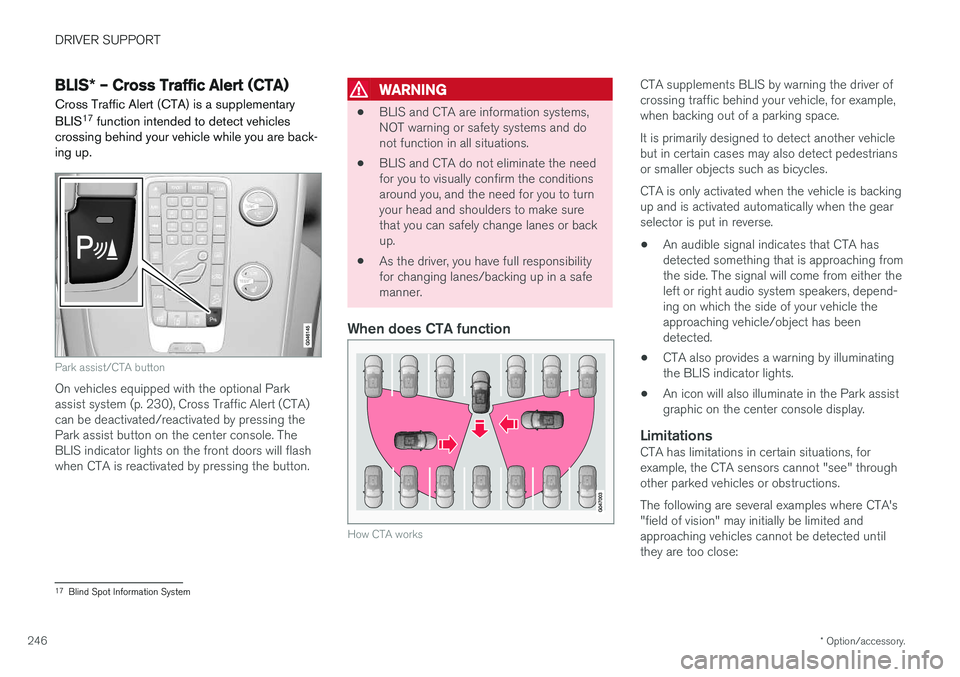
Park assist/CTA button
On vehicles equipped with the optional Park assist system (p. 230), Cross Traffic Alert (CTA)can be deactivated/reactivated by pressing thePark assist button on the center console. TheBLIS indicator lights on the front doors will flashwhen CTA is reactivated by pressing the button.
WARNING
• BLIS and CTA are information systems, NOT warning or safety systems and donot function in all situations.
• BLIS and CTA do not eliminate the needfor you to visually confirm the conditionsaround you, and the need for you to turnyour head and shoulders to make surethat you can safely change lanes or backup.
• As the driver, you have full responsibilityfor changing lanes/backing up in a safemanner.
When does CTA function
How CTA works
CTA supplements BLIS by warning the driver of crossing traffic behind your vehicle, for example,when backing out of a parking space. It is primarily designed to detect another vehicle but in certain cases may also detect pedestriansor smaller objects such as bicycles. CTA is only activated when the vehicle is backing up and is activated automatically when the gearselector is put in reverse.
• An audible signal indicates that CTA hasdetected something that is approaching fromthe side. The signal will come from either theleft or right audio system speakers, depend-ing on which the side of your vehicle theapproaching vehicle/object has beendetected.
• CTA also provides a warning by illuminatingthe BLIS indicator lights.
• An icon will also illuminate in the Park assistgraphic on the center console display.
LimitationsCTA has limitations in certain situations, forexample, the CTA sensors cannot "see" throughother parked vehicles or obstructions. The following are several examples where CTA's "field of vision" may initially be limited andapproaching vehicles cannot be detected untilthey are too close:
17
Blind Spot Information System
Page 255 of 396
STARTING AND DRIVING
* Option/accessory.253
Engine Remote Start (ERS) * –
starting the engine
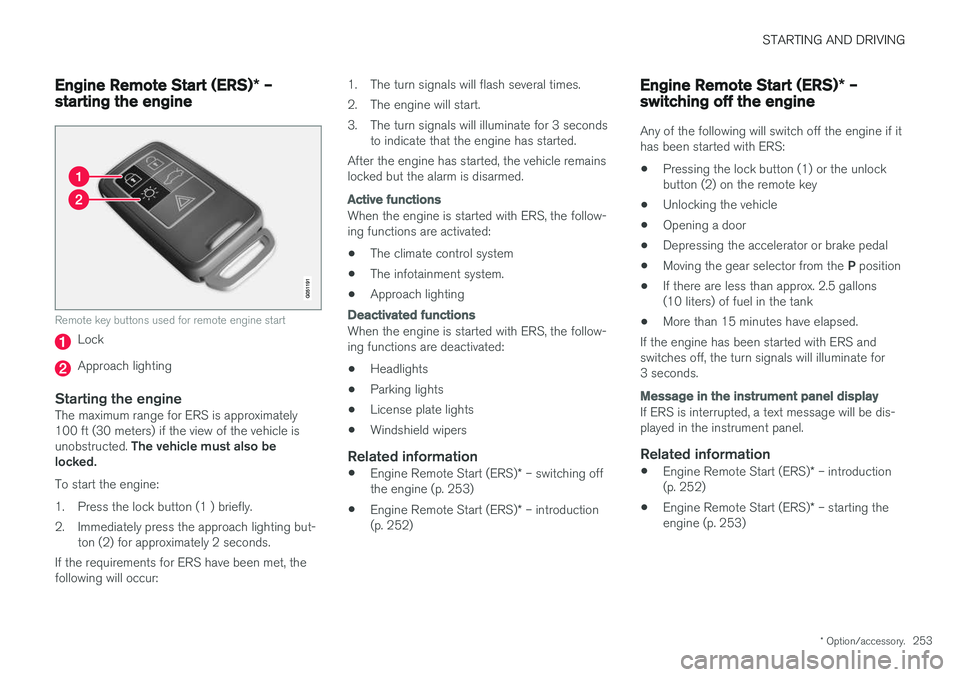
Remote key buttons used for remote engine start
Lock
Approach lighting
Starting the engineThe maximum range for ERS is approximately 100 ft (30 meters) if the view of the vehicle is unobstructed. The vehicle must also be
locked. To start the engine:
1. Press the lock button (1 ) briefly.
2. Immediately press the approach lighting but- ton (2) for approximately 2 seconds.
If the requirements for ERS have been met, the following will occur: 1. The turn signals will flash several times.
2. The engine will start.
3. The turn signals will illuminate for 3 seconds
to indicate that the engine has started.
After the engine has started, the vehicle remains locked but the alarm is disarmed.
Active functions
When the engine is started with ERS, the follow- ing functions are activated: • The climate control system
• The infotainment system.
• Approach lighting
Deactivated functions
When the engine is started with ERS, the follow- ing functions are deactivated: •
Headlights
• Parking lights
• License plate lights
• Windshield wipers
Related information
•
Engine Remote Start (ERS)
* – switching off
the engine (p. 253)
• Engine Remote Start (ERS)
* – introduction
(p. 252)
Engine Remote Start (ERS) * –
switching off the engine
Any of the following will switch off the engine if it has been started with ERS: • Pressing the lock button (1) or the unlock button (2) on the remote key
• Unlocking the vehicle
• Opening a door
• Depressing the accelerator or brake pedal
• Moving the gear selector from the
P position
• If there are less than approx. 2.5 gallons(10 liters) of fuel in the tank
• More than 15 minutes have elapsed.
If the engine has been started with ERS andswitches off, the turn signals will illuminate for3 seconds.
Message in the instrument panel display
If ERS is interrupted, a text message will be dis- played in the instrument panel.
Related information
• Engine Remote Start (ERS)
* – introduction
(p. 252)
• Engine Remote Start (ERS)
* – starting the
engine (p. 253)
Page 276 of 396
STARTING AND DRIVING
274
Parking brake – symbols and messages
A text message can be erased by pressing briefly on the OK button on the turn signal lever.
Symbol and messages in the instrument panel
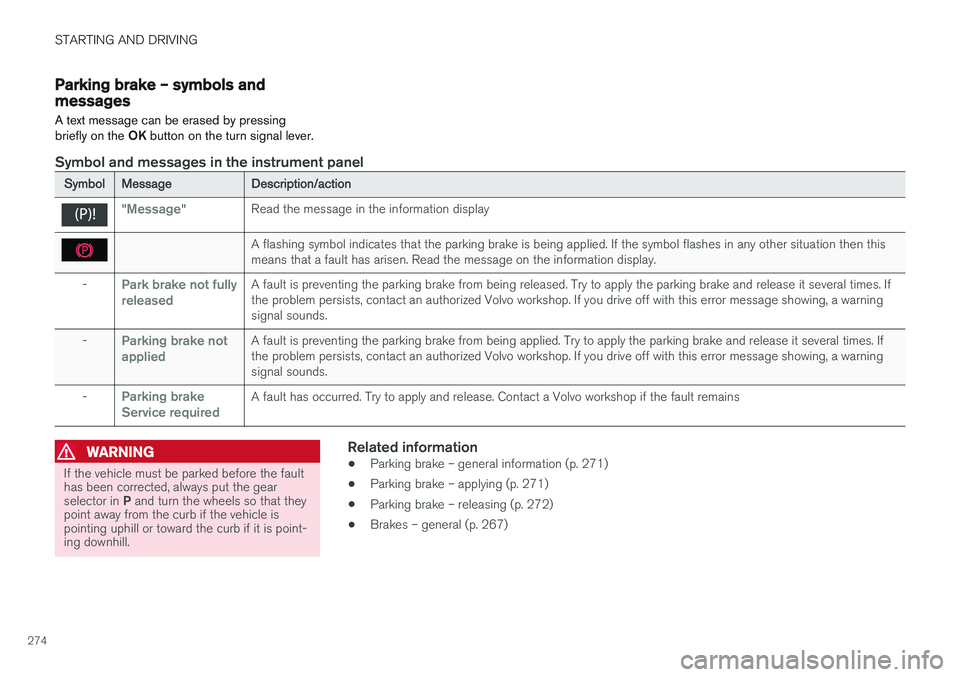
Symbol Message Description/action
"Message"Read the message in the information display
A flashing symbol indicates that the parking brake is being applied. If the symbol flashes in any other situation then this means that a fault has arisen. Read the message on the information display.
-
Park brake not fully releasedA fault is preventing the parking brake from being released. Try to apply the parking brake and release it several times. If the problem persists, contact an authorized Volvo workshop. If you drive off with this error message showing, a warningsignal sounds.
-
Parking brake not appliedA fault is preventing the parking brake from being applied. Try to apply the parking brake and release it several times. If the problem persists, contact an authorized Volvo workshop. If you drive off with this error message showing, a warningsignal sounds.
-
Parking brake Service requiredA fault has occurred. Try to apply and release. Contact a Volvo workshop if the fault remains
WARNING
If the vehicle must be parked before the fault has been corrected, always put the gear selector in P and turn the wheels so that they
point away from the curb if the vehicle is pointing uphill or toward the curb if it is point-ing downhill.
Related information
• Parking brake – general information (p. 271)
• Parking brake – applying (p. 271)
• Parking brake – releasing (p. 272)
• Brakes – general (p. 267)
Page 336 of 396
MAINTENANCE AND SERVICING
334
CAUTION
Keep the area around the power steering fluid reservoir clean when checking.
Bulbs – introduction
Certain bulbs can be replaced by the vehicle's owner. However, the bulbs on the following listshould only be replaced by a trained and quali-fied Volvo service technician.
All bulb specifications are listed in Bulbs – speci-
fications (p. 341).
• Active Bending Lights
• Front parking lights
• Front side marker lights
• Cornering lights
• Turn signals in the door mirrors
• Approach lighting in the door mirrors
• Interior lighting (except for the front footwelllighting)
• Rear parking lights
• LED bulbs
NOTE
• For information regarding any bulbs not mentioned in this section, please contactyour Volvo retailer or a trained andauthorized Volvo service technician.
• Always switch off the ignition before star-ting to replace a bulb.
• If an error message remains in the dis-play after a faulty bulb has been replaced,contact an authorized Volvo workshop.
• Condensation may form temporarily onthe inside of the lenses of exterior lightssuch as headlights, fog lights, or taillights.This is normal and the lights aredesigned to withstand moisture. Normally,condensation will dissipate after thelights have been on for a short time.
• The optional Active Bending Light bulbscontain trace amounts of mercury. Thesebulbs should always be disposed of by atrained and qualified Volvo service techni-cian.
CAUTION
Never touch the glass of bulbs with your fin- gers. Grease and oils from your fingers vapor-ize in the heat and will leave a deposit on thereflector, which will damage it.
Page 340 of 396
MAINTENANCE AND SERVICING
338
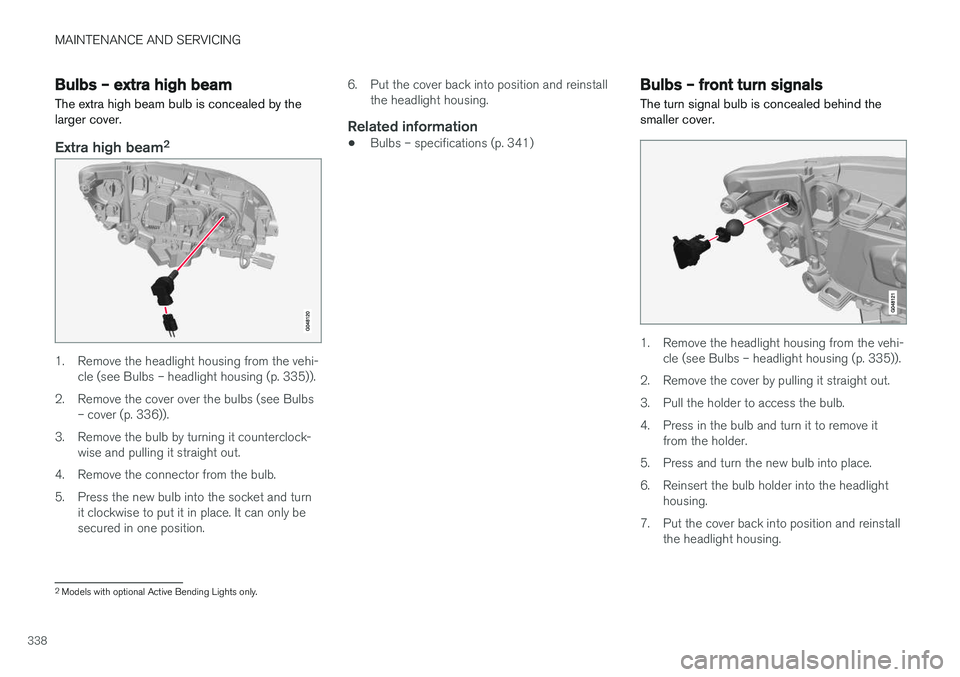
Bulbs – extra high beam The extra high beam bulb is concealed by the larger cover.
Extra high beam2
1. Remove the headlight housing from the vehi-
cle (see Bulbs – headlight housing (p. 335)).
2. Remove the cover over the bulbs (see Bulbs – cover (p. 336)).
3. Remove the bulb by turning it counterclock- wise and pulling it straight out.
4. Remove the connector from the bulb.
5. Press the new bulb into the socket and turn it clockwise to put it in place. It can only be secured in one position. 6. Put the cover back into position and reinstall
the headlight housing.
Related information
• Bulbs – specifications (p. 341)
Bulbs – front turn signals The turn signal bulb is concealed behind the smaller cover.
1. Remove the headlight housing from the vehi-
cle (see Bulbs – headlight housing (p. 335)).
2. Remove the cover by pulling it straight out.
3. Pull the holder to access the bulb.
4. Press in the bulb and turn it to remove it from the holder.
5. Press and turn the new bulb into place.
6. Reinsert the bulb holder into the headlight housing.
7. Put the cover back into position and reinstall the headlight housing.
2Models with optional Active Bending Lights only.
Page 341 of 396
MAINTENANCE AND SERVICING
339
Related information
•Bulbs – specifications (p. 341)
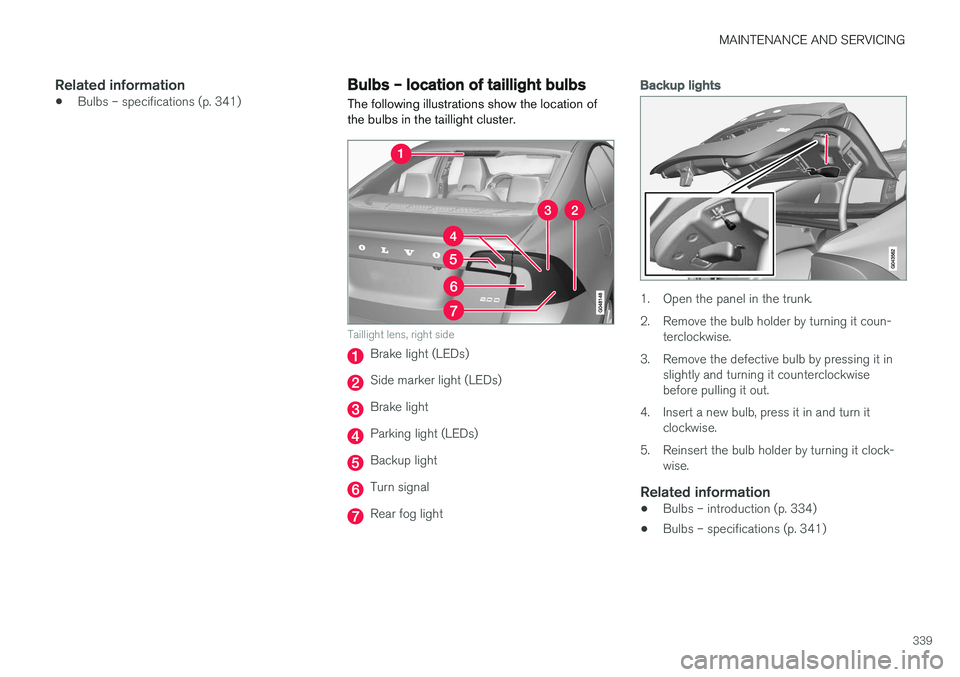
Bulbs – location of taillight bulbs
The following illustrations show the location of the bulbs in the taillight cluster.
Taillight lens, right side
Brake light (LEDs)
Side marker light (LEDs)
Brake light
Parking light (LEDs)
Backup light
Turn signal
Rear fog light
Backup lights
1. Open the panel in the trunk.
2. Remove the bulb holder by turning it coun- terclockwise.
3. Remove the defective bulb by pressing it in slightly and turning it counterclockwise before pulling it out.
4. Insert a new bulb, press it in and turn it clockwise.
5. Reinsert the bulb holder by turning it clock- wise.
Related information
• Bulbs – introduction (p. 334)
• Bulbs – specifications (p. 341)
Page 343 of 396
MAINTENANCE AND SERVICING
}}
* Option/accessory.341
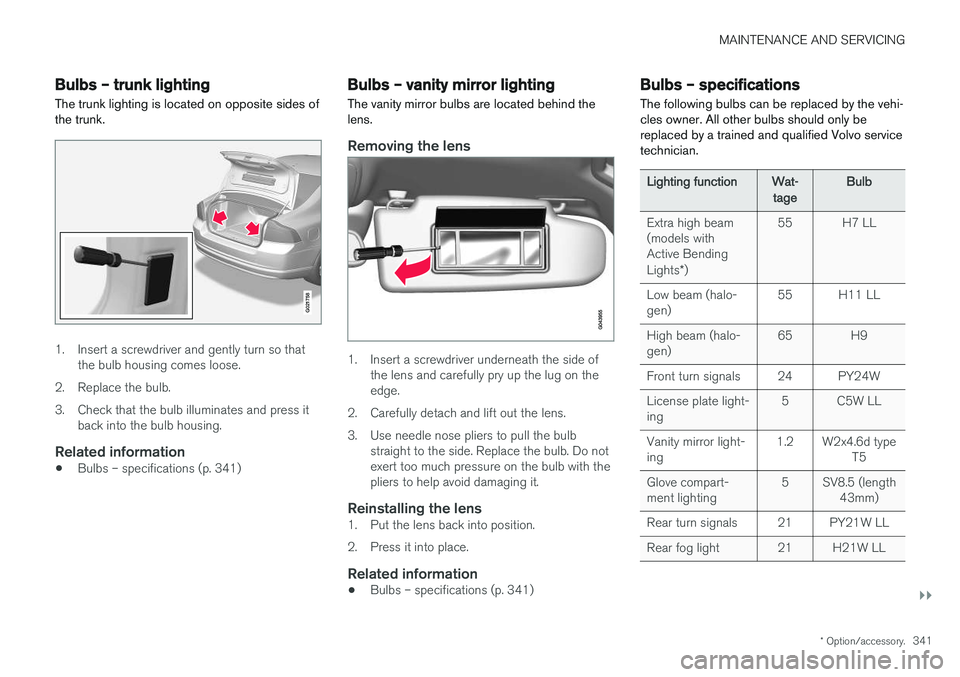
Bulbs – trunk lighting
The trunk lighting is located on opposite sides of the trunk.
G021758
1. Insert a screwdriver and gently turn so that the bulb housing comes loose.
2. Replace the bulb.
3. Check that the bulb illuminates and press it back into the bulb housing.
Related information
• Bulbs – specifications (p. 341)
Bulbs – vanity mirror lighting
The vanity mirror bulbs are located behind the lens.
Removing the lens
1. Insert a screwdriver underneath the side of the lens and carefully pry up the lug on the edge.
2. Carefully detach and lift out the lens.
3. Use needle nose pliers to pull the bulb straight to the side. Replace the bulb. Do not exert too much pressure on the bulb with thepliers to help avoid damaging it.
Reinstalling the lens1. Put the lens back into position.
2. Press it into place.
Related information
• Bulbs – specifications (p. 341)
Bulbs – specifications The following bulbs can be replaced by the vehi- cles owner. All other bulbs should only bereplaced by a trained and qualified Volvo servicetechnician.
Lighting function
Wat-
tage Bulb
Extra high beam (models withActive Bending Lights *) 55 H7 LL
Low beam (halo- gen) 55 H11 LL
High beam (halo-gen) 65 H9
Front turn signals 24 PY24W License plate light- ing 5 C5W LL
Vanity mirror light-ing 1.2 W2x4.6d type
T5
Glove compart-ment lighting 5 SV8.5 (length
43mm)
Rear turn signals 21 PY21W LL
Rear fog light 21 H21W LL
Page 383 of 396
SPECIFICATIONS
}}
* Option/accessory.381
Indicator symbols
The following tables list the most common warn- ing and indicator lights and symbols and a refer-ence to where more detailed information can befound.
: The red warning symbol illuminates to
indicate a problem related to safety and/or driva- bility. A message will also appear in the maininstruments panel's display.
: The information symbol illuminates and a
text message is displayed to provide the driver with necessary information about one of thevehicle's systems.
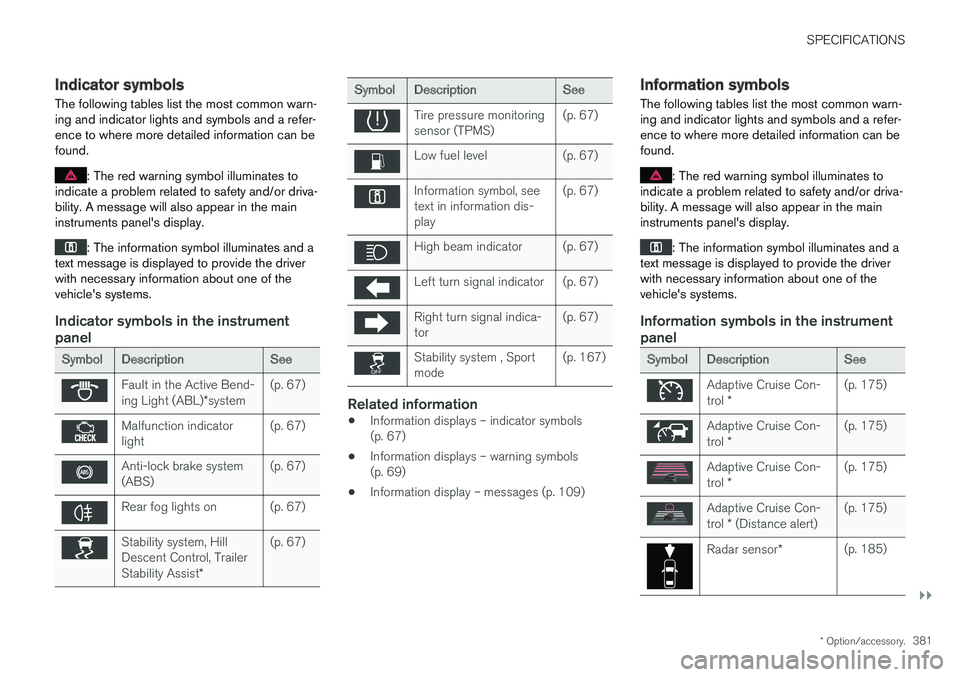
Indicator symbols in the instrument panel
Symbol Description See
Fault in the Active Bend- ing Light (ABL)*system (p. 67)
Malfunction indicator light
(p. 67)
Anti-lock brake system (ABS)(p. 67)
Rear fog lights on (p. 67)
Stability system, Hill Descent Control, Trailer Stability Assist
*(p. 67)
Symbol
Description See
Tire pressure monitoring sensor (TPMS)(p. 67)
Low fuel level (p. 67)
Information symbol, see text in information dis-play(p. 67)
High beam indicator (p. 67)
Left turn signal indicator (p. 67)
Right turn signal indica- tor
(p. 67)
Stability system , Sport mode(p. 167)
Related information
•
Information displays – indicator symbols (p. 67)
• Information displays – warning symbols(p. 69)
• Information display – messages (p. 109)
Information symbols
The following tables list the most common warn- ing and indicator lights and symbols and a refer-ence to where more detailed information can befound.
: The red warning symbol illuminates to
indicate a problem related to safety and/or driva- bility. A message will also appear in the maininstruments panel's display.
: The information symbol illuminates and a
text message is displayed to provide the driver with necessary information about one of thevehicle's systems.
Information symbols in the instrument panel
Symbol Description See
Adaptive Cruise Con- trol * (p. 175)
Adaptive Cruise Con- trol
* (p. 175)
Adaptive Cruise Con- trol
* (p. 175)
Adaptive Cruise Con- trol
* (Distance alert) (p. 175)
Radar sensor
*(p. 185)
Page 393 of 396
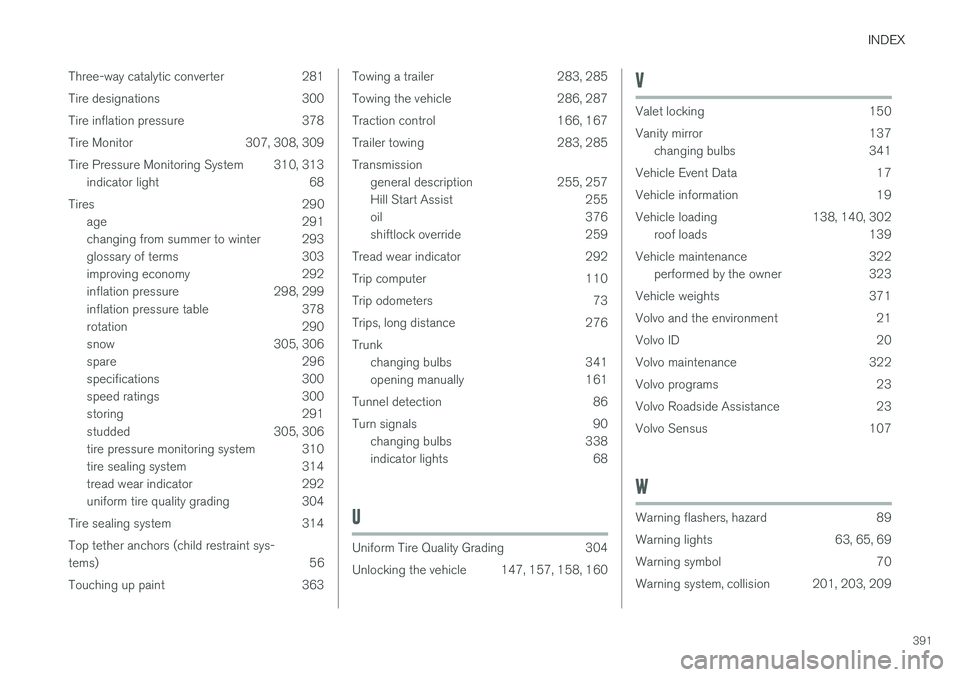
INDEX
391
Three-way catalytic converter 281
Tire designations 300
Tire inflation pressure 378
Tire Monitor 307, 308, 309
Tire Pressure Monitoring System 310, 313
indicator light 68
Tires 290 age 291
changing from summer to winter 293
glossary of terms 303
improving economy 292
inflation pressure 298, 299
inflation pressure table 378
rotation 290
snow 305, 306
spare 296
specifications 300
speed ratings 300
storing 291
studded 305, 306
tire pressure monitoring system 310
tire sealing system 314
tread wear indicator 292
uniform tire quality grading 304
Tire sealing system 314 Top tether anchors (child restraint sys- tems) 56
Touching up paint 363
Towing a trailer 283, 285
Towing the vehicle 286, 287
Traction control 166, 167
Trailer towing 283, 285Transmission general description 255, 257
Hill Start Assist 255
oil 376
shiftlock override 259
Tread wear indicator 292
Trip computer 110
Trip odometers 73
Trips, long distance 276Trunk changing bulbs 341
opening manually 161
Tunnel detection 86
Turn signals 90 changing bulbs 338
indicator lights 68
U
Uniform Tire Quality Grading 304
Unlocking the vehicle 147, 157, 158, 160
V
Valet locking 150
Vanity mirror 137changing bulbs 341
Vehicle Event Data 17
Vehicle information 19
Vehicle loading 138, 140, 302 roof loads 139
Vehicle maintenance 322 performed by the owner 323
Vehicle weights 371
Volvo and the environment 21
Volvo ID 20
Volvo maintenance 322
Volvo programs 23
Volvo Roadside Assistance 23
Volvo Sensus 107
W
Warning flashers, hazard 89
Warning lights 63, 65, 69
Warning symbol 70
Warning system, collision 201, 203, 209