warning light VOLVO S60 CROSS COUNTRY 2017 Owner´s Manual
[x] Cancel search | Manufacturer: VOLVO, Model Year: 2017, Model line: S60 CROSS COUNTRY, Model: VOLVO S60 CROSS COUNTRY 2017Pages: 398, PDF Size: 9.47 MB
Page 187 of 398
DRIVER SUPPORT
185
•
ACC has kept the vehicle at a standstill for more than 2 minutes
• The engine has been switched off
• The brakes have overheated
Related information
•
Adaptive Cruise Control – introduction(p. 176)
Radar sensor
The radar sensor is designed to help detect cars or larger vehicles driving in the same direction asyour vehicle, in the same lane.
The radar sensor and its limitationsIn addition to being used by the Adaptive Cruise Control (ACC), the radar sensor is also used byDistance Alert (see Distance Alert – introduction(p. 191)) and Collision Warning with Full Auto-brake and Pedestrian Detection (see Collisionwarning – introduction (p. 202)).
WARNING
• If there is visible damage to the front grille or you suspect that the radar sensormay be damaged in any way, contact atrained and qualified Volvo service techni-cian as soon as possible. The radar sen-sor may only function partially (or not atall) if it is damaged or is not securely fas-tened in place.
• Accessories or other objects, such asextra headlights, must not be installed infront of the grille.
• Modification of the radar sensor couldmake its use illegal.
The radar sensor's capacity to detect vehicles ahead is impeded: • if the radar sensor is obstructed and cannotdetect other vehicles, for example in heavy rain, or if snow or other objects are obscuringthe radar sensor.
NOTE
Keep the area in front of the radar sensor clean.
•
if the speed of vehicles ahead is significantly different from your own speed.
Related information
•Adaptive Cruise Control – introduction(p. 176)
• Collision warning – introduction (p. 202)
• Distance Alert – introduction (p. 191)
Page 193 of 398
DRIVER SUPPORT
}}
191
Distance Alert – introduction
Distance Alert is part of Adaptive Cruise Control and is a function that provides information aboutthe time interval to the vehicle ahead.
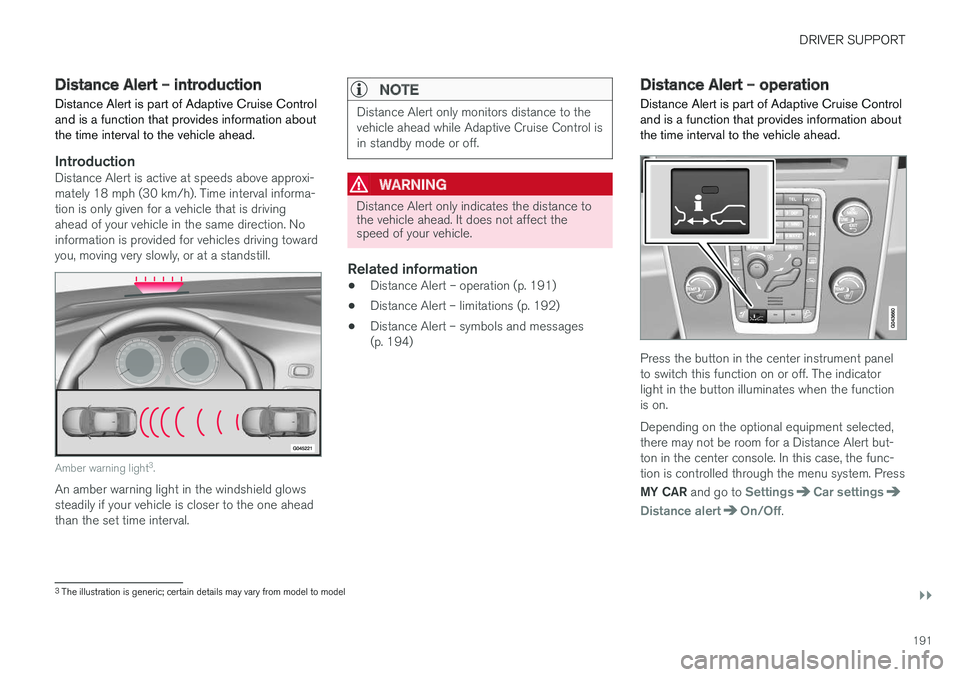
IntroductionDistance Alert is active at speeds above approxi- mately 18 mph (30 km/h). Time interval informa-tion is only given for a vehicle that is drivingahead of your vehicle in the same direction. Noinformation is provided for vehicles driving towardyou, moving very slowly, or at a standstill.
Amber warning light 3
.
An amber warning light in the windshield glows steadily if your vehicle is closer to the one aheadthan the set time interval.
NOTE
Distance Alert only monitors distance to the vehicle ahead while Adaptive Cruise Control isin standby mode or off.
WARNING
Distance Alert only indicates the distance to the vehicle ahead. It does not affect thespeed of your vehicle.
Related information
• Distance Alert – operation (p. 191)
• Distance Alert – limitations (p. 192)
• Distance Alert – symbols and messages (p. 194)
Distance Alert – operation
Distance Alert is part of Adaptive Cruise Control and is a function that provides information aboutthe time interval to the vehicle ahead.
Press the button in the center instrument panel to switch this function on or off. The indicatorlight in the button illuminates when the functionis on. Depending on the optional equipment selected, there may not be room for a Distance Alert but-ton in the center console. In this case, the func-tion is controlled through the menu system. Press MY CAR and go to
SettingsCar settings
Distance alertOn/Off.
3
The illustration is generic; certain details may vary from model to model
Page 199 of 398
DRIVER SUPPORT
}}
197
City Safety – operation
Using City Safety™
NOTE
The City Safety™ function is activated auto-
matically each time the engine has been switched off and restarted.
On and OffIn certain situations, it may be desirable to switch City Safety ™ off, such as when driving in close
quarters where leaves, branches, etc. may obscure the hood and windshield. When the engine is running, City Safety ™ can be
switched off as follows: Press My Car in the center console control panel
and go to
SettingsCar settingsDriver
support systems
City Safety. Select Off.
If the engine is switched off, City Safety ™ will
reactivate when the engine is restarted.
WARNING
The laser sensor emits light when the ignition is in mode II or higher, even if City Safety ™
has been switched off.
To switch City Safety ™ on again: •
Follow the same procedure as for switching City Safety
™ off but select
On.
Related information
• City Safety – introduction (p. 195)
• City Safety – function (p. 196)
• City Safety – limitations (p. 197)
• City Safety – troubleshooting (p. 198)
• City Safety – symbols and messages (p. 200)
• City Safety – Laser sensor (p. 201)
• My Car – introduction (p. 71)
City Safety – limitations
Limitations
WARNING
The laser sensor has certain limitations and its function may be reduced (or it may notfunction at all) in conditions such as heavyrain or snowfall, or by dense fog or thick,blowing dust or snow. Condensation, dirt, iceor snow on the windshield may also interferewith the sensor
Page 203 of 398
DRIVER SUPPORT
}}
201
City Safety – Laser sensor
The laser sensor
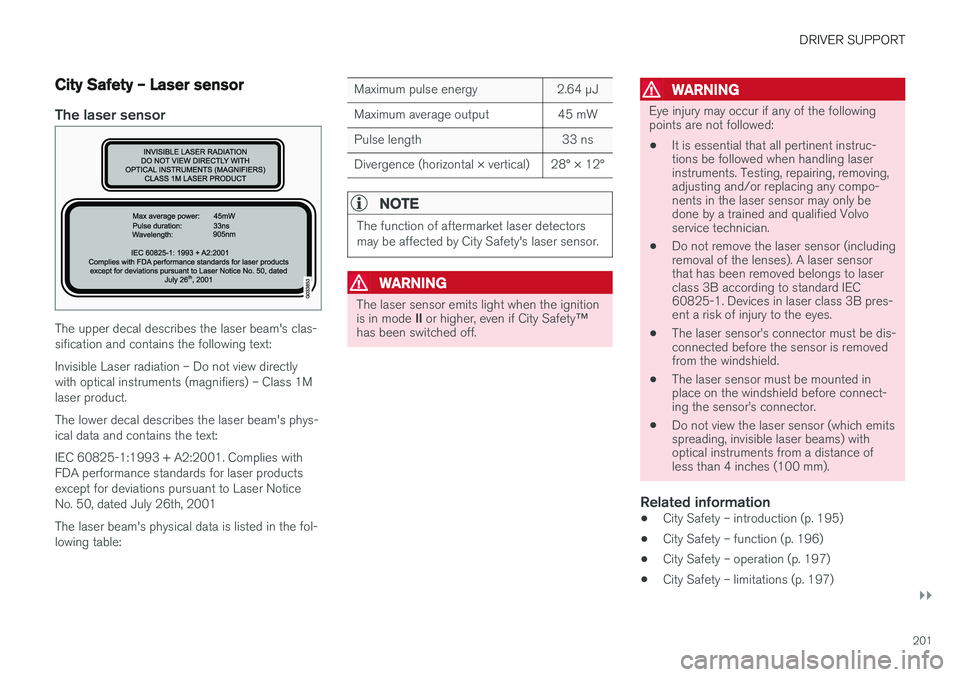
The upper decal describes the laser beam's clas- sification and contains the following text: Invisible Laser radiation – Do not view directly with optical instruments (magnifiers) – Class 1Mlaser product. The lower decal describes the laser beam's phys- ical data and contains the text: IEC 60825-1:1993 + A2:2001. Complies with FDA performance standards for laser productsexcept for deviations pursuant to Laser NoticeNo. 50, dated July 26th, 2001 The laser beam's physical data is listed in the fol- lowing table:
Maximum pulse energy2.64 μJ
Maximum average output45 mW
Pulse length33 ns
Divergence (horizontal × vertical)28° × 12°
NOTE
The function of aftermarket laser detectors may be affected by City Safety's laser sensor.
WARNING
The laser sensor emits light when the ignition is in mode II or higher, even if City Safety ™
has been switched off.
WARNING
Eye injury may occur if any of the following points are not followed:
• It is essential that all pertinent instruc-tions be followed when handling laserinstruments. Testing, repairing, removing,adjusting and/or replacing any compo-nents in the laser sensor may only bedone by a trained and qualified Volvoservice technician.
• Do not remove the laser sensor (includingremoval of the lenses). A laser sensorthat has been removed belongs to laserclass 3B according to standard IEC60825-1. Devices in laser class 3B pres-ent a risk of injury to the eyes.
• The laser sensor
Page 205 of 398
DRIVER SUPPORT
* Option/accessory, for more information, see Introduction.203
WARNING
•Pedestrian and Cyclist Detection with Full Auto Brake does not work in all driving,traffic, weather and road conditions. Itdoes not react to vehicles not traveling inthe same direction as your vehicle.
• Pedestrian and Cyclist Detection with FullAuto Brake does not react to animals.
• Warnings are only provided when the riskof collision is high. The "Function" sectionprovides information about limitations thatthe driver must be aware of before usingCollision Warning.
• Pedestrian and Cyclist Detection with FullAuto Brake will not provide a warning orbrake the vehicle for pedestrians orcyclists at speeds above 50 mph(80 km/h).
WARNING
•
Pedestrian and Cyclist Detection with Full Auto Brake will not provide a warning orbrake the vehicle for pedestrians in dark-ness or in tunnels, even if there is streetlighting in the area.
• The auto-brake function can help preventa collision or reduce the speed at impactbut the driver should always apply thebrakes for the best possible brakingeffect, even if auto-brake is actively apply-ing the brakes.
• Never wait for a collision warning. Thissystem is designed to be a supplemen-tary driving aid. It is not, however,intended to replace the driver's attentionand judgement. The driver is responsiblefor maintaining a safe distance andspeed, even when the collision warningsystem is in use.
• Maintenance of the Pedestrian andCyclist Detection with Full Auto Brakesystem's components must only be per-formed by a trained and qualified Volvotechnician.
Related information
•
Collision warning
* – function (p. 204)
• Collision warning
* – operation (p. 205)
• Collision warning
* – Pedestrian detection
(p. 207) •
Collision warning
* – Cyclist detection
(p. 206)
• Collision warning
* – limitations (p. 208)
• The camera
Page 206 of 398
DRIVER SUPPORT
* Option/accessory, for more information, see Introduction.
204
Collision warning * – function
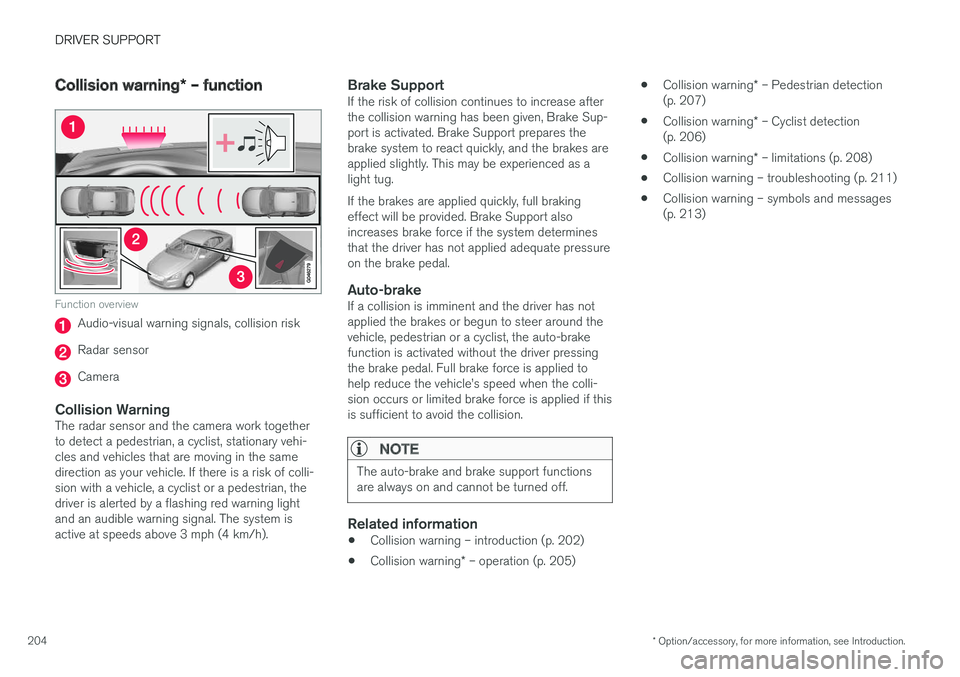
Function overview
Audio-visual warning signals, collision risk
Radar sensor
Camera
Collision WarningThe radar sensor and the camera work together to detect a pedestrian, a cyclist, stationary vehi-cles and vehicles that are moving in the samedirection as your vehicle. If there is a risk of colli-sion with a vehicle, a cyclist or a pedestrian, thedriver is alerted by a flashing red warning lightand an audible warning signal. The system isactive at speeds above 3 mph (4 km/h).
Brake SupportIf the risk of collision continues to increase afterthe collision warning has been given, Brake Sup-port is activated. Brake Support prepares thebrake system to react quickly, and the brakes areapplied slightly. This may be experienced as alight tug. If the brakes are applied quickly, full braking effect will be provided. Brake Support alsoincreases brake force if the system determinesthat the driver has not applied adequate pressureon the brake pedal.
Auto-brakeIf a collision is imminent and the driver has notapplied the brakes or begun to steer around thevehicle, pedestrian or a cyclist, the auto-brakefunction is activated without the driver pressingthe brake pedal. Full brake force is applied tohelp reduce the vehicle
Page 207 of 398
DRIVER SUPPORT
}}
* Option/accessory, for more information, see Introduction.205
Collision warning* – operation
Settings are made by pressing MY CAR on the
center console control panel and using the menus displayed.
Activating/deactivating both warning
signals
To switch the system's audible and visual sig-
nals on or off at the same time, press MY CAR
on the center console control panel and go to
SettingsCar settingsDriver support
systems
Collision Warning. If Pedestrian
and Cyclist Detection with Full Auto Brake is on, the system will perform a self-test each time theengine is started by briefly illuminating the warn-ing light. See My Car – introduction (p. 71) for adescription of the menu system. When the engine is switched on, the system set- ting that was being used when it was switchedoff will be the default setting.
NOTE
The auto-brake and pedestrian/cyclist detec- tion features are always on, even if the audi-ble and visual warning signals have beendeactivated.
Activating/deactivating the audible warning signal only
The audible warning signal can be activated/ deactivated by pressing MY CAR on the center
console control panel and going to
Settings
Car settingsDriver support systemsWarning sound if risk of collision.
Setting a warning distanceThis setting determines the distance at which the visual and audible warnings are triggered. Select
Long, Normal or Short by pressing MY CAR on
the center console control panel and going to
SettingsCar settingsDriver support
systems
Collision WarningWarning
distance.
The warning distance determines the level of sensitivity used by the system. The warning dis- tance
Long provides an earlier warning. Begin by
using Long and if the system gives too many
warnings, try changing to Normal.
WARNING
• The setting Short should only be used in
situations where traffic is light and mov- ing at low speeds.
• Pedestrian and Cyclist Detection with FullAuto Brake alerts the driver to the risk ofa collision but this function cannot reducethe driver
Page 209 of 398
DRIVER SUPPORT
}}
* Option/accessory, for more information, see Introduction.207
•
The camera's function is deactivated and will not detect a cyclist in darkness or in tunnels,even if there is street lighting in the area.
• For optimal cyclist detection, City Safety
™
must be activated.
WARNING
Pedestrian and Cyclist Detection with Full Auto Brake is designed to be a supplemen-tary driving aid. It is not, however, intended toreplace the driver's attention and judgement.The driver is always responsible for operatingthe vehicle in a safe manner. The system cannot detect a bike/cyclist if:
• He/she is wearing loose-fitting clothing that may obscure body contours
• The bike is approaching your vehicle fromthe side
• The bike is not equipped with a rear-fac-ing red reflector
• The bike is carrying large objects
• Most of the cyclist's body or the bikeitself cannot be "seen" by the system'scamera
Related information
•Collision warning – introduction (p. 202)
• Collision warning
* – function (p. 204)
• Collision warning
* – operation (p. 205) •
Collision warning
* – Pedestrian detection
(p. 207)
• Collision warning
* – limitations (p. 208)
• Collision warning – troubleshooting (p. 211)
• Collision warning – symbols and messages (p. 213)
Collision warning
* – Pedestrian
detection
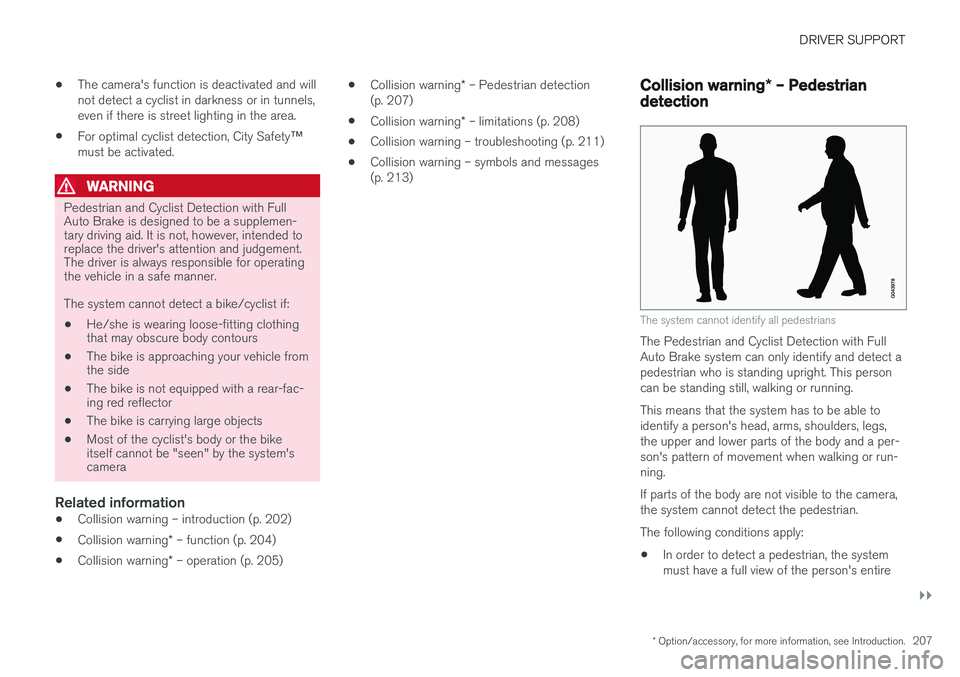
The system cannot identify all pedestrians
The Pedestrian and Cyclist Detection with Full Auto Brake system can only identify and detect apedestrian who is standing upright. This personcan be standing still, walking or running. This means that the system has to be able to identify a person's head, arms, shoulders, legs,the upper and lower parts of the body and a per-son's pattern of movement when walking or run-ning. If parts of the body are not visible to the camera, the system cannot detect the pedestrian. The following conditions apply:
• In order to detect a pedestrian, the system must have a full view of the person's entire
Page 210 of 398
||
DRIVER SUPPORT
* Option/accessory, for more information, see Introduction.
208 body and the person must be at least 32 in. (80 cm) tall.
• The system cannot detect a pedestrian carry-ing a large object.
• The camera's capacity to see a pedestrian atdawn or dusk is limited, much as it is for thehuman eye.
• The camera's function is deactivated and willnot detect a pedestrian in darkness or in tun-nels, even if there is street lighting in thearea.
WARNING
•Pedestrian and Cyclist Detection with Full Auto Brake is designed to be a supple-mentary driving aid. It is not, however,intended to replace the driver's attentionand judgement. The driver is alwaysresponsible for operating the vehicle in asafe manner.
• The system cannot detect all pedestriansin all situations, such as in darkness/atnight and cannot detect partially hiddenpedestrians, people who are less thanapprox. 32 in. (80 cm) tall, or peoplewearing clothing that obscures the con-tours of their bodies.
Related information
•Collision warning – introduction (p. 202)
• Collision warning
* – function (p. 204) •
Collision warning
* – operation (p. 205)
• Collision warning
* – Cyclist detection
(p. 206)
• Collision warning
* – limitations (p. 208)
• Collision warning – troubleshooting (p. 211)
• Collision warning – symbols and messages (p. 213)
Collision warning
* – limitations
Strong sunlight, reflections, extreme light con- trasts, the use of sunglasses, or if the driver is notlooking straight ahead may make the visual warn-ing signal in the windshield difficult to see. Forthis reason, always activate the audible warningsignal. Slippery driving conditions increase braking dis- tance, which can reduce the system's capacity toavoid a collision. In these conditions, the ABS andstability systems provide the best possible brak-ing effect while helping to maintain stability.
NOTE
The visual warning signal may be temporarily disengaged in the event of high passengercompartment temperature due to strong sun-light, etc. If this occurs, the audible warningsignal will be used, even if it has been deacti-vated in the menu system.
Page 224 of 398
DRIVER SUPPORT
222
Lane Departure Warning (LDW) – operation
Operation and function
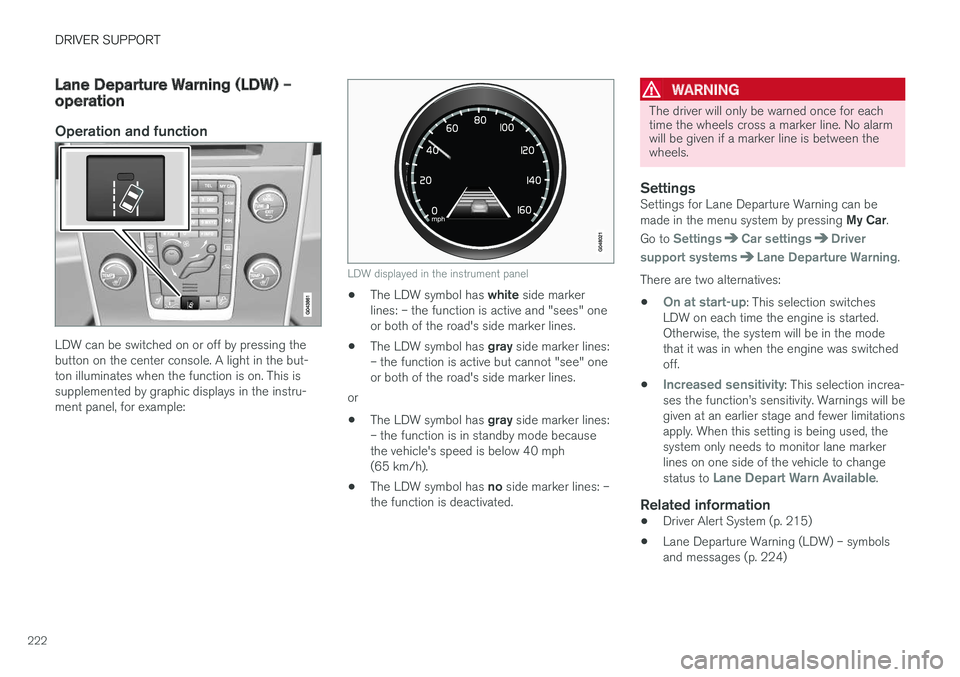
LDW can be switched on or off by pressing the button on the center console. A light in the but-ton illuminates when the function is on. This issupplemented by graphic displays in the instru-ment panel, for example:
LDW displayed in the instrument panel
•The LDW symbol has
white side marker
lines: – the function is active and "sees" one or both of the road's side marker lines.
• The LDW symbol has
gray side marker lines:
– the function is active but cannot "see" oneor both of the road's side marker lines.
or
• The LDW symbol has
gray side marker lines:
– the function is in standby mode becausethe vehicle's speed is below 40 mph(65 km/h).
• The LDW symbol has
no side marker lines: –
the function is deactivated.
WARNING
The driver will only be warned once for each time the wheels cross a marker line. No alarmwill be given if a marker line is between thewheels.
SettingsSettings for Lane Departure Warning can be made in the menu system by pressing My Car.
Go to
SettingsCar settingsDriver
support systems
Lane Departure Warning.
There are two alternatives:
•
On at start-up: This selection switches
LDW on each time the engine is started. Otherwise, the system will be in the modethat it was in when the engine was switchedoff.
•
Increased sensitivity: This selection increa-
ses the function