change wheel VOLVO S60 INSCRIPTION 2016 Owner´s Manual
[x] Cancel search | Manufacturer: VOLVO, Model Year: 2016, Model line: S60 INSCRIPTION, Model: VOLVO S60 INSCRIPTION 2016Pages: 344, PDF Size: 7.24 MB
Page 221 of 344
08 Starting and driving
08
}}
* Option/accessory, for more information, see Introduction.219
Geartronic: steering wheel paddles*In addition to the manual gearshift function using the gear selector, this option makes itpossible to manually shift gears from thesteering wheel.
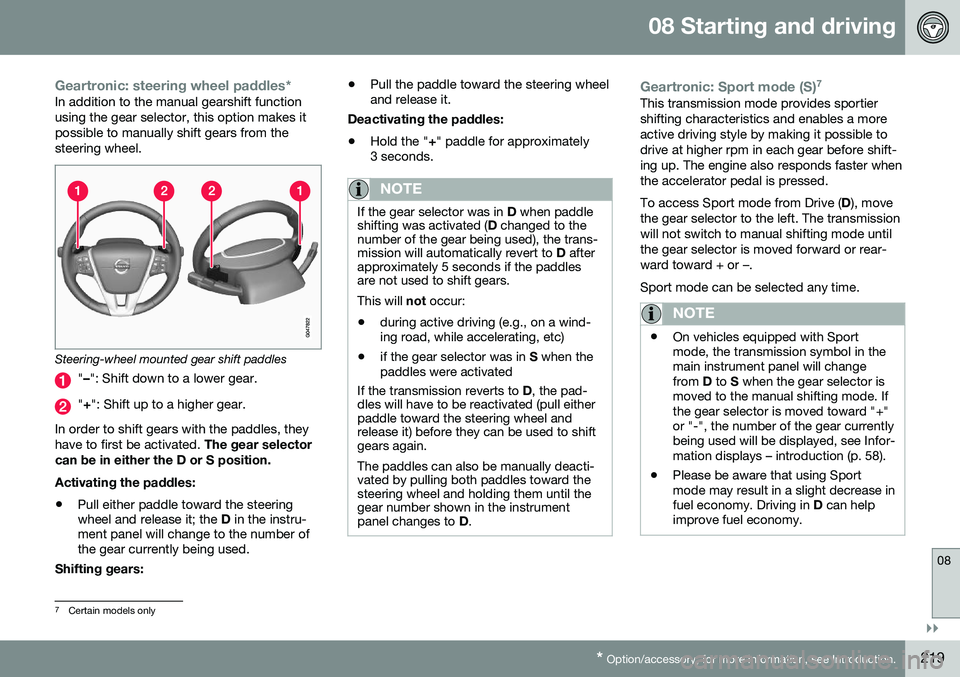
Steering-wheel mounted gear shift paddles
" – ": Shift down to a lower gear.
"+ ": Shift up to a higher gear.
In order to shift gears with the paddles, they have to first be activated. The gear selector
can be in either the D or S position. Activating the paddles:
• Pull either paddle toward the steering wheel and release it; the
D in the instru-
ment panel will change to the number ofthe gear currently being used.
Shifting gears: •
Pull the paddle toward the steering wheeland release it.
Deactivating the paddles: • Hold the "
+" paddle for approximately
3 seconds.
NOTE
If the gear selector was in D when paddle
shifting was activated ( D changed to the
number of the gear being used), the trans- mission will automatically revert to D after
approximately 5 seconds if the paddlesare not used to shift gears. This will not occur:
• during active driving (e.g., on a wind- ing road, while accelerating, etc)
• if the gear selector was in
S when the
paddles were activated
If the transmission reverts to D, the pad-
dles will have to be reactivated (pull either paddle toward the steering wheel andrelease it) before they can be used to shiftgears again. The paddles can also be manually deacti- vated by pulling both paddles toward thesteering wheel and holding them until thegear number shown in the instrumentpanel changes to D.
Geartronic: Sport mode (S) 7This transmission mode provides sportier shifting characteristics and enables a moreactive driving style by making it possible todrive at higher rpm in each gear before shift-ing up. The engine also responds faster whenthe accelerator pedal is pressed. To access Sport mode from Drive (
D), move
the gear selector to the left. The transmission will not switch to manual shifting mode untilthe gear selector is moved forward or rear-ward toward + or –. Sport mode can be selected any time.
NOTE
• On vehicles equipped with Sport mode, the transmission symbol in themain instrument panel will changefrom
D to S when the gear selector is
moved to the manual shifting mode. Ifthe gear selector is moved toward "+"or "-", the number of the gear currentlybeing used will be displayed, see Infor-mation displays – introduction (p. 58).
• Please be aware that using Sportmode may result in a slight decrease infuel economy. Driving in
D can help
improve fuel economy.
7 Certain models only
Page 229 of 344
08 Starting and driving
08
* Option/accessory, for more information, see Introduction.227
This feature is primarily intended to be used in driving situations where a decrease inspeed is expected, such as when approach-ing an intersection or a traffic light.
Eco Coast enables proactive driving with as little braking as possible.
Combinations of On and OffDepending on the driving situation, Eco can be used in different ways to help reduce fuelconsumption:
• With Eco activated
: this enables Eco
Coast, which allows the vehicle to roll
freely for as far as possible when the
driver releases the accelerator pedal (e.g., when approaching a traffic light or inter-section).
or
• With Eco deactivated
: engine braking
can be used when the vehicle will only
roll for a short distance (in heavy traffic,
etc.) or when driving down hills .
To help keep fuel consumption as low as possible, Eco Coast should not be used intraffic situations where the brakes have to beused frequently.
Activating Eco CoastEco Coast is activated when the accelerator pedal is released completely if:
• Eco is activated
• The gear selector is in
D •
The vehicle's speed is between approxi- mately 40–85 mph (65–140 km/h). Alwaysobserve posted speed limits
• The gradient of a down-slope is less thanapproximately 6%
Deactivating Eco CoastIn certain situations, it may be advisable to switch off the Eco Coast function, such as:
• When driving down steep hills, in order to utilize engine braking
• Prior to passing another vehicle, in orderto do so as safely as possible
Deactivating Eco Coast (and reactivating engine braking) can be done in the followingways:
• Press the
ECO button on the center con-
sole
• Move the gear selector to the manual "
S
+/– " position
• Change gears using the steering wheel paddles*
• Press the brake or accelerator pedal
Eco Coast limitationsThis function will not be available if:
• Cruise control is activated
• The gradient of a down-slope is morethan approximately 6%
• The steering wheel paddles* are used tomanually change gears •
The engine and/or transmission have notreached their normal operating tempera-ture
• The gear selector is moved from
D to the
manual " S+/–" position
• The vehicle's speed is not within the40–85 mph (65–140 km/h). interval
Additional information and settings
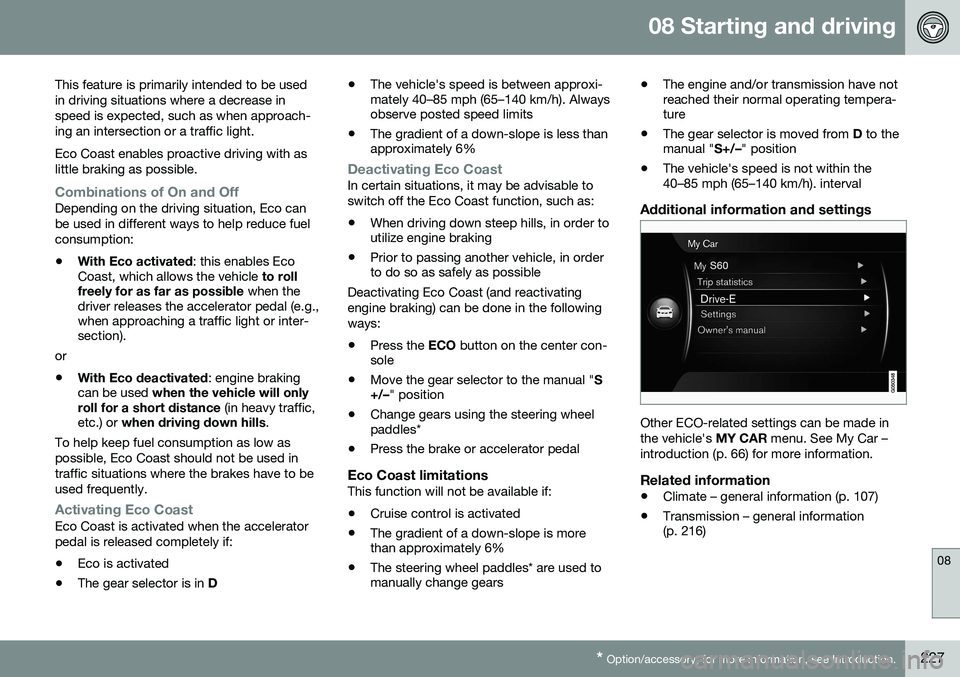
Other ECO-related settings can be made in the vehicle's
MY CAR menu. See My Car –
introduction (p. 66) for more information.
Related information
• Climate – general information (p. 107)
• Transmission – general information (p. 216)
Page 254 of 344
09 Wheels and tires
09
252
Changing a wheel – direction of rotation
Incorrectly mounted tires impair the car's braking properties and ability to force asiderain, snow and slush.
Summer and winter tires
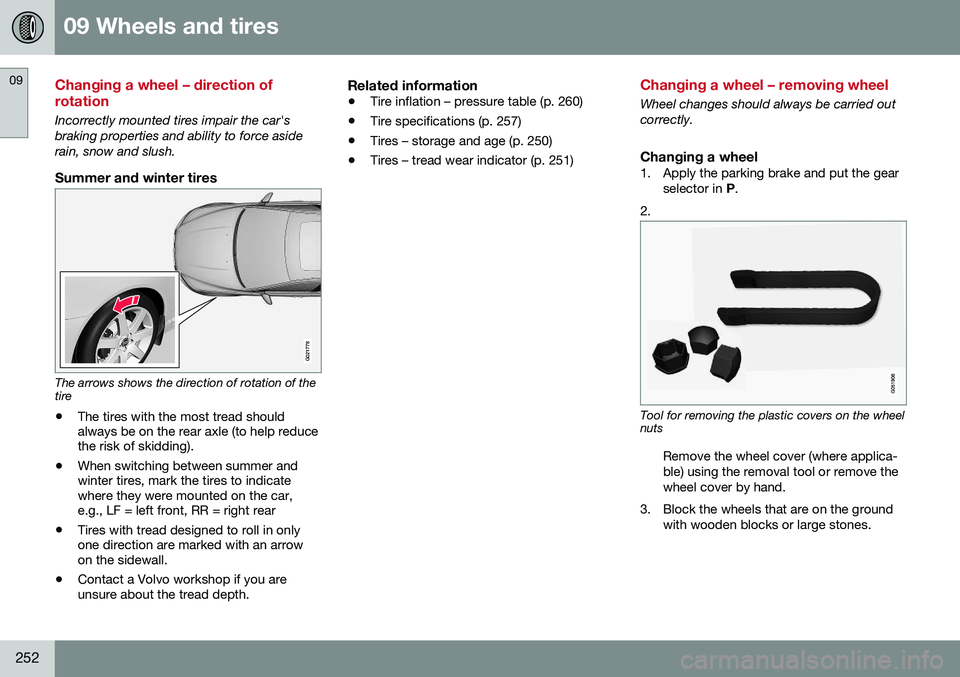
G021778
The arrows shows the direction of rotation of the tire• The tires with the most tread should always be on the rear axle (to help reducethe risk of skidding).
• When switching between summer andwinter tires, mark the tires to indicatewhere they were mounted on the car,e.g., LF = left front, RR = right rear
• Tires with tread designed to roll in onlyone direction are marked with an arrowon the sidewall.
• Contact a Volvo workshop if you areunsure about the tread depth.
Related information
•
Tire inflation – pressure table (p. 260)
• Tire specifications (p. 257)
• Tires – storage and age (p. 250)
• Tires – tread wear indicator (p. 251)
Changing a wheel – removing wheel
Wheel changes should always be carried out correctly.
Changing a wheel1. Apply the parking brake and put the gear
selector in P.
2.
Tool for removing the plastic covers on the wheel nuts
Remove the wheel cover (where applica- ble) using the removal tool or remove thewheel cover by hand.
3. Block the wheels that are on the ground with wooden blocks or large stones.
Page 256 of 344
||
09 Wheels and tires
09
254
NOTE
The jack provided with your vehicle is intended to be used only in temporary sit-uations such as changing wheels in theevent of a flat tire. Only the jack that camewith your particular model should be usedto lift the vehicle. If the vehicle needs to belifted more frequently or for a prolongedperiod, using a garage jack or hoist is rec-ommended. Always follow this device’sinstructions for use.
Related information
•Changing a wheel – installing a wheel (p. 255)
Changing a wheel – spare wheel
Wheel changes should always be carried out correctly.
Spare wheel
WARNING
Current legislation prohibits the use of the “Temporary Spare” tire other than as atemporary replacement for a puncturedtire. It must be replaced as soon as possi-ble by a standard tire. Road holding andhandling may be affected with the “Tem-porary Spare” in use.
CAUTION
The vehicle must never be driven with more than one temporary spare wheel.
Related information
•Changing a wheel – installing a wheel (p. 255)
• Changing a wheel – removing wheel(p. 252)
Changing a wheel – accessing the spare wheel
The following procedure explains how to access the spare wheel (where applicable).
Page 258 of 344
||
09 Wheels and tires
09
256
NOTE
•The placards shown indicate inflation pressure for the tires installed on thevehicle at the factory only.
• A certain amount of air seepage fromthe tires occurs naturally and tire pres-sure fluctuates with seasonal changesin temperature. Always check tirepressure regularly.
•
Use the recommended cold inflation pressure for optimum tire performanceand wear.
• Under-inflation or over-inflation maycause uneven treadwear patterns.
WARNING
• Under-inflation is the most common cause of tire failure and may result insevere tire cracking, tread separation,or "blow-out," with unexpected loss ofvehicle control and increased risk ofinjury.
• Under-inflated tires reduce the loadcarrying capacity of your vehicle.
When weather temperature changes occur, tire inflation pressures also change. A 10-degree temperature drop causes a corres-ponding drop of 1 psi (7 kPa) in inflation pres-sure. Check your tire pressures frequentlyand adjust them to the proper pressure, which can be found on the vehicle's tire infor-mation placard or certification label.
Related information
•
Tire specifications (p. 257)
• Tires – storage and age (p. 250)
• Tires – tread wear indicator (p. 251)
• Tire inflation – pressure table (p. 260)
Tire inflation – checking pressure
Inflation pressure should be checked when the tires are cold.
Cold tiresThe tires are considered to be cold when they have the same temperature as thesurrounding (ambient) air. This temperature is normally reached after the vehicle has been parked for at least 3 hours. After driving a distance of approximately 1 mile (1.6 km), the tires are considered to behot. If you have to drive farther than this dis-tance to pump your tire(s), check and recordthe tire pressure first and add the appropriateair pressure when you get to the pump. If checking tire pressure when the tire is hot, never "bleed" or reduce air pressure. Thetires are hot from driving and it is normal forpressures to increase above recommendedcold pressures. A hot tire at or below recom-mended cold inflation pressure could be sig-nificantly under-inflated.
Page 269 of 344
09 Wheels and tires
09
267
Tire Pressure Monitoring System (TPMS) – changing wheels
Please keep the following in mind when changing or replacing the factory installedTPMS wheels/tires on the vehicle: •Not all aftermarket wheels are equipped with TPMS sensors in the valves.
• If the vehicle is equipped with a tempo-rary spare tire, this tire does not have aTPMS sensor.
• If wheels without TPMS sensors aremounted on the vehicle, a text messagewill displayed in the instrument paneleach time the vehicle is driven above20 mph (30 km/h) for 10 minutes or more.
• Once TPMS sensors are properly instal-led, the warning message should notreappear. If the message is still displayed,drive the vehicle for several minutes at aspeed of 20 mph (30 km/h) or faster toerase the message.
• Volvo recommends that TPMS sensorsbe fitted on all wheels used on the vehi-cle, including winter tires. Volvo does notrecommend moving sensors back andforth between sets of wheels.
CAUTION
When inflating tires with TPMS sensors, press the pump's mouthpiece straightonto the valve to help avoid bending orotherwise damaging the valve.
CAUTION
• After inflating the tires, always reinstall the valve cap to help avoid damage tothe valve from dirt, gravel, etc.
• Use plastic valve caps only. Metalcaps could corrode and become diffi-cult to remove.
NOTE
•
If you change to tires with a different dimension than the factory-installedones, the TPMS system must bereconfigured for these tires. This mustbe done by a trained and qualifiedVolvo service technician.
• If a tire is changed, or if the TPMS sen-sor is moved to another wheel, thesensor's seal, nut, and valve coreshould be replaced.
• When installing TPMS sensors, thevehicle must be parked for at least15 minutes with the ignition off. If thevehicle is driven within 15 minutes, aTPMS error message will be displayed.
Related information
•
Tire Pressure Monitoring System (TPMS) – general information (p. 266)
• Tire Pressure Monitoring System (TPMS)– recalibrating (p. 268)
• Tire Pressure Monitoring System (TPMS)– messages (p. 269)
• Tire Pressure Monitoring System (TPMS)– activating/deactivating (p. 268)
Page 272 of 344
09 Wheels and tires
09
270
Tire Monitor - introduction
Tire Monitor uses the rotational speed of the tires in combination with signal analysis of theABS sensor signals to determine if they areproperly inflated. When a tire is under-inflated, its diameter (and consequently also its rotational speed)changes. By comparing the individual tireswith each other it is possible to determine ifone or more tires are under inflated. When low inflation pressure is detected or if the system is not functioning properly, TireMonitor will light up the tire pressure warning light (
) (also referred to as a telltale) in
the instrument panel and will display one of the following messages in the text window, for example:
Tire pressure low Check rear
right tire4 or Tire press. syst Service
required.
If two or more tires have low pressure or if the system cannot determine which tire has low pressure, a general text (
Tire pressure low
Check tires) will be displayed.
NOTE
If a malfunction occurs in the system, the tire pressure warning light will flash forapproximately 1 minute and then remain illuminated.
Tire press. syst Service
required will be displayed.
NOTE
The system indicates low tire pressure but does not replace normal tire maintenance.For information on correct tire pressure,please refer to the tire inflation pressuretable (see Tire inflation – pressure table(p. 260)), the tire inflation pressure placardlocated on the driver's side B-pillar (thestructural member at the side of the vehi-cle, at the rear of the driver's door open-ing) or consult your Volvo retailer.
Related information
• Tire pressure monitoring - introduction (p. 265)
Calibrating Tire Monitor
In order for Tire Monitor to work correctly, tire pressure reference values must be set. Thismust be done each time wheels or tire pres-sures are changed.
Calibration1. Switch off the engine.
2. Inflate the tires to the desired pressure
(consult tire pressure placard located on the driver's side B-pillar (the structuralmember at the side of the vehicle) andput the ignition in mode II, see Ignition
modes (p. 69).
3. Press the MY CAR button on the center
console control panel and select
Settings
Car settingsTire monitoring.
4. Press OK/MENU , select
Calibrate tire
pressure and press OK/MENU again.
5. Drive away. > The calibration process will be comple-ted while driving and will be interrupted if the vehicle is parked and the engineis switched off. Calibration continuesautomatically when driving resumes.The system will not give any confirma-tion when calibration is finishedalthough it will state if calibration fails.
4That last part of this message varies, depending on the tire(s) effected.
Page 273 of 344
09 Wheels and tires
09
271
The new reference values will be used until steps 1-5 stated above are repeated.
NOTE
Always remember to calibrate Tire Monitor when the wheels have been changed orthe tire pressure has been correctedaccording to tire pressure placard or tirepressure table. If correct reference valueshave not been set, the system cannotissue low tire pressure alerts correctly.
Tire Monitor status information
The current status of the system and the tires is indicated by color-coded graphics. This status can be displayed by pressing the MY CAR
button on the center console and
going to
SettingsCar settingsTire
monitoring.
The following color-coded graphics indicate:
• All green
: the system is operational and
all tire pressures are at or above the rec- ommended levels.
• One yellow wheel
: the tire indicated is
under-inflated.
• All wheels yellow
: two or more tires are
under-inflated
• All wheels gray
: the system is currently
unavailable. It might be necessary todrive at a speed of at least 20 mph(30 km/h) for several minutes for the sys-tem to become operational.
• All wheels gray in combination with the message
Tire press. syst Service
required and the telltale in the instru-
ment panel (
) is illuminated : the
system is not functioning correctly. Have it checked by a trained and qualifiedVolvo service technician.
• All wheels gray in combination with the message
Tire press. syst currently
unavailable and the telltale in the
instrument panel (
) is illuminated :the system is temporarily unavailable. It should become operational again shortly.
Related information
•
Tire Monitor – messages (p. 272)
Page 290 of 344
||
10 Maintenance and servicing
10
288
WARNING
Do not allow oil to spill onto or come into contact with hot exhaust pipe surfaces.
Electronically checking the oil levelThe oil level should be checked at regular intervals, particularly during the period up tothe first scheduled maintenance service. To check the oil level:
1. Activate ignition mode II, see Ignition
modes (p. 69).
2. Turn the thumb wheel on the left steering wheel lever until
Oil level is displayed.
> The oil level will be displayed.
NOTE
• The system cannot detect changes in the oil level immediately. The vehiclemust be driven approximately 20 miles(30 km) or have been parked on levelground with the engine off for5 minutes before the oil level readingwill be correct.
• If the necessary conditions are not metfor checking the oil level electronically(time interval after the engine wasswitched off, if the vehicle is parked on an incline, etc.),
No values availablewill be displayed. This does
not indi-
cate a problem with the oil level sen- sor.
Engine compartment – coolant
Normally, the coolant does not need to be changed. If the system must be drained, con-sult a trained and qualified Volvo service tech-nician.
Level check and fillingSee Fuel tank volume – specification and vol-ume (p. 325) for information on cooling sys-tem capacities.
CAUTION
• If necessary, top up the cooling sys- tem with Volvo Genuine Coolant/Anti-freeze only (a 50/50 mix of water andantifreeze).
• Different types of antifreeze/coolantmay not be mixed.
• If the cooling system is drained, itshould be flushed with clean water orpremixed anti-freeze before it is refilledwith the correct mixture of water/anti-freeze.
• The cooling system must always bekept filled to the correct level, and thelevel must be between the
MIN and
MAX marks. If it is not kept filled, there
can be high local temperatures in theengine which could result in damage.Check coolant regularly!
• Do not top up with water only. Thisreduces the rust-protective and anti-freeze qualities of the coolant and hasa lower boiling point. It can also causedamage to the cooling system if itshould freeze.
• Do not use chlorinated tap water in thevehicle's cooling system.