lights VOLVO S60 INSCRIPTION 2016 Owner´s Manual
[x] Cancel search | Manufacturer: VOLVO, Model Year: 2016, Model line: S60 INSCRIPTION, Model: VOLVO S60 INSCRIPTION 2016Pages: 344, PDF Size: 7.24 MB
Page 92 of 344
03 Instruments and controls
03
90* Option/accessory, for more information, see Introduction.
Interior rearview mirror
The interior rearview mirror has an auto-dim function that helps reduce glare from follow-ing vehicle's headlights.
Auto-dim functionThe interior rearview mirror’s auto-dim func-tion is controlled by two sensors: one point-ing forward (located on the forward-facingside of the mirror, which monitors the amountof ambient light) and one pointing rearward(located on the side of the mirror facing thedriver at the upper edge, which senses thestrength of following vehicles' headlights),and work together to help eliminate glare.
NOTE
Related information
• Power door mirrors (p. 87)
Digital compass*
The rear-view mirror has an integrated display that shows the compass direction in whichthe vehicle is traveling.
OperationEight different directions are shown with the abbreviations: N (north), NE (north east), E(east), SE (southeast), S (south), SW (south-
west), W (west) and NW (northwest).
CalibrationNorth America is divided into 15 magnetic zones and the compass will need to be cali-brated if the vehicle is driven into a new one(see the magnetic zones on the map in thefollowing section "Selecting a magneticzone"). To do so:
1. Stop the vehicle in a large open area, safely out of traffic and away from steel structures and high-tension electricalwires. 2. Start the vehicle.
NOTE
•
For best calibration results, switch off all electrical equipment in the vehicle(climate system, windshield wipers,audio system, etc.) and make sure thatall doors are closed.
• Calibration may not succeed or beincorrect if the vehicle's electricalequipment is not switched off.
3.
4. Press and hold the button for 3 seconds
until the number of the current magnetic zone is displayed.
5. Press the button repeatedly until the number of the desired magnetic zone (
1-15) is displayed. See the magnetic
zones on the map in the following section "Selecting a magnetic zone").
6. Wait until
C is again displayed in the mir-
ror.
7. Drive slowly in a circle at a speed of no more than 6 mph (10 km/h) until a direc- tion is displayed. This indicates that cali-bration is complete.
8. Drive around in a circle an additional two times to fine-tune the calibration.
Page 112 of 344
04 Climate
04
110* Option/accessory, for more information, see Introduction.
Electronic climate control (ECC)
ECC (Electronic Climate Control) helps main- tain the selected temperature in the passen-ger compartment and the temperature can beset separately on the driver's and passenger'ssides. The AUTO function (p. 112) automatically regulates the temperature, air conditioning,blower speed, recirculation and air distribu-tion.
Related information
• Climate – general information (p. 107)
Heated seats
The front seat heating has three levels to increase comfort for the driver and passengerin cold weather. The rear outboard seat heating has three lev- els to increase comfort for the passengers incold weather.
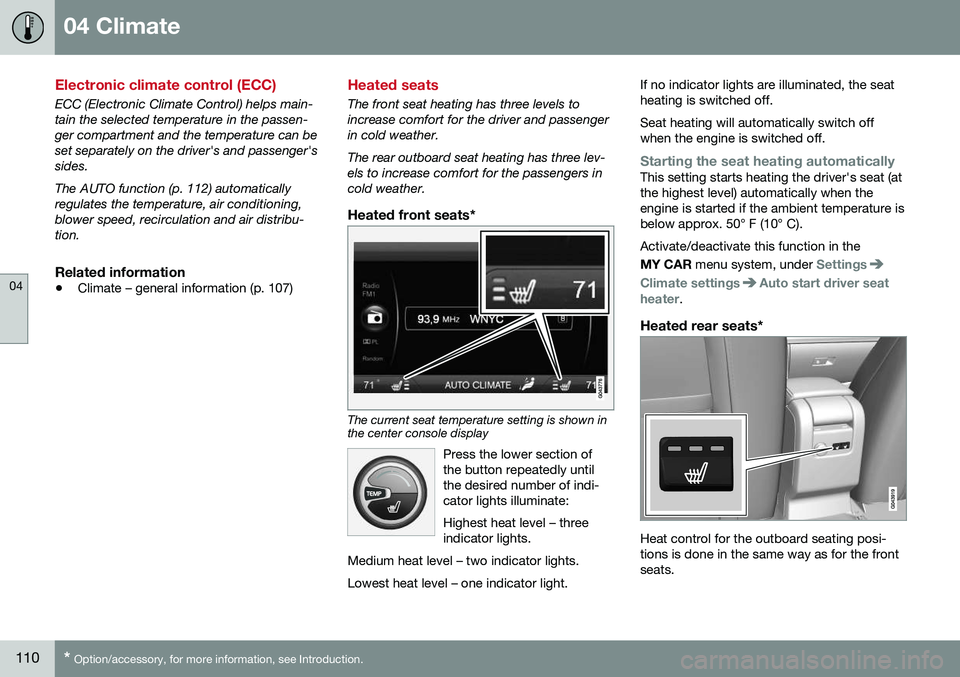
Heated front seats*
The current seat temperature setting is shown in the center console display
Press the lower section of the button repeatedly untilthe desired number of indi-cator lights illuminate: Highest heat level – three indicator lights.
Medium heat level – two indicator lights. Lowest heat level – one indicator light.
If no indicator lights are illuminated, the seat heating is switched off. Seat heating will automatically switch off when the engine is switched off.
Starting the seat heating automaticallyThis setting starts heating the driver's seat (at the highest level) automatically when theengine is started if the ambient temperature isbelow approx. 50° F (10° C). Activate/deactivate this function in the MY CAR menu system, under
Settings
Climate settingsAuto start driver seat
heater.
Heated rear seats*
Heat control for the outboard seating posi- tions is done in the same way as for the frontseats.
Page 129 of 344
06 Locks and alarm
06
* Option/accessory, for more information, see Introduction.127
interference that may cause undesired opera- tion. Canada–IC: 3659A-WFS125VOOperation is subject to the following condi- tions: (1) this device may not cause interfer-ence, and (2) this device must accept anyinterference, including interference that maycause undesired operation of the device. For information on starting the vehicle, see Starting the engine (p. 211).
Remote key – functions
The remote key is used e.g., to unlock the doors and start the engine.
Buttons on the remote
Unlock – Press the Unlock button on the
remote once to unlock the driver's door. This function can be changed so that all doors unlock at the same time by pressing My Car and going to
SettingsCar
settings
Lock settingsChange doors
unlock setting. For a description of the menu
system, see My Car – introduction (p. 66).
Approach lighting – As you approach
the vehicle, press the button on the remote key to light the interior lighting, parking lights,license plate lighting and the lights in the doormirrors*. These lights will switch off automatically after 30, 60 or 90 seconds. For a description of themenu system, see My Car – introduction(p. 66).
Panic alarm – This button can be used
to attract attention during emergency situa- tions. To activate the panic alarm, press and hold this button for at least 3 seconds or press ittwice within 3 seconds. The turn signals andhorn will be activated. The panic alarm will stop automatically after 2 minutes and45 seconds. To deactivate, wait approximately 5 seconds and press the button again. The Panic alarm button will not unlock the vehicle.
Related information
•
Locking/unlocking – from inside (p. 135)
• Locking/unlocking – from the outside (p. 134)
• Locking/unlocking confirmation (p. 125)
Page 161 of 344
07 Driver support
07
}}
159
Radar sensor
The radar sensor is designed to help detect cars or larger vehicles driving in the samedirection as your vehicle, in the same lane.
The radar sensor and its limitationsIn addition to being used by the AdaptiveCruise Control (ACC), the radar sensor is alsoused by Distance Alert (see Distance Alert –introduction (p. 164)) and Collision Warningwith Full Auto-brake and Pedestrian Detec-tion (see Collision warning – introduction(p. 175)).
WARNING
•If there is visible damage to the front grille or you suspect that the radarsensor may be damaged in any way,contact a trained and qualified Volvoservice technician as soon as possible.The radar sensor may only functionpartially (or not at all) if it is damagedor is not securely fastened in place.
• Accessories or other objects, such asextra headlights, must not be installedin front of the grille.
• Modification of the radar sensor couldmake its use illegal.
The radar sensor's capacity to detect vehi- cles ahead is impeded:
• if the radar sensor is obstructed and can- not detect other vehicles, for example in heavy rain, or if snow or other objects areobscuring the radar sensor.
NOTE
Keep the area in front of the radar sensor clean.
•
if the speed of vehicles ahead is signifi- cantly different from your own speed.
Related information
•Adaptive Cruise Control – introduction(p. 150)
• Collision warning – introduction (p. 175)
• Distance Alert – introduction (p. 164)
Adaptive Cruise Control – limitations
The ACC cannot cover all driving situations and traffic, weather and road conditions.
Situations where ACC may not function optimally
WARNING
• The radar sensor has a limited field of vision. In some situations it may detecta vehicle later than expected or notdetect other vehicles at all.
• If ACC is not functioning properly,cruise control will also be disabled.
Page 171 of 344
07 Driver support
07
169
•
City Safety – troubleshooting (p. 171)
• City Safety – symbols and messages (p. 173)
• City Safety – Laser sensor (p. 174)
City Safety – function
FunctionCity Safety™ monitors traffic ahead of you using a laser sensor mounted in the uppersection of the windshield. If a collision isimminent, City Safety™ will automaticallyapply the brakes, which may feel like hardbraking. If the difference in speed between your vehi- cle and the vehicle ahead is more thanapproximately 9 mph (15 km/h), City Safety™alone cannot prevent a collision from takingplace. The driver must apply the brakes tohelp avoid a collision or reduce its effect. When the function activates and applies the brakes, a message will appear in the informa-tion display to indicate that the system is/hasbeen active.
NOTE
•When City Safety™ applies the brakes, the brake lights will illuminate.
• In cases where City Safety™ has stop-ped the vehicle, the system will thenrelease the brakes. The driver mustapply the brakes to keep the vehicle ata standstill.
Related information
•
City Safety – introduction (p. 168)
• City Safety – operation (p. 170) •
City Safety – limitations (p. 170)
• City Safety – troubleshooting (p. 171)
• City Safety – symbols and messages (p. 173)
• City Safety – Laser sensor (p. 174)
Page 172 of 344
07 Driver support
07
170
City Safety – operation
Using City Safety™
NOTE
The City Safety™ function is activated automatically each time the engine hasbeen switched off and restarted.
On and OffIn certain situations, it may be desirable to switch City Safety™ off, such as when drivingin close quarters where leaves, branches, etc.may obscure the hood and windshield. When the engine is running, City Safety™ can be switched off as follows: Press My Car in the center console control
panel and go to
SettingsCar settings
Driver support systemsCity Safety.
Select
Off.
If the engine is switched off, City Safety™ will reactivate when the engine is restarted.
WARNING
The laser sensor emits light when the igni- tion is in mode II or higher, even if City
Safety™ has been switched off.
To switch City Safety™ on again:
• Follow the same procedure as for switch- ing City Safety™ off but select
On.
Related information
•City Safety – introduction (p. 168)
• City Safety – function (p. 169)
• City Safety – limitations (p. 170)
• City Safety – troubleshooting (p. 171)
• City Safety – symbols and messages (p. 173)
• City Safety – Laser sensor (p. 174)
• My Car – introduction (p. 66)
City Safety – limitations
Limitations
WARNING
The laser sensor has certain limitations and its function may be reduced (or it maynot function at all) in conditions such asheavy rain or snowfall, or by dense fog orthick, blowing dust or snow. Condensa-tion, dirt, ice or snow on the windshieldmay also interfere with the sensor’s func-tion.
The sensor used by City Safety™ is designed to detect cars and other larger motor vehiclesahead of your vehicle in both daylight anddarkness. Objects such as warning flags hanging from long objects on the roof or accessories suchas auxiliary lights or protective arches on thefront of the vehicle that are higher than thehood may also impede the sensor’s function. Braking distance to the vehicle ahead increa- ses on slippery road surfaces, which mayreduce City Safety’s capacity to avoid a colli-sion. In situations like this, the stability sys-tem (see Stability system – introduction(p. 141)) will help provide the best possiblebraking capacity and stability. City Safety™ emits a laser beam and meas- ures the way in which the light is reflected.
Page 201 of 344
07 Driver support
07
199
Audible signalThe Park Assist system uses an intermittent tone that pulses faster as you come close toan object, and becomes constant when youare within approximately 1 ft (30 cm) of anobject in front of or behind the vehicle. Ifthere are objects within this distance bothbehind and in front of the vehicle, the tonealternates between front and rear speakers.
NOTE
The level of the audible signal can be low- ered/raised with the infotainment volumecontrol. The level can also be set in the MYCAR menu system. See My Car – introduc-tion (p. 66) for a description of the menusystem.
If the volume of another source from the audio system is high, this will be automati-cally lowered.
Rear park assistThe distance monitored behind the vehicle is approximately 5 ft (1.5 m). The audible signalcomes from the rear speakers. The system must be deactivated when towing a trailer, carrying bicycles in a rear-mountedcarrier, etc, which could trigger the rear parkassist system's sensors.
NOTE
•Rear park assist is deactivated auto- matically when towing a trailer if Volvogenuine trailer wiring is used. If a non-Volvo trailer hitch is being used, it maybe necessary to switch off the systemmanually, see Park assist – operation(p. 200).
• The system will not detect highobjects, such as a loading dock, etc.
• Objects such as chains, thin shinypoles or low objects may temporarilynot be detected by the system. Thismay result in the pulsing tone unex-pectedly stopping instead of changingto a constant tone as the vehicleapproaches the object. In such cases,use caution when backing up or stopthe vehicle to help avoid damage.
Front park assistThe distance monitored in front of the vehicle is approximately 2.5 ft (0.8 m). The audiblesignal comes from the audio system's frontspeakers. It may not be possible to combine auxiliary headlights and front park assist since theselights could trigger the system's sensors.
NOTE
Front park assist is deactivated when the parking brake is applied and or when thegear selector is in the
P position.
Related information
• Park assist – introduction (p. 198)
• Park assist – limitations (p. 200)
• Park assist – operation (p. 200)
• Park assist – troubleshooting (p. 201)
• Rear Park Assist Camera (PAC) – function (p. 202)
Page 206 of 344
07 Driver support
07
204* Option/accessory, for more information, see Introduction.
Rear Park Assist Camera (PAC) – limitations
LimitationsEven if a fairly small section of the screen image appears to be obstructed, this maymean that a relatively large area behind thevehicle is hidden and objects there may notbe detected until they are very near the vehi-cle.
NOTE
Keep in mind
• Keep the camera's lens free of dirt, ice and snow. Remove ice and snow care-fully to avoid scratching the lens.
• Clean the lens regularly with warm waterand a suitable car washing detergent.
Related information
•Rear Park Assist Camera (PAC) – intro-duction (p. 201)
• Rear Park Assist Camera (PAC) – opera-tion (p. 202)
• Park assist – introduction (p. 198)
BLIS* – introduction
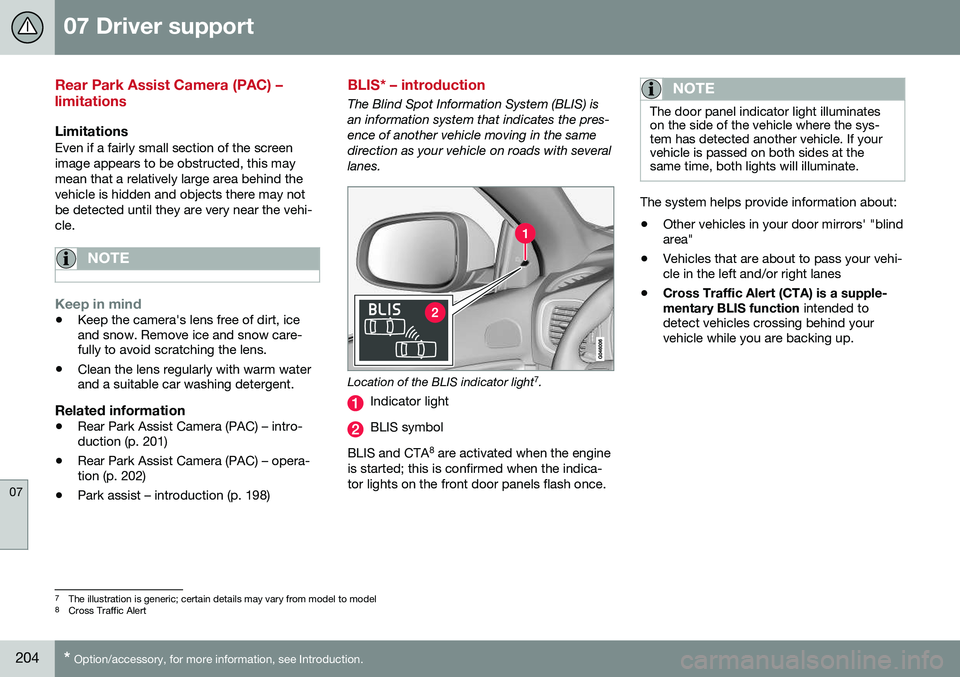
The Blind Spot Information System (BLIS) is an information system that indicates the pres-ence of another vehicle moving in the samedirection as your vehicle on roads with severallanes.
Location of the BLIS indicator light 7
.
Indicator light
BLIS symbol
BLIS and CTA 8
are activated when the engine
is started; this is confirmed when the indica- tor lights on the front door panels flash once.
NOTE
The door panel indicator light illuminates on the side of the vehicle where the sys-tem has detected another vehicle. If yourvehicle is passed on both sides at thesame time, both lights will illuminate.
The system helps provide information about:
• Other vehicles in your door mirrors' "blind area"
• Vehicles that are about to pass your vehi-cle in the left and/or right lanes
• Cross Traffic Alert (CTA) is a supple- mentary BLIS function
intended to
detect vehicles crossing behind your vehicle while you are backing up.
7 The illustration is generic; certain details may vary from model to model
8 Cross Traffic Alert
Page 208 of 344
07 Driver support
07
206* Option/accessory, for more information, see Introduction.
BLIS* – operation
Activating/deactivating BLIS
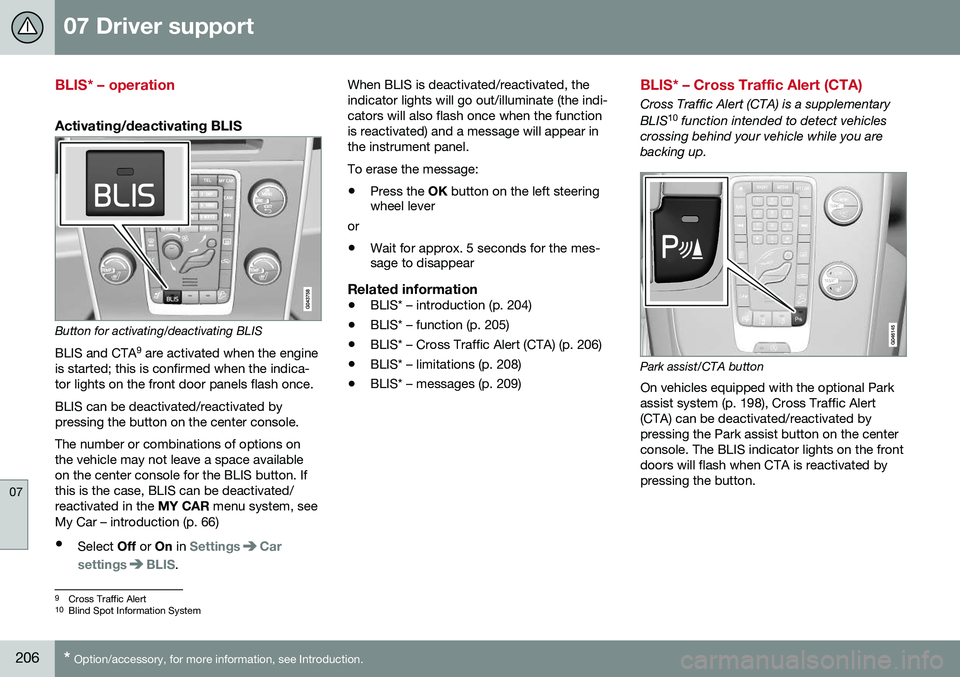
Button for activating/deactivating BLIS BLIS and CTA 9
are activated when the engine
is started; this is confirmed when the indica- tor lights on the front door panels flash once. BLIS can be deactivated/reactivated by pressing the button on the center console. The number or combinations of options on the vehicle may not leave a space availableon the center console for the BLIS button. Ifthis is the case, BLIS can be deactivated/reactivated in the MY CAR menu system, see
My Car – introduction (p. 66)
• Select Off or On in
SettingsCar
settings
BLIS. When BLIS is deactivated/reactivated, the indicator lights will go out/illuminate (the indi-cators will also flash once when the functionis reactivated) and a message will appear inthe instrument panel. To erase the message: •
Press the
OK button on the left steering
wheel lever
or
• Wait for approx. 5 seconds for the mes- sage to disappear
Related information
•BLIS* – introduction (p. 204)
• BLIS* – function (p. 205)
• BLIS* – Cross Traffic Alert (CTA) (p. 206)
• BLIS* – limitations (p. 208)
• BLIS* – messages (p. 209)
BLIS* – Cross Traffic Alert (CTA)
Cross Traffic Alert (CTA) is a supplementary BLIS 10
function intended to detect vehicles
crossing behind your vehicle while you are backing up.
Park assist/CTA button On vehicles equipped with the optional Park assist system (p. 198), Cross Traffic Alert(CTA) can be deactivated/reactivated bypressing the Park assist button on the centerconsole. The BLIS indicator lights on the frontdoors will flash when CTA is reactivated bypressing the button.
9 Cross Traffic Alert
10 Blind Spot Information System
Page 209 of 344
07 Driver support
07
}}
207
WARNING
•BLIS and CTA are information sys- tems, NOT warning or safety systemsand do not function in all situations.
• BLIS and CTA do not eliminate theneed for you to visually confirm theconditions around you, and the needfor you to turn your head and should-ers to make sure that you can safelychange lanes or back up.
• As the driver, you have full responsibil-ity for changing lanes/backing up in asafe manner.
When does CTA function
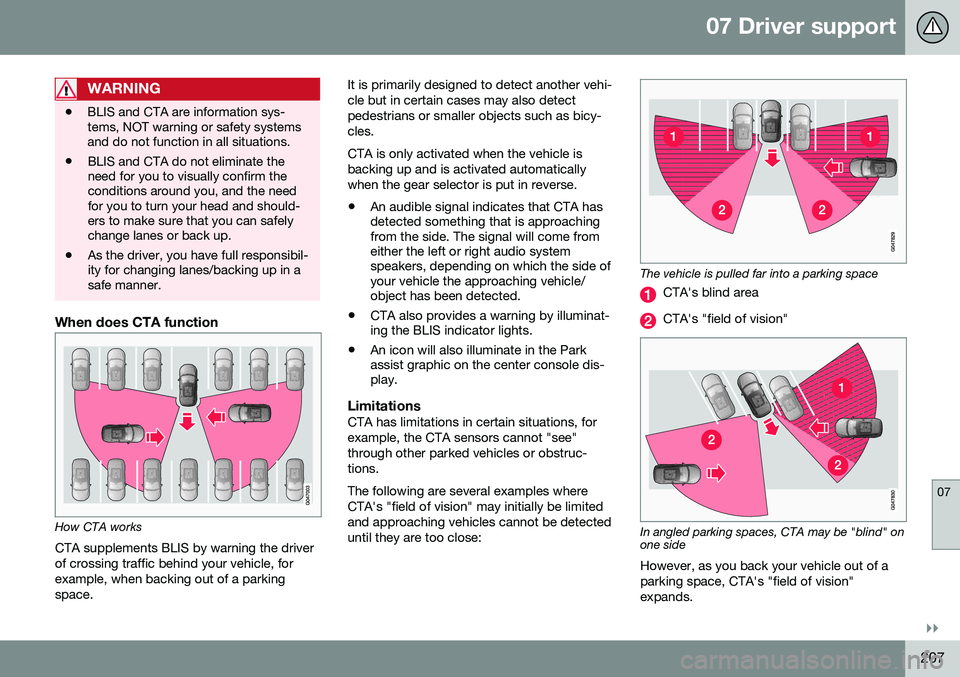
How CTA works
CTA supplements BLIS by warning the driver of crossing traffic behind your vehicle, forexample, when backing out of a parkingspace. It is primarily designed to detect another vehi-cle but in certain cases may also detectpedestrians or smaller objects such as bicy-cles. CTA is only activated when the vehicle is backing up and is activated automaticallywhen the gear selector is put in reverse.
• An audible signal indicates that CTA has detected something that is approachingfrom the side. The signal will come fromeither the left or right audio systemspeakers, depending on which the side ofyour vehicle the approaching vehicle/object has been detected.
• CTA also provides a warning by illuminat-ing the BLIS indicator lights.
• An icon will also illuminate in the Parkassist graphic on the center console dis-play.
LimitationsCTA has limitations in certain situations, for example, the CTA sensors cannot "see"through other parked vehicles or obstruc-tions. The following are several examples where CTA's "field of vision" may initially be limitedand approaching vehicles cannot be detecteduntil they are too close:
The vehicle is pulled far into a parking space
CTA's blind area
CTA's "field of vision"
In angled parking spaces, CTA may be "blind" on one side
However, as you back your vehicle out of a parking space, CTA's "field of vision"expands.