warning light VOLVO S60 INSCRIPTION 2016 Owner´s Manual
[x] Cancel search | Manufacturer: VOLVO, Model Year: 2016, Model line: S60 INSCRIPTION, Model: VOLVO S60 INSCRIPTION 2016Pages: 344, PDF Size: 7.24 MB
Page 268 of 344
09 Wheels and tires
09
266
exists. When the malfunction indicator is illu- minated, the system may not be able todetect or signal low tire pressure as intended. System malfunctions may occur for a variety of reasons, including the installation ofreplacement or alternate tires or wheels onthe vehicle that prevent the tire pressuremonitoring system from functioning properly. Always check the system's malfunction tell- tale after replacing one or more tires orwheels on your vehicle to ensure that thereplacement or alternate tires and wheelsallow the system to continue to functionproperly.
NOTE
The system indicates low tire pressure but does not replace normal tire maintenance.For information on correct tire pressure,please refer to the tire inflation pressuretable (see Tire inflation – pressure table(p. 260)), the tire inflation pressure placardlocated on the driver's side B-pillar (thestructural member at the side of the vehi-cle, at the rear of the driver's door open-ing) or consult your Volvo retailer.
WARNING
Incorrect inflation pressure could lead to tire failure, resulting in a loss of control ofthe vehicle.
Tire Pressure Monitoring System (TPMS) – general information
TPMS uses sensors mounted in the tire valves to check inflation pressure levels. When thevehicle is moving at a speed of approximately20 mph (30 km/h) or faster, these sensorstransmit inflation pressure data to a receiverlocated in the vehicle.
NOTE
USA – FCC ID: KR5S180052050 This device complies with part 15 of the FCC rules. Operation is subject to the fol-lowing conditions: (1) This device may notcause harmful interference, and (2) thisdevice must accept any interferencereceived, including interference that maycause undesired operation.
When low inflation pressure is detected or if a sensor is not functioning properly, TPMS will light up the tire pressure warning light (
)
(also referred to as a telltale) in the instrument panel and will display one of the following messages:
Tire pressure low, Tire needs
air now or Tire press. syst Service
required.
NOTE
If a malfunction occurs in the system, the tire pressure warning light will flash forapproximately 1 minute and then remain illuminated.
Tire press. syst Service
required will be displayed.
Related information
• Tire Pressure Monitoring System (TPMS) – recalibrating (p. 268)
• Tire Pressure Monitoring System (TPMS)– messages (p. 269)
• Tire Pressure Monitoring System (TPMS)– activating/deactivating (p. 268)
• Tire Pressure Monitoring System (TPMS)– changing wheels (p. 267)
Page 271 of 344
09 Wheels and tires
09
269
Tire Pressure Monitoring System (TPMS) – messages
Erasing warning messagesWhen a low tire pressure warning message has been displayed and the tire pressure warning light in the instrument panell (
)
has come on:
1. Use a tire pressure gauge to check the inflation pressure of all four tires.
2. Re-inflate the tire(s) to the correct pres- sure (consult the tire pressure placard located on the driver's side B-pillar (thestructural member at the side of the vehi-cle, at the rear of the driver's door open-ing) or the inflation pressure table, seeTire inflation – pressure table (p. 260).
3. In certain cases, it may be necessary to drive the vehicle for several minutes at aspeed of 20 mph (30 km/h) or faster. Thiswill erase the warning text and the telltalewill go out.
NOTE
•Tire monitoring systems use a tem- perature compensated pressure value.This pressure value is dependent ontire temperature and ambient tempera-ture, which can differ from the recom-mended cold tire pressure in the tireinflation table and on the tire pressureplacard located on the driver's side B-pillar (the structural member at theside of the vehicle, at the rear of thedriver's door opening). This meansthat it may sometimes be necessary toinflate them slightly above the recom-mended cold pressure value(approx. 3-4 psi or 0.2-0.3 bar) in orderto reset a low tire pressure warning.
• To help avoid incorrect tire inflationpressure, if possible only inflate thetires when they are cold. The tires areconsidered to be cold when they havethe same temperature as the sur-rounding (ambient) air. This tempera-ture is normally reached after the vehi-cle has been parked for at least3 hours. After driving a distance ofapproximately 1 mile (1.6 km), the tiresare considered to be hot.
CAUTION
•
After inflating the tires, always reinstall the valve cap to help avoid damage tothe valve from dirt, gravel, etc.
• Use plastic valve caps only. Metalcaps could corrode and become diffi-cult to remove.
WARNING
•Incorrect inflation pressure could lead to tire failure, resulting in a loss of con-trol of the vehicle.
• Tire monitoring systems cannot indi-cate sudden tire damage caused byexternal factors (e.g., a blowout) inadvance.
Related information
•
Tire Pressure Monitoring System (TPMS) – general information (p. 266)
• Tire Pressure Monitoring System (TPMS)– recalibrating (p. 268)
• Tire Pressure Monitoring System (TPMS)– activating/deactivating (p. 268)
• Tire Pressure Monitoring System (TPMS)– changing wheels (p. 267)
• Tire pressure monitoring - introduction(p. 265)
• Tire inflation – pressure table (p. 260)
Page 272 of 344
09 Wheels and tires
09
270
Tire Monitor - introduction
Tire Monitor uses the rotational speed of the tires in combination with signal analysis of theABS sensor signals to determine if they areproperly inflated. When a tire is under-inflated, its diameter (and consequently also its rotational speed)changes. By comparing the individual tireswith each other it is possible to determine ifone or more tires are under inflated. When low inflation pressure is detected or if the system is not functioning properly, TireMonitor will light up the tire pressure warning light (
) (also referred to as a telltale) in
the instrument panel and will display one of the following messages in the text window, for example:
Tire pressure low Check rear
right tire4 or Tire press. syst Service
required.
If two or more tires have low pressure or if the system cannot determine which tire has low pressure, a general text (
Tire pressure low
Check tires) will be displayed.
NOTE
If a malfunction occurs in the system, the tire pressure warning light will flash forapproximately 1 minute and then remain illuminated.
Tire press. syst Service
required will be displayed.
NOTE
The system indicates low tire pressure but does not replace normal tire maintenance.For information on correct tire pressure,please refer to the tire inflation pressuretable (see Tire inflation – pressure table(p. 260)), the tire inflation pressure placardlocated on the driver's side B-pillar (thestructural member at the side of the vehi-cle, at the rear of the driver's door open-ing) or consult your Volvo retailer.
Related information
• Tire pressure monitoring - introduction (p. 265)
Calibrating Tire Monitor
In order for Tire Monitor to work correctly, tire pressure reference values must be set. Thismust be done each time wheels or tire pres-sures are changed.
Calibration1. Switch off the engine.
2. Inflate the tires to the desired pressure
(consult tire pressure placard located on the driver's side B-pillar (the structuralmember at the side of the vehicle) andput the ignition in mode II, see Ignition
modes (p. 69).
3. Press the MY CAR button on the center
console control panel and select
Settings
Car settingsTire monitoring.
4. Press OK/MENU , select
Calibrate tire
pressure and press OK/MENU again.
5. Drive away. > The calibration process will be comple-ted while driving and will be interrupted if the vehicle is parked and the engineis switched off. Calibration continuesautomatically when driving resumes.The system will not give any confirma-tion when calibration is finishedalthough it will state if calibration fails.
4That last part of this message varies, depending on the tire(s) effected.
Page 287 of 344
10 Maintenance and servicing
10
}}
285
where any retailer can access or search for this information using your vehicle's VIN num-ber. This number can be found in your war-ranty booklet or on the dashboard at thelower left corner of the windshield.
–Select Maintenance & repairSend
vehicle data.
Booking information and vehicle dataWhen you opt to book service from your vehi- cle, booking information and vehicle data willbe transmitted. Vehicle data consists of anumber of parameters in the following areas:
• Service requirements
• Function status
• Fluid levels
• Odometer reading (mileage)
• Vehicle Identification Number (VIN)
• The vehicle's software version
Related information
•Volvo ID (p. 21)
Maintenance – opening/closing hood
The hood is opened by first releasing the lock from the passenger compartment and thenpressing the release control.
Opening and closing the hood
Lift the hood slightly. Press the release control (located under the right front edgeof the hood) to the left, and lift the hood.
WARNING
Check that the hood locks properly when closed.
Related information
•Maintenance – owner maintenance (p. 282)
• Engine compartment – overview (p. 285)
Engine compartment – overview
The overview shows the main inspection points in the engine compartment. The appearance of the engine compartment may vary depending on engine model.
WARNING
The cooling fan (located at the front of the engine compartment, behind the radiator)may start or continue to operate (for up to6 minutes) after the engine has beenswitched off.
Page 292 of 344
10 Maintenance and servicing
10
290* Option/accessory, for more information, see Introduction.
Bulbs – introduction
Certain bulbs can be replaced by the vehicle's owner. However, the bulbs on the followinglist should only be replaced by a trained andqualified Volvo service technician.
NOTE
• For information regarding any bulbs not mentioned in this section, pleasecontact your Volvo retailer or a trainedand authorized Volvo service techni-cian.
• Always switch off the ignition beforestarting to replace a bulb.
• If an error message remains in the dis-play after a faulty bulb has beenreplaced, contact an authorized Volvoworkshop.
• Condensation may form temporarily onthe inside of the lenses of exteriorlights such as headlights, fog lights, ortaillights. This is normal and the lightsare designed to withstand moisture.Normally, condensation will dissipateafter the lights have been on for ashort time.
• The optional Active Bending Lightbulbs contain trace amounts of mer-cury. These bulbs should always bedisposed of by a trained and qualifiedVolvo service technician.
CAUTION
Never touch the glass of bulbs with your fingers. Grease and oils from your fingersvaporize in the heat and will leave adeposit on the reflector, which will damageit.
WARNING
•
The engine should not be running when changing bulbs.
• If the engine has been running justprior to replacing bulbs in the head-light housing, please keep in mind thatcomponents in the engine compart-ment will be hot.
WARNING
•
Active Bending Lights* – due to the high voltage used by these headlights,these bulbs should only be replacedby a trained and qualified Volvo serv-ice technician.
• Turn off the lights and remove theremote key from the ignition beforechanging any bulbs.
Related information
•
Bulbs – headlight housing (p. 290)
• Bulbs – vanity mirror lighting (p. 293)
• Bulbs – license plate lighting (p. 292)
Bulbs – headlight housing
The entire headlight housing must be lifted out when replacing all front bulbs.
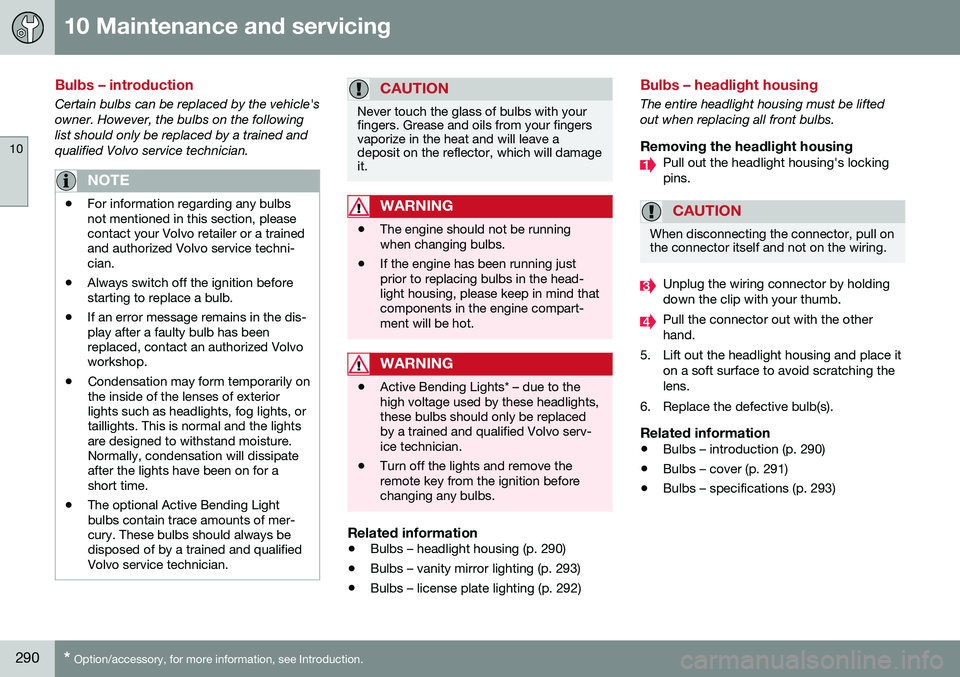
Removing the headlight housingPull out the headlight housing's locking pins.
CAUTION
When disconnecting the connector, pull on the connector itself and not on the wiring.
Unplug the wiring connector by holding down the clip with your thumb.
Pull the connector out with the other hand.
5. Lift out the headlight housing and place it on a soft surface to avoid scratching thelens.
6. Replace the defective bulb(s).
Related information
• Bulbs – introduction (p. 290)
• Bulbs – cover (p. 291)
• Bulbs – specifications (p. 293)
Page 297 of 344
10 Maintenance and servicing
10
}}
295
against the windshield and press the
START/
STOP ENGINE button briefly to put the igni-
tion in mode I (or start the engine).
CleaningKeeping the windshield and wiper blades clean helps improve visibility and prolongsthe service life of the wiper blades. Clean thewiper blades with a stiff-bristle brush andlukewarm soap solution or car washing deter-gent.
Related information
• Engine compartment – washer fluid (p. 295)
• Wiper blades – service position (p. 293)
Engine compartment – washer fluid
Washer fluid helps keep the windshield and headlights clean. During cold weather, thereservoir should be filled with windshieldwasher solvent containing antifreeze. UseVolvo Original Washer Fluid or the equivalentwith a recommended pH value between 6 and8. The windshield and headlight washers share a common reservoir. The washer fluid reservoir is located on the driver's side of the engine compartment. Forcapacities, see the printed Owner's Manual. Specification:
Use a washer antifreeze rec-
ommended by Volvo, mixed with water. Volume: • 6.8 US qts (6.5 liters)
• 4.7 US qts (4.5 liters 4
)
Related information
• Wiper blades – service position (p. 293)
Battery – symbols
There are information and warning symbols on the battery.
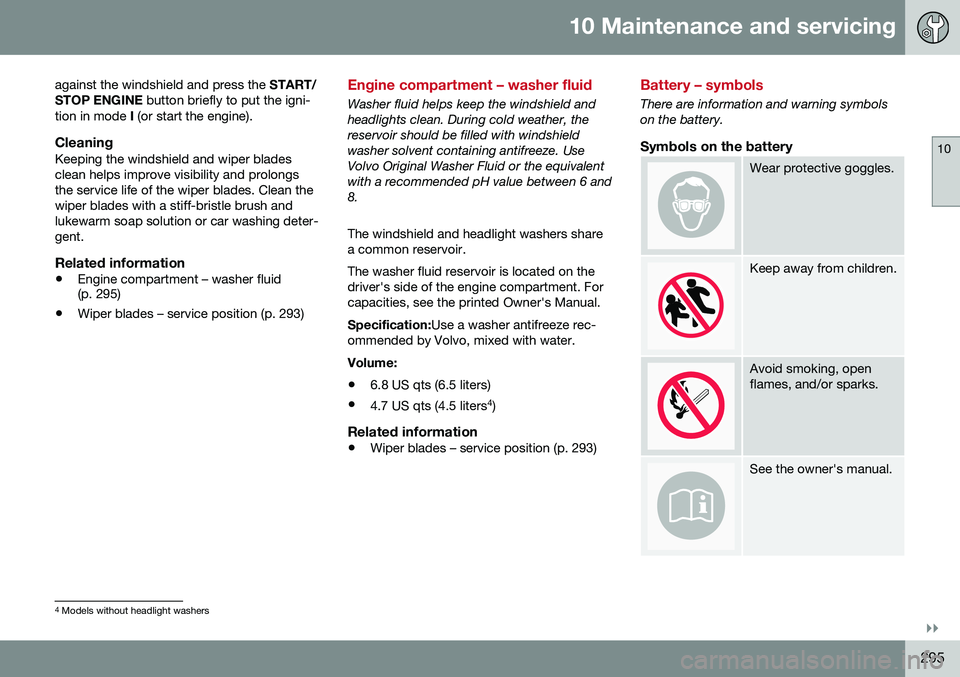
Symbols on the battery
Wear protective goggles.
Keep away from children.
Avoid smoking, open flames, and/or sparks.
See the owner's manual.
4
Models without headlight washers
Page 305 of 344
10 Maintenance and servicing
10
}}
* Option/accessory, for more information, see Introduction.303
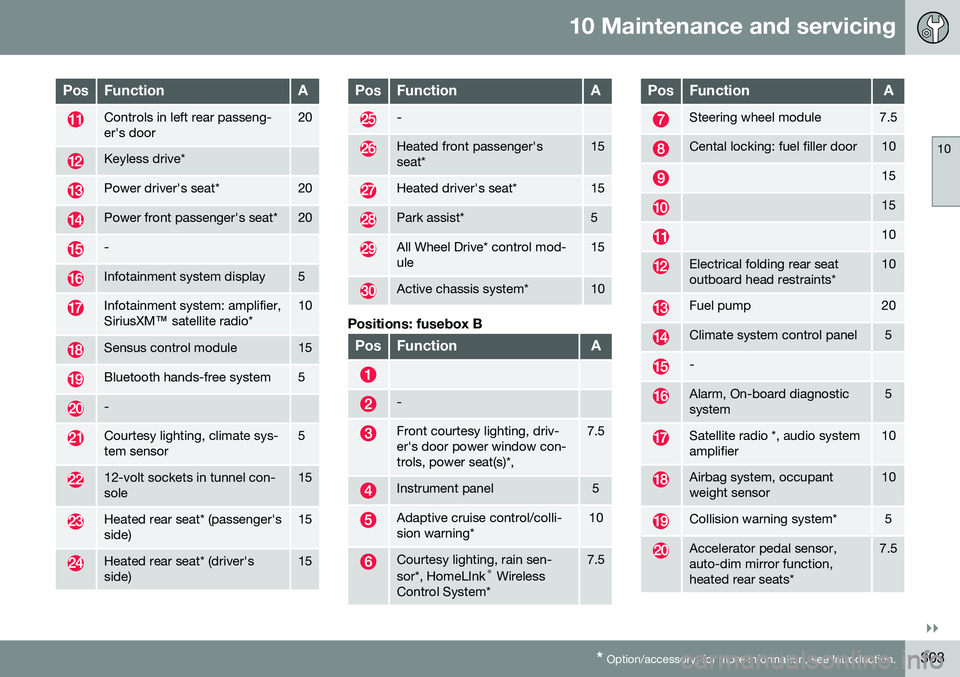
PosFunctionA
Controls in left rear passeng- er's door20
Keyless drive*
Power driver's seat*20
Power front passenger's seat*20
-
Infotainment system display5
Infotainment system: amplifier, SiriusXM ™ satellite radio*10
Sensus control module15
Bluetooth hands-free system5
-
Courtesy lighting, climate sys- tem sensor5
12-volt sockets in tunnel con- sole15
Heated rear seat* (passenger's side)15
Heated rear seat* (driver's side)15
PosFunctionA
-
Heated front passenger's seat*15
Heated driver's seat*15
Park assist*5
All Wheel Drive* control mod- ule15
Active chassis system*10
Positions: fusebox B
PosFunctionA
-
Front courtesy lighting, driv- er's door power window con-trols, power seat(s)*,7.5
Instrument panel5
Adaptive cruise control/colli- sion warning*10
Courtesy lighting, rain sen- sor*, HomeLInk ®
Wireless
Control System*7.5
PosFunctionA
Steering wheel module7.5
Cental locking: fuel filler door10
15
15
10
Electrical folding rear seat outboard head restraints*10
Fuel pump20
Climate system control panel5
-
Alarm, On-board diagnostic system5
Satellite radio *, audio system amplifier10
Airbag system, occupant weight sensor10
Collision warning system*5
Accelerator pedal sensor, auto-dim mirror function,heated rear seats*7.5
Page 311 of 344
10 Maintenance and servicing
10
}}
309
Automatic car wash
The vehicle should be washed at regular inter- vals since dirt, dust, insects and tar spotsadhere to the paint and may cause damage.To help prevent corrosion, it is particularlyimportant to wash the car frequently in thewintertime.• We do NOT recommend washing your car in an automatic wash during the firstfew months (because the paint will nothave hardened sufficiently).
• An automatic wash is a simple and quickway to clean your car, but it is worthremembering that it may not be as thor-ough as when you yourself go over thecar with sponge and water. Keeping theunderbody clean is most important, espe-cially in the winter. Some automaticwashers do not have facilities for washingthe underbody.
NOTE
Condensation may form temporarily on the inside of the lenses of exterior lights suchas headlights, fog lights, or taillights. Thisis normal and the lights are designed towithstand moisture. Normally, condensa-tion will dissipate after the lights have beenon for a short time.
CAUTION
• Before driving into an automatic car wash, turn off the optional rain sensorto avoid damaging the windshield wip-ers.
• Make sure that side view mirrors, aux-iliary lamps, etc, are secure, and thatany antenna(s) are retracted orremoved. Otherwise there is risk of themachine dislodging them.
• Chromed wheels:
Clean chrome-
plated wheels using the same deter-gents used for the body of the vehicle.Aggressive wheel-cleaning agents canpermanently stain chrome-platedwheels.
WARNING
• When the vehicle is driven immediately after being washed, apply the brakes,including the parking brake, severaltimes in order to remove any moisturefrom the brake linings.
• Engine cleaning agents should not beused when the engine is warm. Thisconstitutes a fire risk.
Related information
•
Polishing and waxing (p. 309)
• Cleaning the interior (p. 310)
• Washing the car (p. 308)
Polishing and waxing
Normally, polishing is not required during the first year after delivery, however, waxing maybe beneficial.
• Before applying polish or wax the vehicle must be washed and dried. Tar spots canbe removed with kerosene or tar remover.Difficult spots may require a fine rubbingcompound.
• After polishing use liquid or paste wax.
• Several commercially available productscontain both polish and wax.
• Waxing alone does not substitute for pol-ishing a dull surface.
• A wide range of polymer-based waxescan be purchased today. These waxesare easy to use and produce a long-last-ing, high-gloss finish that protects thebodywork against oxidation, road dirt andfading.
• Do not polish or wax your vehicle in directsunlight (the surface of the vehicle shouldnot be warmer than 113 °F (45 °C).
Page 329 of 344
11 Specifications
11
}}
327
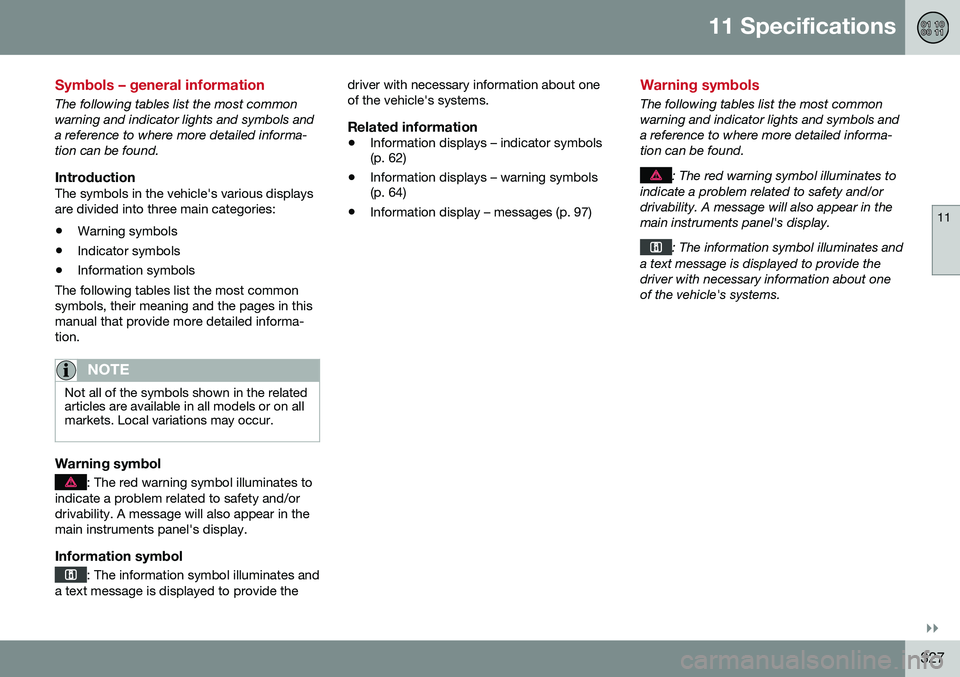
Symbols – general information
The following tables list the most common warning and indicator lights and symbols anda reference to where more detailed informa-tion can be found.
IntroductionThe symbols in the vehicle's various displaysare divided into three main categories:• Warning symbols
• Indicator symbols
• Information symbols
The following tables list the most commonsymbols, their meaning and the pages in thismanual that provide more detailed informa-tion.
NOTE
Not all of the symbols shown in the related articles are available in all models or on allmarkets. Local variations may occur.
Warning symbol
: The red warning symbol illuminates to
indicate a problem related to safety and/or drivability. A message will also appear in themain instruments panel's display.
Information symbol
: The information symbol illuminates and
a text message is displayed to provide the driver with necessary information about one of the vehicle's systems.
Related information
•
Information displays – indicator symbols (p. 62)
• Information displays – warning symbols(p. 64)
• Information display – messages (p. 97)
Warning symbols
The following tables list the most common warning and indicator lights and symbols anda reference to where more detailed informa-tion can be found.
: The red warning symbol illuminates to
indicate a problem related to safety and/or drivability. A message will also appear in themain instruments panel's display.
: The information symbol illuminates and
a text message is displayed to provide the driver with necessary information about oneof the vehicle's systems.
Page 330 of 344
||
11 Specifications
11
328* Option/accessory, for more information, see Introduction.
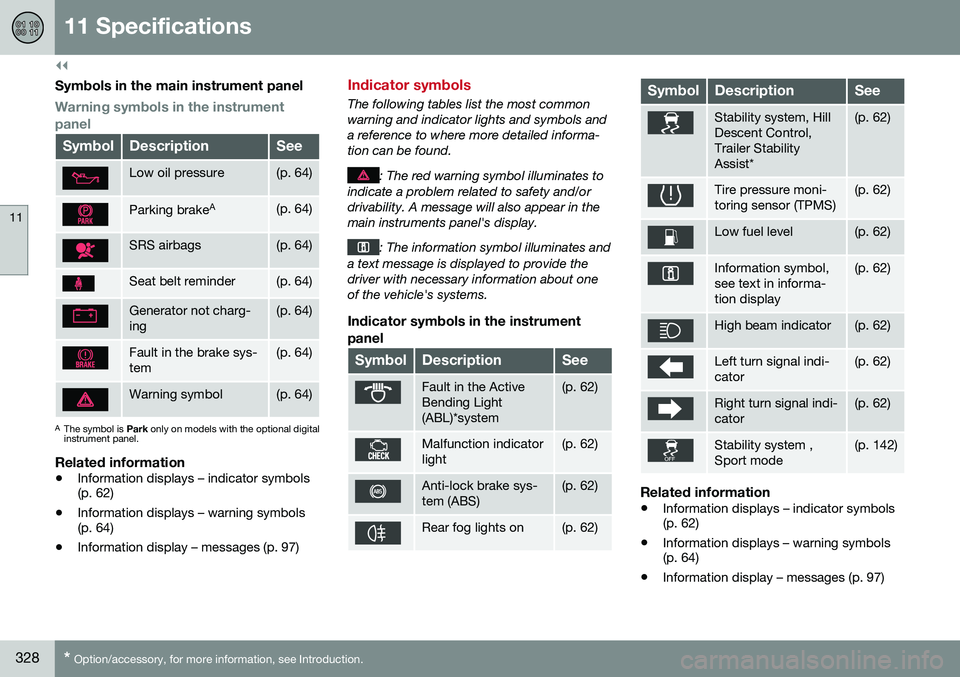
Symbols in the main instrument panel
Warning symbols in the instrument panel
SymbolDescriptionSee
Low oil pressure(p. 64)
Parking brake A(p. 64)
SRS airbags(p. 64)
Seat belt reminder(p. 64)
Generator not charg- ing(p. 64)
Fault in the brake sys- tem(p. 64)
Warning symbol(p. 64)
A
The symbol is Park only on models with the optional digital
instrument panel.
Related information
• Information displays – indicator symbols (p. 62)
• Information displays – warning symbols(p. 64)
• Information display – messages (p. 97)
Indicator symbols
The following tables list the most common warning and indicator lights and symbols anda reference to where more detailed informa-tion can be found.
: The red warning symbol illuminates to
indicate a problem related to safety and/or drivability. A message will also appear in themain instruments panel's display.
: The information symbol illuminates and
a text message is displayed to provide the driver with necessary information about oneof the vehicle's systems.
Indicator symbols in the instrument
panel
SymbolDescriptionSee
Fault in the Active Bending Light(ABL)*system(p. 62)
Malfunction indicator light(p. 62)
Anti-lock brake sys- tem (ABS)(p. 62)
Rear fog lights on(p. 62)
SymbolDescriptionSee
Stability system, Hill Descent Control,Trailer StabilityAssist*(p. 62)
Tire pressure moni- toring sensor (TPMS)(p. 62)
Low fuel level(p. 62)
Information symbol, see text in informa-tion display(p. 62)
High beam indicator(p. 62)
Left turn signal indi- cator(p. 62)
Right turn signal indi- cator(p. 62)
Stability system , Sport mode(p. 142)
Related information
• Information displays – indicator symbols (p. 62)
• Information displays – warning symbols(p. 64)
• Information display – messages (p. 97)