air conditioning VOLVO S60 INSCRIPTION 2016 Owner´s Manual
[x] Cancel search | Manufacturer: VOLVO, Model Year: 2016, Model line: S60 INSCRIPTION, Model: VOLVO S60 INSCRIPTION 2016Pages: 344, PDF Size: 7.24 MB
Page 6 of 344
Contents
4* Option/accessory, for more information, see Introduction.
04
04 Climate
Climate – general information................. 107
Climate – sensors................................... 107
Air quality................................................ 108
Interior Air Quality System (IAQS)*.......... 108
Climate – menu settings......................... 109
Air distribution – general......................... 109
Electronic climate control (ECC)............. 110
Heated seats........................................... 110
Temperature and blower control............ 111
Automatic climate control....................... 112
Air conditioning....................................... 112Max. defroster and electrically heated
windshield*.............................................. 112
Air distribution – function........................ 114
Air distribution – recirculation................. 114
Air distribution – table............................. 116
05
05 Loading and storage
Storage spaces....................................... 119
Tunnel console........................................ 119
Tunnel console – 12-volt sockets........... 119
Glove compartment................................ 120
Vanity mirror............................................ 120
Loading – general................................... 120
Loading – roof load carriers.................... 121
Load anchoring eyelets........................... 121
Grocery bag holder................................. 122
06
06 Locks and alarm
Remote key and key blade..................... 124
Remote key – loss................................... 124
Key memory............................................ 125
Locking/unlocking confirmation.............. 125
Immobilizer (start inhibitor)...................... 126
Remote key – functions.......................... 127
Remote key – range................................ 128Detachable key blade – general informa-
tion.......................................................... 128 Detachable key blade – detaching/rein-
serting..................................................... 128
Detachable key blade – unlocking.......... 129
Remote key – replacing the battery........ 129
Keyless drive*– locking/unlocking.......... 131Keyless drive* – unlocking with key
blade....................................................... 131
Keyless drive* – key memory.................. 132
Keyless drive* – messages..................... 133
Keyless drive* – antenna locations......... 134
Locking/unlocking – from the outside..... 134
Manual locking........................................ 134
Locking/unlocking – from inside............. 135
Locking/unlocking – glove compartment 136
Alarm – general information.................... 136
Page 10 of 344
Contents
8
10
10 Maintenance and servicing
Maintenance – introduction.................... 281
Maintenance – owner maintenance........ 282
Maintenance – hoisting........................... 282
Onboard Diagnostic System................... 283
Booking service and repairs .................. 283
Maintenance – opening/closing hood..... 285
Engine compartment – overview............ 285
Engine compartment – engine oil........... 286
Engine compartment – coolant............... 288
Engine compartment – brake fluid.......... 289Engine compartment – power steering
fluid......................................................... 289
Bulbs – introduction................................ 290
Bulbs – headlight housing....................... 290
Bulbs – cover.......................................... 291
Bulbs – low beam, Halogen.................... 291
Bulbs – high beam, Halogen................... 291
Bulbs – extra high beam......................... 292
Bulbs – front turn signals........................ 292
Bulbs – license plate lighting.................. 292
Bulbs – vanity mirror lighting.................. 293
Bulbs – specifications............................. 293
Wiper blades – service position.............. 293
Wiper blades – windshield...................... 294
10
Engine compartment – washer fluid....... 295
Battery – symbols................................... 295
Battery – handling................................... 296
Battery – maintenance............................ 297
Battery – changing.................................. 298
Fuses – introduction............................... 299
Fuses – engine compartment................. 299
Fuses – glove compartment................... 302
Fuses – cargo area/trunk........................ 305Fuses – engine compartment cold zone
(Start/Stop only)...................................... 306
Washing the car...................................... 308
Automatic car wash................................ 309
Polishing and waxing.............................. 309
Cleaning the interior................................ 310
Touching up paintwork........................... 312
11
11 Specifications
Label information.................................... 315
Dimensions............................................. 318
Weights................................................... 320
Engine specifications.............................. 322
Oil specifications..................................... 323
Oil volume............................................... 323
Coolant – specification and volume........ 324Transmission oil – specification and vol-
umes....................................................... 324
Brake fluid – specification and volume... 324
Power steering – specification................ 325Fuel tank volume – specification and vol-
ume......................................................... 325 Air conditioning – specification and vol-
ume......................................................... 325
Battery specifications............................. 326
Symbols – general information............... 327
Warning symbols.................................... 327
Indicator symbols.................................... 328
Information symbols............................... 329
Information symbols – ceiling console.... 330
Information symbols – center console.... 330
Page 24 of 344
01 Introduction
01
22
Volvo and the environment
Volvo is committed to the well being of its customers. As a natural part of this commit-ment, we care about the environment inwhich we all live. Concern for the environmentmeans an everyday involvement in reducingour environmental impact. Volvo's environmental activities are based on a holistic view, which means we consider theoverall environmental impact of a productthroughout its complete life cycle. In this con-text, design, production, product use, andrecycling are all important considerations. Inproduction, Volvo has partly or completelyphased out several chemicals includingCFCs, lead chromates, asbestos, and cad-mium; and reduced the number of chemicalsused in our plants 50% since 1991. Volvo was the first in the world to introduce into production a three-way catalytic con-verter with a Lambda sond, now called theheated oxygen sensor, in 1976. The currentversion of this highly efficient system reducesemissions of harmful substances (CO, HC,NOx) from the exhaust pipe by approximately95 – 99% and the search to eliminate theremaining emissions continues. Volvo is theonly automobile manufacturer to offer CFC-free retrofit kits for the air conditioning systemof all models as far back as the 1975model 240. Advanced electronic engine con-trols and cleaner fuels are bringing us closerto our goal. In addition to continuous environ-mental refinement of conventional gasoline-powered internal combustion engines, Volvois actively looking at advanced technologyalternative-fuel vehicles. When you drive a Volvo, you become our partner in the work to lessen the car's impacton the environment. To reduce your vehicle'senvironmental impact, you can: •
Maintain proper air pressure in your tires. Tests have shown decreased fuel econ-omy with improperly inflated tires.
• Follow the recommended maintenanceschedule in your Warranty and ServiceRecords Information booklet.
• Drive at a constant speed whenever pos-sible.
• See a trained and qualified Volvo servicetechnician as soon as possible forinspection if the check engine (malfunc-tion indicator) light illuminates, or stayson after the vehicle has started.
• Properly dispose of any vehicle-relatedwaste such as used motor oil, used bat-teries, brake pads, etc.
• When cleaning your vehicle, please usegenuine Volvo car care products. AllVolvo car care products are formulated tobe environmentally friendly.
FSC®
The FSC ®
(Forest Stewardship Council ®
)
symbol indicates that the wood pulp used in this publication comes from FSC ®
certified
forests and other responsible sources.
Related information
• Economical driving (p. 243)
• Tires – tire economy (p. 251)
Page 109 of 344
04 Climate
04
* Option/accessory, for more information, see Introduction.107
Climate – general information
The vehicle is equipped with Electronic Cli- mate Control (ECC) (p. 110) that cools, heatsor dehumidifies the air in the passenger com-partment.
Air conditioning
NOTE
• The air conditioning can be switched off, but to ensure the best possible cli-mate comfort in the passenger com-partment and to prevent the windowsfrom misting, it should always be on.
• In warm weather, a small amount ofwater may accumulate under the carwhen it has been parked. This water iscondensation from the A/C systemand is normal.
Fog on the inside of the windowsThe defroster function (p. 112) should be used to remove fog or mist from the inside ofthe windows. Keeping the windows cleanwith a commercially available window wash-ing spray will also help prevent fogging ormisting.
Temporary shut-off of the air conditioning
The air conditioning (p. 112) is momentarily disengaged during full acceleration or when driving uphill with a trailer. This may result ina temporary increase in cabin temperature.
Ice and snowAlways keep the air intake grille at the base ofthe windshield free of snow.
Climate system maintenanceSpecial tools and equipment are required tomaintain and carry out repairs on the climatesystem. Work of this type should only bedone by a trained and qualified Volvo servicetechnician.
RefrigerantVolvo cares about the environment. The airconditioning system in your car contains aCFC-free refrigerant – R134a. This substancewill not deplete the ozone layer. The air con-ditioning system contains 1.76 lbs (800 g) ofR134a. The systems uses PAG oil.
Related information
•
Climate – sensors (p. 107)
• Climate – menu settings (p. 109)
Climate – sensors
The climate system utilizes a number of sen- sors to help regulate the temperature andhumidity level in the passenger compartment.
Sensor location
• The sunlight sensor is located on the top side of the dashboard.
NOTE
The sunlight sensor monitors which side of the car that is most exposed to sunlight.This can mean that the temperature maydiffer between the right and left-side airvents, even if the temperatures set for bothsides of the passenger compartment arethe same.
•The temperature sensor for the passen- ger compartment is located below the cli-mate control panel.
• The outside (ambient) temperature sensoris located on the door mirror.
• The humidity sensor* is located in theinterior rearview mirror.
NOTE
Do not cover or block the sensors with clothing or other objects.
Related information
•
Climate – general information (p. 107)
Page 112 of 344
04 Climate
04
110* Option/accessory, for more information, see Introduction.
Electronic climate control (ECC)
ECC (Electronic Climate Control) helps main- tain the selected temperature in the passen-ger compartment and the temperature can beset separately on the driver's and passenger'ssides. The AUTO function (p. 112) automatically regulates the temperature, air conditioning,blower speed, recirculation and air distribu-tion.
Related information
• Climate – general information (p. 107)
Heated seats
The front seat heating has three levels to increase comfort for the driver and passengerin cold weather. The rear outboard seat heating has three lev- els to increase comfort for the passengers incold weather.
Heated front seats*
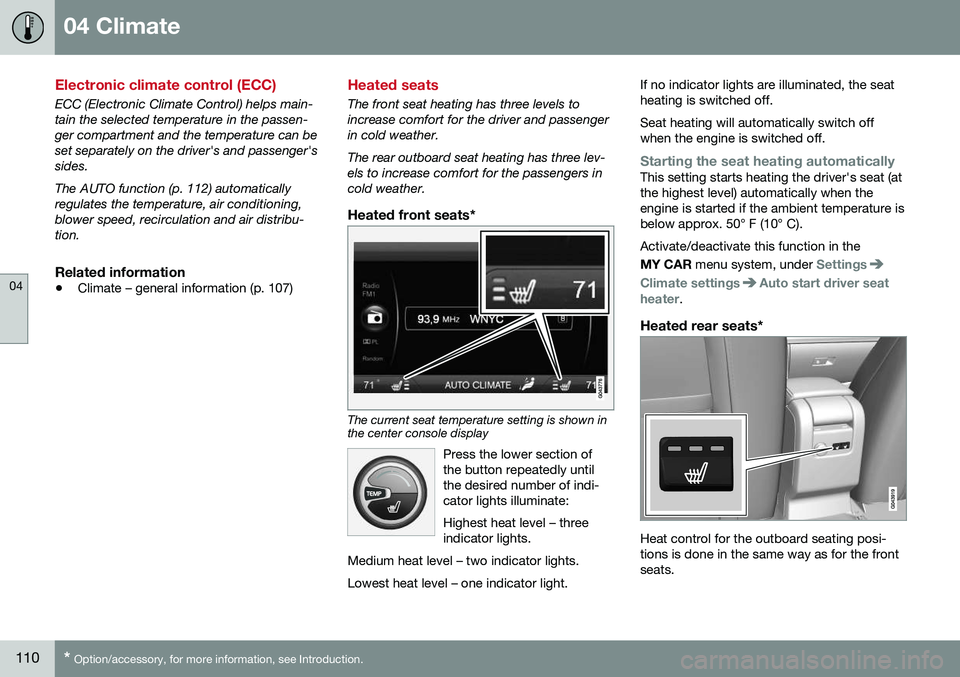
The current seat temperature setting is shown in the center console display
Press the lower section of the button repeatedly untilthe desired number of indi-cator lights illuminate: Highest heat level – three indicator lights.
Medium heat level – two indicator lights. Lowest heat level – one indicator light.
If no indicator lights are illuminated, the seat heating is switched off. Seat heating will automatically switch off when the engine is switched off.
Starting the seat heating automaticallyThis setting starts heating the driver's seat (at the highest level) automatically when theengine is started if the ambient temperature isbelow approx. 50° F (10° C). Activate/deactivate this function in the MY CAR menu system, under
Settings
Climate settingsAuto start driver seat
heater.
Heated rear seats*
Heat control for the outboard seating posi- tions is done in the same way as for the frontseats.
Page 113 of 344
04 Climate
04
111
Related information
•Climate – general information (p. 107)
• Electronic climate control (ECC) (p. 110)
Temperature and blower control
When the vehicle is started, the most recent setting is resumed. The blower should always be activated to help avoid condensation and fogging on thewindows.
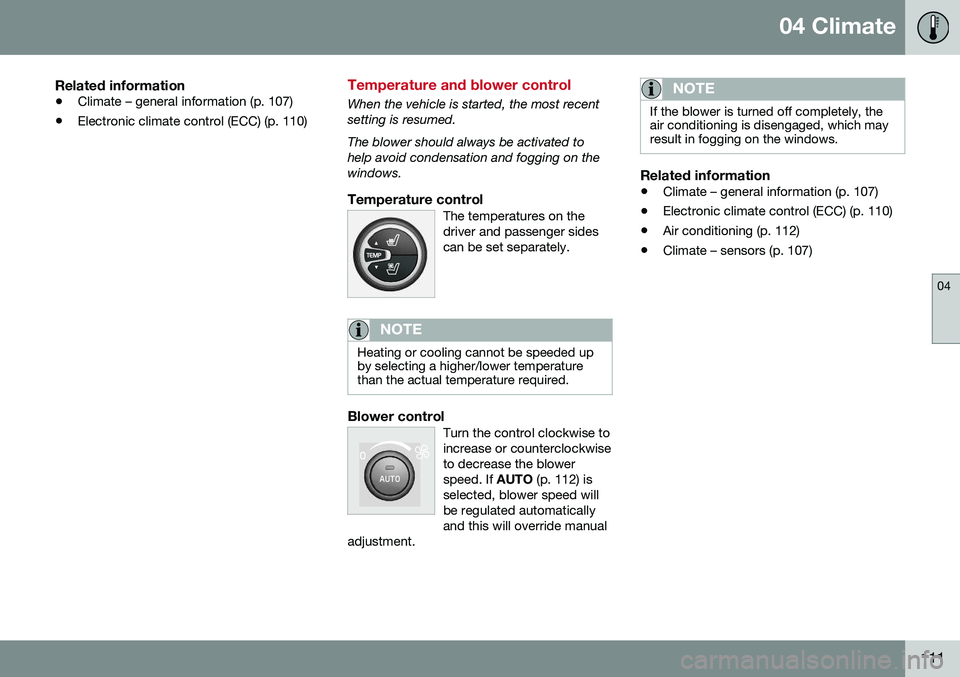
Temperature controlThe temperatures on thedriver and passenger sidescan be set separately.
NOTE
Heating or cooling cannot be speeded up by selecting a higher/lower temperaturethan the actual temperature required.
Blower controlTurn the control clockwise to increase or counterclockwiseto decrease the blowerspeed. If
AUTO (p. 112) is
selected, blower speed willbe regulated automaticallyand this will override manual
adjustment.
NOTE
If the blower is turned off completely, the air conditioning is disengaged, which mayresult in fogging on the windows.
Related information
• Climate – general information (p. 107)
• Electronic climate control (ECC) (p. 110)
• Air conditioning (p. 112)
• Climate – sensors (p. 107)
Page 114 of 344
04 Climate
04
112* Option/accessory, for more information, see Introduction.
Automatic climate control
The Auto function automatically controls tem- perature (p. 111), air conditioning (p. 112),blower speed (p. 111), recirculation (p. 114)and air distribution (p. 109).
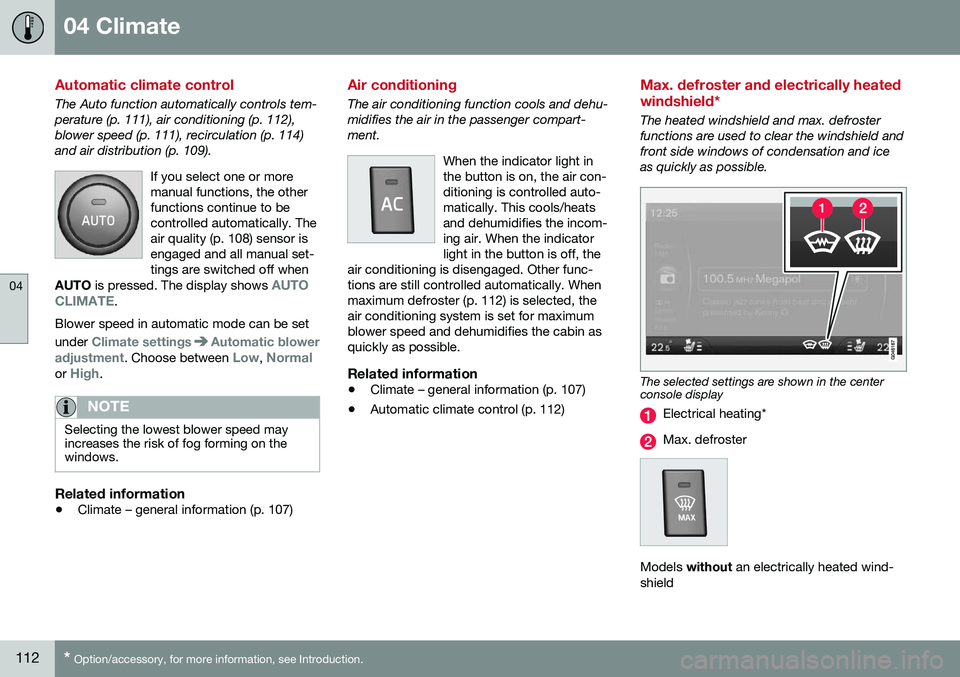
If you select one or moremanual functions, the otherfunctions continue to becontrolled automatically. Theair quality (p. 108) sensor isengaged and all manual set-tings are switched off when
AUTO is pressed. The display shows
AUTO
CLIMATE.
Blower speed in automatic mode can be set under
Climate settingsAutomatic blower
adjustment
. Choose between Low, Normalor High.
NOTE
Selecting the lowest blower speed may increases the risk of fog forming on thewindows.
Related information
• Climate – general information (p. 107)
Air conditioning
The air conditioning function cools and dehu- midifies the air in the passenger compart-ment.
When the indicator light inthe button is on, the air con-ditioning is controlled auto-matically. This cools/heatsand dehumidifies the incom-ing air. When the indicatorlight in the button is off, the
air conditioning is disengaged. Other func-tions are still controlled automatically. Whenmaximum defroster (p. 112) is selected, theair conditioning system is set for maximumblower speed and dehumidifies the cabin asquickly as possible.
Related information
• Climate – general information (p. 107)
• Automatic climate control (p. 112)
Max. defroster and electrically heated windshield*
The heated windshield and max. defroster functions are used to clear the windshield andfront side windows of condensation and iceas quickly as possible.
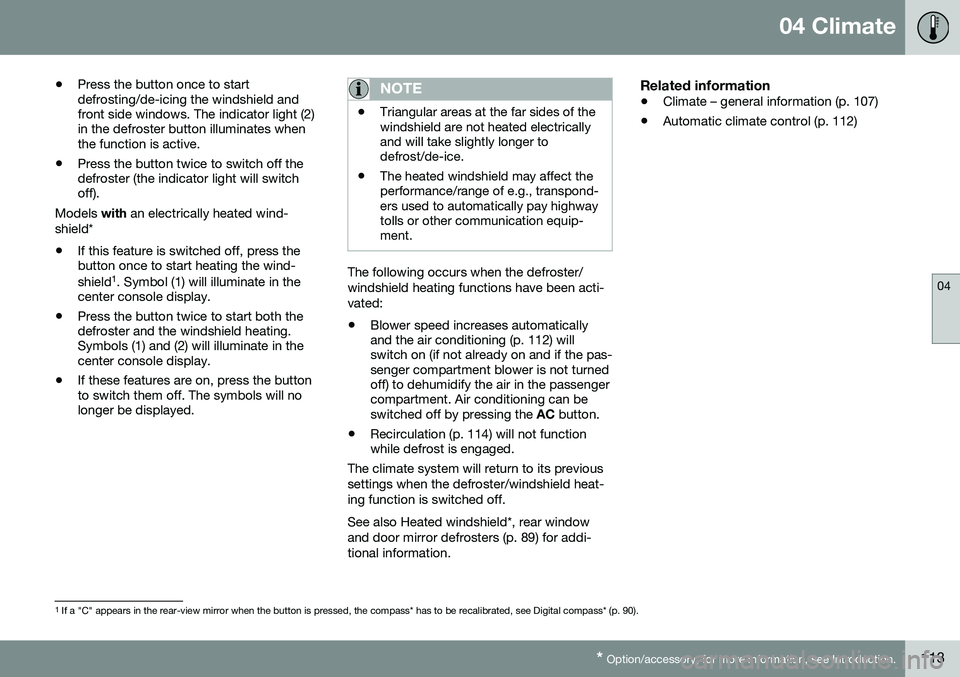
The selected settings are shown in the center console display
Electrical heating*
Max. defroster
Models
without an electrically heated wind-
shield
Page 115 of 344
04 Climate
04
* Option/accessory, for more information, see Introduction.113
•
Press the button once to start defrosting/de-icing the windshield andfront side windows. The indicator light (2)in the defroster button illuminates whenthe function is active.
• Press the button twice to switch off thedefroster (the indicator light will switchoff).
Models with an electrically heated wind-
shield*
• If this feature is switched off, press thebutton once to start heating the wind- shield 1
. Symbol (1) will illuminate in the
center console display.
• Press the button twice to start both the defroster and the windshield heating.Symbols (1) and (2) will illuminate in thecenter console display.
• If these features are on, press the buttonto switch them off. The symbols will nolonger be displayed.
NOTE
•Triangular areas at the far sides of the windshield are not heated electricallyand will take slightly longer todefrost/de-ice.
• The heated windshield may affect theperformance/range of e.g., transpond-ers used to automatically pay highwaytolls or other communication equip-ment.
The following occurs when the defroster/ windshield heating functions have been acti-vated: •
Blower speed increases automatically and the air conditioning (p. 112) willswitch on (if not already on and if the pas-senger compartment blower is not turnedoff) to dehumidify the air in the passengercompartment. Air conditioning can beswitched off by pressing the
AC button.
• Recirculation (p. 114) will not functionwhile defrost is engaged.
The climate system will return to its previous
settings when the defroster/windshield heat- ing function is switched off. See also Heated windshield*, rear window and door mirror defrosters (p. 89) for addi-tional information.
Related information
• Climate – general information (p. 107)
• Automatic climate control (p. 112)
1
If a "C" appears in the rear-view mirror when the button is pressed, the compass* has to be recalibrated, see Digital compass* (p. 90).
Page 118 of 344
04 Climate
04
116
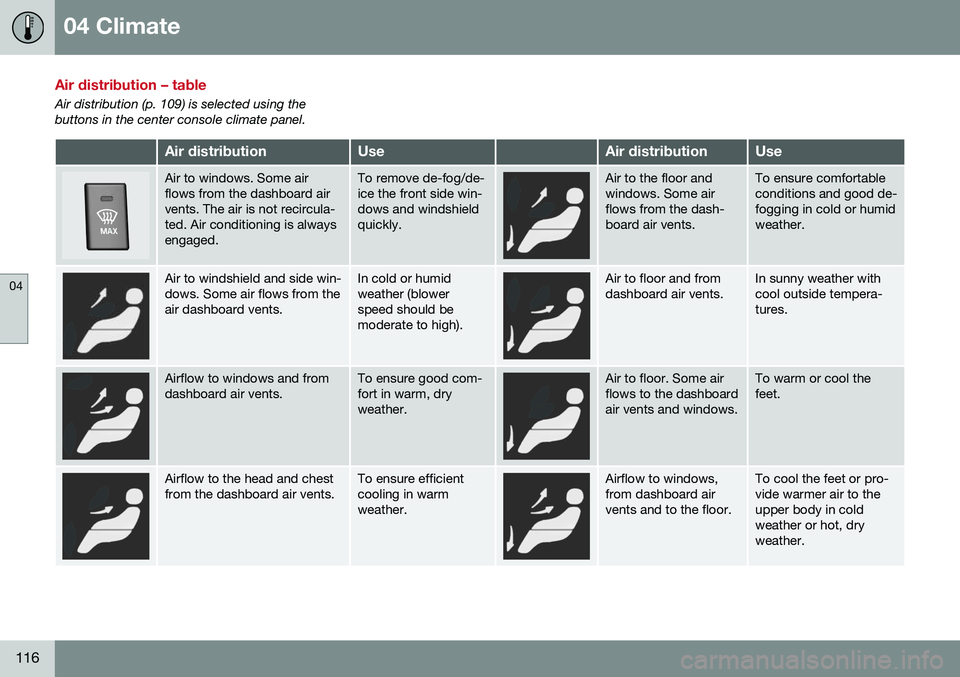
Air distribution – table
Air distribution (p. 109) is selected using the buttons in the center console climate panel.
Air distributionUseAir distributionUse
Air to windows. Some air flows from the dashboard airvents. The air is not recircula-ted. Air conditioning is alwaysengaged.To remove de-fog/de- ice the front side win-dows and windshieldquickly.Air to the floor and windows. Some airflows from the dash-board air vents.To ensure comfortable conditions and good de-fogging in cold or humidweather.
Air to windshield and side win- dows. Some air flows from theair dashboard vents.In cold or humid weather (blowerspeed should bemoderate to high).Air to floor and from dashboard air vents.In sunny weather with cool outside tempera-tures.
Airflow to windows and from dashboard air vents.To ensure good com- fort in warm, dryweather.Air to floor. Some air flows to the dashboardair vents and windows.To warm or cool the feet.
Airflow to the head and chest from the dashboard air vents.To ensure efficient cooling in warmweather.Airflow to windows, from dashboard airvents and to the floor.To cool the feet or pro- vide warmer air to theupper body in coldweather or hot, dryweather.
Page 228 of 344
08 Starting and driving
08
226* Option/accessory, for more information, see Introduction.
ECO*
Eco is a function 10
developed by Volvo to give
the driver the opportunity to actively drive more economically and to help reduce fuelconsumption.
IntroductionWhen Eco is activated, thefollowing functions are modi-fied:
• The automatic transmission's shifting points
• The engine management system andaccelerator pedal response
• Stop/stop function (Start/Stop – introduc-tion (p. 221)): the engine can auto-stopbefore the vehicle has come to a full stop
• Eco Coast functionality is activated:engine braking is disabled
• Climate system settings: certain functions(e.g., air conditioning) will be temporarilyreduced or deactivated
NOTE
When Eco is activated, several climate system parameters are changed and thefunction of certain current-consuming sys-tems will be reduced. Some of these functions can be restarted manually but full functionality will not berestored until Eco is deactivated.
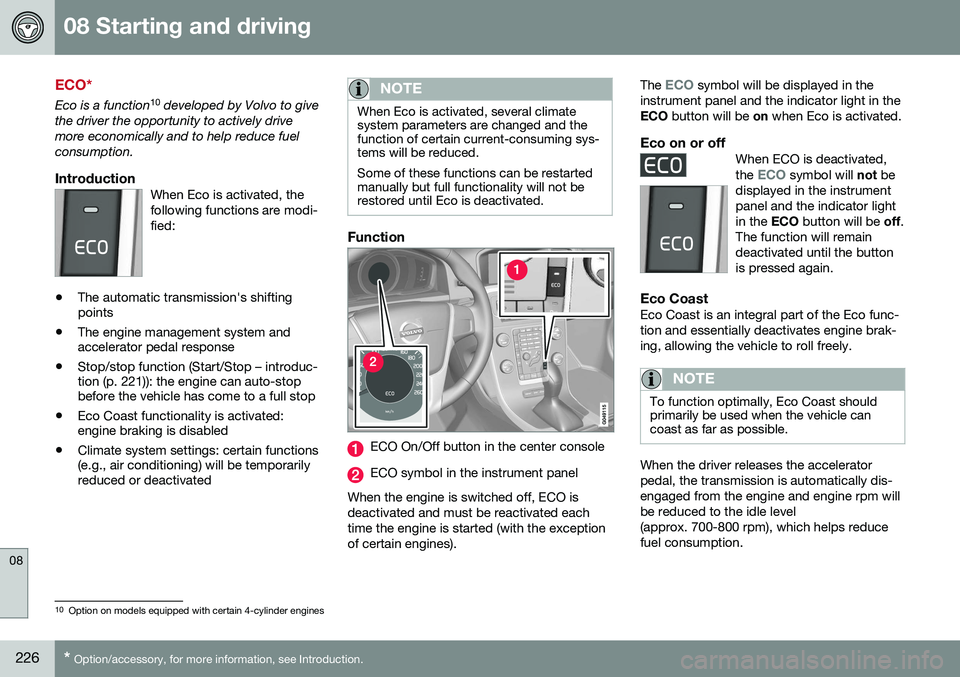
Function
ECO On/Off button in the center console
ECO symbol in the instrument panel
When the engine is switched off, ECO is deactivated and must be reactivated eachtime the engine is started (with the exceptionof certain engines). The
ECO symbol will be displayed in the
instrument panel and the indicator light in the ECO button will be on when Eco is activated.
Eco on or offWhen ECO is deactivated, the ECO symbol will not be
displayed in the instrument panel and the indicator lightin the ECO button will be off.
The function will remaindeactivated until the buttonis pressed again.
Eco CoastEco Coast is an integral part of the Eco func- tion and essentially deactivates engine brak-ing, allowing the vehicle to roll freely.
NOTE
To function optimally, Eco Coast should primarily be used when the vehicle cancoast as far as possible.
When the driver releases the accelerator pedal, the transmission is automatically dis-engaged from the engine and engine rpm willbe reduced to the idle level(approx. 700-800 rpm), which helps reducefuel consumption.
10 Option on models equipped with certain 4-cylinder engines