warning light VOLVO S60 INSCRIPTION 2017 Owner´s Manual
[x] Cancel search | Manufacturer: VOLVO, Model Year: 2017, Model line: S60 INSCRIPTION, Model: VOLVO S60 INSCRIPTION 2017Pages: 398, PDF Size: 9.45 MB
Page 71 of 398
INSTRUMENTS AND CONTROLS
}}
69
Related information
•Information displays – introduction (p. 63)
• Information displays – warning symbols (p. 69)
Information displays – warning symbols
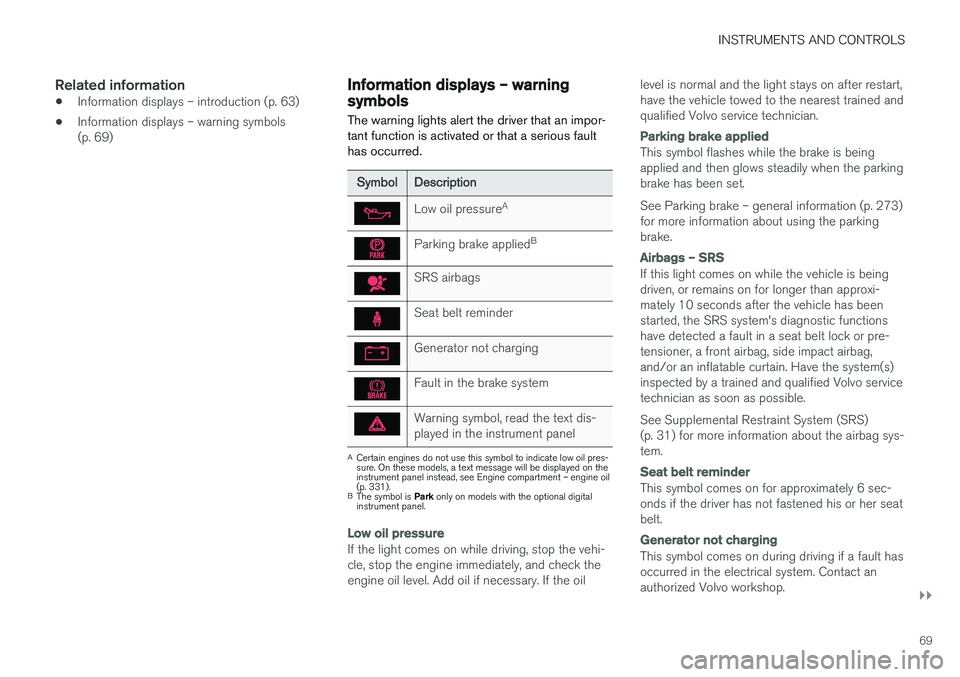
The warning lights alert the driver that an impor- tant function is activated or that a serious faulthas occurred.
SymbolDescription
Low oil pressure A
Parking brake applied B
SRS airbags
Seat belt reminder
Generator not charging
Fault in the brake system
Warning symbol, read the text dis- played in the instrument panel
A
Certain engines do not use this symbol to indicate low oil pres- sure. On these models, a text message will be displayed on theinstrument panel instead, see Engine compartment – engine oil(p. 331).
B The symbol is Park only on models with the optional digital
instrument panel.
Low oil pressure
If the light comes on while driving, stop the vehi- cle, stop the engine immediately, and check theengine oil level. Add oil if necessary. If the oil level is normal and the light stays on after restart,have the vehicle towed to the nearest trained andqualified Volvo service technician.
Parking brake applied
This symbol flashes while the brake is being applied and then glows steadily when the parkingbrake has been set. See Parking brake – general information (p. 273) for more information about using the parkingbrake.
Airbags – SRS
If this light comes on while the vehicle is being driven, or remains on for longer than approxi-mately 10 seconds after the vehicle has beenstarted, the SRS system's diagnostic functionshave detected a fault in a seat belt lock or pre-tensioner, a front airbag, side impact airbag,and/or an inflatable curtain. Have the system(s)inspected by a trained and qualified Volvo servicetechnician as soon as possible. See Supplemental Restraint System (SRS) (p. 31) for more information about the airbag sys-tem.
Seat belt reminder
This symbol comes on for approximately 6 sec- onds if the driver has not fastened his or her seatbelt.
Generator not charging
This symbol comes on during driving if a fault has occurred in the electrical system. Contact anauthorized Volvo workshop.
Page 72 of 398
||
INSTRUMENTS AND CONTROLS
70
Engine temperature
Engine overheating can result from low oil or coolant levels, towing or hard driving at high heatand altitude, or mechanical malfunction. Engineoverheating will be signaled with text and a redwarning triangle in the middle of the instrumentdisplay. The exact text will depend on the degree of overheating. It may range from
High engine
temp Reduce speed to High engine temp
Stop engine. If appropriate, other messages,
such as Coolant level low, Stop safely will
also be displayed. If your engine does overheat so that you must stop the engine, always allowthe engine to cool before attempting to check oiland coolant levels. See Engine compartment – coolant (p. 333) for more information.
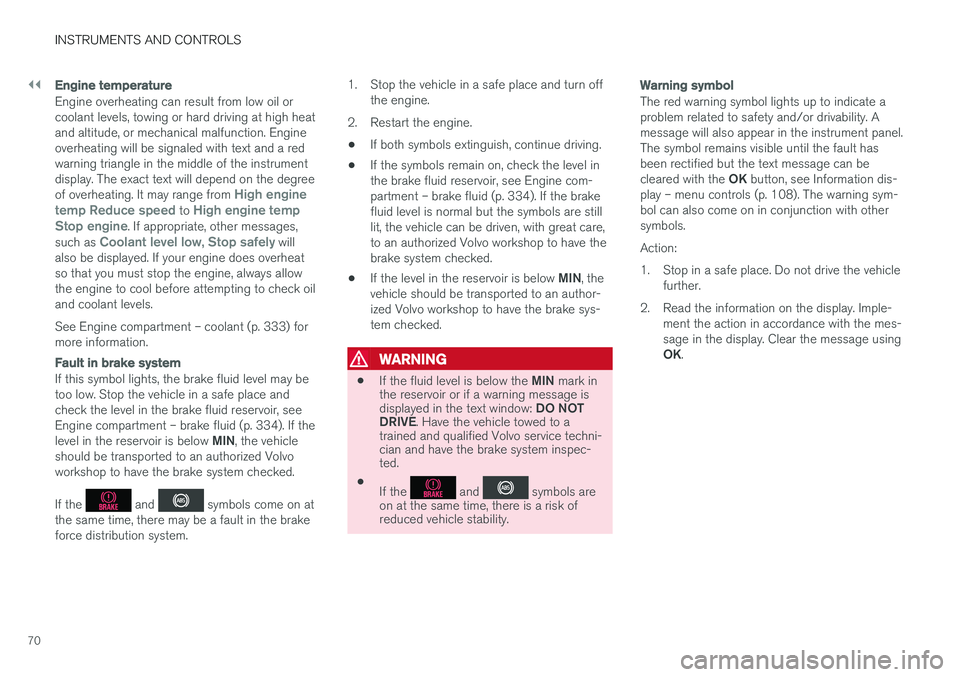
Fault in brake system
If this symbol lights, the brake fluid level may be too low. Stop the vehicle in a safe place andcheck the level in the brake fluid reservoir, seeEngine compartment – brake fluid (p. 334). If the level in the reservoir is below MIN, the vehicle
should be transported to an authorized Volvo workshop to have the brake system checked. If the
and symbols come on at
the same time, there may be a fault in the brake force distribution system. 1. Stop the vehicle in a safe place and turn off
the engine.
2. Restart the engine.
• If both symbols extinguish, continue driving.
• If the symbols remain on, check the level inthe brake fluid reservoir, see Engine com-partment – brake fluid (p. 334). If the brakefluid level is normal but the symbols are stilllit, the vehicle can be driven, with great care,to an authorized Volvo workshop to have thebrake system checked.
• If the level in the reservoir is below
MIN, the
vehicle should be transported to an author-ized Volvo workshop to have the brake sys-tem checked.
WARNING
• If the fluid level is below the
MIN mark in
the reservoir or if a warning message is displayed in the text window: DO NOT
DRIVE . Have the vehicle towed to a
trained and qualified Volvo service techni- cian and have the brake system inspec-ted.
• If the
and symbols are
on at the same time, there is a risk of reduced vehicle stability.
Warning symbol
The red warning symbol lights up to indicate a problem related to safety and/or drivability. Amessage will also appear in the instrument panel.The symbol remains visible until the fault hasbeen rectified but the text message can be cleared with the OK button, see Information dis-
play – menu controls (p. 108). The warning sym- bol can also come on in conjunction with othersymbols. Action:
1. Stop in a safe place. Do not drive the vehicle further.
2. Read the information on the display. Imple- ment the action in accordance with the mes- sage in the display. Clear the message using OK.
Page 74 of 398
||
INSTRUMENTS AND CONTROLS
* Option/accessory, for more information, see Introduction.
72
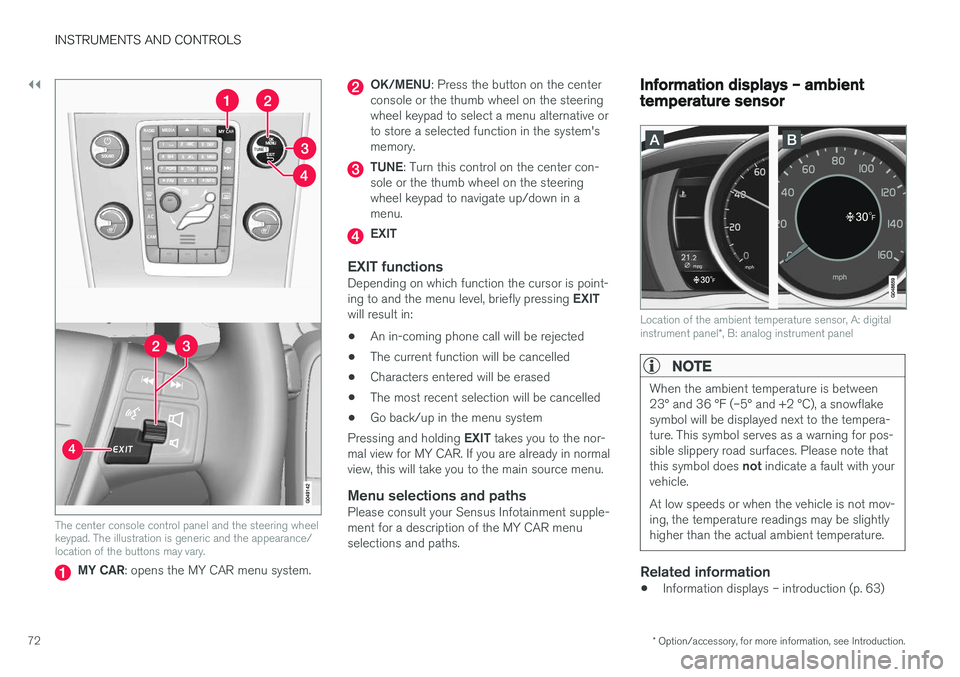
The center console control panel and the steering wheel keypad. The illustration is generic and the appearance/location of the buttons may vary.
MY CAR : opens the MY CAR menu system.
OK/MENU : Press the button on the center
console or the thumb wheel on the steering wheel keypad to select a menu alternative orto store a selected function in the system'smemory.
TUNE : Turn this control on the center con-
sole or the thumb wheel on the steering wheel keypad to navigate up/down in amenu.
EXIT
EXIT functionsDepending on which function the cursor is point- ing to and the menu level, briefly pressing EXIT
will result in:
• An in-coming phone call will be rejected
• The current function will be cancelled
• Characters entered will be erased
• The most recent selection will be cancelled
• Go back/up in the menu system
Pressing and holding EXIT takes you to the nor-
mal view for MY CAR. If you are already in normal view, this will take you to the main source menu.
Menu selections and pathsPlease consult your Sensus Infotainment supple-ment for a description of the MY CAR menuselections and paths.
Information displays – ambient temperature sensor
Location of the ambient temperature sensor, A: digital instrument panel *, B: analog instrument panel
NOTE
When the ambient temperature is between 23° and 36 °F (–5° and +2 °C), a snowflakesymbol will be displayed next to the tempera-ture. This symbol serves as a warning for pos-sible slippery road surfaces. Please note that this symbol does not indicate a fault with your
vehicle. At low speeds or when the vehicle is not mov- ing, the temperature readings may be slightlyhigher than the actual ambient temperature.
Related information
• Information displays – introduction (p. 63)
Page 76 of 398
||
INSTRUMENTS AND CONTROLS
* Option/accessory, for more information, see Introduction.
74
CAUTION
Foreign objects in the ignition slot can impair function or cause damage.
Removing the remote keyThe remote key can be removed from the ignition slot by pulling it out.
Related information
• Ignition modes (p. 74)
Ignition modes
The vehicle's ignition has 3 modes: 0, I, and II
that can be used without starting the engine. The following table shows examples of whichfunctions are available in the respective modes.
NOTE
To access ignition modes I or II without star-
ting the engine, the brake pedal must not be
depressed.
ModeFunction
0The odometer, clock and temperature gauge are illuminated. Power seats *
can be adjusted and the infotainment system can be used for a limited time(to minimize battery drain, see theSensus Infotainment Supplement).
IThe Moonroof *, power windows,12-
volt sockets in the passenger com- partment, navigation system *, climate
system blower, windshield wipers can be used.
IIThe headlights/taillights illuminate. Warning/indicator lights illuminate for5 seconds. Other systems are acti- vated. However, the heated seats * and
heated rear window function can only be activated when the engine is run- ning. Mode II should only be used
for very short periods to help avoid draining the battery.
Ignition modes
Ignition mode 0
–The vehicle is unlocked.
Page 83 of 398
INSTRUMENTS AND CONTROLS
81
Rear seats – folding backrestThe rear seat head restraints and backrests can be folded down. The center head restraint canbe raised/lowered according to the passenger'sheight.
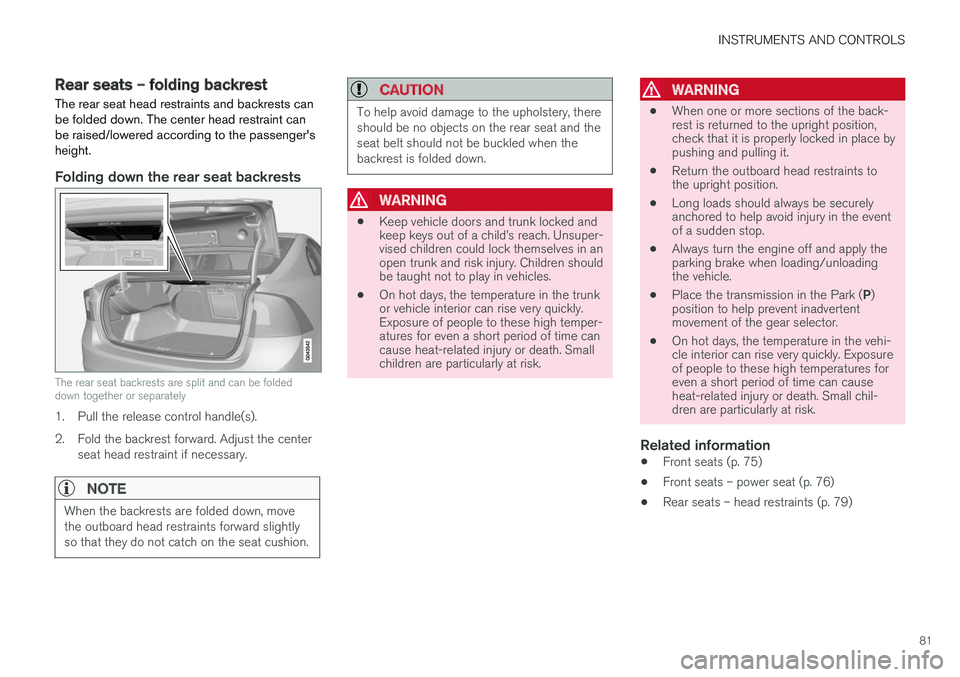
Folding down the rear seat backrests
The rear seat backrests are split and can be folded down together or separately
1. Pull the release control handle(s).
2. Fold the backrest forward. Adjust the center seat head restraint if necessary.
NOTE
When the backrests are folded down, move the outboard head restraints forward slightlyso that they do not catch on the seat cushion.
CAUTION
To help avoid damage to the upholstery, there should be no objects on the rear seat and theseat belt should not be buckled when thebackrest is folded down.
WARNING
• Keep vehicle doors and trunk locked and keep keys out of a child
Page 84 of 398
INSTRUMENTS AND CONTROLS
* Option/accessory, for more information, see Introduction.
82
Steering wheel The steering wheel can be adjusted to various positions and has controls for the horn, cruise control *, menus, the infotainment system and
Bluetooth ®
-connected cell phone.
Adjusting
G021138
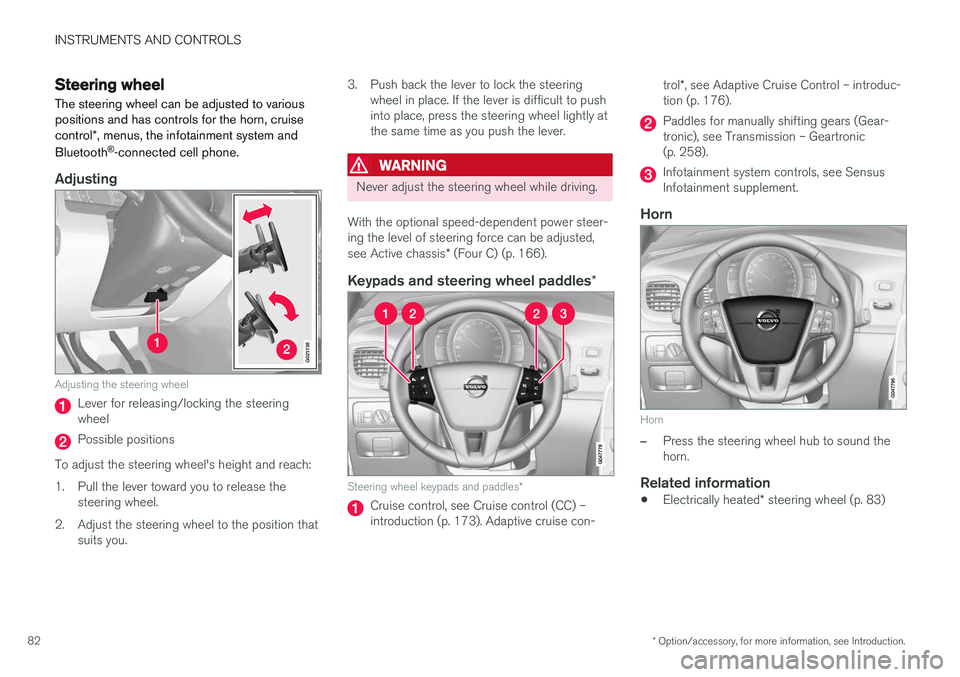
Adjusting the steering wheel
Lever for releasing/locking the steering wheel
Possible positions
To adjust the steering wheel's height and reach:
1. Pull the lever toward you to release the steering wheel.
2. Adjust the steering wheel to the position that suits you. 3. Push back the lever to lock the steering
wheel in place. If the lever is difficult to push into place, press the steering wheel lightly atthe same time as you push the lever.
WARNING
Never adjust the steering wheel while driving.
With the optional speed-dependent power steer- ing the level of steering force can be adjusted, see Active chassis * (Four C) (p. 166).
Keypads and steering wheel paddles *
Steering wheel keypads and paddles*
Cruise control, see Cruise control (CC) – introduction (p. 173). Adaptive cruise con- trol
*, see Adaptive Cruise Control – introduc-
tion (p. 176).
Paddles for manually shifting gears (Gear- tronic), see Transmission – Geartronic(p. 258).
Infotainment system controls, see Sensus Infotainment supplement.
Horn
Horn
–Press the steering wheel hub to sound the horn.
Related information
• Electrically heated
* steering wheel (p. 83)
Page 91 of 398
INSTRUMENTS AND CONTROLS
}}
89
Rear fog lights
The rear fog lights are considerably brighter than the normal taillights and should be used onlywhen conditions such as fog, rain, snow, smokeor dust reduce visibility for other vehicles to lessthan 500 ft. (150 meters).
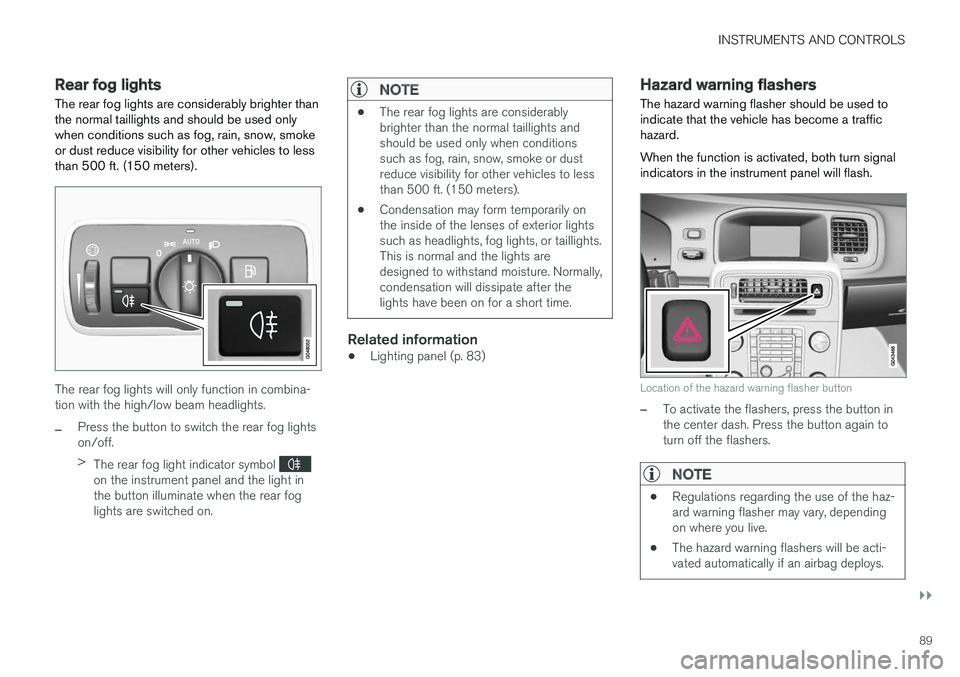
The rear fog lights will only function in combina- tion with the high/low beam headlights.
–Press the button to switch the rear fog lights on/off. > The rear fog light indicator symbol
on the instrument panel and the light in the button illuminate when the rear foglights are switched on.
NOTE
• The rear fog lights are considerably brighter than the normal taillights andshould be used only when conditionssuch as fog, rain, snow, smoke or dustreduce visibility for other vehicles to lessthan 500 ft. (150 meters).
• Condensation may form temporarily onthe inside of the lenses of exterior lightssuch as headlights, fog lights, or taillights.This is normal and the lights aredesigned to withstand moisture. Normally,condensation will dissipate after thelights have been on for a short time.
Related information
•Lighting panel (p. 83)
Hazard warning flashers
The hazard warning flasher should be used to indicate that the vehicle has become a traffichazard. When the function is activated, both turn signal indicators in the instrument panel will flash.
Location of the hazard warning flasher button
–To activate the flashers, press the button in the center dash. Press the button again toturn off the flashers.
NOTE
• Regulations regarding the use of the haz- ard warning flasher may vary, dependingon where you live.
• The hazard warning flashers will be acti-vated automatically if an airbag deploys.
Page 98 of 398
INSTRUMENTS AND CONTROLS
96
Power windows
All power windows can be operated using the control panel in the driver's door. The controlpanels in the other doors only operate the win-dow in the respective doors.
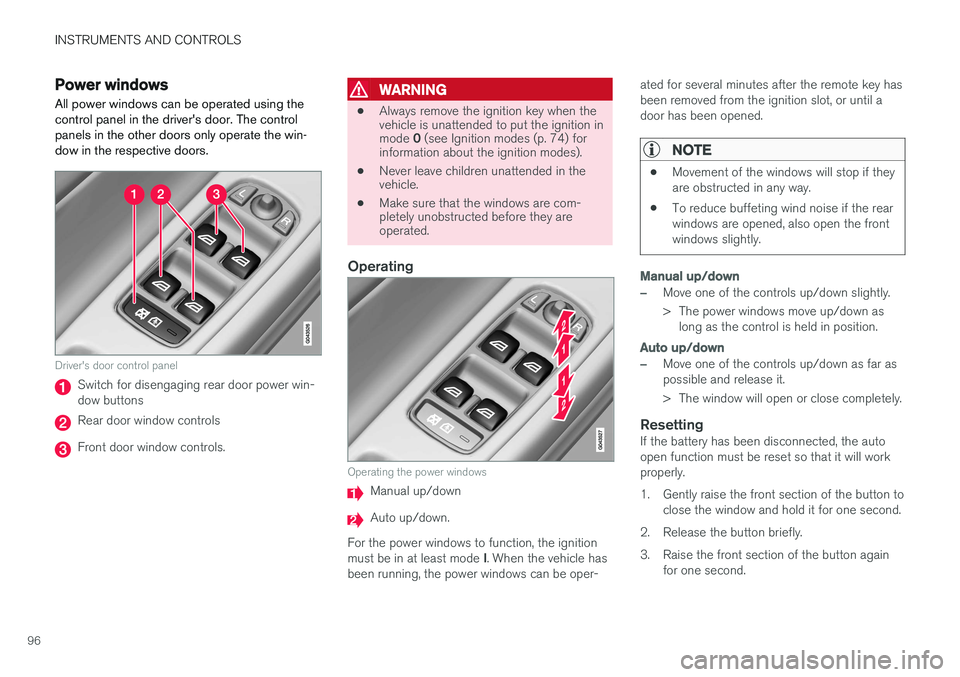
Driver's door control panel
Switch for disengaging rear door power win- dow buttons
Rear door window controls
Front door window controls.
WARNING
• Always remove the ignition key when the vehicle is unattended to put the ignition in mode
0 (see Ignition modes (p. 74) for
information about the ignition modes).
• Never leave children unattended in the vehicle.
• Make sure that the windows are com-pletely unobstructed before they areoperated.
Operating
Operating the power windows
Manual up/down
Auto up/down.
For the power windows to function, the ignition must be in at least mode I. When the vehicle has
been running, the power windows can be oper- ated for several minutes after the remote key has been removed from the ignition slot, or until adoor has been opened.
NOTE
•
Movement of the windows will stop if they are obstructed in any way.
• To reduce buffeting wind noise if the rearwindows are opened, also open the frontwindows slightly.
Manual up/down
–Move one of the controls up/down slightly.
> The power windows move up/down as
long as the control is held in position.
Auto up/down
–Move one of the controls up/down as far as possible and release it.
> The window will open or close completely.
ResettingIf the battery has been disconnected, the auto open function must be reset so that it will workproperly.
1. Gently raise the front section of the button to close the window and hold it for one second.
2. Release the button briefly.
3. Raise the front section of the button again for one second.
Page 100 of 398
INSTRUMENTS AND CONTROLS
* Option/accessory, for more information, see Introduction.
98
Power door mirrors
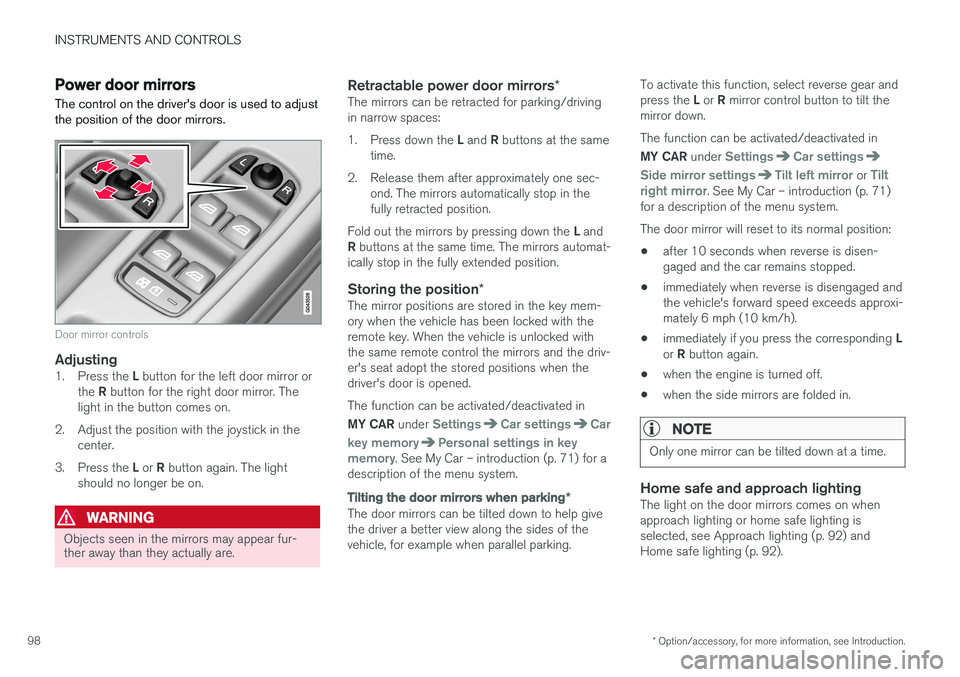
The control on the driver's door is used to adjust the position of the door mirrors.
Door mirror controls
Adjusting1. Press the L button for the left door mirror or
the R button for the right door mirror. The
light in the button comes on.
2. Adjust the position with the joystick in the center.
3. Press the L or R button again. The light
should no longer be on.
WARNING
Objects seen in the mirrors may appear fur- ther away than they actually are.
Retractable power door mirrors *The mirrors can be retracted for parking/driving in narrow spaces: 1.
Press down the L and R buttons at the same
time.
2. Release them after approximately one sec- ond. The mirrors automatically stop in the fully retracted position.
Fold out the mirrors by pressing down the L and
R buttons at the same time. The mirrors automat-
ically stop in the fully extended position.
Storing the position *The mirror positions are stored in the key mem-ory when the vehicle has been locked with theremote key. When the vehicle is unlocked withthe same remote control the mirrors and the driv-er's seat adopt the stored positions when thedriver's door is opened. The function can be activated/deactivated in MY CAR under
SettingsCar settingsCar
key memory
Personal settings in key
memory. See My Car – introduction (p. 71) for a
description of the menu system.
Tilting the door mirrors when parking *
The door mirrors can be tilted down to help give the driver a better view along the sides of thevehicle, for example when parallel parking. To activate this function, select reverse gear and press the
L or R mirror control button to tilt the
mirror down. The function can be activated/deactivated in MY CAR under
SettingsCar settings
Side mirror settingsTilt left mirror or Tilt
right mirror. See My Car – introduction (p. 71)
for a description of the menu system. The door mirror will reset to its normal position:
• after 10 seconds when reverse is disen- gaged and the car remains stopped.
• immediately when reverse is disengaged andthe vehicle's forward speed exceeds approxi-mately 6 mph (10 km/h).
• immediately if you press the corresponding
L
or R button again.
• when the engine is turned off.
• when the side mirrors are folded in.
NOTE
Only one mirror can be tilted down at a time.
Home safe and approach lightingThe light on the door mirrors comes on when approach lighting or home safe lighting isselected, see Approach lighting (p. 92) andHome safe lighting (p. 92).
Page 106 of 398
||
INSTRUMENTS AND CONTROLS
* Option/accessory, for more information, see Introduction.
104
Tilt position
G028899
Tilt position, raised at the rear edge
Open by pressing the rear edge of the con- trol upward.
Close by pulling the rear edge of the control downward and hold it until the moonroof hasclosed completely.
HomeLink ®
Wireless Control
System * – introduction
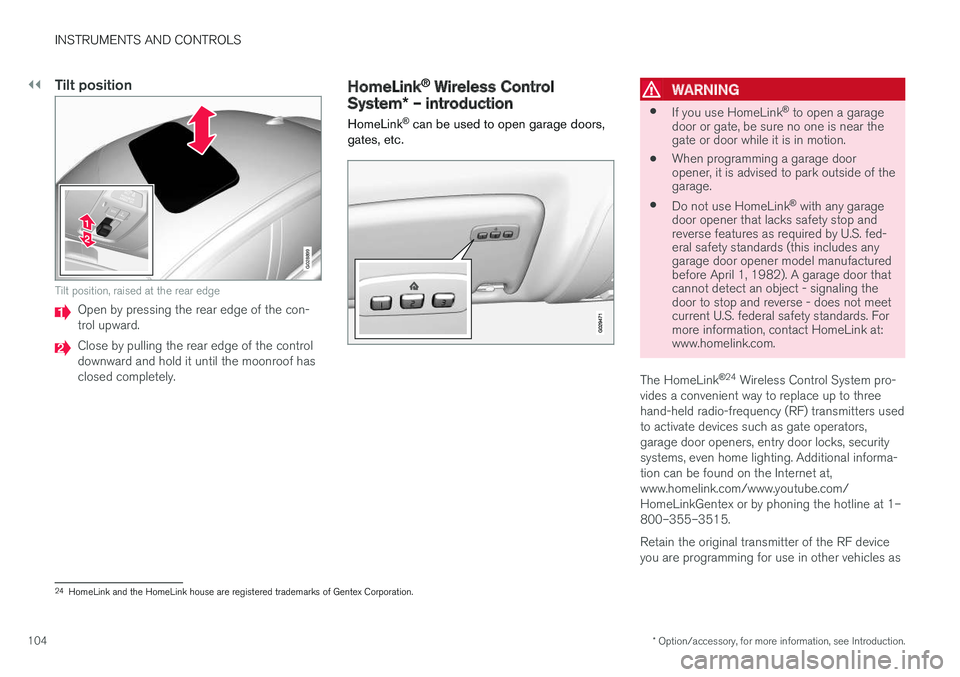
HomeLink ®
can be used to open garage doors,
gates, etc.WARNING
• If you use HomeLink ®
to open a garage
door or gate, be sure no one is near the gate or door while it is in motion.
• When programming a garage dooropener, it is advised to park outside of thegarage.
• Do not use HomeLink ®
with any garage
door opener that lacks safety stop andreverse features as required by U.S. fed-eral safety standards (this includes anygarage door opener model manufacturedbefore April 1, 1982). A garage door thatcannot detect an object - signaling thedoor to stop and reverse - does not meetcurrent U.S. federal safety standards. Formore information, contact HomeLink at:www.homelink.com.
The HomeLink ®
24
Wireless Control System pro-
vides a convenient way to replace up to three hand-held radio-frequency (RF) transmitters usedto activate devices such as gate operators,garage door openers, entry door locks, securitysystems, even home lighting. Additional informa-tion can be found on the Internet at,www.homelink.com/www.youtube.com/HomeLinkGentex or by phoning the hotline at 1–800–355–3515. Retain the original transmitter of the RF device you are programming for use in other vehicles as
24 HomeLink and the HomeLink house are registered trademarks of Gentex Corporation.