ignition VOLVO S60 INSCRIPTION 2017 Owner´s Manual
[x] Cancel search | Manufacturer: VOLVO, Model Year: 2017, Model line: S60 INSCRIPTION, Model: VOLVO S60 INSCRIPTION 2017Pages: 398, PDF Size: 9.45 MB
Page 96 of 398
INSTRUMENTS AND CONTROLS
* Option/accessory, for more information, see Introduction.
94
Rain sensor *
The rain sensor automatically regulates wiper speed according to the amount of water on thewindshield.
The sensitivity of the rain sensor can be adjusted moving the thumb wheel up (the wipers willsweep the windshield more frequently) or down(the wipers will sweep the windshield less fre-quently).
NOTE
The wipers will make an extra sweep each time the thumb wheel is adjusted upward.
When the rain sensor is activated, the symbol
will illuminate in the instrument panel.
Activating and setting the sensitivity
When activating the rain sensor, the vehicle must be running or in ignition mode II and the wind-
shield wiper lever must be in position 0 or in the
single sweep position. Activate the rain sensor by pressing the button
. The windshield wipers will make one
sweep. Press the lever up for the wipers to make an extra sweep. The rain sensor returns to activemode when the stalk is released back to position 0 .
Deactivating
Deactivate the rain sensor by pressing the button
or press the lever down to another wiper
position. The rain sensor is automatically deactivated when the key is removed from the ignition slot or fiveminutes after the ignition has been switched off.
CAUTION
The rain sensor should be deactivated when washing the car in an automatic car wash, etc.If the rain sensor function is left on, the wip-ers will start inadvertently in the car wash andcould be damaged.
Windshield washer
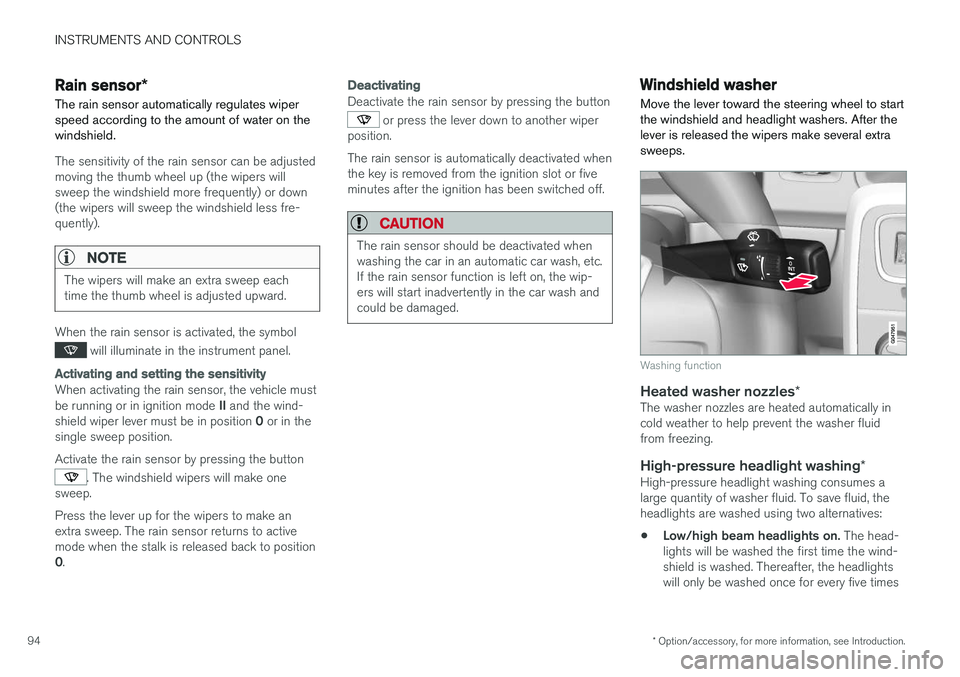
Move the lever toward the steering wheel to start the windshield and headlight washers. After thelever is released the wipers make several extrasweeps.
Washing function
Heated washer nozzles *The washer nozzles are heated automatically in cold weather to help prevent the washer fluidfrom freezing.
High-pressure headlight washing *High-pressure headlight washing consumes alarge quantity of washer fluid. To save fluid, theheadlights are washed using two alternatives:
• Low/high beam headlights on.
The head-
lights will be washed the first time the wind-shield is washed. Thereafter, the headlightswill only be washed once for every five times
Page 98 of 398
INSTRUMENTS AND CONTROLS
96
Power windows
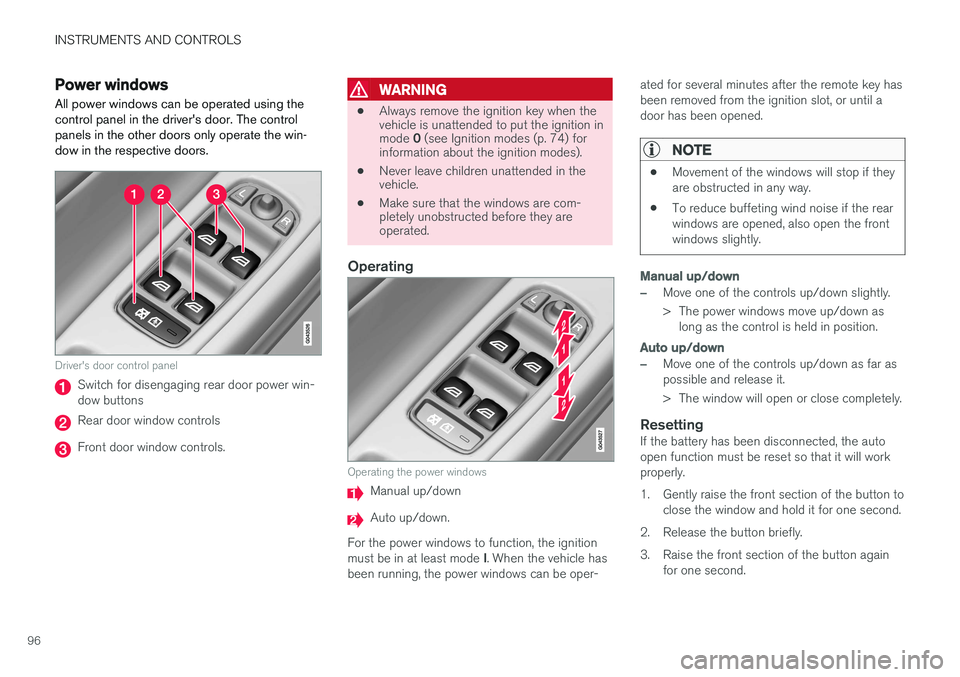
All power windows can be operated using the control panel in the driver's door. The controlpanels in the other doors only operate the win-dow in the respective doors.
Driver's door control panel
Switch for disengaging rear door power win- dow buttons
Rear door window controls
Front door window controls.
WARNING
• Always remove the ignition key when the vehicle is unattended to put the ignition in mode
0 (see Ignition modes (p. 74) for
information about the ignition modes).
• Never leave children unattended in the vehicle.
• Make sure that the windows are com-pletely unobstructed before they areoperated.
Operating
Operating the power windows
Manual up/down
Auto up/down.
For the power windows to function, the ignition must be in at least mode I. When the vehicle has
been running, the power windows can be oper- ated for several minutes after the remote key has been removed from the ignition slot, or until adoor has been opened.
NOTE
•
Movement of the windows will stop if they are obstructed in any way.
• To reduce buffeting wind noise if the rearwindows are opened, also open the frontwindows slightly.
Manual up/down
–Move one of the controls up/down slightly.
> The power windows move up/down as
long as the control is held in position.
Auto up/down
–Move one of the controls up/down as far as possible and release it.
> The window will open or close completely.
ResettingIf the battery has been disconnected, the auto open function must be reset so that it will workproperly.
1. Gently raise the front section of the button to close the window and hold it for one second.
2. Release the button briefly.
3. Raise the front section of the button again for one second.
Page 99 of 398
INSTRUMENTS AND CONTROLS
97
Sun shades
Sun shades can be integrated into the panels in the rear doors. A sun shade can be integrated into the rear par- cel shelf.
Side windows
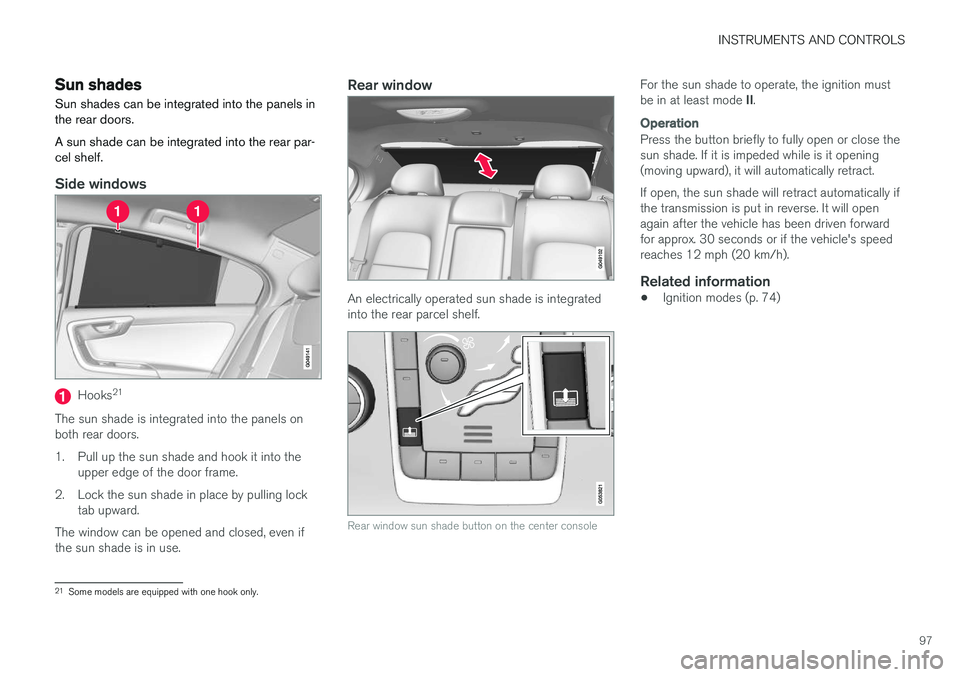
Hooks 21
The sun shade is integrated into the panels on both rear doors.
1. Pull up the sun shade and hook it into the upper edge of the door frame.
2. Lock the sun shade in place by pulling lock tab upward.
The window can be opened and closed, even if the sun shade is in use.
Rear window
An electrically operated sun shade is integrated into the rear parcel shelf.
Rear window sun shade button on the center console
For the sun shade to operate, the ignition must be in at least mode II.
Operation
Press the button briefly to fully open or close the sun shade. If it is impeded while is it opening(moving upward), it will automatically retract. If open, the sun shade will retract automatically if the transmission is put in reverse. It will openagain after the vehicle has been driven forwardfor approx. 30 seconds or if the vehicle's speedreaches 12 mph (20 km/h).
Related information
• Ignition modes (p. 74)
21
Some models are equipped with one hook only.
Page 102 of 398
INSTRUMENTS AND CONTROLS
* Option/accessory, for more information, see Introduction.
100
Heated windshield *, rear window
and door mirror defrosters
The heating function is used to defrost/de-ice the windshield and/or the rear window and doormirrors.
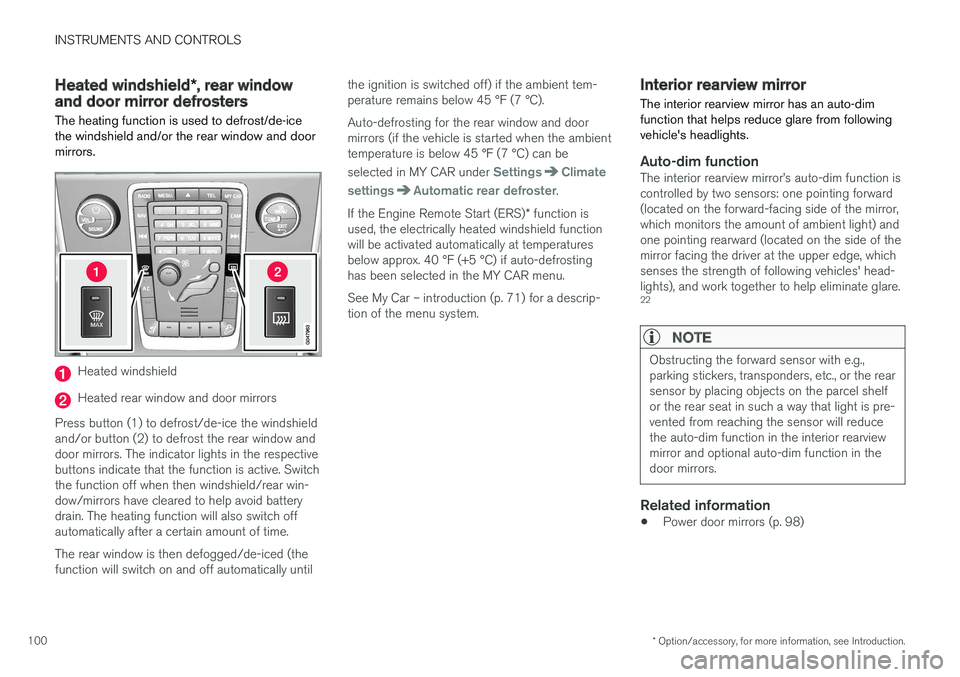
Heated windshield
Heated rear window and door mirrors
Press button (1) to defrost/de-ice the windshield and/or button (2) to defrost the rear window anddoor mirrors. The indicator lights in the respectivebuttons indicate that the function is active. Switchthe function off when then windshield/rear win-dow/mirrors have cleared to help avoid batterydrain. The heating function will also switch offautomatically after a certain amount of time. The rear window is then defogged/de-iced (the function will switch on and off automatically until the ignition is switched off) if the ambient tem-perature remains below 45 °F (7 °C). Auto-defrosting for the rear window and door mirrors (if the vehicle is started when the ambienttemperature is below 45 °F (7 °C) can be selected in MY CAR under
SettingsClimate
settings
Automatic rear defroster.
If the Engine Remote Start (ERS) * function is
used, the electrically heated windshield function will be activated automatically at temperaturesbelow approx. 40 °F (+5 °C) if auto-defrostinghas been selected in the MY CAR menu. See My Car – introduction (p. 71) for a descrip- tion of the menu system.
Interior rearview mirror The interior rearview mirror has an auto-dim function that helps reduce glare from followingvehicle's headlights.
Auto-dim functionThe interior rearview mirror
Page 103 of 398

INSTRUMENTS AND CONTROLS
}}
* Option/accessory, for more information, see Introduction.101
Digital compass*
The rear-view mirror has an integrated display that shows the compass direction in which thevehicle is traveling.
Operation
Rearview mirror with compass.
Eight different directions are shown with the abbreviations: N (north), NE (north east), E (east),SE (southeast), S (south), SW (southwest), W(west) and NW (northwest).
The compass is displayed automatically when the vehicle is started or in ignition mode II. To switch
the compass on/off use a pen, paperclip or simi- lar object and press in the button on the under-side of the mirror.
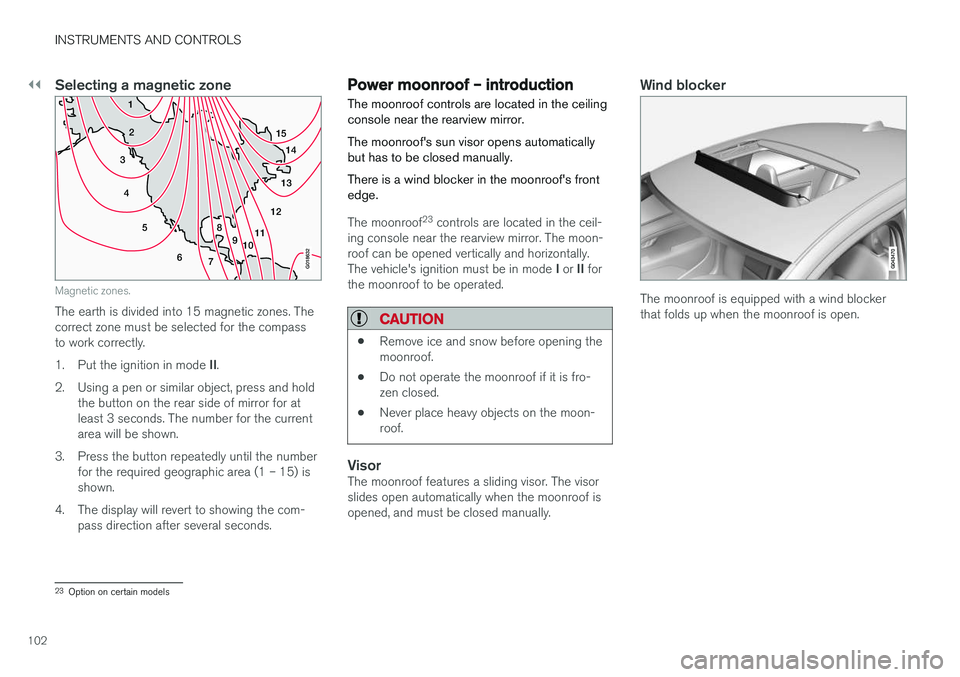
CalibrationNorth America is divided into 15 magnetic zonesand the compass will need to be calibrated if thevehicle is driven into a new one (see the mag-netic zones on the map in the following section"Selecting a magnetic zone"). To do so:
1. Stop the vehicle in a large open area, safely out of traffic and away from steel structures and high-tension electrical wires.
2. Start the vehicle.
NOTE
• For best calibration results, switch off all electrical equipment in the vehicle (climatesystem, windshield wipers, audio system,etc.) and make sure that all doors areclosed.
• Calibration may not succeed or be incor-rect if the vehicle's electrical equipment isnot switched off.
3. Using a pen, paperclip or similar object, press
and hold the button on the underside of mir- ror for approx. 6 seconds until
C is displayed
in the mirror.
4. Press and hold the button for 3 seconds until the number of the current magnetic zone is displayed. 5. Press the button repeatedly until the number
of the desired magnetic zone (
1-15) is dis-
played. See the magnetic zones on the map in the following section "Selecting a mag-netic zone").
6. Wait until
C is again displayed in the mirror.
7. Drive slowly in a circle at a speed of no more than 6 mph (10 km/h) until a direction is dis- played. This indicates that calibration is com-plete.
8. Drive around in a circle an additional two times to fine-tune the calibration.
9. Vehicles with an electrically heated wind- shield: * if
C is displayed when the heating
function is activated, perform step 7 with the heating function on. See also Max. defroster and electrically heated windshield * (p. 128)
for additional information about the heated windshield.
Repeat the calibration procedure if necessary.
22 The auto-dim function is also available as an option on the door mirrors.
Page 104 of 398
||
INSTRUMENTS AND CONTROLS
102
Selecting a magnetic zone
1514
13
12
11
9
8
7
6
5
4
3
2
1
10
G018632
Magnetic zones.
The earth is divided into 15 magnetic zones. The correct zone must be selected for the compassto work correctly. 1.Put the ignition in mode II.
2. Using a pen or similar object, press and hold the button on the rear side of mirror for at least 3 seconds. The number for the currentarea will be shown.
3. Press the button repeatedly until the number for the required geographic area (1 – 15) isshown.
4. The display will revert to showing the com- pass direction after several seconds.
Power moonroof – introduction The moonroof controls are located in the ceiling console near the rearview mirror. The moonroof's sun visor opens automatically but has to be closed manually. There is a wind blocker in the moonroof's front edge.
The moonroof 23
controls are located in the ceil-
ing console near the rearview mirror. The moon- roof can be opened vertically and horizontally. The vehicle's ignition must be in mode I or II for
the moonroof to be operated.
CAUTION
• Remove ice and snow before opening the moonroof.
• Do not operate the moonroof if it is fro-zen closed.
• Never place heavy objects on the moon-roof.
VisorThe moonroof features a sliding visor. The visor slides open automatically when the moonroof isopened, and must be closed manually.
Wind blocker
The moonroof is equipped with a wind blocker that folds up when the moonroof is open.
23
Option on certain models
Page 105 of 398
INSTRUMENTS AND CONTROLS
}}
103
Power moonroof – operationThe moonroof controls are located in the ceiling console near the rearview mirror. The moonroof's sun visor opens automatically but has to be closed manually. There is a wind blocker in the moonroof's front edge.
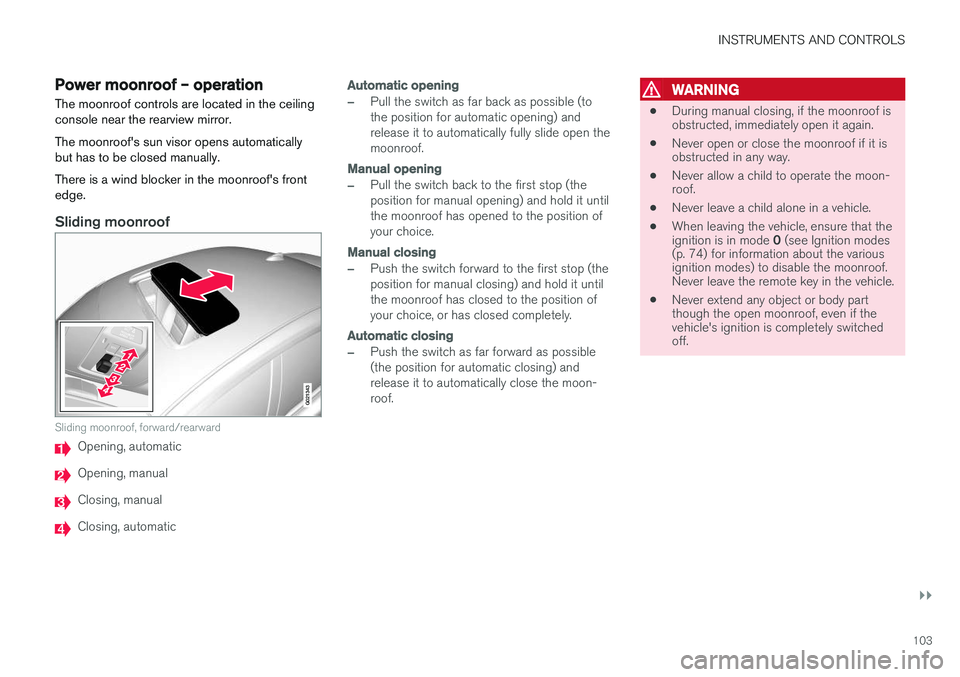
Sliding moonroof
G021343
Sliding moonroof, forward/rearward
Opening, automatic
Opening, manual
Closing, manual
Closing, automatic
Automatic opening
–Pull the switch as far back as possible (to the position for automatic opening) andrelease it to automatically fully slide open themoonroof.
Manual opening
–Pull the switch back to the first stop (the position for manual opening) and hold it untilthe moonroof has opened to the position ofyour choice.
Manual closing
–Push the switch forward to the first stop (the position for manual closing) and hold it untilthe moonroof has closed to the position ofyour choice, or has closed completely.
Automatic closing
–Push the switch as far forward as possible (the position for automatic closing) andrelease it to automatically close the moon-roof.
WARNING
• During manual closing, if the moonroof is obstructed, immediately open it again.
• Never open or close the moonroof if it isobstructed in any way.
• Never allow a child to operate the moon-roof.
• Never leave a child alone in a vehicle.
• When leaving the vehicle, ensure that the ignition is in mode
0 (see Ignition modes
(p. 74) for information about the various ignition modes) to disable the moonroof.Never leave the remote key in the vehicle.
• Never extend any object or body partthough the open moonroof, even if thevehicle's ignition is completely switchedoff.
Page 107 of 398
INSTRUMENTS AND CONTROLS
}}
* Option/accessory, for more information, see Introduction.105
well as for future HomeLink programming. It is also suggested that upon the sale of the vehicle,the programmed HomeLink buttons be erasedfor security purposes. Refer to “Resetting Home- Link Buttons” in HomeLink
®
Wireless Control
System * – programming (p. 105).
Using HomeLinkTo operate, simply press and hold the pro- grammed HomeLink button until the traineddevice begins to operate (this may take severalseconds). Activation will now occur for the traineddevice (i.e., garage door opener, gate operator,security system, entry door lock, home/officelighting, etc.). For convenience, the hand-heldtransmitter of the device may also be used at anytime. In the event that there are still programmingdifficulties or questions, contact HomeLink at:www.homelink.com/www.youtube.com/HomeLinkGentex or by phoning the hotline at 1–800–355–3515.
NOTE
If the ignition is switched off, HomeLink will function for 30 minutes after the driver's doorhas been opened.
HomeLink ®
Wireless Control
System * – programming
The HomeLink Wireless Control System pro- vides a convenient way to replace up to threehand-held radio-frequency (RF) transmittersused to activate devices such as gate operators,garage door openers, entry door locks, securitysystems, even home lighting. Additional informa-tion can be found on the Internetatwww.homelink.com/www.youtube.com/HomeLinkGentex or by phoning the hotline at 1–800–355–3515.
NOTE
Some vehicles may require the ignition to be switched on or be in the “accessories” posi-tion for programming and/or operation ofHomeLink. It is also recommended that a newbattery be placed in the hand-held transmitterof the device being programmed to Home-Link for quicker training and accurate trans-mission of the radio-frequency signal. TheHomeLink buttons must be reset first. Whenthis has been completed, Homelink is inlearning mode so that you can perform pro-gramming.
1. Position the end of your hand-held transmit- ter 1–3 inches (5–14 cm) away from the HomeLink button you wish to program whilekeeping the indicator light in view. 2. Simultaneously press and hold both the
chosen HomeLink and hand-held transmitterbuttons until the HomeLink indicator lightchanges from a slow to a rapidly blinkinglight. Now you may release both the Home-Link and hand-held transmitter buttons.
NOTE
Some devices may require you to replace this Programming Step 2 with procedures notedin the “Gate Operator / Canadian Program-ming” section. If the HomeLink indicator lightdoes not change to a rapidly blinking lightafter performing these steps, contact Home-Link at www.homelink.com/www.youtube.com/HomeLinkGentex or byphoning the hotline at 1–800–355–3515.
Page 110 of 398
||
INSTRUMENTS AND CONTROLS
* Option/accessory, for more information, see Introduction.
108
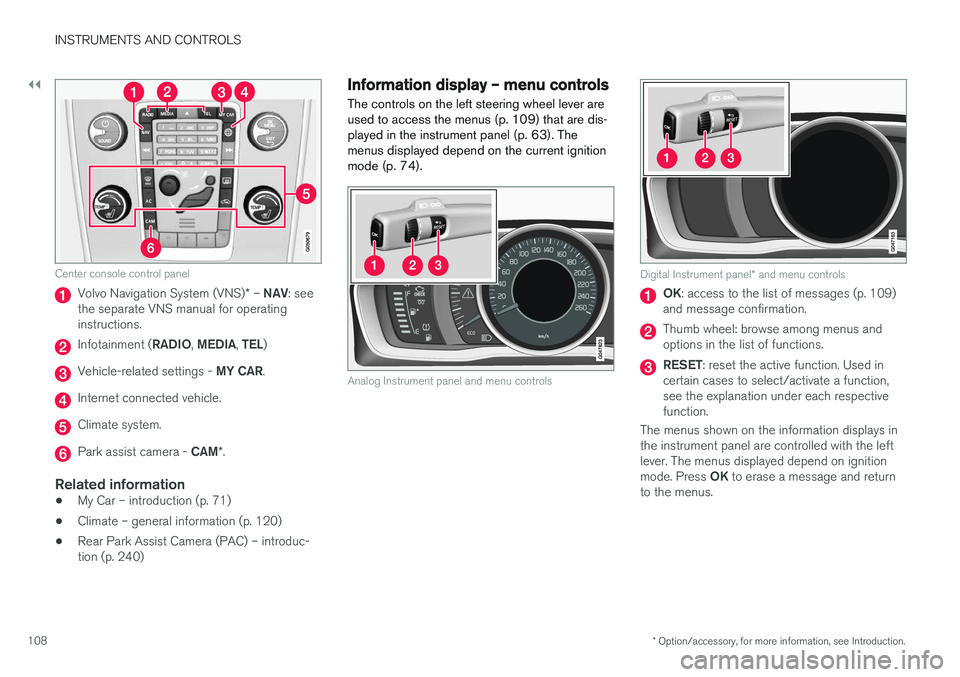
Center console control panel
Volvo Navigation System (VNS) * – NAV : see
the separate VNS manual for operating instructions.
Infotainment ( RADIO, MEDIA , TEL )
Vehicle-related settings - MY CAR.
Internet connected vehicle.
Climate system.
Park assist camera - CAM*.
Related information
• My Car – introduction (p. 71)
• Climate – general information (p. 120)
• Rear Park Assist Camera (PAC) – introduc- tion (p. 240)
Information display – menu controls
The controls on the left steering wheel lever are used to access the menus (p. 109) that are dis-played in the instrument panel (p. 63). Themenus displayed depend on the current ignitionmode (p. 74).
Analog Instrument panel and menu controls
Digital Instrument panel * and menu controls
OK : access to the list of messages (p. 109)
and message confirmation.
Thumb wheel: browse among menus and options in the list of functions.
RESET : reset the active function. Used in
certain cases to select/activate a function, see the explanation under each respectivefunction.
The menus shown on the information displays inthe instrument panel are controlled with the leftlever. The menus displayed depend on ignition mode. Press OK to erase a message and return
to the menus.
Page 111 of 398
INSTRUMENTS AND CONTROLS
}}
* Option/accessory, for more information, see Introduction.109
Information display – menu overview
The menus displayed depend on the current ignition mode (p. 74).
The following menu alternatives may vary, depending on the equipment installed in the vehi-cle.
Analog instrument panelDigital speed Trip comp. opt.Service status
Messages (##) 26
Digital instrument panel
*Settings
Themes
Contrast mode /Color mode
Service status
Messages
Trip computer reset
Related information
• Information displays – introduction (p. 63)
• Information display – menu controls (p. 108)
• Information display – messages (p. 109)
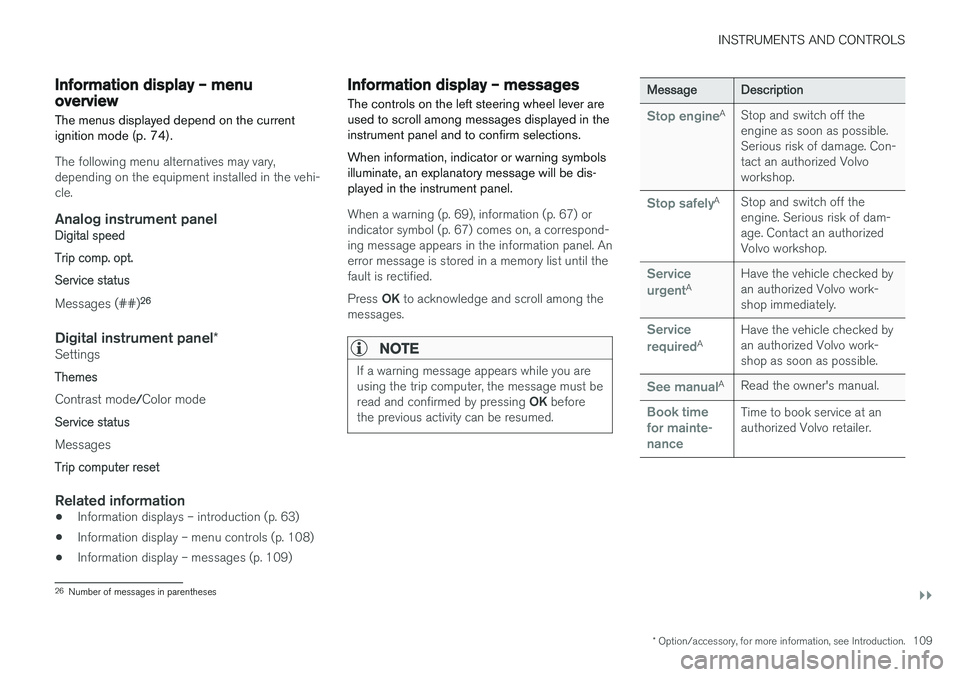
Information display – messages
The controls on the left steering wheel lever are used to scroll among messages displayed in theinstrument panel and to confirm selections. When information, indicator or warning symbols illuminate, an explanatory message will be dis-played in the instrument panel.
When a warning (p. 69), information (p. 67) or indicator symbol (p. 67) comes on, a correspond-ing message appears in the information panel. Anerror message is stored in a memory list until thefault is rectified. Press OK to acknowledge and scroll among the
messages.
NOTE
If a warning message appears while you are using the trip computer, the message must be read and confirmed by pressing OK before
the previous activity can be resumed.
MessageDescription
Stop engineAStop and switch off the engine as soon as possible.Serious risk of damage. Con-tact an authorized Volvoworkshop.
Stop safelyAStop and switch off the engine. Serious risk of dam-age. Contact an authorizedVolvo workshop.
Service urgentAHave the vehicle checked by an authorized Volvo work-shop immediately.
Service requiredAHave the vehicle checked by an authorized Volvo work-shop as soon as possible.
See manualARead the owner's manual.
Book time for mainte-nanceTime to book service at an authorized Volvo retailer.
26 Number of messages in parentheses