change time VOLVO S60 INSCRIPTION 2017 Owner´s Manual
[x] Cancel search | Manufacturer: VOLVO, Model Year: 2017, Model line: S60 INSCRIPTION, Model: VOLVO S60 INSCRIPTION 2017Pages: 398, PDF Size: 9.45 MB
Page 14 of 398
||
INTRODUCTION
12such texts in the article will be displayed here.
Turn TUNE to navigate among the links or scroll
in an article. When you have scrolled to thebeginning/end of an article, you can return to thestart page or a favorite by scrolling one additional step up/down. Press OK/MENU to activate a
selection or highlighted link. Press EXIT to return
to the previous view.
Related information
• Information on the Internet (p. 19)
Owner's information
Your vehicle is equipped with a screen on which you can display information about your vehicle'sfeatures and functions. The printed owner'smanual supplements the on-board informationand contains important texts, the latest updatesand instructions that can be useful in situationswhen it is not practical to read the information onthe screen. Changing the language used for the on-board information could mean that some of the infor-mation displayed may not comply with nationalor local statutes and regulations.NOTE
• Do not export your Volvo to another country before investigating that coun-try's applicable safety and exhaust emis-sion requirements. In some cases it maybe difficult or impossible to comply withthese requirements. Modifications to theemission control system(s) may renderyour Volvo not certifiable for legal opera-tion in the U.S., Canada and other coun-tries.
• All information, illustrations and specifica-tions contained in this manual are basedon the latest product information availa-ble at the time of publication. Please notethat some vehicles may be equipped dif-ferently, depending on market-specificadaptations or special legal requirements.Optional equipment described in thismanual may not be available in all mar-kets.
• Some of the illustrations shown aregeneric and are intended as examplesonly, and may not depict the exact modelfor which this owner's information isintended.
• Volvo reserves the right to make modeland product changes at any time, or tochange specifications or design withoutnotice and without incurring obligation.
Page 15 of 398
INTRODUCTION
}}
13
WARNING
The driver is always responsible for operating the vehicle in a safe manner and for comply-ing with current statutes and regulations. It is also essential to maintain and service the vehicle according to Volvo's recommendationsas stated in the owner's information and theservice and warranty booklet. If the on-board information differs from the printed owner's manual, the printed informa-tion always takes precedence.
Contacting Volvo
In the USA:Volvo Cars of North America, LLC
Customer Care Center 1 Volvo Drive,P.O. Box 914 Rockleigh, New Jersey 076471-800-458-1552www.volvocars.com/us In Canada: Volvo Cars of Canada National Customer Service9130 Leslie Street, Suite 101Richmond Hill, Ontario L4B 0B91-800-663-8255www.volvocars.com/ca
Related information
• About this manual (p. 13)
• Important warnings (p. 22)
• Crash event data (p. 17)
• Volvo Structural Parts Statement (p. 18)
About this manual
Reading your owner's manual is a good way to familiarize yourself with the features and systemsin your vehicle.
• Before you operate your vehicle for the first time, we recommend that you look throughthe information found in the chapters "YourDriving Environment" and "During Your Trip."
• Information contained in the balance of themanual is extremely useful and should beread after operating the vehicle for the firsttime.
• The manual is structured so that it can beused for reference. For this reason, it shouldbe kept in the vehicle for ready access.
On-board owner's manualWhen the printed manual refers to the on-boardowner's manual, this pertains to the informationdisplayed on the center console screen. The language used on the center console screen and instrument panel can be changed in the
MY
CAR system settings menu.
NOTE
Please be aware that changing languages to one that you do not understand may make itdifficult to change back to the original lan-guage.
Page 19 of 398
INTRODUCTION
}}
17
operation in the U.S., Canada and other countries.
• All information, illustrations and specifica-tions contained in this manual are based onthe latest product information available at thetime of publication. Please note that somevehicles may be equipped differently,depending on special legal requirements.Optional equipment described in this manualmay not be available in all markets.
• Some of the illustrations shown are genericand may not depict the exact model forwhich this manual is intended.
• Volvo reserves the right to make modelchanges at any time, or to change specifica-tions or design without notice and withoutincurring obligation.
Related information
•
Information on the Internet (p. 19)
• Volvo and the environment (p. 21)
• Important warnings (p. 22)
Change of ownership
When the vehicle changes owners, all personal settings should be reset to the factory defaults.
To reset, press the MY CAR button in the center
console followed by OK/MENU and select
SettingsReset to factory settings.
User data e.g., for apps, the web browser and for personal settings in menus such as the climatesystem and vehicle settings should be reset tofactory defaults. For vehicles equipped with the optional Volvo On Call with Sensus Connect (VOC), personal set-tings stored in the vehicle should be deleted, seeChanging ownership of a vehicle with Volvo OnCall.
Related information
• Volvo ID (p. 20)
Crash event data
This vehicle is equipped with an event data recorder (EDR). The main purpose of an EDR isto record, in certain crash or near crash-like sit-uations, such as an air bag deployment or hittinga road obstacle, data that will assist in under-standing how a vehicle's systems performed.The EDR is designed to record data related tovehicle dynamics and safety systems for a shortperiod of time, typically 30 seconds or less. TheEDR in this vehicle is designed to record suchdata as:
• How various systems in your vehicle were operating;
• Whether or not the driver and passengersafety belts were buckled/fastened;
• How far (if at all) the driver was depressingthe accelerator and/or brake pedal; and,
• How fast the vehicle was traveling.
These data can help provide a better understand-ing of the circumstances in which crashes andinjuries occur. EDR data are recorded by your vehicle only if a non-trivial crash situation occurs; no data arerecorded by the EDR under normal driving condi-tions and the EDR never registers who is drivingthe vehicle or the location of a crash or a nearcrash-like situation. However, other parties, suchas law enforcement, could combine the EDR datawith the type of personally identifying data rou-
Page 22 of 398
INTRODUCTION
* Option/accessory, for more information, see Introduction.
20
Volvo ID
This is your personal ID that can be used to access a number of services 1
Creating a Volvo IDTo create a Volvo ID, provide your personal email address and then follow the instructions providedin the email that you will receive from Volvo. Thiscan be done from: •
From an Internet-connected vehicle: Enter your email address in the app that requires aVolvo ID and follow the instructions provides or press the Internet connect (
) button on
the center console and select Apps,Settings and follow the instructions provi-
ded.
• Volvo On Call (VOC
*): download the latest
version of the VOC app and create a Volvo ID on the start page.
Open Source Software Notice
The systems in your Volvo contain certain free/ open source and other software.
This product uses certain free / open source and other software originating from third parties, thatis subject to the GNU General Public Licenseversion 2 and 3 (GPLv2/GPLv3), GNU LesserGeneral Public License version 3 (LGPLv3), TheFreeType Project License (“FreeType License”)and other different and/or additional copyrightlicenses, disclaimers and notices. The links howto access the exact terms of GPLv2, GPLv3,LGPLv3, and the other open source softwarelicenses, disclaimers, acknowledgements andnotices are provided to you below. Please refer tothe exact terms of the relevant License, regardingyour rights under said licenses. Volvo CarCorporation (VCC) offers to provide the sourcecode of said free/open source software to youfor a charge covering the cost of performing suchdistribution, such as the cost of media, shippingand handling, upon written request. Pleasecontact your nearest Volvo retailer. This offer is valid for a period of at least three (3) years from the date of the distribution of thisproduct by VCC / or for as long as VCC offersspare parts or customer support. Portions of this product uses software copyrighted
© v2.4.3/2010 The FreeTypeProject
(www.freetype.org). All rights reserved. This product includes software under following licenses: GPL v2 : http://www.gnu.org/licenses/old- licenses/gpl-2.0.html
• Linux kernel (merge between MontaVista2.6.31 kernel and kernel fromL2.6.31_MX51_ER_1007 BSP)
• uBoot (based on v2009.08)
• busybox (based on version 1.13.2.)
GCC runtime library exception: http://www.gnu.org/licenses/gcc-exception.html
• libgcc_s.so.1
LGPL v3: http://www.gnu.org/licenses/lgpl.html • Libc.so.6, libpthread.so.0, Librt.so.1
The FreeType Project License: http:// www.freetype.org/FTL.TXT
• libfreetype.so.6 (version 2.4.3)
Related information
•
About this manual (p. 13)
1
These services vary and may be subject to change. Consult your Volvo retailer.
Page 70 of 398
||
INSTRUMENTS AND CONTROLS
* Option/accessory, for more information, see Introduction.
68
Malfunction Indicator Light
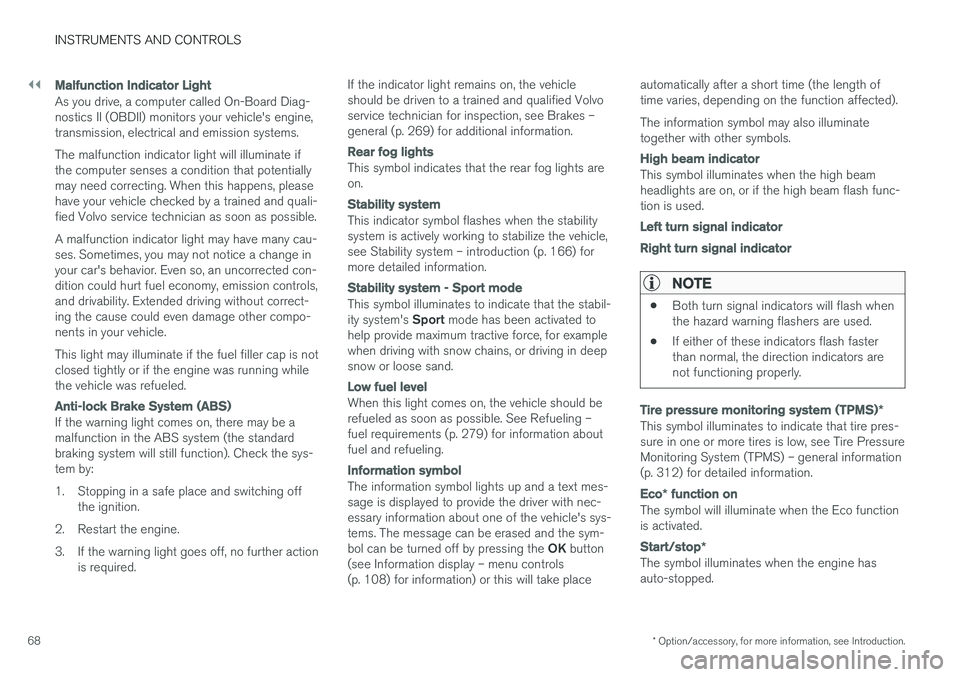
As you drive, a computer called On-Board Diag- nostics II (OBDII) monitors your vehicle's engine,transmission, electrical and emission systems. The malfunction indicator light will illuminate if the computer senses a condition that potentiallymay need correcting. When this happens, pleasehave your vehicle checked by a trained and quali-fied Volvo service technician as soon as possible. A malfunction indicator light may have many cau- ses. Sometimes, you may not notice a change inyour car's behavior. Even so, an uncorrected con-dition could hurt fuel economy, emission controls,and drivability. Extended driving without correct-ing the cause could even damage other compo-nents in your vehicle. This light may illuminate if the fuel filler cap is not closed tightly or if the engine was running whilethe vehicle was refueled.
Anti-lock Brake System (ABS)
If the warning light comes on, there may be a malfunction in the ABS system (the standardbraking system will still function). Check the sys-tem by:
1. Stopping in a safe place and switching off
the ignition.
2. Restart the engine.
3. If the warning light goes off, no further action is required. If the indicator light remains on, the vehicle should be driven to a trained and qualified Volvoservice technician for inspection, see Brakes –general (p. 269) for additional information.
Rear fog lights
This symbol indicates that the rear fog lights are on.
Stability system
This indicator symbol flashes when the stability system is actively working to stabilize the vehicle,see Stability system – introduction (p. 166) formore detailed information.
Stability system - Sport mode
This symbol illuminates to indicate that the stabil- ity system's
Sport mode has been activated to
help provide maximum tractive force, for example when driving with snow chains, or driving in deepsnow or loose sand.
Low fuel level
When this light comes on, the vehicle should be refueled as soon as possible. See Refueling –fuel requirements (p. 279) for information aboutfuel and refueling.
Information symbol
The information symbol lights up and a text mes- sage is displayed to provide the driver with nec-essary information about one of the vehicle's sys-tems. The message can be erased and the sym- bol can be turned off by pressing the OK button
(see Information display – menu controls (p. 108) for information) or this will take place automatically after a short time (the length oftime varies, depending on the function affected). The information symbol may also illuminate together with other symbols.
High beam indicator
This symbol illuminates when the high beam headlights are on, or if the high beam flash func-tion is used.
Left turn signal indicator Right turn signal indicator
NOTE
•
Both turn signal indicators will flash when the hazard warning flashers are used.
• If either of these indicators flash fasterthan normal, the direction indicators arenot functioning properly.
Tire pressure monitoring system (TPMS)
*
This symbol illuminates to indicate that tire pres- sure in one or more tires is low, see Tire PressureMonitoring System (TPMS) – general information(p. 312) for detailed information.
Eco* function on
The symbol will illuminate when the Eco function is activated.
Start/stop *
The symbol illuminates when the engine has auto-stopped.
Page 107 of 398
INSTRUMENTS AND CONTROLS
}}
* Option/accessory, for more information, see Introduction.105
well as for future HomeLink programming. It is also suggested that upon the sale of the vehicle,the programmed HomeLink buttons be erasedfor security purposes. Refer to “Resetting Home- Link Buttons” in HomeLink
®
Wireless Control
System * – programming (p. 105).
Using HomeLinkTo operate, simply press and hold the pro- grammed HomeLink button until the traineddevice begins to operate (this may take severalseconds). Activation will now occur for the traineddevice (i.e., garage door opener, gate operator,security system, entry door lock, home/officelighting, etc.). For convenience, the hand-heldtransmitter of the device may also be used at anytime. In the event that there are still programmingdifficulties or questions, contact HomeLink at:www.homelink.com/www.youtube.com/HomeLinkGentex or by phoning the hotline at 1–800–355–3515.
NOTE
If the ignition is switched off, HomeLink will function for 30 minutes after the driver's doorhas been opened.
HomeLink ®
Wireless Control
System * – programming
The HomeLink Wireless Control System pro- vides a convenient way to replace up to threehand-held radio-frequency (RF) transmittersused to activate devices such as gate operators,garage door openers, entry door locks, securitysystems, even home lighting. Additional informa-tion can be found on the Internetatwww.homelink.com/www.youtube.com/HomeLinkGentex or by phoning the hotline at 1–800–355–3515.
NOTE
Some vehicles may require the ignition to be switched on or be in the “accessories” posi-tion for programming and/or operation ofHomeLink. It is also recommended that a newbattery be placed in the hand-held transmitterof the device being programmed to Home-Link for quicker training and accurate trans-mission of the radio-frequency signal. TheHomeLink buttons must be reset first. Whenthis has been completed, Homelink is inlearning mode so that you can perform pro-gramming.
1. Position the end of your hand-held transmit- ter 1–3 inches (5–14 cm) away from the HomeLink button you wish to program whilekeeping the indicator light in view. 2. Simultaneously press and hold both the
chosen HomeLink and hand-held transmitterbuttons until the HomeLink indicator lightchanges from a slow to a rapidly blinkinglight. Now you may release both the Home-Link and hand-held transmitter buttons.
NOTE
Some devices may require you to replace this Programming Step 2 with procedures notedin the “Gate Operator / Canadian Program-ming” section. If the HomeLink indicator lightdoes not change to a rapidly blinking lightafter performing these steps, contact Home-Link at www.homelink.com/www.youtube.com/HomeLinkGentex or byphoning the hotline at 1–800–355–3515.
Page 108 of 398
||
INSTRUMENTS AND CONTROLS
1063.
Firmly press, hold for five seconds and
release the programmed HomeLink button
up to two separate times to activate the door. If the door does not activate, press and holdthe just-trained HomeLink button andobserve the indicator light.
• If the indicator light
stays on constantly,
programming is complete and your
device should activate when the Home-Link button is pressed and released.
• If the indicator light blinks
rapidly for two
seconds and then turns to a constantlight continue with “Programming”steps 4-6 to complete the programming
of a rolling code equipped device (mostcommonly a garage door opener).
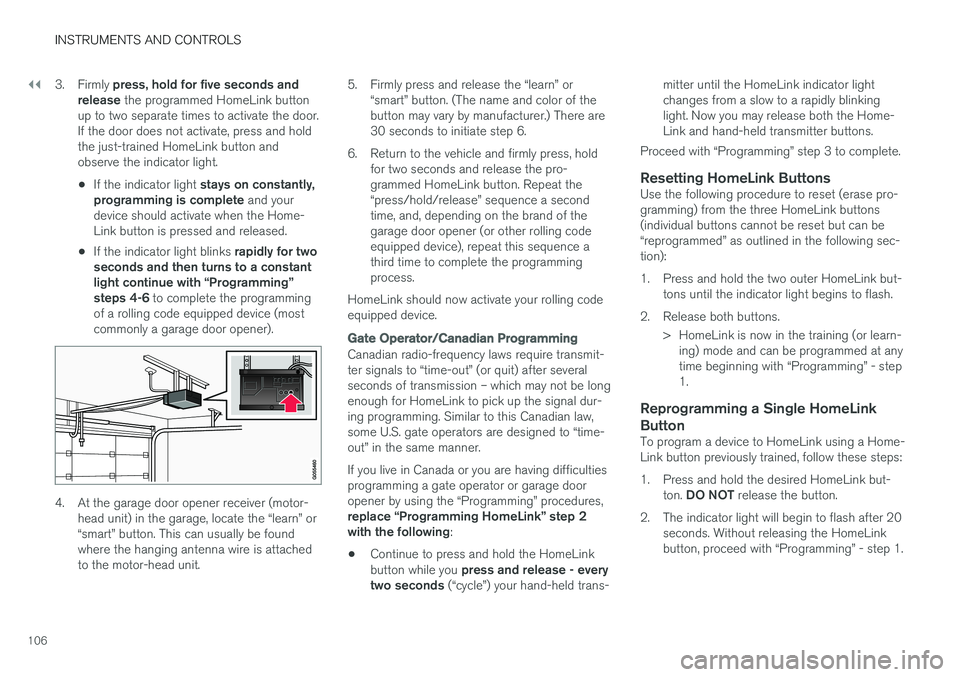
4. At the garage door opener receiver (motor- head unit) in the garage, locate the “learn” or “smart” button. This can usually be foundwhere the hanging antenna wire is attachedto the motor-head unit. 5. Firmly press and release the “learn” or
“smart” button. (The name and color of thebutton may vary by manufacturer.) There are30 seconds to initiate step 6.
6. Return to the vehicle and firmly press, hold for two seconds and release the pro-grammed HomeLink button. Repeat the“press/hold/release” sequence a secondtime, and, depending on the brand of thegarage door opener (or other rolling codeequipped device), repeat this sequence athird time to complete the programmingprocess.
HomeLink should now activate your rolling codeequipped device.
Gate Operator/Canadian Programming
Canadian radio-frequency laws require transmit- ter signals to “time-out” (or quit) after severalseconds of transmission – which may not be longenough for HomeLink to pick up the signal dur-ing programming. Similar to this Canadian law,some U.S. gate operators are designed to “time-out” in the same manner. If you live in Canada or you are having difficulties programming a gate operator or garage dooropener by using the “Programming” procedures, replace “Programming HomeLink” step 2 with the following :
• Continue to press and hold the HomeLink button while you
press and release - every
two seconds (“cycle”) your hand-held trans- mitter until the HomeLink indicator light changes from a slow to a rapidly blinkinglight. Now you may release both the Home-Link and hand-held transmitter buttons.
Proceed with “Programming” step 3 to complete.
Resetting HomeLink ButtonsUse the following procedure to reset (erase pro-gramming) from the three HomeLink buttons(individual buttons cannot be reset but can be“reprogrammed” as outlined in the following sec-tion):
1. Press and hold the two outer HomeLink but- tons until the indicator light begins to flash.
2. Release both buttons. > HomeLink is now in the training (or learn-ing) mode and can be programmed at any time beginning with “Programming” - step1.
Reprogramming a Single HomeLink Button
To program a device to HomeLink using a Home- Link button previously trained, follow these steps:
1. Press and hold the desired HomeLink but-
ton. DO NOT release the button.
2. The indicator light will begin to flash after 20 seconds. Without releasing the HomeLink button, proceed with “Programming” - step 1.
Page 118 of 398
||
INSTRUMENTS AND CONTROLS
116
FunctionDescription
Contrast mode/Color modeAdjust the instrument panel's contrast and color.
Service statusShows the number of months and mileage until the next scheduled service.
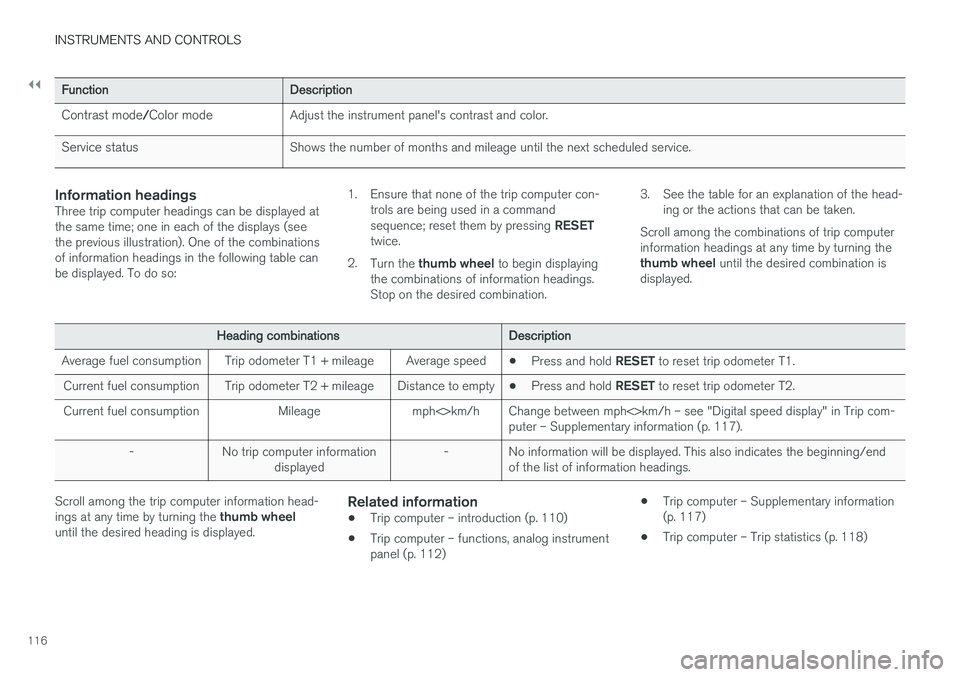
Information headingsThree trip computer headings can be displayed at the same time; one in each of the displays (seethe previous illustration). One of the combinationsof information headings in the following table canbe displayed. To do so: 1. Ensure that none of the trip computer con-
trols are being used in a command sequence; reset them by pressing RESET
twice.
2. Turn the thumb wheel to begin displaying
the combinations of information headings. Stop on the desired combination. 3. See the table for an explanation of the head-
ing or the actions that can be taken.
Scroll among the combinations of trip computerinformation headings at any time by turning the thumb wheel until the desired combination is
displayed.
Heading combinationsDescription
Average fuel consumptionTrip odometer T1 + mileageAverage speed• Press and hold
RESET to reset trip odometer T1.
Current fuel consumptionTrip odometer T2 + mileageDistance to empty•Press and hold
RESET to reset trip odometer T2.
Current fuel consumptionMileagemph<>km/hChange between mph<>km/h – see "Digital speed display" in Trip com- puter – Supplementary information (p. 117).
-No trip computer information
displayed-No information will be displayed. This also indicates the beginning/end of the list of information headings.
Scroll among the trip computer information head- ings at any time by turning the thumb wheel
until the desired heading is displayed.Related information
• Trip computer – introduction (p. 110)
• Trip computer – functions, analog instrument panel (p. 112) •
Trip computer – Supplementary information(p. 117)
• Trip computer – Trip statistics (p. 118)
Page 119 of 398
INSTRUMENTS AND CONTROLS
* Option/accessory, for more information, see Introduction.117
Trip computer – Supplementary information
General information for both Analog and Digital trip computer functions.
Average fuel consumptionFuel consumption since the last time this func- tion was reset.
Average speedThe vehicle's average speed since the last timethis function was reset.
Current fuel consumptionCurrent fuel consumption is calculated approxi-mately once a second. When the vehicle is mov-ing at low speed, fuel consumption is displayedper unit of time. At higher speeds, it is displayedin terms of distance. Miles or kilometers can be displayed, see the heading "Changing units".
Distance to emptyThis function shows the approximate distancethat can be driven on the fuel remaining in the tank. When
Distance to empty shows "----",
there is very little useable fuel remaining in that tank; refuel as soon as possible. The calculationis based on average fuel consumption during thelast 20 miles (30 km) of driving and the amountof fuel remaining in the tank (the accuracy of thisfigure may vary if your driving style changes). An economical driving style will generally increasethis distance. See Economical driving (p. 284) for information about driving economically.
Digital speed display
*Speed is expressed in the unit not used by theinstrument panel's speedometer e.g., if the nor-mal speedometer is in mph, the trip computer willdisplay in the speed in km/h and vice versa.
Resetting an analog instrument panel
Trip odometer(s) and average speed
1. Display trip odometer T1 or T1, or Average
speed.
2. Press and hold RESET until selected func-
tion is reset.
Each trip computer heading must be reset indi- vidually.
Resetting a digital instrument panel
Trip odometer
1. Turn the thumb wheel to select the combi-
nation of headings containing the trip odom- eter to be reset.
2. Press and hold RESET until selected trip
odometer is reset.
Average speed and fuel consumption
1. Select Trip computer reset and press OK. 2. Select one of the following alternatives using
the thumb wheel and press OK:
• mpg
• mph
• Reset both
3. Finish by pressing RESET.
Changing unitsTo change the unit (miles/km) used to measure distance and speed, go to
MY CARSettings
System optionsDistance and fuel units.
NOTE
In addition to changing units in the trip com- puter, this also changes the units used in the Volvo Navigation System (VNS) *.
Related information
• Trip computer – introduction (p. 110)
• Trip computer – functions, analog instrument panel (p. 112)
• Trip computer – functions, digital instrumentpanel (p. 115)
• Trip computer – Trip statistics (p. 118)
Page 125 of 398
CLIMATE
}}
123
Climate – menu settings
The default settings for four of the climate sys-
tem's (p. 120) functions can be changed in themenu system.
• Blower speed (p. 127) in automatic mode (p. 127).
• Recirculation timer (p. 130) for passengercompartment air.
• Automatic rear window defrosting (p. 100).
• The optional Interior Air Quality Sys-tem (p. 122) (IAQS).
The functions can also be returned to factory set-tings in the menu system. See My Car – introduction (p. 71) for a descrip- tion of the menu system.
Related information
• Electronic climate control (ECC) (p. 125)
Air distribution – general
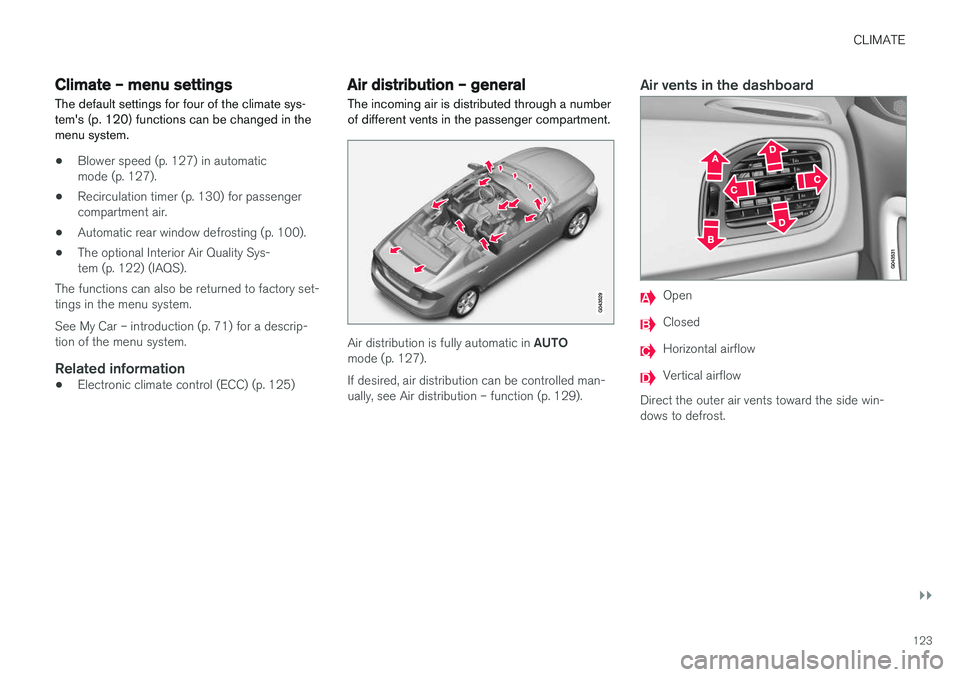
The incoming air is distributed through a number of different vents in the passenger compartment.
Air distribution is fully automatic in AUTO
mode (p. 127). If desired, air distribution can be controlled man- ually, see Air distribution – function (p. 129).
Air vents in the dashboard
Open
Closed
Horizontal airflow
Vertical airflow
Direct the outer air vents toward the side win- dows to defrost.