brake VOLVO S60 INSCRIPTION 2018 Owner´s Manual
[x] Cancel search | Manufacturer: VOLVO, Model Year: 2018, Model line: S60 INSCRIPTION, Model: VOLVO S60 INSCRIPTION 2018Pages: 396, PDF Size: 9.39 MB
Page 69 of 396
INSTRUMENTS AND CONTROLS
}}
* Option/accessory.67
Utilized power
The larger, lower indicator shows the amount of engine power that has been utilized 2
. The higher
the reading on the scale, the greater the amount of power that is being utilized. The larger the gap between the two indicators, the greater the amount of power remaining.Information displays – indicator symbols
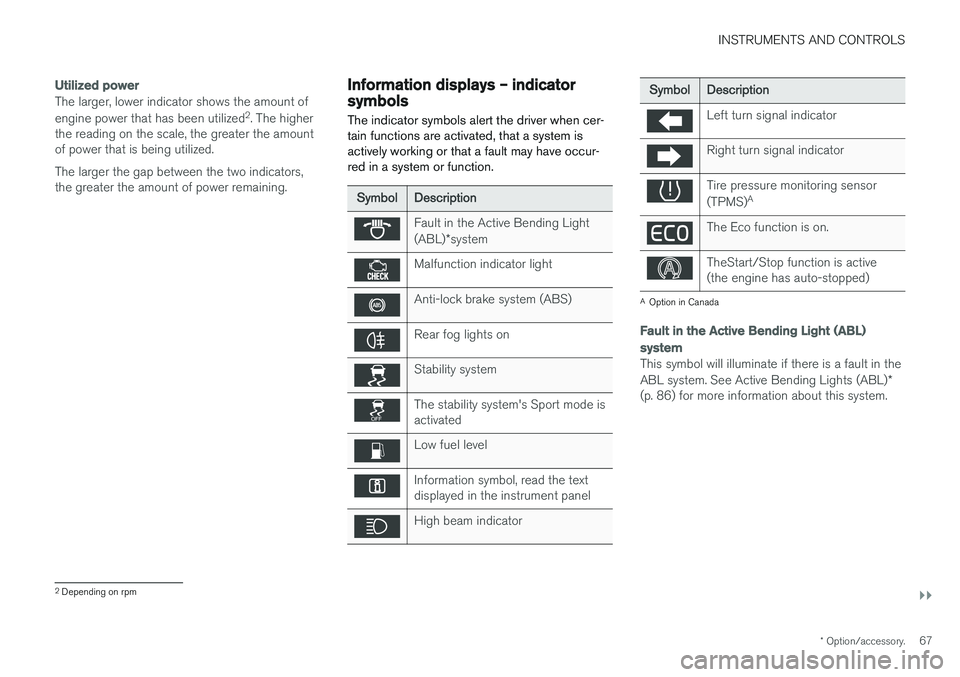
The indicator symbols alert the driver when cer- tain functions are activated, that a system isactively working or that a fault may have occur-red in a system or function.
Symbol Description
Fault in the Active Bending Light (ABL)*system
Malfunction indicator light
Anti-lock brake system (ABS)
Rear fog lights on
Stability system
The stability system's Sport mode is activated
Low fuel level
Information symbol, read the text displayed in the instrument panel
High beam indicator
Symbol Description
Left turn signal indicator
Right turn signal indicator
Tire pressure monitoring sensor (TPMS)A
The Eco function is on.
TheStart/Stop function is active (the engine has auto-stopped)
A
Option in Canada
Fault in the Active Bending Light (ABL)
system
This symbol will illuminate if there is a fault in the ABL system. See Active Bending Lights (ABL) *
(p. 86) for more information about this system.
2 Depending on rpm
Page 70 of 396
||
INSTRUMENTS AND CONTROLS
* Option/accessory.
68
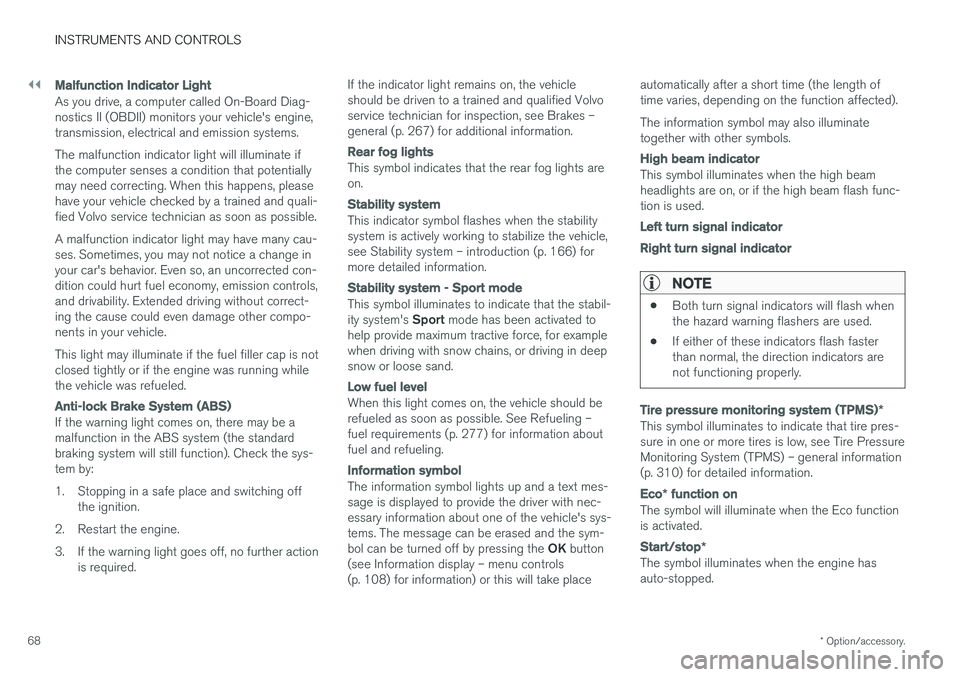
Malfunction Indicator Light
As you drive, a computer called On-Board Diag- nostics II (OBDII) monitors your vehicle's engine,transmission, electrical and emission systems. The malfunction indicator light will illuminate if the computer senses a condition that potentiallymay need correcting. When this happens, pleasehave your vehicle checked by a trained and quali-fied Volvo service technician as soon as possible. A malfunction indicator light may have many cau- ses. Sometimes, you may not notice a change inyour car's behavior. Even so, an uncorrected con-dition could hurt fuel economy, emission controls,and drivability. Extended driving without correct-ing the cause could even damage other compo-nents in your vehicle. This light may illuminate if the fuel filler cap is not closed tightly or if the engine was running whilethe vehicle was refueled.
Anti-lock Brake System (ABS)
If the warning light comes on, there may be a malfunction in the ABS system (the standardbraking system will still function). Check the sys-tem by:
1. Stopping in a safe place and switching off
the ignition.
2. Restart the engine.
3. If the warning light goes off, no further action is required. If the indicator light remains on, the vehicle should be driven to a trained and qualified Volvoservice technician for inspection, see Brakes –general (p. 267) for additional information.
Rear fog lights
This symbol indicates that the rear fog lights are on.
Stability system
This indicator symbol flashes when the stability system is actively working to stabilize the vehicle,see Stability system – introduction (p. 166) formore detailed information.
Stability system - Sport mode
This symbol illuminates to indicate that the stabil- ity system's
Sport mode has been activated to
help provide maximum tractive force, for example when driving with snow chains, or driving in deepsnow or loose sand.
Low fuel level
When this light comes on, the vehicle should be refueled as soon as possible. See Refueling –fuel requirements (p. 277) for information aboutfuel and refueling.
Information symbol
The information symbol lights up and a text mes- sage is displayed to provide the driver with nec-essary information about one of the vehicle's sys-tems. The message can be erased and the sym- bol can be turned off by pressing the OK button
(see Information display – menu controls (p. 108) for information) or this will take place automatically after a short time (the length oftime varies, depending on the function affected). The information symbol may also illuminate together with other symbols.
High beam indicator
This symbol illuminates when the high beam headlights are on, or if the high beam flash func-tion is used.
Left turn signal indicator Right turn signal indicator
NOTE
•
Both turn signal indicators will flash when the hazard warning flashers are used.
• If either of these indicators flash fasterthan normal, the direction indicators arenot functioning properly.
Tire pressure monitoring system (TPMS)
*
This symbol illuminates to indicate that tire pres- sure in one or more tires is low, see Tire PressureMonitoring System (TPMS) – general information(p. 310) for detailed information.
Eco* function on
The symbol will illuminate when the Eco function is activated.
Start/stop *
The symbol illuminates when the engine has auto-stopped.
Page 71 of 396
INSTRUMENTS AND CONTROLS
}}
69
Related information
•Information displays – introduction (p. 63)
• Information displays – warning symbols (p. 69)
Information displays – warning symbols
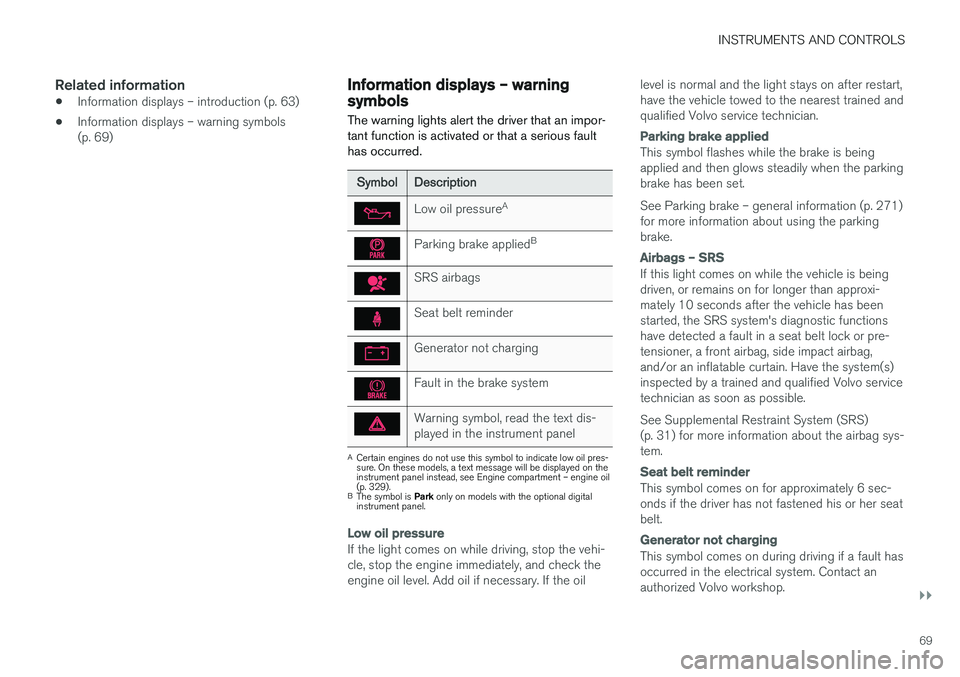
The warning lights alert the driver that an impor- tant function is activated or that a serious faulthas occurred.
Symbol Description
Low oil pressure A
Parking brake applied B
SRS airbags
Seat belt reminder
Generator not charging
Fault in the brake system
Warning symbol, read the text dis- played in the instrument panel
A
Certain engines do not use this symbol to indicate low oil pres- sure. On these models, a text message will be displayed on theinstrument panel instead, see Engine compartment – engine oil(p. 329).
B The symbol is Park only on models with the optional digital
instrument panel.
Low oil pressure
If the light comes on while driving, stop the vehi- cle, stop the engine immediately, and check theengine oil level. Add oil if necessary. If the oil level is normal and the light stays on after restart,have the vehicle towed to the nearest trained andqualified Volvo service technician.
Parking brake applied
This symbol flashes while the brake is being applied and then glows steadily when the parkingbrake has been set. See Parking brake – general information (p. 271) for more information about using the parkingbrake.
Airbags – SRS
If this light comes on while the vehicle is being driven, or remains on for longer than approxi-mately 10 seconds after the vehicle has beenstarted, the SRS system's diagnostic functionshave detected a fault in a seat belt lock or pre-tensioner, a front airbag, side impact airbag,and/or an inflatable curtain. Have the system(s)inspected by a trained and qualified Volvo servicetechnician as soon as possible. See Supplemental Restraint System (SRS) (p. 31) for more information about the airbag sys-tem.
Seat belt reminder
This symbol comes on for approximately 6 sec- onds if the driver has not fastened his or her seatbelt.
Generator not charging
This symbol comes on during driving if a fault has occurred in the electrical system. Contact anauthorized Volvo workshop.
Page 72 of 396
||
INSTRUMENTS AND CONTROLS
70
Engine temperature
Engine overheating can result from low oil or coolant levels, towing or hard driving at high heatand altitude, or mechanical malfunction. Engineoverheating will be signaled with text and a redwarning triangle in the middle of the instrumentdisplay. The exact text will depend on the degree of overheating. It may range from
High engine
temp Reduce speed to High engine temp
Stop engine. If appropriate, other messages,
such as Coolant level low, Stop safely will
also be displayed. If your engine does overheat so that you must stop the engine, always allowthe engine to cool before attempting to check oiland coolant levels. See Engine compartment – coolant (p. 332) for more information.
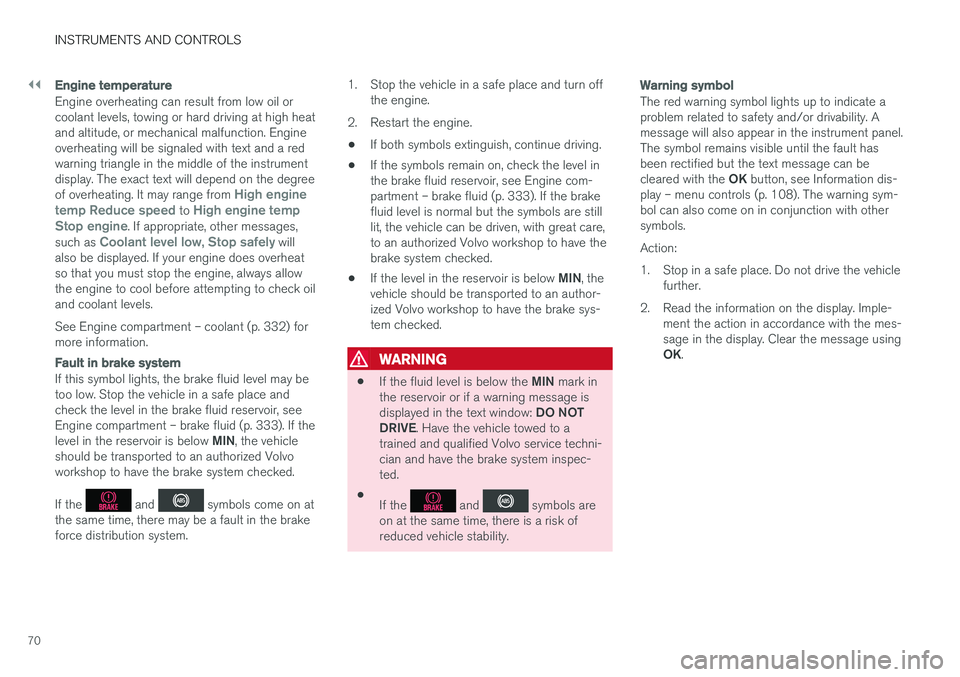
Fault in brake system
If this symbol lights, the brake fluid level may be too low. Stop the vehicle in a safe place andcheck the level in the brake fluid reservoir, seeEngine compartment – brake fluid (p. 333). If the level in the reservoir is below MIN, the vehicle
should be transported to an authorized Volvo workshop to have the brake system checked. If the
and symbols come on at
the same time, there may be a fault in the brake force distribution system. 1. Stop the vehicle in a safe place and turn off
the engine.
2. Restart the engine.
• If both symbols extinguish, continue driving.
• If the symbols remain on, check the level inthe brake fluid reservoir, see Engine com-partment – brake fluid (p. 333). If the brakefluid level is normal but the symbols are stilllit, the vehicle can be driven, with great care,to an authorized Volvo workshop to have thebrake system checked.
• If the level in the reservoir is below
MIN, the
vehicle should be transported to an author-ized Volvo workshop to have the brake sys-tem checked.
WARNING
• If the fluid level is below the
MIN mark in
the reservoir or if a warning message is displayed in the text window: DO NOT
DRIVE . Have the vehicle towed to a
trained and qualified Volvo service techni- cian and have the brake system inspec-ted.
• If the
and symbols are
on at the same time, there is a risk of reduced vehicle stability.
Warning symbol
The red warning symbol lights up to indicate a problem related to safety and/or drivability. Amessage will also appear in the instrument panel.The symbol remains visible until the fault hasbeen rectified but the text message can be cleared with the OK button, see Information dis-
play – menu controls (p. 108). The warning sym- bol can also come on in conjunction with othersymbols. Action:
1. Stop in a safe place. Do not drive the vehicle further.
2. Read the information on the display. Imple- ment the action in accordance with the mes- sage in the display. Clear the message using OK.
Page 76 of 396
||
INSTRUMENTS AND CONTROLS
* Option/accessory.
74
CAUTION
Foreign objects in the ignition slot can impair function or cause damage.
Removing the remote keyThe remote key can be removed from the ignition slot by pulling it out.
Related information
• Ignition modes (p. 74)
Ignition modes
The vehicle's ignition has 3 modes: 0, I, and II
that can be used without starting the engine. The following table shows examples of whichfunctions are available in the respective modes.
NOTE
To access ignition modes I or II without star-
ting the engine, the brake pedal must not be
depressed.
Mode Function
0 The odometer, clock and temperature gauge are illuminated. Power seats
*
can be adjusted and the infotainment system can be used for a limited time(to minimize battery drain, see theSensus Infotainment Supplement).
I The Moonroof *, power windows,12-
volt sockets in the passenger com- partment, navigation system *, climate
system blower, windshield wipers can be used.
II The headlights/taillights illuminate.Warning/indicator lights illuminate for5 seconds. Other systems are acti- vated. However, the heated seats
* and
heated rear window function can only be activated when the engine is run- ning. Mode II should only be used
for very short periods to help avoid draining the battery.
Ignition modes
Ignition mode 0
–The vehicle is unlocked.
Page 77 of 396
INSTRUMENTS AND CONTROLS
* Option/accessory.75
Ignition mode I
–With the remote key fully pressed into the ignition slot8
, press START/STOP ENGINE
briefly.
Ignition mode II
–With the remote key fully pressed into the ignition slot 8
, press START/STOP ENGINE
for approximately 2 seconds.
Returning to mode 0
To return to mode 0 from mode II or I, press
START/STOP ENGINE briefly.
Starting and stopping the engineSee Starting the engine (p. 250) and Switching off the engine (p. 252) for information on star-ting the engine and switching it off.
Emergency towingSee Towing the vehicle (p. 286) for importantinformation about the remote key when the vehi-cle is being towed.
Related information
•Inserting/removing remote key (p. 73)
Front seats
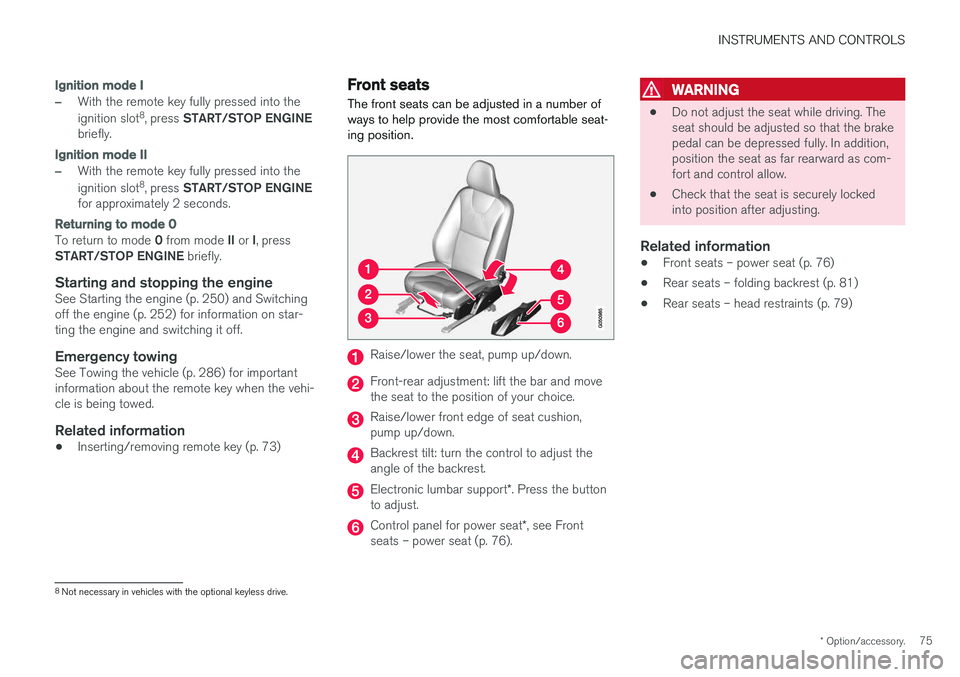
The front seats can be adjusted in a number of ways to help provide the most comfortable seat-ing position.
Raise/lower the seat, pump up/down.
Front-rear adjustment: lift the bar and move the seat to the position of your choice.
Raise/lower front edge of seat cushion, pump up/down.
Backrest tilt: turn the control to adjust the angle of the backrest.
Electronic lumbar support *. Press the button
to adjust.
Control panel for power seat *, see Front
seats – power seat (p. 76).
WARNING
• Do not adjust the seat while driving. The seat should be adjusted so that the brakepedal can be depressed fully. In addition,position the seat as far rearward as com-fort and control allow.
• Check that the seat is securely lockedinto position after adjusting.
Related information
• Front seats – power seat (p. 76)
• Rear seats – folding backrest (p. 81)
• Rear seats – head restraints (p. 79)
8
Not necessary in vehicles with the optional keyless drive.
Page 81 of 396
INSTRUMENTS AND CONTROLS
}}
79
Returning the seat/mirrors to the stored positions
To move the seat and door mirrors to the position stored in the remote key: 1.Unlock the driver's door with the same
remote key (the one used to lock the doors). For models equipped with the optional key-less drive, you must have the same remotekey in your possession.
2. Open the driver's door within 2 minutes. The driver's seat and door mirrors will automati- cally move to the position in which you left them(if the vehicle has been unlocked with one of theother keys and new seat/mirror adjustments havebeen made).
NOTE
• The seat will move to this position even if someone else has moved it to a different position and locked the vehicle with a
dif-
ferent remote key.
• This feature will work in the same way with all of the remote keys that you usewith your vehicle.
Emergency stop
WARNING
•
Because the driver's seat can be adjusted with the ignition off, children should neverbe left unattended in the vehicle.
• Movement of the seat can be STOPPEDat any time by pressing any button on thepower seat control panel.
• Do not adjust the seat while driving. Theseat should be adjusted so that the brakepedal can be depressed fully. In addition,position the seat as far rearward as com-fort and control allow.
• The seat rails on the floor must not beobstructed in any way when the seat is inmotion.
Related information
• Remote key – functions (p. 147)
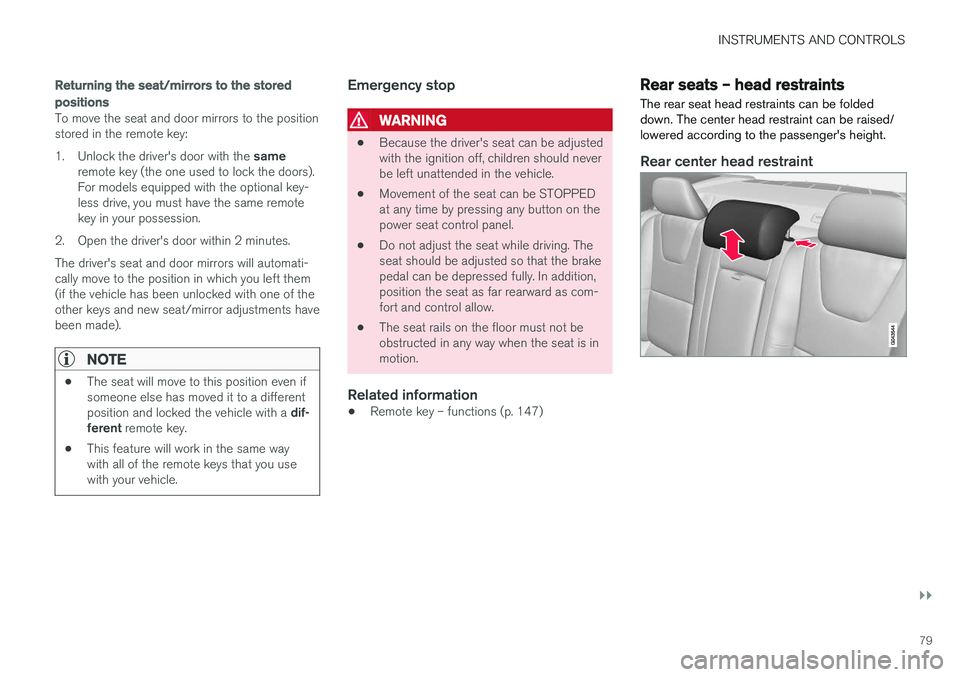
Rear seats – head restraints The rear seat head restraints can be folded down. The center head restraint can be raised/lowered according to the passenger's height.
Rear center head restraint
Page 140 of 396
LOADING AND STORAGE
138
Loading – general
The load carrying capacity of your vehicle is determined by factors such as the number ofpassengers, the amount of cargo, the weight ofany accessories that may be installed, etc.
To increase loading space, the rear seat back- rests can be folded down, see Rear seats – fold-
ing backrest (p. 81).
When loading the trunk, keep the following in
mind:
The trunk lid can be unlocked an pop-ped open slightly via the button locatedon the lighting panel, see Locking/
unlocking – trunk (p. 160).
• Load objects in the trunk against the back- rest whenever possible.
• Unstable loads can be secured to the loadanchoring eyelets with straps or web lash-ings to help keep them from shifting.
• Stop the engine and apply the parking brakewhen loading or unloading long objects. Thegear selector can be knocked out of positionby long loads, which could set the vehicle inmotion.
WARNING
• Stop the engine, put the gear selector in P
, and apply the parking brake when
loading or unloading long objects.
• The vehicle's driving characteristics may change depending on the weight and dis-tribution of the load.
• A 44-pound (20 kg) object produces aforce of 2,200 pounds (1,000 kg) in ahead-on collision at 30 mph (50 km/h).
• The rear seat should not be loaded to alevel higher than 2 in. (5 cm) below theupper edge of the rear side windows.Objects placed higher than this levelcould impede the function of the VolvoInflatable Curtain.
Related information
• Load anchoring eyelets (p. 140)
• Loading – roof load carriers (p. 139)
Ski hatch
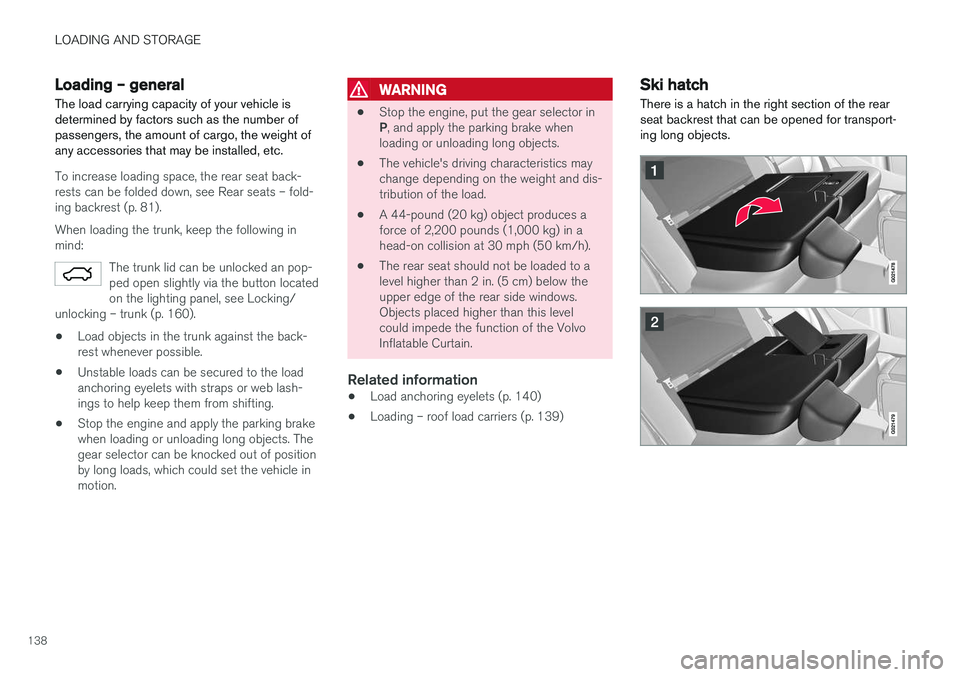
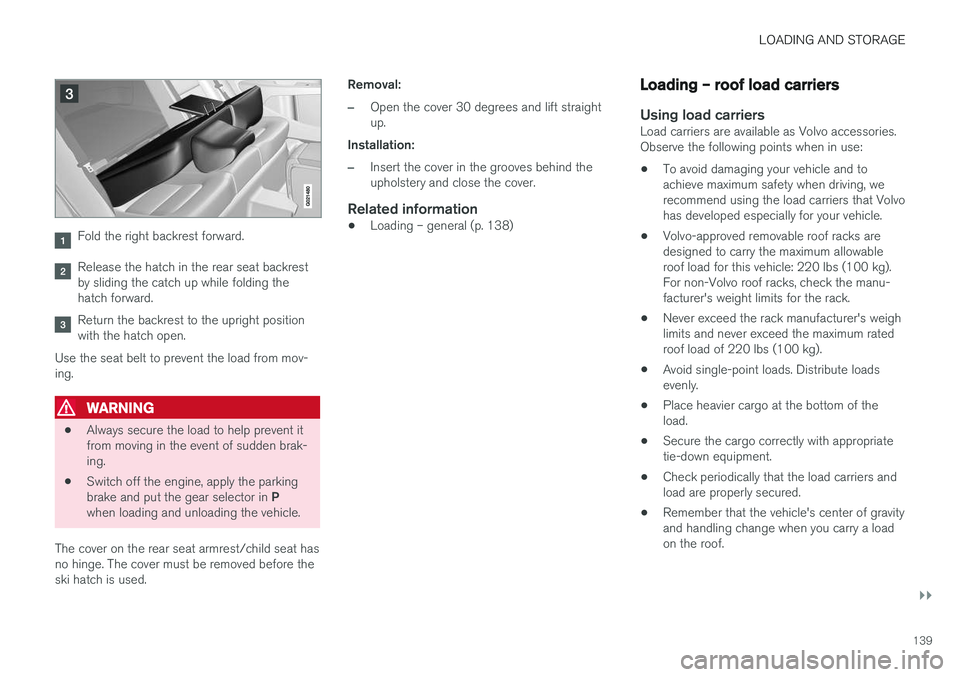
There is a hatch in the right section of the rear seat backrest that can be opened for transport-ing long objects.
Page 141 of 396
LOADING AND STORAGE
}}
139
Fold the right backrest forward.
Release the hatch in the rear seat backrest by sliding the catch up while folding thehatch forward.
Return the backrest to the upright position with the hatch open.
Use the seat belt to prevent the load from mov-ing.
WARNING
• Always secure the load to help prevent it from moving in the event of sudden brak-ing.
• Switch off the engine, apply the parking brake and put the gear selector in
P
when loading and unloading the vehicle.
The cover on the rear seat armrest/child seat has no hinge. The cover must be removed before theski hatch is used. Removal:
–Open the cover 30 degrees and lift straight up.
Installation:
–Insert the cover in the grooves behind the upholstery and close the cover.
Related information
• Loading – general (p. 138)
Loading – roof load carriers
Using load carriersLoad carriers are available as Volvo accessories. Observe the following points when in use:
• To avoid damaging your vehicle and toachieve maximum safety when driving, werecommend using the load carriers that Volvohas developed especially for your vehicle.
• Volvo-approved removable roof racks aredesigned to carry the maximum allowableroof load for this vehicle: 220 lbs (100 kg).For non-Volvo roof racks, check the manu-facturer's weight limits for the rack.
• Never exceed the rack manufacturer's weighlimits and never exceed the maximum ratedroof load of 220 lbs (100 kg).
• Avoid single-point loads. Distribute loadsevenly.
• Place heavier cargo at the bottom of theload.
• Secure the cargo correctly with appropriatetie-down equipment.
• Check periodically that the load carriers andload are properly secured.
• Remember that the vehicle's center of gravityand handling change when you carry a loadon the roof.
Page 142 of 396
||
LOADING AND STORAGE
140•
The vehicle's wind resistance and fuel con- sumption will increase with the size of theload.
• Drive smoothly. Avoid rapid starts, fast cor-nering and hard braking.
Related information
• Loading – general (p. 138)
• Load anchoring eyelets (p. 140)
Load anchoring eyelets
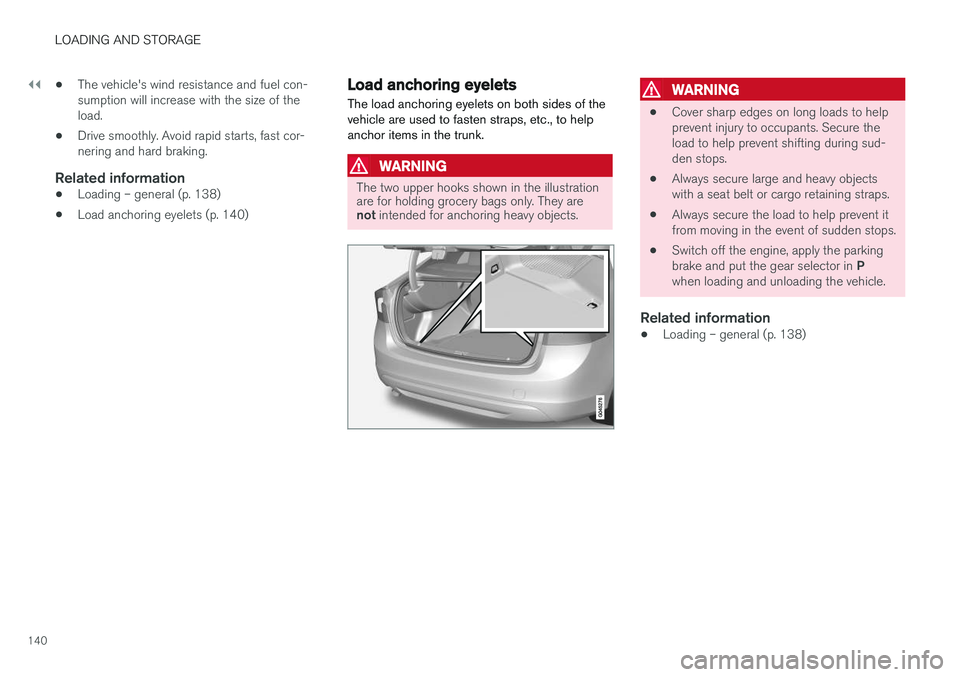
The load anchoring eyelets on both sides of the vehicle are used to fasten straps, etc., to helpanchor items in the trunk.
WARNING
The two upper hooks shown in the illustration are for holding grocery bags only. They are not intended for anchoring heavy objects.
WARNING
• Cover sharp edges on long loads to help prevent injury to occupants. Secure theload to help prevent shifting during sud-den stops.
• Always secure large and heavy objectswith a seat belt or cargo retaining straps.
• Always secure the load to help prevent itfrom moving in the event of sudden stops.
• Switch off the engine, apply the parking brake and put the gear selector in
P
when loading and unloading the vehicle.
Related information
• Loading – general (p. 138)