light VOLVO S60 INSCRIPTION 2018 Owner´s Manual
[x] Cancel search | Manufacturer: VOLVO, Model Year: 2018, Model line: S60 INSCRIPTION, Model: VOLVO S60 INSCRIPTION 2018Pages: 396, PDF Size: 9.39 MB
Page 34 of 396
||
SAFETY
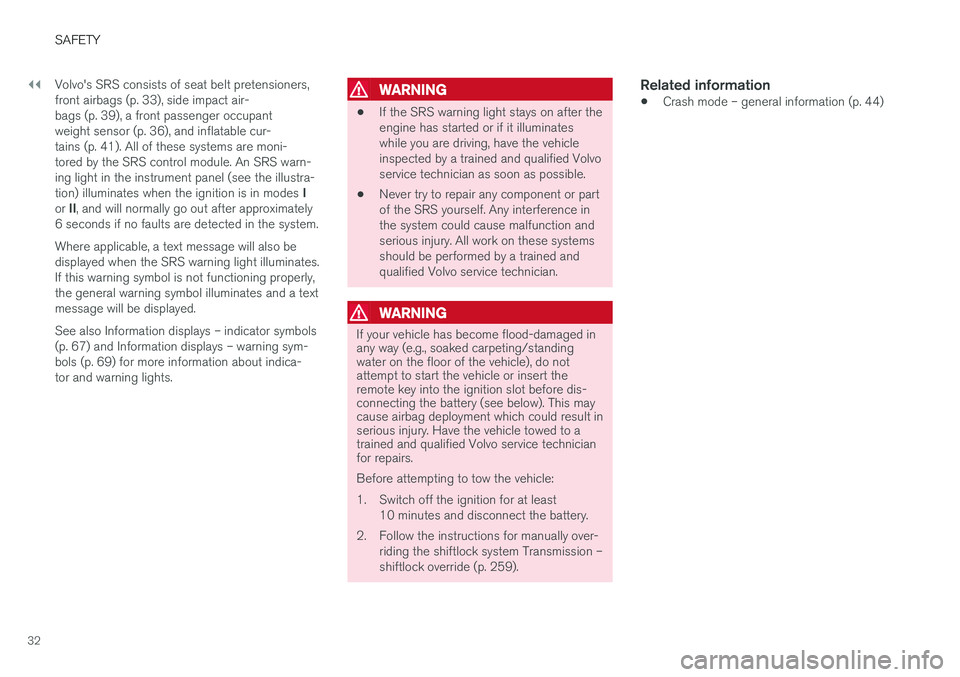
32Volvo's SRS consists of seat belt pretensioners, front airbags (p. 33), side impact air-bags (p. 39), a front passenger occupantweight sensor (p. 36), and inflatable cur-tains (p. 41). All of these systems are moni-tored by the SRS control module. An SRS warn-ing light in the instrument panel (see the illustra- tion) illuminates when the ignition is in modes
I
or II, and will normally go out after approximately
6 seconds if no faults are detected in the system. Where applicable, a text message will also be displayed when the SRS warning light illuminates.If this warning symbol is not functioning properly,the general warning symbol illuminates and a textmessage will be displayed. See also Information displays – indicator symbols (p. 67) and Information displays – warning sym-bols (p. 69) for more information about indica-tor and warning lights.
WARNING
• If the SRS warning light stays on after the engine has started or if it illuminateswhile you are driving, have the vehicleinspected by a trained and qualified Volvoservice technician as soon as possible.
• Never try to repair any component or partof the SRS yourself. Any interference inthe system could cause malfunction andserious injury. All work on these systemsshould be performed by a trained andqualified Volvo service technician.
WARNING
If your vehicle has become flood-damaged in any way (e.g., soaked carpeting/standingwater on the floor of the vehicle), do notattempt to start the vehicle or insert theremote key into the ignition slot before dis-connecting the battery (see below). This maycause airbag deployment which could result inserious injury. Have the vehicle towed to atrained and qualified Volvo service technicianfor repairs. Before attempting to tow the vehicle:
1. Switch off the ignition for at least
10 minutes and disconnect the battery.
2. Follow the instructions for manually over- riding the shiftlock system Transmission – shiftlock override (p. 259).
Related information
•Crash mode – general information (p. 44)
Page 38 of 396
||
SAFETY
36
WARNING
•No objects or accessory equipment, e.g. dashboard covers, may be placed on,attached to, or installed near the air baghatch (the area above the glove compart-ment) or the area affected by airbagdeployment.
• There should be no loose articles, suchas coffee cups on the floor, seat, or dash-board area.
• Never try to open the airbag cover on thesteering wheel or the passenger's sidedashboard. This should only be done by atrained and qualified Volvo service techni-cian.
• Failure to follow these instructions canresult in injury to the vehicle occupants.
Related information
• Occupant Weight Sensor (p. 36)
• Side impact protection (SIPS) airbags(p. 39)
• Inflatable Curtain (IC) (p. 41)
• Supplemental Restraint System (SRS)(p. 31)
Occupant Weight Sensor
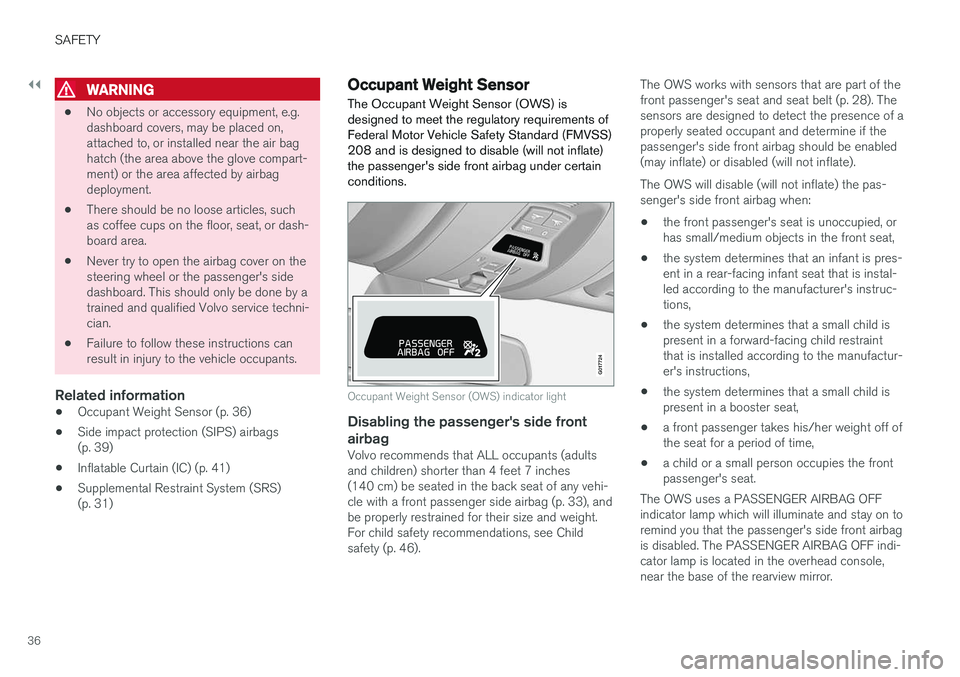
The Occupant Weight Sensor (OWS) is designed to meet the regulatory requirements ofFederal Motor Vehicle Safety Standard (FMVSS)208 and is designed to disable (will not inflate)the passenger's side front airbag under certainconditions.
2
2
G017724
Occupant Weight Sensor (OWS) indicator light
Disabling the passenger's side frontairbag
Volvo recommends that ALL occupants (adults and children) shorter than 4 feet 7 inches(140 cm) be seated in the back seat of any vehi-cle with a front passenger side airbag (p. 33), andbe properly restrained for their size and weight.For child safety recommendations, see Childsafety (p. 46). The OWS works with sensors that are part of thefront passenger's seat and seat belt (p. 28). Thesensors are designed to detect the presence of aproperly seated occupant and determine if thepassenger's side front airbag should be enabled(may inflate) or disabled (will not inflate). The OWS will disable (will not inflate) the pas- senger's side front airbag when:
• the front passenger's seat is unoccupied, orhas small/medium objects in the front seat,
• the system determines that an infant is pres-ent in a rear-facing infant seat that is instal-led according to the manufacturer's instruc-tions,
• the system determines that a small child ispresent in a forward-facing child restraintthat is installed according to the manufactur-er's instructions,
• the system determines that a small child ispresent in a booster seat,
• a front passenger takes his/her weight off ofthe seat for a period of time,
• a child or a small person occupies the frontpassenger's seat.
The OWS uses a PASSENGER AIRBAG OFFindicator lamp which will illuminate and stay on toremind you that the passenger's side front airbagis disabled. The PASSENGER AIRBAG OFF indi-cator lamp is located in the overhead console,near the base of the rearview mirror.
Page 39 of 396
SAFETY
}}
37
NOTE
When the ignition is switched on, the OWS indicator light will illuminate for several sec-onds while the system performs a self-diag-nostic test.
However, if a fault is detected in the system:
• The OWS indicator light will stay on
• The SRS warning light (p. 31) will come on and stay on
• The message
Pass. Airbag OFF Service
urgent will be displayed in the information
display.
WARNING
If a fault in the system is detected and indi- cated as described, be aware that the pas-senger's side front airbag will not deploy inthe event of a collision. In this case, the SRSsystem and Occupant Weight Sensor shouldbe inspected by a trained and qualified Volvoservice technician as soon as possible.
WARNING
• Never try to open, remove, or repair any components in the OWS system. Thiscould result in system malfunction. Main-tenance or repairs should only be carriedout by an a trained and qualified Volvoservice technician.
• The front passenger's seat should not bemodified in any way. This could reducepressure on the seat cushion, whichmight interfere with the OWS system'sfunction.
Passenger's seat occu-pancy status OWS indi-cator lightstatusPassenger'sside front air-bag status
Seat unoccu- pied OWS indi-cator lightlights up.Passenger'sside front air-bag disabled
Seat occu-pied by lowweight occu- pant/object AOWS indi-
cator light lights up Passenger'sside front air-
bag disabled
Seat occu-pied by heavyoccupant/object OWS indi-cator light is
not lit Passenger'sside front air-bag enabled
A
Volvo recommends that children always be properly restrained in appropriate child restraints in the rear seats. Do not assumethat the passenger's side front airbag is disabled unless thePASSENGER AIRBAG OFF indicator lamp is lit. Make sure thechild restraint is properly installed. If there is any doubt as to thestatus of the passenger's side front airbag, move the childrestraint to the rear seat.
The OWS is designed to enable (may inflate) the passenger's side front airbag in the event of acollision anytime the system senses that a per-son of adult size is sitting properly in the frontpassenger's seat. The PASSENGER AIRBAGOFF indicator lamp will be off and remain off. If a person of adult size is sitting in the front pas- senger's seat, but the PASSENGER AIRBAGOFF indicator lamp is on, it is possible that the
Page 44 of 396
||
SAFETY
42
Related information
•Supplemental Restraint System (SRS) (p. 31)
• Front airbags (p. 33)
• Child safety (p. 46)
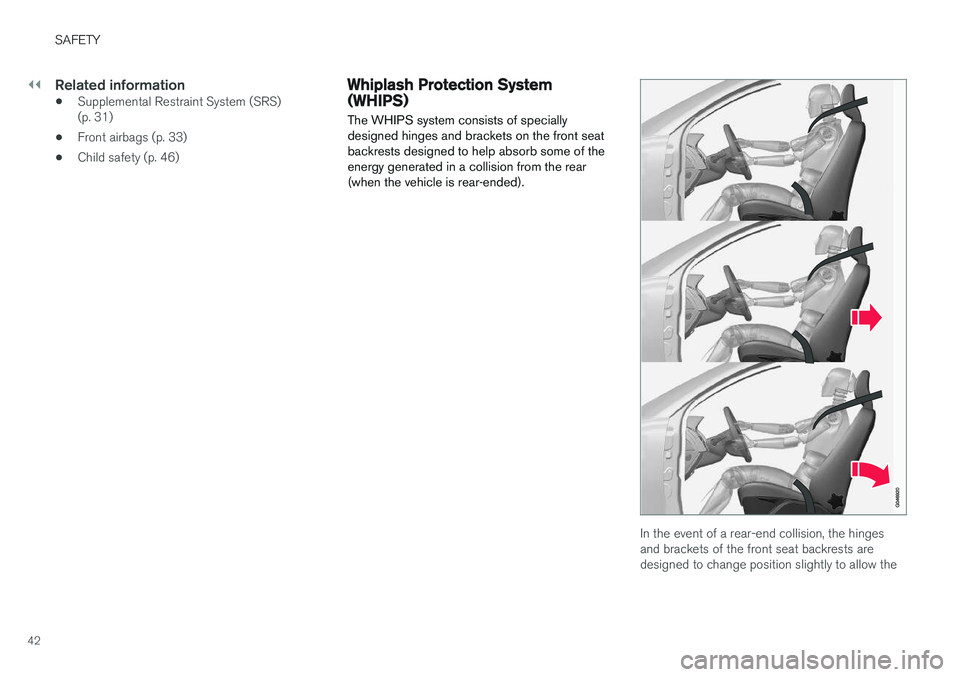
Whiplash Protection System (WHIPS) The WHIPS system consists of specially designed hinges and brackets on the front seatbackrests designed to help absorb some of theenergy generated in a collision from the rear(when the vehicle is rear-ended).
In the event of a rear-end collision, the hinges and brackets of the front seat backrests aredesigned to change position slightly to allow the
Page 45 of 396
SAFETY
}}
43
backrest/head restraint to help support the occu- pant's head before moving slightly rearward. Thismovement helps absorb some of the forces thatcould result in whiplash.
WARNING
•
The WHIPS system is designed to sup- plement the other safety systems in yourvehicle. For this system to function prop-erly, the three-point seat belt must beworn. Please be aware that no systemcan prevent all possible injuries that mayoccur in an accident.
• The WHIPS system is designed to func-tion in certain collisions from the rear,depending on the crash severity, angleand speed.
WARNING
•
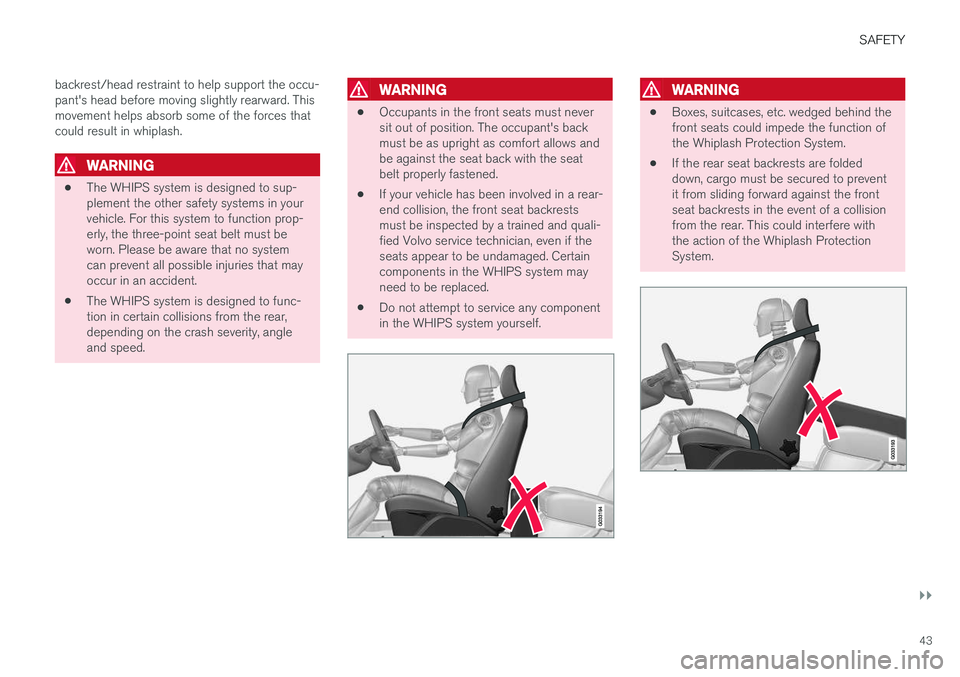
Occupants in the front seats must never sit out of position. The occupant's backmust be as upright as comfort allows andbe against the seat back with the seatbelt properly fastened.
• If your vehicle has been involved in a rear-end collision, the front seat backrestsmust be inspected by a trained and quali-fied Volvo service technician, even if theseats appear to be undamaged. Certaincomponents in the WHIPS system mayneed to be replaced.
• Do not attempt to service any componentin the WHIPS system yourself.
WARNING
•Boxes, suitcases, etc. wedged behind the front seats could impede the function ofthe Whiplash Protection System.
• If the rear seat backrests are foldeddown, cargo must be secured to preventit from sliding forward against the frontseat backrests in the event of a collisionfrom the rear. This could interfere withthe action of the Whiplash ProtectionSystem.
Page 64 of 396
||
INSTRUMENTS AND CONTROLS
* Option/accessory.
62
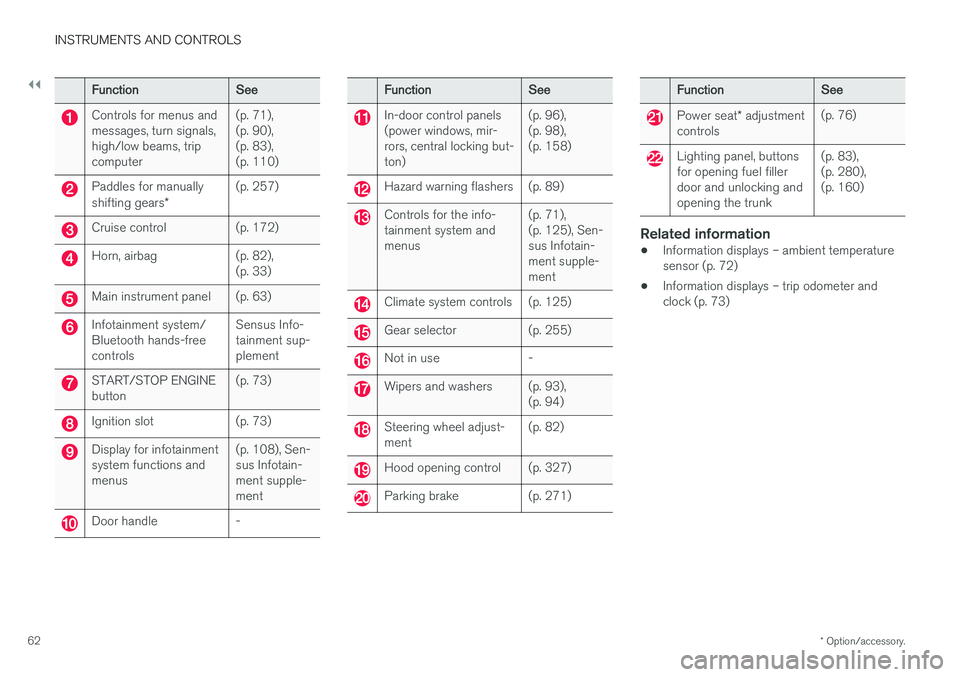
Function See
Controls for menus and messages, turn signals,high/low beams, tripcomputer(p. 71),(p. 90),(p. 83),(p. 110)
Paddles for manually shifting gears
*(p. 257)
Cruise control (p. 172)
Horn, airbag (p. 82),
(p. 33)
Main instrument panel (p. 63)
Infotainment system/ Bluetooth hands-freecontrolsSensus Info-tainment sup-plement
START/STOP ENGINE button
(p. 73)
Ignition slot (p. 73)
Display for infotainment system functions andmenus(p. 108), Sen-sus Infotain-ment supple-ment
Door handle -
Function
See
In-door control panels (power windows, mir-rors, central locking but-ton)(p. 96),(p. 98),(p. 158)
Hazard warning flashers (p. 89)
Controls for the info- tainment system andmenus
(p. 71),(p. 125), Sen-sus Infotain-ment supple-ment
Climate system controls (p. 125)
Gear selector (p. 255)
Not in use -
Wipers and washers (p. 93),
(p. 94)
Steering wheel adjust- ment(p. 82)
Hood opening control (p. 327)
Parking brake (p. 271)
Function
See
Power seat* adjustment
controls (p. 76)
Lighting panel, buttons for opening fuel fillerdoor and unlocking andopening the trunk(p. 83),(p. 280),(p. 160)
Related information
•
Information displays – ambient temperature sensor (p. 72)
• Information displays – trip odometer andclock (p. 73)
Page 65 of 396
INSTRUMENTS AND CONTROLS
}}
* Option/accessory.63
Information displays – introduction
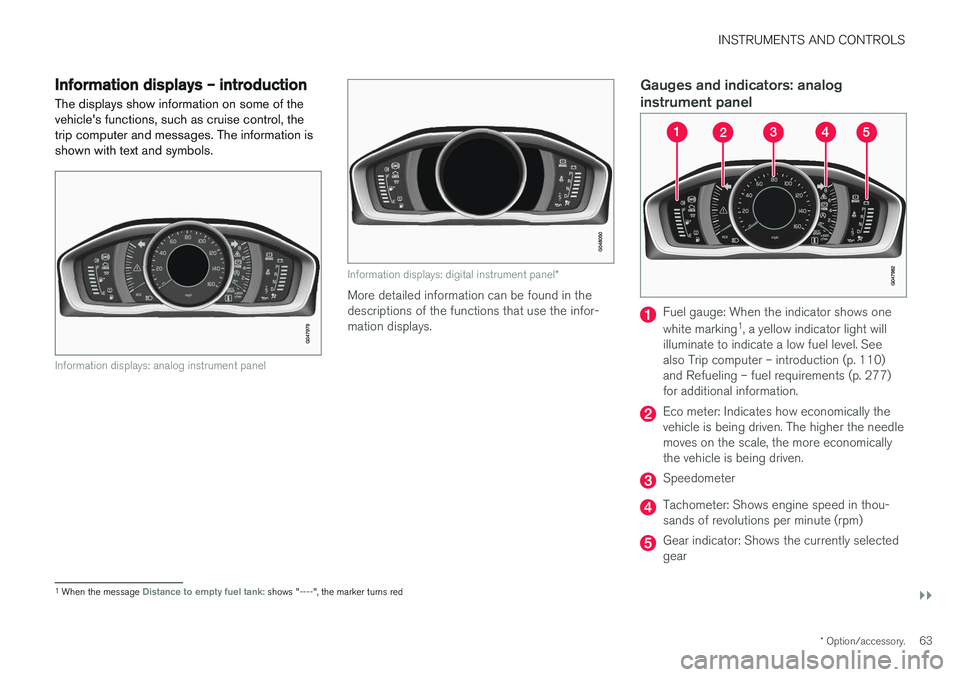
The displays show information on some of the vehicle's functions, such as cruise control, thetrip computer and messages. The information isshown with text and symbols.
Information displays: analog instrument panel
Information displays: digital instrument panel *
More detailed information can be found in the descriptions of the functions that use the infor-mation displays.
Gauges and indicators: analog instrument panel
Fuel gauge: When the indicator shows one white marking1
, a yellow indicator light will
illuminate to indicate a low fuel level. See also Trip computer – introduction (p. 110)and Refueling – fuel requirements (p. 277)for additional information.
Eco meter: Indicates how economically the vehicle is being driven. The higher the needlemoves on the scale, the more economicallythe vehicle is being driven.
Speedometer
Tachometer: Shows engine speed in thou- sands of revolutions per minute (rpm)
Gear indicator: Shows the currently selected gear
1 When the message Distance to empty fuel tank: shows "----", the marker turns red
Page 66 of 396
||
INSTRUMENTS AND CONTROLS
* Option/accessory.
64
Gauges and indicators: digital instrument panel *
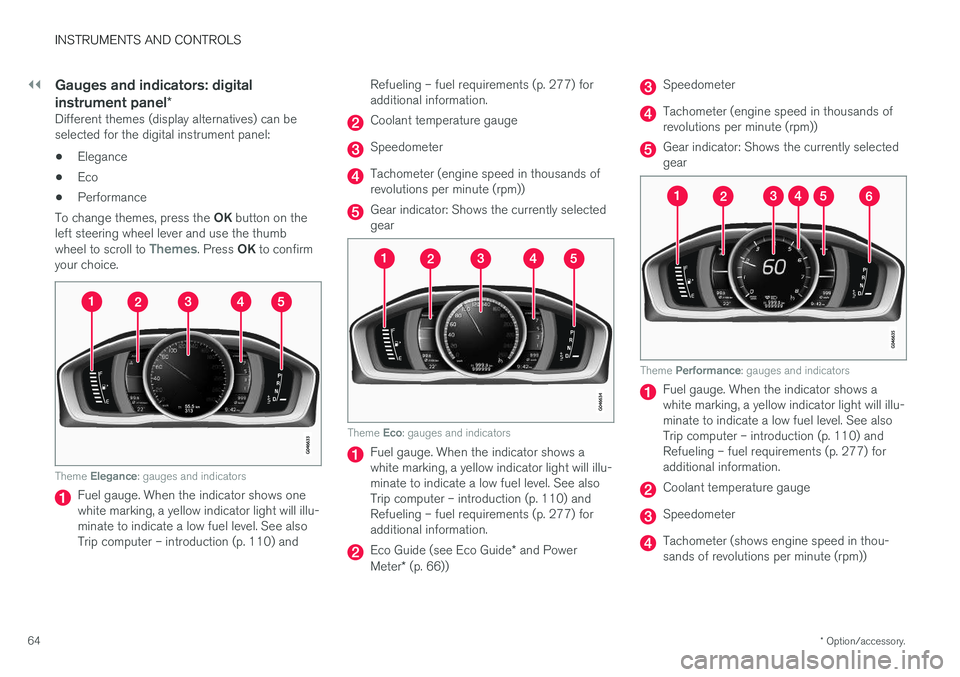
Different themes (display alternatives) can be selected for the digital instrument panel:
• Elegance
• Eco
• Performance
To change themes, press the OK button on the
left steering wheel lever and use the thumb wheel to scroll to
Themes. Press OK to confirm
your choice.
Theme Elegance : gauges and indicators
Fuel gauge. When the indicator shows one white marking, a yellow indicator light will illu-minate to indicate a low fuel level. See alsoTrip computer – introduction (p. 110) and Refueling – fuel requirements (p. 277) foradditional information.
Coolant temperature gauge
Speedometer
Tachometer (engine speed in thousands of revolutions per minute (rpm))
Gear indicator: Shows the currently selected gear
Theme
Eco: gauges and indicators
Fuel gauge. When the indicator shows a white marking, a yellow indicator light will illu-minate to indicate a low fuel level. See alsoTrip computer – introduction (p. 110) andRefueling – fuel requirements (p. 277) foradditional information.
Eco Guide (see Eco Guide * and Power
Meter * (p. 66))
Speedometer
Tachometer (engine speed in thousands of revolutions per minute (rpm))
Gear indicator: Shows the currently selected gear
Theme Performance : gauges and indicators
Fuel gauge. When the indicator shows a white marking, a yellow indicator light will illu-minate to indicate a low fuel level. See alsoTrip computer – introduction (p. 110) andRefueling – fuel requirements (p. 277) foradditional information.
Coolant temperature gauge
Speedometer
Tachometer (shows engine speed in thou- sands of revolutions per minute (rpm))
Page 67 of 396
INSTRUMENTS AND CONTROLS
* Option/accessory.65
Power Meter (see Eco Guide * and Power
Meter * (p. 66)).
Gear indicator: Shows the currently selected gear
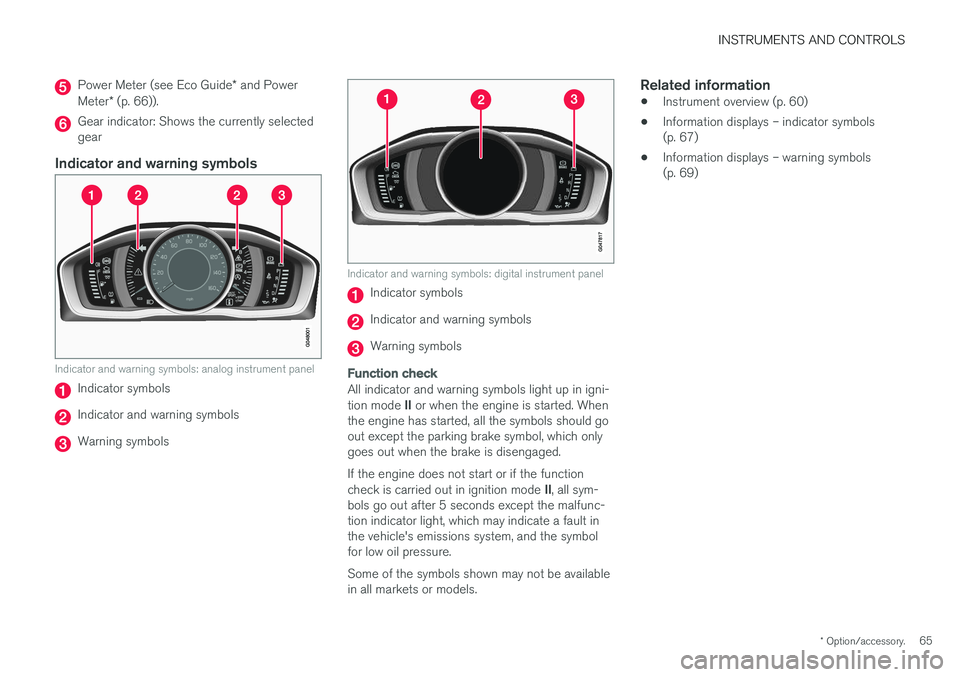
Indicator and warning symbols
Indicator and warning symbols: analog instrument panel
Indicator symbols
Indicator and warning symbols
Warning symbols
Indicator and warning symbols: digital instrument panel
Indicator symbols
Indicator and warning symbols
Warning symbols
Function check
All indicator and warning symbols light up in igni- tion mode II or when the engine is started. When
the engine has started, all the symbols should go out except the parking brake symbol, which onlygoes out when the brake is disengaged. If the engine does not start or if the function check is carried out in ignition mode II, all sym-
bols go out after 5 seconds except the malfunc- tion indicator light, which may indicate a fault inthe vehicle's emissions system, and the symbolfor low oil pressure. Some of the symbols shown may not be available in all markets or models.
Related information
• Instrument overview (p. 60)
• Information displays – indicator symbols(p. 67)
• Information displays – warning symbols(p. 69)
Page 68 of 396
INSTRUMENTS AND CONTROLS
* Option/accessory.
66
Eco Guide * and Power Meter *
Eco guide and Power guide are two gauges in the instrument panel that help improve drivingeconomy. The vehicle also stores driving-related statistics in the form of a bar graph, see Trip computer –Trip statistics (p. 118).
Introduction
To display or remove these functions from the instrument panel, select the "Eco" theme (seeInformation displays – introduction (p. 63)). Driving statistics are also stored and can be dis- played in the form of a bar chart (see Trip com-puter – Trip statistics (p. 118)).
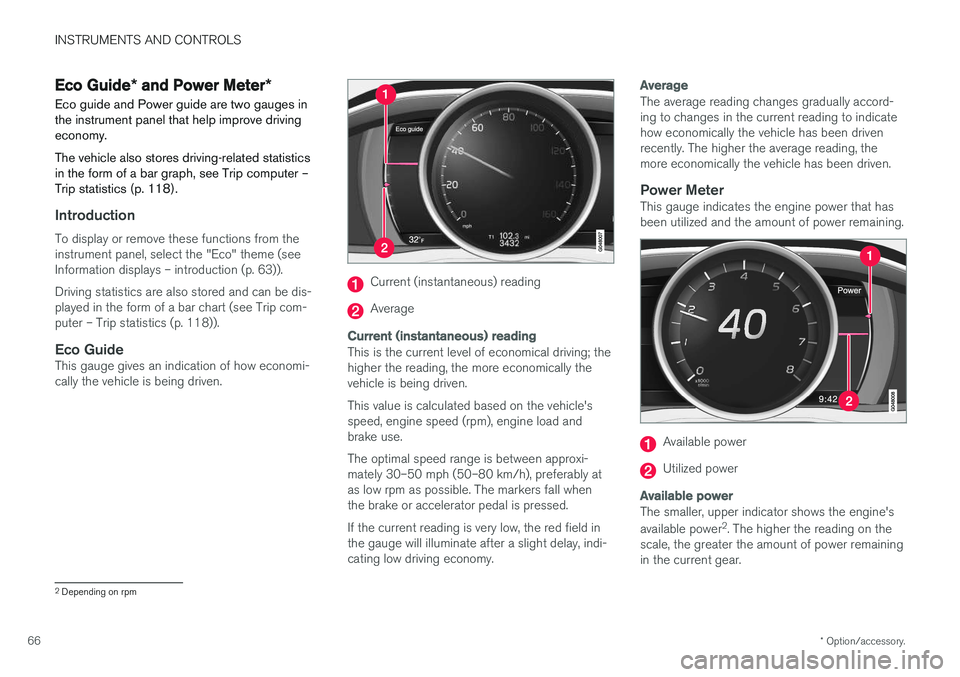
Eco GuideThis gauge gives an indication of how economi-cally the vehicle is being driven.
Current (instantaneous) reading
Average
Current (instantaneous) reading
This is the current level of economical driving; the higher the reading, the more economically thevehicle is being driven. This value is calculated based on the vehicle's speed, engine speed (rpm), engine load andbrake use. The optimal speed range is between approxi- mately 30–50 mph (50–80 km/h), preferably atas low rpm as possible. The markers fall whenthe brake or accelerator pedal is pressed. If the current reading is very low, the red field in the gauge will illuminate after a slight delay, indi-cating low driving economy.
Average
The average reading changes gradually accord- ing to changes in the current reading to indicatehow economically the vehicle has been drivenrecently. The higher the average reading, themore economically the vehicle has been driven.
Power MeterThis gauge indicates the engine power that hasbeen utilized and the amount of power remaining.
Available power
Utilized power
Available power
The smaller, upper indicator shows the engine's available power 2
. The higher the reading on the
scale, the greater the amount of power remaining in the current gear.
2 Depending on rpm