sport mode VOLVO S60 INSCRIPTION 2018 Owner´s Manual
[x] Cancel search | Manufacturer: VOLVO, Model Year: 2018, Model line: S60 INSCRIPTION, Model: VOLVO S60 INSCRIPTION 2018Pages: 396, PDF Size: 9.39 MB
Page 261 of 396
STARTING AND DRIVING
}}
259
Geartronic: Sport mode ( S)7
This transmission mode provides sportier shifting characteristics and enables a more active drivingstyle by making it possible to drive at higher rpmin each gear before shifting up. The engine alsoresponds faster when the accelerator pedal ispressed. To access Sport mode from Drive (
D), move the
gear selector to the left. The transmission will not switch to manual shifting mode until the gearselector is moved forward or rearward toward +or –. Sport mode can be selected any time.
NOTE
• On vehicles equipped with Sport mode, the transmission symbol in the main instrument panel will change from
D to S
when the gear selector is moved to the manual shifting mode. If the gear selectoris moved toward "+" or "-", the number ofthe gear currently being used will be dis-played, see Information displays – intro-duction (p. 63).
• Please be aware that using Sport modemay result in a slight decrease in fuel economy. Driving in
D can help improve
fuel economy.
Geartronic : starting on slippery surfaces
Selecting 3rd gear in Geartronic
Page 264 of 396
STARTING AND DRIVING
* Option/accessory.
262
Start/Stop – Auto-stop exceptions
In certain situations or conditions, the engine may not auto-stop when the vehicle comes to a
standstill, such as if:
Condition/situation The vehicle's speed has not reached a speed of approx. 6 mph (10 km/h) after the mostrecent auto-start or after the driver has startedthe engine. The driver unbuckles his/her seat belt.The main battery's charge is below the mini- mum level. The engine has not reached its normal operat- ing temperature. The ambient temperature is below approx. 25°F (-4°C) or above approx. 85°F (30°C). The windshield's heating function * is activated.
The climate system cannot keep the desired settings in the passenger compartment; theblower will operate at high speed. The vehicle is backing up.The main battery's temperature is below freez- ing or too high. The driver is turning the steering wheel hard.
Condition/situation The road's incline is very steep. A trailer's electrical system is connected to the vehicle. The hood has been opened A
.
The transmission has not reached its normal operating temperature. Atmospheric pressure is below a level equiva- lent to an altitude of approx. 4,900–8,200 ft
(1500–2500 m) above sea level. The actualpressure is also affected by current weatherconditions. The Adaptive Cruise Control's * Queue Assist
feature is activated. The gear selector is in the SB
or " +/–" posi-
tion.
A Certain engines only
B Sport mode (where applicable)
Related information
• Start/Stop – introduction (p. 260)
• Start/Stop – function (p. 261)
• Start/Stop – settings (p. 263)
• Start/Stop – Auto-start exceptions (p. 262)
• Start/Stop – Hill Start Assist (HSA) (p. 260)
• Start/Stop – symbols and messages (p. 264)
Start/Stop – Auto-start exceptions
In certain situations or conditions, the engine may auto-start
even though the driver is still
pressing the brake pedal, such as if:
Condition/situation Condensation forms on the windows. The climate system cannot keep the desired settings in the passenger compartment. Electrical current consumption is temporarily high or the main battery's charge is below theminimum level. The brake pedal is pumped repeatedly. The hood has been opened A
.
The vehicle begins to move or increases speed
slightly (if the engine auto-stopped before the vehicle was at a standstill (see ECO *
(p. 265))). The driver unbuckles his/her seat belt while the gear selector is in the D or N positions.
The steering wheel is turned A
.
Page 265 of 396
STARTING AND DRIVING
263
Condition/situation The gear selector is moved from D to SB
, R or
" +/– ".
The driver's door is opened with the gear selector in D – an audible signal and a text
message will inform the driver that Start/Stop is active.
A Certain engines only
B Sport mode (where applicable)
WARNING
Do not open the hood if the engine has auto- stopped. The engine could suddenly auto-start. Before opening the hood:
• Switch off the ignition using the
START/
STOP ENGINE button.
• Be aware that if the engine has been run- ning, components in the engine compart-ment will be very hot.
If the engine does not auto-start, this couldbe due to :
• The driver's seat belt is not fastened
• The gear selector is in
P and the driver's
door is opened In these cases, the driver will have to restart the engine by pressing the
START/STOP ENGINE
button.
Related information
• Start/Stop – introduction (p. 260)
• Start/Stop – function (p. 261)
• Start/Stop – settings (p. 263)
• Start/Stop – Auto-stop exceptions (p. 262)
• Start/Stop – Hill Start Assist (HSA) (p. 260)
• Start/Stop – symbols and messages (p. 264)
Start/Stop – settings
Settings for the Start/Stop function can be made in the MY CAR menu system.
Related information
•
Start/Stop – introduction (p. 260)
• Start/Stop – function (p. 261)
• Start/Stop – Auto-stop exceptions (p. 262)
• Start/Stop – Auto-start exceptions (p. 262)
• Start/Stop – Hill Start Assist (HSA) (p. 260)
• Start/Stop – symbols and messages (p. 264)
Page 284 of 396
||
STARTING AND DRIVING
* Option/accessory.
282 nents, altering emission system components or location or removing components, and/orrepeated use of leaded fuel.
NOTE
Unleaded fuel is required for vehicles with three-way catalytic converters.
Heated oxygen sensorsThe heated oxygen sensors monitor the oxygen content of the exhaust gases. Readings are fedinto a control module that continuously monitorsengine functions and controls fuel injection. Theratio of fuel to air into the engine is continuouslyadjusted for efficient combustion to help reduceharmful emissions.
Related information
•
Information displays – warning symbols(p. 69)
• Engine and cooling system (p. 275)
Economical driving
Better driving economy may be obtained by thinking ahead, avoiding rapid starts and stopsand adjusting the speed of your vehicle to imme-diate traffic conditions.
Economical driving conserves natural
resources
Observe the following rules: • Bring the engine to normal operating tem- perature as soon as possible by driving witha light foot on the accelerator pedal for thefirst few minutes of operation. A cold engineuses more fuel and is subject to increasedwear.
• Whenever possible, avoid using the vehiclefor driving short distances. This does notallow the engine to reach normal operatingtemperature.
• Drive carefully and avoid rapid accelerationand hard braking.
• Use the transmission's Drive (
D) position as
often as possible and avoid using kick-down.
• Using the transmission's Sport mode 13
may
increase fuel consumption somewhat. Use the transmission's Drive ( D) position as often
as possible. For additional information about Sport mode, see Transmission – Geartronic(p. 257). •
Using the engine's optional Eco function canhelp improve fuel economy. For additional information, see ECO
* (p. 265).
• Do not exceed posted speed limits.
• Avoid carrying unnecessary items (extra load) in the vehicle.
• Maintain correct tire pressure. Check tirepressure regularly (when tires are cold).
• Remove snow tires when threat of snow orice has ended.
• Note that roof racks, ski racks, etc, increaseair resistance and also fuel consumption.
• At highway driving speeds, fuel consumptionwill be lower with the air conditioning on andthe windows closed than with the air condi-tioning off and the windows open.
• Using the onboard trip computer's fuel con-sumption modes can help you learn how todrive more economically.
Other factors that decrease gas mileage are:
• Dirty air cleaner
• Dirty engine oil and clogged oil filter
• Dragging brakes
• Incorrect front end alignment
13
Certain models only.
Page 293 of 396
WHEELS AND TIRES
291
Tires – storage and ageWhen storing complete wheels (tires mounted on rims), they should be suspended off the flooror placed on their sides on the floor.
New Tires
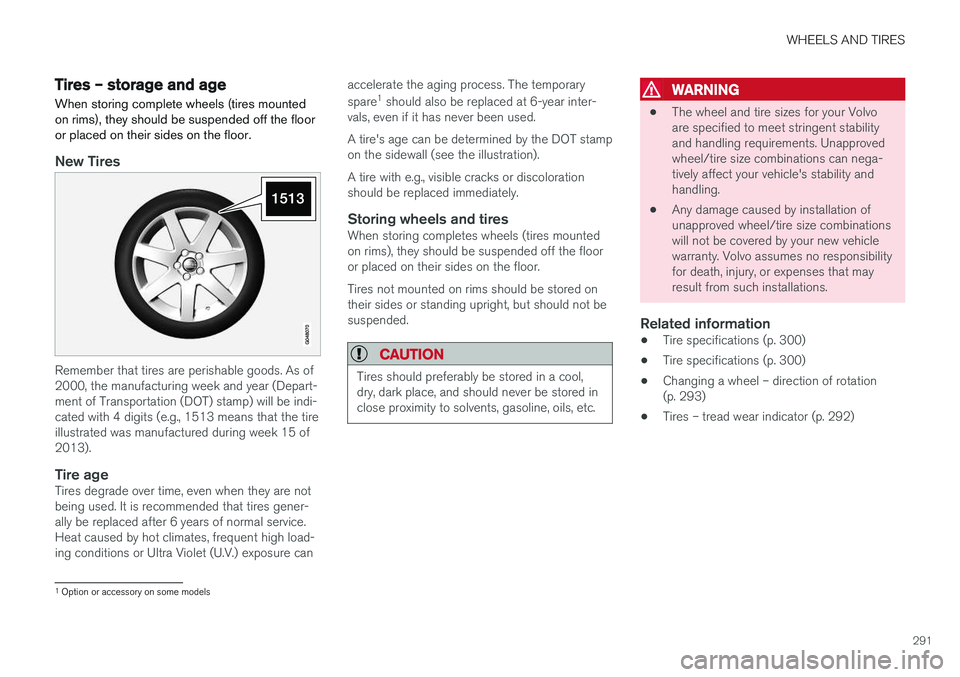
Remember that tires are perishable goods. As of 2000, the manufacturing week and year (Depart-ment of Transportation (DOT) stamp) will be indi-cated with 4 digits (e.g., 1513 means that the tireillustrated was manufactured during week 15 of2013).
Tire ageTires degrade over time, even when they are not being used. It is recommended that tires gener-ally be replaced after 6 years of normal service.Heat caused by hot climates, frequent high load-ing conditions or Ultra Violet (U.V.) exposure can accelerate the aging process. The temporary spare
1
should also be replaced at 6-year inter-
vals, even if it has never been used. A tire's age can be determined by the DOT stamp on the sidewall (see the illustration). A tire with e.g., visible cracks or discoloration should be replaced immediately.
Storing wheels and tiresWhen storing completes wheels (tires mountedon rims), they should be suspended off the flooror placed on their sides on the floor. Tires not mounted on rims should be stored on their sides or standing upright, but should not besuspended.
CAUTION
Tires should preferably be stored in a cool, dry, dark place, and should never be stored inclose proximity to solvents, gasoline, oils, etc.
WARNING
• The wheel and tire sizes for your Volvo are specified to meet stringent stabilityand handling requirements. Unapprovedwheel/tire size combinations can nega-tively affect your vehicle's stability andhandling.
• Any damage caused by installation ofunapproved wheel/tire size combinationswill not be covered by your new vehiclewarranty. Volvo assumes no responsibilityfor death, injury, or expenses that mayresult from such installations.
Related information
•Tire specifications (p. 300)
• Tire specifications (p. 300)
• Changing a wheel – direction of rotation(p. 293)
• Tires – tread wear indicator (p. 292)
1
Option or accessory on some models
Page 314 of 396
WHEELS AND TIRES
* Option/accessory.
312
Tire Pressure Monitoring System (TPMS) – recalibrating
The Tire Pressure Monitoring System (TPMS) uses a reference value in order to determine iftire pressure is too low.
Recalibrating TPMS (Canadian models
only) *
In certain cases, it may be necessary to recali- brate TPMS to conform to Volvo's recommendedtire inflation pressures (see the tire inflation decalon the driver's door opening), for example, ifhigher inflation pressure is necessary whentransporting heavy loads. Always inflate the tires to Volvo's recommended tire pressure before recalibrating TPMS. Recalibrating TPMS is done in the vehicle's menu system. To do so:
1. Switch off the engine.
2. Inflate the tires to the desired pressure and
put the ignition in mode I or II (see Ignition
modes (p. 74) for additional information).
3. Press the MY CAR key in the center console
control panel and select
SettingsCar
settings
Tire pressure.
4. Press OK/MENU , select
Calibrate tire
pressure and press OK/MENU again. 5. Drive the vehicle at a speed above 20 mph
(30 km/h) continuously for at least 10 minutes.
> Calibration is done automatically once ini-tiated by the driver and the system does not provide confirmation when calibrationis completed.
After adjusting inflation pressure, repeat steps1-5 above.
Related information
• Tire Pressure Monitoring System (TPMS) –general information (p. 310)
• Tire Pressure Monitoring System (TPMS) –messages (p. 313)
• Tire Pressure Monitoring System (TPMS) –activating/deactivating (p. 312)
• Tire Pressure Monitoring System (TPMS) –changing wheels (p. 311)
• My Car – introduction (p. 71)
Tire Pressure Monitoring System (TPMS) – activating/deactivating
Activating/deactivating TPMS
(Canadian models only)
1. Switch off the engine. 2. Put the ignition in mode I or II (see Ignition
modes (p. 74) for additional information).
3. Press the MY CAR key in the center console
control panel and select
SettingsCar
settings
Tire pressure
4. Select Tire monitoring and press OK/
MENU to turn the system on or off.
Related information
•Tire Pressure Monitoring System (TPMS) – general information (p. 310)
Page 370 of 396
||
SPECIFICATIONS
368
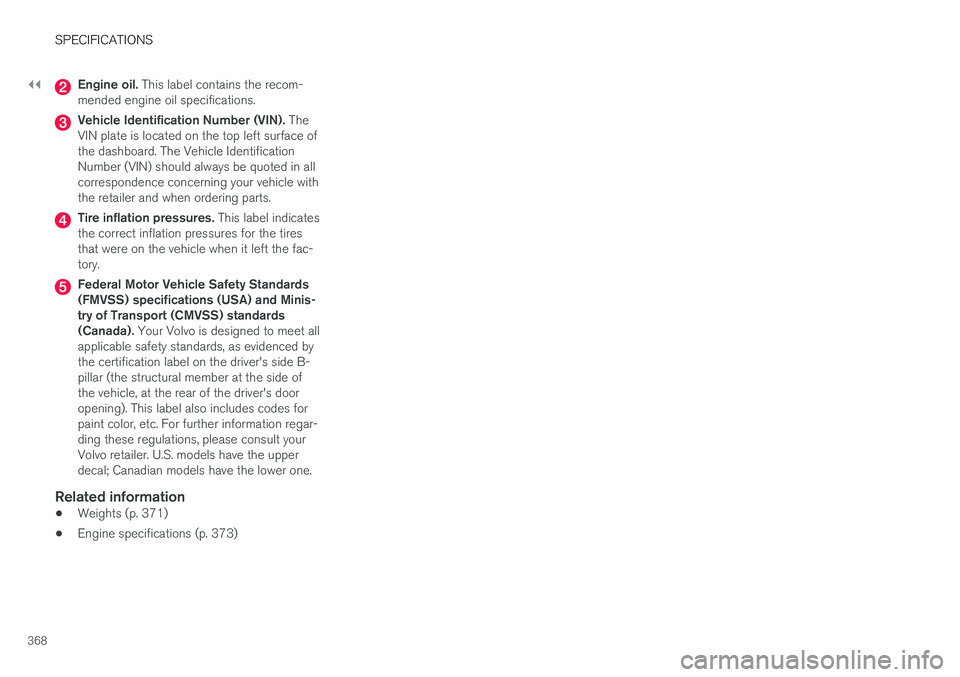
Engine oil. This label contains the recom-
mended engine oil specifications.
Vehicle Identification Number (VIN). The
VIN plate is located on the top left surface of the dashboard. The Vehicle IdentificationNumber (VIN) should always be quoted in allcorrespondence concerning your vehicle withthe retailer and when ordering parts.
Tire inflation pressures. This label indicates
the correct inflation pressures for the tires that were on the vehicle when it left the fac-tory.
Federal Motor Vehicle Safety Standards (FMVSS) specifications (USA) and Minis-try of Transport (CMVSS) standards(Canada). Your Volvo is designed to meet all
applicable safety standards, as evidenced bythe certification label on the driver's side B-pillar (the structural member at the side ofthe vehicle, at the rear of the driver's dooropening). This label also includes codes forpaint color, etc. For further information regar-ding these regulations, please consult yourVolvo retailer. U.S. models have the upperdecal; Canadian models have the lower one.
Related information
• Weights (p. 371)
• Engine specifications (p. 373)
Page 383 of 396
SPECIFICATIONS
}}
* Option/accessory.381
Indicator symbols
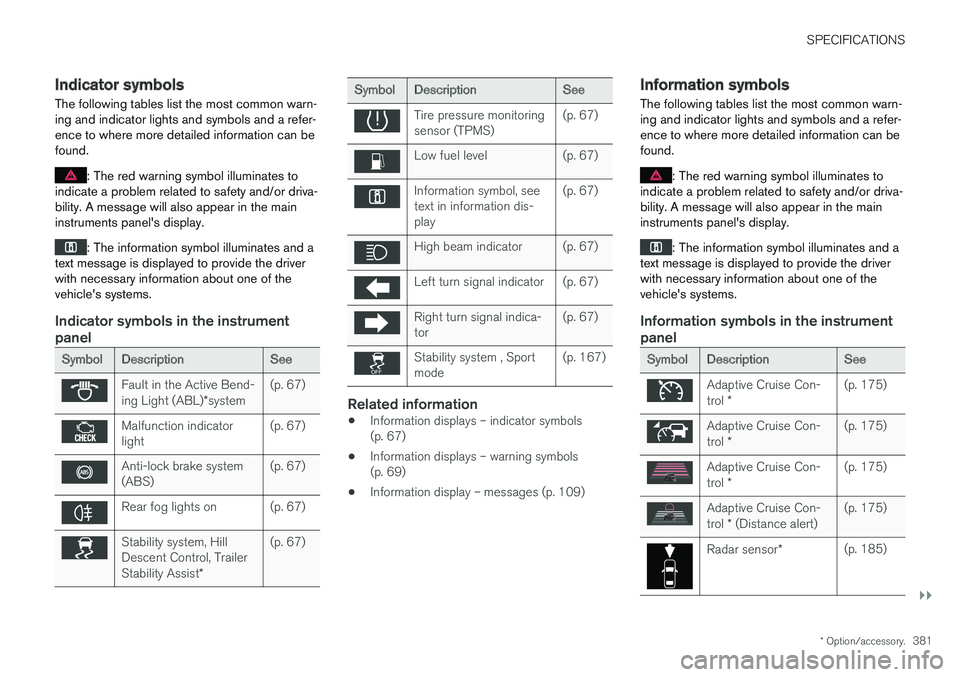
The following tables list the most common warn- ing and indicator lights and symbols and a refer-ence to where more detailed information can befound.
: The red warning symbol illuminates to
indicate a problem related to safety and/or driva- bility. A message will also appear in the maininstruments panel's display.
: The information symbol illuminates and a
text message is displayed to provide the driver with necessary information about one of thevehicle's systems.
Indicator symbols in the instrument panel
Symbol Description See
Fault in the Active Bend- ing Light (ABL)*system (p. 67)
Malfunction indicator light
(p. 67)
Anti-lock brake system (ABS)(p. 67)
Rear fog lights on (p. 67)
Stability system, Hill Descent Control, Trailer Stability Assist
*(p. 67)
Symbol
Description See
Tire pressure monitoring sensor (TPMS)(p. 67)
Low fuel level (p. 67)
Information symbol, see text in information dis-play(p. 67)
High beam indicator (p. 67)
Left turn signal indicator (p. 67)
Right turn signal indica- tor
(p. 67)
Stability system , Sport mode(p. 167)
Related information
•
Information displays – indicator symbols (p. 67)
• Information displays – warning symbols(p. 69)
• Information display – messages (p. 109)
Information symbols
The following tables list the most common warn- ing and indicator lights and symbols and a refer-ence to where more detailed information can befound.
: The red warning symbol illuminates to
indicate a problem related to safety and/or driva- bility. A message will also appear in the maininstruments panel's display.
: The information symbol illuminates and a
text message is displayed to provide the driver with necessary information about one of thevehicle's systems.
Information symbols in the instrument panel
Symbol Description See
Adaptive Cruise Con- trol * (p. 175)
Adaptive Cruise Con- trol
* (p. 175)
Adaptive Cruise Con- trol
* (p. 175)
Adaptive Cruise Con- trol
* (Distance alert) (p. 175)
Radar sensor
*(p. 185)