instrument panel VOLVO S60 INSCRIPTION 2018 Owner´s Manual
[x] Cancel search | Manufacturer: VOLVO, Model Year: 2018, Model line: S60 INSCRIPTION, Model: VOLVO S60 INSCRIPTION 2018Pages: 396, PDF Size: 9.39 MB
Page 176 of 396
||
DRIVER SUPPORT
1742. Press and hold one of these buttons to
increase/decrease the speed in 1-mph or 1- km/h increments. Release the button whenyou have reached the desired speed.
NOTE
• A temporary increase in speed by press- ing the accelerator pedal, for less than1 minute (e.g. when passing another car),does not affect the current cruise controlsetting. The vehicle will automaticallyreturn to the previously set speed whenthe accelerator pedal is released.
• If one of the cruise control buttons iskept depressed for more than approx.1 minute cruise control is disengaged.The engine must then be switched off inorder to reset cruise control.
Related information
•Cruise control (CC) – introduction (p. 172)
• Cruise control (CC) – deactivating (p. 175)
Toggling between ACC and CC (standard Cruise Control)
Adaptive Cruise Control (ACC) helps the driver maintain a safe distance/time interval to the vehi-cle ahead.
Switching from ACC to CCThis may be useful if, for example, the radar sen- sor is obstructed in some way. See AdaptiveCruise Control – limitations (p. 185) for addi-tional information.
• Press and hold the
button; the symbol in
the instrument panel will switch from
to
.
> This activates the standard cruise control function (see Cruise control (CC) – introduc- tion (p. 172)).
WARNING
Switching from ACC to CC means that:
• Your vehicle will
no longer automatically
maintain a set distance to a vehicle ahead.
• Only the set speed will be maintained andthe driver will have to apply the brakeswhen needed.
Switching from CC to ACC
Switch off cruise control by pressing once or
twice as needed according to the instructions in the previous section "Turning ACC off com- pletely." The next time the system is switched on,ACC will be reactivated.
Related information
•
Adaptive Cruise Control – introduction(p. 175)
• Adaptive Cruise Control – function (p. 177)
Page 181 of 396
DRIVER SUPPORT
}}
179
Adaptive Cruise Control – engaging
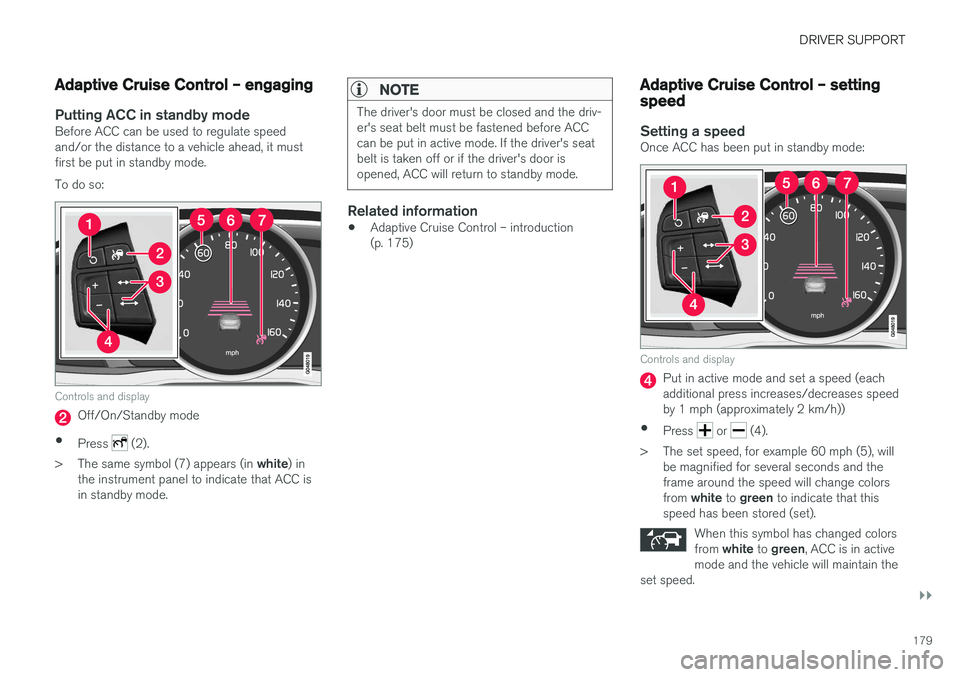
Putting ACC in standby modeBefore ACC can be used to regulate speed and/or the distance to a vehicle ahead, it mustfirst be put in standby mode. To do so:
Controls and display
Off/On/Standby mode
• Press
(2).
> The same symbol (7) appears (in white) in
the instrument panel to indicate that ACC is in standby mode.
NOTE
The driver's door must be closed and the driv- er's seat belt must be fastened before ACCcan be put in active mode. If the driver's seatbelt is taken off or if the driver's door isopened, ACC will return to standby mode.
Related information
• Adaptive Cruise Control – introduction (p. 175)
Adaptive Cruise Control – setting speed
Setting a speedOnce ACC has been put in standby mode:
Controls and display
Put in active mode and set a speed (each additional press increases/decreases speedby 1 mph (approximately 2 km/h))
• Press
or (4).
> The set speed, for example 60 mph (5), will be magnified for several seconds and the frame around the speed will change colors from white to green to indicate that this
speed has been stored (set).
When this symbol has changed colorsfrom white to green , ACC is in active
mode and the vehicle will maintain the
set speed.
Page 183 of 396
DRIVER SUPPORT
}}
181
Different time intervals can be selected and are shown in the instrument panel
4
as 1–5 hori-
zontal bars. The greater the number of bars, the longer thetime interval. One bar repre-sents a time interval of approxi-
mately 1 second; 5 bars is approximately3 seconds.
To set/change a time interval:
• Press the
/ buttons (3).
At low speeds, when the distance to the vehicle ahead is short, ACC increases the time intervalslightly. In order to follow the vehicle ahead assmoothly as possible, ACC allows the time inter-val to vary considerably in certain situations.
WARNING
• Only use a time interval that is suitable in current traffic conditions.
• A short time interval gives the driver lim-ited reaction time if an unexpected situa-tion occurs in traffic.
Related information
• Adaptive Cruise Control – introduction(p. 175)
Adaptive Cruise Control – deactivating
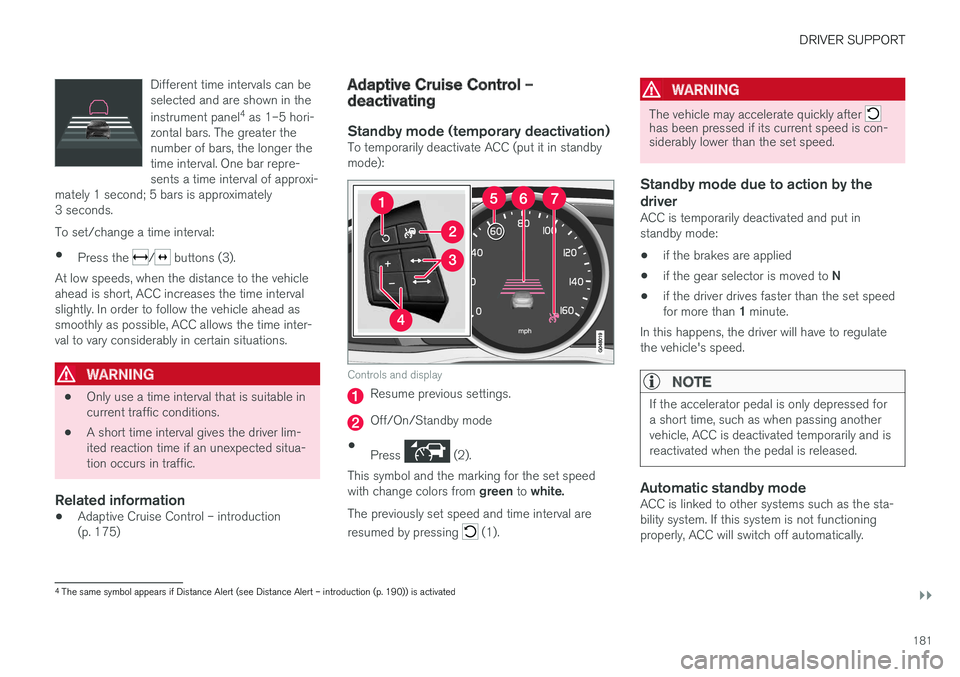
Standby mode (temporary deactivation)To temporarily deactivate ACC (put it in standby mode):
Controls and display
Resume previous settings.
Off/On/Standby mode
• Press
(2).
This symbol and the marking for the set speed with change colors from green to white.
The previously set speed and time interval are resumed by pressing
(1).
WARNING
The vehicle may accelerate quickly after has been pressed if its current speed is con- siderably lower than the set speed.
Standby mode due to action by the driver
ACC is temporarily deactivated and put in standby mode:
• if the brakes are applied
• if the gear selector is moved to
N
• if the driver drives faster than the set speed for more than
1 minute.
In this happens, the driver will have to regulate
the vehicle's speed.
NOTE
If the accelerator pedal is only depressed for a short time, such as when passing anothervehicle, ACC is deactivated temporarily and isreactivated when the pedal is released.
Automatic standby modeACC is linked to other systems such as the sta- bility system. If this system is not functioningproperly, ACC will switch off automatically.
4 The same symbol appears if Distance Alert (see Distance Alert – introduction (p. 190)) is activated
Page 184 of 396
||
DRIVER SUPPORT
182In the event of automatic deactivation, an audible signal will sound and the message
Cruise
control Cancelled is shown in the instrument
panel. The driver must then intervene and adapt the vehicle's speed to the surrounding traffic andregulate the distance to the vehicle ahead. An automatic switch to standby mode may be caused if:
• engine speed (rpm) is too high/low
• The driver's door is opened
• The driver unbuckles his/her seat belt
• the vehicle's speed goes below 18 mph(30 km/h)
• the wheels lose traction
• brake temperature is high
• the radar sensor is obstructed by, for exam-ple, wet snow or rain.
Resuming the set speedIf ACC is in standby mode, it can be reactivated by pressing the
button on the steering wheel
keypad. The vehicle will return to the most recently set speed.
WARNING
The vehicle may accelerate quickly after has been pressed if its current speed is con- siderably lower than the set speed.
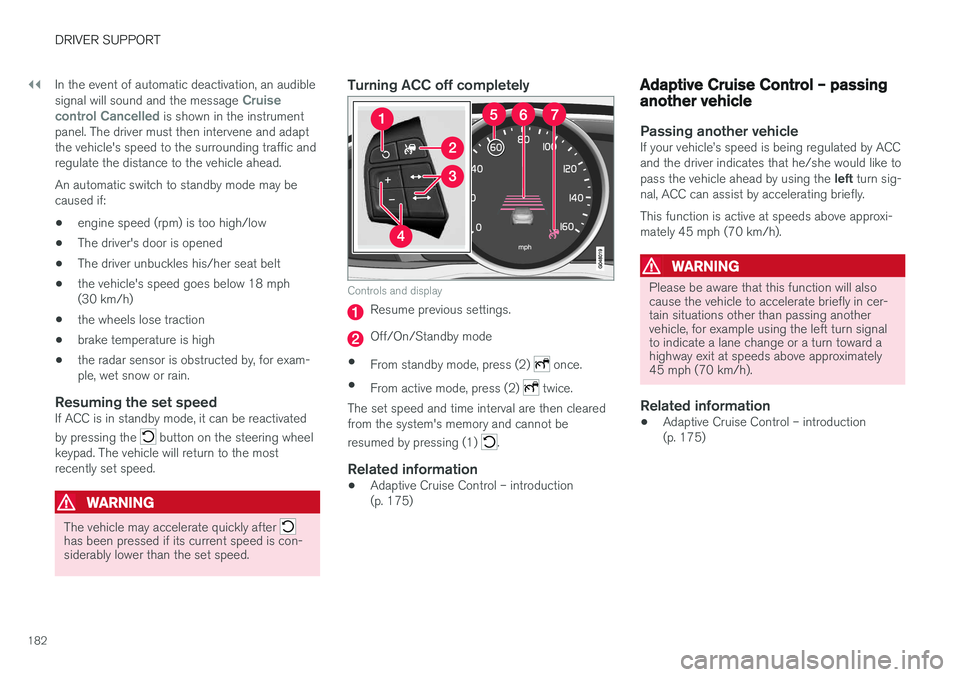
Turning ACC off completely
Controls and display
Resume previous settings.
Off/On/Standby mode
• From standby mode, press (2)
once.
• From active mode, press (2)
twice.
The set speed and time interval are then cleared from the system's memory and cannot be resumed by pressing (1)
.
Related information
• Adaptive Cruise Control – introduction (p. 175)
Adaptive Cruise Control – passing another vehicle
Passing another vehicleIf your vehicle
Page 192 of 396
DRIVER SUPPORT
190
Distance Alert – introduction
Distance Alert is part of Adaptive Cruise Control and is a function that provides information aboutthe time interval to the vehicle ahead.
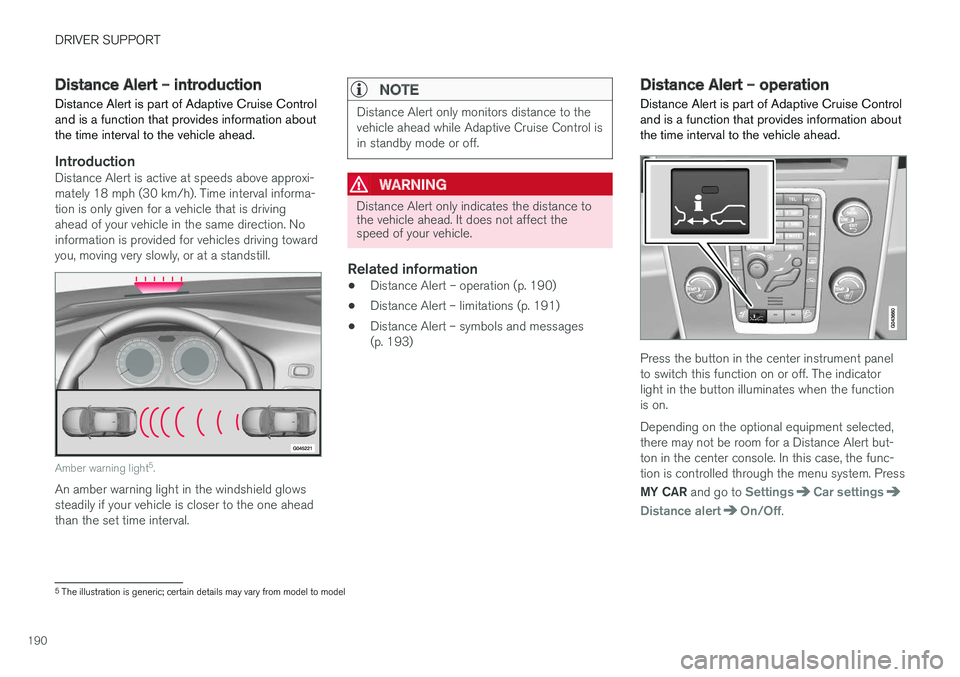
IntroductionDistance Alert is active at speeds above approxi- mately 18 mph (30 km/h). Time interval informa-tion is only given for a vehicle that is drivingahead of your vehicle in the same direction. Noinformation is provided for vehicles driving towardyou, moving very slowly, or at a standstill.
Amber warning light 5
.
An amber warning light in the windshield glows steadily if your vehicle is closer to the one aheadthan the set time interval.
NOTE
Distance Alert only monitors distance to the vehicle ahead while Adaptive Cruise Control isin standby mode or off.
WARNING
Distance Alert only indicates the distance to the vehicle ahead. It does not affect thespeed of your vehicle.
Related information
• Distance Alert – operation (p. 190)
• Distance Alert – limitations (p. 191)
• Distance Alert – symbols and messages (p. 193)
Distance Alert – operation
Distance Alert is part of Adaptive Cruise Control and is a function that provides information aboutthe time interval to the vehicle ahead.
Press the button in the center instrument panel to switch this function on or off. The indicatorlight in the button illuminates when the functionis on. Depending on the optional equipment selected, there may not be room for a Distance Alert but-ton in the center console. In this case, the func-tion is controlled through the menu system. Press MY CAR and go to
SettingsCar settings
Distance alertOn/Off.
5
The illustration is generic; certain details may vary from model to model
Page 201 of 396
DRIVER SUPPORT
199
City Safety – symbols and messages
Symbols and messages in the display
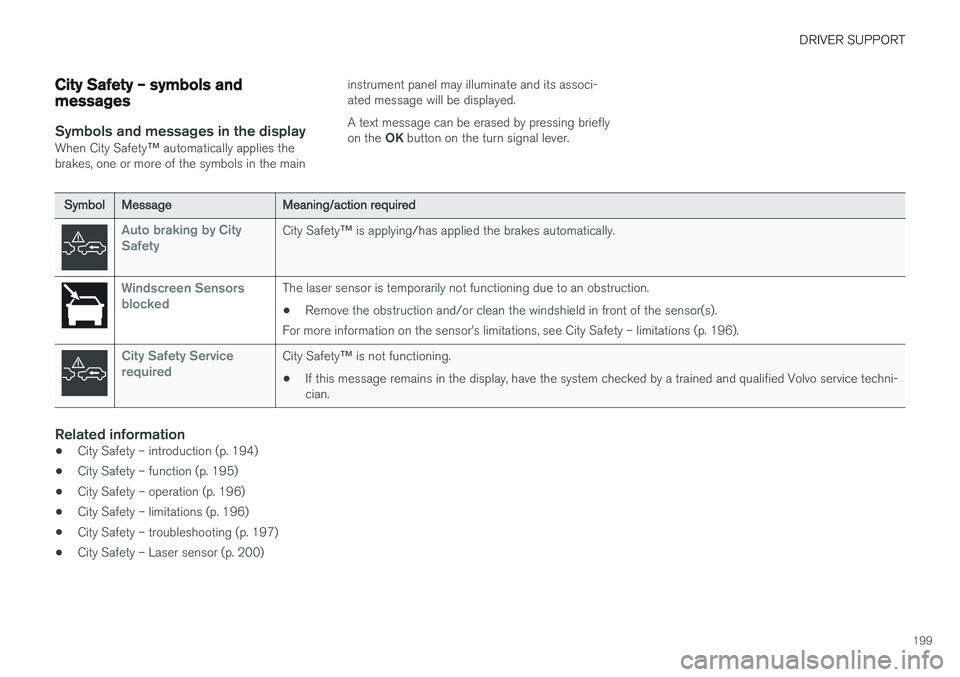
When City Safety™ automatically applies the
brakes, one or more of the symbols in the main instrument panel may illuminate and its associ- ated message will be displayed. A text message can be erased by pressing briefly on the
OK button on the turn signal lever.
Symbol Message Meaning/action required
Auto braking by City SafetyCity Safety™ is applying/has applied the brakes automatically.
Windscreen Sensors blockedThe laser sensor is temporarily not functioning due to an obstruction.
• Remove the obstruction and/or clean the windshield in front of the sensor(s).
For more information on the sensor
Page 220 of 396
DRIVER SUPPORT
218
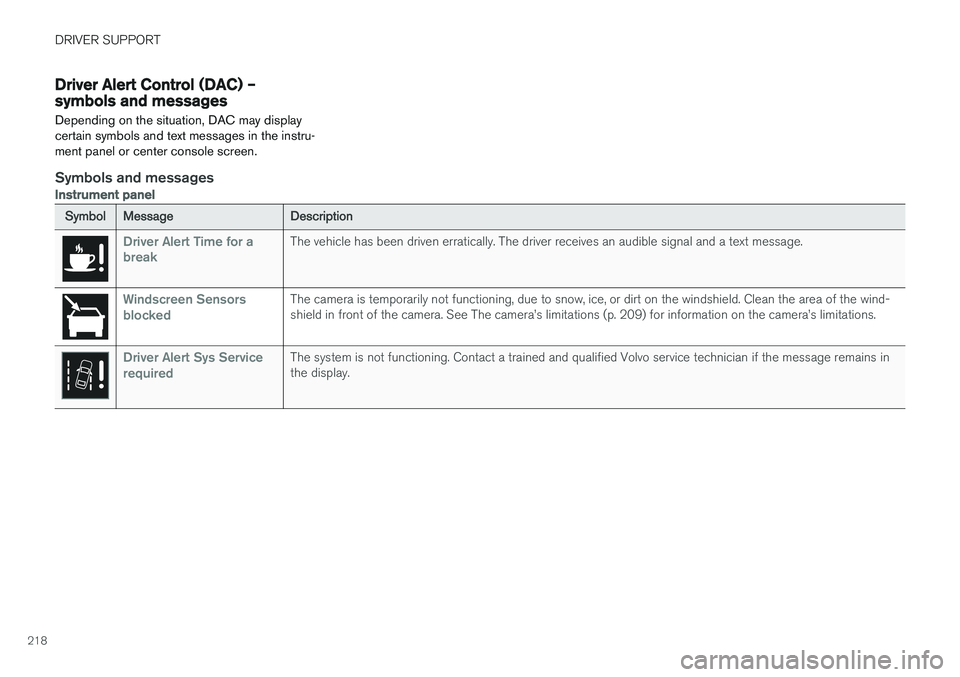
Driver Alert Control (DAC) – symbols and messages Depending on the situation, DAC may display certain symbols and text messages in the instru-ment panel or center console screen.
Symbols and messages
Instrument panel
SymbolMessage Description
Driver Alert Time for a breakThe vehicle has been driven erratically. The driver receives an audible signal and a text message.
Windscreen Sensors blockedThe camera is temporarily not functioning, due to snow, ice, or dirt on the windshield. Clean the area of the wind- shield in front of the camera. See The camera
Page 223 of 396
DRIVER SUPPORT
}}
221
Lane Departure Warning (LDW) – operation
Operation and function
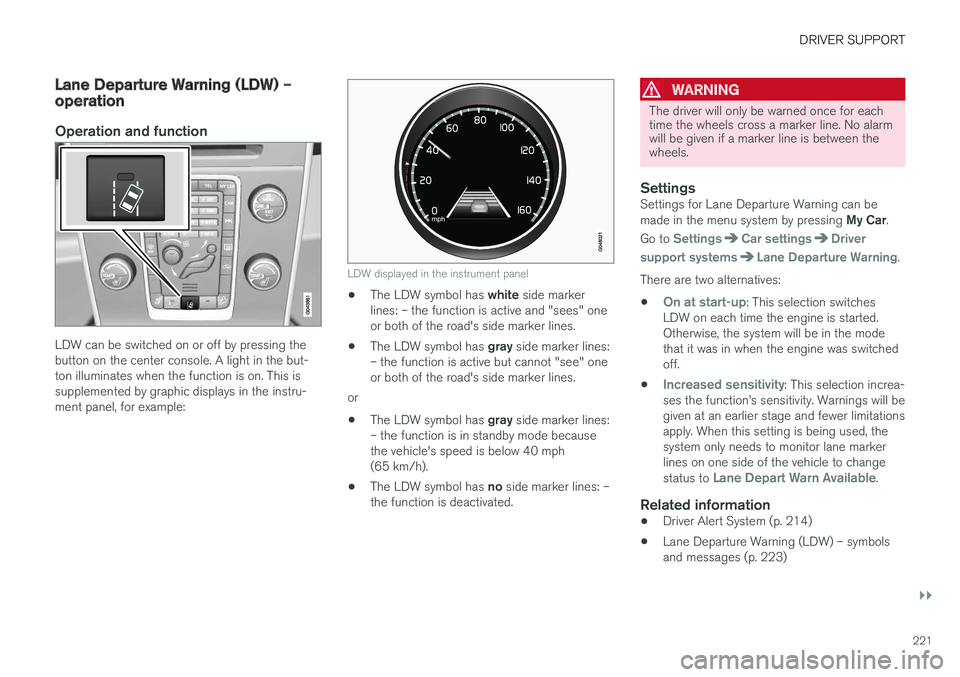
LDW can be switched on or off by pressing the button on the center console. A light in the but-ton illuminates when the function is on. This issupplemented by graphic displays in the instru-ment panel, for example:
LDW displayed in the instrument panel
•The LDW symbol has
white side marker
lines: – the function is active and "sees" one or both of the road's side marker lines.
• The LDW symbol has
gray side marker lines:
– the function is active but cannot "see" oneor both of the road's side marker lines.
or
• The LDW symbol has
gray side marker lines:
– the function is in standby mode becausethe vehicle's speed is below 40 mph(65 km/h).
• The LDW symbol has
no side marker lines: –
the function is deactivated.
WARNING
The driver will only be warned once for each time the wheels cross a marker line. No alarmwill be given if a marker line is between thewheels.
SettingsSettings for Lane Departure Warning can be made in the menu system by pressing My Car.
Go to
SettingsCar settingsDriver
support systems
Lane Departure Warning.
There are two alternatives:
•
On at start-up: This selection switches
LDW on each time the engine is started. Otherwise, the system will be in the modethat it was in when the engine was switchedoff.
•
Increased sensitivity: This selection increa-
ses the function
Page 236 of 396
DRIVER SUPPORT
* Option/accessory.
234
Park Assist Pilot (PAP) * –
introduction
The Park Assist Pilot provides assistance when parallel parking by measuring the parking spaceand turning the steering wheel.
Introduction
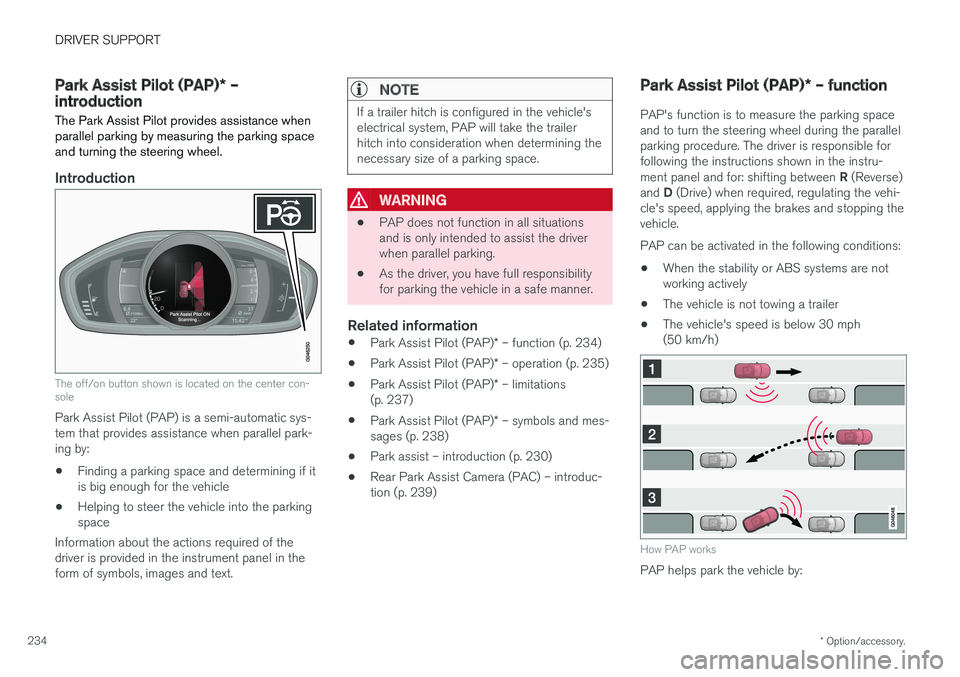
The off/on button shown is located on the center con- sole
Park Assist Pilot (PAP) is a semi-automatic sys- tem that provides assistance when parallel park-ing by:
• Finding a parking space and determining if itis big enough for the vehicle
• Helping to steer the vehicle into the parkingspace
Information about the actions required of thedriver is provided in the instrument panel in theform of symbols, images and text.
NOTE
If a trailer hitch is configured in the vehicle's electrical system, PAP will take the trailerhitch into consideration when determining thenecessary size of a parking space.
WARNING
• PAP does not function in all situations and is only intended to assist the driverwhen parallel parking.
• As the driver, you have full responsibilityfor parking the vehicle in a safe manner.
Related information
•
Park Assist Pilot (PAP)
* – function (p. 234)
• Park Assist Pilot (PAP)
* – operation (p. 235)
• Park Assist Pilot (PAP)
* – limitations
(p. 237)
• Park Assist Pilot (PAP)
* – symbols and mes-
sages (p. 238)
• Park assist – introduction (p. 230)
• Rear Park Assist Camera (PAC) – introduc-tion (p. 239)
Park Assist Pilot (PAP)
* – function
PAP's function is to measure the parking space and to turn the steering wheel during the parallelparking procedure. The driver is responsible forfollowing the instructions shown in the instru- ment panel and for: shifting between R (Reverse)
and D (Drive) when required, regulating the vehi-
cle's speed, applying the brakes and stopping the vehicle. PAP can be activated in the following conditions:
• When the stability or ABS systems are not working actively
• The vehicle is not towing a trailer
• The vehicle's speed is below 30 mph(50 km/h)
How PAP works
PAP helps park the vehicle by:
Page 238 of 396
||
DRIVER SUPPORT
* Option/accessory.
236
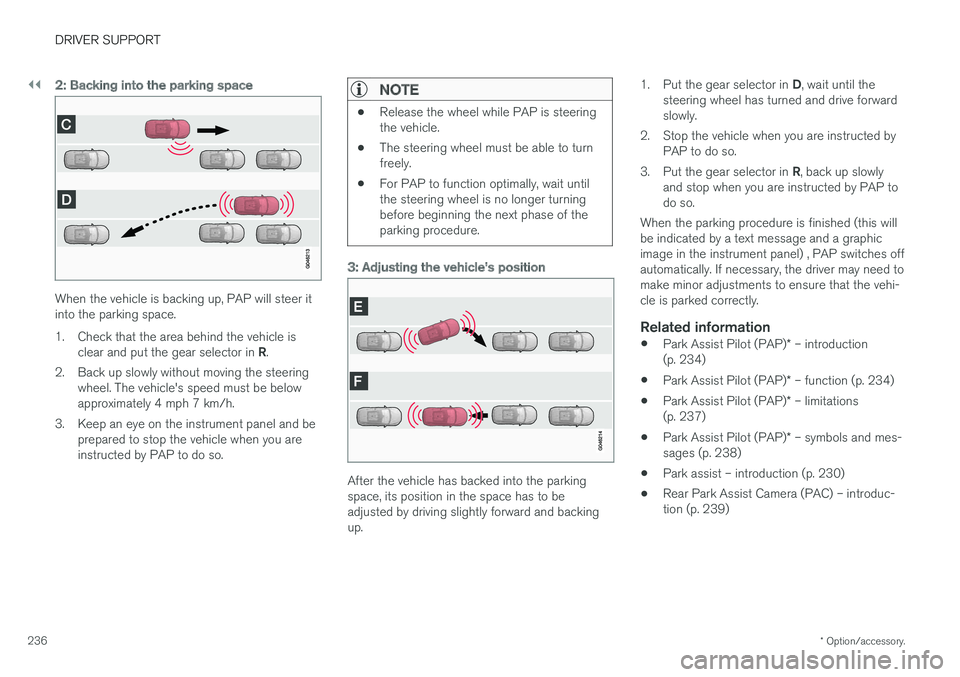
2: Backing into the parking space
When the vehicle is backing up, PAP will steer it into the parking space.
1. Check that the area behind the vehicle is
clear and put the gear selector in R.
2. Back up slowly without moving the steering wheel. The vehicle's speed must be below approximately 4 mph 7 km/h.
3. Keep an eye on the instrument panel and be prepared to stop the vehicle when you areinstructed by PAP to do so.
NOTE
•Release the wheel while PAP is steering the vehicle.
• The steering wheel must be able to turnfreely.
• For PAP to function optimally, wait untilthe steering wheel is no longer turningbefore beginning the next phase of theparking procedure.
3: Adjusting the vehicle's position
After the vehicle has backed into the parking space, its position in the space has to beadjusted by driving slightly forward and backingup. 1.
Put the gear selector in D, wait until the
steering wheel has turned and drive forwardslowly.
2. Stop the vehicle when you are instructed by PAP to do so.
3. Put the gear selector in R, back up slowly
and stop when you are instructed by PAP todo so.
When the parking procedure is finished (this willbe indicated by a text message and a graphicimage in the instrument panel) , PAP switches offautomatically. If necessary, the driver may need tomake minor adjustments to ensure that the vehi-cle is parked correctly.
Related information
• Park Assist Pilot (PAP)
* – introduction
(p. 234)
• Park Assist Pilot (PAP)
* – function (p. 234)
• Park Assist Pilot (PAP)
* – limitations
(p. 237)
• Park Assist Pilot (PAP)
* – symbols and mes-
sages (p. 238)
• Park assist – introduction (p. 230)
• Rear Park Assist Camera (PAC) – introduc-tion (p. 239)