warning VOLVO S60 TWIN ENGINE 2019 Owners Manual
[x] Cancel search | Manufacturer: VOLVO, Model Year: 2019, Model line: S60 TWIN ENGINE, Model: VOLVO S60 TWIN ENGINE 2019Pages: 645, PDF Size: 13.96 MB
Page 287 of 645
DRIVER SUPPORT
}}
* Option/accessory.285
If Pilot Assist detects that thedriver's hands are not on thesteering wheel, a symbol andtext message will appear toinstruct the driver to activelysteer the vehicle.
If the driver's hands are still detected on thesteering wheel after a few seconds have passed,the instructions to actively steer the vehicle willbe repeated, accompanied by an audible signal.
If Pilot Assist still does not detect the driver'shands on the steering wheel after a few moreseconds have passed, the audible signal willbecome intense and the steering function willswitch off. Pilot Assist must then be reactivated
by pressing the button on the steeringwheel.
NOTE
Note that the Pilot Assist function only workswhen the driver's hands are on the steeringwheel.
Related information
Pilot Assist (p. 281)
Deactivating/reactivating Pilot Assist(p. 285)
Deactivating/reactivating PilotAssist
Pilot Assist can be temporarily put into standbymode and then reactivated.
Deactivating and putting Pilot Assist in
standby mode
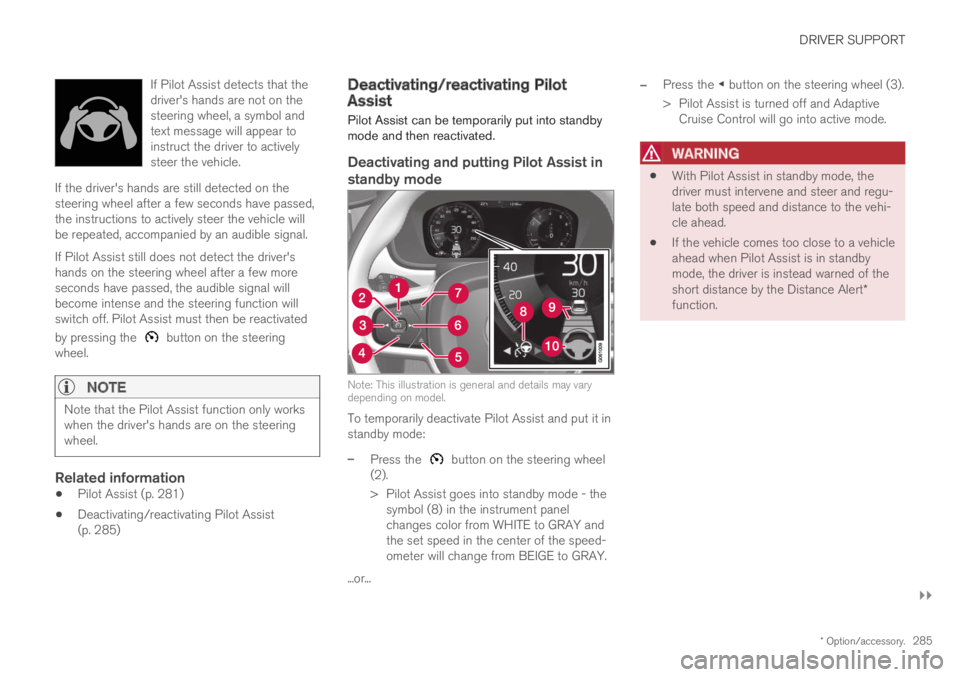
Note: This illustration is general and details may varydepending on model.
To temporarily deactivate Pilot Assist and put it instandby mode:
–Press the button on the steering wheel(2).
>Pilot Assist goes into standby mode - thesymbol (8) in the instrument panelchanges color from WHITE to GRAY andthe set speed in the center of the speed-ometer will change from BEIGE to GRAY.
...or...
–Press the ◀ button on the steering wheel (3).
>Pilot Assist is turned off and AdaptiveCruise Control will go into active mode.
WARNING
With Pilot Assist in standby mode, thedriver must intervene and steer and regu-late both speed and distance to the vehi-cle ahead.
If the vehicle comes too close to a vehicleahead when Pilot Assist is in standbymode, the driver is instead warned of theshort distance by the Distance Alert*function.
Page 288 of 645

||
DRIVER SUPPORT
286
Standby mode due to action by the driver
Pilot Assist will be temporarily deactivated andput in standby mode if:
the brakes are applied.
the gear selector is moved to N.
a turn signal is used for more than 1 minute.
the vehicle is driven faster than the setspeed for more than 1 minute.
Temporarily increasing speed using the accelera-tor pedal, e.g. when passing another vehicle, willnot affect the setting. The vehicle will return tothe set speed when the accelerator pedal isreleased.
When the turn signals are used, Pilot Assist'ssteering assistance will be temporarily deacti-vated. When the turn signal is switched off, steer-ing assistance will be automatically reactivated ifthe traffic lane's side markings can still bedetected.
Automatic standby mode
Pilot Assist is dependent on other systems, such
as Electronic Stability Control (ESC32). If any ofthese other systems stops working, Pilot Assistwill automatically switch off.
WARNING
With automatic standby mode, the driver iswarned by an acoustic signal and a messageon the instrument panel.
The driver must then regulate vehiclespeed, apply the brakes if necessary, andmaintain a safe distance to other vehicles.
Adaptive Cruise Control may go into standbymode if, e.g.:
the driver opens the door.
the brake temperature is high.
the driver's hands are not on the steeringwheel.
the parking brake is applied.
the engine speed (rpm) is too low/high.
the driver unbuckles the seat belt.
one or more of the wheels lose traction.
the camera/radar sensor is covered by snowor heavy rain (the camera lens/radar wavesare blocked).
your vehicle's speed goes under 5 km/h(3 mph) and Pilot Assist cannot determine ifthe vehicle ahead is stationary or if it isanother object, e.g. a speed bump.
your vehicle's speed goes under 5 km/h(3 mph) and the vehicle ahead turns so thatPilot Assist no longer has a vehicle to follow.
Reactivating Pilot Assist from standby
mode
Note: This illustration is general and details may varydepending on model.
To reactivate Pilot Assist:
–Press the button on the steering wheel(1).
>Speed will be set to the most recentlystored speed.
32Electronic Stability Control
Page 289 of 645

DRIVER SUPPORT
}}}}
287
WARNING
A noticeable increase in speed may follow
when the speed is resumed with the steering wheel button.
Related information
Pilot Assist (p. 281)
Activating and starting Pilot Assist (p. 284)
Pilot Assist limitations
Pilot Assist functionality may be reduced in cer-tain situations.
Pilot Assist is a driver support function designedto simplify driving and assist the driver in manysituations. However, the driver is always responsi-ble for maintaining a suitable distance to vehiclesor objects around it and ensuring that the vehicleis correctly positioned in the traffic lane.
WARNING
In some situations, Pilot Assist may have trou-ble helping the driver properly or may bedeactivated automatically – we advise againstusing Pilot Assist in such cases. Examples ofsuch situations include:
the lane markings are worn, missing orcross each other.
lane division is unclear, for example, whenthe lanes divide or merge or at exits orwhen there are multiple sets of markings.
edges or other lines than lane markingsare present on or near the road, e.g.curbs, joints or repairs to the road sur-face, edges of barriers, roadside edges orstrong shadows.
the lane is narrow or winding.
the lane contains ridges or holes.
weather conditions are poor, e.g. rain,snow or fog or slush or reduced visibilitywith poor light conditions, backlighting,wet road surface, etc.
The driver should also note that Pilot Assisthas the following limitations:
High curbs, roadside barriers, temporaryobstacles (traffic cones, safety barriers,etc.) are not detected. Alternatively, theymay be detected incorrectly as lane mark-ings, with a subsequent risk of contactbetween the vehicle and such obstacles.
Page 292 of 645

||
DRIVER SUPPORT
* Option/accessory.290
The previous illustration34 shows that Pilot Assistis set to maintain a speed of 110 km/h (68 mph)and that there is no target vehicle ahead to fol-low.
Pilot Assist will provide steering assistancebecause it can detect the lane's side markinglines.
Related information
Pilot Assist (p. 281)
Collision risk warning from driversupport
The driver support systems Pilot Assist and
Adaptive Cruise Control*35 can help alert thedriver if the distance to the vehicle ahead sud-denly decreases to an unsafe distance.
Collision warning audible signal and symbol.
Acoustic collision warning signal
Collision warning symbol
Camera/radar sensor distance monitoring
Driver support uses approx. 40% of the vehicle'sbraking capacity. If a situation requires morebraking force than driver support can provide, andif the driver does not apply the brakes, a warning
light and audible warning signal will be activatedto alert the driver that immediate action isrequired.
WARNING
The driver support system only issues a warn-ing for vehicles detected by its radar unit –thus, a warning may come after a delay or notat all. Never wait for a warning. Apply thebrakes when necessary.
Collision warning symbol on the windshield.
In vehicles equipped with a head-up display*, aflashing warning symbol will be displayed on thewindshield.
34Note: This illustration is general and details may vary depending on model.35Adaptive Cruise Control
Page 293 of 645
DRIVER SUPPORT
* Option/accessory.291
NOTE
Visual warnings on the windshield may be dif-ficult to notice in cases of strong sunlight,reflections, extreme light contrasts, or if thedriver is wearing sunglasses or is not lookingstraight ahead.
Related information
Driver support systems (p. 260)
Adaptive Cruise Control* (p. 272)
Pilot Assist (p. 281)
Distance Alert* (p. 270)
Head-up display* (p. 140)
Switching target vehicles with driversupport
At certain speeds, vehicles with automatic trans-missions and the driver support functions Adap-
tive Cruise Control*36 and Pilot Assist canswitch target vehicles.
Switching target vehicles
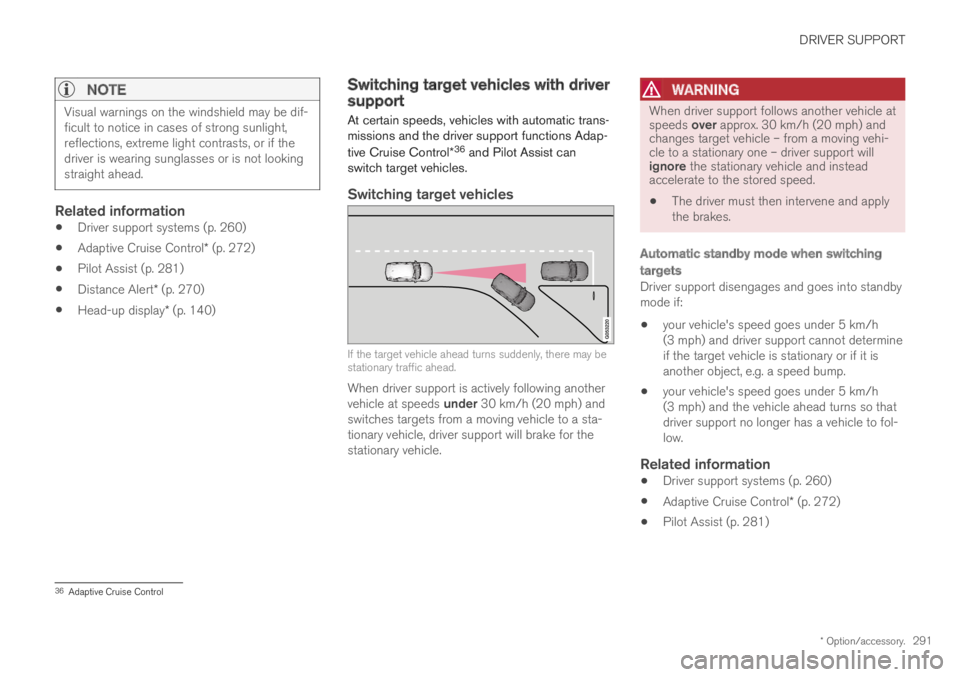
If the target vehicle ahead turns suddenly, there may bestationary traffic ahead.
When driver support is actively following anothervehicle at speeds under 30 km/h (20 mph) andswitches targets from a moving vehicle to a sta-tionary vehicle, driver support will brake for thestationary vehicle.
WARNING
When driver support follows another vehicle atspeeds over approx. 30 km/h (20 mph) andchanges target vehicle – from a moving vehi-cle to a stationary one – driver support willignore the stationary vehicle and insteadaccelerate to the stored speed.
The driver must then intervene and applythe brakes.
Automatic standby mode when switching
targets
Driver support disengages and goes into standbymode if:
your vehicle's speed goes under 5 km/h(3 mph) and driver support cannot determineif the target vehicle is stationary or if it isanother object, e.g. a speed bump.
your vehicle's speed goes under 5 km/h(3 mph) and the vehicle ahead turns so thatdriver support no longer has a vehicle to fol-low.
Related information
Driver support systems (p. 260)
Adaptive Cruise Control* (p. 272)
Pilot Assist (p. 281)
36Adaptive Cruise Control
Page 294 of 645
DRIVER SUPPORT
* Option/accessory.292
Set time interval for driver support
The time interval to the vehicle ahead can be set
for the functions Adaptive Cruise Control*37,Pilot Assist and Distance Alert*.
Different time intervals to thevehicle ahead can be selectedand are shown in the instru-ment panel as 1–5 horizontalbars. The more bars, the longerthe time interval. One bar rep-resents an interval ofapprox. 1 second to the vehicle ahead. 5 barsrepresents approx. 3 seconds.
NOTE
When the symbol in the instrument panelshows a vehicle and a steering wheel, PilotAssist follows a vehicle ahead at a presettime interval.
When only a steering wheel is shown, there isno vehicle ahead within a reasonable dis-tance.
NOTE
When the symbol in the instrument panelshows two vehicles, ACC is following the vehi-cle ahead at a preset time interval.
When only one vehicle is shown, there is novehicle ahead within a reasonable distance.
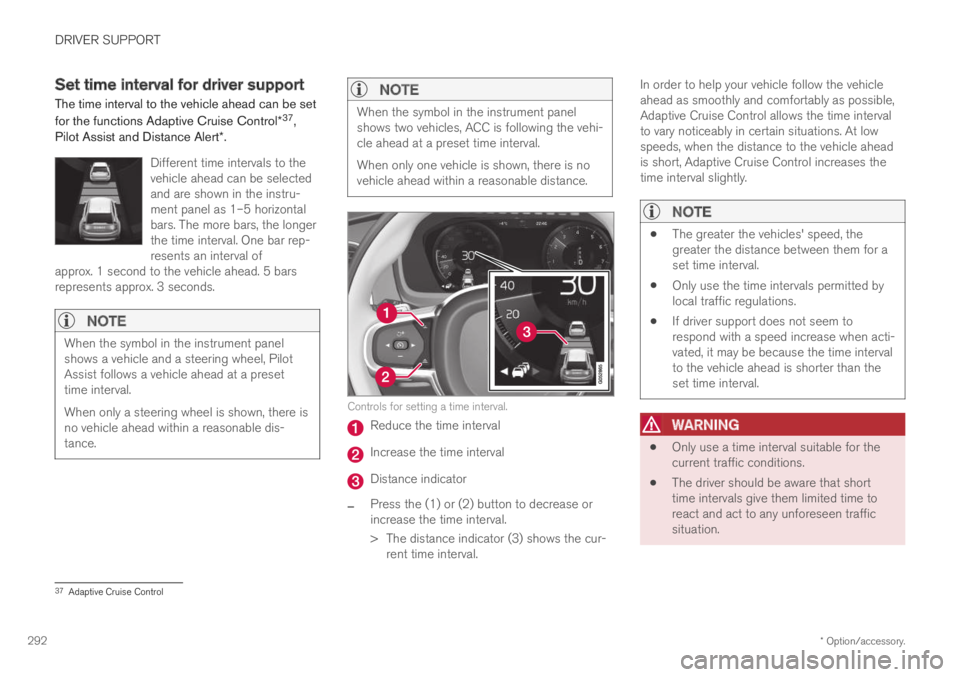
Controls for setting a time interval.
Reduce the time interval
Increase the time interval
Distance indicator
–Press the (1) or (2) button to decrease orincrease the time interval.
>The distance indicator (3) shows the cur-rent time interval.
In order to help your vehicle follow the vehicleahead as smoothly and comfortably as possible,Adaptive Cruise Control allows the time intervalto vary noticeably in certain situations. At lowspeeds, when the distance to the vehicle aheadis short, Adaptive Cruise Control increases thetime interval slightly.
NOTE
The greater the vehicles' speed, thegreater the distance between them for aset time interval.
Only use the time intervals permitted bylocal traffic regulations.
If driver support does not seem torespond with a speed increase when acti-vated, it may be because the time intervalto the vehicle ahead is shorter than theset time interval.
WARNING
Only use a time interval suitable for thecurrent traffic conditions.
The driver should be aware that shorttime intervals give them limited time toreact and act to any unforeseen trafficsituation.
37Adaptive Cruise Control
Page 297 of 645

DRIVER SUPPORT
}}
* Option/accessory.295
NOTE
Driver support can keep the vehicle stationaryfor no more than 5 minutes – after that timethe parking brake is applied and the functionis deactivated.
The parking brake must be released beforedriver support can be reactivated.
Deactivation of the Auto-hold brake function
In certain situations, auto-hold will be deactivatedwhen the vehicle is at a standstill and the func-tion will go into standby mode. This means thatthe brakes will be released and the vehicle couldbegin to roll. The driver must actively apply thebrakes to keep the vehicle stationary.
This can occur if:
the driver depresses the brake pedal
the parking brake is applied
the gear selector is moved to the P, N or Rpositions
the driver puts the function in standby mode.
Auto Activate Parking Brake
In certain situations, the parking brake will beapplied to keep the vehicle at a standstill.
This occurs if the function is keeping the vehiclestationary using the brakes and:
the driver opens the door or unbuckleshis/her seat belt
the function has kept the vehicle at a stand-still for more than approx. 5 minutes
the brakes overheat
the driver switches off the engine manually.
Related information
Driver support systems (p. 260)
Adaptive Cruise Control* (p. 272)
Pilot Assist (p. 281)
Brake functions (p. 396)
Passing assistance
Passing assistance can assist the driver whenpassing other vehicles. The function can beused with Pilot Assist or Adaptive Cruise Con-
trol* (ACC40).
How passing assistance works
When Pilot Assist or ACC is following anothervehicle and you indicate that you intend to pass
that vehicle by using the turn signal41, the systemwill begin accelerating toward the vehicle aheadbefore your vehicle has moved into the passinglane.
The function will then delay a speed reduction toavoid early braking as your vehicle approaches aslower-moving vehicle.
The function remains active until your vehicle haspassed the other vehicle.
WARNING
Please note that this function can be acti-vated in more situations than just passinganother vehicle, such as when a direction indi-cator is used to indicate a lane change orbefore exiting to another road – the vehiclewill then briefly accelerate.
39Adaptive Cruise Control40Adaptive Cruise Control41Only the left-hand turn signal for left-hand drive vehicles, or right-hand turn signal for right-hand drive vehicles.
Page 298 of 645
||
DRIVER SUPPORT
* Option/accessory.296
Related information
Driver support systems (p. 260)
Using passing assistance (p. 296)
Adaptive Cruise Control* (p. 272)
Pilot Assist (p. 281)
Using passing assistance
Several conditions must be met for passingassistance to be possible.
In order to activate passing assistance:
your vehicle must be following a vehicleahead (target vehicle)
your vehicle's current speed must beat least 70 km/h (43 mph)
the set speed must be high enough tosafely pass another vehicle.
To start passing assistance:
–Turn on the left turn signal.
>Passing assistance will start.
WARNING
The driver should be aware that if conditionssuddenly change when using Passing Assis-tance, the function may implement an unde-sired acceleration in certain conditions.
Some situations should be avoided, e.g. if:
the vehicle is approaching an exit in thesame direction as passing would normallyoccur
the vehicle ahead slows before your vehi-cle has had time to switch to the passinglane
traffic in the passing lane slows down
Situations of this type can be avoided by tempo-rarily putting Adaptive Cruise Control or PilotAssist in standby mode.
Related information
Passing assistance (p. 295)
Adaptive Cruise Control* (p. 272)
Pilot Assist (p. 281)
Page 305 of 645

DRIVER SUPPORT
* Option/accessory.303
Park Assist Camera *
Blind sectors
There are "blind" sectors between the cameras' fields ofvision.
With Park Assist Camera's 360° view* selected,objects/obstacles may not be detected if theyare located in the "joints" where the edges of theindividual camera views meet.
WARNING
Even if it seems as though only a fairly smallsection of the screen image is obstructed, thismay mean that a relatively large sector is hid-den and obstacles there may not be detecteduntil they are very near the vehicle.
Defective camera
If a camera sector is dark andcontains this symbol, this indi-cates that the camera is notfunctioning properly.
See the following illustration foran example.
The vehicle's left-side camera is malfunctioning.
A dark camera sector may also be displayed inthe following situations, but without the defectivecamera symbol:
a door is open
the trunk lid is open
a rearview mirror is folded in
Lighting conditions
The camera image is automatically adjustedaccording to the current lighting conditions. Thismeans that the brightness and quality of the
image may vary slightly. Poor lighting conditionsmay result in reduced image quality.
Rear Park Assist Camera
WARNING
Be extra cautious whenreversing if this symbol isshown when a trailer, bikecarrier or similar is attachedand electrically connectedto the vehicle.
The symbol indicates thatthe rear parking assist sensors are deacti-vated and will not warn of any obstacles.
NOTE
A bike carrier and other accessories mountedon the rear of the vehicle can obscure thecamera's view.
Related information
Camera (p. 299)
Radar sensor (p. 297)
Recommended camera and radar sensormaintenance (p. 304)
Park Assist Camera* (p. 355)
Page 306 of 645

DRIVER SUPPORT
* Option/accessory.304
Recommended camera and radarsensor maintenance
In order for the camera and radar sensor to func-tion properly, they must be kept free of dirt, ice,snow, etc. and should be washed regularly withwater and car washing detergent.
NOTE
Dirt, ice and snow covering the sensors couldcause false warnings, reduced function, or nofunction.
Location of the Park Assist sensors.
Location of rear radar sensors. Keep the marked areaclean (on both the left and right sides of the vehicle).
For optimal performance, it is important tokeep the areas in front of the sensors clean.
Do not attach any objects, tape or decals tothe surface of the sensors.
Clean the camera lenses regularly usinglukewarm water and car washing detergent.Wash gently to avoid scratching the lens.
CAUTION
Maintenance of driver support components
may only performed by a workshop46.
Related information
Camera (p. 299)
Radar sensor (p. 297)
Camera/radar sensor limitations (p. 300)
Park Assist Camera* (p. 355)
46An authorized Volvo workshop is recommended.