air condition VOLVO S60 TWIN ENGINE 2019 User Guide
[x] Cancel search | Manufacturer: VOLVO, Model Year: 2019, Model line: S60 TWIN ENGINE, Model: VOLVO S60 TWIN ENGINE 2019Pages: 645, PDF Size: 13.96 MB
Page 90 of 645
||
DISPLAYS AND VOICE CONTROL
88
Distance to empty tank
The trip computer calculates the dis-tance that can be driven on the fuelremaining in the tank.
This calculation is based on average fuel con-sumption during the last 30 km (20 miles) andthe amount of fuel remaining in the tank.
When the gauge displays "----", there is notenough fuel remaining to calculate the remainingmileage. Refuel as soon as possible.
NOTE
This may vary if your driving style changes.
An economical driving style will generallyincrease how far you can drive on a certainamount of fuel.
Distance to discharged battery
This gauge shows the approximate dis-tance that can be driven with theremaining current in the hybrid battery.
This calculation is based on average consump-tion with a normally loaded vehicle in normal driv-ing conditions, and takes into account whetherthe air conditioning is on or off. Changing drivemodes from Hybrid to Pure may increase thecalculated distance because Pure mode hasreduced climate control settings (ECO Climate).
When the gauge displays "----", there is littlecharge remaining in the battery and electricmotor range cannot be reliably calculated.
NOTE
This may vary if your driving style changes.
An economical driving style will generallyincrease how far you can drive on a certainamount of fuel.
Starting values for fully charged hybrid
battery
Because it is difficult to predict driving style andother factors that affect the range of electricmotors, Volvo uses a starting value when thevehicle is fully charged. This starting value pro-vides an "up to" amount instead of a predictionon the range of the electric current in the motor.The difference in starting value between Hybridand Pure is because the vehicle is permitted touse more current from the hybrid battery in Puremode, and because the vehicle switches to ECOClimate.
Mileage when using electric motor
To achieve the longest possible mileage whenusing the electric motor, the driver of an electricvehicle also needs to think about conservingelectricity. The more electricity consumers(stereo, heated windows/mirrors/seats, very cold
air from climate control system, etc.) that areactive, the shorter the potential mileage.
NOTE
In addition to high electrical consumption inthe passenger compartment, rapid accelera-tion, sudden braking, high speeds, heavyloads, low ambient temperatures and drivingup hills can reduce possible driving distance.
Tourist - alternative speedometer
The alternative digital speedometer makes it eas-ier to drive in countries where speed limit signsare shown in a different measurement unit thanthe one shown in the vehicle's gauges.
When used, the digital speed is displayed in theopposite unit to that shown in the analog speed-ometer. If mph is used in the analog speedome-ter, the equivalent speed in km/h will be shownin the digital speedometer.
Related information
Displaying trip data in the instrument panel(p. 89)
Resetting the trip odometer (p. 90)
Displaying trip statistics in the center display(p. 90)
Instrument panel (p. 82)
Changing system units of measurement(p. 130)
Page 96 of 645

||
DISPLAYS AND VOICE CONTROL
94
SymbolMeaning
Active high beams off
This symbol lights up in white whenthe active high beams are off.Parking lights are on.
High beams on
This symbol illuminates when thehigh beams and parking lights areon.
Rear fog light on
This symbol illuminates when therear fog light is on.
Rain sensor on
This symbol illuminates when therain sensor is on.
Preconditioning on
This symbol illuminates when theengine block/passenger compart-ment heater or air conditioning arepreconditioning the vehicle.
Stability system
This symbol flashes when the sta-bility system is actively working tostabilize the vehicle. If the symbolglows steadily, there is a fault inthe system.
SymbolMeaning
Stability system, Sport mode
This symbol illuminates when Sportmode is activated. Sport modeoffers a more active driving experi-ence.
Lane Keeping Aid
White symbol: Lane Keeping Aid ison and lane marker lines aredetected.
Gray symbol: Lane Keeping Aid ison but no lane marker lines aredetected.
Amber-colored symbol: Lane Keep-ing Aid is alerting/intervening.
Lane Keeping Aid and rain sen-sor
White symbol: Lane Keeping Aid ison and lane marker lines aredetected. The rain sensor is on.
Gray symbol: Lane Keeping Aid ison but no lane marker lines aredetected. The rain sensor is on.
ACanadian models.BUS models.
Related information
Instrument panel (p. 82)
Warning symbols in the instrument panel(p. 95)
Page 200 of 645
||
CLIMATE CONTROL
* Option/accessory.198
"Turn on auto" – activates automatic cli-mate control.
"Air condition on"/"Air condition off" -activates/deactivates air conditioning.
"Recirculation on"/"Recirculation off" -activates/deactivates air recirculation.
"Turn on defroster "/"Turn off defroster"- activates/deactivates window and door mir-ror defrosting.
"Turn on max defroster"/"Turn off maxdefroster" - activates/deactivates maxdefroster.
"Turn on rear defroster"/"Turn off reardefroster" - Activates/deactivates heatedrear window and door mirrors.
"Turn steering wheel heat on"/"Turnsteering wheel heat off" - activates/deac-tivates heated steering wheel*.
"Raise steering wheel heat"/"Lowersteering wheel heat" - raises/lowers thelevel of steering wheel heating*.
"Turn on seat heat"/"Turn off seat heat"- activates/deactivates seat heating*.
"Raise seat heat"/"Lower seat heat" -raises/lowers the level of seat heating*.
"Turn on seat ventilation"/"Turn off seatventilation" - activates/deactivates seatventilation*.
"Raise seat ventilation"/"Lower seatventilation" - raises/lowers the level of seatventilation*.
Related information
Climate (p. 196)
Voice control (p. 143)
Using voice commands (p. 144)
Voice control settings (p. 147)
Air quality
The materials used in the passenger compart-ment and air filtering system have been selectedto ensure a high level of air quality in the passen-ger compartment.
Materials used in the passenger
compartment
The materials in the passenger compartment aredesigned to be pleasant and comfortable, evenfor people with asthma or allergies.
The materials have been developed and tested tominimize dust in the passenger compartment andmake it easier to keep clean.
The mats in both the passenger compartmentand trunk can be easily removed for cleaning.
Use Volvo-recommended cleaning agents andcar care products to clean the interior.
Air filtering systems
In addition to the passenger compartment filter,the Clean Zone Interior Package* and Interior AirQuality System* also help maintain high air qual-ity in the passenger compartment.
Related information
Climate (p. 196)
Clean Zone* (p. 199)
Clean Zone Interior Package* (p. 199)
Interior Air Quality System* (p. 200)
Passenger compartment air filter (p. 201)
Page 201 of 645

CLIMATE CONTROL
* Option/accessory.199
Clean Zone*
The Clean Zone function monitors the condi-tions affecting good air quality in the passengercompartment and indicates whether they are ful-filled or not.
The indicator is shown in the center display'sClimate view.
The indicator is shown in the climate barwhen Climate view is not open.
If the conditions are not met, the text CleanZone will be shown in white. When all the condi-tions are met, the text will change to blue.
The following conditions must be met:
All doors and trunk lid are closed.
All side windows and panoramic roof* areclosed.
The Interior Air Quality System* is activated.
The blower is activated.
Air recirculation is deactivated.
NOTE
Clean Zone does not indicate that the airquality is good, but only that the conditions forgood air quality have been met.
Related information
Air quality (p. 198)
Clean Zone Interior Package* (p. 199)
Interior Air Quality System* (p. 200)
Passenger compartment air filter (p. 201)
Clean Zone Interior Package*
Clean Zone Interior Package (CZIP) is a seriesof modifications that filters even more allergy andasthma-inducing substances from the passengercompartment.
CZIP includes the following:
An enhanced function that starts the blowerwhen the vehicle is unlocked using theremote key. The blower will then fill the pas-senger compartment with fresh air. The func-tion starts when required and switches offautomatically after a period of time or whenone of the passenger compartment doors isopened. The amount of time the blower runsgradually decreases due to reduced need upuntil the vehicle is 4 years old.
The fully automatic Interior Air QualitySystem (IAQS).
Related information
Air quality (p. 198)
Clean Zone* (p. 199)
Interior Air Quality System* (p. 200)
Passenger compartment air filter (p. 201)
Page 209 of 645

CLIMATE CONTROL
}}
* Option/accessory.207
Climate system controls
The climate system functions are controlled fromphysical buttons on the center console, the cen-ter display, and the climate panel on the rearside of the tunnel console*.
Physical buttons in the center console
Button for max defroster.
Button for heated rear window and door mir-rors.
Climate bar in the center display
The most common climate system functions canbe controlled from the climate bar.
Temperature controls for driver and passen-ger side.
Controls for heated* and ventilated* driverand front passenger seat, as well as heatedsteering wheel*.
Button for opening Climate view. The graphicin the button shows activated climate systemsettings.
Climate view in the center display
Tap the symbol in the center of the cli-mate bar to open Climate view.
Depending on equipment level, Climateview may be divided into several tabs.Toggle between the tabs by swiping the screento the left/right or by tapping the desired head-ing.
Main climate
In addition to the functions in the climate bar,other main climate system functions can be con-trolled from the Main climate tab.
Max, Rear – Controls for defrosting windowsand door mirrors.
AC - Air conditioning controls.
Recirc - Air recirculation controls.
Air distribution controls.
Page 210 of 645

||
CLIMATE CONTROL
* Option/accessory.208
Blower control.
AUTO - Automatic climate control.
Parking climate
Parking climate functions can be controlled fromthe Parking climate tab.
Climate controls on the rear side of the
tunnel console *
If the vehicle is equipped with heated rear seats*,there are physical buttons on the rear side of thetunnel console to control this function.
Related information
Climate (p. 196)
Activating and deactivating power frontseats* (p. 208)
Activating and deactivating the heated rearseats* (p. 209)
Activating and deactivating front seat ventila-tion* (p. 209)
Activating and deactivating the heated steer-ing wheel* (p. 210)
Activating auto climate control (p. 211)
Activating and deactivating recirculation(p. 211)
Activating and deactivating max defroster(p. 212)
Activating and deactivating the heated rearwindow and door mirrors (p. 213)
Setting the blower speed for the front seats(p. 214)
Synchronize temperature (p. 216)
Activating and deactivating air conditioning(p. 216)
Activating and deactivating power
front seats*
The seats can be heated for added comfort forthe driver and passengers in cold weather.
1. Tap the left- or right-side steering wheel andseat button in the center display's climatebar to open the controls for steering wheeland seat heating.
If the vehicle is not equipped with ventilatedseats or heated steering wheel (for the driv-er's side), the button for seat heating isdirectly accessible in the climate bar.
2. Tap the seat heating button repeatedly toselect one of the four levels: Off, High,Medium or Low.
>The level is changed and the set level isdisplayed in the button.
Related information
Climate system controls (p. 207)
Activating and deactivating the heated frontseat* (p. 209)
Page 213 of 645
CLIMATE CONTROL
}}
211
Activating auto climate control
If auto climate control is activated, several cli-mate system functions are controlled automati-cally.
1. Tap the symbol in the center of the climatebar to open Climate view in the center dis-play.
2.Tap or press and hold AUTO Climate
Tap - air recirculation, air conditioning andair distribution are controlled automati-cally.
Press and hold - air recirculation, air con-ditioning and air distribution are controlledautomatically. Temperature and blowerspeed are changed to standard settings:22 °C (72 °F) and speed 3.
>Auto climate mode is activated and thebutton lights up.
NOTE
It is possible to change the temperature andblower speed without deactivating automaticclimate control. Automatic climate control isdeactivated when the air distribution ischanged manually or when the max defrosteris activated.
Related information
Climate system controls (p. 207)Activating and deactivatingrecirculation
The climate system's recirculation function helpsshut out smog, smoke, exhaust fumes, etc. byreusing the air in the passenger compartment.
1. Tap the symbol in the center of the climatebar to open Climate view in the center dis-play.
2.Tap Recirc.
>Air recirculation is activated/deactivatedand the button lights up/goes out.
CAUTION
If the air in the vehicle is recirculated too long,there is a risk of fogging on the inside of thewindows.
NOTE
Recirculation cannot be activated when themax defroster is on.
Page 217 of 645

CLIMATE CONTROL
215
CAUTION
The air conditioning will not engage if theblower is turned off completely, which maycause fogging on the inside of the windows.
NOTE
The climate system automatically adapts air-flow as needed within the set blower speed,which means that airflow speed may varyslightly within the same blower speed.
Related information
Climate system controls (p. 207)
Setting the temperature for the
front seats3
The temperature can be set to the desired num-ber of degrees for the front seat climate zones.
Temperature buttons in the climate bar.
1. Tap the left- or right-side temperature but-tons in the center display's climate bar toopen the control.
Temperature control.
2. Set the temperature by doing one of the fol-lowing:
dragging the control to the desired tem-perature, or
tapping +− to raise/lower the tempera-ture.
> The temperature will be set and the but-ton will display the new temperature.
NOTE
Heating/cooling cannot be accelerated bychoosing a higher/lower temperature thanthe desired temperature.
Related information
Climate system controls (p. 207)
3The same setting applies to the rear seats with the 2-zone climate system.
Page 218 of 645
CLIMATE CONTROL
* Option/accessory.216
Synchronize temperature
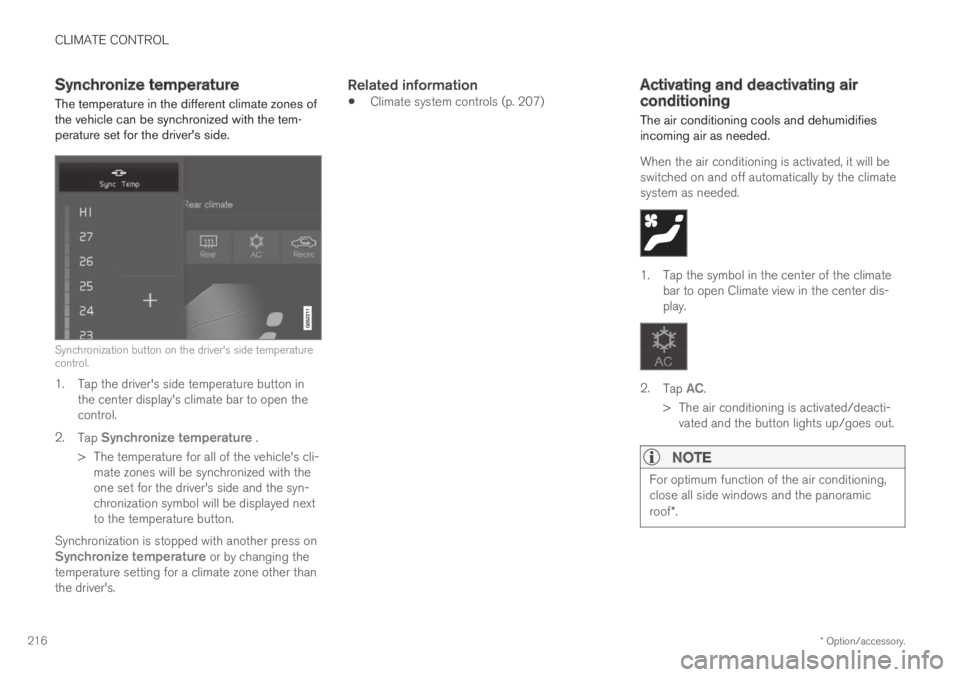
The temperature in the different climate zones ofthe vehicle can be synchronized with the tem-perature set for the driver's side.
Synchronization button on the driver's side temperaturecontrol.
1. Tap the driver's side temperature button inthe center display's climate bar to open thecontrol.
2.Tap Synchronize temperature .
>The temperature for all of the vehicle's cli-mate zones will be synchronized with theone set for the driver's side and the syn-chronization symbol will be displayed nextto the temperature button.
Synchronization is stopped with another press onSynchronize temperature or by changing thetemperature setting for a climate zone other thanthe driver's.
Related information
Climate system controls (p. 207)Activating and deactivating airconditioning
The air conditioning cools and dehumidifiesincoming air as needed.
When the air conditioning is activated, it will beswitched on and off automatically by the climatesystem as needed.
1. Tap the symbol in the center of the climatebar to open Climate view in the center dis-play.
2.Tap AC.
>The air conditioning is activated/deacti-vated and the button lights up/goes out.
NOTE
For optimum function of the air conditioning,close all side windows and the panoramicroof*.
Page 219 of 645
CLIMATE CONTROL
}}
* Option/accessory.217
NOTE
The air conditioning cannot be activated whenthe fan speed is set to Off.
Related information
Climate system controls (p. 207)
Parking climate
Parking climate is an umbrella term for variousfunctions that improve the passenger compart-ment climate when the vehicle is parked, e.g.preconditioning.
Parking climate functions are con-trolled from the Parking climate tabin the center display's Climate view.Tap the symbol in the center of the cli-mate bar to open Climate view.
Related information
Climate (p. 196)
Preconditioning (p. 217)
Climate comfort retaining function (p. 222)
Parking climate symbols and messages(p. 223)
Preconditioning
Preconditioning is a climate function that, if pos-sible, attempts to achieve a comfortable tem-perature in the passenger compartment beforedriving.
Preconditioning can be started immediately orstarted at a preset time using a timer.
The function utilizes several of the vehicle's sys-tems:
In cold weather, the parking heater heats thepassenger compartment to a comfortabletemperature.
In warm weather, air conditioning cools thepassenger compartment to a comfortabletemperature.
The electrically heated steering wheel* andseats* can be activated.
Heating for the windshield, rear window anddoor mirrors are automatically activated asneeded.
During preconditioning in a hot climate, conden-sation from the air conditions may drip under thevehicle. This is normal.