fuel VOLVO S60 TWIN ENGINE 2019 User Guide
[x] Cancel search | Manufacturer: VOLVO, Model Year: 2019, Model line: S60 TWIN ENGINE, Model: VOLVO S60 TWIN ENGINE 2019Pages: 645, PDF Size: 13.96 MB
Page 64 of 645

||
SAFETY
62
WARNING
Never attempt to perform repairs or resetelectrical components on your own after thevehicle has been in safety mode. This couldresult in injury or prevent the vehicle fromfunctioning properly. Volvo recommends hav-ing the vehicle inspected and reset to normaloperating status by an authorized Volvo work-shop after Safety mode See Owner'smanual has been displayed.
WARNING
When the vehicle is in safety mode, it shouldnot be towed behind another vehicle. It shouldbe towed from the site on a tow truck. Volvorecommends towing the vehicle directly to anauthorized Volvo workshop.
Related information
Safety (p. 42)
Starting and moving the vehicle when it is insafety mode (p. 62)
Recovery (p. 440)
Starting and moving the vehiclewhen it is in safety mode
If safety mode has been set, it may be possibleto reset the system in order to start and movethe vehicle a short distance, for example, if it isblocking traffic.
Starting the vehicle when it is in safety
mode
1. Check the vehicle for damage, particularly forfuel leakage. Make sure you do not detectany gasoline fumes.
If the damage to the vehicle is minor andthere is no fuel leakage/fumes, you mayattempt to start the engine.
WARNING
Never attempt to restart the vehicle if yousmell fuel fumes when the message Safetymode See Owner's manual is displayed inthe instrument panel. Leave the vehicle imme-diately.
2.Switch off the ignition.
3. Then try to start the vehicle.
> The vehicle's electrical system will per-form a system check and then attempt toreset to normal operating mode. The mes-sage Vehicle start System check, waitwill be displayed on the instrument panelduring the check. This may take up to aminute.
4.When Vehicle start System check, wait isno longer displayed in the instrument panel,try again to start the vehicle.
CAUTION
If the message Safety mode See Owner'smanual is still displayed, the vehicle shouldnot be driven or towed behind another vehi-cle. If the vehicle needs to be moved, it mustbe towed on a tow truck. Even if no damageis apparent, there may be hidden damage thatcould make the vehicle impossible to control.
Moving the vehicle when it is in safety
mode
1.If the message Normal mode The vehicleis now in normal mode is displayed afterattempting to start the engine, the vehiclemay be moved carefully from its presentposition if, for example, it is blocking traffic.
Page 84 of 645
DISPLAYS AND VOICE CONTROL
* Option/accessory.82
Instrument panel
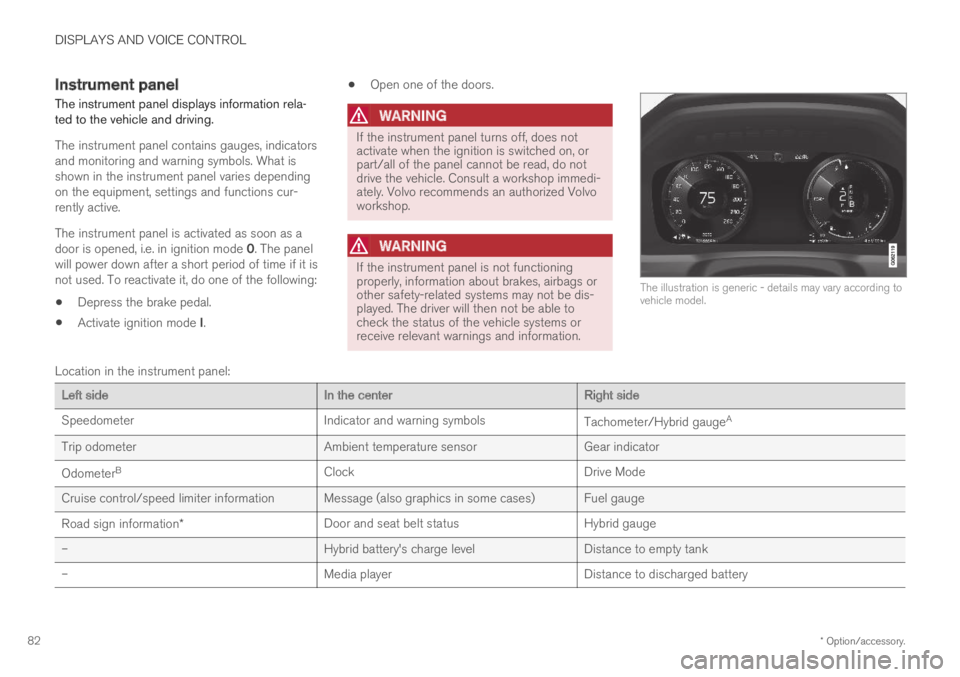
The instrument panel displays information rela-ted to the vehicle and driving.
The instrument panel contains gauges, indicatorsand monitoring and warning symbols. What isshown in the instrument panel varies dependingon the equipment, settings and functions cur-rently active.
The instrument panel is activated as soon as adoor is opened, i.e. in ignition mode 0. The panelwill power down after a short period of time if it isnot used. To reactivate it, do one of the following:
Depress the brake pedal.
Activate ignition mode I.
Open one of the doors.
WARNING
If the instrument panel turns off, does notactivate when the ignition is switched on, orpart/all of the panel cannot be read, do notdrive the vehicle. Consult a workshop immedi-ately. Volvo recommends an authorized Volvoworkshop.
WARNING
If the instrument panel is not functioningproperly, information about brakes, airbags orother safety-related systems may not be dis-played. The driver will then not be able tocheck the status of the vehicle systems orreceive relevant warnings and information.
The illustration is generic - details may vary according tovehicle model.
Location in the instrument panel:
Left sideIn the centerRight side
SpeedometerIndicator and warning symbolsTachometer/Hybrid gaugeA
Trip odometerAmbient temperature sensorGear indicator
OdometerBClockDrive Mode
Cruise control/speed limiter information Message (also graphics in some cases) Fuel gauge
Road sign information*Door and seat belt statusHybrid gauge
–Hybrid battery's charge levelDistance to empty tank
–Media playerDistance to discharged battery
Page 85 of 645
DISPLAYS AND VOICE CONTROL
* Option/accessory.83
Left sideIn the centerRight side
–Navigation system map*Current fuel consumption
–PhoneApp menu (activated using steering wheel keypad)
–Voice Control–
ADepends on selected drive mode.BTotal distance.
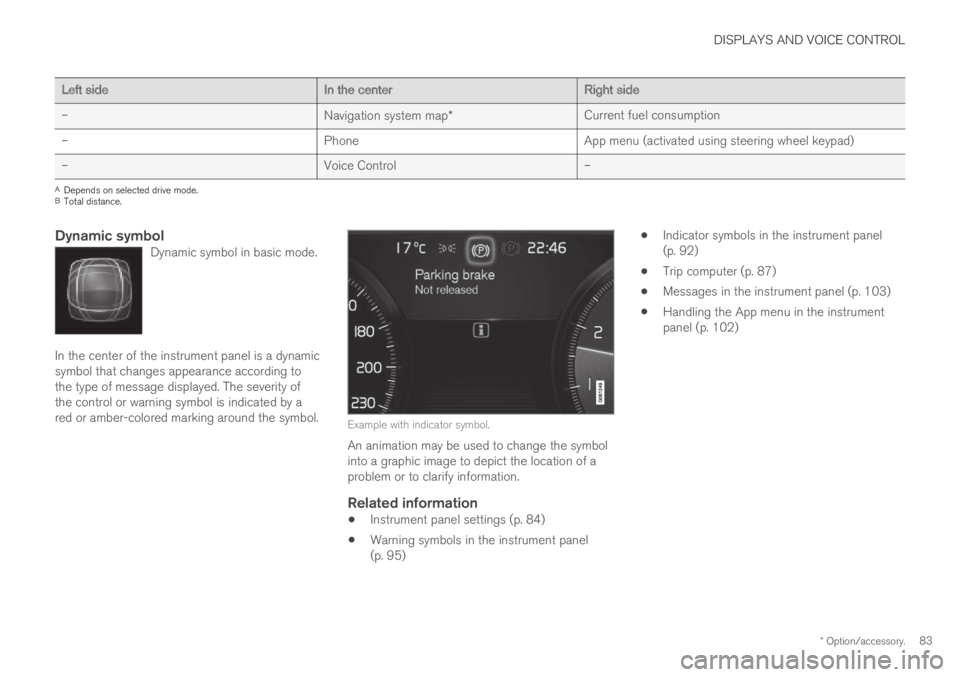
Dynamic symbol
Dynamic symbol in basic mode.
In the center of the instrument panel is a dynamicsymbol that changes appearance according tothe type of message displayed. The severity ofthe control or warning symbol is indicated by ared or amber-colored marking around the symbol.Example with indicator symbol.
An animation may be used to change the symbolinto a graphic image to depict the location of aproblem or to clarify information.
Related information
Instrument panel settings (p. 84)
Warning symbols in the instrument panel(p. 95)
Indicator symbols in the instrument panel(p. 92)
Trip computer (p. 87)
Messages in the instrument panel (p. 103)
Handling the App menu in the instrumentpanel (p. 102)
Page 87 of 645

DISPLAYS AND VOICE CONTROL
}}
85
Fuel gauge
The fuel gauge in the instrument panel showsthe fuel level in the tank.
The beige area in the fuel gauge indicates theamount of fuel left in the tank.
When the fuel level is low and it is time to refuel,the fuel pump symbol will illuminate with anamber-colored light. The trip computer also indi-cates the approximate distance driven on the fuelremaining in the tank.
Related information
Instrument panel (p. 82)
Hybrid battery gauge (p. 86)
Refueling (p. 426)
Fuel tank volume (p. 622)
Hybrid gauge
In Hybrid and Pure drive modes, the instrumentpanel will display a hybrid gauge, which can helpthe driver achieve optimal driving economy.
The hybrid gauge shows the ratio between theelectric motor's current power consumption andthe remaining available power. This information isshown in various ways.
Symbols in the hybrid gauge
Indicates the current available powerfrom the electric motor. A solid symbolindicates that the electric motor isbeing used.
A hollow symbol indicates that theelectric motor is not being used.
Indicates the power level when theinternal combustion engine starts. Asolid symbol indicates that the internalcombustion engine is being used.
Indicates the power level when theinternal combustion engine will start. Ahollow symbol indicates that the inter-nal combustion engine is not beingused.
Indicates that the hybrid battery isbeing charged, e.g. by lightly pressingthe brake pedal.
Driver-requested power
The hybrid gauge displays the amount of powerrequested (utilized) by the driver through pres-sure on the accelerator pedal. The higher thereading on the scale, the more power utilized inthe current gear. The mark between the lightningsymbol and the drop symbol indicates the pointat which the combustion engine will start.
Page 89 of 645
DISPLAYS AND VOICE CONTROL
}}
87
Symbols in the hybrid battery gauge
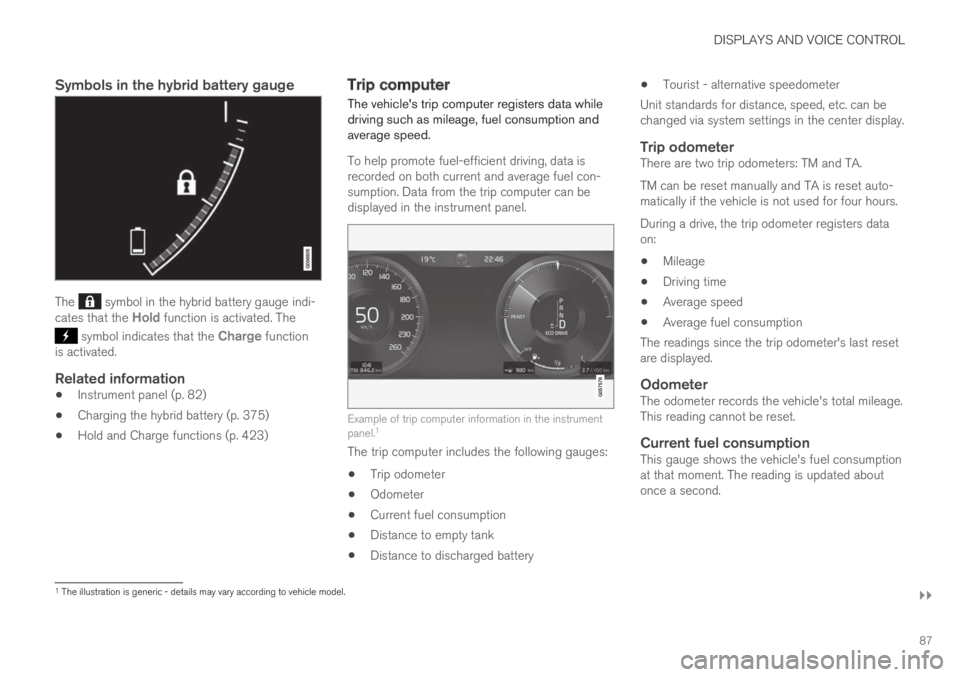
The symbol in the hybrid battery gauge indi-cates that the Hold function is activated. The
symbol indicates that the Charge functionis activated.
Related information
Instrument panel (p. 82)
Charging the hybrid battery (p. 375)
Hold and Charge functions (p. 423)
Trip computer
The vehicle's trip computer registers data whiledriving such as mileage, fuel consumption andaverage speed.
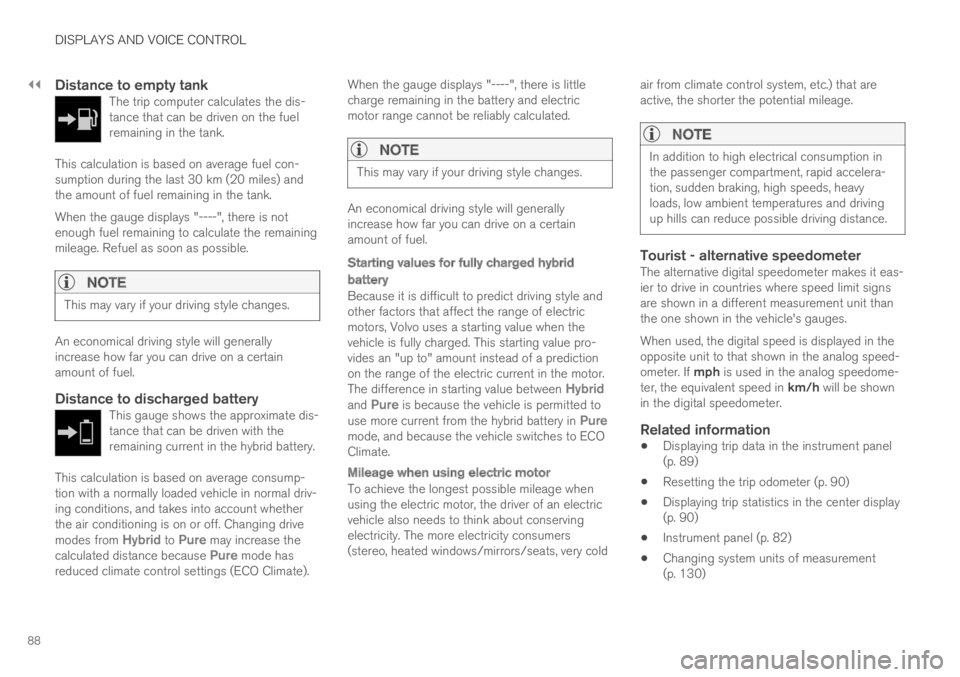
To help promote fuel-efficient driving, data isrecorded on both current and average fuel con-sumption. Data from the trip computer can bedisplayed in the instrument panel.
Example of trip computer information in the instrumentpanel.1
The trip computer includes the following gauges:
Trip odometer
Odometer
Current fuel consumption
Distance to empty tank
Distance to discharged battery
Tourist - alternative speedometer
Unit standards for distance, speed, etc. can bechanged via system settings in the center display.
Trip odometer
There are two trip odometers: TM and TA.
TM can be reset manually and TA is reset auto-matically if the vehicle is not used for four hours.
During a drive, the trip odometer registers dataon:
Mileage
Driving time
Average speed
Average fuel consumption
The readings since the trip odometer's last resetare displayed.
Odometer
The odometer records the vehicle's total mileage.This reading cannot be reset.
Current fuel consumption
This gauge shows the vehicle's fuel consumptionat that moment. The reading is updated aboutonce a second.
1The illustration is generic - details may vary according to vehicle model.
Page 90 of 645
||
DISPLAYS AND VOICE CONTROL
88
Distance to empty tank
The trip computer calculates the dis-tance that can be driven on the fuelremaining in the tank.
This calculation is based on average fuel con-sumption during the last 30 km (20 miles) andthe amount of fuel remaining in the tank.
When the gauge displays "----", there is notenough fuel remaining to calculate the remainingmileage. Refuel as soon as possible.
NOTE
This may vary if your driving style changes.
An economical driving style will generallyincrease how far you can drive on a certainamount of fuel.
Distance to discharged battery
This gauge shows the approximate dis-tance that can be driven with theremaining current in the hybrid battery.
This calculation is based on average consump-tion with a normally loaded vehicle in normal driv-ing conditions, and takes into account whetherthe air conditioning is on or off. Changing drivemodes from Hybrid to Pure may increase thecalculated distance because Pure mode hasreduced climate control settings (ECO Climate).
When the gauge displays "----", there is littlecharge remaining in the battery and electricmotor range cannot be reliably calculated.
NOTE
This may vary if your driving style changes.
An economical driving style will generallyincrease how far you can drive on a certainamount of fuel.
Starting values for fully charged hybrid
battery
Because it is difficult to predict driving style andother factors that affect the range of electricmotors, Volvo uses a starting value when thevehicle is fully charged. This starting value pro-vides an "up to" amount instead of a predictionon the range of the electric current in the motor.The difference in starting value between Hybridand Pure is because the vehicle is permitted touse more current from the hybrid battery in Puremode, and because the vehicle switches to ECOClimate.
Mileage when using electric motor
To achieve the longest possible mileage whenusing the electric motor, the driver of an electricvehicle also needs to think about conservingelectricity. The more electricity consumers(stereo, heated windows/mirrors/seats, very cold
air from climate control system, etc.) that areactive, the shorter the potential mileage.
NOTE
In addition to high electrical consumption inthe passenger compartment, rapid accelera-tion, sudden braking, high speeds, heavyloads, low ambient temperatures and drivingup hills can reduce possible driving distance.
Tourist - alternative speedometer
The alternative digital speedometer makes it eas-ier to drive in countries where speed limit signsare shown in a different measurement unit thanthe one shown in the vehicle's gauges.
When used, the digital speed is displayed in theopposite unit to that shown in the analog speed-ometer. If mph is used in the analog speedome-ter, the equivalent speed in km/h will be shownin the digital speedometer.
Related information
Displaying trip data in the instrument panel(p. 89)
Resetting the trip odometer (p. 90)
Displaying trip statistics in the center display(p. 90)
Instrument panel (p. 82)
Changing system units of measurement(p. 130)
Page 91 of 645
DISPLAYS AND VOICE CONTROL
89
Displaying trip data in theinstrument panel
Data recorded and calculated by the trip com-puter can be displayed on the instrument panel.
This data is stored in a trip computer app. Youcan choose which information the instrumentpanel will display in the app menu.
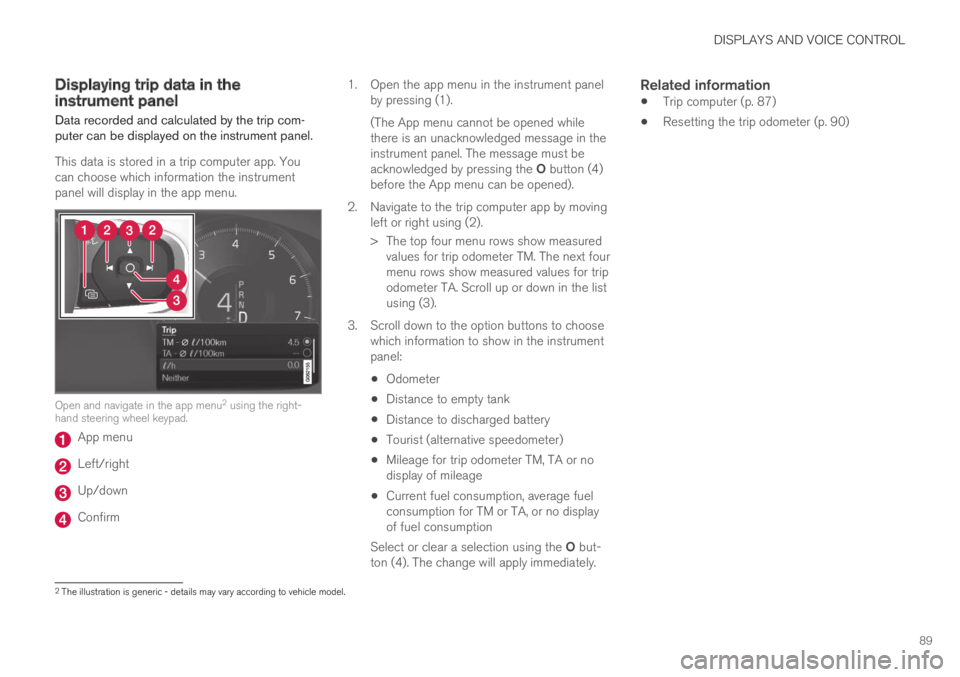
Open and navigate in the app menu2 using the right-hand steering wheel keypad.
App menu
Left/right
Up/down
Confirm
1.Open the app menu in the instrument panelby pressing (1).
(The App menu cannot be opened whilethere is an unacknowledged message in theinstrument panel. The message must beacknowledged by pressing the O button (4)before the App menu can be opened).
2. Navigate to the trip computer app by movingleft or right using (2).
> The top four menu rows show measuredvalues for trip odometer TM. The next fourmenu rows show measured values for tripodometer TA. Scroll up or down in the listusing (3).
3. Scroll down to the option buttons to choosewhich information to show in the instrumentpanel:
Odometer
Distance to empty tank
Distance to discharged battery
Tourist (alternative speedometer)
Mileage for trip odometer TM, TA or nodisplay of mileage
Current fuel consumption, average fuelconsumption for TM or TA, or no displayof fuel consumption
Select or clear a selection using the O but-ton (4). The change will apply immediately.
Related information
Trip computer (p. 87)
Resetting the trip odometer (p. 90)
2The illustration is generic - details may vary according to vehicle model.
Page 92 of 645
DISPLAYS AND VOICE CONTROL
90
Resetting the trip odometer
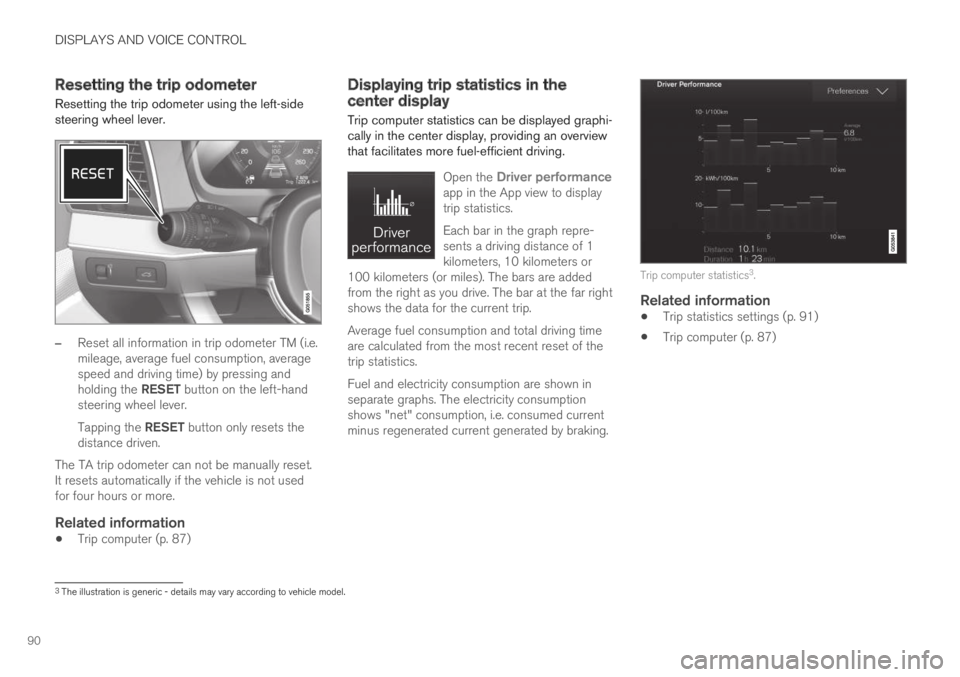
Resetting the trip odometer using the left-sidesteering wheel lever.
–Reset all information in trip odometer TM (i.e.mileage, average fuel consumption, averagespeed and driving time) by pressing andholding the RESET button on the left-handsteering wheel lever.
Tapping the RESET button only resets thedistance driven.
The TA trip odometer can not be manually reset.It resets automatically if the vehicle is not usedfor four hours or more.
Related information
Trip computer (p. 87)
Displaying trip statistics in thecenter display
Trip computer statistics can be displayed graphi-cally in the center display, providing an overviewthat facilitates more fuel-efficient driving.
Open the Driver performanceapp in the App view to displaytrip statistics.
Each bar in the graph repre-sents a driving distance of 1kilometers, 10 kilometers or100 kilometers (or miles). The bars are addedfrom the right as you drive. The bar at the far rightshows the data for the current trip.
Average fuel consumption and total driving timeare calculated from the most recent reset of thetrip statistics.
Fuel and electricity consumption are shown inseparate graphs. The electricity consumptionshows "net" consumption, i.e. consumed currentminus regenerated current generated by braking.
Trip computer statistics3.
Related information
Trip statistics settings (p. 91)
Trip computer (p. 87)
3The illustration is generic - details may vary according to vehicle model.
Page 232 of 645

KEY, LOCKS AND ALARM
* Option/accessory.230
Remote key
The remote key is used to lock and unlock doorsand the trunk lid. The remote key must be in thevehicle in order to start the engine.
Remote key3 and button-less key (Key Tag)*.
The remote key is not physically used to start theignition because the vehicle is standard-equippedwith keyless start (Passive Start). The key onlyneeds to be in the front section of the passengercompartment.
For vehicles equipped with keyless locking andunlocking (Passive Entry)*, the engine can bestarted with the key anywhere in the vehicle. Asmaller, lighter and button-less key (Key Tag) isalso provided.
The remote keys can be linked to different driverprofiles to store personal settings in the vehicle.
Remote key buttons
The remote key has four buttons, one on the left sideand three on the right.
Locking - Press once to lock the doors,trunk lid and fuel filler door and arm thealarm.
Press and hold to close all windows.
Unlocking – Press once to unlock thedoors and trunk lid and disarm the alarm.
Press and hold to open all windows at thesame time. This total airing function can beused to e.g. quickly air out the vehicle in hotweather.
Trunk lid - Press to unlock and disarm thetrunk lid only. Pressing and holding will open
the trunk lid mechanically due to the preloa-ded springs.
Panic alarm - Used to attract attention inemergency situations. Press and hold thebutton for at least 3 seconds or press twicewithin 3 seconds to activate the turn signalsand horn. To deactivate, wait at least 5 sec-onds and press the button again. If no actionis taken, the panic alarm will deactivate auto-matically after 3 minutes.
WARNING
If anyone is left in the vehicle, make sure thatpower to the power windows and panoramicroof* is cut off by always taking the remotekey with you when you leave the vehicle.
3The illustration is generic - details may vary according to vehicle model.
Page 295 of 645
DRIVER SUPPORT
}}
* Option/accessory.293
Related information
Driver support systems (p. 260)
Adaptive Cruise Control* (p. 272)
Pilot Assist (p. 281)
Distance Alert* (p. 270)
Head-up display* (p. 140)
Drive mode for driver support
The driver can choose different drive modes todetermine how driver support should maintain atime interval to the vehicle ahead.
Settings are made using the DRIVE MODE con-trols.
Select one of the following:
Pure - Driver support will focus on providingoptimal fuel economy, which will increase thetime interval to the vehicle ahead.
Hybrid - Driver support will focus on follow-ing the set time interval to the vehicle aheadas smoothly as possible.
Power - Driver support will focus on follow-ing the set time interval to the vehicle aheadmore exactly, which could mean faster accel-eration and heavier braking.
Related information
Driver support systems (p. 260)
Drive modes (p. 412)
Adjusting set speed for driversupport
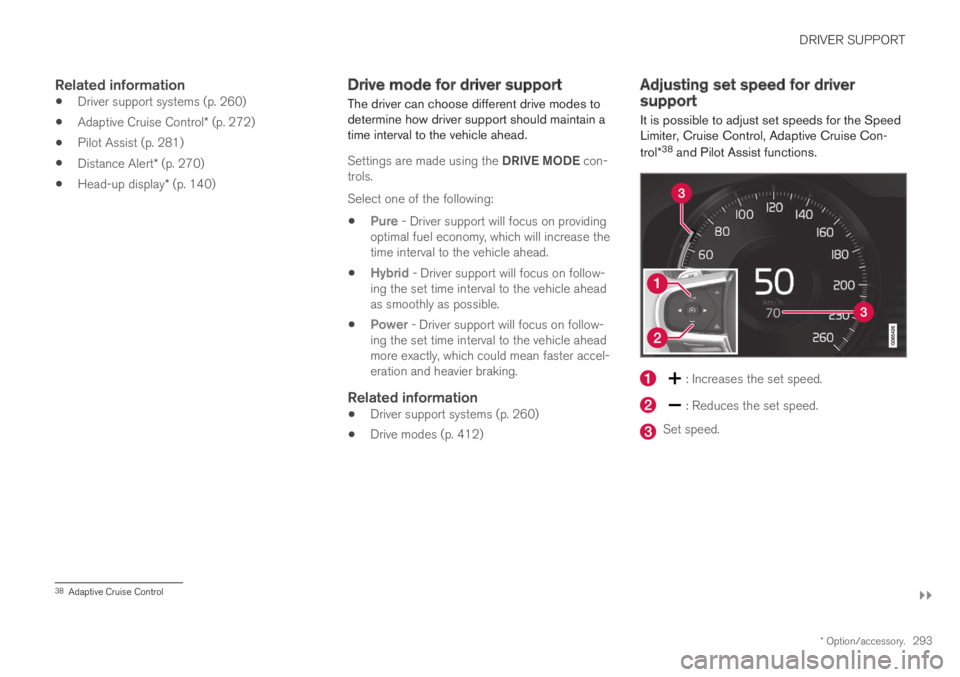
It is possible to adjust set speeds for the SpeedLimiter, Cruise Control, Adaptive Cruise Con-
trol*38 and Pilot Assist functions.
: Increases the set speed.
: Reduces the set speed.
Set speed.
38Adaptive Cruise Control