keyless VOLVO S60 TWIN ENGINE 2019 User Guide
[x] Cancel search | Manufacturer: VOLVO, Model Year: 2019, Model line: S60 TWIN ENGINE, Model: VOLVO S60 TWIN ENGINE 2019Pages: 645, PDF Size: 13.96 MB
Page 234 of 645
KEY, LOCKS AND ALARM
* Option/accessory.232
Locking and unlocking using theremote key
All doors and the trunk lid can be locked andunlocked simultaneously using the buttons onthe remote key.
Locking with remote key
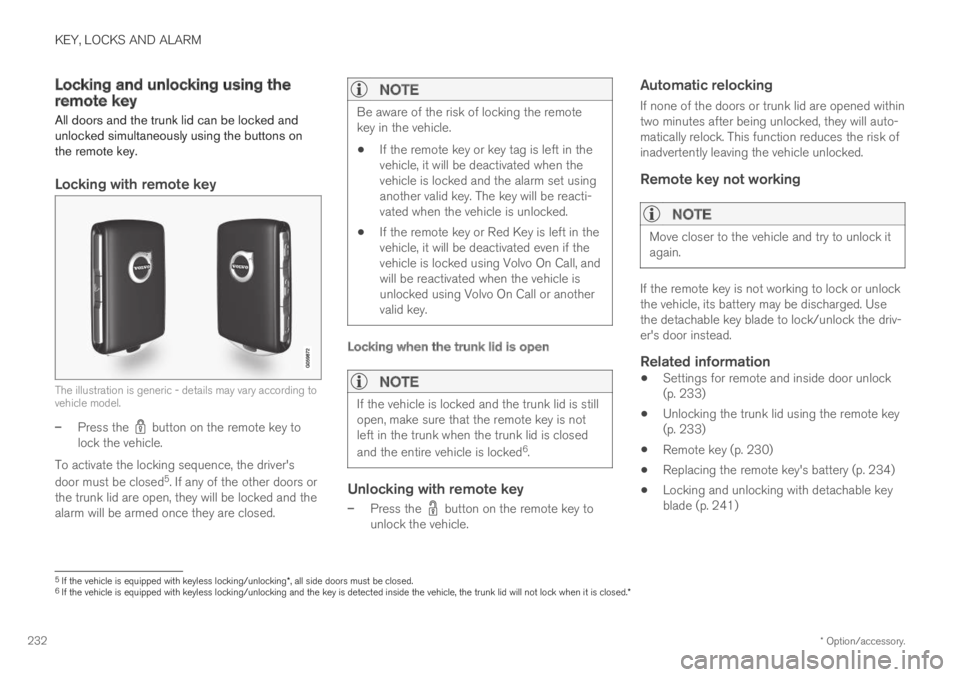
The illustration is generic - details may vary according tovehicle model.
–Press the button on the remote key tolock the vehicle.
To activate the locking sequence, the driver's
door must be closed5. If any of the other doors orthe trunk lid are open, they will be locked and thealarm will be armed once they are closed.
NOTE
Be aware of the risk of locking the remotekey in the vehicle.
If the remote key or key tag is left in thevehicle, it will be deactivated when thevehicle is locked and the alarm set usinganother valid key. The key will be reacti-vated when the vehicle is unlocked.
If the remote key or Red Key is left in thevehicle, it will be deactivated even if thevehicle is locked using Volvo On Call, andwill be reactivated when the vehicle isunlocked using Volvo On Call or anothervalid key.
Locking when the trunk lid is open
NOTE
If the vehicle is locked and the trunk lid is stillopen, make sure that the remote key is notleft in the trunk when the trunk lid is closed
and the entire vehicle is locked6.
Unlocking with remote key
–Press the button on the remote key tounlock the vehicle.
Automatic relocking
If none of the doors or trunk lid are opened withintwo minutes after being unlocked, they will auto-matically relock. This function reduces the risk ofinadvertently leaving the vehicle unlocked.
Remote key not working
NOTE
Move closer to the vehicle and try to unlock itagain.
If the remote key is not working to lock or unlockthe vehicle, its battery may be discharged. Usethe detachable key blade to lock/unlock the driv-er's door instead.
Related information
Settings for remote and inside door unlock(p. 233)
Unlocking the trunk lid using the remote key(p. 233)
Remote key (p. 230)
Replacing the remote key's battery (p. 234)
Locking and unlocking with detachable keyblade (p. 241)
5If the vehicle is equipped with keyless locking/unlocking*, all side doors must be closed.6If the vehicle is equipped with keyless locking/unlocking and the key is detected inside the vehicle, the trunk lid will not lock when it is closed.*
Page 236 of 645

KEY, LOCKS AND ALARM
* Option/accessory.234
Remote key range
In order to function correctly, the remote keymust be within a certain distance from the vehi-cle.
Manual use
The remote key's functions for e.g. locking and
unlocking, which are activated by pressing or
, have a range of approx. 20 meters (65 feet)from the vehicle.
If the vehicle's locks do not react, move closerand try again.
Keyless * use
The shaded areas around the vehicle illustrate the rangeof the system's antennas.
For keyless use, a remote key or the Key Tagmust be within the shaded areas shown in theillustration, i.e. a semicircle with a radius of
approx. 1.5 meter (5 feet) along the sides of thevehicle or approx. 1 meter (3 feet) from the trunklid.
NOTE
The functions of the remote control key canbe disrupted by ambient radio waves, build-ings, topographical conditions, etc. The vehi-cle can always be locked/unlocked using thekey blade.
If the remote key is removed from the
vehicle
If the remote key is removed from thevehicle while the engine is running, thewarning message Vehicle key notfound Removed from vehicle will bedisplayed in the instrument panel and an audiblesignal will sound when the last door is closed.
The message will disappear when the key isreturned to the vehicle and the O button on theright-side steering wheel keypad is pressed orwhen the last door is closed again.
Related information
Remote key (p. 230)
Antenna locations for the start and lock sys-tem (p. 248)
Keyless and touch-sensitive surfaces*(p. 244)
Replacing the remote key's battery
The battery in the remote key must be replacedwhen it is discharged.
NOTE
All batteries have a limited service life andmust eventually be replaced (does not applyfor Key Tag). The battery's service life variesdepending on how often the vehicle/key isused.
The remote key battery should be replaced if
the information symbol illuminates and themessage Vehicle key bat. low is displayedin the instrument panel.
the locks do not react after several attemptsto lock or unlock the vehicle using theremote key within approx. 20 meter (65 feet)from the vehicle.
NOTE
Move closer to the vehicle and try to unlock itagain.
Page 237 of 645

KEY, LOCKS AND ALARM
}}
* Option/accessory.235
The battery in the smaller key without buttons7
(the Key Tag) cannot be replaced. A new key canbe ordered from an authorized Volvo workshop.
CAUTION
An end-of-life Key Tag must be turned in toan authorized Volvo workshop. The key mustbe deleted from the vehicle because it canstill be used to start the vehicle via backupstart.
Opening the key and replacing the
battery
Hold the remote key with the front side(with the Volvo logo) facing up and move thebutton on the key ring section to the right.Slide the front cover slightly upward.
The cover will loosen and can beremoved from the key.
Turn the key over, move the button to theside and slide the rear cover slightly upward.
The cover will loosen and can beremoved from the key.
7Included in vehicles equipped with keyless locking/unlocking*.
Page 240 of 645
KEY, LOCKS AND ALARM
* Option/accessory.238
Ordering additional remote keys
Two remote keys are provided with the vehicle.One Key Tag is also included if the vehicle isequipped with keyless locking/unlocking*. Addi-tional keys can be ordered.
A total of 12 keys can be programmed and usedfor the same vehicle. An additional driver profilewill be added for each new remote key. This alsoapplies to the key tag.
Loss of a remote key
If you lose your remote key, you can order areplacement from a workshop - an authorizedVolvo workshop is recommended. Bring the otherremaining remote keys to the workshop. As ananti-theft measure, the code of the lost remotekey must be erased from the system.
The current number of keys registered for thevehicle can be checked via driver profiles in the
center display's Top view. Select Settings
SystemDriver Profiles.
NOTE
Volvo recommends that you order a new orduplicate remote control key from an author-ized Volvo workshop.
You can also obtain additional or duplicateremote control keys from certain independentrepair facilities and locksmiths that are quali-fied to make remote control keys. Each keymust be programmed to work with your vehi-cle.
A list of independent repair facilities and/orlocksmiths known to Volvo that can cut andcode replacement keys can be found:
on Volvo's website www.volvocars.com/us
by calling Volvo Customer Care1-800-458-1552.
Related information
Remote key (p. 230)
Red Key - restricted remote key*
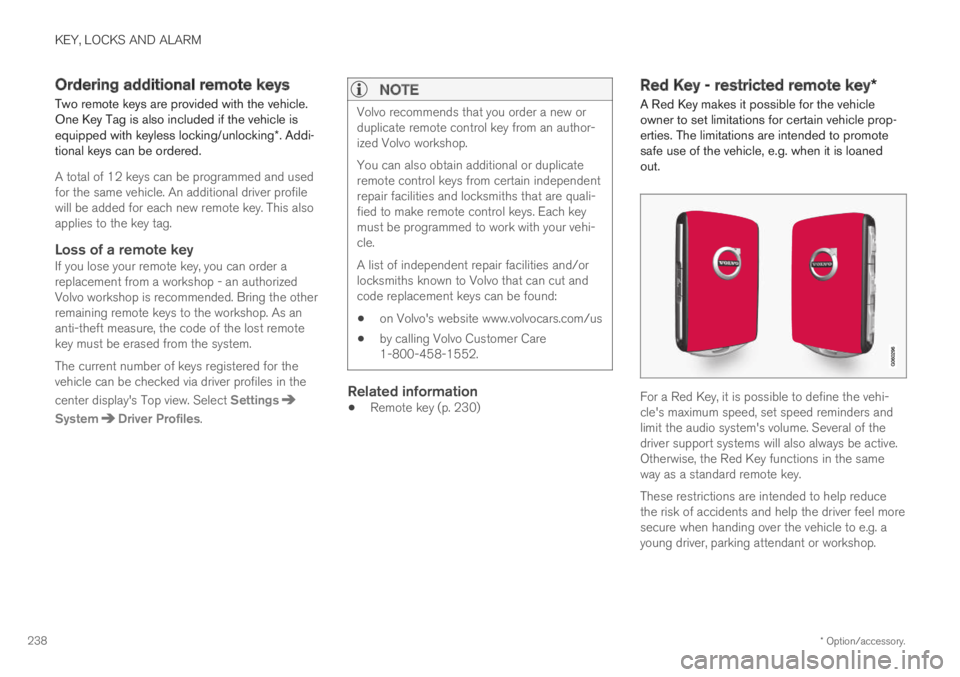
A Red Key makes it possible for the vehicleowner to set limitations for certain vehicle prop-erties. The limitations are intended to promotesafe use of the vehicle, e.g. when it is loanedout.
For a Red Key, it is possible to define the vehi-cle's maximum speed, set speed reminders andlimit the audio system's volume. Several of thedriver support systems will also always be active.Otherwise, the Red Key functions in the sameway as a standard remote key.
These restrictions are intended to help reducethe risk of accidents and help the driver feel moresecure when handing over the vehicle to e.g. ayoung driver, parking attendant or workshop.
Page 242 of 645
||
KEY, LOCKS AND ALARM
* Option/accessory.240
Driver Alert Control (DAC)*
Road Sign Information*
Related information
Red Key - restricted remote key* (p. 238)
Detachable key blade
The remote key contains a detachable metal keyblade that can be used to activate a number offunctions and preform certain actions.
A Volvo workshop can provide you with the keyblade's unique code, which is recommended incase you need to order a new key blade.
Using the detachable key blade
The detachable key blade can be used to
manually open the left-side front door if cen-tral locking cannot be activated with theremote key
emergency lock all doors
activate/deactivate the rear door mechanicalchild safety locks
The button-less key8 does not have a detachablekey blade. If needed, use the standard remotekey's detachable key blade.
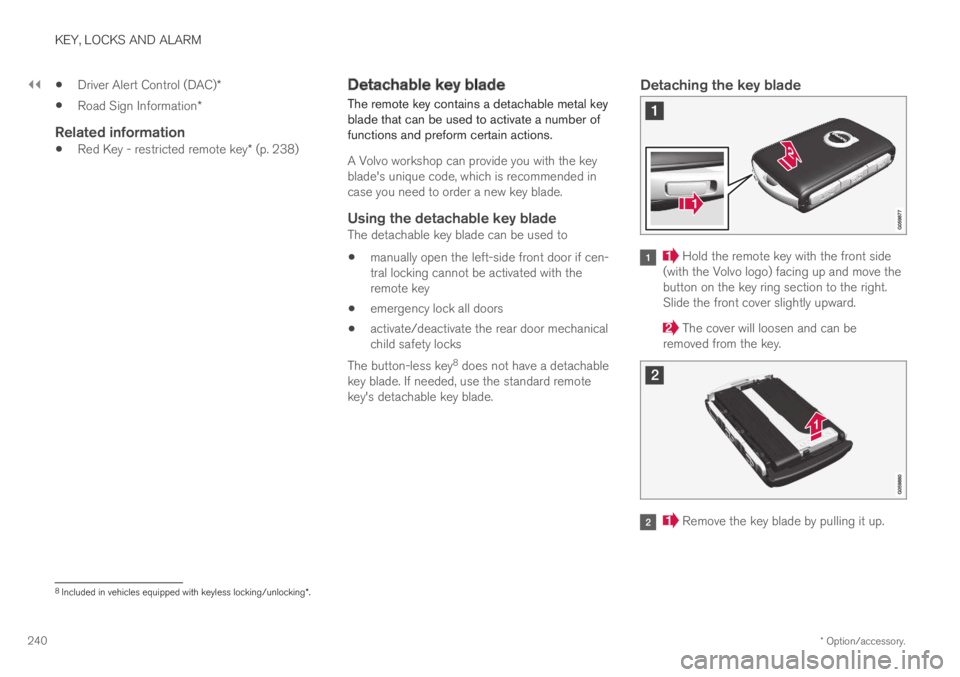
Detaching the key blade
Hold the remote key with the front side(with the Volvo logo) facing up and move thebutton on the key ring section to the right.Slide the front cover slightly upward.
The cover will loosen and can beremoved from the key.
Remove the key blade by pulling it up.
8Included in vehicles equipped with keyless locking/unlocking*.
Page 246 of 645

||
KEY, LOCKS AND ALARM
* Option/accessory.244
(1) This device may not cause harmful interfer-ence, and
(2) this device must accept any interferencereceived, including interference that may causeundesired operation.
Any changes or modification not expresslyapproved by the party responsible for compliancecould void the user's authority to operate thisequipment.
Canada
Volvo Standard Key IC: 4008C-HUF8423
Volvo Tag ID IC: 4008C-HUF8432
This device complies with Industry Canadalicense-exempt RSS standards. Operation is sub-ject to the following two conditions:
(1) This device may not cause harmful interfer-ence, and (2) this device must accept any inter-ference received, including interference that maycause undesired operation.
Immobilizer and Passive Entry * /Passive
Start systems
USA-FCC ID: LTQVO3134
This device complies with part 15 of the FCCrules. Operation is subject to the following twoconditions:
(1) This device may not cause harmful interfer-ence, and
(2) this device must accept any interferencereceived, including interference that may causeundesired operation.
Any changes or modification not expresslyapproved by the party responsible for compliancecould void the user's authority to operate thisequipment.
Canada-IC:3659A-VO3134
This device complies with Industry Canadalicense-exempt RSS standards. Operation is sub-ject to the following two conditions:
(1) This device may not cause harmful interfer-ence, and (2) this device must accept any inter-ference received, including interference that maycause undesired operation.
Related information
Remote key (p. 230)
Keyless and touch-sensitive
surfaces*
With the keyless locking and unlocking function,the remote key only needs to be within range,e.g. in a pocket or bag. The vehicle can then belocked or unlocked by touching the pressure-sensitive surface on the door handle.
Page 247 of 645
KEY, LOCKS AND ALARM
}}
* Option/accessory.245
Pressure-sensitive surfaces
Door handle
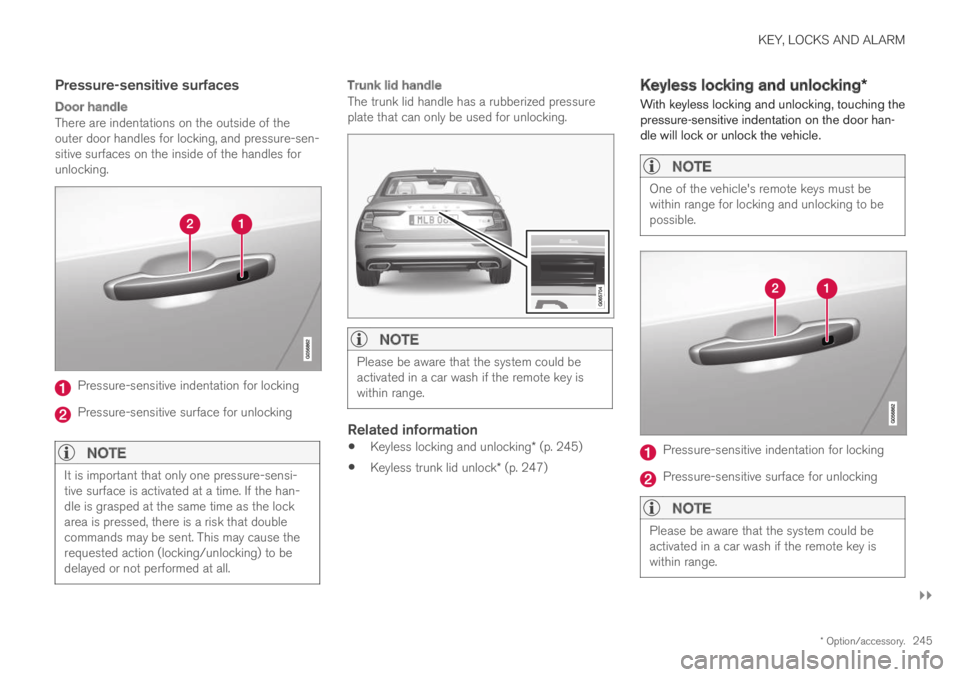
There are indentations on the outside of theouter door handles for locking, and pressure-sen-sitive surfaces on the inside of the handles forunlocking.
Pressure-sensitive indentation for locking
Pressure-sensitive surface for unlocking
NOTE
It is important that only one pressure-sensi-tive surface is activated at a time. If the han-dle is grasped at the same time as the lockarea is pressed, there is a risk that doublecommands may be sent. This may cause therequested action (locking/unlocking) to bedelayed or not performed at all.
Trunk lid handle
The trunk lid handle has a rubberized pressureplate that can only be used for unlocking.
NOTE
Please be aware that the system could beactivated in a car wash if the remote key iswithin range.
Related information
Keyless locking and unlocking* (p. 245)
Keyless trunk lid unlock* (p. 247)
Keyless locking and unlocking*
With keyless locking and unlocking, touching thepressure-sensitive indentation on the door han-dle will lock or unlock the vehicle.
NOTE
One of the vehicle's remote keys must bewithin range for locking and unlocking to bepossible.
Pressure-sensitive indentation for locking
Pressure-sensitive surface for unlocking
NOTE
Please be aware that the system could beactivated in a car wash if the remote key iswithin range.
Page 248 of 645

||
KEY, LOCKS AND ALARM
* Option/accessory.246
Keyless locking
All of the doors have to be closed before thevehicle can be locked. However, the trunk lid canbe open when a door handle is used for locking.
–Touch the marked area on the outside of oneof the door handles after the door is closed.
>The lock indicator light on the dashboardwill flash to confirm that the vehicle islocked.
To close all door windows at the same time -place your finger on the pressure-sensitiveindentation on the outside of the door handle andhold it there until the side windows have closed.
Locking when the trunk lid is open
NOTE
If the vehicle is locked and the trunk lid is stillopen, make sure that the remote key is notleft in the trunk when the trunk lid is closed.
If the key is detected in the vehicle, the trunklid will not lock when it is closed.
Keyless unlocking
–To unlock, grasp a door handle or lightlypress the rubberized button on the undersideof the trunk lid handle.
>The lock indicator light on the dashboardwill stop flashing to confirm that the vehi-cle is unlocked.
The rubberized button on the trunk lid can only be usedfor unlocking.
Automatic relocking
If none of the doors or trunk lid are opened withintwo minutes after being unlocked, they will auto-matically relock. This function reduces the risk ofinadvertently leaving the vehicle unlocked.
Related information
Keyless unlock settings* (p. 246)
Keyless trunk lid unlock* (p. 247)
Keyless and touch-sensitive surfaces*(p. 244)
Keyless unlock settings*
Several different sequences are available forkeyless unlocking.
To change this setting:
1.Tap Settings in the center display's Topview.
2.Tap My CarLockingKeyless Unlock
3. Select alternative:
All Doors – unlocks all doors at the sametime.
Single Door – unlocks the selected door.
Related information
Keyless locking and unlocking* (p. 245)
Keyless and touch-sensitive surfaces*(p. 244)
Page 249 of 645

KEY, LOCKS AND ALARM
}}
* Option/accessory.247
Keyless trunk lid unlock*
With keyless locking/unlocking, touching thepressure-sensitive indentation on the trunk lidhandle will unlock the trunk lid.
NOTE
One of the vehicle's remote keys must bewithin range behind the vehicle for unlockingto be possible.
The trunk lid is held closed by an electronic lock-ing mechanism.
To open:
1.Lightly press the rubberized pressure plateon the underside of the trunk lid handle.
> The lock will disengage.
2. Lift the outer handle to open the trunk lid.
CAUTION
Only light pressure on the rubberized pres-sure plate is necessary to release thetrunk lid's locking mechanism.
Use the handle to lift the trunk lid and donot apply force to the rubberized pressureplate. Too much force can damage thepressure plate's electrical connections.
Hands-free opening of the trunk lid is also possi-ble using a foot movement under the rearbumper.
Kicking motion within the sensor's activation area.
–Make one slow forward kicking motion withyour foot under the left section of the rearbumper. Take a step back. Do not touch thebumper.
>A brief audible signal will sound whenopening is activated – the trunk lid willopen/close.
If several opening attempts have been madewithout the remote key in range behind the vehi-cle, foot movement operation will not be availablefor a short period of time.
Do not keep your foot under the vehicle in a kick-ing motion. This may prevent activation.
Page 250 of 645

||
KEY, LOCKS AND ALARM
* Option/accessory.248
NOTE
Please note that the system could be inadver-tently activated in a car wash or similar if theremote key is within range.
WARNING
Do not drive with the trunk lid open. Toxicexhaust fumes can be sucked into the vehiclethrough the trunk.
Related information
Keyless and touch-sensitive surfaces*(p. 244)
Remote key range (p. 234)
Antenna locations for the start andlock system
The antennas for the keyless start system andkeyless locking system* are integrated in thevehicle.
Location of the antennas:
Under the cup holder in the front section ofthe tunnel console
In the upper front section of the left-side rear
door10
In the upper front section of the right-side
rear door10
In the trunk10
WARNING
Individuals with an implanted pacemakershould not allow the pacemaker to comecloser than 22 cm (9 in.) to the Keyless sys-tem antennas. The aim of this is to preventdisturbances between the pacemaker and theKeyless system.
Related information
Keyless and touch-sensitive surfaces*(p. 244)
Remote key range (p. 234)
10Only in vehicles equipped with keyless locking and unlocking*.