power steering VOLVO S60 TWIN ENGINE 2019 Owner's Guide
[x] Cancel search | Manufacturer: VOLVO, Model Year: 2019, Model line: S60 TWIN ENGINE, Model: VOLVO S60 TWIN ENGINE 2019Pages: 645, PDF Size: 13.96 MB
Page 416 of 645

||
STARTING AND DRIVING
414
This drive mode is optimized for maximum drivingdistance with electric propulsion and is primarilyintended for use in city driving. Pure helps pro-vide the lowest possible consumption even whenthe hybrid battery is fully discharged. ECO climateis activated to control the climate in the passen-ger compartment, and in slippery road conditionsslightly more wheel spin may be permitted beforeall-wheel drive is automatically activated.
ECO Climate
In Pure mode, ECO climate is automatically acti-vated in the passenger compartment to helpreduce energy consumption.
NOTE
When the Pure drive mode is activated, set-tings for certain climate system and electricityconsuming functions are reduced. Some ofthese settings can be reset manually, but fullfunctionality will only be restored by leavingPure mode or adapting the Individual drivemode to full climate system functionality.
If condensation forms on the windows, tap themax defroster button, which will function normally.
Constant AWD
Improves the vehicle's traction and handlingby increasing all-wheel drive.
This drive mode locks the vehicle in all-wheeldrive. An optimal distribution between front andrear axle torque helps provide the best possible
control, stability and traction, e.g. on slipperyroads or when towing a heavy trailer or anothervehicle. The Constant AWD drive mode isalways available regardless of the hybrid battery'scharge status.
Both the combustion engine and the electricmotor are engaged to enable all-wheel drive,which results in higher fuel consumption.
In the other drive modes, the vehicle automati-cally adapts the need for all-wheel drive accord-ing to the road surface, and can activate the elec-tric motor or start the combustion engine as nee-ded.
Power
The vehicle gets sportier driving characteris-tics and a faster acceleration response.
This drive mode maximizes the combined powerfrom the combustion engine and the electricmotor by providing power to both the front andrear wheels. Gear shifting will be faster and moredistinct and the transmission will prioritize gearswith a higher traction force. Steering response isfaster and suspension is stiffer.
Both the combustion engine and the electricmotor are engaged to enable all-wheel drive,which results in higher fuel consumption.
This drive mode is optimized for maximum per-formance and throttle response. It changes thethrottle response, gear shifting program andturbo boost system. Chassis settings and steer-ing and brake response are also optimized. The
Power drive mode is always available regardlessof the hybrid battery's charge status.
Page 417 of 645
STARTING AND DRIVING
}}
415
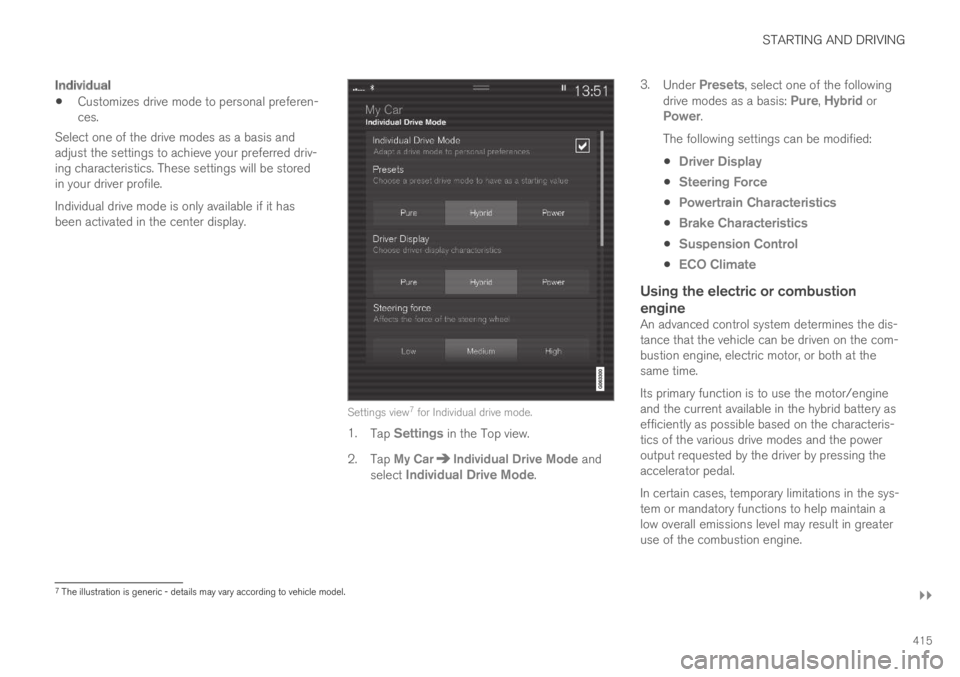
Individual
Customizes drive mode to personal preferen-ces.
Select one of the drive modes as a basis andadjust the settings to achieve your preferred driv-ing characteristics. These settings will be storedin your driver profile.
Individual drive mode is only available if it hasbeen activated in the center display.
Settings view7 for Individual drive mode.
1.Tap Settings in the Top view.
2.Tap My CarIndividual Drive Mode andselect Individual Drive Mode.
3.Under Presets, select one of the followingdrive modes as a basis: Pure, Hybrid orPower.
The following settings can be modified:
Driver Display
Steering Force
Powertrain Characteristics
Brake Characteristics
Suspension Control
ECO Climate
Using the electric or combustion
engine
An advanced control system determines the dis-tance that the vehicle can be driven on the com-bustion engine, electric motor, or both at thesame time.
Its primary function is to use the motor/engineand the current available in the hybrid battery asefficiently as possible based on the characteris-tics of the various drive modes and the poweroutput requested by the driver by pressing theaccelerator pedal.
In certain cases, temporary limitations in the sys-tem or mandatory functions to help maintain alow overall emissions level may result in greateruse of the combustion engine.
7The illustration is generic - details may vary according to vehicle model.
Page 423 of 645

STARTING AND DRIVING
}}
* Option/accessory.421
Driving
Choose the Pure drive mode to help mini-mize electric power consumption.
Maintain a steady speed and a generous fol-lowing distance to traffic ahead to minimizebraking. This drive mode has the lowestpower consumption.
Balance energy requirements using theaccelerator pedal. Use the indicator on theinstrument panel to see available electricpower and avoid starting the combustionengine unnecessarily. The electric motor ismore effective than the combustion engine,especially at low speeds.
When braking is necessary, brake gentlyusing the brake pedal. This will help rechargethe hybrid battery. A regenerative function isintegrated in the brake pedal and can beaugmented by the electric motor's brakingcapacity when the gear selector is in modeB.
Higher speeds increase energy consumption- air resistance increases with speed.
Activate the Hold function in the Functionview at high speeds when traveling fartherthan is possible using the hybrid battery'scapacity.
Whenever possible, avoid using the Chargefunction to charge the hybrid battery. Charg-ing the battery using the combustion engine
increases fuel consumption and carbon diox-ide emissions.
In a cold climate, reduce heating of the wind-shield/rear window, mirrors, seats and thesteering wheel.
Maintain the correct pressure in the tires andcheck pressure regularly.
The type of tires used could affect energyconsumption - consult a retailer for advice onsuitable tires.
Remove unnecessary items from the vehicle- the heavier the load, the higher the fuelconsumption.
Roof loads increase air resistance andincrease fuel consumption. Remove roofboxes, ski racks, etc. that are not in use.
Avoid driving with the windows open.
Do not keep the vehicle still on an upwardgradient by using the accelerator pedal. Usethe brakes instead.
Related information
Drive-E ‒ purer driving pleasure (p. 27)
Energy distribution in hybrid mode using mapdata* (p. 417)
Factors affecting electric motor range(p. 421)
Hybrid gauge (p. 85)
Checking tire pressure (p. 519)
Factors affecting electric motorrange
A number of factors affect the electric motor'sdriving range. The ability to achieve a long driv-ing range varies according to the outside condi-tions and to how the vehicle is driven.
The certified value for the distance that can bedriven using the electric motor should not beconsidered an expected driving range. The actualrange is dependent on a number of factors.
Factors affecting driving range
The driver can influence some factors affectingdriving range, but not all.
The longest range is achieved under very favora-ble conditions when all factors positively influ-ence range.
Page 438 of 645

||
STARTING AND DRIVING
* Option/accessory.436
The automatic transmission selects the optimalgear for the current load and engine speed.
Steep inclines
Do not lock the automatic transmission into ahigher gear than what the engine can handle ‒ itis not always preferable to drive in high gears atlow rpm.
Parking on a hill
1. Depress the brake pedal.
2. Apply the parking brake.
3.Put the gear selector in P.
4. Release the brake pedal.
Put chocks behind the wheels when the vehicleis parked on a hill with a trailer attached.
Starting on a hill
1. Depress the brake pedal.
2.Put the gear selector in D.
3. Release the parking brake.
4. Release the brake pedal and start driving.
Related information
Trailer Stability Assist* (p. 436)
Checking trailer lights (p. 437)
Towing capacity and tongue weight (p. 618)
Overheating of engine and transmission(p. 431)
Trailer Stability Assist*
Trailer Stability Assist (TSA12) is a functiondesigned to help stabilize a vehicle that is tow-ing a trailer when the vehicle and trailer havebegun to sway. The function is part of the Elec-
tronic Stability Control system ESC13.
Reasons for swaying
A vehicle towing a trailer may begin to sway forvarious reasons. Normally this only occurs at highspeeds. However, if the trailer is overloaded orunevenly distributed, e.g. too far back, there is arisk of swaying even at low speeds.
Swaying may be caused by factors such as:
The vehicle and trailer are hit by a sudden,strong crosswind.
The vehicle and trailer are traveling on anuneven road or over a bump.
Sudden movements of the steering wheel.
Once swaying has begun, it can be difficult orimpossible to stop it. This makes the vehicle andtrailer difficult to control and there is a risk ofswerving into oncoming traffic or driving off theroad.
Trailer Stability Assist function
Trailer Stability Assist continuously monitors thevehicle's movements, particularly lateral move-
ments. If swaying is detected, the brakes areapplied individually on the front wheels, which hasa stabilizing effect on the vehicle and trailer. Thisis often enough to enable the driver to regaincontrol of the vehicle.
If the Trailer Stability Assist function's firstattempt is not adequate to stop the swayingmotion, the brakes are applied on all wheels andengine power is temporarily reduced. As theswaying motion begins to decrease and the vehi-cle and trailer have once again become stable,TSA stops regulating the brakes/engine powerand the driver regains control of the vehicle.
NOTE
Trailer Stability Assist is deactivated if thedriver selects the sport mode by deactivatingESC in the center display's menu system.
Trailer Stability Assist may not intervene if thedriver tries to compensate for the swaying motionby moving the steering wheel rapidly, becausethe system will then not be able to determine if itis the trailer or the driver causing the swaying.
12Trailer Stability Assist13Electronic Stability Control
Page 586 of 645

||
MAINTENANCE AND SERVICE
* Option/accessory.584
FunctionAmpere
––
––
––
––
––
Headlight washers*25
Windshield washer25
––
Horn20
Alarm siren*5
Brake system control module(valves, parking brake)40
Wipers30
––
––
Parking heater*20
Brake system control module(ABS pump)40
FunctionAmpere
––
––
Fed when ignition is on:Engine control module; trans-mission components, electricalpower steering, central electri-cal module
5
Exterior vehicle sound (certainmarkets)5
Right-side headlight7.5
Right-side headlight, some
models with LEDA15
––
––
––
Airbags5
Left-side headlight7.5
Left-side headlight, some
models with LEDA15
Accelerator pedal sensor 5
FunctionAmpere
Transmission control module;gear selector control module15
Engine control module5
––
––
––
––
Engine control module; actua-tor; throttle unit; turbo-chargervalve
20
Solenoids; valve; engine cool-ing system thermostat10
Vacuum regulators; valve 7.5
Spoiler shutter control module;radiator shutter control mod-ule
5
––
Heated oxygen sensor, front;heated oxygen sensor, rear15
Oil pump solenoid; A/C mag-netic coupling; heated oxygensensor (center)
15
Page 589 of 645

MAINTENANCE AND SERVICE
}}
* Option/accessory.587
Fuse pliers are provided on the inside of the fusebox cover to assist in removing and insertingfuses.
There are also spaces for several extra fuses inthe distribution box in the engine compart-ment.
Positions
Fuses 1, 3-21, 23-36, 39-53 and 55-59 are"Micro" fuses.
Fuses 2-22, 37-38 and 54 are "MCase"fuses and should only be replaced by a work-
shop19.
FunctionAmpere
––
––
––
Movement sensor*5
Media player5
Instrument panel5
Center console buttons5
Sun sensor5
FunctionAmpere
––
––
Steering wheel module5
Module for start knob andparking brake controls5
Heated steering wheel* mod-ule15
––
––
––
––
Climate system control mod-ule10
––
Data link connector OBD-II 10
Center display5
Climate system blower module(front)40
FunctionAmpere
USB HUB5
Instrument lighting; Interiorlighting; Rearview mirror auto-dim function*; Rain and lightsensors*; Rear tunnel consolekeypad, rear seat*; Power frontseats*; Rear door control pan-els; Climate system blowermodule left/right
7.5
Control module for driver sup-port functions5
Panoramic roof with sun cur-tain*20
Head-up display*5
Passenger compartment light-ing5
––
Ceiling console display (seatbelt reminder/front passengerside airbag indicator)
5
––
19An authorized Volvo workshop is recommended.
Page 638 of 645

INDEX
636
Security code 253
Sensors
air quality 200
Camera unit 299
climate 196
Radar unit 297
Sensus
connection and entertainment 30
Sensus Navigation
Road Sign Information 331
Service position 608
Service program 556
Set time interval for Distance Alert 292
settings
Categories 133
contextual 131
resetting 132
Shiftlock 409
Side airbag 60
Side Impact Protection System 60
SIM card 497
SIPS (Side Impact Protection System) 60
Sirius Satellite radio
Travel link 464
SiriusXM® Satellite radio
traffic information 460, 461, 463
Ski hatch554
Slippery conditions424
Slippery road conditions424
Snow chains533
Software updates33
Sound experience449
Sound settings448, 491
phone492
playing media470, 472
text message491
Spare tire531
handling532
Speed camera information333
Speed Limiter
change speed293
Speed symbols, tires516
Spin control261
Stability and traction control system 261
sport mode262, 263
Symbols and messages264
Stains593, 595, 596, 597, 598
Start and lock system
type designations243
Start battery432, 574
overload432
Start engine392
Starting the engine
after a collision62
Start the vehicle 392
Steering assistance at risk of collision 344
Steering power level, see Steering wheel
resistance 260
Steering wheel 192, 193
heating 210
keypad 192
paddle 192
steering wheel adjustment 193
Steering wheel keypad 192
Steering wheel paddles 408
Steering wheel resistance, speed-depend-
ent260
Stone chips and scratches 605, 606
Storage compartments 544
center console 545
glove compartment 549
sun visor 550
Sunroof
pinch protection 164
Sun shade
panoramic roof 170, 174
pinch protection 164
rear window 167