four wheel drive VOLVO S60 TWIN ENGINE 2019 Owners Manual
[x] Cancel search | Manufacturer: VOLVO, Model Year: 2019, Model line: S60 TWIN ENGINE, Model: VOLVO S60 TWIN ENGINE 2019Pages: 645, PDF Size: 13.96 MB
Page 92 of 645
DISPLAYS AND VOICE CONTROL
90
Resetting the trip odometer
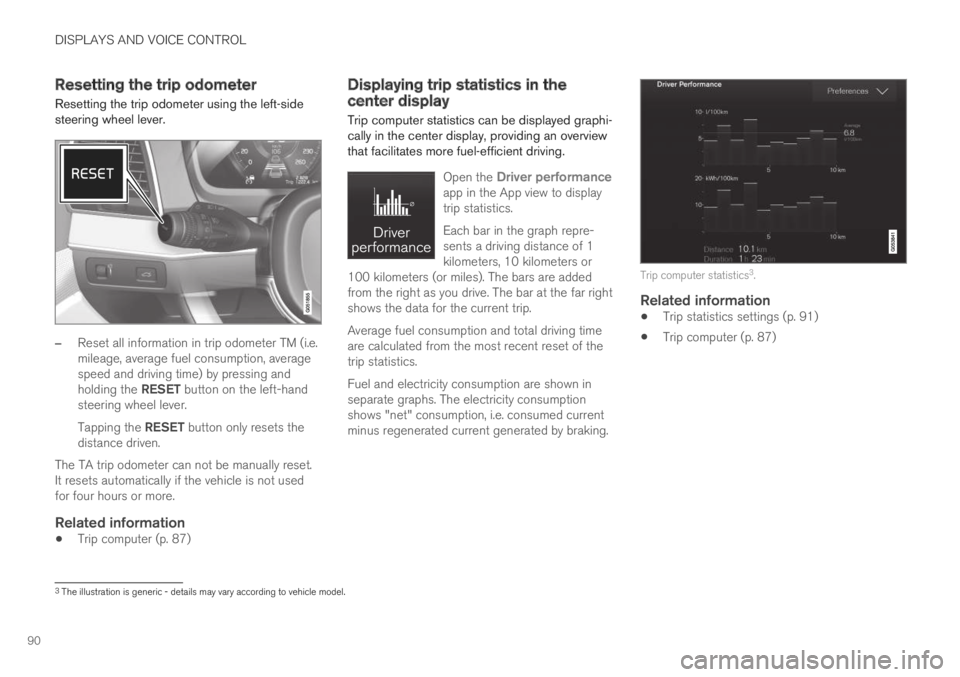
Resetting the trip odometer using the left-sidesteering wheel lever.
–Reset all information in trip odometer TM (i.e.mileage, average fuel consumption, averagespeed and driving time) by pressing andholding the RESET button on the left-handsteering wheel lever.
Tapping the RESET button only resets thedistance driven.
The TA trip odometer can not be manually reset.It resets automatically if the vehicle is not usedfor four hours or more.
Related information
Trip computer (p. 87)
Displaying trip statistics in thecenter display
Trip computer statistics can be displayed graphi-cally in the center display, providing an overviewthat facilitates more fuel-efficient driving.
Open the Driver performanceapp in the App view to displaytrip statistics.
Each bar in the graph repre-sents a driving distance of 1kilometers, 10 kilometers or100 kilometers (or miles). The bars are addedfrom the right as you drive. The bar at the far rightshows the data for the current trip.
Average fuel consumption and total driving timeare calculated from the most recent reset of thetrip statistics.
Fuel and electricity consumption are shown inseparate graphs. The electricity consumptionshows "net" consumption, i.e. consumed currentminus regenerated current generated by braking.
Trip computer statistics3.
Related information
Trip statistics settings (p. 91)
Trip computer (p. 87)
3The illustration is generic - details may vary according to vehicle model.
Page 182 of 645
SEATS AND STEERING WHEEL
* Option/accessory.180
Manual front seats
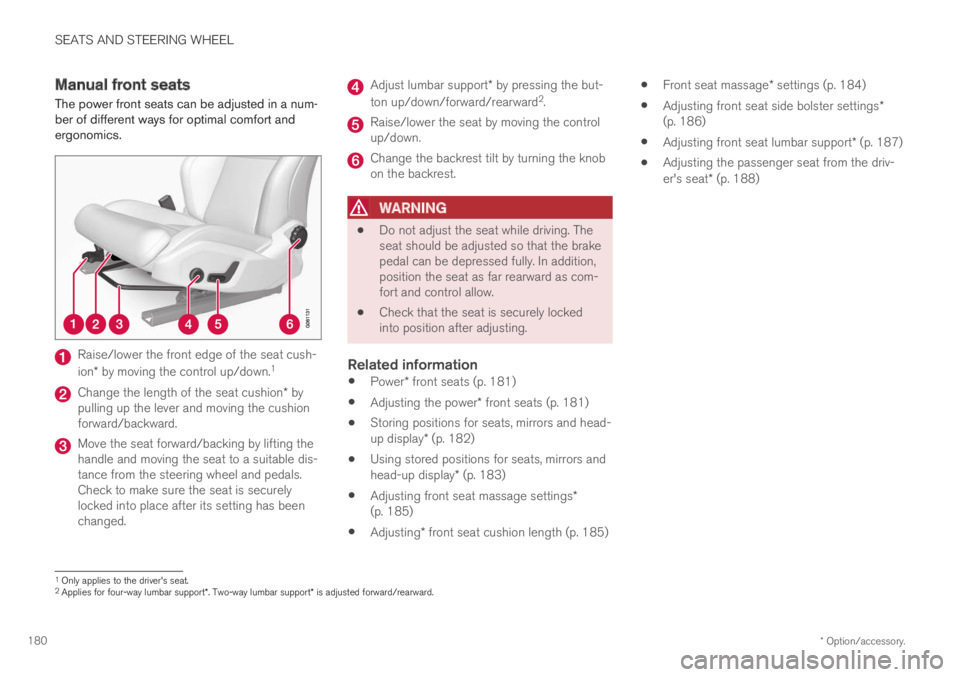
The power front seats can be adjusted in a num-ber of different ways for optimal comfort andergonomics.
Raise/lower the front edge of the seat cush-
ion* by moving the control up/down.1
Change the length of the seat cushion* bypulling up the lever and moving the cushionforward/backward.
Move the seat forward/backing by lifting thehandle and moving the seat to a suitable dis-tance from the steering wheel and pedals.Check to make sure the seat is securelylocked into place after its setting has beenchanged.
Adjust lumbar support* by pressing the but-
ton up/down/forward/rearward2.
Raise/lower the seat by moving the controlup/down.
Change the backrest tilt by turning the knobon the backrest.
WARNING
Do not adjust the seat while driving. Theseat should be adjusted so that the brakepedal can be depressed fully. In addition,position the seat as far rearward as com-fort and control allow.
Check that the seat is securely lockedinto position after adjusting.
Related information
Power* front seats (p. 181)
Adjusting the power* front seats (p. 181)
Storing positions for seats, mirrors and head-up display* (p. 182)
Using stored positions for seats, mirrors andhead-up display* (p. 183)
Adjusting front seat massage settings*(p. 185)
Adjusting* front seat cushion length (p. 185)
Front seat massage* settings (p. 184)
Adjusting front seat side bolster settings*(p. 186)
Adjusting front seat lumbar support* (p. 187)
Adjusting the passenger seat from the driv-er's seat* (p. 188)
1Only applies to the driver's seat.2Applies for four-way lumbar support*. Two-way lumbar support* is adjusted forward/rearward.
Page 210 of 645

||
CLIMATE CONTROL
* Option/accessory.208
Blower control.
AUTO - Automatic climate control.
Parking climate
Parking climate functions can be controlled fromthe Parking climate tab.
Climate controls on the rear side of the
tunnel console *
If the vehicle is equipped with heated rear seats*,there are physical buttons on the rear side of thetunnel console to control this function.
Related information
Climate (p. 196)
Activating and deactivating power frontseats* (p. 208)
Activating and deactivating the heated rearseats* (p. 209)
Activating and deactivating front seat ventila-tion* (p. 209)
Activating and deactivating the heated steer-ing wheel* (p. 210)
Activating auto climate control (p. 211)
Activating and deactivating recirculation(p. 211)
Activating and deactivating max defroster(p. 212)
Activating and deactivating the heated rearwindow and door mirrors (p. 213)
Setting the blower speed for the front seats(p. 214)
Synchronize temperature (p. 216)
Activating and deactivating air conditioning(p. 216)
Activating and deactivating power
front seats*
The seats can be heated for added comfort forthe driver and passengers in cold weather.
1. Tap the left- or right-side steering wheel andseat button in the center display's climatebar to open the controls for steering wheeland seat heating.
If the vehicle is not equipped with ventilatedseats or heated steering wheel (for the driv-er's side), the button for seat heating isdirectly accessible in the climate bar.
2. Tap the seat heating button repeatedly toselect one of the four levels: Off, High,Medium or Low.
>The level is changed and the set level isdisplayed in the button.
Related information
Climate system controls (p. 207)
Activating and deactivating the heated frontseat* (p. 209)
Page 211 of 645

CLIMATE CONTROL
}}
* Option/accessory.209
Activating and deactivating the
heated front seat*
The seats can be heated for added comfort forthe driver and passengers in cold weather.
Seat heating can be set to automatically activatewhen the engine is started. When set to automat-ically activate, heating will be turned on at lowambient temperatures.
1.Tap Settings in the Top view in the centerdisplay.
2.Tap Climate.
3.Select Auto Driver Seat Heating Leveland Auto Passenger Seat Heating Levelto activate/deactivate automatic start ofheated driver's and passenger seat.
>An "A" will be displayed next to the rele-vant seat heating button in the climate barwhen auto start has been activated.
4.Select Low, Medium or High to select levelafter the function has been activated.
Related information
Climate system controls (p. 207)
Activating and deactivating power frontseats* (p. 208)
Activating and deactivating the
heated rear seats*
The seats can be heated for added comfort forthe driver and passengers in cold weather.
Activating and deactivating the heated
rear seats from the rear seat
Buttons for seat heating on the rear side of the tunnelconsole.
–Press repeatedly on the left or right seatheating buttons on the rear side of the tun-nel console to select one of four levels: Off,High, Medium or Low.
>The level is changed and the indicatorlights in the button display the level.
Related information
Climate system controls (p. 207)
Activating and deactivating front
seat ventilation*
The seats can be ventilated to provide increasedcomfort in warm weather.
The ventilation system consists of fans in theseats and backrest that draw air through the seatupholstery. The cooler the passenger compart-ment is, the greater the cooling effect of the ven-tilation. The system can be activated when theengine is running.
1. Tap the left- or right-side steering wheel andseat button in the center display's climatebar to open the controls for steering wheeland seat heating.
If the vehicle is not equipped with heatedseats or heated steering wheel (for the driv-er's side), the button for seat ventilation isdirectly accessible in the climate bar.
2. Tap the seat ventilation button repeatedly toselect one of the four levels: Off, High,Medium or Low.
>The level is changed and the set level isdisplayed in the button.
Page 212 of 645

||
CLIMATE CONTROL
* Option/accessory.210
Related information
Climate system controls (p. 207)Activating and deactivating the
heated steering wheel*
The steering wheel can be heated for addedcomfort in cold weather.
1. Tap the driver's side steering wheel and seatbutton in the climate bar in the center displayto open the controls for steering wheel andseat heating.
If the vehicle is not equipped with heated orventilated seats, the button for steeringwheel heating is directly accessible in the cli-mate bar.
2. Tap the steering wheel heating buttonrepeatedly to select one of the four levels:Off, High, Medium or Low.
>The level is changed and the set level isdisplayed in the button.
Related information
Climate system controls (p. 207)
Activating and deactivating automatic steer-ing wheel heating* (p. 210)
Activating and deactivating
automatic steering wheel heating*
The steering wheel can be heated for addedcomfort in cold weather.
Steering wheel heating can be set to automati-cally activate when the engine is started. Whenset to automatically activate, heating will beturned on at low ambient temperatures.
1.Tap Settings in the Top view in the centerdisplay.
2.Tap Climate.
3.Select Auto Steering Wheel HeatingLevel to activate/deactivate automatic startof heated steering wheel.
>An "A" will be displayed next to theheated steering wheel button in the cli-mate bar when auto start has been acti-vated.
4.Select Low, Medium or High to select levelafter the function has been activated.
Related information
Activating and deactivating the heated steer-ing wheel* (p. 210)
Page 318 of 645

||
DRIVER SUPPORT
316
your lane must have clear side lane markings
your vehicle must be positioned straight inyour lane
the oncoming vehicle must be positionedwithin your vehicle's lane markings
the oncoming vehicle's headlights must beon
the function can only handle “front-to-front”collisions
the function can only detect vehicles withfour wheels.
NOTE
The function uses the vehicle's camera andradar sensor, which has certain general limita-tions.
WARNING
The driver support system only issues a warn-ing for obstacles detected by its radar sensor– thus, a warning may come after a delay ornot at all.
Never wait for a warning or assistance.Apply the brakes when necessary.
WARNING
The function is supplementary driver sup-port intended to facilitate driving and helpmake it safer – it cannot handle all situa-tions in all traffic, weather and road condi-tions.
The driver is advised to read all sectionsin the Owner's Manual about this functionto learn of its limitations, which the drivermust be aware of before using the func-tion.
Driver support functions are not a substi-tute for the driver's attention and judg-ment. The driver is always responsible forensuring the vehicle is driven in a safemanner, at the appropriate speed, with anappropriate distance to other vehicles,and in accordance with current trafficrules and regulations.
Related information
City Safety™ (p. 305)
City Safety limitations (p. 316)
Camera/radar sensor limitations (p. 300)
City Safety limitations
City Safety48 functionality may be reduced incertain situations.
Surroundings
Low objects
Hanging objects, such as flags for overhangingloads or accessories such as auxiliary lights orfront protective grids that extend beyond theheight of the hood, may limit City Safety function-ality.
Slippery road conditions
The extended braking distance on slippery roadsmay reduce City Safety's capacity to help avoid acollision. In these types of situations, the Anti-lock Braking System and Electronic Stability Con-
trol (ESC49) will help provide optimal brakingpower with maintained stability.
Backlighting
The visual warning signal in the windshield maybe difficult to detect in bright sunlight, if there arereflections, or if the driver is wearing sunglassesor not looking straight ahead.
Heat
If the temperature in the passenger compartmentis high due to e.g. bright sunlight, the visual warn-ing signal in the windshield may be temporarilydisabled.
48This function is not available on all markets.49Electronic Stability Control
Page 412 of 645

STARTING AND DRIVING
410
The kickdown function
Kickdown can be used when maximum accelera-tion is needed, e.g. when passing.
When the accelerator pedal is depressed all theway to the floor (past the normal full acceleratorposition), the transmission will automaticallyengage kickdown, i.e. immediately shift down to alower gear.
If the accelerator pedal is released from the kick-down position, the transmission will automaticallyshift up again.
Safety function
The transmission control module is equipped witha downshift protection feature to help prevent theengine from overheating.
In some conditions, the transmission will preventdownshifting/kickdown if this would lead to suchhigh engine speed (rpm) that the engine couldbe damaged. If the driver still attempts downshift-ing or kickdown at a high rpm, nothing will hap-pen and the original gear will remain selected.
With kickdown, the vehicle can downshift one ormore steps at a time depending on the enginespeed. The vehicle upshifts when the engine rea-ches its maximum rpm to prevent engine dam-age.
Related information
Gear selector positions for automatic trans-missions (p. 406)
All Wheel Drive (AWD)
All-wheel drive (AWD5), also called four-wheeldrive, means that power is distributed to all fourwheels, which improves traction.
The electric motor that powers the rear wheelsenables electronic all-wheel drive functionality.All-wheel drive reacts differently depending onwhich drive mode is selected.
Related information
Drive modes (p. 412)
Transmission (p. 406)
Drive systems
Volvo Twin Engine combines a combustionengine for the front wheels and an electric motorfor the rear wheels.
Two drive systems
Depending on the selected drive mode andpower available in the electric motor, the drivesystems can either be used separately or in tan-dem.
The electric motor gets its energy from a hybridbattery located under the tunnel console. Thehybrid can be charged from a wall outlet or in aspecial charging station. The combustion enginecan also charge the hybrid battery using a specialhigh-voltage generator.
Both the combustion engine and the electricmotor can generate power directly to the wheels.An advanced control system coordinates both thedrive systems to help optimize driving economy.
Page 440 of 645

||
STARTING AND DRIVING
438
Disabling the automatic check
The automatic light check can be disabled in thecenter display.
1.Tap Settings in the Top view.
2.Tap My CarLights and Lighting.
3.Deselect Automatic Trailer Lamp Check.
Manual check
If the automatic check has been disabled, thecheck can be started manually.
1.Tap Settings in the Top view.
2.Tap My CarLights and Lighting.
3.Select Manual Trailer Lamp Check.
>The light check will begin. Get out of thevehicle to perform the check.
Related information
Driving with a trailer (p. 434)
Towing using a towline
This section refers to one vehicle being towedbehind another using a towline.
Never attempt to tow a Twin Engine vehiclebehind another vehicle as this could damage theelectric motor. The vehicle must instead be liftedonto a tow truck and transported with all fourwheels on the bed or lifting platform of the truck(no wheels may touch the road).
Towing another vehicle
Towing another vehicle requires a lot of power -use the Constant AWD drive mode. This helpscharge the hybrid battery and improve the vehi-cle's driving and roadholding characteristics.
Before towing another vehicle, check applicablespeed limit regulations.
Jump starting
Never attempt to tow the vehicle to start theengine, as this could damage the electric motor.Use an auxiliary battery if the start battery'scharge level is so low that the engine cannot bestarted.
CAUTION
Attempts to tow-start the vehicle could causedamage to the electrical drive motor andthree-way catalytic converter.
Related information
Attaching and removing the towing eyelet(p. 439)
Hazard warning flashers (p. 159)
Recovery (p. 440)
Jump starting using another battery (p. 432)
Selecting ignition mode (p. 396)
Page 514 of 645

WHEELS AND TIRES
512
Tires
The function of the tires is to carry loads, providetraction on road surfaces, reduce vibrations andprotect the wheels from wear.
The tires significantly influence the vehicle's driv-ing characteristics. The type, dimensions, tirepressure and speed rating have a considerableimpact on how the vehicle performs.
Your vehicle is equipped with tires according tothe vehicle's tire information placard on the B-pil-lar (the structural member at the side of the vehi-cle, at the rear of the driver's door opening).
WARNING
A damaged tire could cause the driver to losecontrol of the vehicle.
CAUTION
Some Volvo models are equipped with anUltra High Performance tire and wheel com-bination designed to provide maximum drypavement performance with consideration forhydroplaning resistance. They may be moresusceptible to road hazard damage and,depending on driving conditions, may achievea tread life of less than 30,000 km (20,000miles). Even if this vehicle is equipped withVolvo's advanced AWD or stability system,these tires are not designed for winter driving,and should be replaced with winter tires whenweather conditions dictate.
The tires have good road holding characteristicsand offer good handling on dry and wet surfaces.It should be noted however that the tires havebeen developed to give these features on snow/ice-free surfaces.
Most models are equipped with "all-season" tires,which provide a somewhat higher degree of road-holding on slippery road surfaces than tires with-out the "all-season" rating. However, for optimalroadholding on icy or snow-covered roads, Volvorecommends snow tires on all four wheels.
When replacing tires, be sure that the new tiresare the same size designation, type (radial) andpreferably from the same manufacturer, on all
four wheels. Otherwise there is a risk of alteringthe vehicle's roadholding and handling characte-ristics.
Recommended tires
On delivery, the car is equipped with Volvo origi-
nal tires that have the VOL1 marking on the sideof the tires. These tires have been designed spe-cifically for your vehicle. It is therefore importantwhen replacing tires that the new tires have thissame marking to help maintain the vehicle's driv-ing characteristics, comfort and fuel consumption.
New tires
Tires are perishable goods. After a few years,they will begin to harden and their friction proper-ties will gradually deteriorate. Always replace tireswith the freshest tires possible. This is particularlyimportant for snow tires. A series of numbers is
1This may vary for certain tire dimensions.
Page 519 of 645

WHEELS AND TIRES
517
NOTE
The tire's load index and speed rating maynot appear on the sidewall because they arenot required by law.
7.M+S or M/S = Mud and Snow, AT = All Ter-rain, AS = All Season
8.U.S. DOT Tire Identification Number(TIN): This begins with the letters "DOT" andindicates that the tire meets all federalstandards. The next two numbers are thefactory code where the tire was manufac-tured, the next two are the tire size code andthe last four numbers represent the weekand year the tire was made. For example,0717 means that the tire was manufacturedduring week 7 of 2017. The numbers inbetween are marketing codes used at themanufacturer's discretion. This informationhelps a tire manufacturer identify a tire forsafety recall purposes.
9.Tire Ply Composition and Material Used:Indicates the number of plies indicates or thenumber of layers of rubber-coated fabric inthe tire tread and sidewall. Tire manufactur-ers also must indicate the ply materials in thetire and the sidewall, which include steel,nylon, polyester, and others.
10.Maximum Load: Indicates the maximumload in pounds and kilograms that can becarried by the tire. Refer to the vehicle's tire
information placard located on the B-Pillarfor the correct tire pressure for your vehicle.
11.Treadwear, Traction, and Temperaturegrades.
12.Maximum permissible inflation pressure:the greatest amount of air pressure thatshould ever be put in the tire. This limit is setby the tire manufacturer.
Speed Symbol
A tire's Speed Symbol (SS) indicates the maxi-mum speed for which the tire has been certifiedand should be at least equivalent to the vehicle'stop speed.
Winter tires, with or without studs, are exceptionsand may use a lower SS. When winter tires areinstalled, the vehicle may not be driven fasterthan the tires' SS.
The vehicle's speed should always be determinedby the posted speed limit and traffic and roadconditions, not the tire's SS.
The following table indicates the maximum per-missible speed for each SS.
M 130 km/h (81 mph)
Q160 km/h (100 mph)
T 190 km/h (118 mph)
H 210 km/h (130 mph)
V 240 km/h (149 mph)
W270 km/h (168 mph)
Y 300 km/h (186 mph)
WARNING
The wheel and tire sizes for your Volvoare specified to meet stringent stabilityand handling requirements. Unapprovedwheel/tire size combinations can nega-tively affect your vehicle's stability andhandling.
Any damage caused by installation ofunapproved wheel/tire size combinationswill not be covered by your new vehiclewarranty. Volvo assumes no responsibilityfor death, injury, or expenses that mayresult from such installations.
Related information
Tires (p. 512)