mileage VOLVO S60 TWIN ENGINE 2019 Owners Manual
[x] Cancel search | Manufacturer: VOLVO, Model Year: 2019, Model line: S60 TWIN ENGINE, Model: VOLVO S60 TWIN ENGINE 2019Pages: 645, PDF Size: 13.96 MB
Page 89 of 645
DISPLAYS AND VOICE CONTROL
}}
87
Symbols in the hybrid battery gauge
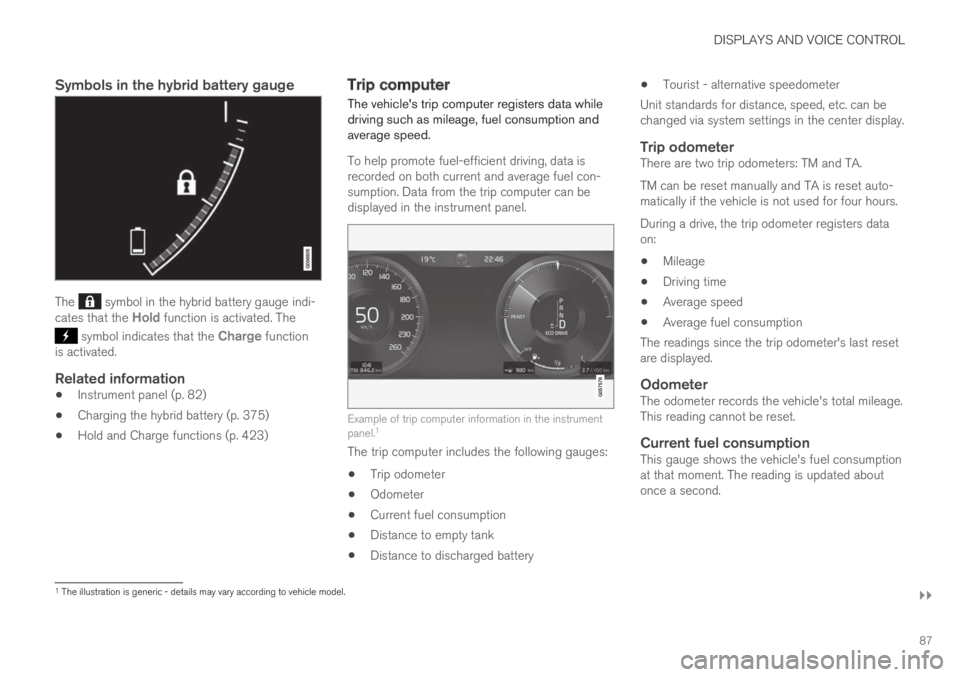
The symbol in the hybrid battery gauge indi-cates that the Hold function is activated. The
symbol indicates that the Charge functionis activated.
Related information
Instrument panel (p. 82)
Charging the hybrid battery (p. 375)
Hold and Charge functions (p. 423)
Trip computer
The vehicle's trip computer registers data whiledriving such as mileage, fuel consumption andaverage speed.
To help promote fuel-efficient driving, data isrecorded on both current and average fuel con-sumption. Data from the trip computer can bedisplayed in the instrument panel.
Example of trip computer information in the instrumentpanel.1
The trip computer includes the following gauges:
Trip odometer
Odometer
Current fuel consumption
Distance to empty tank
Distance to discharged battery
Tourist - alternative speedometer
Unit standards for distance, speed, etc. can bechanged via system settings in the center display.
Trip odometer
There are two trip odometers: TM and TA.
TM can be reset manually and TA is reset auto-matically if the vehicle is not used for four hours.
During a drive, the trip odometer registers dataon:
Mileage
Driving time
Average speed
Average fuel consumption
The readings since the trip odometer's last resetare displayed.
Odometer
The odometer records the vehicle's total mileage.This reading cannot be reset.
Current fuel consumption
This gauge shows the vehicle's fuel consumptionat that moment. The reading is updated aboutonce a second.
1The illustration is generic - details may vary according to vehicle model.
Page 90 of 645
||
DISPLAYS AND VOICE CONTROL
88
Distance to empty tank
The trip computer calculates the dis-tance that can be driven on the fuelremaining in the tank.
This calculation is based on average fuel con-sumption during the last 30 km (20 miles) andthe amount of fuel remaining in the tank.
When the gauge displays "----", there is notenough fuel remaining to calculate the remainingmileage. Refuel as soon as possible.
NOTE
This may vary if your driving style changes.
An economical driving style will generallyincrease how far you can drive on a certainamount of fuel.
Distance to discharged battery
This gauge shows the approximate dis-tance that can be driven with theremaining current in the hybrid battery.
This calculation is based on average consump-tion with a normally loaded vehicle in normal driv-ing conditions, and takes into account whetherthe air conditioning is on or off. Changing drivemodes from Hybrid to Pure may increase thecalculated distance because Pure mode hasreduced climate control settings (ECO Climate).
When the gauge displays "----", there is littlecharge remaining in the battery and electricmotor range cannot be reliably calculated.
NOTE
This may vary if your driving style changes.
An economical driving style will generallyincrease how far you can drive on a certainamount of fuel.
Starting values for fully charged hybrid
battery
Because it is difficult to predict driving style andother factors that affect the range of electricmotors, Volvo uses a starting value when thevehicle is fully charged. This starting value pro-vides an "up to" amount instead of a predictionon the range of the electric current in the motor.The difference in starting value between Hybridand Pure is because the vehicle is permitted touse more current from the hybrid battery in Puremode, and because the vehicle switches to ECOClimate.
Mileage when using electric motor
To achieve the longest possible mileage whenusing the electric motor, the driver of an electricvehicle also needs to think about conservingelectricity. The more electricity consumers(stereo, heated windows/mirrors/seats, very cold
air from climate control system, etc.) that areactive, the shorter the potential mileage.
NOTE
In addition to high electrical consumption inthe passenger compartment, rapid accelera-tion, sudden braking, high speeds, heavyloads, low ambient temperatures and drivingup hills can reduce possible driving distance.
Tourist - alternative speedometer
The alternative digital speedometer makes it eas-ier to drive in countries where speed limit signsare shown in a different measurement unit thanthe one shown in the vehicle's gauges.
When used, the digital speed is displayed in theopposite unit to that shown in the analog speed-ometer. If mph is used in the analog speedome-ter, the equivalent speed in km/h will be shownin the digital speedometer.
Related information
Displaying trip data in the instrument panel(p. 89)
Resetting the trip odometer (p. 90)
Displaying trip statistics in the center display(p. 90)
Instrument panel (p. 82)
Changing system units of measurement(p. 130)
Page 91 of 645
DISPLAYS AND VOICE CONTROL
89
Displaying trip data in theinstrument panel
Data recorded and calculated by the trip com-puter can be displayed on the instrument panel.
This data is stored in a trip computer app. Youcan choose which information the instrumentpanel will display in the app menu.
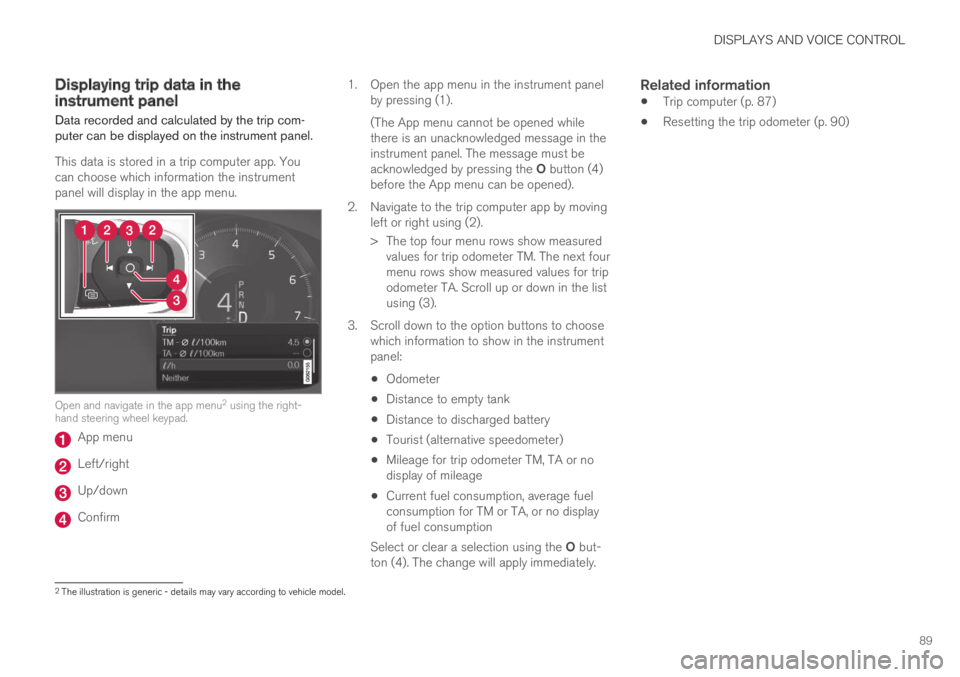
Open and navigate in the app menu2 using the right-hand steering wheel keypad.
App menu
Left/right
Up/down
Confirm
1.Open the app menu in the instrument panelby pressing (1).
(The App menu cannot be opened whilethere is an unacknowledged message in theinstrument panel. The message must beacknowledged by pressing the O button (4)before the App menu can be opened).
2. Navigate to the trip computer app by movingleft or right using (2).
> The top four menu rows show measuredvalues for trip odometer TM. The next fourmenu rows show measured values for tripodometer TA. Scroll up or down in the listusing (3).
3. Scroll down to the option buttons to choosewhich information to show in the instrumentpanel:
Odometer
Distance to empty tank
Distance to discharged battery
Tourist (alternative speedometer)
Mileage for trip odometer TM, TA or nodisplay of mileage
Current fuel consumption, average fuelconsumption for TM or TA, or no displayof fuel consumption
Select or clear a selection using the O but-ton (4). The change will apply immediately.
Related information
Trip computer (p. 87)
Resetting the trip odometer (p. 90)
2The illustration is generic - details may vary according to vehicle model.
Page 92 of 645
DISPLAYS AND VOICE CONTROL
90
Resetting the trip odometer
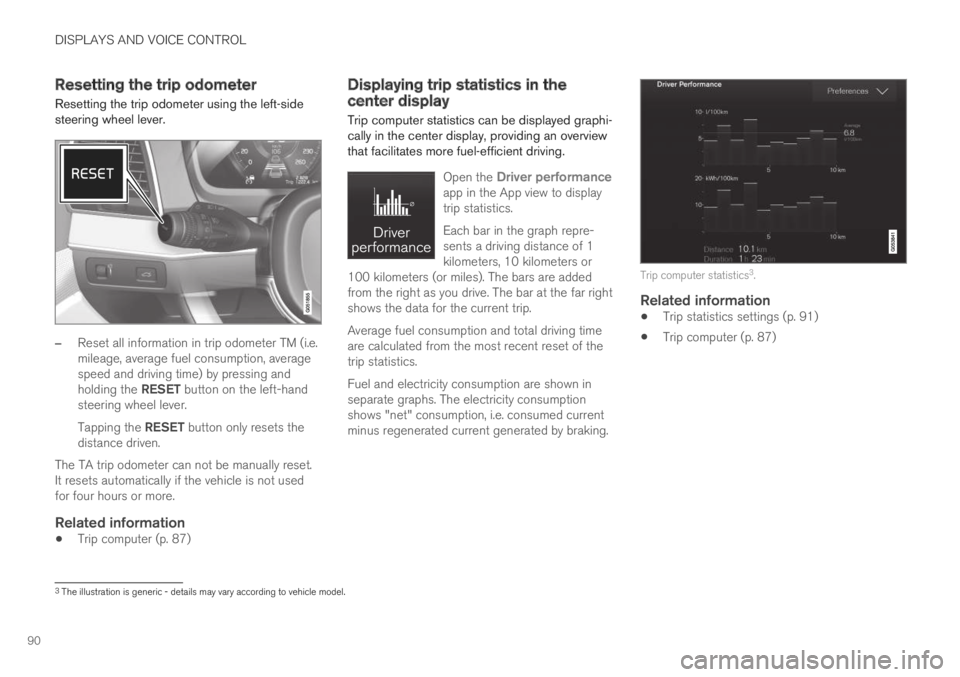
Resetting the trip odometer using the left-sidesteering wheel lever.
–Reset all information in trip odometer TM (i.e.mileage, average fuel consumption, averagespeed and driving time) by pressing andholding the RESET button on the left-handsteering wheel lever.
Tapping the RESET button only resets thedistance driven.
The TA trip odometer can not be manually reset.It resets automatically if the vehicle is not usedfor four hours or more.
Related information
Trip computer (p. 87)
Displaying trip statistics in thecenter display
Trip computer statistics can be displayed graphi-cally in the center display, providing an overviewthat facilitates more fuel-efficient driving.
Open the Driver performanceapp in the App view to displaytrip statistics.
Each bar in the graph repre-sents a driving distance of 1kilometers, 10 kilometers or100 kilometers (or miles). The bars are addedfrom the right as you drive. The bar at the far rightshows the data for the current trip.
Average fuel consumption and total driving timeare calculated from the most recent reset of thetrip statistics.
Fuel and electricity consumption are shown inseparate graphs. The electricity consumptionshows "net" consumption, i.e. consumed currentminus regenerated current generated by braking.
Trip computer statistics3.
Related information
Trip statistics settings (p. 91)
Trip computer (p. 87)
3The illustration is generic - details may vary according to vehicle model.
Page 436 of 645

||
STARTING AND DRIVING
434
If contact occurs, flush the affected areaimmediately with water. Obtain medicalhelp immediately if eyes are affected.
Never expose the battery to open flameor electric spark. Do not smoke near thebattery. Failure to follow the instructionsfor jump starting can lead to injury.
NOTE
The vehicle cannot be started if the hybridbattery is discharged.
NOTE
If the starter battery has been discharged tothe extent that the vehicle does not have nor-mal electrical functions and the engine mustthen be jump-started with an external batteryor a battery charger, the Start/Stop functionmay remain activated. If the Start/Stop func-tion shortly thereafter auto-stops the engine,there is a huge risk that auto-start of theengine will fail due to insufficient batterycapacity since the battery had not had time torecharge.
If the vehicle has been jump-started or ifthere has not been enough time for the bat-tery to be charged with a battery charger, theStart/Stop function should be temporarilydeactivated until the battery has beenrecharged by the vehicle. At an ambient tem-perature of about +15°C (about 60°F), thebattery must be charged by the vehicle for atleast one hour. At lower ambient tempera-tures, the charging time can increase to3-4 hours. It is advisable to charge the batterywith an external battery charger.
Related information
Starting the vehicle (p. 392)
Ignition modes (p. 395)
Adjusting the steering wheel (p. 193)
Selecting ignition mode (p. 396)
Driving with a trailer
There are a number of things to consider whentowing a trailer, such as the towbar, the trailerand how the load is distributed in the trailer.
Load-carrying capacity is determined by the vehi-cle's curb weight. The total weight of all passen-gers and any installed accessories, e.g. towbar,reduces the vehicle's load-carrying capacity bythe corresponding amount.
Towbars used on the vehicle must beapproved for the applicable use.
Distribute the load on the trailer so that theweight on the towbar complies with thespecified maximum towball weight. Thetongue weight is calculated as part of thevehicle's payload.
Increase the tire pressure to the recom-mended pressure for a full load.
The engine is subjected to more load thanusual when towing a trailer.
Towing a trailer affects the vehicle's han-dling, durability and driving economy.
Do not drive with a heavy trailer when thevehicle is very new. Wait until the mileagehas reached at least 1000 km (620 miles).
On long and steep downgrades, the vehicle'sbrakes are subjected to much more loadthan usual. When manually shifting, down-shift and adapt speed accordingly.
Page 565 of 645

MAINTENANCE AND SERVICE
* Option/accessory.563
Vehicle information can be accessed by anyretailer if they are provided with your vehicle iden-
tification number (VIN11).
Vehicle information contents
The most recently saved vehicle-related informa-tion will be sent (the last time the vehicle wasturned on). This includes information regarding:
service requirements
time since last service was performed
function status
fluid levels
mileage (odometer reading)
Vehicle Identification Number (VIN11)
software version
diagnostic information.
Related information
Scheduling service and repairs (p. 561)
Vehicle status (p. 560)
Navigating in the center display's views(p. 113)
Internet-connected vehicle* (p. 494)
11Vehicle Identification Number.
Page 635 of 645

INDEX
633
Pilot Assist 288
stability and traction control system 264
Messages in display 103, 138
handling 104, 138
saved 105, 139
Mileage 87
electric motor 421
Misting
condensation in headlights 598, 601
Mood lighting 162
adjusting 162
O
Occupant safety43
Occupant weight sensor56
Octane rating429
Oil, see also Engine oil620
On-board diagnostics556
On-board Diagnostic socket37
Option/accessory21
Outside temperature gauge92
Overheating431, 434
Owner's information16
OWNER'S MANUAL21
environmental labeling23
in cellular phone20
in the center display17, 18
P
Paddle at steering wheel192
Paint
color code606
paint damage and touch-up 605, 606
Panoramic roof170
opening and closing171
pinch protection164
sun shade174
ventilation position172
Parallel parking364
Park Assist Camera355
activating361
limitations300
sensor field360
Symbols and messages363
trajectory lines358
views356
Park Assist Pilot364
limitations369
parallel parking365
parking366
perpendicular parking365
pulling out of a parking space 368
Symbols and messages372
parking
on hills402
Parking Assist350
activating/deactivating352
front, rear and sides351
limitations353
Symbols and messages354
Parking brake400
activating/deactivating400
automatic activation402
Low battery charge level402
Parking climate217
Symbols and messages223
Parking heater224
Passenger compartment filter201
Passenger compartment heater (Parking
heater)224
Passenger compartment interior 544
center console545
electrical outlet546
glove compartment549
sun visor550
Passenger compartment lighting 160
adjusting162
auto switch161