wheel VOLVO S60 TWIN ENGINE 2020 Owners Manual
[x] Cancel search | Manufacturer: VOLVO, Model Year: 2020, Model line: S60 TWIN ENGINE, Model: VOLVO S60 TWIN ENGINE 2020Pages: 657, PDF Size: 13.6 MB
Page 370 of 657

DRIVER SUPPORT
* Option/accessory.
368
Leaving a parallel parking space with Park Assist Pilot *
The
Park Out function can help the driver to
pull out of a parking space when the vehicle is parallel-parked.
NOTE
Leaving a parking space with the Park Outfunction should only be used in connection with parallel parking – it does not work forperpendicular parking.
The Park Out function is acti-
vated in the center display's Function view or in Cameraview.
GREEN button indicator light – the func- tion is activated.
GRAY button indicator light – the functionis deactivated.
1. Tap
Park Out in Function view or in Cam-
era view.
2. Move the gear selector to the suitable position (e.g. D or R) for the direction in which you will be pulling out of the park-ing space. 3. Be prepared to stop the vehicle when
instructed to do so by a graphic and mes-sage in the center display. Follow theinstructions in the same way as for theparking procedure.
Note that the steering wheel can "spring"back when the procedure is completed andthe driver may need to turn the steering wheelback to the maximum position in order to pullout of the parking space. If the function determines that the driver can pull out of the parking space without any extramaneuvers, the function will be deactivated,even if it seems as though the vehicle is notcompletely out of the parking space.
Related information
Park Assist Pilot
* (p. 363)
Park Assist Pilot
* limitations (p. 368)
Park Assist Pilot * limitations
Park Assist Pilot (PAP 103
) may not be able to
detect all conditions in all situations and func- tionality may therefore be limited.
WARNING
The parking sensors have dead/blind spots where objects cannot bedetected.
Pay particular attention to people andanimals near the vehicle.
Bear in mind that the front end of thevehicle may swing out towards oncom-ing traffic during the parking maneuver.
CAUTION
Objects situated higher than the detection area of the sensors are not included whenthe parking maneuver is calculated, whichcould cause the function to swing into theparking space too early. Such parkingspaces should be avoided for this reason.
The driver should be aware of the following limitations for Park Assist Pilot:
103
Park Assist Pilot
Page 371 of 657

DRIVER SUPPORT
}}
369
The parking sequence is cancelledA parking sequence will be cancelled if: the driver moves the steering wheel
the vehicle's speed exceeds 7 km/h (4 mph)
the driver taps
Cancel in the center dis-
play
when the anti-lock brakes or the Elec- tronic stability control are engaged - e.g.when a wheel loses grip on a slippery road
when speed-dependent power steeringwheel resistance is working at reducedpower – e.g. during cooling due to over-heating.
when, while parking, the parking sensorsdetect a vehicle or pedestrian in the vehi-cle's intended direction of travel behind orin front of the vehicle, the auto-brake func-tion will bring the vehicle to a standstill.
A message in the center display will explainwhy the parking sequence was cancelled.
CAUTION
Under certain circumstances, the function may not be able to find parking spaces –one reason may be that the sensors aredisrupted by external sound sources thatemit the same ultrasonic frequencies thatthe system works with. Examples of such sources include horns, wet tires on asphalt, pneumatic brakes,exhaust noise from motorcycles, etc.
NOTE
Dirt, ice and snow covering the sensors reduce their function and can make meas-urement impossible.
Driver responsibilityThe driver should keep in mind that the func- tion is a parking aid ‒
not an infallible fully
automatic system. The driver must always beprepared to take control and cancel a parkingsequence if necessary. There are a number of things to keep in mindwhen parking, including:
The driver is always responsible for deter-mining if the space suggested by the func-tion is suitable for parking.
Do not use the function when using snowchains or a temporary spare tire.
Do not use the function if there are anyobjects protruding from the vehicle.
Heavy rain or snowfall may inhibit PAP'sability to accurately measure a parkingspace.
While searching and measuring the park-ing space, the function may be unable todetect objects located far into the space.
PAP may not suggest parking spaces onnarrow streets if it does not detect suffi-cient space for maneuvering the vehicle.
Use approved tires 104
inflated to the cor-
rect tire pressure because this affects thefunction's ability to provide parking assis-tance.
The function is based on the way the vehi-cles are parked behind and in front of yourparking space. If they are, for example,parked too close to the curb, there is a riskthat your vehicle's tires or wheel rims
104
"Approved tires" refers to tires of the same type and make as the vehicle's original, factory-installed tires.
Page 372 of 657
||
DRIVER SUPPORT
* Option/accessory.
370 could be damaged by the curb during the parking procedure.
Perpendicular parking spaces may not bedetected or may be suggested unneces-sarily if a parked vehicle is sticking outmore than other parked vehicles.
The function is intended to provide park-ing assistance on straight streets, not sec-tions of street with sharp curves or bends.Always make sure that your vehicle is par-allel to relevant parking spaces when thefunction is measuring the parking space.
Related information
Park Assist Pilot
* (p. 363)
Speed-dependent steering wheel resis-tance (p. 260)
Camera/radar sensor limitations (p. 301)
Page 373 of 657
DRIVER SUPPORT
* Option/accessory.371
Park Assist Pilot * messages
Messages for Park Assist Pilot (PAP 105
) may
be displayed in the instrument panel and/or the center display. Several examples are pro- vided below.
Message Meaning
Park Assist System Sensors blocked, cleaning neededOne or more of the sensors are blocked. Check and clean/remove the obstacle as soon as possible.
Park Assist System Unavailable Service requiredThe system is not functioning as intended. Contact a workshop
A
.
A An authorized Volvo workshop is recommended.
A text message can be erased by briefly press- ing the
button in the center of the right-
side steering wheel keypad. If a message cannot be erased, contact a workshop A
.
Related information
Park Assist Pilot
* (p. 363)
Park Assist Pilot
* limitations (p. 368)
105
Park Assist Pilot
Page 394 of 657

STARTING AND DRIVING
* Option/accessory.
392
Starting the vehicle
The vehicle can be started using the start knob in the tunnel console when the remotekey is in the passenger compartment.
Start knob in the tunnel console.
WARNING
Before starting:
Buckle your seat belt.
Adjust the seat, steering wheel and mirrors.
Make sure you can fully depress thebrake pedal.
The remote key is not physically used to startthe ignition because the vehicle is equippedwith the keyless Passive Start system. To start the vehicle:
CAUTION
The vehicle cannot be started if the charg- ing cable is still plugged in. Make sure topull out the charging cable from the charg-ing socket before starting the vehicle.
1. The remote key must be inside the vehicle.
For vehicles with Passive Start, the key must be in the front section of the passen-ger compartment. With the optional key- less locking/unlocking function *, the key
can be anywhere in the vehicle.
2. Press and hold down the brake pedal 1
as
far as possible.
3. Turn the start knob clockwise and release. The control will automatically return to the original position.
WARNING
Never use more than one inlay mat at a time on the driver's floor. If any othertype of floor mat is used, remove theoriginal mat from the driver's seat floorbefore driving. All types of mats mustbe securely anchored in the attach-ment points in the floor. Make sure thefloor mat does not impede the move-ment of the brake pedal or acceleratorpedal in any way, as this could be aserious safety hazard.
Volvo's floor mats are specially manu-factured for your vehicle. They must beproperly secured in the attachmentpoints in the floor to help ensure theycannot slide and become trappedunder the pedals.
The starter motor will crank until the enginestarts or until overheating protection is trig-gered. During normal start conditions, the vehicle's electric motor will be prioritized and the gaso-line engine will remain off. This means thatonce the start knob is turned clockwise, theelectric motor has been "started" and the vehi-cle is ready to be driven. The warning andinformation symbols in the instrument panel
1 If the vehicle is moving, it is only necessary to turn the start knob clockwise to start the engine.
Page 396 of 657
||
STARTING AND DRIVING
394
CAUTION
When starting in cold weather, the automatic transmission may shift up atslightly higher engine speeds than nor-mal until the automatic transmissionfluid reaches normal operating tem-perature.
Do not race a cold engine immediatelyafter starting. This could prevent fluidsfrom properly lubricating vital compo-nents in the engine before it hasreached the proper operating tempera-ture.
The engine should be idling when thegear selector is moved. Never acceler-ate until the gear is fully engaged.Accelerating rapidly before a gear isproperly engaged could lead to harderwear of components.
To help prevent the transmission oilfrom overheating, select
P or N when
idling at a standstill for prolonged peri-ods of time.
NOTE
With a cold start, idling speed may be con- siderably higher than normal for certainengine types. This is done to get the emis-sions system up to normal operating tem-perature as quickly as possible, which min-imizes exhaust emissions and protects theenvironment.
Related information
Switching off the vehicle (p. 394)
Ignition modes (p. 395)
Adjusting the steering wheel (p. 195)
Jump starting using another battery (p. 434)
Selecting ignition mode (p. 396)
Switching off the vehicle
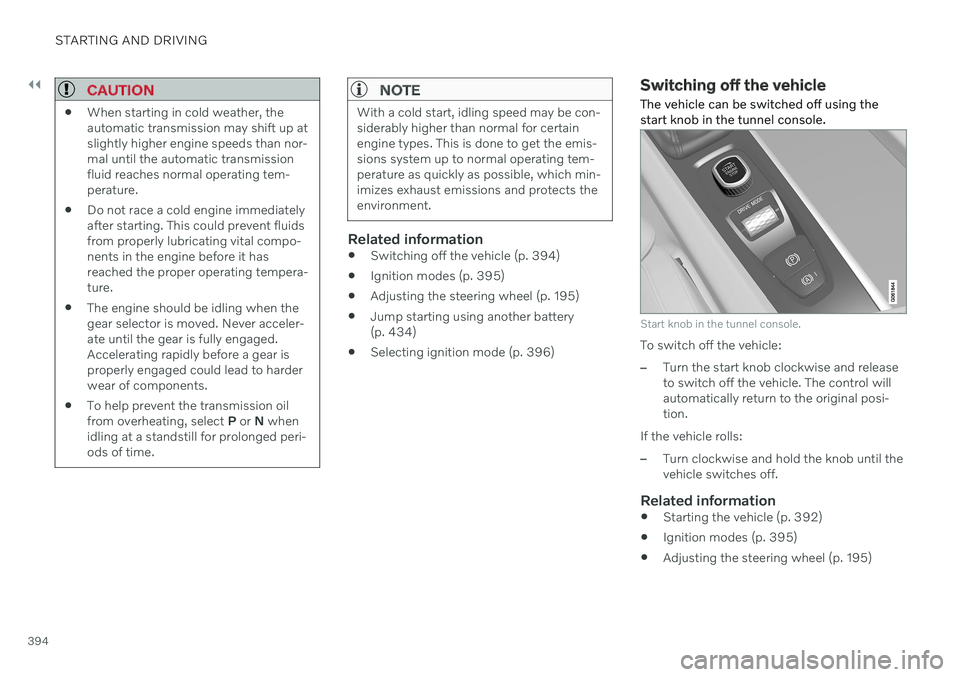
The vehicle can be switched off using the start knob in the tunnel console.
Start knob in the tunnel console.
To switch off the vehicle:
–Turn the start knob clockwise and release to switch off the vehicle. The control willautomatically return to the original posi-tion.
If the vehicle rolls:
–Turn clockwise and hold the knob until the vehicle switches off.
Related information
Starting the vehicle (p. 392)
Ignition modes (p. 395)
Adjusting the steering wheel (p. 195)
Page 398 of 657

||
STARTING AND DRIVING
396
Mode FunctionsII The headlights illuminate.
Warning/indicator lights illumi- nate for 5 seconds.
A number of other systems areactivated. However, seat andrear window heating can onlybe activated when the engineis running.
This ignition mode uses a lot ofcurrent from the battery andshould be avoided wheneverpossible!
A Also activated when the door is opened.
Related information
Starting the vehicle (p. 392)
Adjusting the steering wheel (p. 195)
Jump starting using another battery (p. 434)
Selecting ignition mode (p. 396)
Selecting ignition mode
The vehicle's ignition can be put in various modes (levels) to make different functionsavailable.
Selecting an ignition mode
Start knob in the tunnel console.
Ignition mode 0
– Unlock the vehicle and
keep the remote key in the passenger compartment.
NOTE
To set level I or II without engine start –
do not depress the brake pedal (or clutch
pedal for vehicles with manual transmis- sion) when selecting this ignition mode.
Ignition mode I
– Turn the start knob
clockwise and release it. The control will automatically return to the original posi- tion.
Ignition mode II
– Turn the start knob
clockwise and hold it there forapprox. 5 seconds. Release the knob,which will automatically return to its origi-nal position.
Back to ignition mode 0
– To return to
ignition mode 0 from modes I and II, turn
the start knob clockwise and release it.The control will automatically return to theoriginal position.
Related information
Starting the vehicle (p. 392)
Switching off the vehicle (p. 394)
Ignition modes (p. 395)
Adjusting the steering wheel (p. 195)
Jump starting using another battery(p. 434)
Page 399 of 657

STARTING AND DRIVING
}}
397
Brake functions
The vehicle's brakes are used to reduce speed or prevent the vehicle from rolling.
In addition to the wheel brakes and parking brakes, the vehicle is also equipped with anumber of automatic brake assist functions.These systems provide assistance by e.g. thedriver not needing to depress the brake pedalat a traffic light or when starting up a hill. Depending on how the vehicle is equipped, the following brake assist functions may beincluded:
Auto-hold brake function at a standstill(Auto Hold)
Hill Start Assist (Hill Start Assist)
Braking assist after a collision
City Safety
Related information
Brakes (p. 397)
Parking brake (p. 400)
Auto-hold brakes (p. 404)
Braking assist after a collision (p. 406)
Hill Start Assist (p. 405)
City Safety
™ (p. 306)
Brakes
The brake pedal is used to apply the vehicle's regular brakes, which are part of the brakesystem.
The vehicle is equipped with two brake cir- cuits. If one brake circuit is damaged, thebrake pedal will go down further whendepressed. More pressure will then berequired from the driver for normal brakingeffect.
WARNING
The power brakes only work when the electric motor or combustion engine is run-ning.
If the brake pedal is used when the engine is switched off, greater pressure must be appliedto brake the vehicle. In very hilly areas or when driving with a heavy load, gear position B can be used to augment
the brakes with engine braking.
Anti-lock brakesThe vehicle is equipped with an Anti-lock Braking System (ABS 2
), which helps prevent
the wheels from locking and helps maintain steering control when braking. Vibrations maybe felt from the brake pedal when ABS isoperating, which is normal. After the vehicle is started, a brief test of theABS system is automatically performed whenthe driver releases the brake pedal. An addi-tional automatic test of the system may beperformed when the vehicle is traveling at alow speed. During the test, the brake pedalmay feel as though it is pulsating.
Light braking charges the hybrid
battery
When the brakes are applied lightly, the elec-tric motor braking function is used. This con-verts the vehicle's kinetic energy into electricalenergy, which is used to charge the hybridbattery. When the battery is being chargedwith the electric motor braking function, thiswill be indicated in the instrument panel.
2 Anti-lock Braking System
Page 402 of 657

STARTING AND DRIVING
400
Braking on salted roads
When driving on salted roads, a layer of salt may form on the brake discs and brake pads.
This could increase stopping distance. Main- tain an extra large safety distance to the vehi-cle ahead. Make sure to also:
Apply the brakes from time to time to helpremove salt. Make sure braking does notpose a risk to any other road users.
Gently apply the brakes when you havefinished driving and before driving again.
Related information
Brakes (p. 397)
Braking on wet roads (p. 399)
Maintenance of the brake system
Regularly check the brake system compo- nents for wear.
To keep the vehicle as safe and reliable as possible, follow the Volvo service schedulespecified in the Warranty and MaintenanceRecords Information booklet. After replacingbrake pads and brake discs, braking effect isnot adapted until they are "broken in" by driv-ing a few hundred kilometers (miles). Com-pensate for the reduced braking effect byapplying greater pressure to the brake pedal.Volvo recommends only using brake padsapproved for your Volvo.
CAUTION
The brake system's components should be regularly checked for wear. Contact a workshop for advice on how to do this or let a workshop perform theinspection - an authorized Volvo workshopis recommended.
Related information
Brakes (p. 397)
Parking brake
The parking brake helps keep the vehicle sta- tionary by mechanically locking two wheels.
The parking brake controls are located in the tunnel console between the seats.
When the electric parking brake is being applied, a faint sound can be heard from thebrake's electric motor. This sound can also beheard during the automatic function check ofthe parking brake. If the vehicle is stationary when the parking brake is activated, it will only be applied to therear wheels. If it is activated while the vehicleis moving, the normal brakes will be used onall four wheels. Braking will be transferred toonly the rear wheels when the vehicle isalmost stopped.
Page 405 of 657

STARTING AND DRIVING
}}
403
Parking on a hillAlways use the parking brake when parking on a hill.
WARNING
Always apply the parking brake when park- ing on an incline. Selecting a gear or put-ting the automatic transmission in P may
not be sufficient to keep the vehicle sta-tionary in all situations.
If the vehicle is pointing uphill:
Turn the front wheels so they are pointing away from
the curb.
If the vehicle is pointing downhill:
Turn the front wheels so they are pointingtoward
the curb.
Heavy load uphill
Heavy loads, such as a trailer, could cause the vehicle to roll backward when the parkingbrake is released automatically on steep uphillgradients. To help avoid this, pull the controlupward while you are driving away. Releasethe control when the vehicle gains traction.
Related information
Activating and deactivating the parkingbrake (p. 401)
Parking brake malfunction
If you are unable to deactivate or activate the parking brake after several attempts, contactan authorized Volvo workshop.
A audible warning signal will sound if the park- ing brake is activated while the vehicle isbeing driven. If the vehicle must be parked before the prob- lem is rectified, turn the wheels as when park-ing on an incline and put the gear selector inP .
Low battery charge levelIf the battery charge level is too low, it will notbe possible to activate or deactivate the park-ing brake. Connect an auxiliary battery to thevehicle if the battery is discharged.
Replacing brake padsDue to the design of the electric parkingbrake, the rear brake pads must be replacedby a workshop. An authorized Volvo workshopis recommended.
Symbols in the instrument panel
Symbol Meaning
A
B A flashing symbol indicates that a fault has been detected. Seethe message in the instrumentpanel.
A
BFault in the brake system. See the message in the instrumentpanel.
Information message in the instrument panel.
A
Canadian models.
B US models.