wipers VOLVO S60 TWIN ENGINE 2020 User Guide
[x] Cancel search | Manufacturer: VOLVO, Model Year: 2020, Model line: S60 TWIN ENGINE, Model: VOLVO S60 TWIN ENGINE 2020Pages: 657, PDF Size: 13.6 MB
Page 436 of 657

STARTING AND DRIVING
434
Battery drain
The electrical functions in the vehicle drain the battery to varying degrees. Avoid usingignition mode II when the engine is switched
off. Use ignition mode I instead, as this uses
less electrical current.
Note that certain accessories may also drain power from the electrical system. Do not usefunctions that use a lot of electrical currentwhen the engine is turned off. Examples ofsuch functions are: blower
headlights
windshield wipers
audio system (especially at high volume).
If the starter battery voltage is low, a message is shown in the driver display. The vehicle'senergy-saving function will then turn off orreduce certain functions, such as the blowerand/or the audio system.
–Charge the battery by starting the engine and let it run for at least 15 minutes (driv-ing charges the battery faster than lettingthe engine idle).
Related information
Start battery (p. 579)
Ignition modes (p. 395)
Jump starting using another battery If the start battery is discharged, current from another battery can be used to start the vehi-cle.
Jumper cable connecting points.
CAUTION
The charging point of the vehicle is only intended for jump starting the vehicle inquestion. The charging point is notintended for jump-starting another vehicle.Using the charging point to start anothervehicle could cause a fuse to blow, whichwould cause the charging point to stopworking.
If a fuse has blown, 12 V Battery Fuse failure
Service required will be displayed in the instrument panel. Volvo recommends contact- ing an authorized Volvo workshop. To avoid short circuits or other damage, the following steps are recommended when jumpstarting the battery:
Page 449 of 657
STARTING AND DRIVING
}}
* Option/accessory.447
Activating and deactivating the compass*
An integrated compass 21
in the upper right
corner of the rearview mirror shows the direction the vehicle is traveling.
The compass is automatically activated when the vehicle is started. To deactivate/activate the compass manually:
–Use a paper clip or similar object to press the button on the bottom of the mirror.
> If the compass is deactivated when the vehicle is switched off, it will not be activated the next time the vehicle isstarted. The compass will then need tobe activated manually.
Related information
Compass
* (p. 446)
Calibrating the compass
* (p. 447)
Calibrating the compass *
The globe is divided into 15 magnetic zones. The compass 22
should be calibrated if the
vehicle is driven from one zone to another.
1. Stop the vehicle in a large, open area away from steel constructions and high-voltage power lines.
2. Start the engine and switch off all electri- cal equipment (climate system, wipers,etc.) and make sure all doors are closed.
NOTE
Calibration may fail or not even be initiated if electrical equipment is not turned off.
3. Hold the button on the bottom of the rear-view mirror pressed for about 3 seconds (using e.g. a paper clip). The number of thecurrent magnetic zone is shown.
15
14
13
12
11
9
8
7
6
5
4
3
2
1
10
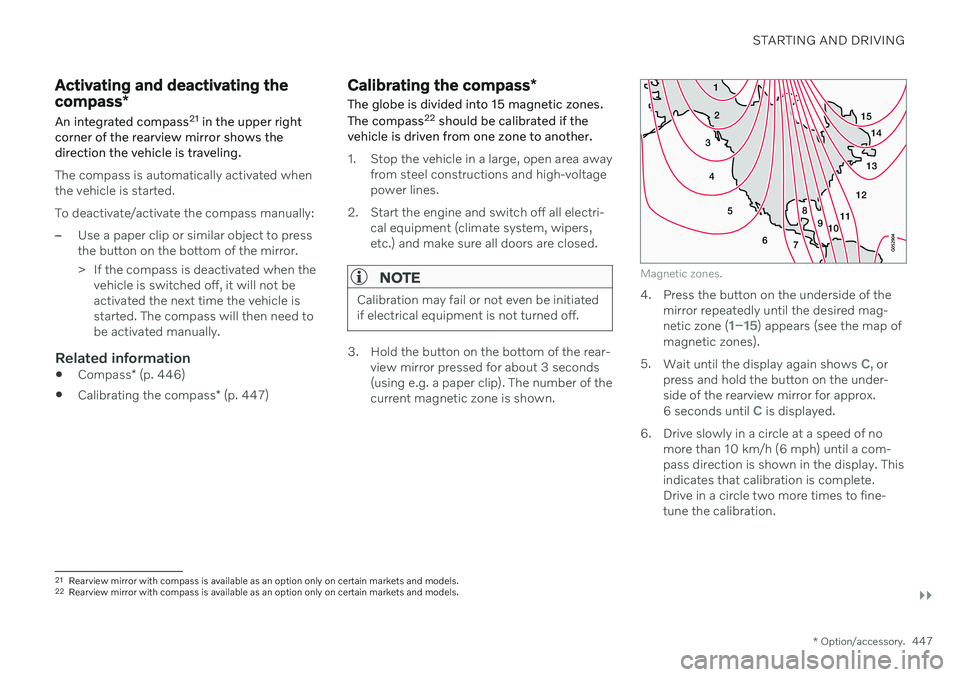
Magnetic zones.
4. Press the button on the underside of themirror repeatedly until the desired mag- netic zone (
1–15) appears (see the map of
magnetic zones).
5. Wait until the display again shows
C, or
press and hold the button on the under- side of the rearview mirror for approx.
6 seconds until
C is displayed.
6. Drive slowly in a circle at a speed of no more than 10 km/h (6 mph) until a com- pass direction is shown in the display. Thisindicates that calibration is complete.Drive in a circle two more times to fine-tune the calibration.
21Rearview mirror with compass is available as an option only on certain markets and models.
22 Rearview mirror with compass is available as an option only on certain markets and models.
Page 566 of 657
||
MAINTENANCE AND SERVICE
564
How can I prepare for my next OBD II
emission inspection?
If your Check Engine (MIL) light is lit or was lit but went out without service, haveyour vehicle diagnosed and, if necessary,serviced by a qualified Volvo technician.
If you recently had service for a lit CheckEngine light, or if you had service thatrequired disconnecting the battery, aperiod of driving is necessary to bring theOBD II system to "ready" for inspection.Two half-hour trips of mixed stop-and-go/highway driving are typically needed toallow OBD II to reach readiness. YourVolvo retailer can provide you with moreinformation on planning a trip.
Maintain your vehicle in accordance withyour vehicle's maintenance schedule.
Owner maintenancePeriodic maintenance requirements and inter-vals are described in your vehicle's Warrantyand Service Records Information booklet. The following points can be carried out between the normally scheduled maintenance services.
Each time the vehicle is refueled:
Check the engine oil level.
Clean the windshield, windshield wipers, headlights, and taillights.
Monthly:
Check cold tire pressure in all tires. Inspect the tires for wear.
Check that engine coolant and other fluidlevels are between the indicated "min"and "max" markings.
Clean interior glass surfaces with a glasscleaner and soft paper towels.
Wipe driver information displays with asoft cloth.
Visually inspect battery terminals for cor-rosion. Corrosion may indicate a loose ter-minal connector, or a battery near the endof its useful service life. Consult your Volvoretailer for additional information.
As needed:
Wash the vehicle, including the undercarriage, to reduce wear that can be caused by abuildup of dirt, and corrosion that can becaused by salt residues. Clean leaves and twigs from air intake vents at the base of the windshield, and from other pla-ces where they may collect.
NOTE
Complete service information for qualified technicians is available online for purchaseor subscription at www.volvotechinfo.com.
Related information
Vehicle status (p. 567)
Scheduling service and repairs (p. 567)
Connecting equipment to the vehicle's data link connector (p. 37)
Technician certification (p. 38)
Climate control system service (p. 571)
Maintenance of the brake system (p. 400)
Engine compartment overview (p. 573)
Page 592 of 657

||
MAINTENANCE AND SERVICE
* Option/accessory.
590
Function Ampere Type
– – Micro
–– MCase
–– MCase
Headlight washers* 25 MCase
Windshield washer
25 MCase
– – Micro
Horn20 Micro
Alarm siren* 5 Micro
Brake system control module (valves, parking brake)
40 MCase
Wipers30 MCase
– – MCase
–– MCase
Parking heater* 20 MCase
Brake system control module (ABS pump)
40 MCase
– – MCase
–– MCase
Page 621 of 657
MAINTENANCE AND SERVICE
}}
619
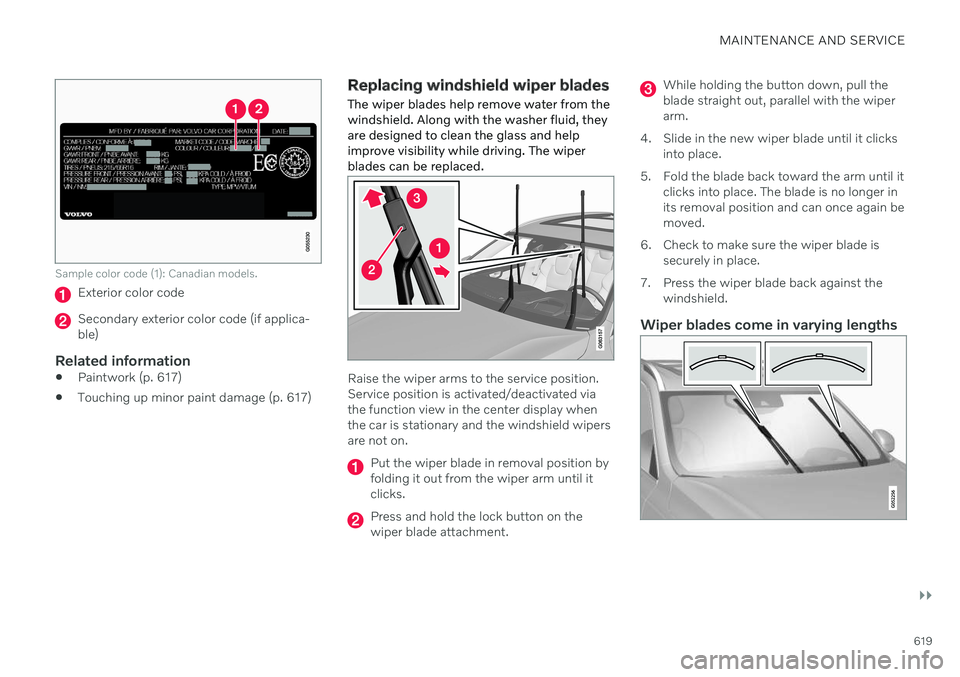
Sample color code (1): Canadian models.
Exterior color code
Secondary exterior color code (if applica- ble)
Related information
Paintwork (p. 617)
Touching up minor paint damage (p. 617)
Replacing windshield wiper blades
The wiper blades help remove water from the windshield. Along with the washer fluid, theyare designed to clean the glass and helpimprove visibility while driving. The wiperblades can be replaced.
Raise the wiper arms to the service position. Service position is activated/deactivated viathe function view in the center display whenthe car is stationary and the windshield wipersare not on.
Put the wiper blade in removal position by folding it out from the wiper arm until itclicks.
Press and hold the lock button on the wiper blade attachment.
While holding the button down, pull the blade straight out, parallel with the wiperarm.
4. Slide in the new wiper blade until it clicks into place.
5. Fold the blade back toward the arm until it clicks into place. The blade is no longer inits removal position and can once again bemoved.
6. Check to make sure the wiper blade is securely in place.
7. Press the wiper blade back against the windshield.
Wiper blades come in varying lengths
Page 622 of 657

||
MAINTENANCE AND SERVICE
620
NOTE
When changing wiper blades, make sure that the blades are of different lengths. Theblade on the driver's side is longer than theone on the passenger side.
Related information
Using the rain sensor (p. 178)
Using the windshield and headlight wash- ers (p. 179)
Using the rain sensor's memory function(p. 179)
Filling washer fluid (p. 621)
Putting the wiper blades in service posi-tion (p. 620)
Using the windshield wipers (p. 177)
Wiper blades and washer fluid (p. 177)
Putting the wiper blades in service position The windshield wiper blades must be in the service (vertical) position for certain opera-tions, e.g. replacing the blades.
Windshield wipers in the service position.
The windshield wipers must be in the service position when replacing, washing or lifting theblades (e.g. to scrape ice or snow from thewindshield).
CAUTION
Before placing the wipers in service posi- tion, ensure that they have not frozen tothe windshield.
Activating/deactivating service position
The service position can be activated/deacti- vated when the vehicle is stationary and thewindshield wipers are switched off. Serviceposition is activated/deactivated via Functionview in the center display:
Tap the
Wiper Service
Position button. The indica-
tor light in the button will illu- minate when service positionis activated. The wipers willmove to the service positionwhen activated. To deactivate
the service position, tap
Wiper Service
Position once. The indicator light in the but-
ton will go out when service position is deacti- vated.
Page 623 of 657

MAINTENANCE AND SERVICE
}}
* Option/accessory.621
The wiper blades will also move out of the service position if:
The windshield wipers are turned on.
The windshield washers are turned on.
The rain sensor is activated.
The vehicle begins moving.
CAUTION
If the wiper arms in service position are raised from the windshield, they must befolded back against the windscreen beforeactivating wiping, washing or rain sensoras well as before departure. This is to pre-vent scratching the paint on the hood.
Related information
Using the rain sensor (p. 178)
Using the windshield and headlight wash- ers (p. 179)
Using the rain sensor's memory function(p. 179)
Filling washer fluid (p. 621)
Replacing windshield wiper blades(p. 619)
Using the windshield wipers (p. 177)
Wiper blades and washer fluid (p. 177)
Filling washer fluid Washer fluid is used to help keep the head- lights and windshield clean. Washer fluidcontaining anti-freeze should be used in verycold weather (below-freezing temperatures).
Fill washer fluid into the reservoir with the blue cover. The reservoir is used for both the windshield washer and the headlight washer
*
NOTE
When there is approximately 1 liter (1 qt) of washer fluid remaining, the message
Washer fluid Level low, refill and the
symbol will be displayed in the
instrument panel.
Recommended grade: Washer fluid recom-
mended by Volvo, with frost protection during cold weather and temperatures below the freezing point.
CAUTION
Use Volvo's original washer fluid or an equivalent fluid with the recommended pHvalue between 6 and 8, diluted as recom-mended, e.g. in a 1:1 solution with pH-neu-tral water.
CAUTION
Use washer fluid with anti-freeze when temperatures are below the freezing pointto help keep the pump, reservoir and hosesfrom freezing.
Volume:
Vehicles
with headlight washing: 5.5 liters
(5.8 qts).
Vehicles
without headlight washing: 3.5
liters (3.7 qts).
Related information
Using the rain sensor (p. 178)
Using the windshield and headlight wash- ers (p. 179)
Using the rain sensor's memory function(p. 179)
Page 624 of 657

||
MAINTENANCE AND SERVICE
622
Putting the wiper blades in service posi- tion (p. 620)
Replacing windshield wiper blades(p. 619)
Using the windshield wipers (p. 177)
Wiper blades and washer fluid (p. 177)
Page 653 of 657

INDEX
651
Volvo ID 26
create and register 27
W
Warning lights Adaptive Cruise Control 288
airbags SRS 94
alternator does not charge 94
brake system error 94
low oil pressure 94
parking brake applied 94
Pilot Assist 288
seat belt reminder 94
stability and traction control system 261
starter battery not charging 94
system error 94
WARNING 94
Warning sound parking brake 403
warning symbols 94 Warning symbols safety 42
Warranties 562 Washer Headlights 179
washer fluid, filling 621
Windshield 179
Washer fluid 177, 621
Waxing 610Weights
Curb weight 629
Wheel bolts 533Wheels cleaning 616
mounting 536
removal 534
Snow chains 540
Wheels and tires Load index and speed symbol 522
Whiplash protection 46
Whiplash Protection System 46
WHIPS (Whiplash Protection System) 46 Wi-Fi connecting vehicle to Internet 497
delete network 501sharing Internet connection, tether-
ing, hotspot 500
technology and security 502
Windows and glass 166 Windshield projected image 139, 141
Windshield washing 179
Windshield wipers 177 rain sensor 178, 179Winter driving 425Snow chains 540
winter tires 539
Wiper blade 177 replacing 619
service position 620
Wiper blade and washing fluid 177
Wiper blades, heated 177