lock VOLVO S60 TWIN ENGINE 2020 Owner's Guide
[x] Cancel search | Manufacturer: VOLVO, Model Year: 2020, Model line: S60 TWIN ENGINE, Model: VOLVO S60 TWIN ENGINE 2020Pages: 657, PDF Size: 13.6 MB
Page 137 of 657
DISPLAYS AND VOICE CONTROL
}}
135
Protecting a driver profile
It may not always be desirable to store set- tings made in the vehicle to the active driverprofile. In these instances, the driver profilecan be protected.
NOTE
Protecting a driver profile is only possible when the vehicle is stationary.
To protect a driver profile: 1. Tap
Settings in the Top view in the center
display.
2. Tap
SystemDriver Profiles.
3. Select
Edit Profile.
> A menu will open in which the driver profile can be changed.
4. Tap
Protect Profile to protect the profile. 5. Confirm your selection to protect the pro-
file by tapping
Back/Close.
> When the profile is protected, settings made in the vehicle will not be auto- matically stored to the profile. Thechanges must instead be saved man- ually under
SettingsSystem
Driver ProfilesEdit Profile by tap-
ping Save current settings to the
profile. If the profile is not protected,
the settings will be automatically stored to the profile.
Related information
Driver profiles (p. 133)
Linking a remote key to a driver profile
A remote key can be linked to a driver profile. This driver profile and all of its settings willthen automatically be selected every time thevehicle is used with that particular remotekey.
The first time the remote key is used, it is not linked to any specific driver profile. The Guestprofile is automatically activated when the ignition is switched on. A driver profile can also be selected manually without linking it to any key. When the vehicleis unlocked, the last active driver profile will beactivated. If the key has ever been linked to adriver profile, it is not necessary to manuallyselect a driver profile when using that particu-lar key.
Linking a remote key to a specific driver profile
NOTE
A remote key can only be connected to a driver profile when the vehicle is stationary.
First select the profile you would like to link to the key (if that profile is not already active).
Page 144 of 657
||
DISPLAYS AND VOICE CONTROL
* Option/accessory.
142
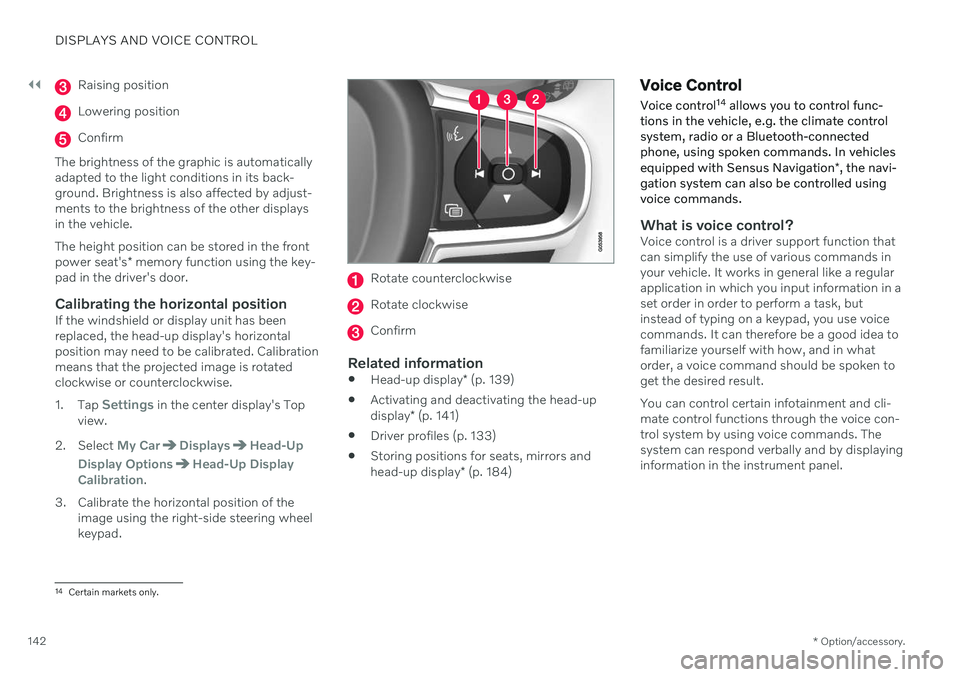
Raising position
Lowering position
Confirm
The brightness of the graphic is automatically adapted to the light conditions in its back-ground. Brightness is also affected by adjust-ments to the brightness of the other displaysin the vehicle. The height position can be stored in the front power seat's * memory function using the key-
pad in the driver's door.
Calibrating the horizontal positionIf the windshield or display unit has been replaced, the head-up display's horizontalposition may need to be calibrated. Calibrationmeans that the projected image is rotatedclockwise or counterclockwise. 1. Tap
Settings in the center display's Top
view.
2. Select
My CarDisplaysHead-Up
Display Options
Head-Up Display
Calibration.
3. Calibrate the horizontal position of the image using the right-side steering wheel keypad.
Rotate counterclockwise
Rotate clockwise
Confirm
Related information
Head-up display
* (p. 139)
Activating and deactivating the head-up display
* (p. 141)
Driver profiles (p. 133)
Storing positions for seats, mirrors andhead-up display
* (p. 184)
Voice Control
Voice control 14
allows you to control func-
tions in the vehicle, e.g. the climate control system, radio or a Bluetooth-connectedphone, using spoken commands. In vehicles equipped with Sensus Navigation *, the navi-
gation system can also be controlled using voice commands.
What is voice control?Voice control is a driver support function that can simplify the use of various commands inyour vehicle. It works in general like a regularapplication in which you input information in aset order in order to perform a task, butinstead of typing on a keypad, you use voicecommands. It can therefore be a good idea tofamiliarize yourself with how, and in whatorder, a voice command should be spoken toget the desired result. You can control certain infotainment and cli- mate control functions through the voice con-trol system by using voice commands. Thesystem can respond verbally and by displayinginformation in the instrument panel.
14 Certain markets only.
Page 157 of 657

LIGHTING
}}
155
. Activate high beams by moving the
steering wheel lever forward.
Deactivate by moving the steering wheel lever backward.
When the high beams are activated, the
symbol will be illuminated in the instrument panel.
Related information
Lighting control and panel (p. 150)
Active high beam (p. 155)
Active high beam
Active high beams is a function that uses camera sensors in the upper edge of thewindshield to detect the headlights ofapproaching vehicles or the taillights of thevehicle directly ahead. When either of theseis detected, the vehicle's headlights will auto-matically switch from high beams to lowbeams.
Active high beams is indicated by the symbol.
This function can be used in dark conditions when the vehicle's speed is approx. 20 km/h(approx. 12 mph) or higher. The function canalso detect street lighting. When the camerasensor no longer detects an approaching vehi-cle or a vehicle ahead, the headlights willreturn to high beams after a second or two.
Activating active high beamsActive high beams can be activated and deac-tivated by turning the lighting ring on the left- side steering wheel lever to position
.
The lighting ring will then return to
.
When active high beams are activated, a white
symbol will be displayed in the instru-
ment panel. When high beams are on, the symbol will be blue. If active high beams are deactivated when the high beams are on, the headlights will auto-matically switch to low beams.
Limitations for active high beamsThe camera sensor on which the function isbased has limitations.
If this symbol and the message
Active High Beam Temporarily
unavailable is displayed in the
instrument panel, switching
between high and low beams must be done manually. The
symbol will go out when
the message is displayed.
The same applies if this symbol along with the message
Windscreen sensor Sensor
blocked, see Owner's manual is
displayed.
Active high beams may be temporarily unavail- able in certain situations, e.g. heavy fog or
Page 158 of 657
||
LIGHTING
156rain. When active high beams become availa- ble again, or the windshield sensors are nolonger blocked, the message will disappear and the
symbol will be displayed.
WARNING
Automatic high beam is an aid in using the best possible light based on prevailing con-ditions. The driver is always responsible for man- ually switching between high and lowbeam when traffic situations or weatherconditions require this.
Related information
Lighting control and panel (p. 150)
Using high beam (p. 154)
Camera/radar sensor limitations (p. 301)
Using turn signals
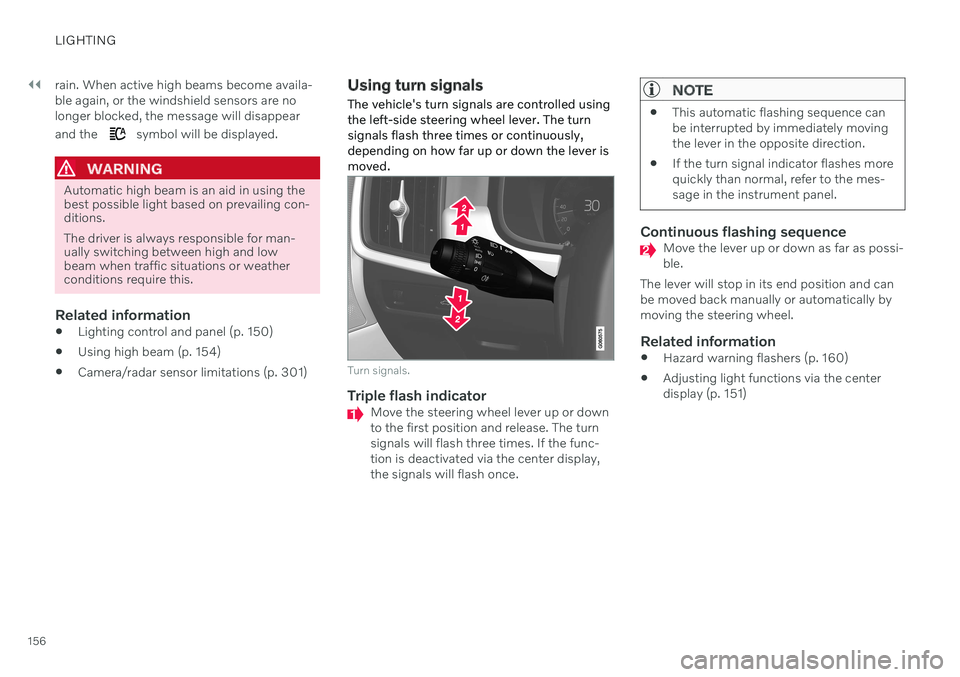
The vehicle's turn signals are controlled using the left-side steering wheel lever. The turnsignals flash three times or continuously,depending on how far up or down the lever ismoved.
Turn signals.
Triple flash indicatorMove the steering wheel lever up or down to the first position and release. The turnsignals will flash three times. If the func-tion is deactivated via the center display,the signals will flash once.
NOTE
This automatic flashing sequence can be interrupted by immediately movingthe lever in the opposite direction.
If the turn signal indicator flashes morequickly than normal, refer to the mes-sage in the instrument panel.
Continuous flashing sequenceMove the lever up or down as far as possi- ble.
The lever will stop in its end position and canbe moved back manually or automatically bymoving the steering wheel.
Related information
Hazard warning flashers (p. 160)
Adjusting light functions via the centerdisplay (p. 151)
Page 162 of 657

LIGHTING
* Option/accessory.
160
Hazard warning flashers
Hazard warning flashers warn other road users by all of the vehicle's turn signals beingactivated at the same time. The function canbe used to warn about a traffic hazard.
Hazard warning flashers button.
Press the button to activate the hazard warn- ing flashers.
NOTE
Regulations concerning the use of hazard warning flashers may vary from country tocountry.
Related information
Emergency brake lights (p. 159)
Using turn signals (p. 156)
Using home safe lighting
Some of the exterior lights remain on to illu- minate the area around the vehicle. This iscalled home safe lighting.
To activate home safe lighting:
1. Switch off the ignition.
2. Push the left-side steering wheel lever toward the dashboard and release.
3. Exit the vehicle and lock the doors. > A symbol in the instrument panel illumi-nates to indicate that the function is activated and exterior lighting switcheson: Parking lights, headlights, licenseplate lighting and outer door handle lighting *.
The length of time home safe lighting remains illuminated can be set in the center display.
Related information
Adjusting light functions via the centerdisplay (p. 151)
Welcome Light (p. 160)
Welcome Light
Approach lighting is activated when the vehi- cle is unlocked and can be used to providelight as you walk toward the vehicle.
The function is activated when the remote key is used for unlocking. The parking lights, ceil-ing lights, footwell lights and trunk/cargocompartment lights are activated in daylightconditions. In weak daylight or dark condi-tions, the license plate lighting and outer door handle lighting * will also be activated, with the
light directed toward the ground. If no door is opened, the lights will remain illu- minated for approx. 2 minutes. If a door isopened while the function is activated, the interior lighting and outer door handle lighting *
will remain on for a longer period of time. This function can be activated and deactivated in the center display.
Related information
Adjusting light functions via the centerdisplay (p. 151)
Using home safe lighting (p. 160)
Remote key (p. 232)
Page 163 of 657
LIGHTING
}}
* Option/accessory.161
Interior Lighting
The passenger compartment is equipped with several different types of lighting, e.g.general lighting, adjustable ambient lightingand reading lights.
All lighting in the passenger compartment can be turned on and off manually within5 minutes after:
the engine has been switched off and theignition is in mode
0.
the vehicle is unlocked but has not yetbeen started.
Front ceiling lighting
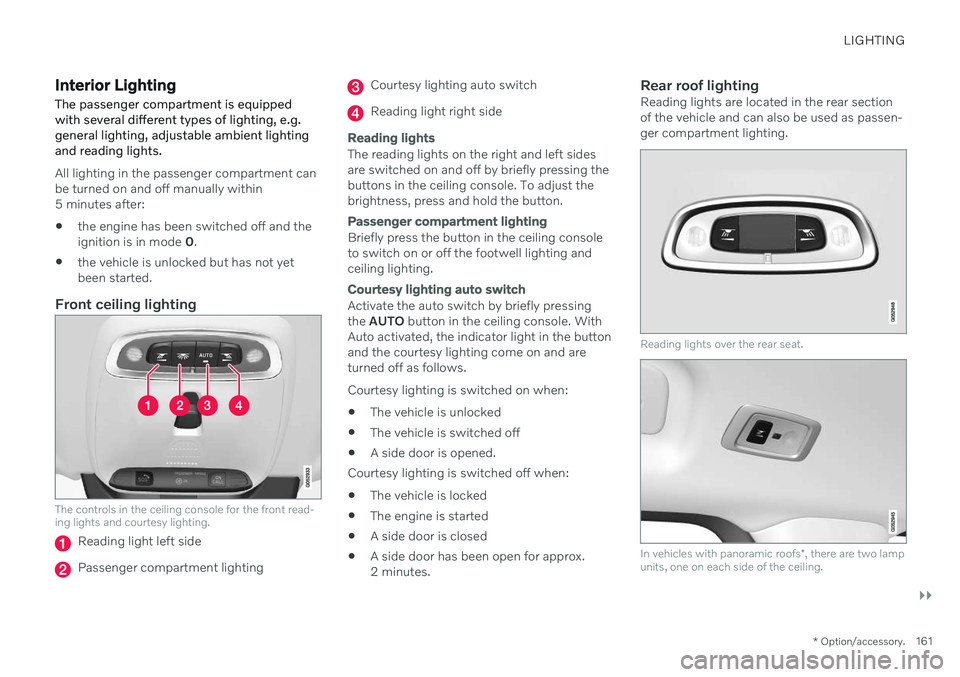
The controls in the ceiling console for the front read- ing lights and courtesy lighting.
Reading light left side
Passenger compartment lighting
Courtesy lighting auto switch
Reading light right side
Reading lights
The reading lights on the right and left sides are switched on and off by briefly pressing thebuttons in the ceiling console. To adjust thebrightness, press and hold the button.
Passenger compartment lighting
Briefly press the button in the ceiling console to switch on or off the footwell lighting andceiling lighting.
Courtesy lighting auto switch
Activate the auto switch by briefly pressing the
AUTO button in the ceiling console. With
Auto activated, the indicator light in the buttonand the courtesy lighting come on and areturned off as follows. Courtesy lighting is switched on when:
The vehicle is unlocked
The vehicle is switched off
A side door is opened.
Courtesy lighting is switched off when: The vehicle is locked
The engine is started
A side door is closed
A side door has been open for approx. 2 minutes.
Rear roof lightingReading lights are located in the rear sectionof the vehicle and can also be used as passen-ger compartment lighting.
Reading lights over the rear seat.
In vehicles with panoramic roofs
*, there are two lamp
units, one on each side of the ceiling.
Page 164 of 657

||
LIGHTING
* Option/accessory.
162 Briefly press the button on the light to turn on or off the reading lights. To adjust the bright-ness, press and hold the button.
Glove compartment lightingThe glove compartment lighting comes on orgoes off when the glove compartment isopened or closed.
Vanity mirror lighting
*The vanity mirror lighting comes on or goes offwhen the cover over the mirror is opened orclosed.
Ground lighting*The ground lighting comes on or goes offwhen a door is opened or closed.
Doorsill lightingThe doorsill lighting comes on or goes offwhen a door is opened or closed.
Trunk lightingThe trunk lighting comes on or goes off whenthe trunk lid is opened or closed.
Ambient LightingThe ambient lighting comes on when thedoors are opened and goes out when the vehi-cle is locked. Ambient lighting brightness canbe adjusted in the center display and also fine-tuned using the thumb wheel in the dash-board.
Mood lighting*The vehicle is equipped with LEDs that pro-vide faint lighting in various colors. This light-ing is on when the engine is running. Moodlighting can be adjusted in the center displayand also fine-tuned using the thumb wheel inthe dashboard.
Lighting in the door storage compartments
Lighting in the door storage compartments comes on when the doors are opened andgoes out when the vehicle is locked. Thebrightness can be adjusted using the thumbwheel in the dashboard.
Lighting in the tunnel console's front
cup holder
The lighting in front console cup holdersswitches on when the vehicle is unlocked andoff when the vehicle is locked. The brightnesscan be adjusted using the thumb wheel in thedashboard.
Related information
Adjusting interior lighting (p. 162)
Lighting control and panel (p. 150)
Ignition modes (p. 395)
Passenger compartment interior (p. 550)
Adjusting interior lighting
Illumination in the vehicle varies depending on ignition mode. The interior lighting can beadjusted with a thumb wheel in the dash-board and certain light functions can also beadjusted via the center display.
The thumb wheel on the dashboard to the left of thesteering wheel can be usedto adjust the brightness ofthe display lighting, instru-ment lights, ambient lighting and mood lighting *.
Adjust ambient decor lighting1.
Tap Settings in the Top view in the center
display.
2. Tap
My CarLights and LightingInterior Lighting.
3. Choose from among the following set- tings:
Under
Ambient Light Intensity, selectOff, Low or High.
Under
Ambient Light Level, selectReduced or Full.
Adjusting mood lighting
*The vehicle is equipped with several LEDs that provide faint lighting in various colors. Thislighting is on when the engine is running.
Page 168 of 657

WINDOWS, GLASS AND MIRRORS
* Option/accessory.
166
Windows, glass and mirrors The vehicle is equipped with several different types of windows, glass and mirrors. Some ofthe windows in the car are laminated.
The windshield has laminated glass. Lamina- ted glass is also available as on option forsome other glass surfaces. Laminated glass isreinforced, which provides better protectionagainst break-ins and improved soundproofingin the passenger compartment. The panoramic roof * also has laminated glass.
The symbol shows the windows containing lamina- ted glass. 1
Related information
Pinch protection for windows and sun cur- tains (p. 166)
Panoramic roof
* (p. 172)
Power windows (p. 167)
Rearview/door mirrors (p. 170)
Using sun curtains
* (p. 169)
Head-up display
* (p. 139)
Using the windshield wipers (p. 177)
Using the windshield and headlight wash-ers (p. 179)
Activating and deactivating the heatedrear window and door mirrors (p. 215)
Pinch protection for windows and sun curtains All power windows and sun curtains
* have a
pinch protection function that is triggered if anything blocks them while they are openingor closing.
If pinch protection is activated, movement will stop and then retract automatically to approx.50 mm (2 inches) from the point at which itwas blocked (or to full ventilation position). It is still possible to override pinch protection when closing is interrupted (e.g. due to ice) bypressing and holding down the control in thesame direction. If there is any problem with the pinch protec- tion, a rest procedure can be tested.
WARNING
If the starter battery is disconnected, the function for automatic opening and closingmust be reset to function correctly. A resetis required in order for the pinch protectionto work.
Related information
Reset procedure for pinch protection (p. 167)
Operating the power windows (p. 168)
1
Does not apply to windshield and panoramic roof *, which are always laminated and therefore do not have this symbol.
Page 169 of 657

WINDOWS, GLASS AND MIRRORS
}}
* Option/accessory.167
Using sun curtains
* (p. 169)
Operating the panoramic roof
* (p. 174)
Reset procedure for pinch protection
If you experience any problems with the elec- trical functions for the power windows, youcan try to perform a reset.
WARNING
If the starter battery is disconnected, the function for automatic opening and closingmust be reset to function correctly. A resetis required in order for the pinch protectionto work.
If the problem persists or if it affects the pan- oramic roof, contact a workshop 2
.
Resetting a power window
1. Start with the window in the closed posi-
tion.
2. Then move the control in manual mode three times upward toward the closed position.
> The system will be automatically acti-vated.
Related information
Pinch protection for windows and sun cur- tains (p. 166)
Operating the power windows (p. 168)
Using sun curtains
* (p. 169)
Power windows Every door has a control panel for the power windows. The driver's door has controls foroperating all windows and for activating thechild safety locks.
Driver's door control panel.
Electric child safety locks * that deactivate
the controls in the rear doors to prevent the doors or windows from being openedfrom the inside.
Rear window controls.
Front window controls.
2 An authorized Volvo workshop is recommended.
Page 171 of 657

WINDOWS, GLASS AND MIRRORS
* Option/accessory.169
WARNING
Make sure that no child or other passenger comes into contact with the windows as they are closing with keyless closing *.
NOTE
One way to reduce the pulsating wind noise heard when the rear windows areopen is to also open the front windowsslightly.
NOTE
The windows cannot be opened at speeds over approx. 180 km/h (ca112 mph), butthey can be closed. The driver is always responsible for follow- ing applicable traffic regulations.
NOTE
It may not be possible to operate the win- dows in low temperatures.
Related information
Power windows (p. 167)
Pinch protection for windows and sun cur- tains (p. 166)
Reset procedure for pinch protection(p. 167)
Keyless locking and unlocking
* (p. 247)
Locking and unlocking using the remotekey (p. 234)
Using sun curtains
*
There is a sun curtain in the parcel shelf in the rear window.
–Pull up the sun curtain and hook it into the ceiling bracket using the two hooks on thesun curtain.
> The spring force in the curtain keeps the hooks hanging in place.
When the sun curtain is not being used, grasp and unhook it and let the curtain slowly retractwhile still holding it.
Related information
Pinch protection for windows and sun cur-tains (p. 166)
Reset procedure for pinch protection(p. 167)
Power windows (p. 167)