phone VOLVO S60T8 2019 Quick Guide
[x] Cancel search | Manufacturer: VOLVO, Model Year: 2019, Model line: S60T8, Model: VOLVO S60T8 2019Pages: 47, PDF Size: 2.05 MB
Page 2 of 47
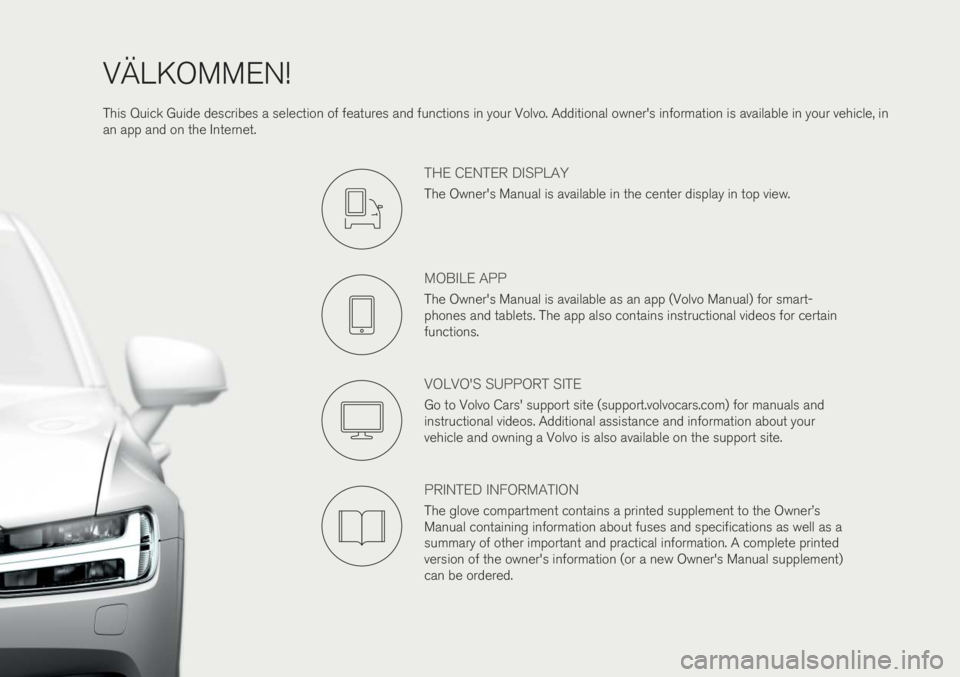
VÄLKOMMEN! This Quick Guide describes a selection of features and functions in your Volvo. Additional owner's information is available in your vehicle, in an app and on the Internet.
THE CENTER DISPLAY
The Owner's Manual is available in the center display in top view.
MOBILE APP
The Owner's Manual is available as an app (Volvo Manual) for smart- phones and tablets. The app also contains instructional videos for certainfunctions.
VOLVO'S SUPPORT SITE
Go to Volvo Cars' support site (support.volvocars.com) for manuals and instructional videos. Additional assistance and information about yourvehicle and owning a Volvo is also available on the support site.
PRINTED INFORMATION
The glove compartment contains a printed supplement to the Owner
Page 21 of 47

Right-side steering wheel keypad The right-side steering wheel keypad controls the instrument panel.Open/close the app menu. From here, you can control the trip computer, media player, a connected cell phone and the naviga-
tion system *.
Press the left/right arrows to scroll among the apps.
Select/deselect or confirm a choice, e.g. select the trip comput- er's menu or erase a message from the instrument panel.
Scroll among a selected app's functions by pressing the up/down arrows.
Raise/lower the media volume by pressing or . If no other
function is active these buttons serve as volume control. Voice control is activated by pressing the
button to give voice com-
mands for e.g. media, navigation and climate systems. Say e.g. “Radio”,
“Raise temperature” or “Cancel”.
See the chapter "Voice control" in this Quick Guide for additional voice commands. Trip computer The trip computer shows e.g. mileage, fuel consumption and average speed. You can choose the type of trip computer information that willbe displayed in the instrument panel. The trip computer calculates theremaining distance that can be driven on the amount of fuel remainingin the tank or until the hybrid battery is discharged. Use the buttons onthe right-side steering wheel keypad to display the various options.When “----” is displayed in the instrument panel, there is no guaranteedelectrical current remaining in the battery.
03
Page 26 of 47

CONNECTIONS The vehicle's various types of connections can be used to play or voice- control media, send or receive text messages, make or receive phonecalls, connect to the Internet, etc. from an external device such as asmartphone. In order to connect your devices to the vehicle, the ignition must be in at least mode I.
Vehicle's modem 4
The easiest and most efficient way to connect the vehicle to the Inter- net is to use its own modem. This provides the highest performance, isactivated automatically each time the engine is started and does notrequire the use of a smartphone.
1. Insert a personal SIM card in the holder in the passenger-side floor- well. 2. Tap
SettingsCommunicationVehicle Modem Internet in
top view.
3. Activate by checking the box for
Vehicle modem Internet.
Sharing Internet connection (tethering) When the vehicle is connected to the Internet via the vehicle's modem, you can share the vehicle's Internet connection (Wi-Fi hotspot) with other devices under
Settings in top view. Tap Communication
Vehicle Wi-Fi Hotspot.
Bluetooth Use Bluetooth as first choice for handling phone calls, text messages and media from your phone to the vehicle's systems. Bluetooth canalso be used to connect the vehicle to the Internet. Two Bluetooth devi-ces can be connected at the same time but only one of them can be
03
Page 27 of 47
used to stream media. The two most recently connected phones will connect automatically when the ignition is switched on (if the phone'sBluetooth function is activated). Up to 20 devices are saved in a list tofacilitate connection at a later time.
1. Activate Bluetooth in the phone. Also activate tethering/personalhotspot if you would like to connect to the Internet.
2. Open the phone tile in the center display.
3. Tap
Add phone or, if a phone is already connected, tap Change and
then Add phone.
4. Select the phone to be connected and then follow the steps on the center display and in the phone. Note that in certain phones, the message function is activated.
Wi-Fi Wi-Fi connections can be used to connect the vehicle to the Internet at greater speeds than are possible using Bluetooth to stream onlineservices such as web radio and music via apps in the vehicle, down-load/upload software, etc. A Wi-Fi connection from a smartphone actsas a hotspot for the vehicle and any external devices that may be in thevehicle.
1. Activate tethering in the phone.
2. Tap
Settings in the center display's top view.
3. Tap
CommunicationWi-Fi and activate by checking the box for
Wi-Fi connection.
Please note that in certain phones, tethering is closed after contact with the vehicle has been broken. The phone's tethering function willthen need to be reactivated before it can be used again. USB The USB ports can be used to connect an external device to e.g. play music. You can also use the USB port for Apple CarPlay * and Android
Auto *. If there are two USB ports, use the one with the white frame. The
external device will also be recharged while it is connected to the vehi- cle.
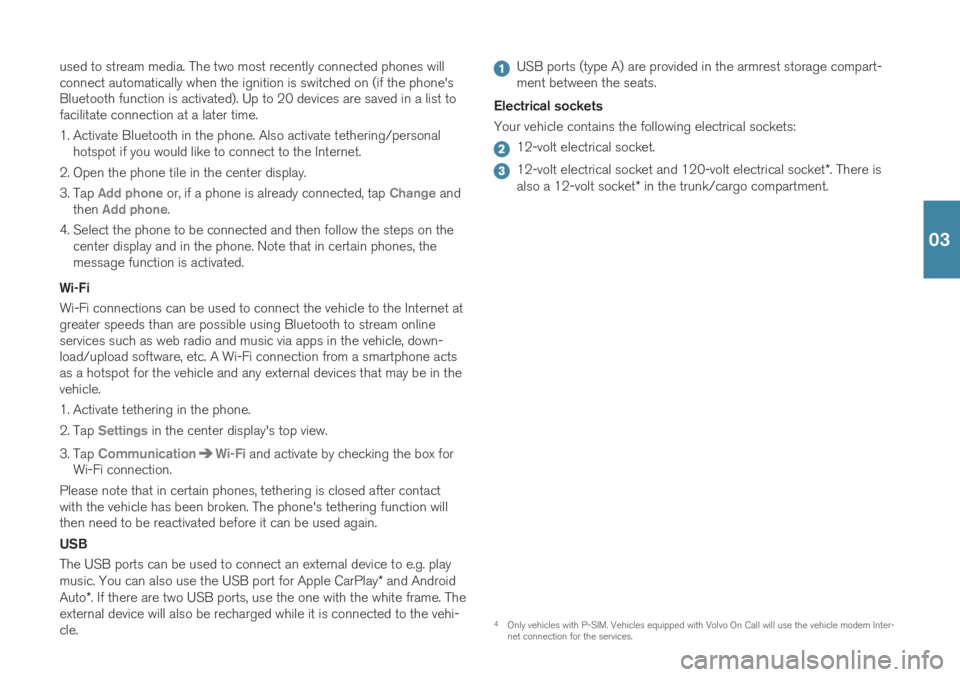
USB ports (type A) are provided in the armrest storage compart- ment between the seats.
Electrical sockets Your vehicle contains the following electrical sockets:
12-volt electrical socket.
12-volt electrical socket and 120-volt electrical socket *. There is
also a 12-volt socket * in the trunk/cargo compartment.
4
Only vehicles with P-SIM. Vehicles equipped with Volvo On Call will use the vehicle modem Inter- net connection for the services.
03
Page 28 of 47

5For information about which phones are compatible with the vehicle, go to support.volvocars.com.
USING CONNECTED DEVICES External devices can be connected to e.g. handle phone calls and play media in the vehicle's audio and media systems. Handling phone calls
5
You can make and receive calls from a Bluetooth-connected phone.
Making calls using the center display
1. Open the Phone tile in home view. Select to make a call using the
list of recent calls or your list of contacts, or enter a number using the keypad.
2. Tap
.
Making a call using the right-side steering wheel keypad
1. Tap and navigate to Phone by tapping or .
2. Scroll through the list of calls using
and select using .
You can also handle calls using voice commands. Tap the voice control button (
) in the right-side steering wheel keypad. For voice com-
mands, see the "Voice control" chapter in this Quick Guide. Playing media In order to listen to audio content from an external device, connect it to the vehicle using the connection of your choice; see the previous sec-tion for connection options.
Bluetooth-connected device
1. Start playback in the connected device.
2. Open the
Bluetooth app in App view in the center dis-
play. Playback will begin.
USB-connected device
1. Start the
USB app in app view.
2. Select a song, track, etc. Playback will begin.
03
Page 29 of 47

6Apple and CarPlay are registered trademarks of Apple Inc.
MP3 player or iPod
1. Start playback in the device.
2. Open the
iPod or USB app, depending on connection
method. For playback from iPod, select the iPod app
regardless of connection method. Playback will begin.
Apple
® CarPlay®*6
and Android Auto *
CarPlay and Android Auto make it possible to use certain apps in your iOS or Android device via the vehicle to e.g. play music or listen to pod-casts. This interaction takes place via the vehicle's center display oryour device. To use CarPlay, Siri must be activated on the iOS device. The device must also be connected to the Internet via Wi-Fi or a mobile network.
1. Connect the phone to the USB port with a white frame.
2. Tap
Apple CarPlay or Android Auto in app view to acti-
vate.
Activate voice control with CarPlay and Android Auto by pressing and holding the
button in the right-side steering wheel keypad. Pressing
this button briefly will instead activate the vehicle's own voice control system. Bluetooth is deactivated when CarPlay is used. Use Wi-Fi or the vehi- cle's modem if you would like to connect the vehicle to the Internet.
03
Page 31 of 47
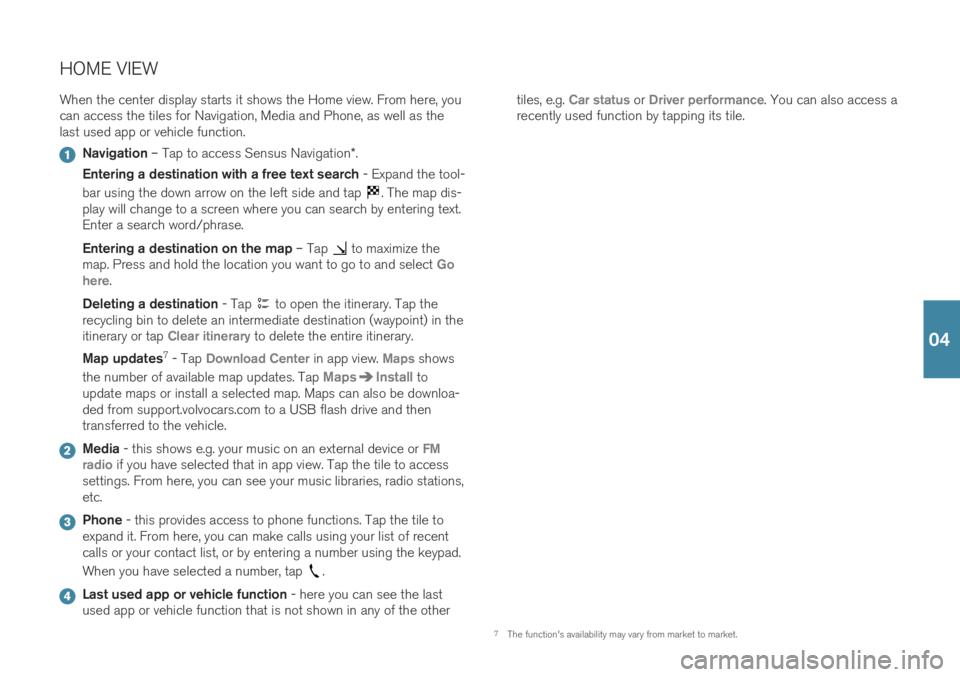
HOME VIEWWhen the center display starts it shows the Home view. From here, you can access the tiles for Navigation, Media and Phone, as well as thelast used app or vehicle function.
Navigation – Tap to access Sensus Navigation *.
Entering a destination with a free text search - Expand the tool-
bar using the down arrow on the left side and tap
. The map dis-
play will change to a screen where you can search by entering text. Enter a search word/phrase. Entering a destination on the map – Tap
to maximize the
map. Press and hold the location you want to go to and select Go
here.
Deleting a destination - Tap
to open the itinerary. Tap the
recycling bin to delete an intermediate destination (waypoint) in the itinerary or tap
Clear itinerary to delete the entire itinerary.
Map updates 7
- Tap
Download Center in app view. Maps shows
the number of available map updates. Tap
MapsInstall to
update maps or install a selected map. Maps can also be downloa- ded from support.volvocars.com to a USB flash drive and thentransferred to the vehicle.
Media - this shows e.g. your music on an external device or FM
radio if you have selected that in app view. Tap the tile to access
settings. From here, you can see your music libraries, radio stations, etc.
Phone - this provides access to phone functions. Tap the tile to
expand it. From here, you can make calls using your list of recent calls or your contact list, or by entering a number using the keypad. When you have selected a number, tap
.
Last used app or vehicle function - here you can see the last
used app or vehicle function that is not shown in any of the other tiles, e.g.
Car status or Driver performance. You can also access a
recently used function by tapping its tile.
7 The function's availability may vary from market to market.
04
Page 42 of 47

VOICE COMMANDSThe voice control system makes it possible to control 11
certain func-
tions in the media player, Bluetooth-connected phones, climate system and the Volvo navigation system * using voice commands. To activate
voice control, press the voice control button in the right-side steering wheel keypad. The following commands can usually be used in any situation:
Repeat
Cancel
Help
Cell phone voice commands
Call [contact]
Call [phone number]
Recent calls
Read message
Message to [contact]12
Radio and media voice commands
Media
Play [artist]
Play [song title]
Play [song title] from [album]
Play [radio station]
Tune to [frequency]
Tune to [frequency] [waveband]
Radio
Radio FM
SiriusXM*
CD*
USB
iPod
Bluetooth
Similar music
Climate system voice commands
Climate
Set temperature to X degrees
Raise temperature/Lower temperature
Sync temperature
Air on feet/Air on body
Air on feet off/Air on body off
Set fan to max/Turn off fan
06
Page 43 of 47

Raise fan speed/Lower fan speed
Turn on auto
Air condition on/Air condition off
Recirculation on/Recirculation off
Turn on defroster /Turn off defroster
Turn on max defroster/Turn off max defroster
Turn on rear defroster/Turn off rear defroster
Turn steering wheel heat on/Turn steering wheel heat off*
Raise steering wheel heat/Lower steering wheel heat*
Turn on seat heat/Turn off seat heat*
Raise seat heat/Lower seat heat*
Turn on seat ventilation/Turn off seat ventilation*
Raise seat ventilation/Lower seat ventilation*
Navigation system voice commands *
Navigation
Take me home
Go to [city]
Go to [address]
Add intersection
Go to [zip code]
Go to [contact]
Search [POI category]
Search [POI category] [city]
Search [POI name]
Change country/Change state13
,
14
Show favorites
Clear itinerary
Repeat voice guidance
Turn off voice guidance
Turn on voice guidance
11
Certain markets only.
12 Only certain phones can send messages via the vehicle. For additional information on compatibil- ity, see support.volvocars.com.
13 For European countries, "country" is used instead of "state".
14 For Brazil and India, the search area is changed using the center display.
06
Page 44 of 47

SUPPLEMENTARY INFORMATIONThe Owner's Manual and other manuals contain safety instructions and all warning, caution and notetexts, which must be read. Some functions onlyapply to certain markets.
WARNING
GETTING STARTED Volvo On Call – The system's services only work in
areas in which Volvo On Call's partners have cellu- lar coverage and in markets where Volvo On Call isavailable. Just as with cellular phones, atmospheric disturban- ces or areas with fewer transmitters, e.g. sparselypopulated rural areas, can make connection impos-sible. For warning, caution and note texts for Volvo On Call services, see the Owner's Manual and theapplicable agreement for the Volvo On Call sub-scription. Sensus Navigation * – Direct all your attention to
the road and make sure that your concentration is focused on driving. Follow applicable traffic lawsand use good judgment while driving. Road condi-tions can be affected by weather or season, whichmay make certain recommendations less reliable. EXTERIOR OVERVIEW Trunk lid – bear in mind the risk of pinching when
opening/closing the trunk lid. Make sure that no one is in the path of the trunk lid who could beinjured by its movement. Always operate the trunklid with caution. Keyless locking/unlocking * – Check that children
or other passengers are not at risk of crushing when all the windows are closed with keyless clos- ing *.
INTERIOR OVERVIEW Passenger airbag – Volvo recommends that all
occupants (adults and children) shorter than 140 cm (4 foot 7 inches) be seated in the rear seat of any vehicle with a front passenger side airbagand be properly restrained for their height andweight. Occupant Weight Sensor (OWS)
No objects that add to the total weight on the seat should be placed on the front passenger'sseat. If a child is seated in the front passenger'sseat with any additional weight, this extra weightcould cause the OWS system to enable the air-bag, which might cause it to deploy in the eventof a collision, thereby injuring the child.
The seat belt should never be wrapped around anobject on the front passenger's seat. This couldinterfere with the OWS system's function.
The front passenger's seat belt should never beused in a way that exerts more pressure on thepassenger than normal. This could increase thepressure exerted on the weight sensor by a child,and could result in the airbag being enabled,which might cause it to deploy in the event of acollision, thereby injuring the child.
Always take the remote key with you when you
leave the vehicle. Make sure the ignition is in mode 0 , especially if there are children in the vehicle.
Always apply the parking brake when parking on
an incline. Selecting a gear or putting the automatictransmission in P may not be sufficient to keep the
vehicle stationary in all situations. CHARGING THE HYBRID BATTERY
Charging the hybrid battery may only be done from approved, grounded 120/240 V outlets(AC, alternating current). If the electrical circuit orelectrical socket's capacity is not known, let alicensed electrician inspect the electrical circuit'scapacity. Using a charge level that exceeds theelectrical circuit's or electrical outlet's capacitymay start a fire or damage the electrical circuit.
The charging cable must be grounded when inuse. It is equipped with a cord with a groundingconductor and a grounding plug. The plug mustbe inserted into an appropriate outlet that isproperly installed and grounded in accordance with all local codes and ordinances and is notdamaged in any way.
Children should be supervised when in the vicin-ity of the charging cable when it is plugged in.
The charging cable and its components must notbe rinsed or immersed in water.
High voltage is present in your electric meterhousing and power distribution service panel.Contact with high voltage can cause death orserious personal injury.
Do not use the charging cable if it is damaged inany way. A damaged or malfunctioning chargingcable may only be repaired by a workshop – anauthorized Volvo workshop is recommended.
Always position the charging cable so that it willnot be driven over, stepped on, tripped over orotherwise damaged, or cause personal injury.
Disconnect the charger from the wall outletbefore cleaning it.
Never connect the charging cable to an exten-sion cord or a multiple plug socket.
Avoid visibly worn or damaged electrical outletssince they may lead to fire damage and/or per-sonal injury if used.
Also, refer to the manufacturer's instructions forusing the charging cable and its components. POWER FRONT SEATS Do not adjust the seat while driving. The seat must be positioned in a way that allows the driver to fullydepress the brake pedal. Adjust the seat as farrearward as comfort and control allow. After adjust-ing the seat, make sure that it is securely lockedinto position before starting to drive. FOLDING THE BACKRESTS IN THE REAR SEAT Make sure the backrest is correctly engaged before folding up and down and that the head restraint iscorrectly engaged after folding up. CONNECTIONS Only use accessories that are not damaged or malfunctioning. The accessories must be CEmarked, UL marked or have an equivalent safetymarking.
Accessories must be designed for 120 V and 60Hz, with plugs intended for the outlet.
New let outlets, plugs or accessories come intocontact with water or another fluid. Do not touchor use the outlet if it appears damaged or hasbeen in contact with water or another fluid.
Do not connect power strips, adapters or exten-sion cords to the outlet has this could cause theoutlet's safety functions to malfunction.
The outlet is equipped with a pet guard. Makesure that no one picks at or damages the outletin such a way that the guard is disabled. Childrenshould not be left unsupervised in the vehiclewhen the outlet is active.
DRIVER SUPPORT The vehicle's driver support systems are designed to offer supplementary assistance to the driver, butcannot handle all situations in all traffic, weatherand road conditions. They are never a substitute forthe driver's attention and judgment. The driver isalways responsible for ensuring the vehicle is drivenin a safe manner, at the appropriate speed, with anappropriate distance to other vehicles, and inaccordance with current traffic rules and regula-tions. The driver always has ultimate responsibilityfor braking and steering the vehicle. Before driving your vehicle, read all sections of the Owner's Manual concerning driver support systemsin the vehicle. PARKING ASSISTANCE SYSTEMS Park Assist Pilot is a supplementary driver support
but cannot handle all situations. The function is only intended to assist the driver when parallel and per-pendicular parking. The driver bears full responsibil-ity for parking the vehicle safely and braking whennecessary. Objects located far into the parkingspace may not be detected when scanning. Thedriver is always responsible for assessing whetherthe space suggested by Park Assist Pilot is suitablefor parking. Park Assist Camera is supplementary driver sup-
port intended to assist when parking the vehicle. The function is never a substitute for the driver'sattention and judgment. The cameras have dead/blind spots where objects cannot be detected. Payparticular attention to people and animals near thevehicle. Bear in mind that the front end of the vehi-
07