warning VOLVO S80 1999 User Guide
[x] Cancel search | Manufacturer: VOLVO, Model Year: 1999, Model line: S80, Model: VOLVO S80 1999Pages: 96, PDF Size: 2.27 MB
Page 19 of 96

pg. 23 Instrument panel
1 Turn signals
2 Text window
3 Temperature gauge
The pointer should be approximately midway on the gauge when driving.
Do not drive the car if the warning light is on. The text window will provide you with additional information.
If the engine temperature remains high, check coolant level - see page 106
.
4 Trip odometer/reset button
The trip odometer is used for measuring shorter distances. The last digit indicates 1/10 mile/kilometer. Press the button
quickly to toggle between trip odometers 1 and 2. Hold in the button for more than 2 seconds to reset.
5 Odometer
6 Speedometer
7 General warning light (see page 24
).
8 High beam indicator light
9 Tachometer
Reads thousands of engine rpm. The engine should not be operated with the needle in the red range on the gauge.
10 Gear and driving mode indicator
The currently selected driving mode is displayed here. If you use the geartronic function on the automatic transmission,
the currently selected gear will be displayed.
11 Ambient temperature indicator
This sensor indicates the air temperature outside your car. A "snowflake" symbol in the text window is displayed when
the temperature is in the range of 23 - 36° F (-5 - +2° C).
Please note that this symbol does not indicate a fault with your car.
At low speeds or when the car is not moving, the temperature readings may be slightly higher than the actual ambient
temperature.
12 Clock/reset button
ProCarManuals.com
Page 20 of 96
Turn the button to adjust the clock.
13 Fuel gauge
The fuel tank holds approximately 21.1 US gal. (80 liters).
When the warning light comes on there is approximately 1.8 US gal. (8 liters) of fuel remaining.
14 Indicator and warning lights
pg. 24 Indicator and warning lights
The indicator and warning lights described on pages 24 and 25 should never stay on when driving
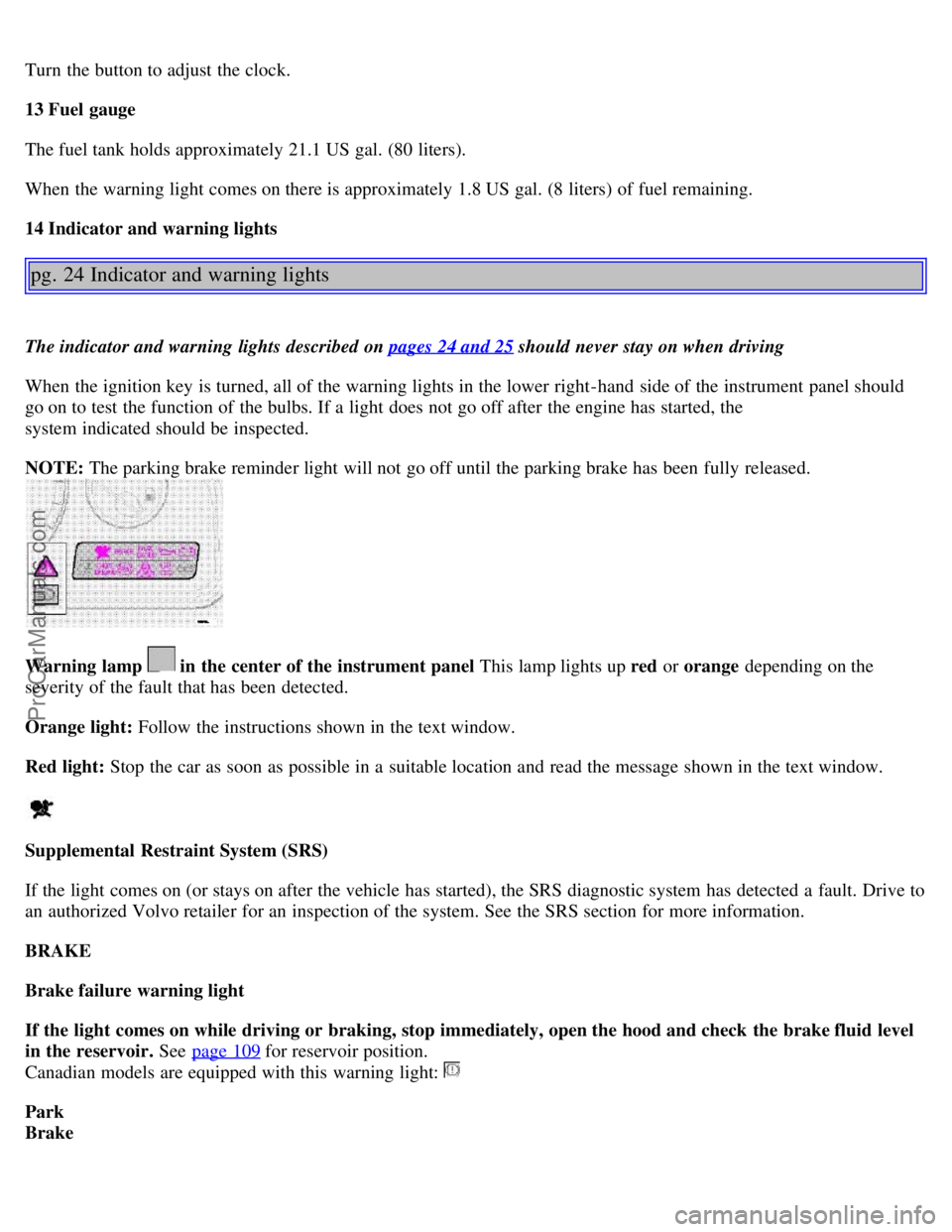
When the ignition key is turned, all of the warning lights in the lower right-hand side of the instrument panel should
go on to test the function of the bulbs. If a light does not go off after the engine has started, the
system indicated should be inspected.
NOTE: The parking brake reminder light will not go off until the parking brake has been fully released.
Warning lamp in the center of the instrument panel This lamp lights up red or orange depending on the
severity of the fault that has been detected.
Orange light: Follow the instructions shown in the text window.
Red light: Stop the car as soon as possible in a suitable location and read the message shown in the text window.
Supplemental Restraint System (SRS)
If the light comes on (or stays on after the vehicle has started), the SRS diagnostic system has detected a fault. Drive to
an authorized Volvo retailer for an inspection of the system. See the SRS section for more information.
BRAKE
Brake failure warning light
If the light comes on while driving or braking, stop immediately, open the hood and check the brake fluid level
in the reservoir. See page 109
for reservoir position.
Canadian models are equipped with this warning light:
Park
Brake
ProCarManuals.com
Page 21 of 96
Parking brake reminder light
This light will be on when the parking brake (hand brake) is applied. The parking brake lever is situated between the
front seats.
Canadian models are equipped with this warning light:
Oil pressure warning light
If the light comes on while driving, stop the car and then stop the engine immediately and check the engine oil
level . See page 111
. If the light stays on after restart, have the car towed to the nearest authorized Volvo retailer. After
hard driving, the light may come on occasionally when the engine is idling. This is normal, provided it goes off when
the engine speed is increased.
Generator warning light
If the light comes on while the engine is running, have the charging system checked.
pg. 25 Indicator and warning lights
Rear fog light
This light indicates that the rear fog light is on.
CHECK
ENGINE
Malfunction indicator lamp
If the light comes on (or stays on after the vehicle has started), the engine diagnostic system has detected a possible
fault in the emission control system. Although driveability may not be affected, see an authorized Volvo retailer as
soon as possible for inspection.
NOTE : If the fuel filler cap is not closed tightly or if the engine is running when the car is refueled, the Malfunction
Indicator Lamp may indicate a fault. However, your vehicle's performance will not be affected. Use only Volvo
original or approved fuel filler caps.
Anti-lock Brake System ABS
If the warning light comes on, there is a malfunction of the ABS system (the standard braking system pwill however
function). The vehicle should be driven to a Volvo retailer for inspection. See page 17 for additional information.
Stability Traction Control (STC) system (option)
An LED in the STC switch in the center console will light up to indicate that the system is activated. See page 18 for
further information.
ProCarManuals.com
Page 29 of 96
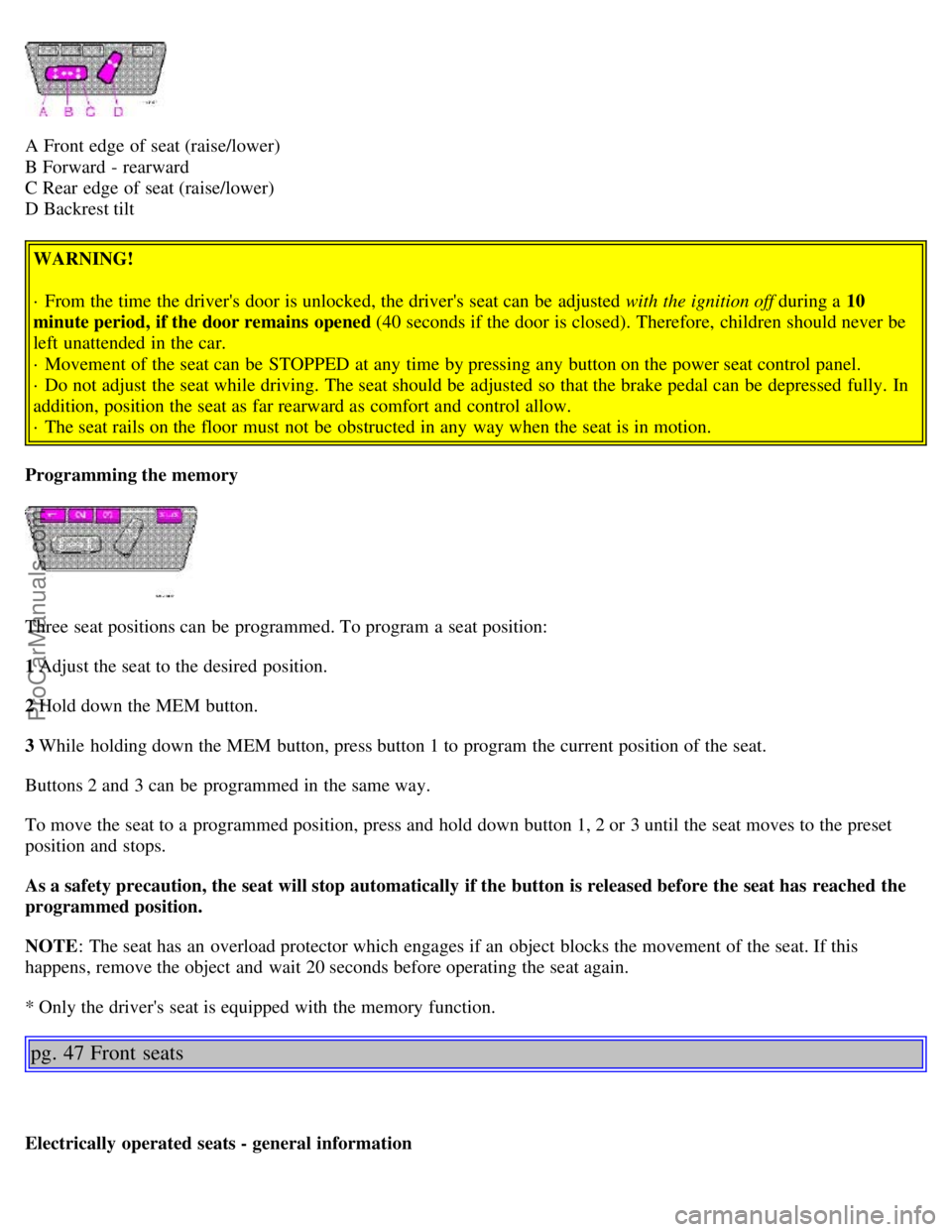
A Front edge of seat (raise/lower)
B Forward - rearward
C Rear edge of seat (raise/lower)
D Backrest tilt WARNING!
· From the time the driver's door is unlocked, the driver's seat can be adjusted with the ignition off during a 10
minute period, if the door remains opened (40 seconds if the door is closed). Therefore, children should never be
left unattended in the car.
· Movement of the seat can be STOPPED at any time by pressing any button on the power seat control panel.
· Do not adjust the seat while driving. The seat should be adjusted so that the brake pedal can be depressed fully. In
addition, position the seat as far rearward as comfort and control allow.
· The seat rails on the floor must not be obstructed in any way when the seat is in motion.
Programming the memory
Three seat positions can be programmed. To program a seat position:
1 Adjust the seat to the desired position.
2 Hold down the MEM button.
3 While holding down the MEM button, press button 1 to program the current position of the seat.
Buttons 2 and 3 can be programmed in the same way.
To move the seat to a programmed position, press and hold down button 1, 2 or 3 until the seat moves to the preset
position and stops.
As a safety precaution, the seat will stop automatically if the button is released before the seat has reached the
programmed position.
NOTE : The seat has an overload protector which engages if an object blocks the movement of the seat. If this
happens, remove the object and wait 20 seconds before operating the seat again.
* Only the driver's seat is equipped with the memory function.
pg. 47 Front seats
Electrically operated seats - general information
ProCarManuals.com
Page 30 of 96
Adjusting the front seats:
Passengers's seat: The passenger's seat can only be adjusted if the ignition key is in position I or II (see page 46).
Driver's seat: The driver's seat can be adjusted if the ignition key is in position I or II (see page 46). However, it can
also be adjusted:
· Within 40 seconds after the ignition has been switched off (even if the key has been removed from the ignition
switch).
· Within 40 seconds after the driver's door has been unlocked with the key or remote control and opened. The key
does not have to be in the ignition switch during this period.
Remote control (central locking system)
If you lock the car and later unlock it with the same remote control and open the driver's door, the driver's seat will
automatically move to the position it was in when you left the car. See page 56 for more information on this function.
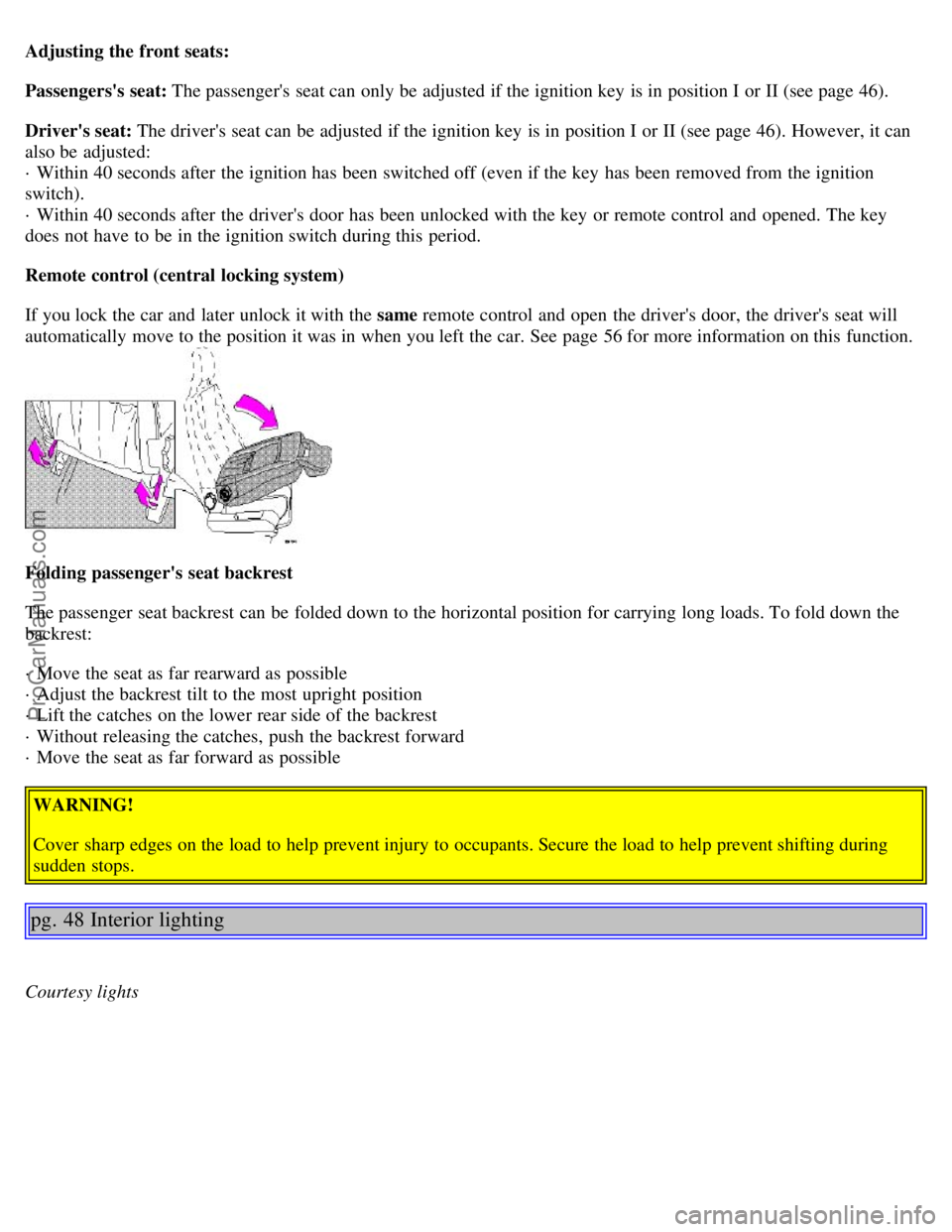
Folding passenger's seat backrest
The passenger seat backrest can be folded down to the horizontal position for carrying long loads. To fold down the
backrest:
· Move the seat as far rearward as possible
· Adjust the backrest tilt to the most upright position
· Lift the catches on the lower rear side of the backrest
· Without releasing the catches, push the backrest forward
· Move the seat as far forward as possible
WARNING!
Cover sharp edges on the load to help prevent injury to occupants. Secure the load to help prevent shifting during
sudden stops.
pg. 48 Interior lighting
Courtesy lights
ProCarManuals.com
Page 32 of 96
WARNING!
Packages on the rear window shelf can obscure vision and may become dangerous projectiles in the event of a
sudden stop or an accident.
Anchor any heavy objects to help prevent them from moving during sudden stops.
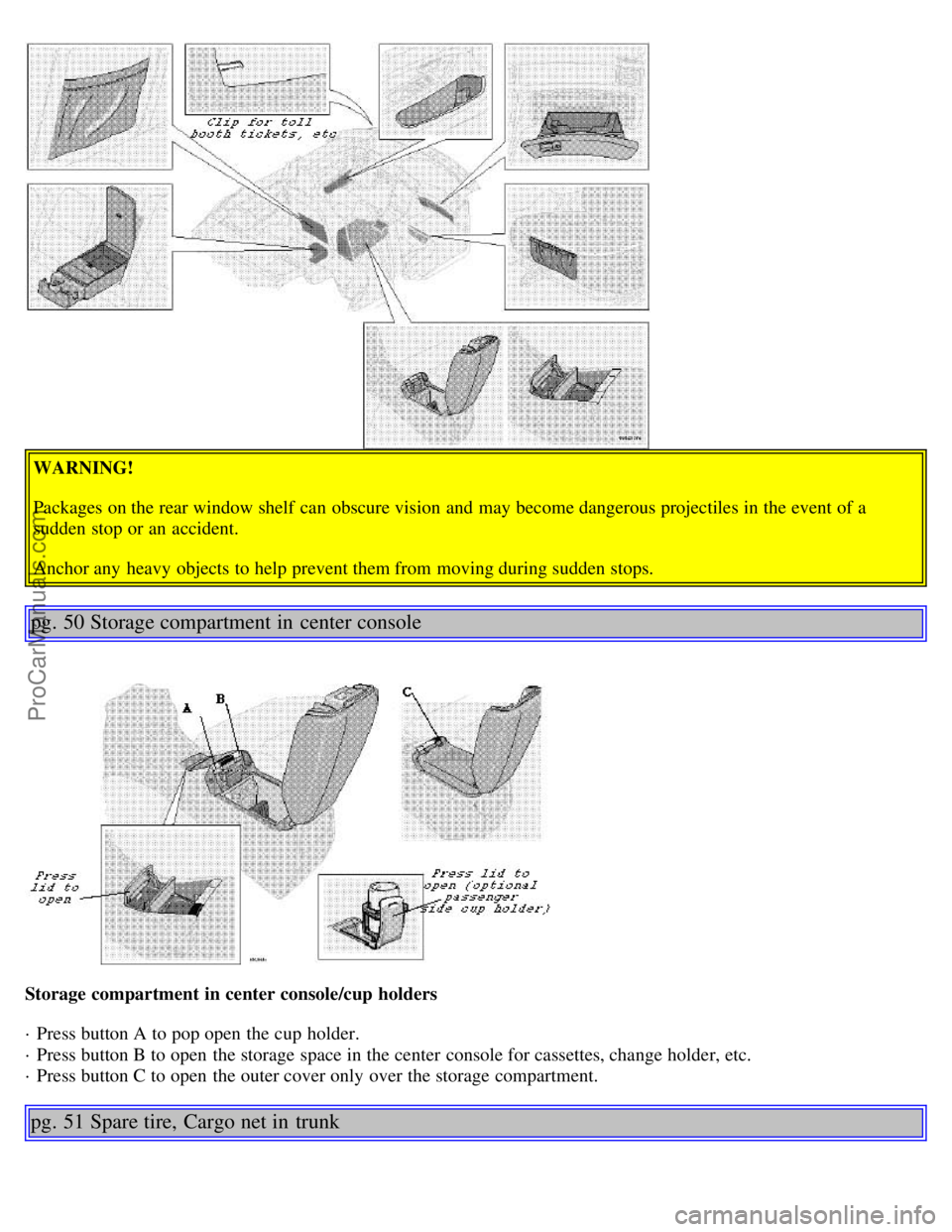
pg. 50 Storage compartment in center console
Storage compartment in center console/cup holders
· Press button A to pop open the cup holder.
· Press button B to open the storage space in the center console for cassettes, change holder, etc.
· Press button C to open the outer cover only over the storage compartment.
pg. 51 Spare tire, Cargo net in trunk
ProCarManuals.com
Page 33 of 96
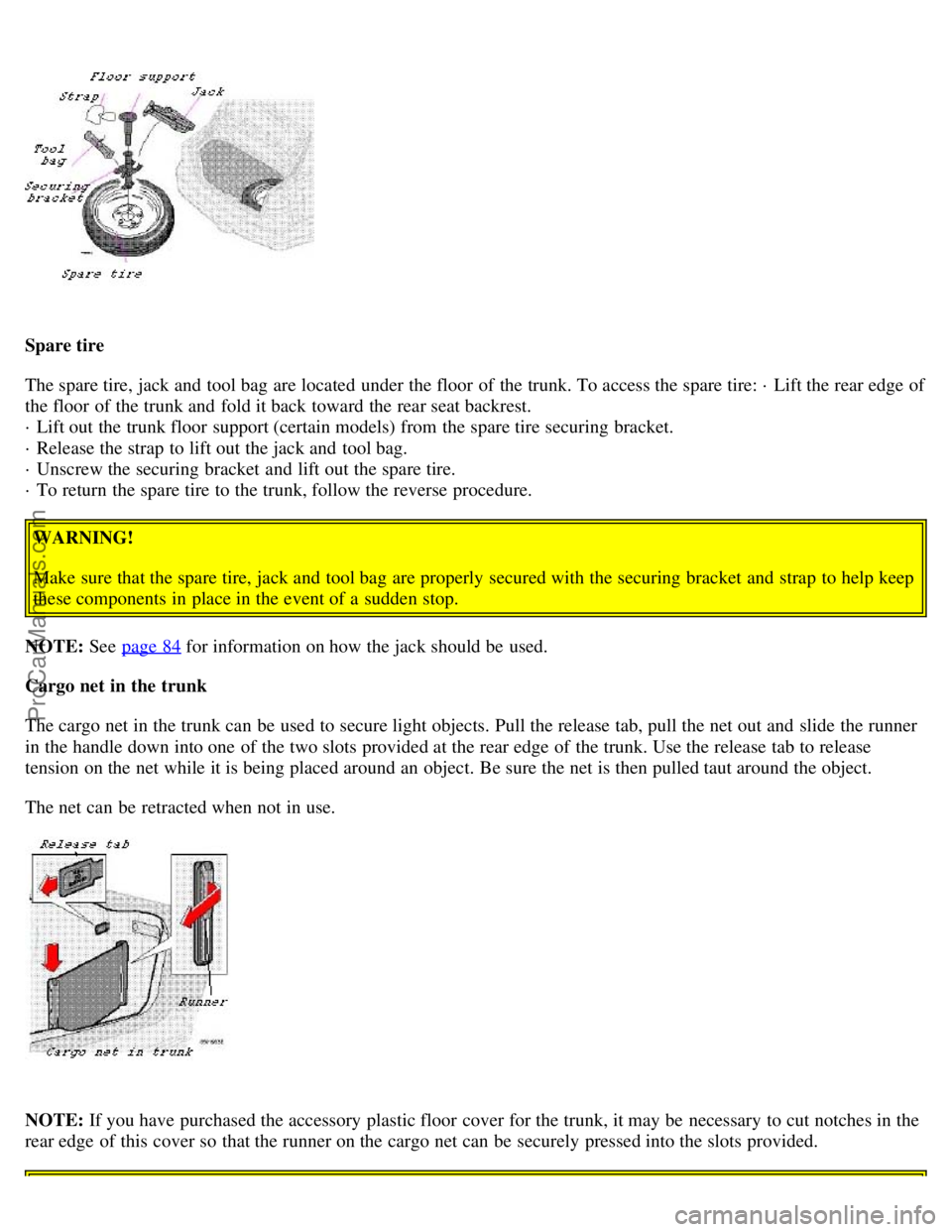
Spare tire
The spare tire, jack and tool bag are located under the floor of the trunk. To access the spare tire: · Lift the rear edge of
the floor of the trunk and fold it back toward the rear seat backrest.
· Lift out the trunk floor support (certain models) from the spare tire securing bracket.
· Release the strap to lift out the jack and tool bag.
· Unscrew the securing bracket and lift out the spare tire.
· To return the spare tire to the trunk, follow the reverse procedure.WARNING!
Make sure that the spare tire, jack and tool bag are properly secured with the securing bracket and strap to help keep
these components in place in the event of a sudden stop.
NOTE: See page 84
for information on how the jack should be used.
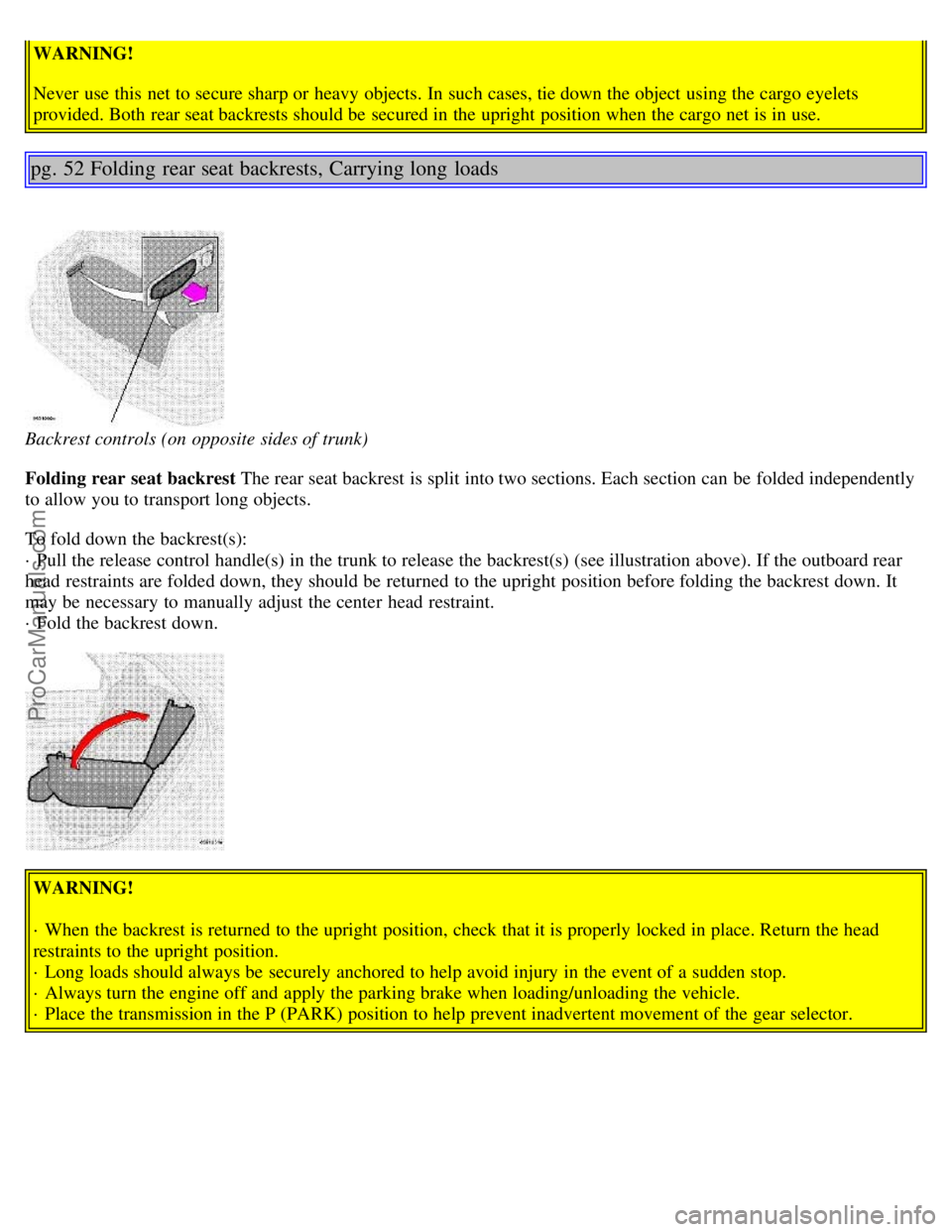
Cargo net in the trunk
The cargo net in the trunk can be used to secure light objects. Pull the release tab, pull the net out and slide the runner
in the handle down into one of the two slots provided at the rear edge of the trunk. Use the release tab to release
tension on the net while it is being placed around an object. Be sure the net is then pulled taut around the object.
The net can be retracted when not in use.
NOTE: If you have purchased the accessory plastic floor cover for the trunk, it may be necessary to cut notches in the
rear edge of this cover so that the runner on the cargo net can be securely pressed into the slots provided.
ProCarManuals.com
Page 34 of 96
WARNING!
Never use this net to secure sharp or heavy objects. In such cases, tie down the object using the cargo eyelets
provided. Both rear seat backrests should be secured in the upright position when the cargo net is in use.
pg. 52 Folding rear seat backrests, Carrying long loads
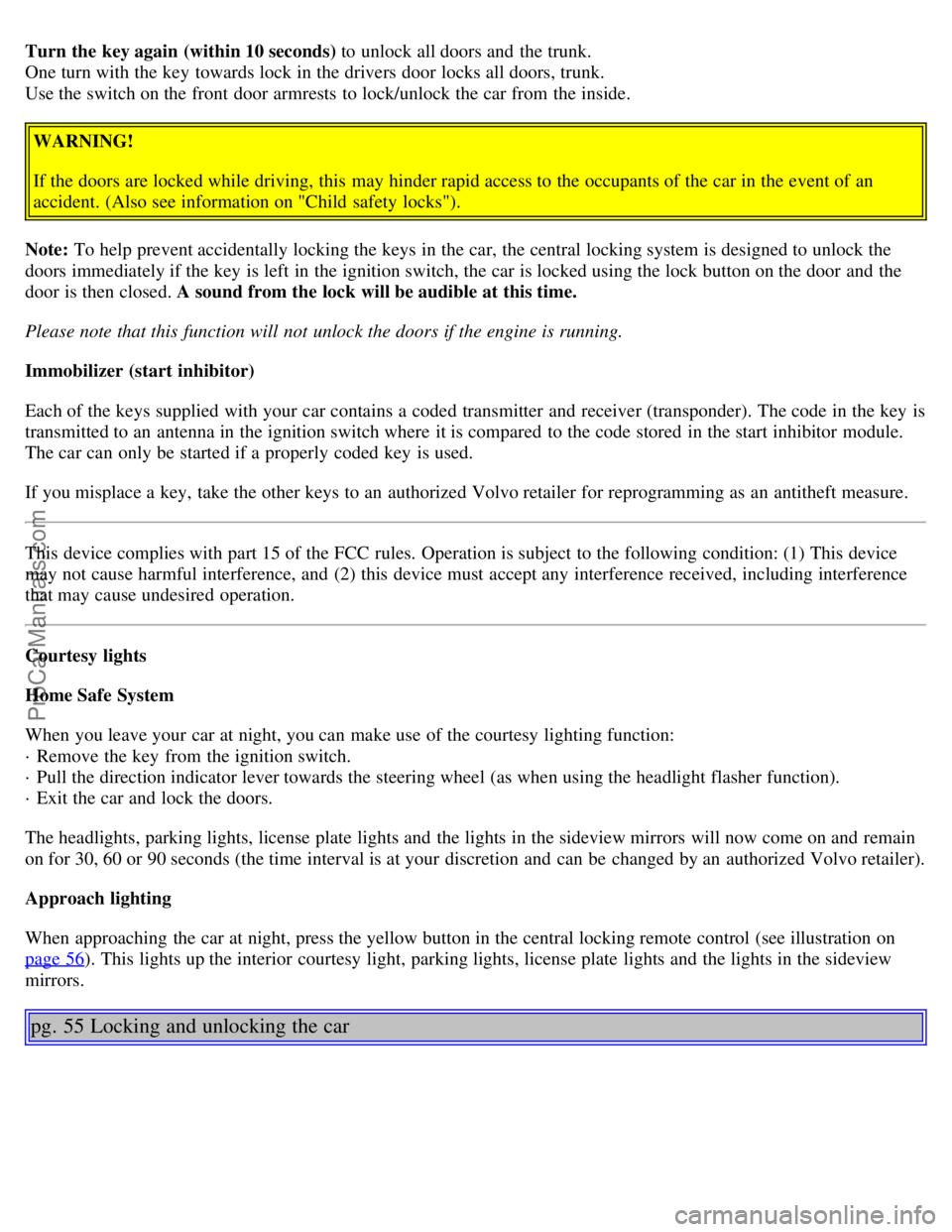
Backrest controls (on opposite sides of trunk)
Folding rear seat backrest The rear seat backrest is split into two sections. Each section can be folded independently
to allow you to transport long objects.
To fold down the backrest(s):
· Pull the release control handle(s) in the trunk to release the backrest(s) (see illustration above). If the outboard rear
head restraints are folded down, they should be returned to the upright position before folding the backrest down. It
may be necessary to manually adjust the center head restraint.
· Fold the backrest down.
WARNING!
· When the backrest is returned to the upright position, check that it is properly locked in place. Return the head
restraints to the upright position.
· Long loads should always be securely anchored to help avoid injury in the event of a sudden stop.
· Always turn the engine off and apply the parking brake when loading/unloading the vehicle.
· Place the transmission in the P (PARK) position to help prevent inadvertent movement of the gear selector.
ProCarManuals.com
Page 37 of 96
Turn the key again (within 10 seconds) to unlock all doors and the trunk.
One turn with the key towards lock in the drivers door locks all doors, trunk.
Use the switch on the front door armrests to lock/unlock the car from the inside.
WARNING!
If the doors are locked while driving, this may hinder rapid access to the occupants of the car in the event of an
accident. (Also see information on "Child safety locks").
Note: To help prevent accidentally locking the keys in the car, the central locking system is designed to unlock the
doors immediately if the key is left in the ignition switch, the car is locked using the lock button on the door and the
door is then closed. A sound from the lock will be audible at this time.
Please note that this function will not unlock the doors if the engine is running.
Immobilizer (start inhibitor)
Each of the keys supplied with your car contains a coded transmitter and receiver (transponder). The code in the key is
transmitted to an antenna in the ignition switch where it is compared to the code stored in the start inhibitor module.
The car can only be started if a properly coded key is used.
If you misplace a key, take the other keys to an authorized Volvo retailer for reprogramming as an antitheft measure.
This device complies with part 15 of the FCC rules. Operation is subject to the following condition: (1) This device
may not cause harmful interference, and (2) this device must accept any interference received, including interference
that may cause undesired operation.
Courtesy lights
Home Safe System
When you leave your car at night, you can make use of the courtesy lighting function:
· Remove the key from the ignition switch.
· Pull the direction indicator lever towards the steering wheel (as when using the headlight flasher function).
· Exit the car and lock the doors.
The headlights, parking lights, license plate lights and the lights in the sideview mirrors will now come on and remain
on for 30, 60 or 90 seconds (the time interval is at your discretion and can be changed by an authorized Volvo retailer).
Approach lighting
When approaching the car at night, press the yellow button in the central locking remote control (see illustration on
page 56
). This lights up the interior courtesy light, parking lights, license plate lights and the lights in the sideview
mirrors.
pg. 55 Locking and unlocking the car
ProCarManuals.com
Page 40 of 96
Using the remote control
· Press the LOCK button once to lock all doors and trunk.
· Press the UNLOCK button once to unlock the driver's door only. Press this button again (within 10 seconds) to
unlock all doors, trunk.
· To pop open the trunk (without unlocking the other doors), press the OPEN trunk button twice within 3 seconds.
* See page 58
for more information on this function.
Remote keyless entry system and driver's seat
The remote control transmitter also controls the electrically operated driver's seat in the following way:
· Adjust the seat to your preferences.
· When you leave your car, lock it using the remote control.
· The next time you unlock the driver's door with the same remote control (the one you used to lock the doors with)
and open the driver's door , the driver's seat will automatically move to the position in which you left it.
The seat will move to this position even if someone else has adjusted the seat since you last drove the car.
NOTE:
· This feature will work in the same way with all of the remote control transmitters (up to 3) that you use with your
car.
· This feature will not function if you lock your car with the key.
This device complies with FCC rules Part 15. Operation is subject to the following two conditions: (1) This device
may not cause harmful interference and (2) this device must accept any interference that may be received, including
interference that may cause undesired operation.
pg. 57 Remote keyless entry system
WARNING!
Volvo does not recommend using the transmitter to lock the doors from inside the car. On cars equipped with an
alarm, the alarm would be activated and would sound when one of the doors is opened. The doors must not be
locked using the remote transmitter while the vehicle is occupied. In case of an accident, this may hinder rapid
access to the occupants of the vehicle. The alarm will also sound on models equipped with this feature.
NOTE :
· If the doors are unlocked, the locks will automatically reengage (re-lock) and the alarm will reset after 2 minutes
unless a door has been opened.
· Airbag deployment will automatically unlock the doors.
· The lock/unlock and alarm features can also be utilized by using the keys. See page 54
.
· To avoid leaving your keys in the car, make a habit of always locking the car with the remote control.
ProCarManuals.com