light VOLVO S80 2001 Service Manual
[x] Cancel search | Manufacturer: VOLVO, Model Year: 2001, Model line: S80, Model: VOLVO S80 2001Pages: 106, PDF Size: 2.54 MB
Page 75 of 106
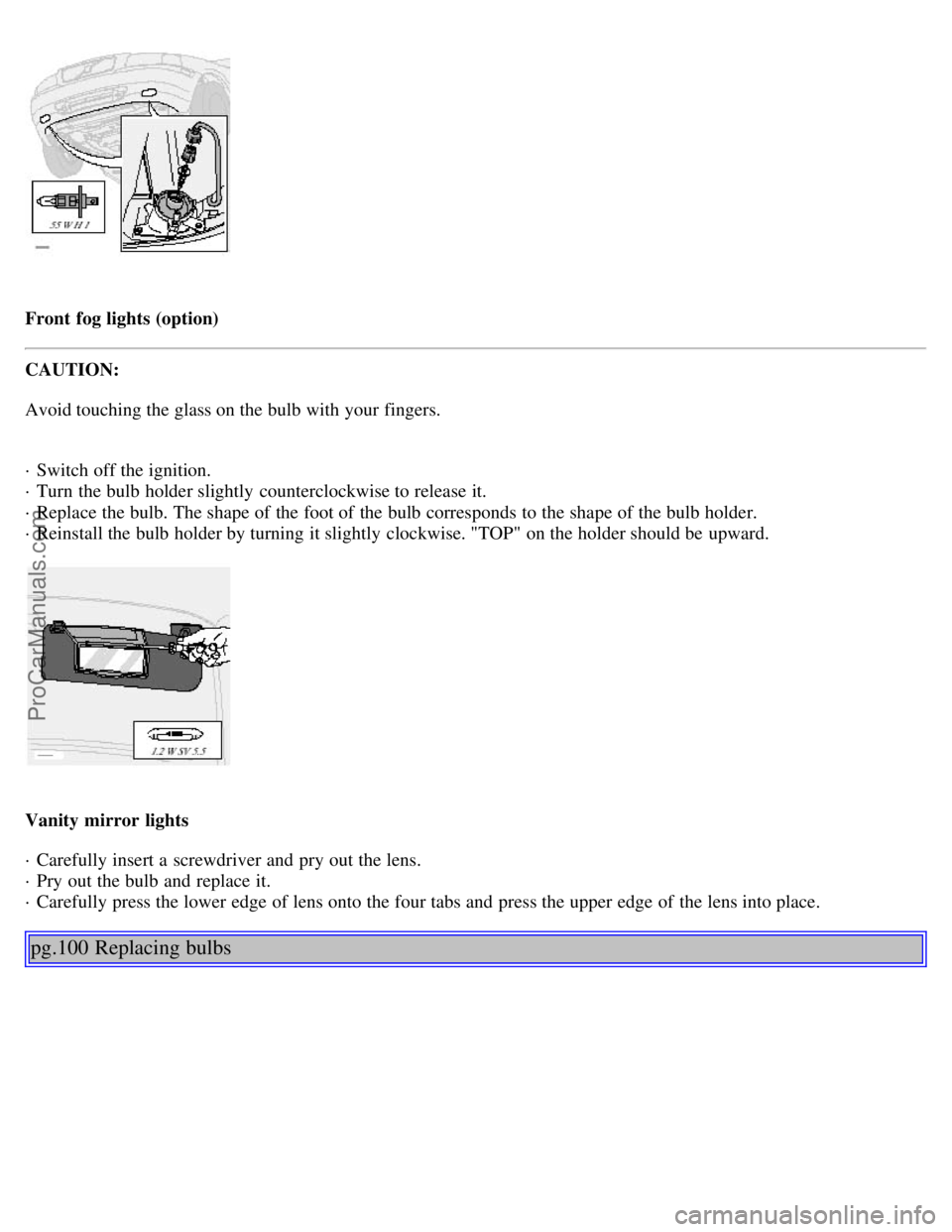
Front fog lights (option)
CAUTION:
Avoid touching the glass on the bulb with your fingers.
· Switch off the ignition.
· Turn the bulb holder slightly counterclockwise to release it.
· Replace the bulb. The shape of the foot of the bulb corresponds to the shape of the bulb holder.
· Reinstall the bulb holder by turning it slightly clockwise. "TOP" on the holder should be upward.
Vanity mirror lights
· Carefully insert a screwdriver and pry out the lens.
· Pry out the bulb and replace it.
· Carefully press the lower edge of lens onto the four tabs and press the upper edge of the lens into place.
pg.100 Replacing bulbs
ProCarManuals.com
Page 76 of 106
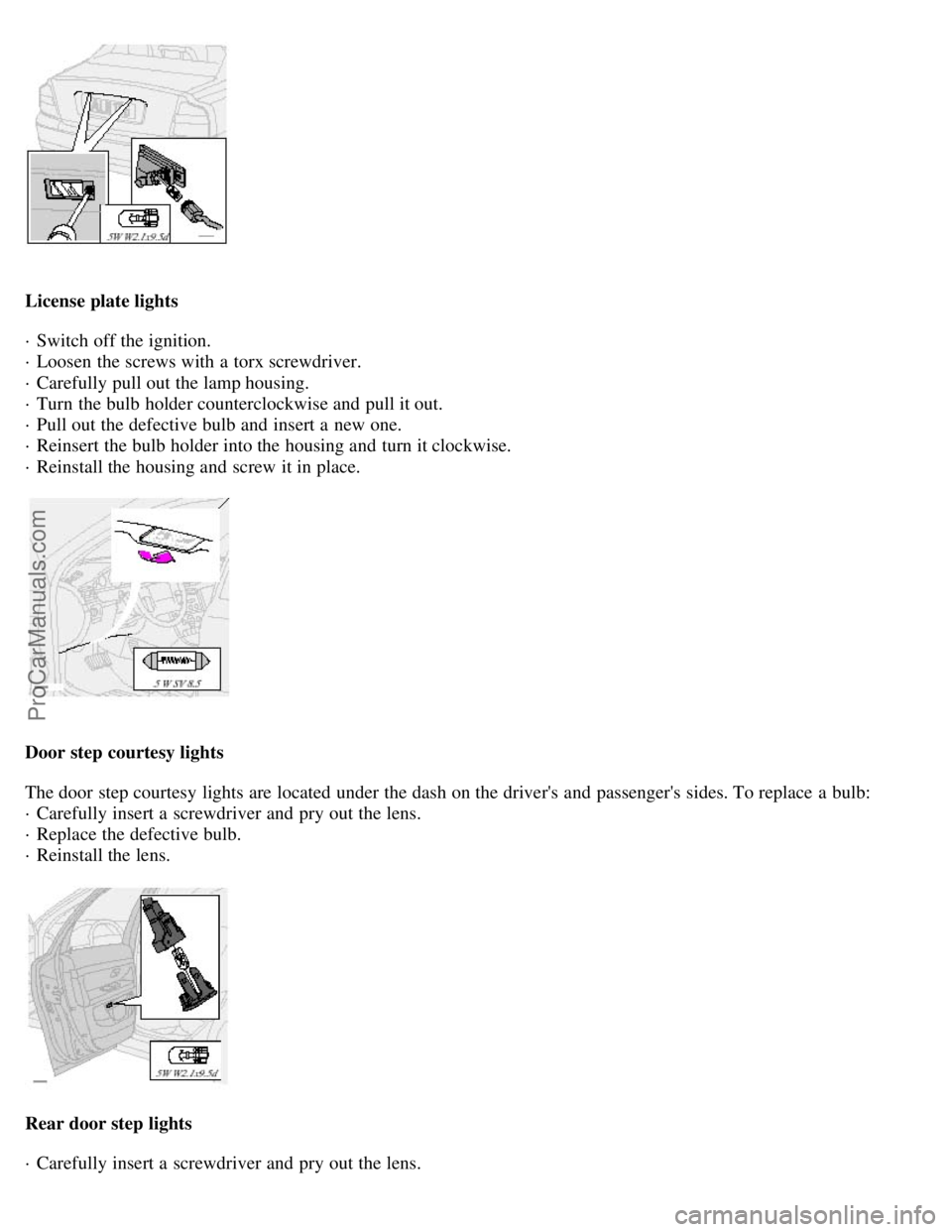
License plate lights
· Switch off the ignition.
· Loosen the screws with a torx screwdriver.
· Carefully pull out the lamp housing.
· Turn the bulb holder counterclockwise and pull it out.
· Pull out the defective bulb and insert a new one.
· Reinsert the bulb holder into the housing and turn it clockwise.
· Reinstall the housing and screw it in place.
Door step courtesy lights
The door step courtesy lights are located under the dash on the driver's and passenger's sides. To replace a bulb:
· Carefully insert a screwdriver and pry out the lens.
· Replace the defective bulb.
· Reinstall the lens.
Rear door step lights
· Carefully insert a screwdriver and pry out the lens.
ProCarManuals.com
Page 84 of 106
Voltagecontrolled generator. Singlewire system with chassis and engine used as conductors. Grounded on chassis.
Battery
Voltage: 12 Volt, capacity: 600 A/115 min.
The battery contains corrosive and poisonous acids. It is of the utmost importance that old batteries are disposed of
correctly. Your Volvo retailer can assist you in this matter.
Generator
Rated output: max. current: 120 A
Starter motor:
Output: 1.7 kW
BulbsBulb US no.Power Socket
Headlights
ProCarManuals.com
Page 86 of 106

2 0 0 1
VOLVO S80
Chapter 10 - Audio systems
pg.129 Audio systems
HU-611 overview130
HU-801 overview131
Functions132
Specifications144
General information145
HomeLink¨ Unversal Transceiver (option)146
NOTE: The text on the face of the radio, describing the button functions, may vary slightly depending on which audio
system you have in your car.
pg.130 Audio system HU-611 - overview
1. On/off - press
Volume - turn
2. Selector knob for:
Stored radio frequencies
CD changer - selecting disc
3. Selector knob:
Radio
Cassette
ProCarManuals.com
Page 94 of 106
2 0 0 1
VOLVO S80
HomeLink® Universal Transceiver (option)
pg.146 HomeLink® Universal Transceiver (option)
HomeLink® Universal Transceiver
HomeLink® is an advanced system that can be programmed to learn the codes of three different remote controlled-
devices (e.g., garage door openers, remote lighting, entry door lock). HomeLink®'s sun visor-mounted transceiver,
powered by your car's electrical system, may then be used in place of your hand -held remote controls..
NOTE: As a security precaution, the HomeLink® Universal Transceiver is designed to not function if the car has
been locked from the outside .
Programming the transceiver
1. The ignition switch must be turned to the "accessory" position (II) before programming the HomeLink® Universal
Transceiver.
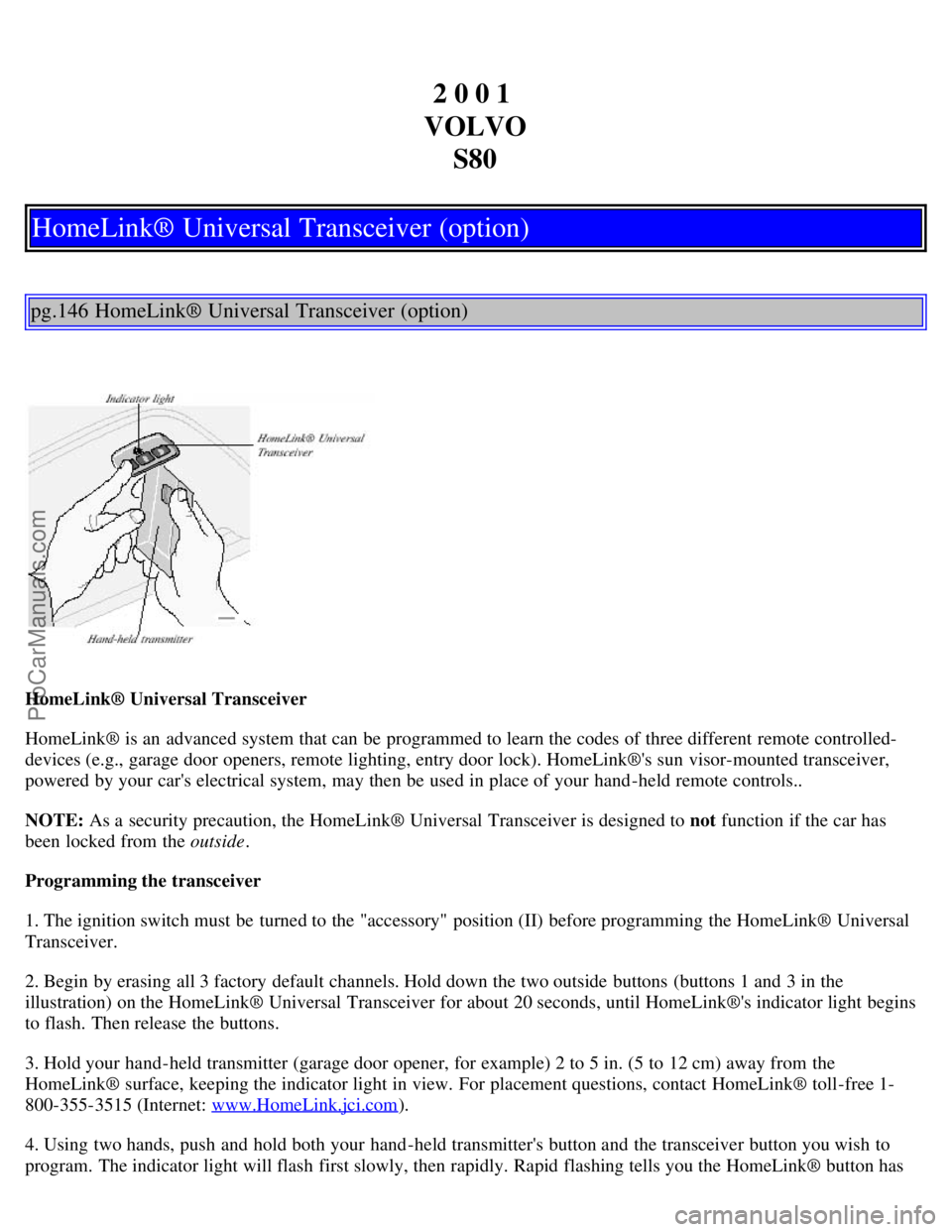
2. Begin by erasing all 3 factory default channels. Hold down the two outside buttons (buttons 1 and 3 in the
illustration) on the HomeLink® Universal Transceiver for about 20 seconds, until HomeLink®'s indicator light begins
to flash. Then release the buttons.
3. Hold your hand -held transmitter (garage door opener, for example) 2 to 5 in. (5 to 12 cm) away from the
HomeLink® surface, keeping the indicator light in view. For placement questions, contact HomeLink® toll-free 1-
800-355-3515 (Internet: www.HomeLink.jci.com
).
4. Using two hands, push and hold both your hand -held transmitter's button and the transceiver button you wish to
program. The indicator light will flash first slowly, then rapidly. Rapid flashing tells you the HomeLink® button has
ProCarManuals.com
Page 95 of 106
been successfully programmed. Release both buttons.
5. If you are programming a rolling code-equipped device (e.g., garage door opener or entry door lock), refer to
"Programming rolling codes" on the next page to complete the programming process. Repeat steps 3 and 4 to program
the other two transceiver buttons. If, after several attempts, you are unable to successfully train the HomeLink®
Universal Transceiver to learn your hand -held transmitter's signal, contact HomeLink® toll-free 1-800-355-3515
(Internet: www.HomeLink.jci.com
).
pg.147 HomeLink® Universal Transceiver (option)
WARNING!
· If you use HomeLink® to open a garage door or gate, be sure no one is near the gate or door while it is in motion.
· Do not use the HomeLink® Universal Transceiver with any garage door opener that lacks safety "stop" and
"reverse" features as required by federal safety standards. (This includes any garage door opener model
manufactured before April 1, 1982) A garage door opener that cannot "detect" an object, signalling the door to
"stop" and "reverse" does not meet current federal safety standards. Using a garage door opener without these
features increases the risk of serious injury or death. For more information on this matter, call toll-free 1-800-355-
3515 (Internet: www.HomeLink.jci.com
).
NOTE - Canadian residents:
During programming, your hand -held transmitter may automatically stop transmitting. To successfully train
HomeLink®, continue to hold the HomeLink® button. At the same time, repeatedly press and hold your hand -held
transmitter's button at two-second intervals until HomeLink® has learned your transmitter's code. The HomeLink®
indicator light will flash first slowly, and then rapidly to indicate that the button has been successfully programmed..
Programming rolling codes
Determine, in one of the following ways, if your garage door uses a rolling code system and is manufactured after
1996:
· Refer to the garage door opener owner's manual for verification.
· If your hand -held transmitter appears to program the HomeLink® Universal Transceiver but the programmed button
does not activate the garage door, your garage door opener may have a rolling code.
· Press the programmed HomeLink® button. If the garage door opener has the rolling code feature, the HomeLink®
indicator light flashes rapidly and then glows steadily after approximately 2 seconds.
To train a garage door opener with the rolling code feature , follow these instructions after the transceiver has been
programmed (the aid of a second person may make the training quicker and easier):
1. Locate the training button on the garage door opener motor head unit . The exact location and color of the button
may vary. If you encounter difficulty, refer to the garage door opener owner's manual or call: 1-800-355-3515
(Internet: www.HomeLink.jci.com
).
2. Press the "training" button on the garage door opener motor head unit until the "training" light comes on.
3. Firmly press and release the programmed HomeLink® button. Press and release the HomeLink® button a second
time to complete the training process.
ProCarManuals.com
Page 96 of 106
Some garage door openers may require you to do this procedure a third time to complete the training.
The programmed button on your HomeLink® Universal Transceiver
should now operate your garage door opener. The original hand -held transmitter can also be used, if necessary, to
operate the garage door.
The remaining two HomeLink® buttons can be programmed in the same way. In the event of any problems in
programming the HomeLink® Universal Transceiver, call toll-free 1-800-355-3515 (Internet:
www.HomeLink.jci.com
).
Operating the HomeLink® Universal Transceiver
Once programmed, the HomeLink® Universal Transceiver can be used in place of hand -held transmitters.
To operate, the key must be turned to the "accessory" position (II) or the engine must be running. Press the
programmed HomeLink® button to activate the garage door, driveway gate, security lighting, home security system,
etc.
Your original hand -held transmitters may, of course, be used at any time.
pg.148 HomeLink® Universal Transceiver (option)
Erasing programmed buttons
Individual buttons cannot be erased. To erase all three programmed buttons:
1. Turn the ignition key to the "accessory" position (II).
2. Hold down the two outside buttons on the HomeLink® Universal Transceiver for about 20 seconds, until
HomeLink®'s indicator light begins to flash.
3. Release both buttons.
The HomeLink® buttons can be reprogrammed using the procedures described on the previous pages.
Reprogramming a single HomeLink® button
1. Press and hold the desired HomeLink® button. Do not release the button until step 3 has been completed.
2. When the indicator light begins to flash slowly (after approximately 20 seconds), position the hand -held transmitter
2 to 5 in. (5 to 12 cm) away from the HomeLink® surface.
3. Press and hold the hand -held transmitter button. The HomeLink® indicator light will flash first slowly, then rapidly.
When the indicator light flashes rapidly, release both buttons.
The previously programmed device has now been erased and the new device can be activated by pressing the
HomeLink® button that has just been programmed. This procedure will not affect any other programmed HomeLink®
buttons.
NOTE:
· Retain the original transmitter(s) for future programming procedures (i.e., if you purchase a new car).
ProCarManuals.com
Page 98 of 106
2 0 0 1
VOLVO S80
Index
pg.162 Index
A
ABS..........17
ABS - warning light..........25
Accessory lights..........27
Adjusting the steering wheel..........32
Advanced User Mode (AUM) - radio..........137
Air conditioning..........41, 42, 43, 45
Air pump system..........110
Air vents..........40
Airbag (SIPS)..........8
Airbag (SRS)..........4
Alarm..........60, 61
Alarm - "panic" function..........60
ALR/ELR..........14
Anti-lock Brake System (ABS)..........17
Anti-lock Brake System - warning light..........25
Antifreeze..........80, 110
Approach lighting..........56
Ashtrays..........34
Audio systems..........129
..cassette deck..........141
..CD player..........139
..HU -611 - overview..........130
..HU -801 - overview..........131
..radio..........134
..specifications..........144
AUM (Advanced User Mode) - radio..........137
Automatic car washing..........105
Automatic locking..........58
Automatic Locking Retractor (ALR)..........14
Automatic transmission
ProCarManuals.com
Page 99 of 106
..Geartronic..........69, 70
..Kickdown..........69
..Specifications..........124
Auxiliary socket..........27, 34
B
Backrests, rear seat - folding..........54
Battery..........80, 127
Battery maintenance..........117, 118
Replacing the battery..........118
Ventilation hose..........118
Blinds - rear/side rear windows..........38
Booster cushion..........13, 15
Booster cushion - integrated..........13
Brake failure warning light ..........24
Brake fluid..........116, 125
Brake system..........16
Break-in period..........64
Bulbs (list)..........127
Bulbs - replacing..........96-102
C
Capacities (oils and fluids)..........121
, 125
Cargo net in trunk..........53
Catalytic converters - three-way..........82
Center console - switches..........27
Center head restraint - rear seat..........3
Central locking buttons..........59
Chains - winter driving..........85
Changing wheels..........88, 89
Child booster cushion ......... 13, 15
Child restraint anchorages ........ 12
Child safety..........12, 13, 14, 15
Child safety locks - rear doors..........62
Climate controls..........41, 42, 43, 45
Climate system - general information..........44
Clock..........23
Coat hanger..........49
Cold weather driving..........80
Combination filter..........41, 45
Coolant..........110, 125
Cooling system..........71, 125
Courtesy light..........50
Courtesy lights (front) - replacing..........102
Courtesy lights - exterior..........56
Cruise control..........29
ProCarManuals.com
Page 100 of 106
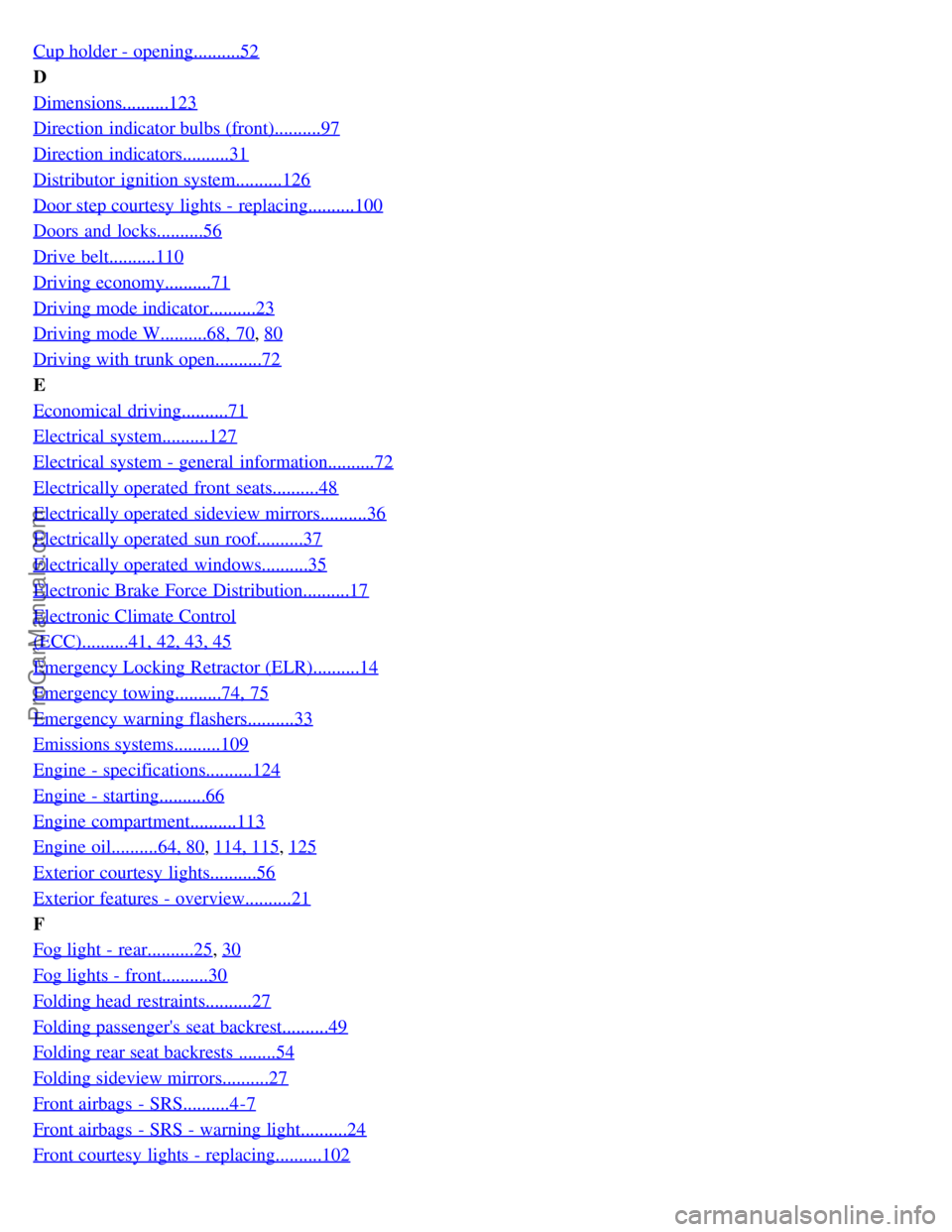
Cup holder - opening..........52
D
Dimensions..........123
Direction indicator bulbs (front)..........97
Direction indicators..........31
Distributor ignition system..........126
Door step courtesy lights - replacing..........100
Doors and locks..........56
Drive belt..........110
Driving economy..........71
Driving mode indicator..........23
Driving mode W..........68, 70, 80
Driving with trunk open..........72
E
Economical driving..........71
Electrical system..........127
Electrical system - general information..........72
Electrically operated front seats..........48
Electrically operated sideview mirrors..........36
Electrically operated sun roof..........37
Electrically operated windows..........35
Electronic Brake Force Distribution..........17
Electronic Climate Control
(ECC)..........41, 42, 43, 45
Emergency Locking Retractor (ELR)..........14
Emergency towing..........74, 75
Emergency warning flashers..........33
Emissions systems..........109
Engine - specifications..........124
Engine - starting..........66
Engine compartment..........113
Engine oil..........64, 80, 114, 115, 125
Exterior courtesy lights..........56
Exterior features - overview..........21
F
Fog light - rear..........25
, 30
Fog lights - front..........30
Folding head restraints..........27
Folding passenger's seat backrest..........49
Folding rear seat backrests ........54
Folding sideview mirrors..........27
Front airbags - SRS..........4-7
Front airbags - SRS - warning light..........24
Front courtesy lights - replacing..........102
ProCarManuals.com