ECU VOLVO S80 2002 Owners Manual
[x] Cancel search | Manufacturer: VOLVO, Model Year: 2002, Model line: S80, Model: VOLVO S80 2002Pages: 111, PDF Size: 2.74 MB
Page 6 of 111
Seat belts
Always fasten the seat belts before you drive or ride. A chime will sound several times if the driver has not
fastened his seat belt.
To buckle:
Pull the belt out far enough to insert the latch plate into the receptacle until a distinct click is heard. The seat belt
retractor is normally "unlocked" and you can move freely, provided that the shoulder belt is not pulled out too far. The
retractor will lock up as follows:
· if the belt is pulled out rapidly
· during braking and acceleration
· if the vehicle is leaning excessively
· when driving in turns
For the seat belt to provide maximum protection in the event of an accident, it must be worn correctly. When wearing
the seat belt remember:
· The belt should not be twisted or turned.
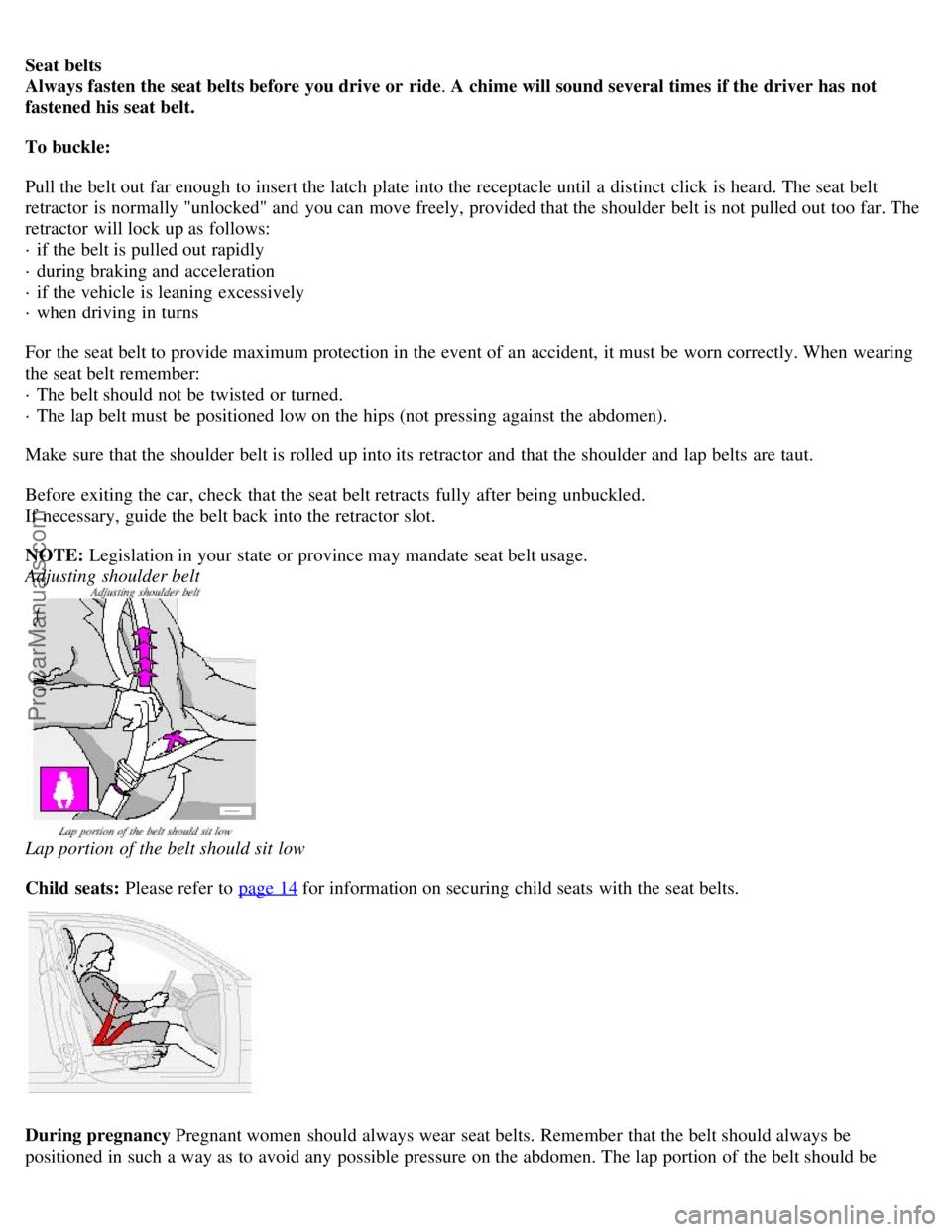
· The lap belt must be positioned low on the hips (not pressing against the abdomen).
Make sure that the shoulder belt is rolled up into its retractor and that the shoulder and lap belts are taut.
Before exiting the car, check that the seat belt retracts fully after being unbuckled.
If necessary, guide the belt back into the retractor slot.
NOTE: Legislation in your state or province may mandate seat belt usage.
Adjusting shoulder belt
Lap portion of the belt should sit low
Child seats: Please refer to page 14
for information on securing child seats with the seat belts.
During pregnancy Pregnant women should always wear seat belts. Remember that the belt should always be
positioned in such a way as to avoid any possible pressure on the abdomen. The lap portion of the belt should be
ProCarManuals.com
Page 32 of 111
Electrically operated seats - general information
Adjusting the front seats:
Passengers's seat: The passenger's seat can only be adjusted if the ignition key is in position I or II (see page 48
).
Driver's seat: The driver's seat can be adjusted if the ignition key is in position I or II (see page 48
). However, it can
also be adjusted:
· Within 40 seconds after the ignition has been switched off (even if the key has been removed from the ignition
switch).
· Within 40 seconds after the driver's door has been unlocked with the key or remote control and opened. The key
does not have to be in the ignition switch during this period.
Remote keyless entry system and driver's seat
The remote control transmitter also controls the electrically operated driver's seat in the following way:
Adjust the seat to your preferences.
When you leave your car, lock it using the remote control
The next time you unlock the driver's door with the same remote control (the one you used to lock the doors with)
and open the driver's door , the driver's seat will automatically move to the position in which you left it.
The seat will move to this position even if someone else has adjusted them since you last drove the car.
NOTE:
This feature will work in the same way with all of the remote control transmitters (up to 3) that you use with your
car.
This feature will not function if you lock your car with the key.
Folding passenger's seat backrest
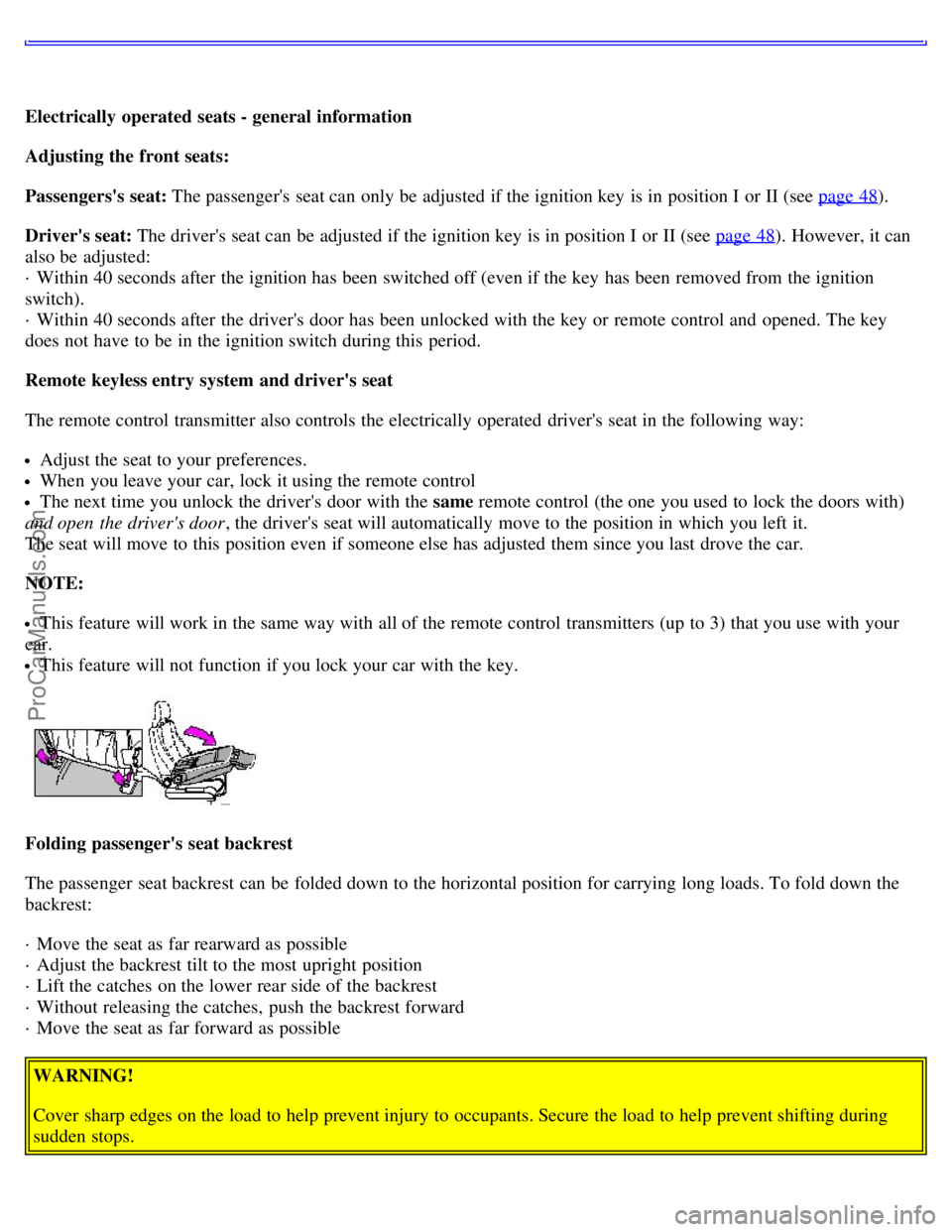
The passenger seat backrest can be folded down to the horizontal position for carrying long loads. To fold down the
backrest:
· Move the seat as far rearward as possible
· Adjust the backrest tilt to the most upright position
· Lift the catches on the lower rear side of the backrest
· Without releasing the catches, push the backrest forward
· Move the seat as far forward as possible
WARNING!
Cover sharp edges on the load to help prevent injury to occupants. Secure the load to help prevent shifting during
sudden stops.
ProCarManuals.com
Page 36 of 111
· Press button B to open the storage space in the center console for cassettes, change holder, etc.
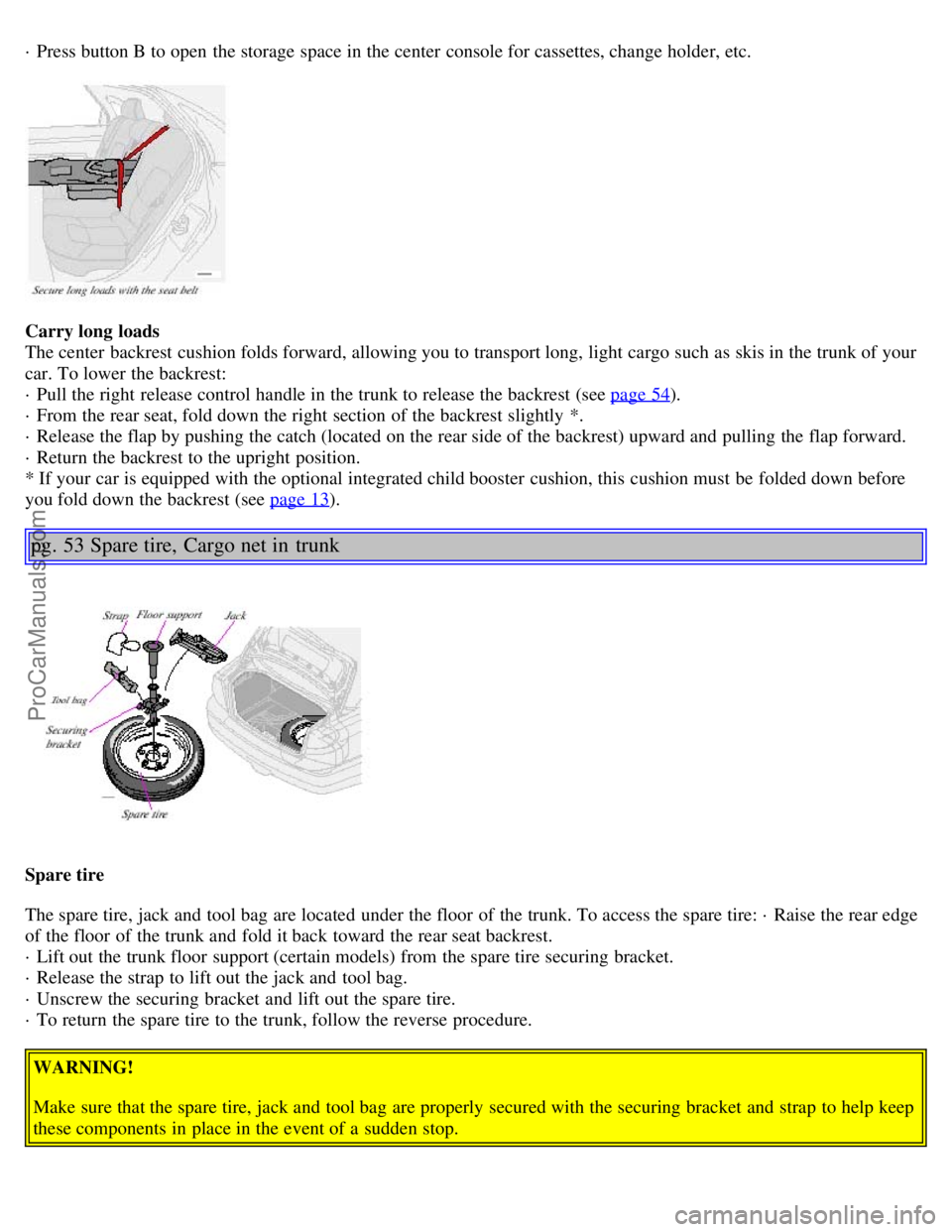
Carry long loads
The center backrest cushion folds forward, allowing you to transport long, light cargo such as skis in the trunk of your
car. To lower the backrest:
· Pull the right release control handle in the trunk to release the backrest (see page 54
).
· From the rear seat, fold down the right section of the backrest slightly *.
· Release the flap by pushing the catch (located on the rear side of the backrest) upward and pulling the flap forward.
· Return the backrest to the upright position.
* If your car is equipped with the optional integrated child booster cushion, this cushion must be folded down before
you fold down the backrest (see page 13
).
pg. 53 Spare tire, Cargo net in trunk
Spare tire
The spare tire, jack and tool bag are located under the floor of the trunk. To access the spare tire: · Raise the rear edge
of the floor of the trunk and fold it back toward the rear seat backrest.
· Lift out the trunk floor support (certain models) from the spare tire securing bracket.
· Release the strap to lift out the jack and tool bag.
· Unscrew the securing bracket and lift out the spare tire.
· To return the spare tire to the trunk, follow the reverse procedure.
WARNING!
Make sure that the spare tire, jack and tool bag are properly secured with the securing bracket and strap to help keep
these components in place in the event of a sudden stop.
ProCarManuals.com
Page 37 of 111
NOTE: See page 92 for information on how the jack should be used.
Cargo net in the trunk
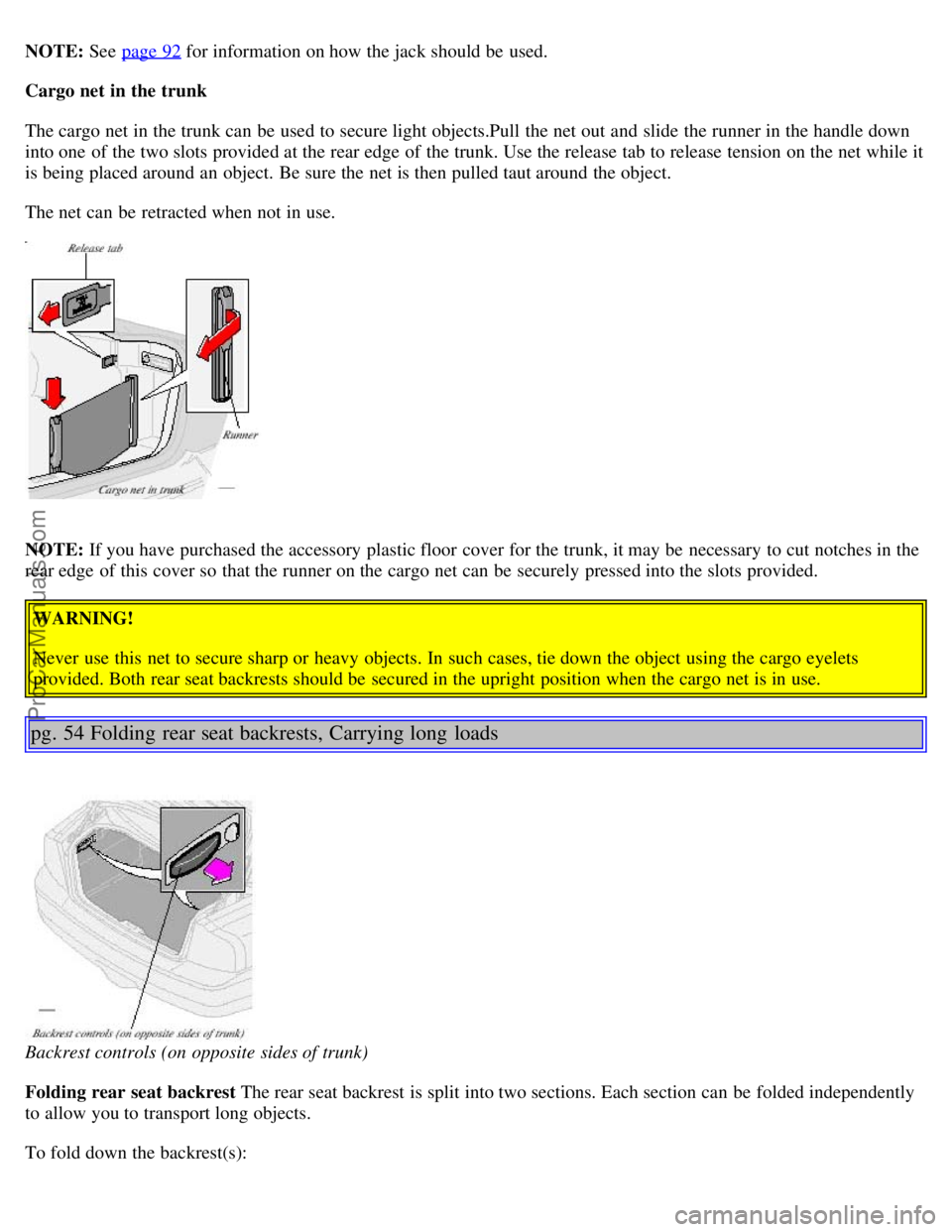
The cargo net in the trunk can be used to secure light objects.Pull the net out and slide the runner in the handle down
into one of the two slots provided at the rear edge of the trunk. Use the release tab to release tension on the net while it
is being placed around an object. Be sure the net is then pulled taut around the object.
The net can be retracted when not in use.
NOTE: If you have purchased the accessory plastic floor cover for the trunk, it may be necessary to cut notches in the
rear edge of this cover so that the runner on the cargo net can be securely pressed into the slots provided.
WARNING!
Never use this net to secure sharp or heavy objects. In such cases, tie down the object using the cargo eyelets
provided. Both rear seat backrests should be secured in the upright position when the cargo net is in use.
pg. 54 Folding rear seat backrests, Carrying long loads
Backrest controls (on opposite sides of trunk)
Folding rear seat backrest The rear seat backrest is split into two sections. Each section can be folded independently
to allow you to transport long objects.
To fold down the backrest(s):
ProCarManuals.com
Page 38 of 111

· Pull the release control handle(s) in the trunk to release the backrest(s) (see illustration above). If the outboard rear
head restraints are folded down, they should be returned to the upright position before folding the backrest down. It
may be necessary to manually adjust the center head restraint.
· Fold the backrest down.WARNING!
All S80 cars feature 60/40 split fold-down rear seats. This function is performed by handles inside the trunk, and
also provides a means for children and adults to enter the passenger compartment in the event they become locked
inside the trunk. Adults are advised to familiarize them-selves with the operation and location of the release handles.
To fold down the rear seats from inside the trunk, pull the release control handles located on either side of the trunk.
WARNING!
· Keep vehicle doors and the luggage compartment locked and keep keys out of a child's reach. Unsupervised
children could lock themselves in an open trunk and risk injury. Children should be taught not to play in vehicles.
· On hot days, the temperature in the trunk or vehicle interior can rise very quickly. Exposure of people to these high
temperatures for even a short period of time can cause heat-related injury or death. Small children are particularly at
risk.
WARNING!
· When the backrest is returned to the upright position, check that it is properly locked in place. Return the head
restraints to the upright position.
· Long loads should always be securely anchored to help avoid injury in the event of a sudden stop.
· Always turn the engine off and apply the parking brake when loading/unloading the vehicle.
· Place the transmission in the P (PARK) position to help prevent inadvertent movement of the gear selector.
Contents | Top of Page
ProCarManuals.com
Page 41 of 111
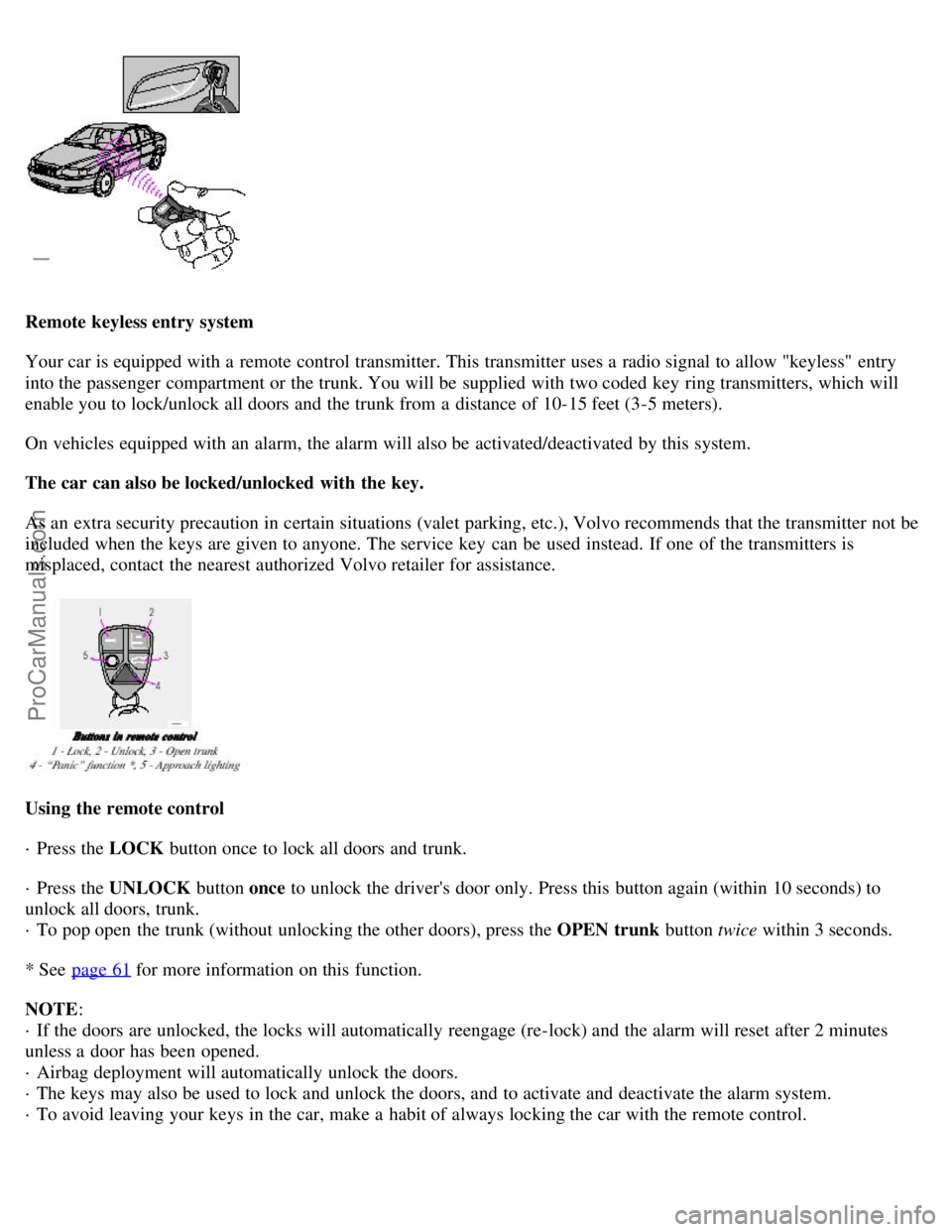
Remote keyless entry system
Your car is equipped with a remote control transmitter. This transmitter uses a radio signal to allow "keyless" entry
into the passenger compartment or the trunk. You will be supplied with two coded key ring transmitters, which will
enable you to lock/unlock all doors and the trunk from a distance of 10-15 feet (3-5 meters).
On vehicles equipped with an alarm, the alarm will also be activated/deactivated by this system.
The car can also be locked/unlocked with the key.
As an extra security precaution in certain situations (valet parking, etc.), Volvo recommends that the transmitter not be
included when the keys are given to anyone. The service key can be used instead. If one of the transmitters is
misplaced, contact the nearest authorized Volvo retailer for assistance.
Using the remote control
· Press the LOCK button once to lock all doors and trunk.
· Press the UNLOCK button once to unlock the driver's door only. Press this button again (within 10 seconds) to
unlock all doors, trunk.
· To pop open the trunk (without unlocking the other doors), press the OPEN trunk button twice within 3 seconds.
* See page 61
for more information on this function.
NOTE :
· If the doors are unlocked, the locks will automatically reengage (re-lock) and the alarm will reset after 2 minutes
unless a door has been opened.
· Airbag deployment will automatically unlock the doors.
· The keys may also be used to lock and unlock the doors, and to activate and deactivate the alarm system.
· To avoid leaving your keys in the car, make a habit of always locking the car with the remote control.
ProCarManuals.com
Page 44 of 111
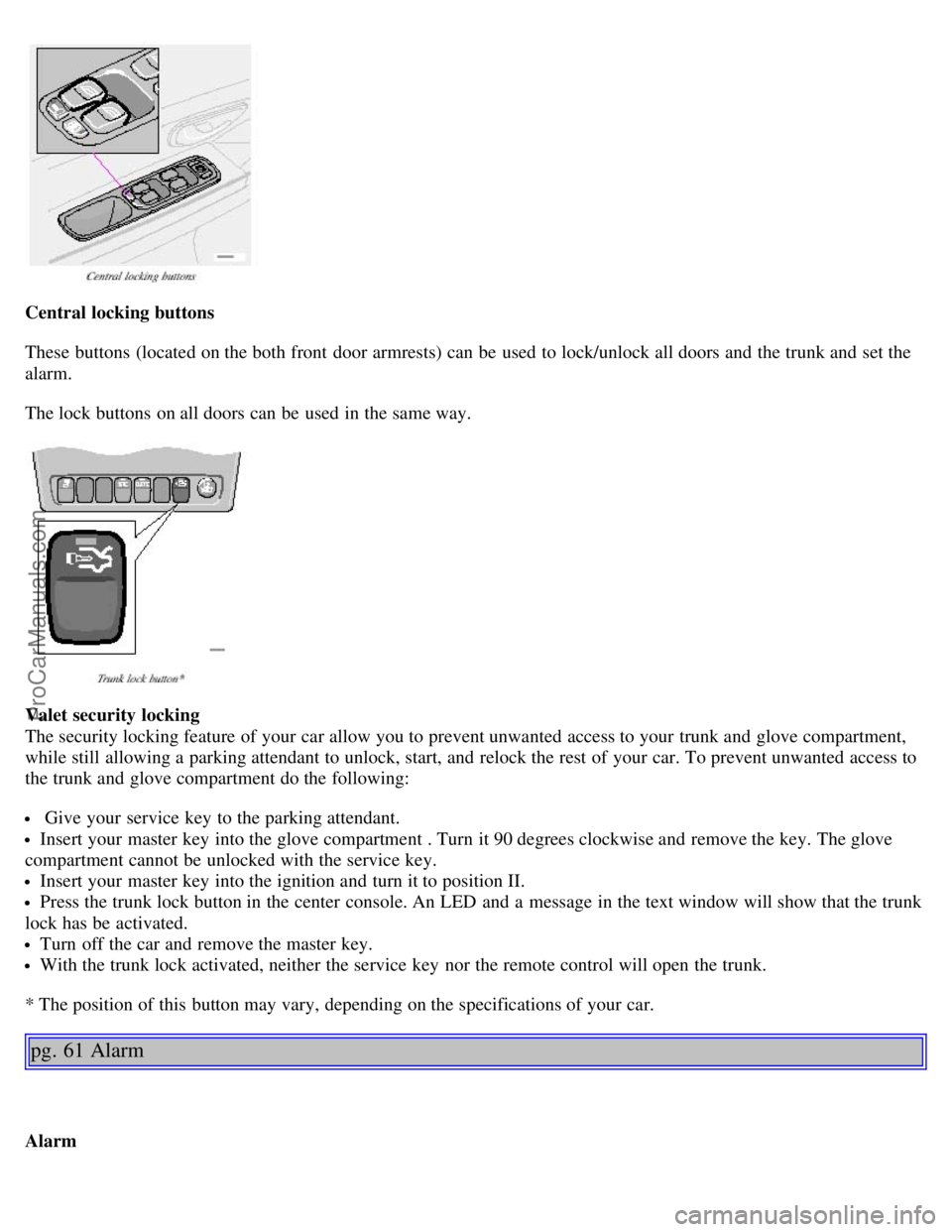
Central locking buttons
These buttons (located on the both front door armrests) can be used to lock/unlock all doors and the trunk and set the
alarm.
The lock buttons on all doors can be used in the same way.
Valet security locking
The security locking feature of your car allow you to prevent unwanted access to your trunk and glove compartment,
while still allowing a parking attendant to unlock, start, and relock the rest of your car. To prevent unwanted access to
the trunk and glove compartment do the following:
Give your service key to the parking attendant.
Insert your master key into the glove compartment . Turn it 90 degrees clockwise and remove the key. The glove
compartment cannot be unlocked with the service key.
Insert your master key into the ignition and turn it to position II.
Press the trunk lock button in the center console. An LED and a message in the text window will show that the trunk
lock has be activated.
Turn off the car and remove the master key.
With the trunk lock activated, neither the service key nor the remote control will open the trunk.
* The position of this button may vary, depending on the specifications of your car.
pg. 61 Alarm
Alarm
ProCarManuals.com
Page 64 of 111
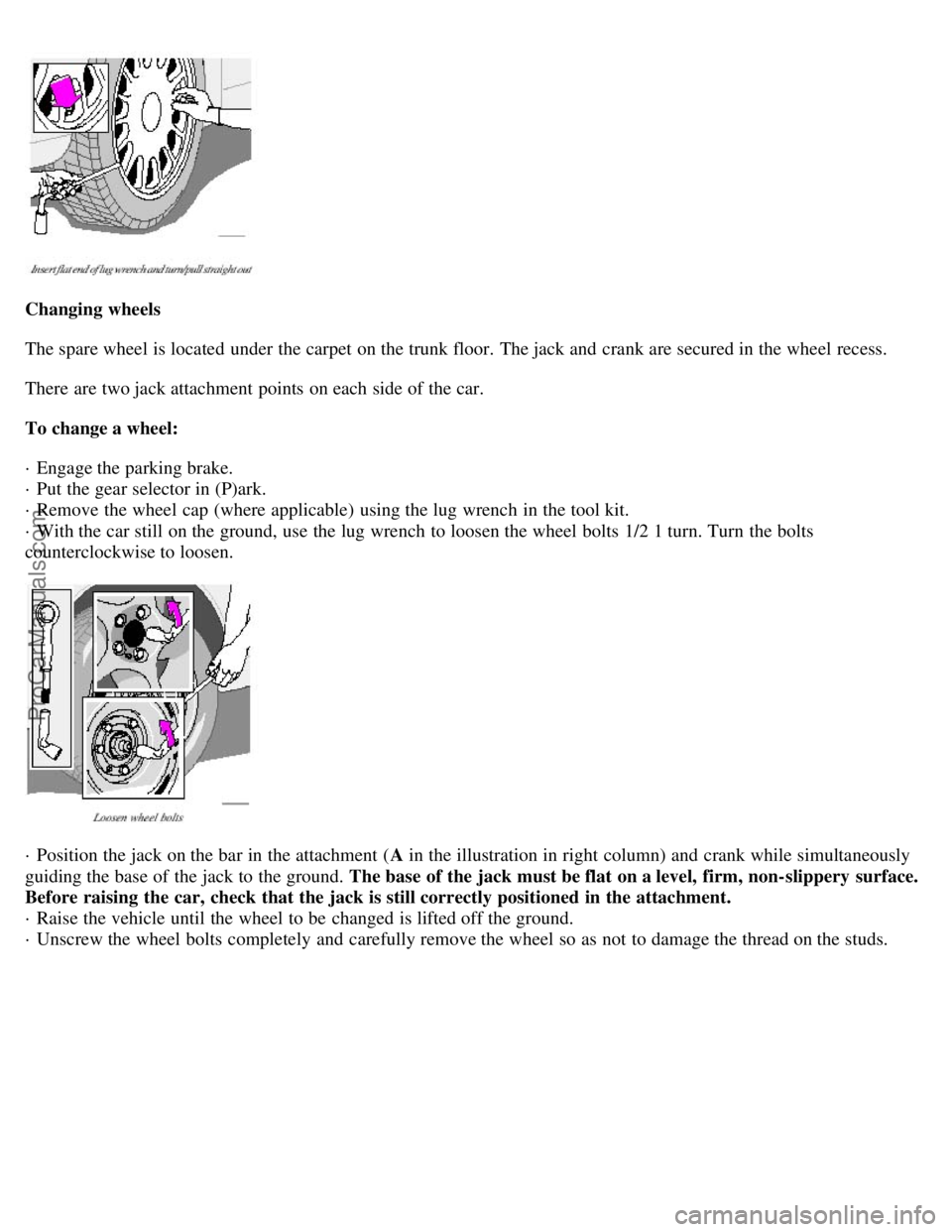
Changing wheels
The spare wheel is located under the carpet on the trunk floor. The jack and crank are secured in the wheel recess.
There are two jack attachment points on each side of the car.
To change a wheel:
· Engage the parking brake.
· Put the gear selector in (P)ark.
· Remove the wheel cap (where applicable) using the lug wrench in the tool kit.
· With the car still on the ground, use the lug wrench to loosen the wheel bolts 1/2 1 turn. Turn the bolts
counterclockwise to loosen.
· Position the jack on the bar in the attachment (A in the illustration in right column) and crank while simultaneously
guiding the base of the jack to the ground. The base of the jack must be flat on a level, firm, non-slippery surface.
Before raising the car, check that the jack is still correctly positioned in the attachment.
· Raise the vehicle until the wheel to be changed is lifted off the ground.
· Unscrew the wheel bolts completely and carefully remove the wheel so as not to damage the thread on the studs.
ProCarManuals.com
Page 96 of 111
2 0 0 2
VOLVO S80
HomeLink® Universal Transceiver (option)
pg. 147 HomeLink® Universal Transceiver (option)
HomeLink® Universal Transceiver
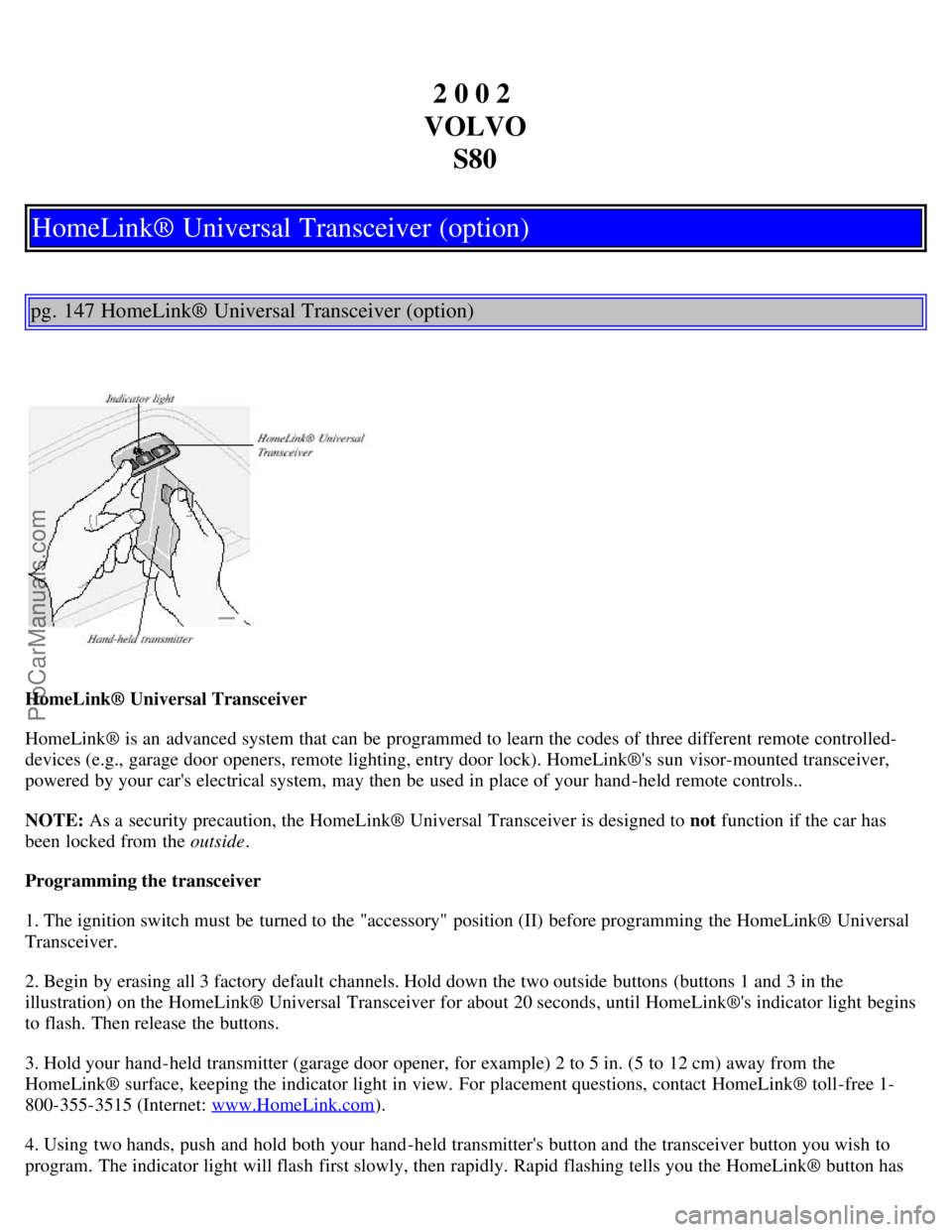
HomeLink® is an advanced system that can be programmed to learn the codes of three different remote controlled-
devices (e.g., garage door openers, remote lighting, entry door lock). HomeLink®'s sun visor-mounted transceiver,
powered by your car's electrical system, may then be used in place of your hand -held remote controls..
NOTE: As a security precaution, the HomeLink® Universal Transceiver is designed to not function if the car has
been locked from the outside .
Programming the transceiver
1. The ignition switch must be turned to the "accessory" position (II) before programming the HomeLink® Universal
Transceiver.
2. Begin by erasing all 3 factory default channels. Hold down the two outside buttons (buttons 1 and 3 in the
illustration) on the HomeLink® Universal Transceiver for about 20 seconds, until HomeLink®'s indicator light begins
to flash. Then release the buttons.
3. Hold your hand -held transmitter (garage door opener, for example) 2 to 5 in. (5 to 12 cm) away from the
HomeLink® surface, keeping the indicator light in view. For placement questions, contact HomeLink® toll-free 1-
800-355-3515 (Internet: www.HomeLink.com
).
4. Using two hands, push and hold both your hand -held transmitter's button and the transceiver button you wish to
program. The indicator light will flash first slowly, then rapidly. Rapid flashing tells you the HomeLink® button has
ProCarManuals.com
Page 98 of 111
Some garage door openers may require you to do this procedure a third time to complete the training.
The programmed button on your HomeLink® Universal Transceiver
should now operate your garage door opener. The original hand -held transmitter can also be used, if necessary, to
operate the garage door.
The remaining two HomeLink® buttons can be programmed in the same way. In the event of any problems in
programming the HomeLink® Universal Transceiver, call toll-free 1-800-355-3515 (Internet: www.HomeLink.com
).
Operating the HomeLink® Universal Transceiver
Once programmed, the HomeLink® Universal Transceiver can be used in place of hand -held transmitters.
To operate, the key must be turned to the "accessory" position (II) or the engine must be running. Press the
programmed HomeLink® button to activate the garage door, driveway gate, security lighting, home security system,
etc.
Your original hand -held transmitters may, of course, be used at any time.
pg. 149 HomeLink® Universal Transceiver (option)
Erasing programmed buttons
Individual buttons cannot be erased. To erase all three programmed buttons:
1. Turn the ignition key to the "accessory" position (II).
2. Hold down the two outside buttons on the HomeLink® Universal Transceiver for about 20 seconds, until
HomeLink®'s indicator light begins to flash.
3. Release both buttons.
The HomeLink® buttons can be reprogrammed using the procedures described on the previous pages.
Reprogramming a single HomeLink® button
1. Press and hold the desired HomeLink® button. Do not release the button until step 3 has been completed.
2. When the indicator light begins to flash slowly (after approximately 20 seconds), position the hand -held transmitter
2 to 5 in. (5 to 12 cm) away from the HomeLink® surface.
3. Press and hold the hand -held transmitter button. The HomeLink® indicator light will flash first slowly, then rapidly.
When the indicator light flashes rapidly, release both buttons.
The previously programmed device has now been erased and the new device can be activated by pressing the
HomeLink® button that has just been programmed. This procedure will not affect any other programmed HomeLink®
buttons.
NOTE:
· Retain the original transmitter(s) for future programming procedures (i.e., if you purchase a new car).
· For your own security, erase all programmed buttons on the HomeLink® Universal Transceiver when you sell your
ProCarManuals.com