mirror VOLVO S80 2006 Owners Manual
[x] Cancel search | Manufacturer: VOLVO, Model Year: 2006, Model line: S80, Model: VOLVO S80 2006Pages: 122, PDF Size: 2.33 MB
Page 7 of 122
Seat belt tensioners
The seat belts are equipped with tensioners that reduce slack in the belts. These tensioners are triggered in situations
where the airbags deploy. The front seat belts also include a tension reducing device which, in the event of a collision,
limits the peak forces exerted by the seat belt on the occupant.
Buckling a seat belt
Pull the belt out far enough to insert the latch plate into the receptacle until a distinct click is heard. The seat belt
retractor is normally "unlocked" and you can move freely, provided that the shoulder belt is not pulled out too far.
The retractor will lock up as follows:
if the belt is pulled out rapidly
during braking and acceleration
if the vehicle is leaning excessively
when driving in turns
When wearing the seat belt remember:
The belt should not be twisted or turned.
The lap section of the belt must be positioned low on the hips (not pressing against the abdomen).
Make sure that the shoulder belt is rolled up into its retractor and that the shoulder and lap belts are taut.
Unbuckling the seat belt
To remove the seat belt, press the red section on the seat belt receptacle. Before exiting the vehicle, check that the seat
belt retracts fully after being unbuckled. If necessary, guide the belt back into the retractor slot.
Seat belt reminder
The seat belt reminder consists of an audible signal, an indicator light above the rearview mirror, and a symbol in the
instrument panel that alert the driver and front seat passenger if their seat belts are not fastened.
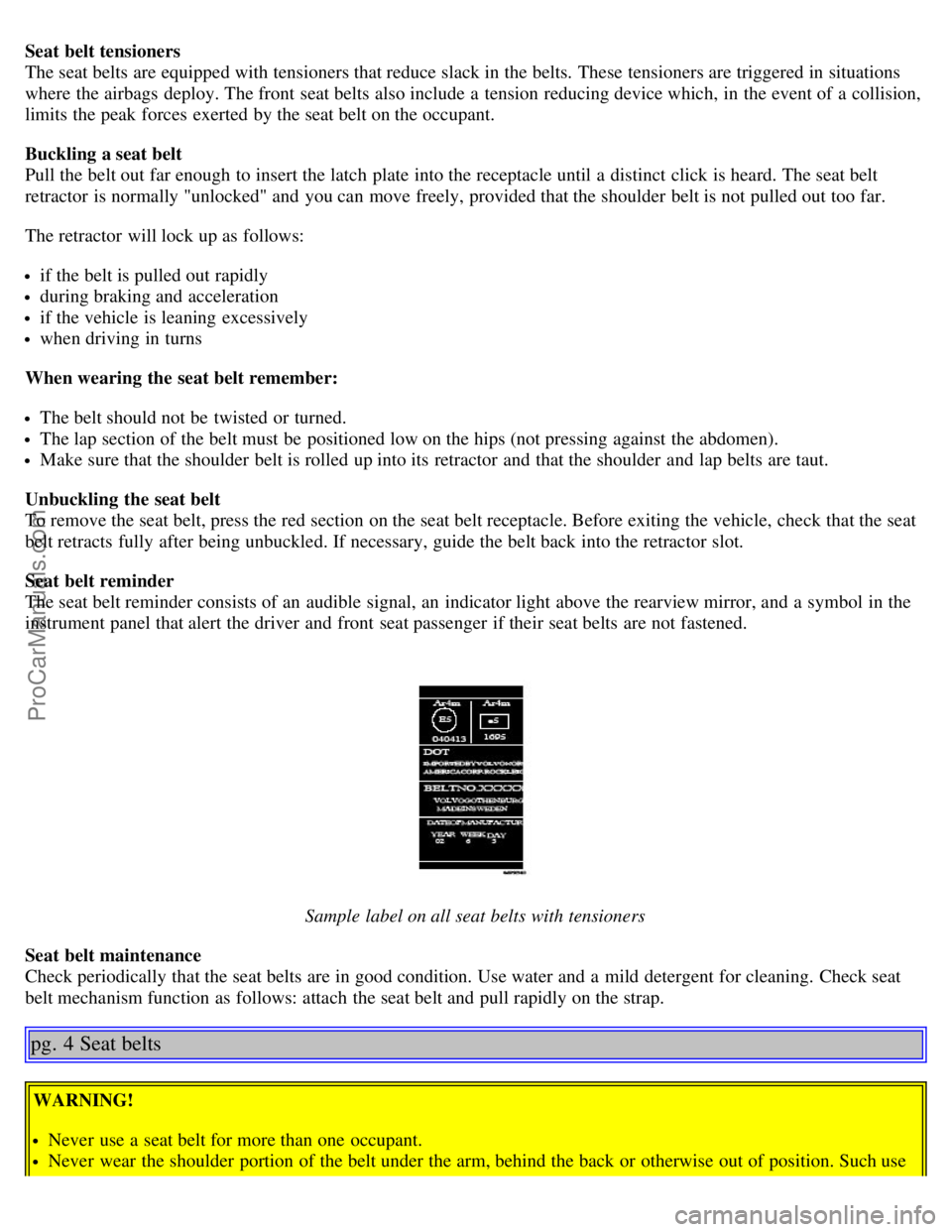
Sample label on all seat belts with tensioners
Seat belt maintenance
Check periodically that the seat belts are in good condition. Use water and a mild detergent for cleaning. Check seat
belt mechanism function as follows: attach the seat belt and pull rapidly on the strap.
pg. 4 Seat belts
WARNING!
Never use a seat belt for more than one occupant.
Never wear the shoulder portion of the belt under the arm, behind the back or otherwise out of position. Such use
ProCarManuals.com
Page 16 of 122
2 0 0 6
VOLVO S80
Chapter 2 - Instruments, switches and controls
pg. 23 Instruments, switches and controls
Interior24
Exterior25
Instruments26
Instrument panel27
Indicator and warning lights28
Text information window30
Switches in center console31
Trip computer32
Cruise control33
Lighting panel34
Manually unlocking the fuel filler door35
Left-side steering wheel lever36
Right-side steering wheel lever37
Steering wheel adjustment/lock, ignition switch38
Warning flashers, heated mirrors/rear window, heated front seats39
Parking brake, auxiliary socket, ashtrays40
Electrically operated windows41
Vanity mirrors, Rearview/sideview mirrors42
Power moonroof43
Sun visor, sun blinds44
pg. 24 Interior
ProCarManuals.com
Page 17 of 122
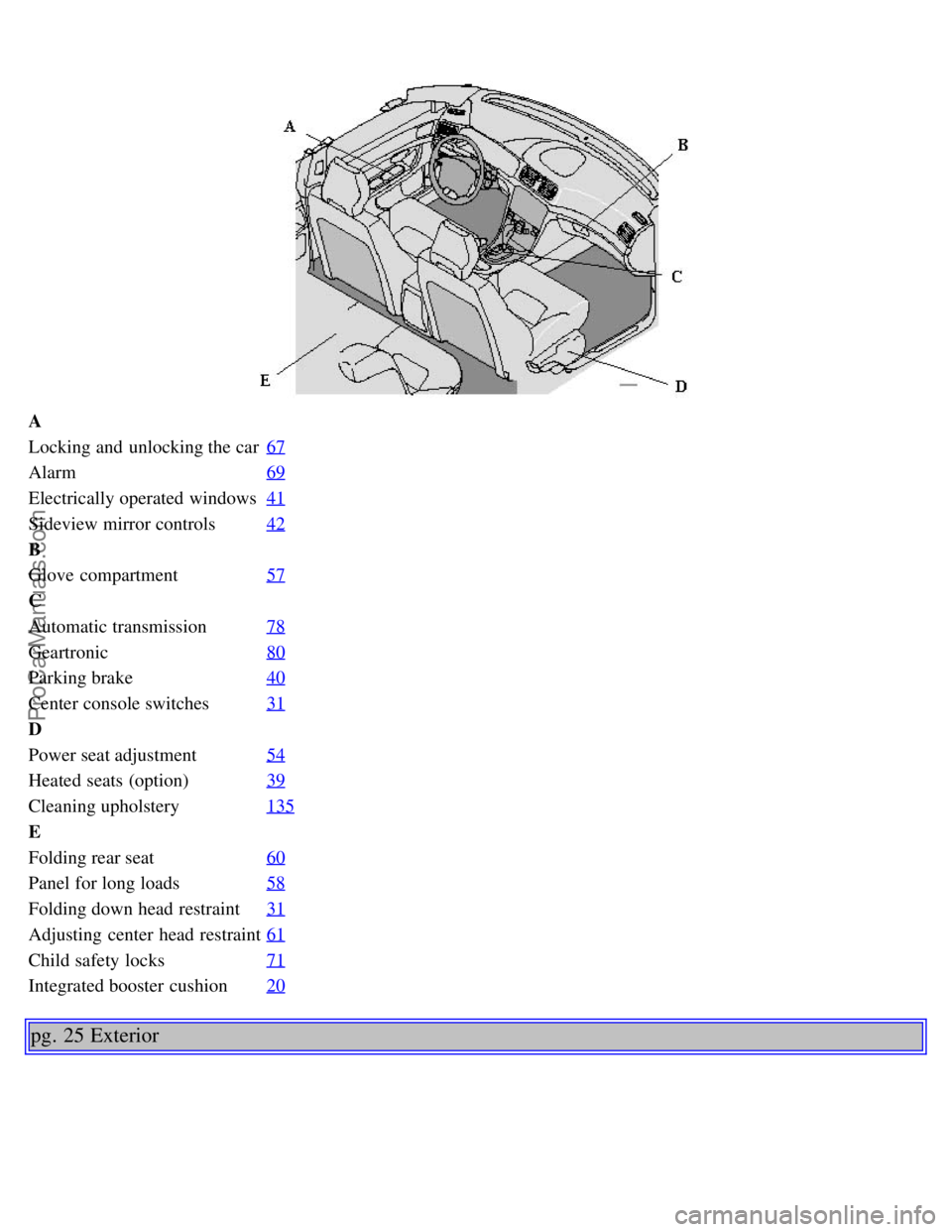
A
Locking and unlocking the car67
Alarm69
Electrically operated windows41
Sideview mirror controls42
B
Glove compartment57
C
Automatic transmission78
Geartronic80
Parking brake40
Center console switches31
D
Power seat adjustment54
Heated seats (option)39
Cleaning upholstery135
E
Folding rear seat60
Panel for long loads58
Folding down head restraint31
Adjusting center head restraint61
Child safety locks71
Integrated booster cushion20
pg. 25 Exterior
ProCarManuals.com
Page 19 of 122
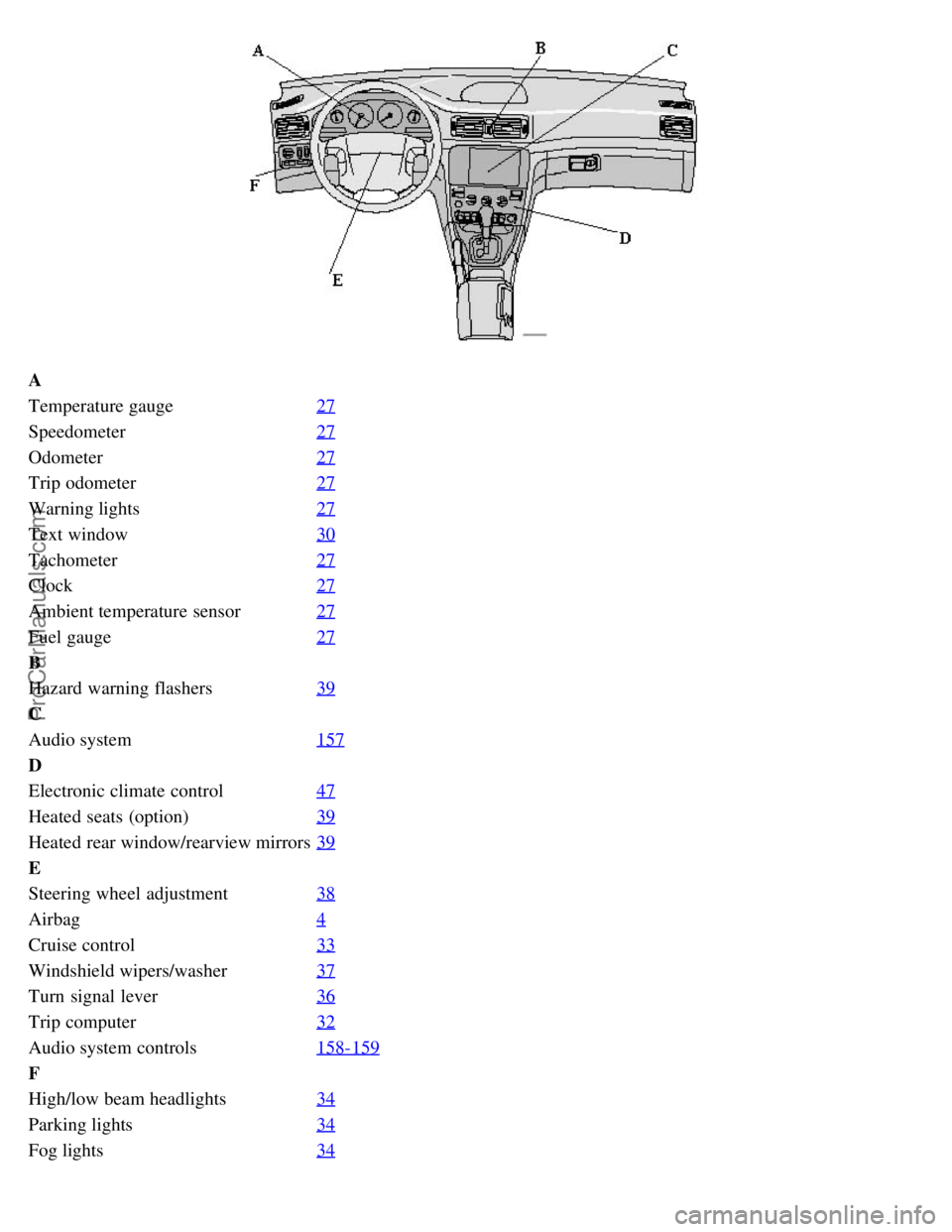
A
Temperature gauge27
Speedometer27
Odometer27
Trip odometer27
Warning lights27
Text window30
Tachometer27
Clock27
Ambient temperature sensor27
Fuel gauge27
B
Hazard warning flashers39
C
Audio system157
D
Electronic climate control47
Heated seats (option)39
Heated rear window/rearview mirrors39
E
Steering wheel adjustment38
Airbag4
Cruise control33
Windshield wipers/washer37
Turn signal lever36
Trip computer32
Audio system controls158-159
F
High/low beam headlights34
Parking lights34
Fog lights34
ProCarManuals.com
Page 26 of 122
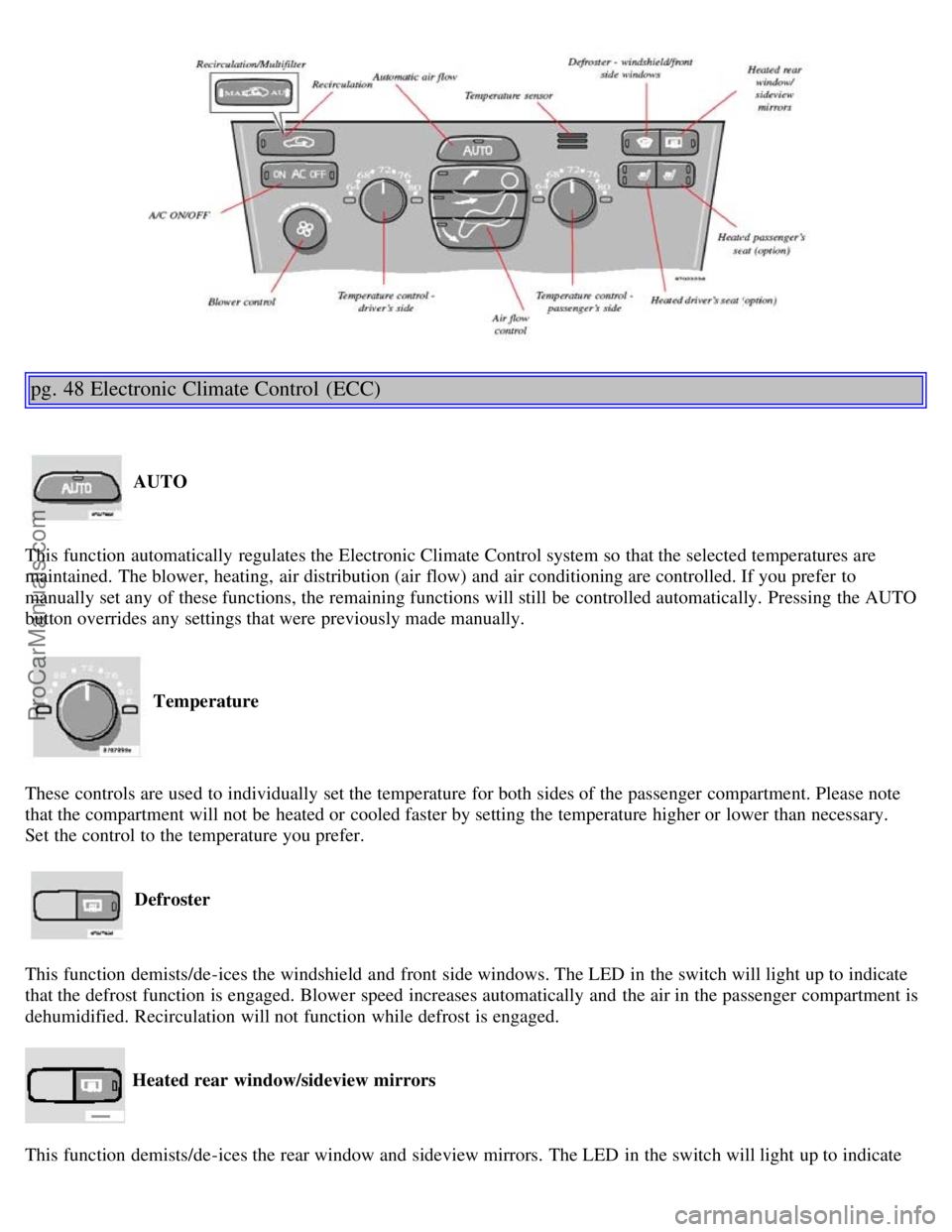
pg. 48 Electronic Climate Control (ECC)
AUTO
This function automatically regulates the Electronic Climate Control system so that the selected temperatures are
maintained. The blower, heating, air distribution (air flow) and air conditioning are controlled. If you prefer to
manually set any of these functions, the remaining functions will still be controlled automatically. Pressing the AUTO
button overrides any settings that were previously made manually.
Temperature
These controls are used to individually set the temperature for both sides of the passenger compartment. Please note
that the compartment will not be heated or cooled faster by setting the temperature higher or lower than necessary.
Set the control to the temperature you prefer.
Defroster
This function demists/de-ices the windshield and front side windows. The LED in the switch will light up to indicate
that the defrost function is engaged. Blower speed increases automatically and the air in the passenger compartment is
dehumidified. Recirculation will not function while defrost is engaged.
Heated rear window/sideview mirrors
This function demists/de-ices the rear window and sideview mirrors. The LED in the switch will light up to indicate
ProCarManuals.com
Page 27 of 122
that the heating function is engaged. See page 39 for additional information on this function.
CAUTION:
Never use ice scrapers made of metal as they can easily scratch the mirror surface.
pg. 49 Electronic Climate Control (ECC) - manual settings
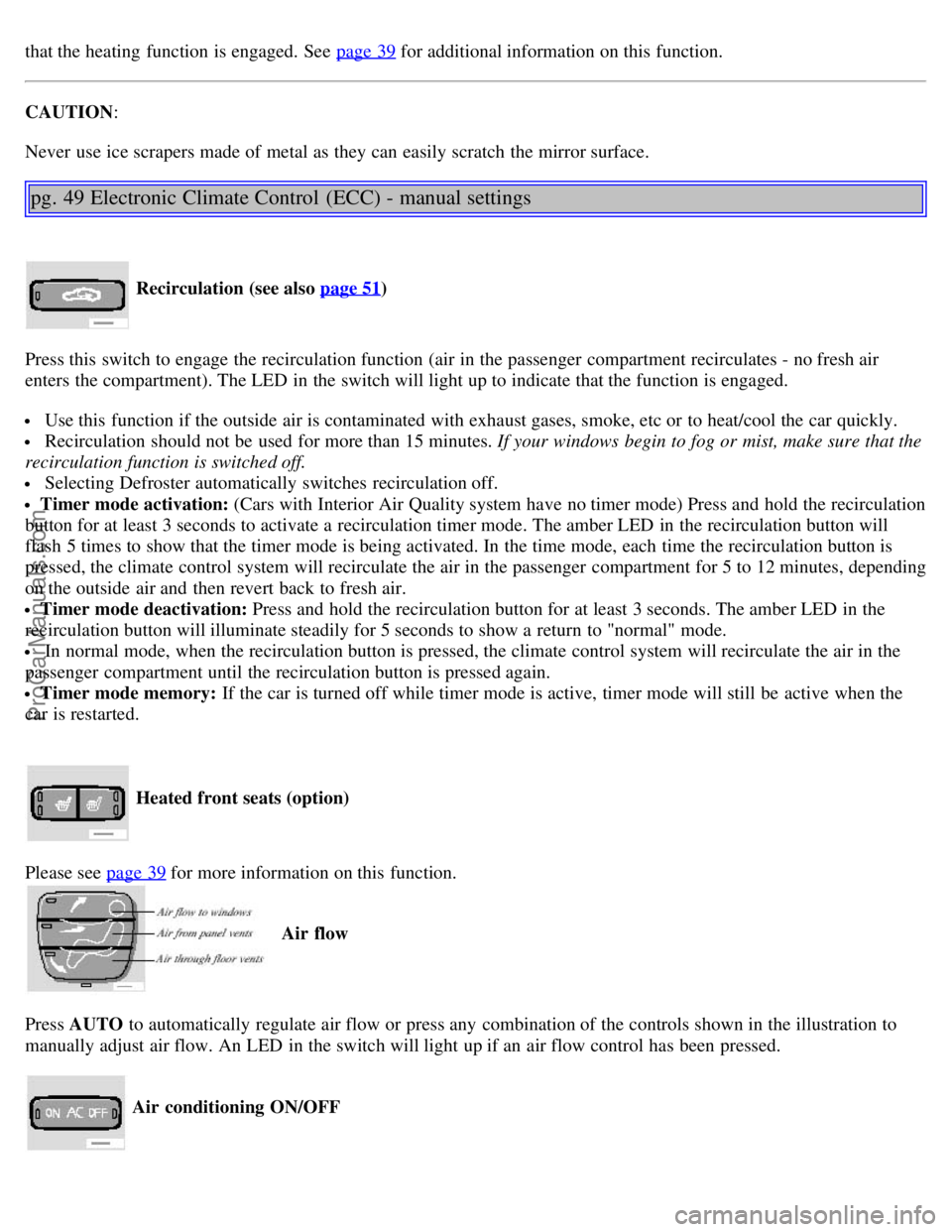
Recirculation (see also page 51)
Press this switch to engage the recirculation function (air in the passenger compartment recirculates - no fresh air
enters the compartment). The LED in the switch will light up to indicate that the function is engaged.
Use this function if the outside air is contaminated with exhaust gases, smoke, etc or to heat/cool the car quickly.
Recirculation should not be used for more than 15 minutes. If your windows begin to fog or mist, make sure that the
recirculation function is switched off.
Selecting Defroster automatically switches recirculation off.
Timer mode activation: (Cars with Interior Air Quality system have no timer mode) Press and hold the recirculation
button for at least 3 seconds to activate a recirculation timer mode. The amber LED in the recirculation button will
flash 5 times to show that the timer mode is being activated. In the time mode, each time the recirculation button is
pressed, the climate control system will recirculate the air in the passenger compartment for 5 to 12 minutes, depending
on the outside air and then revert back to fresh air.
Timer mode deactivation: Press and hold the recirculation button for at least 3 seconds. The amber LED in the
recirculation button will illuminate steadily for 5 seconds to show a return to "normal" mode.
In normal mode, when the recirculation button is pressed, the climate control system will recirculate the air in the
passenger compartment until the recirculation button is pressed again.
Timer mode memory: If the car is turned off while timer mode is active, timer mode will still be active when the
car is restarted.
Heated front seats (option)
Please see page 39
for more information on this function.
Air flow
Press AUTO to automatically regulate air flow or press any combination of the controls shown in the illustration to
manually adjust air flow. An LED in the switch will light up if an air flow control has been pressed.
Air conditioning ON/OFF
ProCarManuals.com
Page 32 of 122
The seat can be adjusted if the ignition key is in position I, II or if the engine is running.
It can also be adjusted as follows with the ignition off:
· Within 10 minutes after the driver's door has been unlocked from the outside and has been opened and remains open.
· Within 40 seconds, if the driver's door has just been closed.
· Within 40 seconds, if the driver's door has not been opened after the ignition has been switched off.
Passenger's seat:
The seat can only be adjusted if the ignition key is in position I, II or if the engine is running.
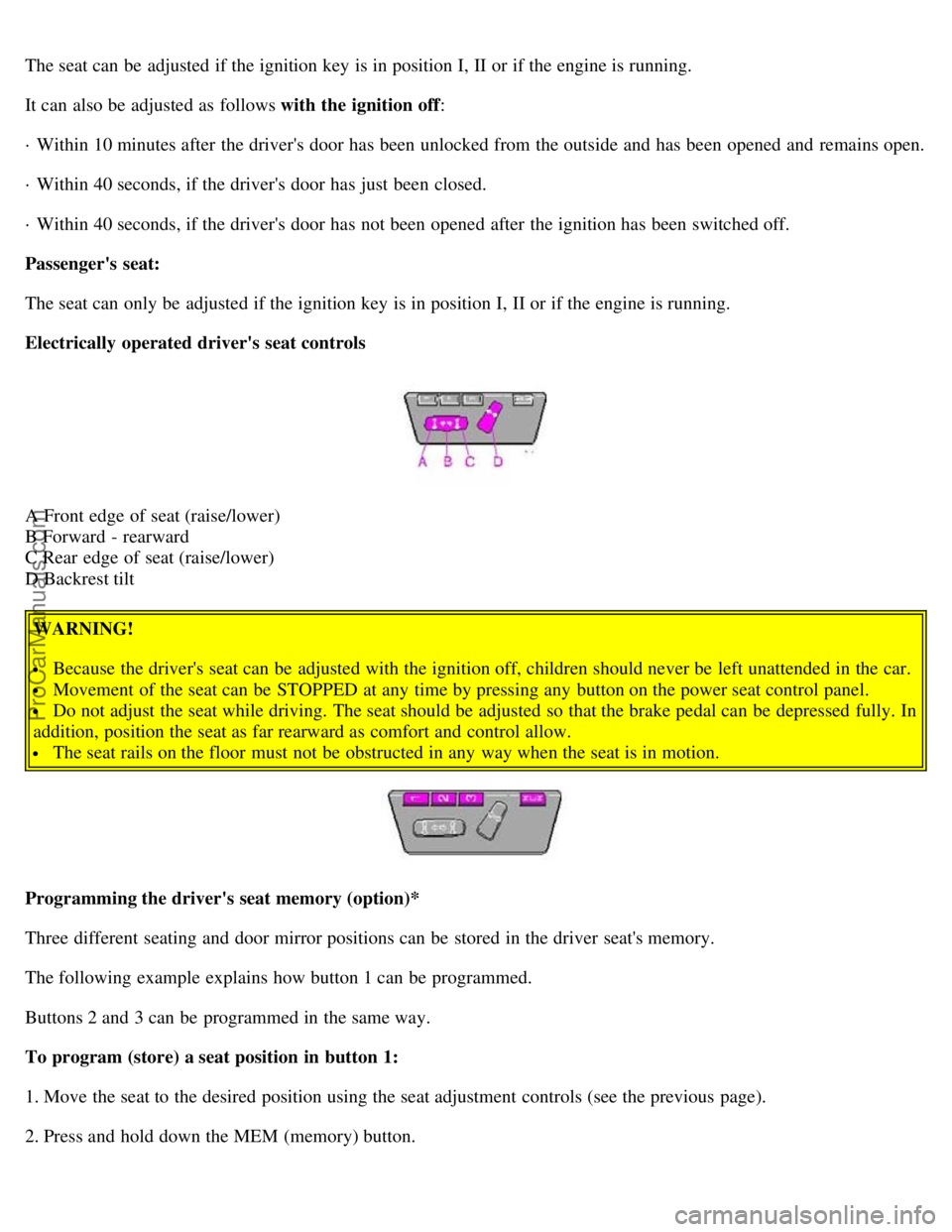
Electrically operated driver's seat controls
A Front edge of seat (raise/lower)
B Forward - rearward
C Rear edge of seat (raise/lower)
D Backrest tilt
WARNING!
Because the driver's seat can be adjusted with the ignition off, children should never be left unattended in the car.
Movement of the seat can be STOPPED at any time by pressing any button on the power seat control panel.
Do not adjust the seat while driving. The seat should be adjusted so that the brake pedal can be depressed fully. In
addition, position the seat as far rearward as comfort and control allow.
The seat rails on the floor must not be obstructed in any way when the seat is in motion.
Programming the driver's seat memory (option)*
Three different seating and door mirror positions can be stored in the driver seat's memory.
The following example explains how button 1 can be programmed.
Buttons 2 and 3 can be programmed in the same way.
To program (store) a seat position in button 1:
1. Move the seat to the desired position using the seat adjustment controls (see the previous page).
2. Press and hold down the MEM (memory) button.
ProCarManuals.com
Page 35 of 122
The courtesy light switches off if:
The engine is started.
The car is locked from the outside with the key or remote control.
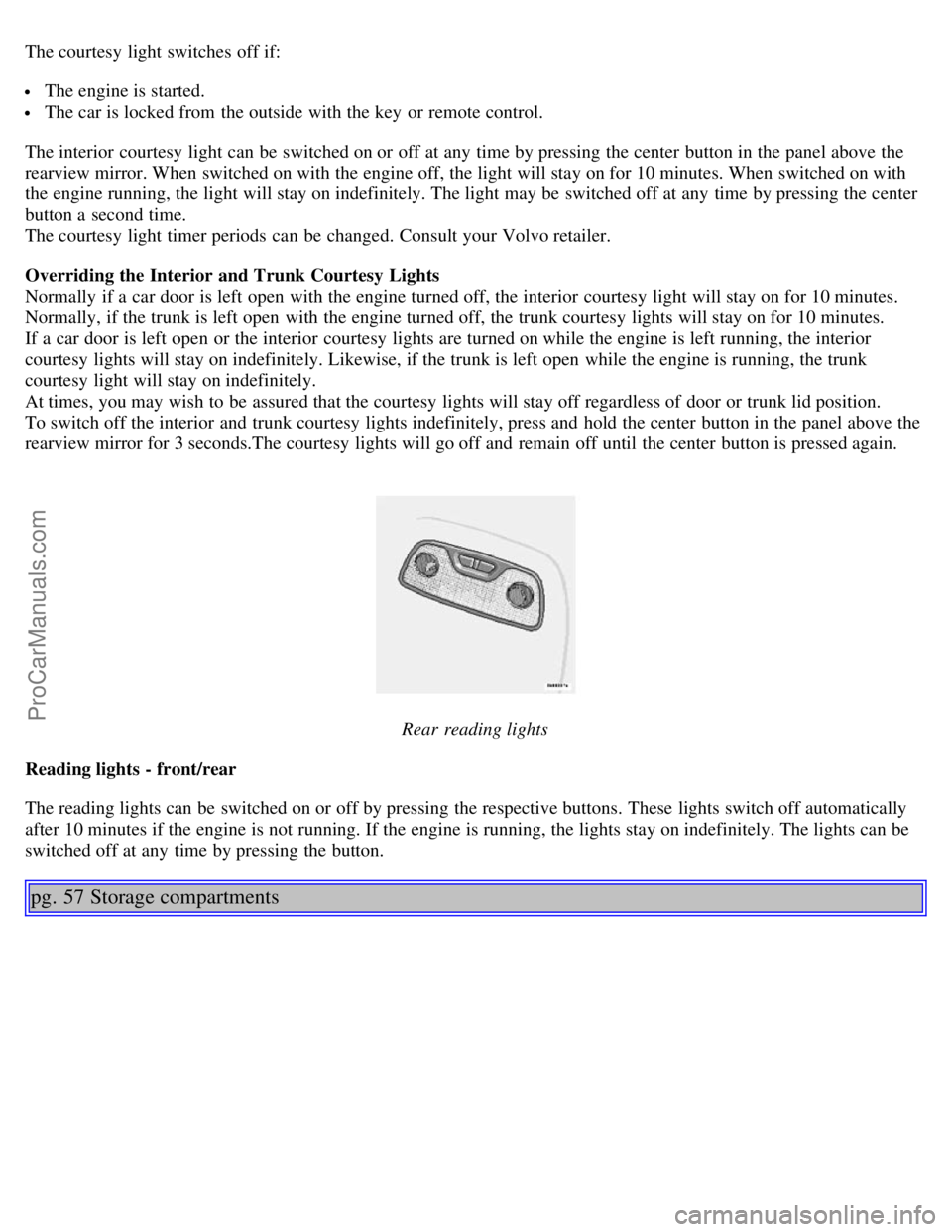
The interior courtesy light can be switched on or off at any time by pressing the center button in the panel above the
rearview mirror. When switched on with the engine off, the light will stay on for 10 minutes. When switched on with
the engine running, the light will stay on indefinitely. The light may be switched off at any time by pressing the center
button a second time.
The courtesy light timer periods can be changed. Consult your Volvo retailer.
Overriding the Interior and Trunk Courtesy Lights
Normally if a car door is left open with the engine turned off, the interior courtesy light will stay on for 10 minutes.
Normally, if the trunk is left open with the engine turned off, the trunk courtesy lights will stay on for 10 minutes.
If a car door is left open or the interior courtesy lights are turned on while the engine is left running, the interior
courtesy lights will stay on indefinitely. Likewise, if the trunk is left open while the engine is running, the trunk
courtesy light will stay on indefinitely.
At times, you may wish to be assured that the courtesy lights will stay off regardless of door or trunk lid position.
To switch off the interior and trunk courtesy lights indefinitely, press and hold the center button in the panel above the
rearview mirror for 3 seconds.The courtesy lights will go off and remain off until the center button is pressed again.
Rear reading lights
Reading lights - front/rear
The reading lights can be switched on or off by pressing the respective buttons. These lights switch off automatically
after 10 minutes if the engine is not running. If the engine is running, the lights stay on indefinitely. The lights can be
switched off at any time by pressing the button.
pg. 57 Storage compartments
ProCarManuals.com
Page 43 of 122
If one of the transmitters is misplaced, contact your nearest authorized Volvo retailer for replacement.
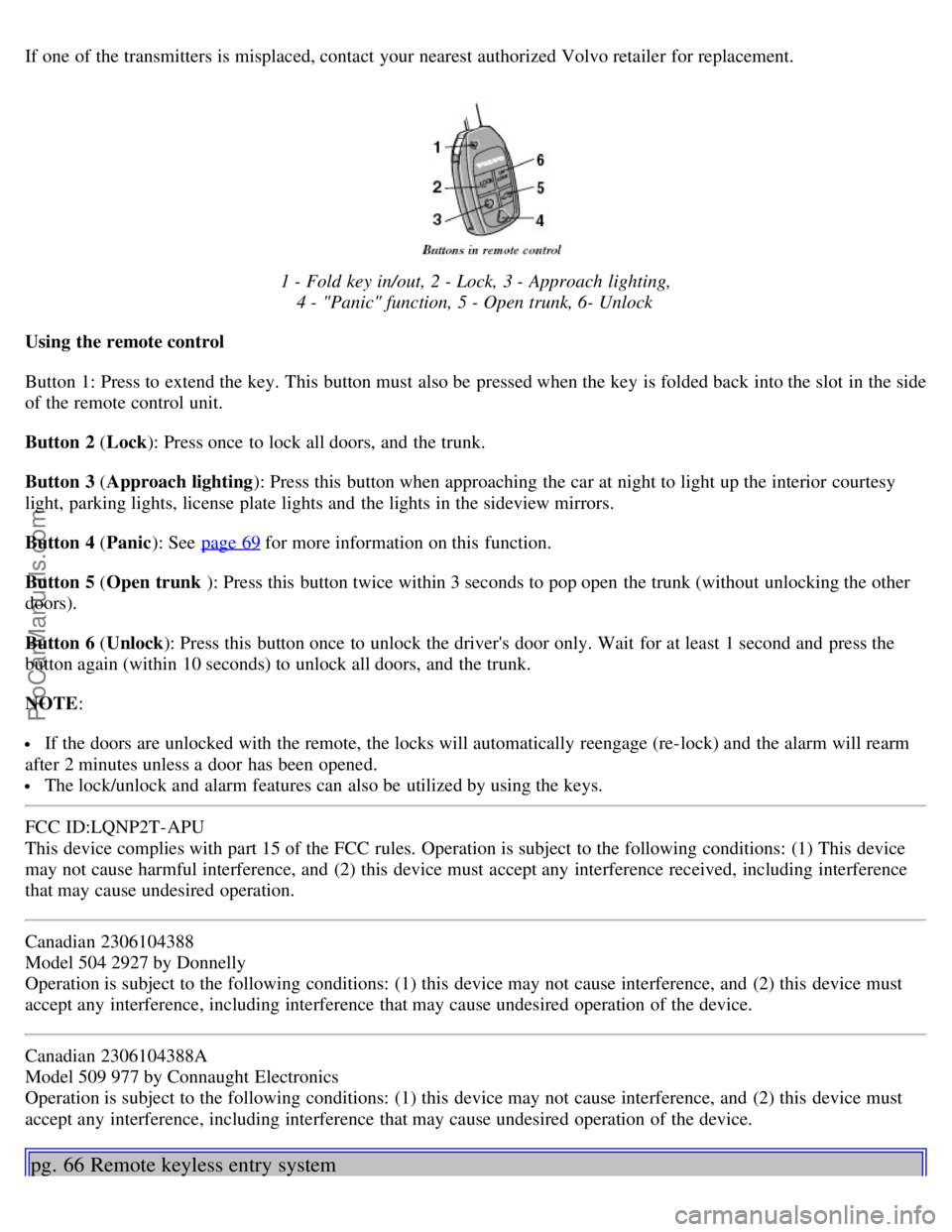
1 - Fold key in/out, 2 - Lock, 3 - Approach lighting,4 - "Panic" function, 5 - Open trunk, 6- Unlock
Using the remote control
Button 1: Press to extend the key. This button must also be pressed when the key is folded back into the slot in the side
of the remote control unit.
Button 2 ( Lock): Press once to lock all doors, and the trunk.
Button 3 ( Approach lighting ): Press this button when approaching the car at night to light up the interior courtesy
light, parking lights, license plate lights and the lights in the sideview mirrors.
Button 4 ( Panic): See page 69
for more information on this function.
Button 5 ( Open trunk ): Press this button twice within 3 seconds to pop open the trunk (without unlocking the other
doors).
Button 6 ( Unlock): Press this button once to unlock the driver's door only. Wait for at least 1 second and press the
button again (within 10 seconds) to unlock all doors, and the trunk.
NOTE :
If the doors are unlocked with the remote, the locks will automatically reengage (re-lock) and the alarm will rearm
after 2 minutes unless a door has been opened.
The lock/unlock and alarm features can also be utilized by using the keys.
FCC ID:LQNP2T-APU
This device complies with part 15 of the FCC rules. Operation is subject to the following conditions: (1) This device
may not cause harmful interference, and (2) this device must accept any interference received, including interference
that may cause undesired operation.
Canadian 2306104388
Model 504 2927 by Donnelly
Operation is subject to the following conditions: (1) this device may not cause interference, and (2) this device must
accept any interference, including interference that may cause undesired operation of the device.
Canadian 2306104388A
Model 509 977 by Connaught Electronics
Operation is subject to the following conditions: (1) this device may not cause interference, and (2) this device must
accept any interference, including interference that may cause undesired operation of the device.
pg. 66 Remote keyless entry system
ProCarManuals.com
Page 53 of 122
additional information.
WARNING!
Never carry a cell phone that is switched on while refueling your vehicle. If the phone rings, this may cause a spark
that could ignite gasoline fumes, resulting in fire and injury.
CAUTION:
Do not refuel with the engine running *. Turn the ignition off or to position I. If the ignition is on, an incorrect
reading could occur in the fuel gauge.
After refueling, close the fuel filler cap by turning it clockwise until it clicks into place *.
Allow for fuel expansion by not overfilling the tank. Overfilling could also cause damage to the emission control
systems.
Avoid spilling gasoline during refueling. In addition to causing damage to the environment, gasolines containing
alcohol can cause damage to painted surfaces, which may not be covered under the New Vehicle Limited Warranty.
Do not use gasolines containing methanol (methyl alcohol, wood alcohol). This practice can result in vehicle
performance deterioration and can damage critical parts in the fuel system. Such damage may not be covered under the
New Vehicle Limited Warranty.
* If the fuel filler cap is not closed tightly or if the engine is running when the car is refueled, the Check Engine
Light (malfunction indicator lamp) may indicate a fault.
However, your vehicle's performance will not be affected. Use only Volvo original or approved fuel filler caps.
pg. 77 Starting the engine
Starting the engine
1. Fasten the seat belt.
WARNING!
Before starting, check that the seat, steering wheel and mirrors are adjusted properly. Make sure the brake pedal can
be depressed completely. Adjust the seat if necessary. See page 54
.
2. Apply the parking brake, if not already set. The gear selector is locked in the (P)ark position (SHIFTLOCK).
3. Without touching the accelerator pedal, turn the ignition key* to the starting position. Allow the starter to operate
for up to 5 seconds (turbo: 10 seconds). Release the key as soon as the engine starts. If the engine fails to start, repeat
this step.
NOTE: On certain models, when the car is started, idle speed may be noticeably higher than normal for a short period,
depending on the temperature of the engine.
This has been done to help bring components in the emission control system to their normal operating temperature as
quickly as possible, which enables them to function normally.
For cold starts at altitudes above 6000 ft (1800 meters), depress the accelerator pedal halfway and turn the key to the
starting position. Release the pedal slowly when the engine starts.
4. To release the gear selector from the (P)ark position, the engine must be running (or the ignition key must be in
position II) and the brake pedal must be depressed. While keeping firm pressure on the brake pedal, release the parking
brake.
5. Select the desired gear. The gear engages after a very slight delay which is especially noticeable when selecting R.
ProCarManuals.com