phone VOLVO S80 2007 User Guide
[x] Cancel search | Manufacturer: VOLVO, Model Year: 2007, Model line: S80, Model: VOLVO S80 2007Pages: 251, PDF Size: 5.7 MB
Page 160 of 251
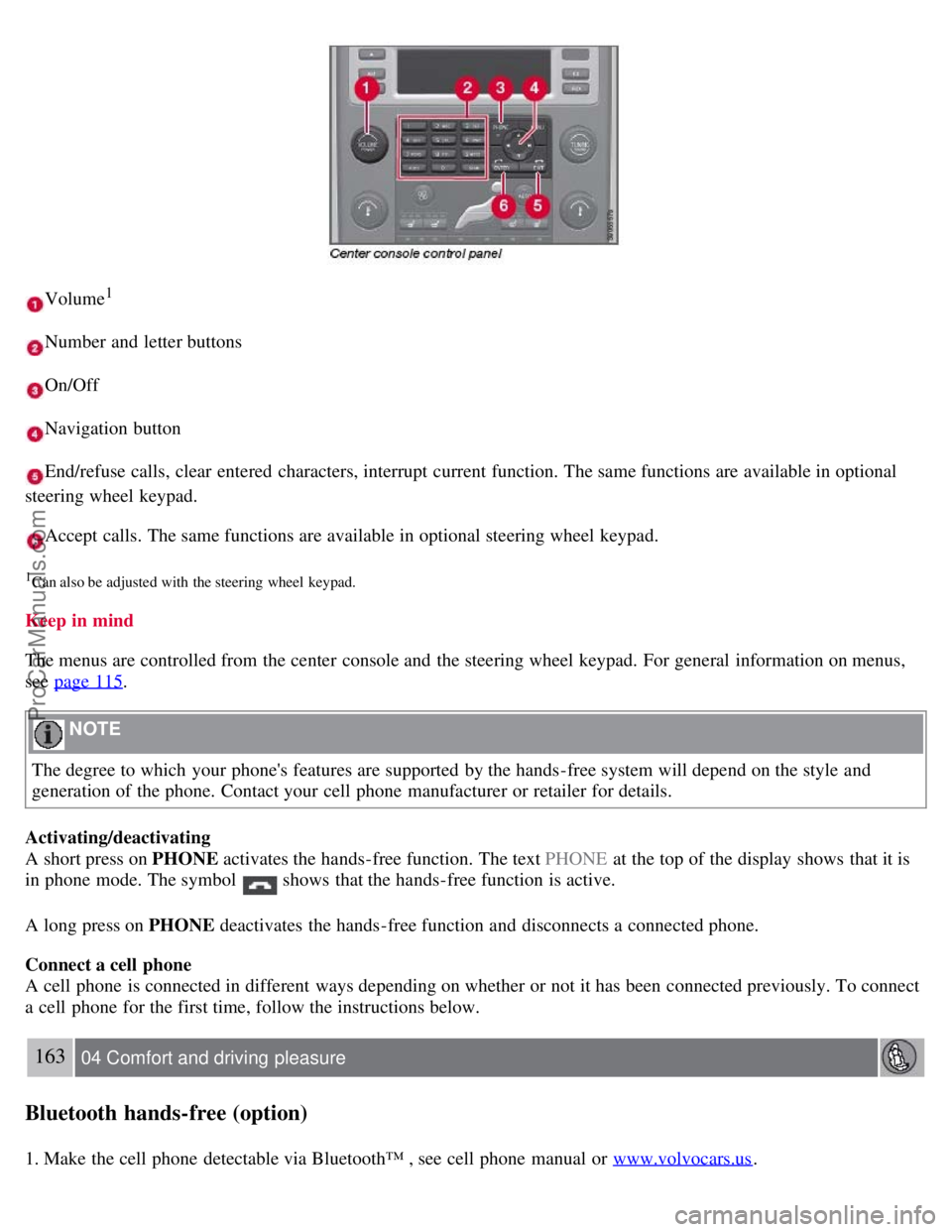
Volume1
Number and letter buttons
On/Off
Navigation button
End/refuse calls, clear entered characters, interrupt current function. The same functions are available in optional
steering wheel keypad.
Accept calls. The same functions are available in optional steering wheel keypad.
1Can also be adjusted with the steering wheel keypad.
Keep in mind
The menus are controlled from the center console and the steering wheel keypad. For general information on menus,
see page 115
.
NOTE
The degree to which your phone's features are supported by the hands-free system will depend on the style and
generation of the phone. Contact your cell phone manufacturer or retailer for details.
Activating/deactivating
A short press on PHONE activates the hands-free function. The text PHONE at the top of the display shows that it is
in phone mode. The symbol
shows that the hands-free function is active.
A long press on PHONE deactivates the hands-free function and disconnects a connected phone.
Connect a cell phone
A cell phone is connected in different ways depending on whether or not it has been connected previously. To connect
a cell phone for the first time, follow the instructions below.
163 04 Comfort and driving pleasure
Bluetooth hands-free (option)
1. Make the cell phone detectable via Bluetooth™ , see cell phone manual or www.volvocars.us.
ProCarManuals.com
Page 161 of 251
2. Activate the hands-free function with PHONE.
The menu option Add phone is shown in the display. If one or more cell phones have already been registered, these
phones will also be displayed.
3. Select Add phone .
The audio system searches for cell phones in the vicinity. The search takes approximately 30 seconds. The cell phones
detected are specified with their respective Bluetooth™ name in the display. The hands-free function's device name
( My Car ) is shown in the cell phone's display.
4. Choose one of the cell phones in the audio system display.
5. Enter the number series shown in the audio system display via the cell phone keypad.
The cell phone is registered and connected automatically to the audio system while the text Synchronizing is shown in
the display. For more information on how cell phones are registered, see page 165
.
When the connection is established the symbol
is shown and the cell phone Bluetooth™ name is shown in the
display. The cell phone can now be controlled from the audio system and the steering wheel keypad.
To call
1. Make sure that the text PHONE is shown at the top of the display and that the
symbol is visible.
2. Dial the number or use the phone book, see page 165
.
3. Press ENTER .
The call can be interrupted with EXIT .
Disconnect and connect cell phone
Automatic disconnection takes place if the cell phone moves out of the audio system's range. When the cell phone
returns within range it is connected automatically. For more information on connection, see page 165
.
Manual disconnection takes place by deactivating the hands-free function with one long press on PHONE . The hands-
free function is also deactivated when the engine is switched off or when a door is opened
1.
When the cell phone has been disconnected an ongoing call can be continued with the cell phone's built-in
microphone and speaker.
1Only Keyless Drive
NOTE
Some cell phones require that the changeover from hands-free is confirmed from the phone's keypad.
164 04 Comfort and driving pleasure
Bluetooth hands-free (option)
Making and receiving calls
ProCarManuals.com
Page 162 of 251
Incoming calls
In manual answer mode, calls are accepted by pressing ENTER. Calls can be accepted even if the audio system is in
CD or FM mode. Pressing ENTER will mute the audio system. You may press EXIT to refuse or terminate a call.
Auto answer
The auto answer function means that calls are accepted automatically. Activate/deactivate under Phone settings
Call
options
Automatic answer .
Call menu
Press MENU or ENTER during an ongoing call to access the following functions:
Mute - the hands-free system microphone is muted.
Privacy - the call is transferred to the cell phone.
NOTE
With certain cell phones the connection is terminated when the privacy function is used. This is normal.The hands-
free function asks if you want to reconnect.
Phone book - searching in the phone book.
NOTE
A new call cannot be started during an ongoing call.
Audio settings
Call volume
The call volume can be regulated when the hands-free function is in phone mode. Use the steering wheel keypad or
VOLUME.
Audio system volume
Providing there is no ongoing call taking place, the audio system volume is controlled as usual with VOLUME. In
order to control audio system volume during an ongoing call, it is necessary to switch to one of the audio sources.
The audio source can be automatically muted for incoming calls under Phone settings
Sounds and volume Mute
radio .
Ring volume
Go to Phone settings
Sounds and volume Ring volume and adjust with / on the navigation button.
Ring signals
The hands-free function has integrated ring signals that can be selected under Phone settings
Sounds and volume
Ring signals Ring signal 1, 2, 3 etc.
165 04 Comfort and driving pleasure
Bluetooth hands-free (option)
NOTE
ProCarManuals.com
Page 163 of 251
The connected cell phone's ring signal is not deactivated when one of the hands-free system's integrated signals is
used.
In order to select the connected phone's ring signal
1, go to Phone settings Sounds and volume Ring signals
Use mobile phone signal .
IDIS
In certain active driving situations, IDIS (Intelligent Driver Information System) can delay or refuse ring signals from
incoming calls, which is intended to help reduce driver distraction. IDIS can be deactivated under Phone settings
IDIS .
NOTE
Only the ring signal from the audio system's speakers is controlled by IDIS. The cell phone's ring signal is not
affected and must be deactivated manually.
1Not supported by all cell phones.
More on registering and connecting
A maximum of five cell phones can be registered. Registration is performed one time per phone. Phones can be
deregistered under Bluetooth
Remove phone . After a registration the phone no longer needs to be visible/detectable.
A maximum of one cell phone can be connected at a time.
Automatic connection
When the hands-free function is active and the most recently connected cell phone is in range, it is connected
automatically. When the audio system searches for the most recently connected phone, its name is shown in the
display. To change over to manual connection of another phone, or to stop the search, press EXIT .
Manual connection
If you want to connect a cell phone other than the most recently connected one, or to change the connected cell phone,
proceed as follows:
1. Set the audio system in phone mode.
2. Press PHONE and select one of the phones in the list.
The connection can also be made via the menu system under Bluetooth
Connect phone or Change phone .
Phone book
In order to use the phone book, the text PHONE must be shown at the top of the display and the
symbol must be
visible.
The audio system stores a copy of the phone book from each registered cell phone. The phone book is copied
automatically to the audio system at each connection. Deactivate the function under Phone settings
Synchronize
phone book. Searching for contacts is only performed in the connected cell phone's phone book.
NOTE
If the cell phone does not support copying of the phone book, List is empty is shown when copying is finished.
ProCarManuals.com
Page 164 of 251
If the phone book contains a caller's contact information, this is shown in the display.
Searching for entries in phone book The easiest way to search in the phone book is with long presses on the keys 2 to
9. This starts a search in the phone book based on the key's first letter.
The phone book can also be reached with
on the navigation button or with on the steering wheel keypad.
166 04 Comfort and driving pleasure
Bluetooth hands-free (option)
The search can also be performed from the phone book's Search menu under Phone book Search:
1. Enter the first few letters of the entry and press ENTER , or simply press ENTER.
2. Scroll to an entry and press ENTER to call.
Voice recognition
If the cell phone supports voice dialing, this function can be used by holding in ENTER .
Voice mailbox
The number to your voice mailbox can be changed in Phone settings
Voice mail number . If no number has been
stored, this menu can be accessed by an extended press on 1. Use the stored number by pressing 1 for several seconds.
Call lists
The call lists are copied to the hands-free function at each new connection and are then updated during the connection.
Press ENTER to show the last dialled. Other call lists are available under Call list .
NOTE
Certain cell phones show a list of the last dialled calls in reverse order.
Entering text
Input text using the keypad in the center console. Press once for the key's first character, twice for the second
character, etc. Continue pressing for more characters, see the table below.
A short press on EXIT deletes an entered characters. One long press on EXIT clears all entered characters.
/ on
the navigation button scrolls between the characters.
ProCarManuals.com
Page 172 of 251
With the exception of gas line antifreeze during winter months, do not add solvents, thickeners, or other store -bought
additives to your vehicle's fuel, cooling, or lubricating systems. Overuse may damage your engine, and some of these
additives contain organically volatile chemicals. Do not needlessly expose yourself to these chemicals.
WARNING
Never carry a cell phone that is switched on while refueling your vehicle. If the phone rings, this may cause a spark
that could ignite gasoline fumes, resulting in fire and injury.
176 05 During your trip
Refueling
WARNING
Carbon monoxide is a poisonous, colorless, and odorless gas. It is present in all exhaust gases. If you ever smell
exhaust fumes inside the vehicle, make sure the passenger compartment is ventilated, and immediately return the
vehicle to your retailer for correction.
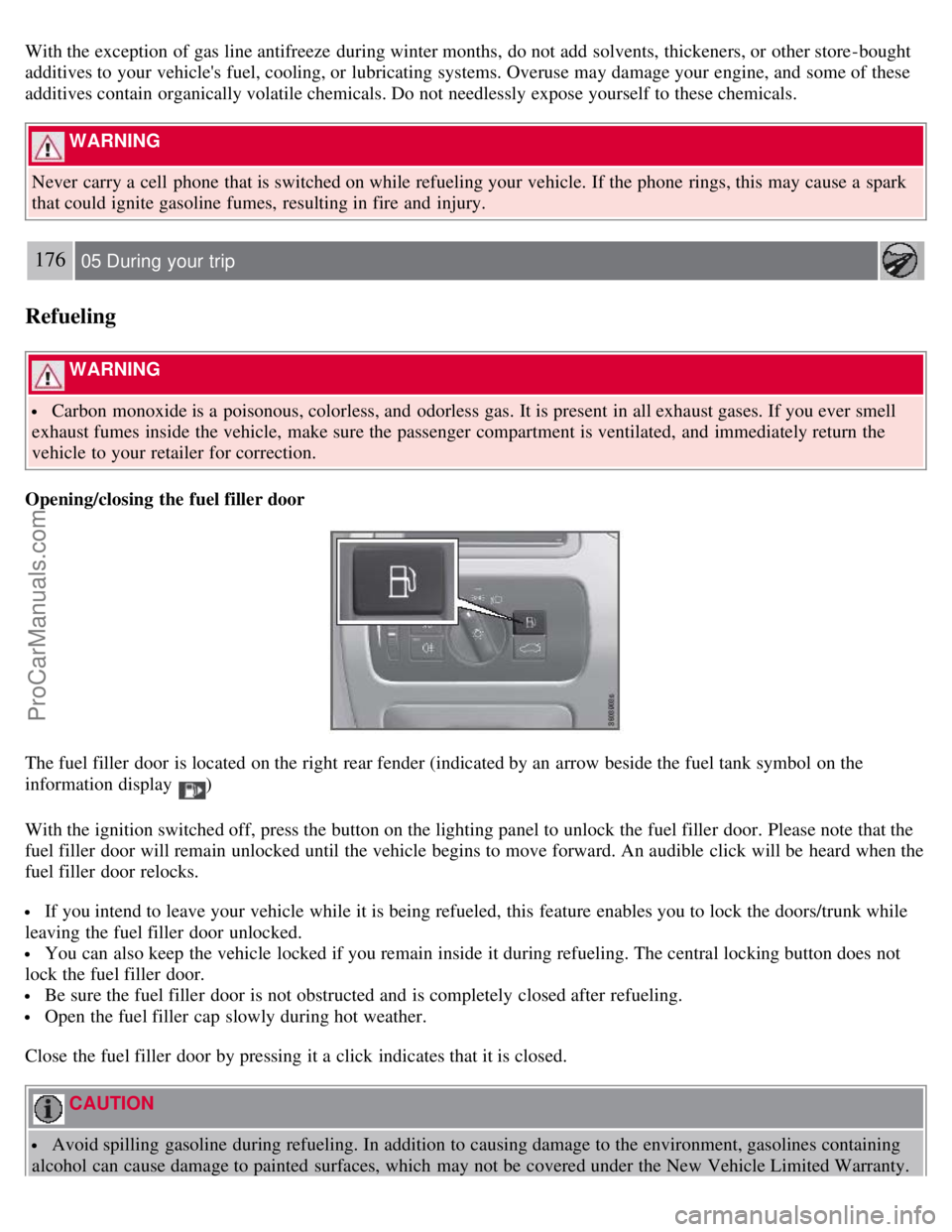
Opening/closing the fuel filler door
The fuel filler door is located on the right rear fender (indicated by an arrow beside the fuel tank symbol on the
information display
)
With the ignition switched off, press the button on the lighting panel to unlock the fuel filler door. Please note that the
fuel filler door will remain unlocked until the vehicle begins to move forward. An audible click will be heard when the
fuel filler door relocks.
If you intend to leave your vehicle while it is being refueled, this feature enables you to lock the doors/trunk while
leaving the fuel filler door unlocked.
You can also keep the vehicle locked if you remain inside it during refueling. The central locking button does not
lock the fuel filler door.
Be sure the fuel filler door is not obstructed and is completely closed after refueling.
Open the fuel filler cap slowly during hot weather.
Close the fuel filler door by pressing it a click indicates that it is closed.
CAUTION
Avoid spilling gasoline during refueling. In addition to causing damage to the environment, gasolines containing
alcohol can cause damage to painted surfaces, which may not be covered under the New Vehicle Limited Warranty.
ProCarManuals.com
Page 241 of 251
Automatic transmission
Geartronic105-106
general description105-106
oil248
shiftlock override106
Axle weight228
B
Battery
changing208-209
maintenance208
remote control, replacing55
specifications249
warning symbols207
Black box6, 190
Blind Spot Information System(BLIS)155-159
Bluetooth hands-free162-166
Booster cushion, integrated42-44
Booster cushions39
Brake lights86
Brake support150
Brake system
checking fluid level197
emergency brake assistance108
fluid248
general information107
warning light73
Bulbs
footwell lighting203
headlights198-200
introduction198
license plate lights202
side marker lights201
specifications204
taillight201-202
trunk lighting203
C
Capacity weight228
Catalytic converter177
CD player/changer128-129
Cellular telephones
Bluetooth hands-free162-166
Central locking system, introduction48
Chains231
Check engine light71
ProCarManuals.com