buttons VOLVO S80 2007 Owner's Manual
[x] Cancel search | Manufacturer: VOLVO, Model Year: 2007, Model line: S80, Model: VOLVO S80 2007Pages: 251, PDF Size: 5.7 MB
Page 138 of 251
immediate steering response. The indicator light in the button will be on to indicate that Sport mode has been selected.
Advanced
In this mode, movement of the shock absorbers is minimal and body sway in curves or when cornering is sharply
reduced.
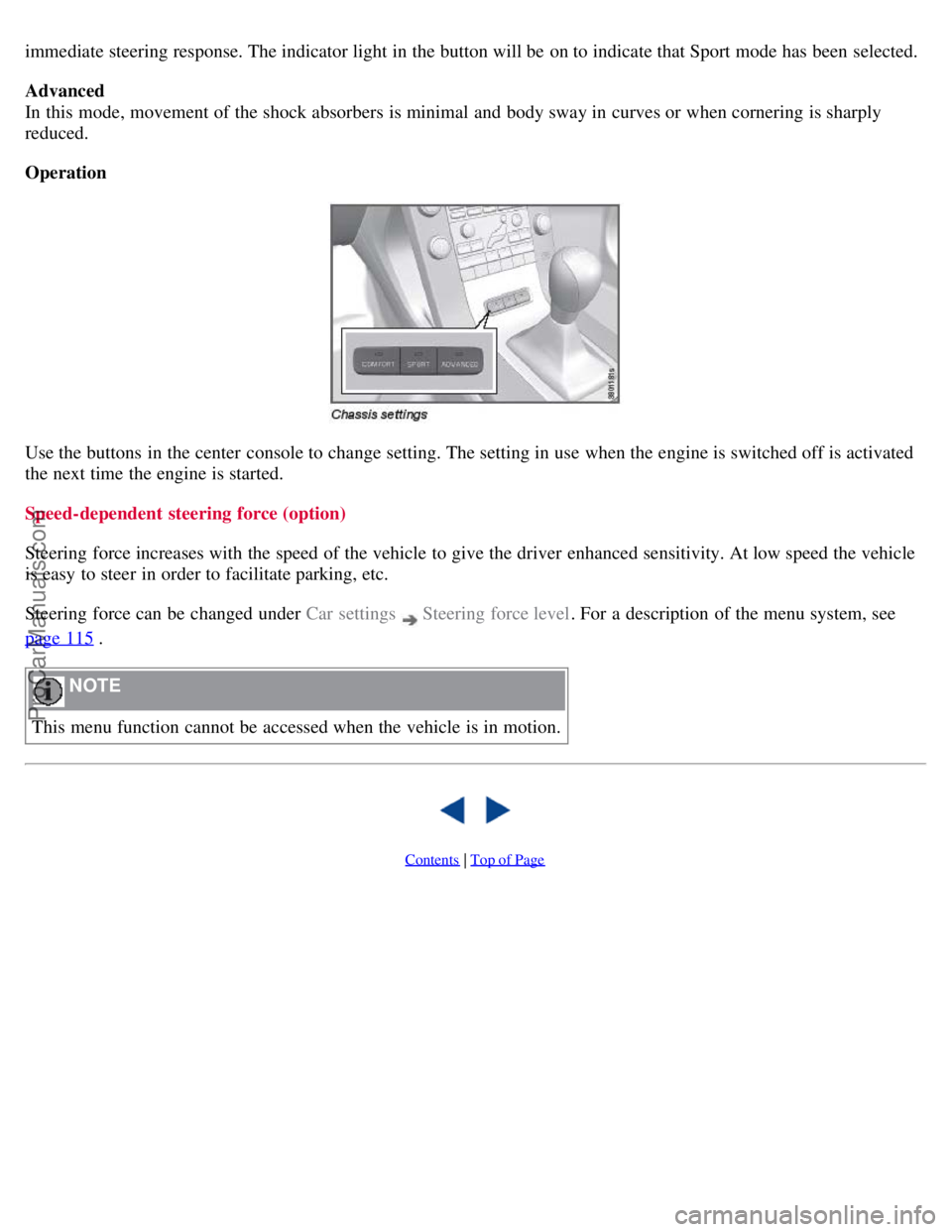
Operation
Use the buttons in the center console to change setting. The setting in use when the engine is switched off is activated
the next time the engine is started.
Speed-dependent steering force (option)
Steering force increases with the speed of the vehicle to give the driver enhanced sensitivity. At low speed the vehicle
is easy to steer in order to facilitate parking, etc.
Steering force can be changed under Car settings
Steering force level. For a description of the menu system, see
page 115
.
NOTE
This menu function cannot be accessed when the vehicle is in motion.
Contents | Top of Page
ProCarManuals.com
Page 139 of 251
2 0 0 7
VOLVO S80
142 04 Comfort and driving pleasure
Cruise control
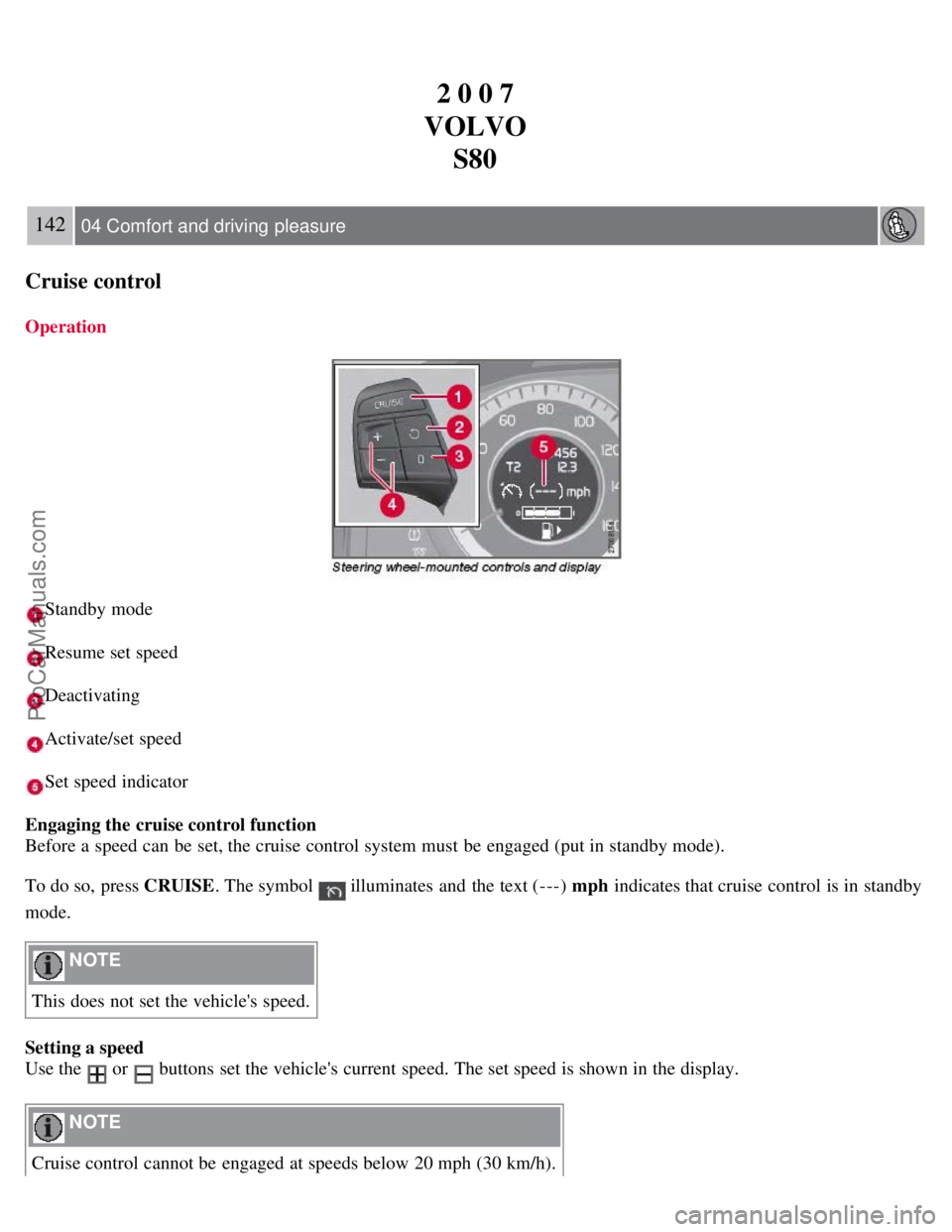
Operation
Standby mode
Resume set speed
Deactivating
Activate/set speed
Set speed indicator
Engaging the cruise control function
Before a speed can be set, the cruise control system must be engaged (put in standby mode).
To do so, press CRUISE . The symbol
illuminates and the text (---) mph indicates that cruise control is in standby
mode.
NOTE
This does not set the vehicle's speed.
Setting a speed
Use the
or buttons set the vehicle's current speed. The set speed is shown in the display.
NOTE
Cruise control cannot be engaged at speeds below 20 mph (30 km/h).
ProCarManuals.com
Page 140 of 251
Adjusting the set speed
After a speed has been set, it can be increased or decreased by using the
or buttons.
Press and hold down or until the vehicle reaches the desired speed. This will become the set speed when the
button is released.
Press or r for approximately a half second and release the button to increase or decrease vehicle speed by
approximately 1 mph (1.6 km/h).
NOTE
A temporary increase in speed, for less than 1 minute (e.g. when passing another car), does not affect the current
cruise control setting. The vehicle will automatically return to the previously set speed when the accelerator pedal is
released.
If one of the cruise control buttons is kept depressed for more than approx. 1 minute cruise control is disengaged.
The engine must then be switched off in order to reset cruise control.
Automatic deactivation
Cruise control is automatically deactivated temporarily if one of the following occurs:
If the speed drops below approximately 20 mph (30 km/h).
When the brake pedal is depressed.
If the gear selector is moved to position N.
During wheel spin or wheel lock-up.
If the vehicle's speed is increased by using the accelerator pedal for more than 1 minute.
The currently set speed will be saved in the system's memory.
143 04 Comfort and driving pleasure
Cruise control
Temporary deactivation
The driver can temporarily deactivate cruise control by pressing 0. The saved speed is shown in brackets in the
information display.
Resume set speed
If cruise control has been deactivated temporarily, it can be reactivated by pressing
. The vehicle's speed returns to
the most recently set speed.
WARNING
There may be a significant increase in speed after the
button has been pressed.
Deactivation
Cruise control is disengaged with CRUISE , by putting the gear selector in Neutral, or by switching off the engine. The
set speed is cleared.
WARNING
ProCarManuals.com
Page 145 of 251
Adaptive cruise control is disengaged (goes into standby mode):
If the speed drops below approximately 20 mph (30 km/h).
When the brake pedal is depressed.
If the gear selector is moved to position N.
During wheel spin or wheel lock-up.
If the vehicle's speed is increased by using the accelerator pedal for more than 1 minute.
NOTE
If the accelerator pedal is depressed for a short period, such as when passing another vehicle, adaptive cruise control
is temporarily disengaged and re-engages when the accelerator pedal is released.
When ACC is disengaged, the driver must assume full control of the vehicle.
Engaging the cruise control function
Before ACC can be used, it must first be put in standby mode.
To do so, press
. The set time interval is briefly shown in the display.
Setting a speed
Use the
or buttons to store (set) the vehicle's current speed. The set speed is shown in the display.
NOTE
Adaptive cruise control cannot be engaged at speeds below 20 mph (30 km/h).
148 04 Comfort and driving pleasure
Adaptive Cruise Control-ACC
Adjusting the set speed
After a speed has been set, it can be increased or decreased by using the
or buttons.
Press and hold down or to increase or decrease the set speed. This will become the set speed when the button
is released.
Press or for approximately a half second and release the button to increase or decrease the set speed by
approximately 5 mph (8 km/h)
When the system is in active mode, the button has the same function as , but results in a smaller increase in
speed.
NOTE
If adaptive cruise control does not react to activation, this may be because the set time interval to the closest
vehicle prevents an increase in speed.
In some situations cruise control cannot be activated. Cruise Control Unavailable is shown in the display, see page
149.
Setting a time interval
ProCarManuals.com
Page 160 of 251
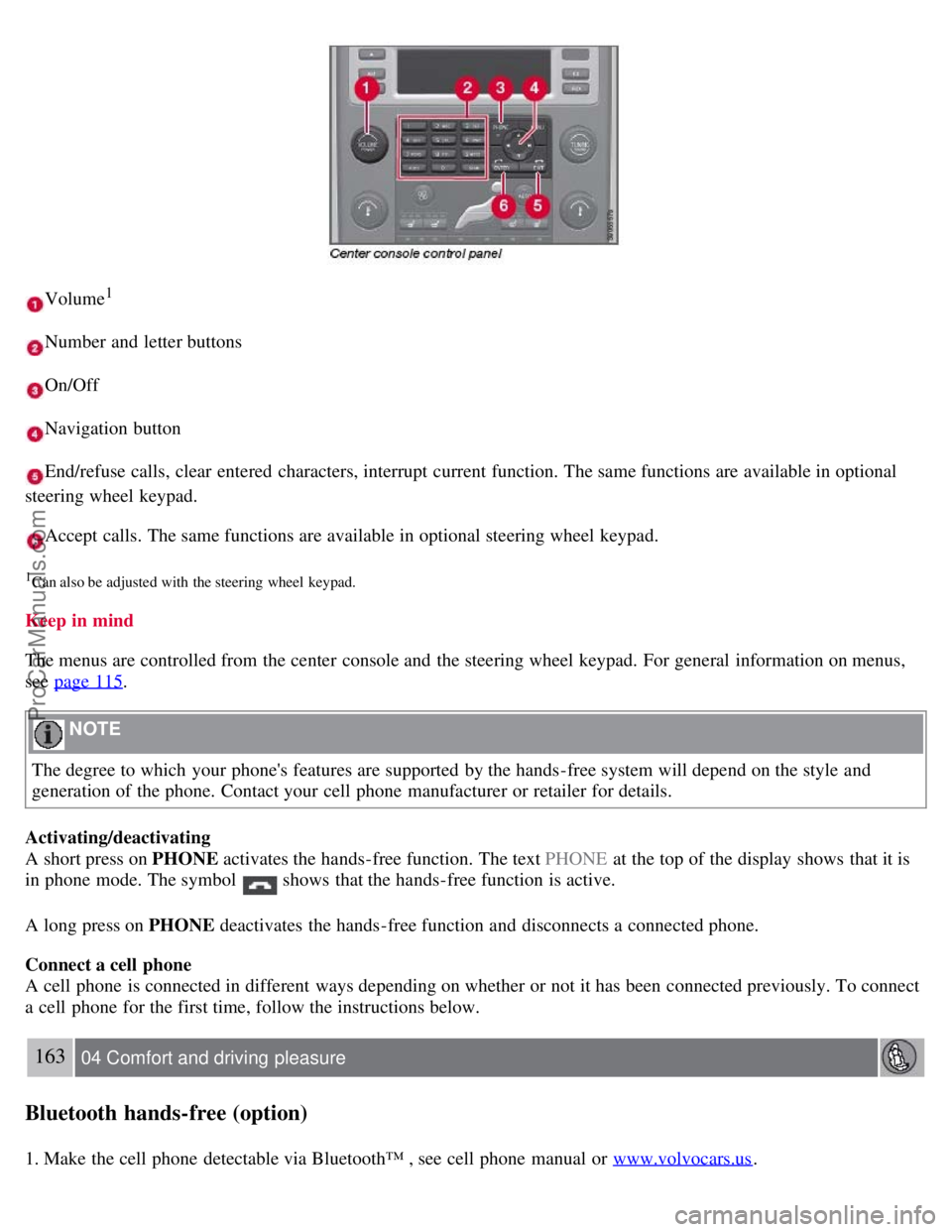
Volume1
Number and letter buttons
On/Off
Navigation button
End/refuse calls, clear entered characters, interrupt current function. The same functions are available in optional
steering wheel keypad.
Accept calls. The same functions are available in optional steering wheel keypad.
1Can also be adjusted with the steering wheel keypad.
Keep in mind
The menus are controlled from the center console and the steering wheel keypad. For general information on menus,
see page 115
.
NOTE
The degree to which your phone's features are supported by the hands-free system will depend on the style and
generation of the phone. Contact your cell phone manufacturer or retailer for details.
Activating/deactivating
A short press on PHONE activates the hands-free function. The text PHONE at the top of the display shows that it is
in phone mode. The symbol
shows that the hands-free function is active.
A long press on PHONE deactivates the hands-free function and disconnects a connected phone.
Connect a cell phone
A cell phone is connected in different ways depending on whether or not it has been connected previously. To connect
a cell phone for the first time, follow the instructions below.
163 04 Comfort and driving pleasure
Bluetooth hands-free (option)
1. Make the cell phone detectable via Bluetooth™ , see cell phone manual or www.volvocars.us.
ProCarManuals.com