remote control VOLVO S80 2007 Owners Manual
[x] Cancel search | Manufacturer: VOLVO, Model Year: 2007, Model line: S80, Model: VOLVO S80 2007Pages: 251, PDF Size: 5.7 MB
Page 12 of 251
If the SRS warning light stays on after the engine has started or if it illuminates while you are driving, have the
vehicle inspected by a trained and qualified Volvo service technician as soon as possible.
Never try to repair any component or part of the SRS yourself. Any interference in the system could cause
malfunction and serious injury. All work on these systems should be performed by a trained and qualified Volvo
service technician.
WARNING
If your vehicle has been subjected to flood conditions (e.g. soaked carpeting/standing water on the floor of the
vehicle) or if your vehicle has become flood-damaged in any way, do not attempt to start the vehicle or insert the
remote control into the ignition slot before disconnecting the battery (see below). This may cause airbag deployment
which could result in personal injury. Have the vehicle towed to a trained and qualified Volvo service technician for
repairs.
Automatic transmission:
Before attempting to tow the vehicle, use the following procedure to override the shiftlock system to move the gear
selector to the neutral position:
Switch off the ignition for at least 10 minutes and disconnect the battery
Wait at least one minute.
Insert the remote control into the ignition slot and press the Start button (without depressing brake pedal) to go to
ignition mode II. See page 75
for more information.
Press firmly on the brake pedal.
Move the gear selector from (P)ark to the (N)eutral position. See page 106 for information on manually overriding
the shiftlock system.
18 01 Safety
Safety in the passenger compartment
Front airbags
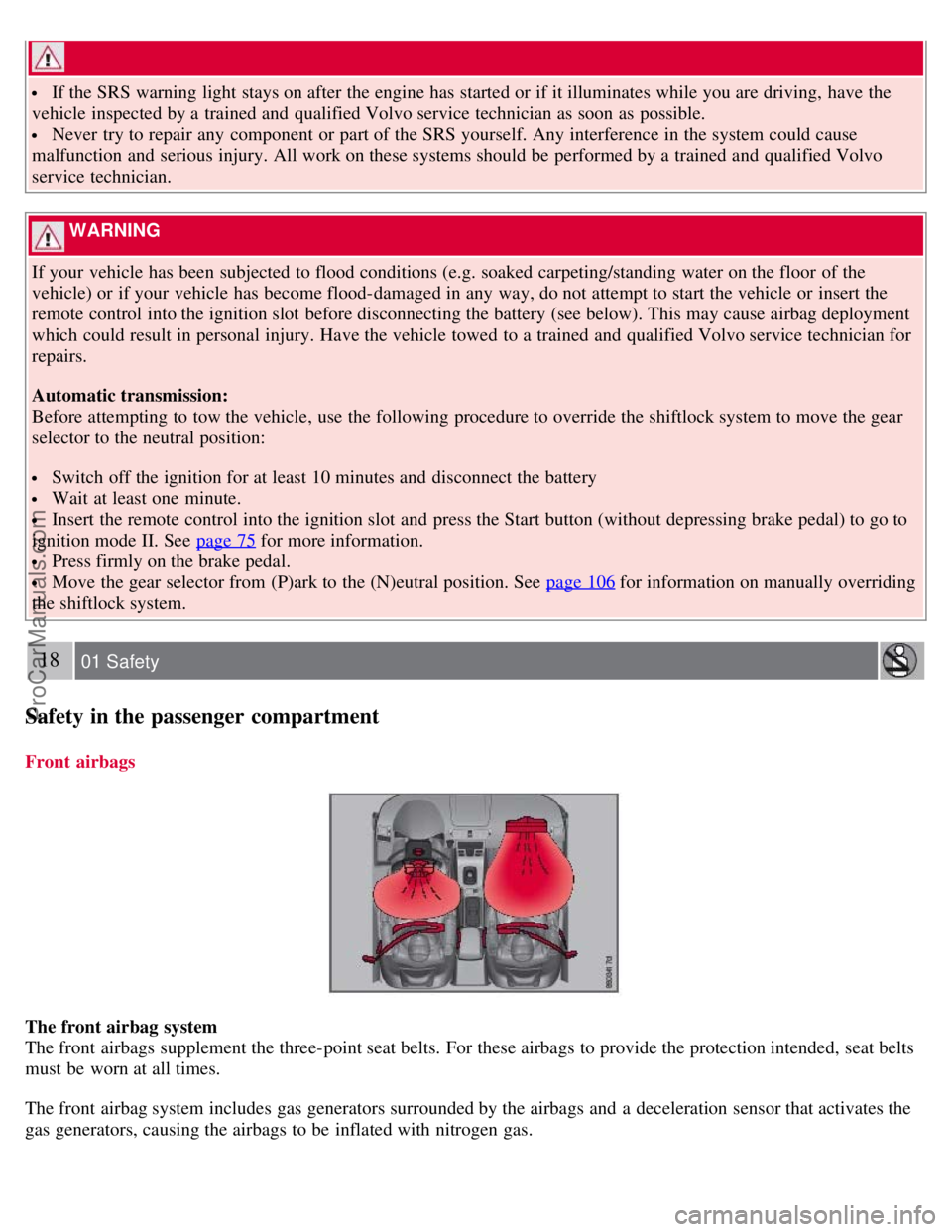
The front airbag system
The front airbags supplement the three-point seat belts. For these airbags to provide the protection intended, seat belts
must be worn at all times.
The front airbag system includes gas generators surrounded by the airbags and a deceleration sensor that activates the
gas generators, causing the airbags to be inflated with nitrogen gas.
ProCarManuals.com
Page 23 of 251
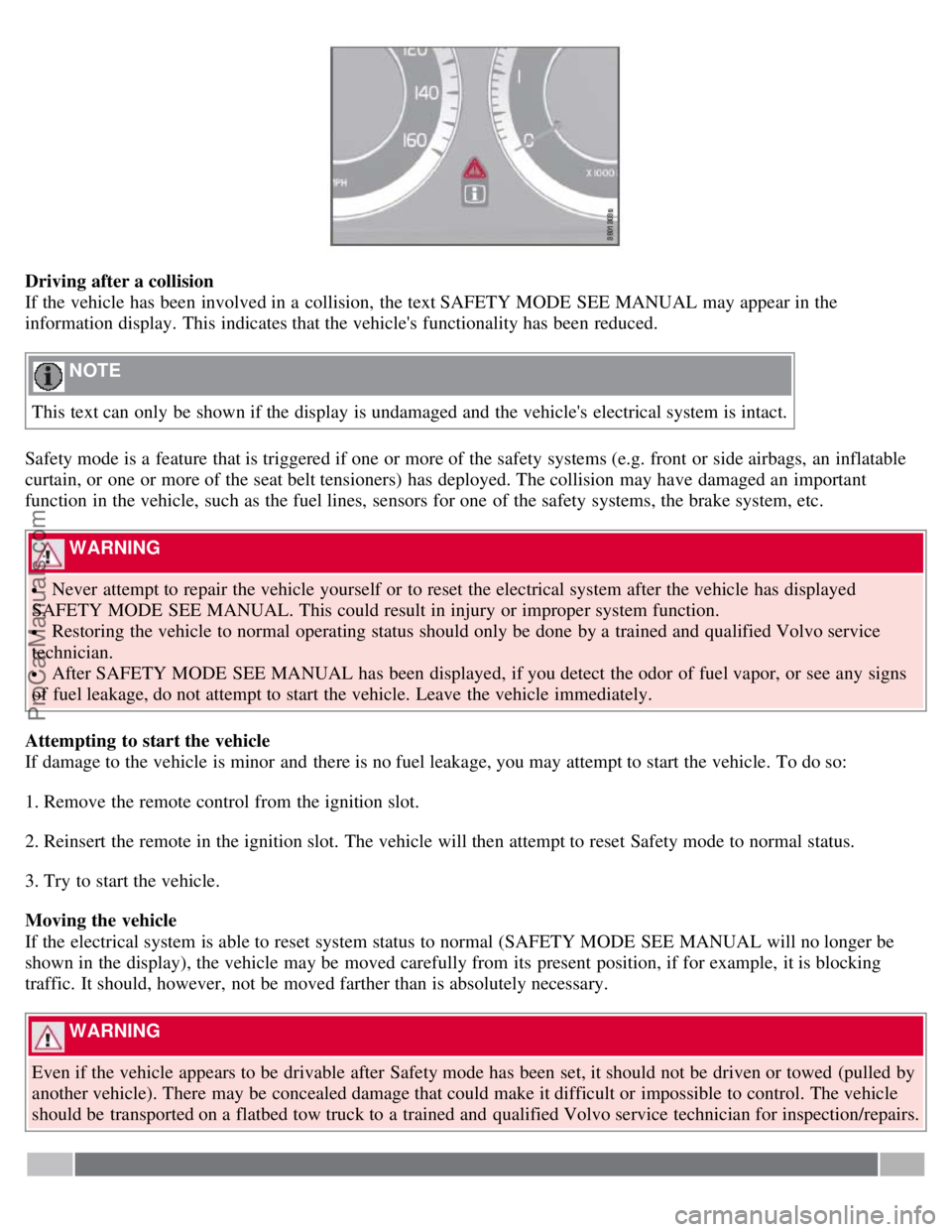
Driving after a collision
If the vehicle has been involved in a collision, the text SAFETY MODE SEE MANUAL may appear in the
information display. This indicates that the vehicle's functionality has been reduced.
NOTE
This text can only be shown if the display is undamaged and the vehicle's electrical system is intact.
Safety mode is a feature that is triggered if one or more of the safety systems (e.g. front or side airbags, an inflatable
curtain, or one or more of the seat belt tensioners) has deployed. The collision may have damaged an important
function in the vehicle, such as the fuel lines, sensors for one of the safety systems, the brake system, etc.
WARNING
Never attempt to repair the vehicle yourself or to reset the electrical system after the vehicle has displayed
SAFETY MODE SEE MANUAL. This could result in injury or improper system function.
Restoring the vehicle to normal operating status should only be done by a trained and qualified Volvo service
technician.
After SAFETY MODE SEE MANUAL has been displayed, if you detect the odor of fuel vapor, or see any signs
of fuel leakage, do not attempt to start the vehicle. Leave the vehicle immediately.
Attempting to start the vehicle
If damage to the vehicle is minor and there is no fuel leakage, you may attempt to start the vehicle. To do so:
1. Remove the remote control from the ignition slot.
2. Reinsert the remote in the ignition slot. The vehicle will then attempt to reset Safety mode to normal status.
3. Try to start the vehicle.
Moving the vehicle
If the electrical system is able to reset system status to normal (SAFETY MODE SEE MANUAL will no longer be
shown in the display), the vehicle may be moved carefully from its present position, if for example, it is blocking
traffic. It should, however, not be moved farther than is absolutely necessary.
WARNING
Even if the vehicle appears to be drivable after Safety mode has been set, it should not be driven or towed (pulled by
another vehicle). There may be concealed damage that could make it difficult or impossible to control. The vehicle
should be transported on a flatbed tow truck to a trained and qualified Volvo service technician for inspection/repairs.
ProCarManuals.com
Page 25 of 251
Do not use child safety seats or child booster cushions/backrests in the front passenger's seat. We also recommend
that children under 4 feet 7 inches (140 cm) in height who have outgrown these devices sit in the rear seat with the
seat belt fastened.
Keep vehicle doors and trunk locked and keep remote controls out of a child's reach. Unsupervised children could
lock themselves in an open trunk and risk injury. Children should be taught not to play in vehicles.
On hot days, the temperature in the trunk or vehicle interior can rise very quickly. Exposure to these high
temperatures for even a short period of time can cause heat-related injury or death. Small children are particularly at
risk.
31 01 Safety
Child safety
Automatic Locking Retractor/Emergency Locking Retractor
To make child seat installation easier, each seat belt (except for the driver's belt) is equipped with a locking mechanism
to help keep the seat belt taut.
When attaching the seat belt to a child seat:
1. Attach the seat belt to the child seat according to the child seat manufacturer's instructions.
2. Pull the seat belt out as far as possible.
3. Insert the seat belt latch plate into the buckle (lock) in the usual way.
4. Release the seat belt and pull it taut around the child seat.
A sound from the seat belt retractor will be audible at this time and is normal. The belt will now be locked in place.
This function is automatically disabled when the seat belt is unlocked and the belt is fully retracted.
WARNING
Do not use child safety seats or child booster cushions/backrests in the front passenger's seat. We also recommend
that children who have outgrown these devices sit in the rear seat with the seat belt properly fastened.
Volvo's recommendations
Why does Volvo believe that no child should sit in the front seat of a vehicle? It's quite simple really. A front airbag is
a very powerful device designed, by law, to help protect an adult.
Because of the size of the airbag and its speed of inflation, a child should never be placed in the front seat, even if he
or she is properly belted or strapped into a child safety seat. Volvo has been an innovator in safety for over seventy-
five years, and we'll continue to do our part. But we need your help. Please remember to put your children in the back
seat, and buckle them up.
Volvo has some very specific recommendations:
Always wear your seat belt.
Airbags are a SUPPLEMENTAL safety device which, when used with a three-point seat belt can help reduce
serious injuries during certain types of accidents. Volvo recommends that you do not disconnect the airbag system in
your vehicle.
Volvo strongly recommends that everyone in the vehicle be properly restrained.
Volvo recommends that ALL occupants (adults and children) shorter than 4 feet 7 inches (140 cm) be seated in the
back seat of any vehicle with a front passenger side airbag.
ProCarManuals.com
Page 38 of 251
In the event of a collision while the integrated booster cushion was occupied, the entire booster cushion and seat
belt must be replaced. The booster cushion should also be replaced if it is badly worn or damaged in any way. This
work should be performed by a trained and qualified Volvo service technician only
45 01 Safety
Child safety locks
Child safety locks
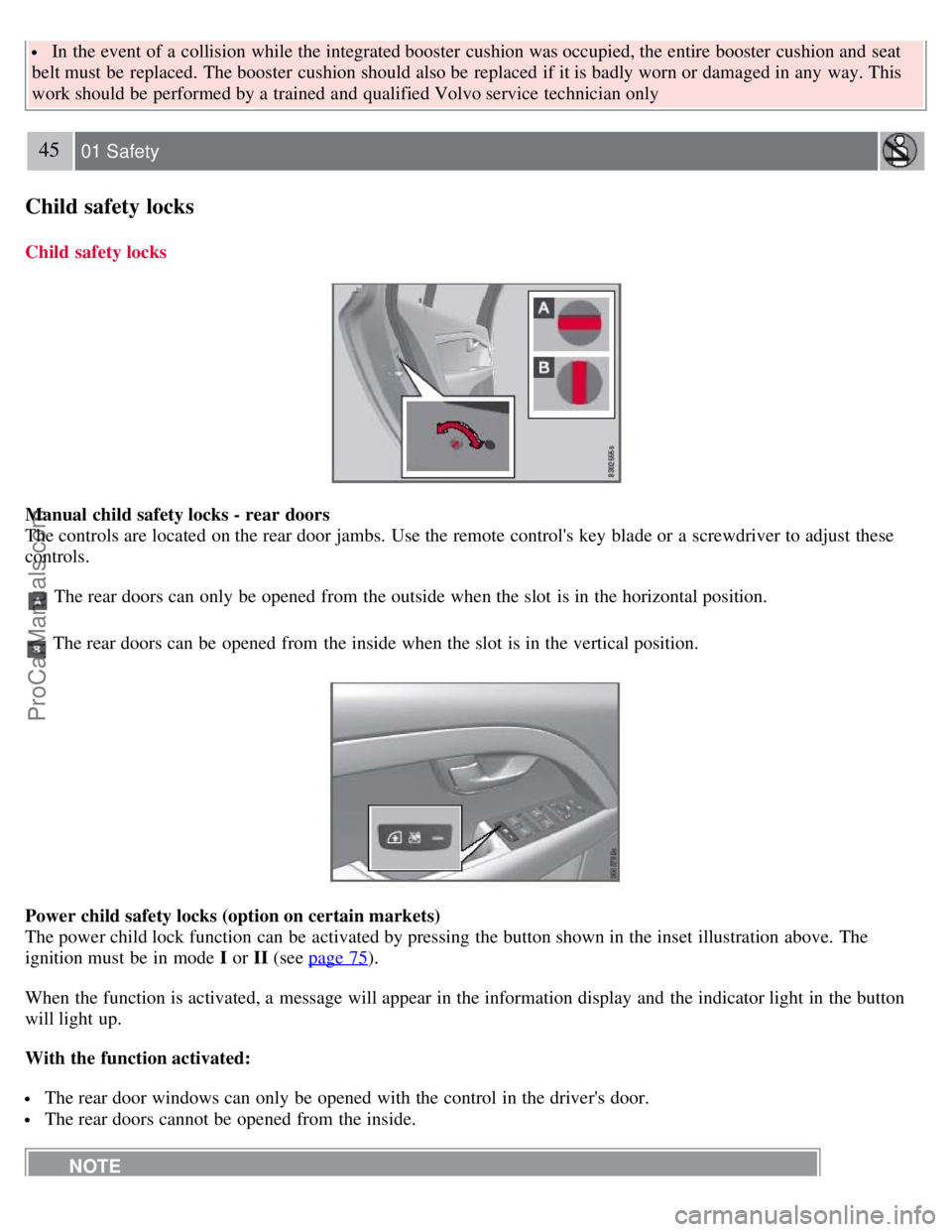
Manual child safety locks - rear doors
The controls are located on the rear door jambs. Use the remote control's key blade or a screwdriver to adjust these
controls.
The rear doors can only be opened from the outside when the slot is in the horizontal position.
The rear doors can be opened from the inside when the slot is in the vertical position.
Power child safety locks (option on certain markets)
The power child lock function can be activated by pressing the button shown in the inset illustration above. The
ignition must be in mode I or II (see page 75
).
When the function is activated, a message will appear in the information display and the indicator light in the button
will light up.
With the function activated:
The rear door windows can only be opened with the control in the driver's door.
The rear doors cannot be opened from the inside.
NOTE
ProCarManuals.com
Page 40 of 251
2 0 0 7
VOLVO S80
46 02 Locks and alarm
Remote key and key blade 48
Keyless drive56
Locks59
Alarm62
47 02 Locks and alarm
48 02 Locks and alarm
Remote key and key blade
Introduction
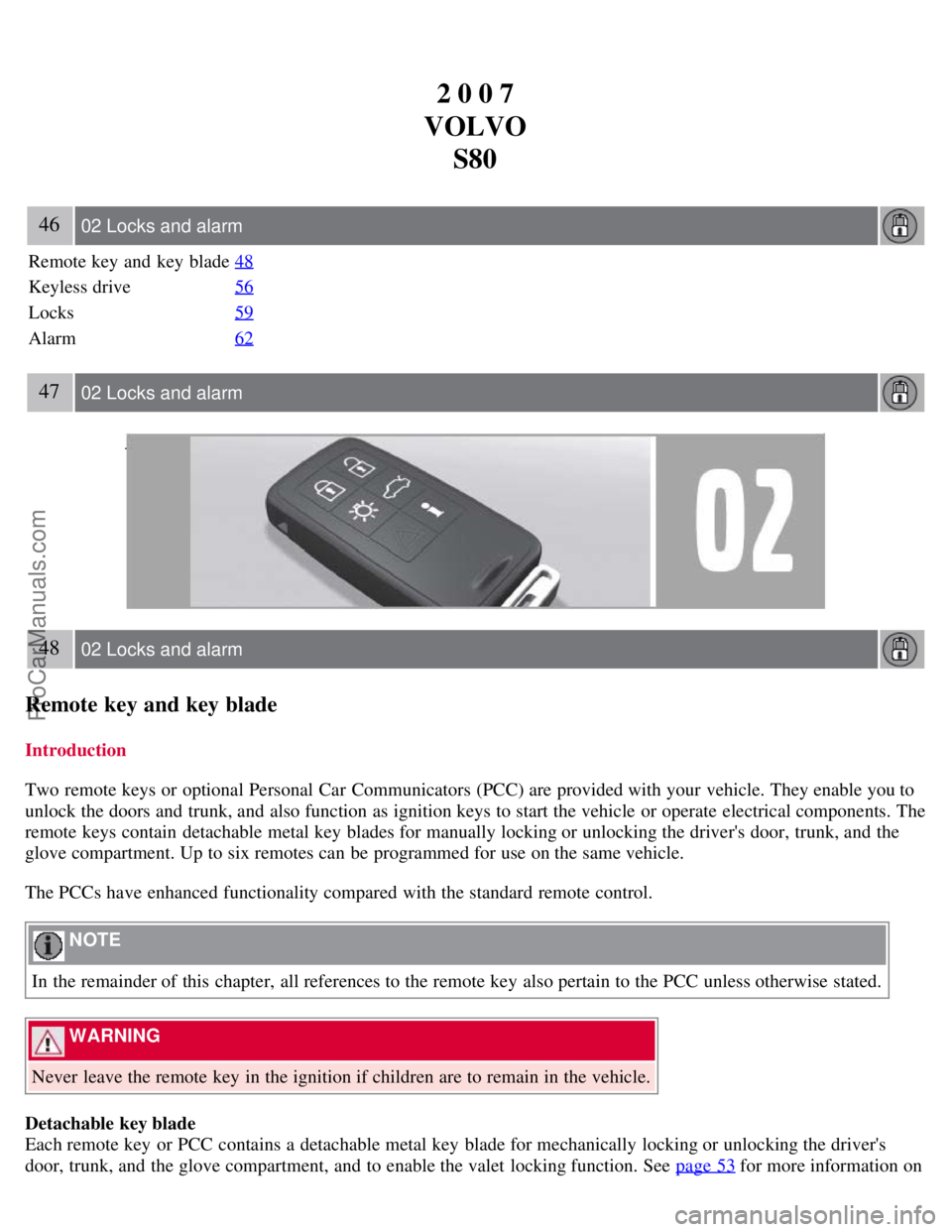
Two remote keys or optional Personal Car Communicators (PCC) are provided with your vehicle. They enable you to
unlock the doors and trunk, and also function as ignition keys to start the vehicle or operate electrical components. The
remote keys contain detachable metal key blades for manually locking or unlocking the driver's door, trunk, and the
glove compartment. Up to six remotes can be programmed for use on the same vehicle.
The PCCs have enhanced functionality compared with the standard remote control.
NOTE
In the remainder of this chapter, all references to the remote key also pertain to the PCC unless otherwise stated.
WARNING
Never leave the remote key in the ignition if children are to remain in the vehicle.
Detachable key blade
Each remote key or PCC contains a detachable metal key blade for mechanically locking or unlocking the driver's
door, trunk, and the glove compartment, and to enable the valet locking function. See page 53 for more information on
ProCarManuals.com
Page 44 of 251
This function can be changed so that all doors unlock at the same time under Car settings lock settings Doors,
unlock. See page 115 for a description of the menu system.
Approach lighting - As you approach the vehicle, press button
on the remote control to light the interior lighting,
parking lights, license plate lighting and the lights in the door mirrors (option).
51 02 Locks and alarm
Remote key and key blade
These lights will switch off automatically after 30, 60 or 90 seconds. See page 115 for more information.
Unlock trunk- Press the button once to disarm the alarm system and optional movement sensor (the alarm indicator
light on the dashboard will go out), and unlock only the trunk. See also page 61
for information on opening the trunk
from the inside.
NOTE
This function will not open the trunk.
As an added safety precaution, the parking lights will come on automatically for a short period when the trunk has
been opened.
After closing, the trunk will not automatically relock. Press Lock to relock it and rearm the alarm.
Panic alarm - This button can be used to attract attention during emergency situations.
To activate the panic alarm, press and hold button
for at least 3 seconds or press it twice within 3 seconds. The turn
signals and horn will be activated. The panic alarm will stop automatically after 2 minutes and 45 seconds. To
deactivate, wait approximately 5 seconds and press the button again.
Range
The remote key has a range of approximately 60 ft. (20 m) from the vehicle.
NOTE
This button will not unlock the vehicle.
Buildings or other obstacles may interfere with the function of the remote key. The vehicle can also be locked or
unlocked with the key blade, see page 53
.
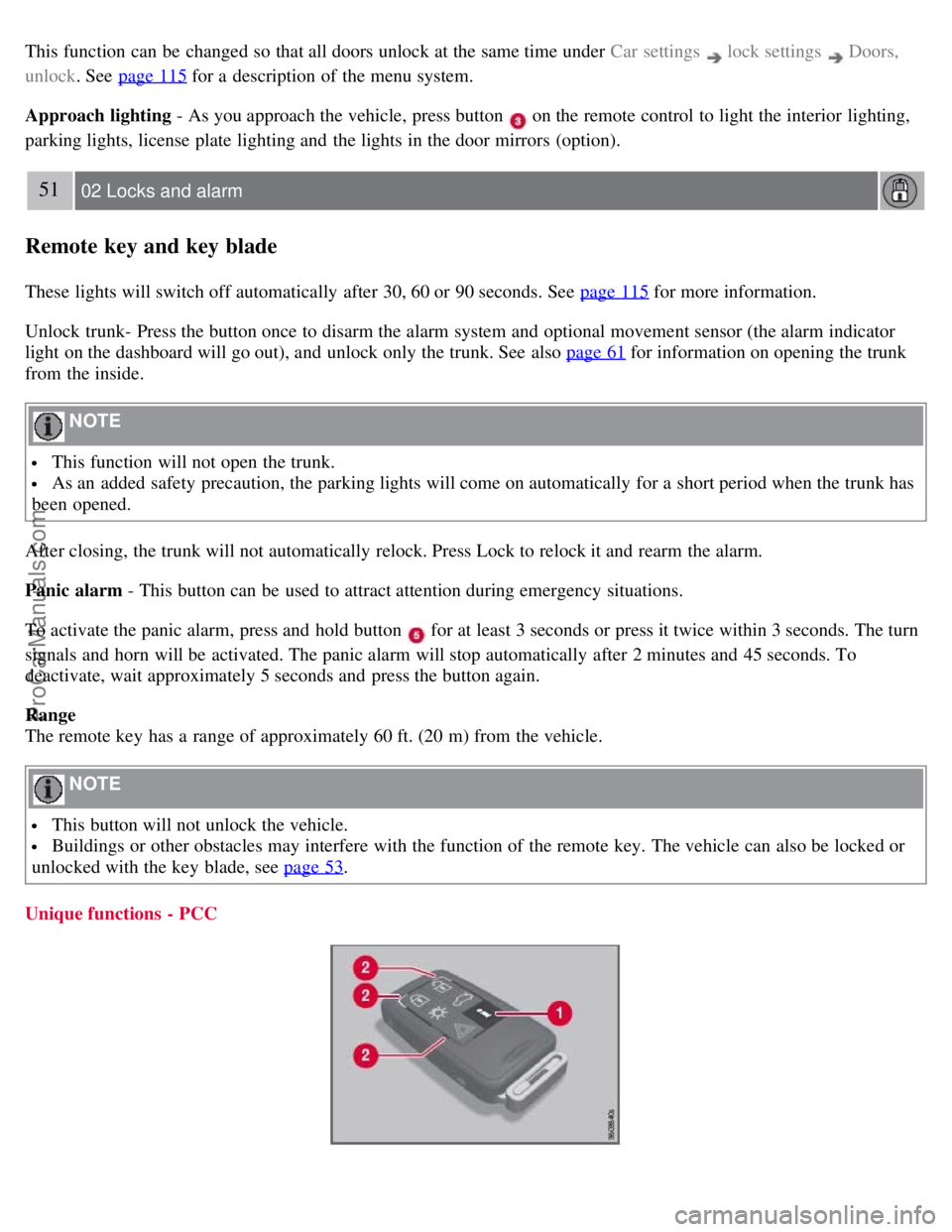
Unique functions - PCC
ProCarManuals.com
Page 45 of 251
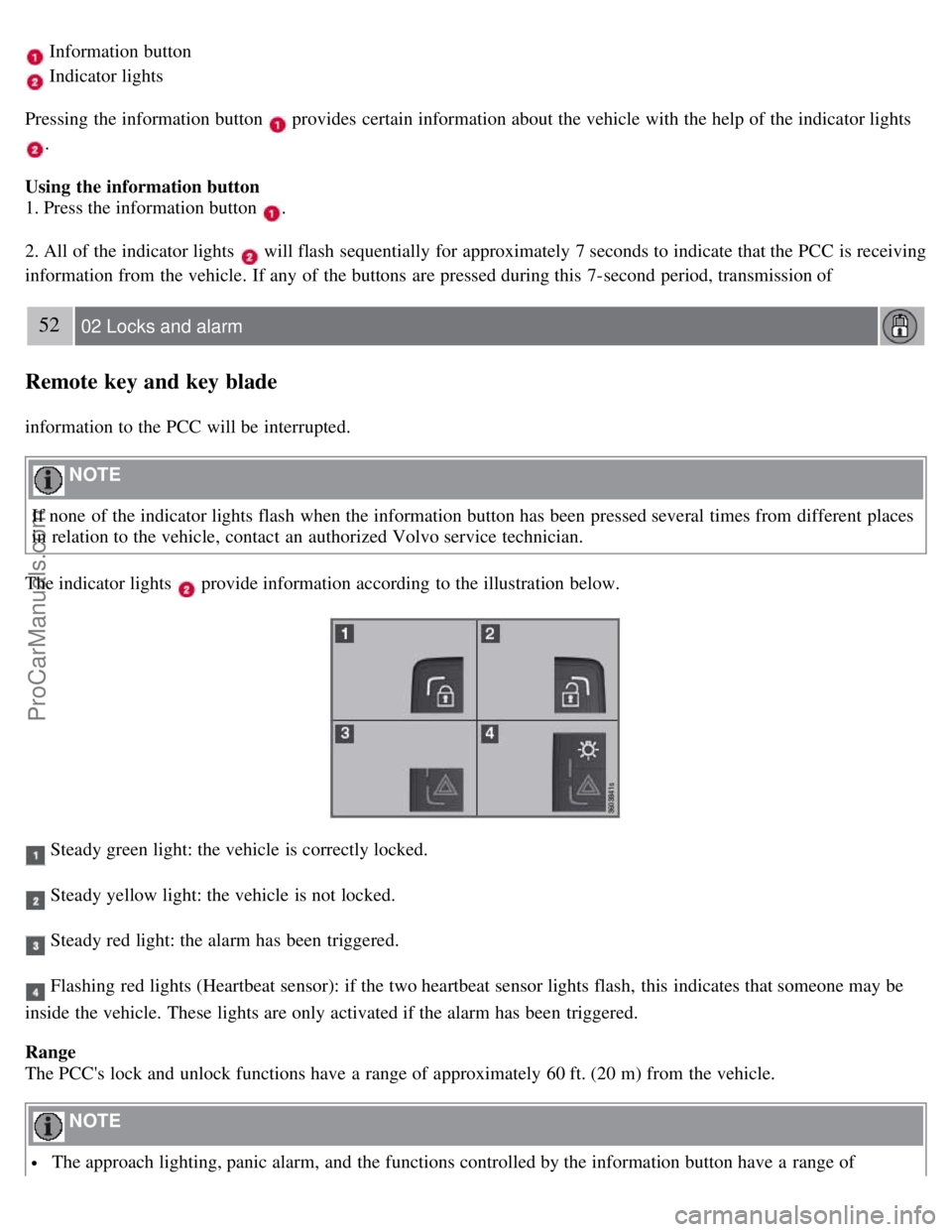
Information button
Indicator lights
Pressing the information button
provides certain information about the vehicle with the help of the indicator lights
.
Using the information button
1. Press the information button
.
2. All of the indicator lights
will flash sequentially for approximately 7 seconds to indicate that the PCC is receiving
information from the vehicle. If any of the buttons are pressed during this 7-second period, transmission of
52 02 Locks and alarm
Remote key and key blade
information to the PCC will be interrupted.
NOTE
If none of the indicator lights flash when the information button has been pressed several times from different places
in relation to the vehicle, contact an authorized Volvo service technician.
The indicator lights
provide information according to the illustration below.
Steady green light: the vehicle is correctly locked.
Steady yellow light: the vehicle is not locked.
Steady red light: the alarm has been triggered.
Flashing red lights (Heartbeat sensor): if the two heartbeat sensor lights flash, this indicates that someone may be
inside the vehicle. These lights are only activated if the alarm has been triggered.
Range
The PCC's lock and unlock functions have a range of approximately 60 ft. (20 m) from the vehicle.
NOTE
The approach lighting, panic alarm, and the functions controlled by the information button have a range of
ProCarManuals.com
Page 46 of 251
approximately 300 ft (100 m) from the vehicle.
Buildings or other obstacles may interfere with the function of the PCC.
Outside of the PCC's range
If the PCC is more than approximately 300 ft (100 m) from the vehicle when the information button is pressed, no new
information will be received. The PCC most recently used to lock or unlock the vehicle will show the vehicle's most
recently received status. The indicator lights will not flash when the information button is pressed while the PCC is out
of range.
NOTE
If none of the indicator lights illuminate when the information button is pressed, this may be because the most recent
transmission between the vehicle and the PCC was interrupted or impeded by buildings or other objects.
Heartbeat Sensor
The heartbeat sensor function
is a complement to the vehicle's standard alarm, and indicates at a distance of up to
300 ft (100 m) that someone may be in the vehicle. The heartbeat sensor only functions if the alarm has been triggered.
NOTE
The heartbeat sensor registers a person's heartbeat in the form of vibrations in the vehicle's chassis. For this reason,
the sensor's function may be impaired in areas with high levels of noise or vibrations.
Keyless drive
Vehicles equipped with the optional Personal Car Communicator have the keyless drive function. See page 56
for
detailed information.
53 02 Locks and alarm
Remote key and key blade
Detachable key blade
The key blade can be removed from the remote control. When removed, the key blade can be used as follows:
To lock/unlock the driver's door
To lock/unlock the trunk (see page 61)
To lock/unlock the glove compartment (see page 60)
To enable/disable the valet locking function (see page 54)
Unlocking the doors with the detached key blade
Insert the key blade as far as possible in the driver's door lock. Turn the key blade clockwise approximately one -
quarter turn to unlock the driver's door only.
NOTE
After unlocking the driver's door with the key blade, opening the door will trigger the alarm.
To disable the alarm:
Insert the remote key in the ignition slot.
ProCarManuals.com
Page 47 of 251
Locking the doors with the detached key blade
1. Lock the rear doors and the front passenger's door by pressing the lock button on each door.
2. Turn the key blade one -quarter turn counter-clockwise to lock the driver's door.
NOTE
This does not arm the alarm or lock the trunk. The trunk has a separate lock that can be locked with the key blade,
see page 61
.
Removing the key blade
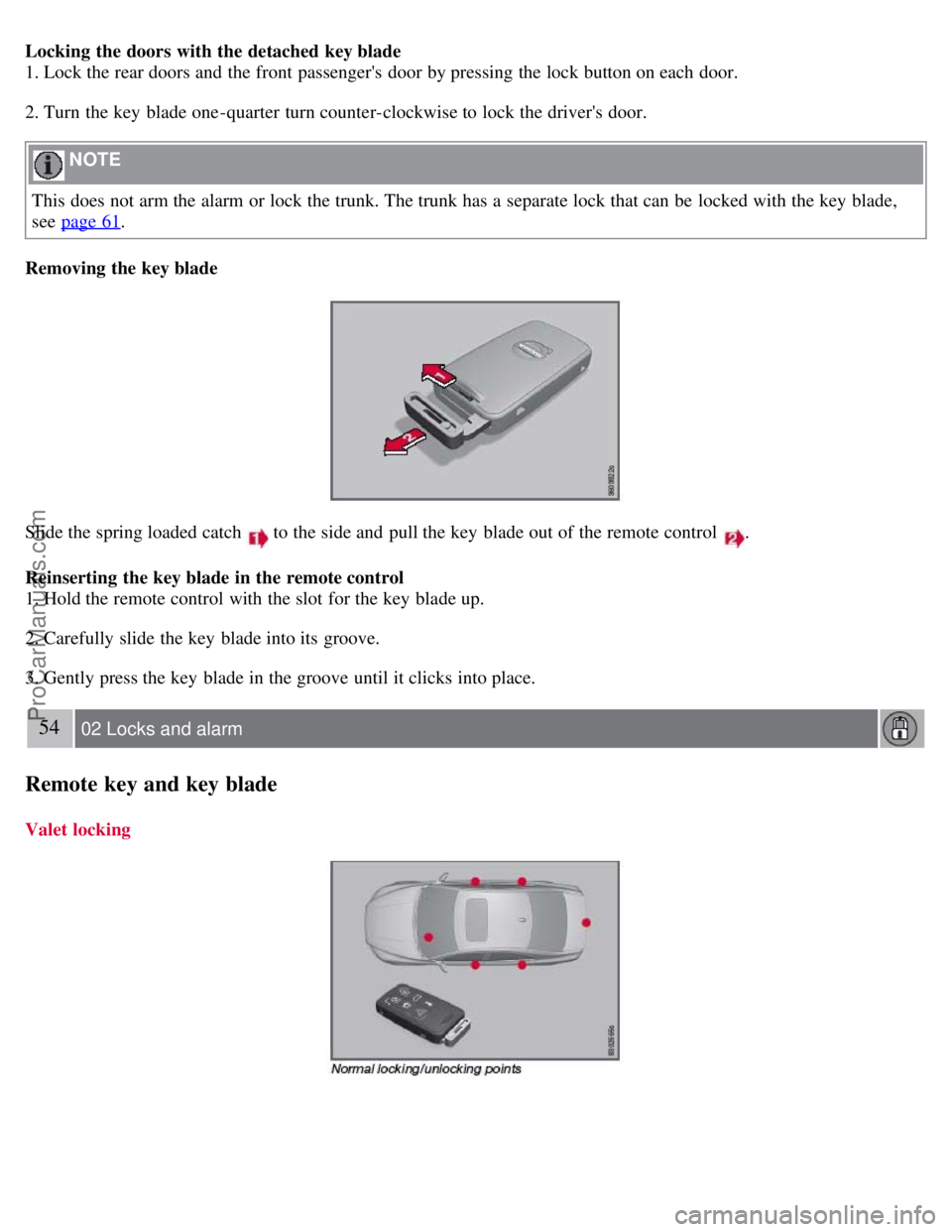
Slide the spring loaded catch to the side and pull the key blade out of the remote control .
Reinserting the key blade in the remote control
1. Hold the remote control with the slot for the key blade up.
2. Carefully slide the key blade into its groove.
3. Gently press the key blade in the groove until it clicks into place.
54 02 Locks and alarm
Remote key and key blade
Valet locking
ProCarManuals.com
Page 48 of 251
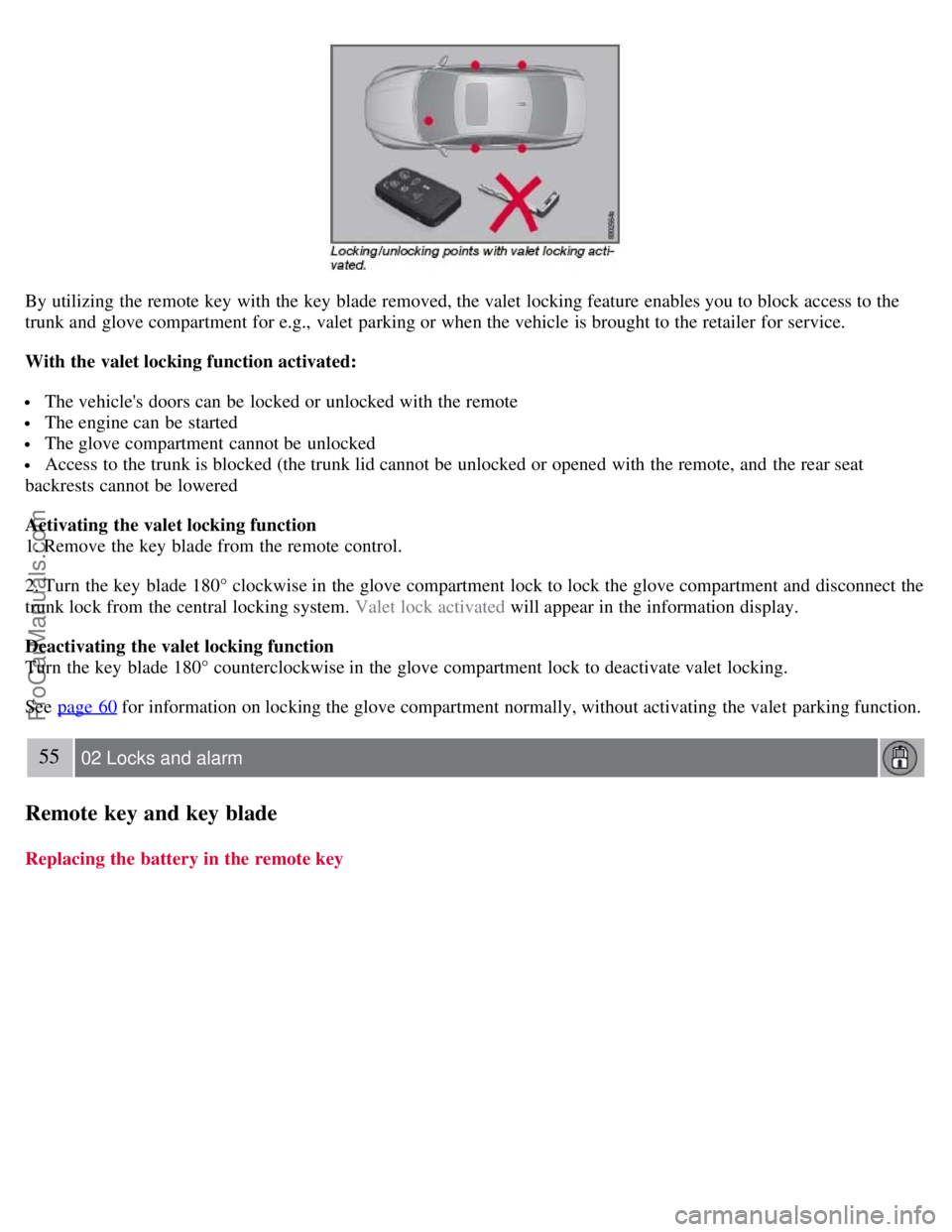
By utilizing the remote key with the key blade removed, the valet locking feature enables you to block access to the
trunk and glove compartment for e.g., valet parking or when the vehicle is brought to the retailer for service.
With the valet locking function activated:
The vehicle's doors can be locked or unlocked with the remote
The engine can be started
The glove compartment cannot be unlocked
Access to the trunk is blocked (the trunk lid cannot be unlocked or opened with the remote, and the rear seat
backrests cannot be lowered
Activating the valet locking function
1. Remove the key blade from the remote control.
2. Turn the key blade 180° clockwise in the glove compartment lock to lock the glove compartment and disconnect the
trunk lock from the central locking system. Valet lock activated will appear in the information display.
Deactivating the valet locking function
Turn the key blade 180° counterclockwise in the glove compartment lock to deactivate valet locking.
See page 60
for information on locking the glove compartment normally, without activating the valet parking function.
55 02 Locks and alarm
Remote key and key blade
Replacing the battery in the remote key
ProCarManuals.com