cruise control VOLVO S80 2008 User Guide
[x] Cancel search | Manufacturer: VOLVO, Model Year: 2008, Model line: S80, Model: VOLVO S80 2008Pages: 275, PDF Size: 7.17 MB
Page 156 of 275
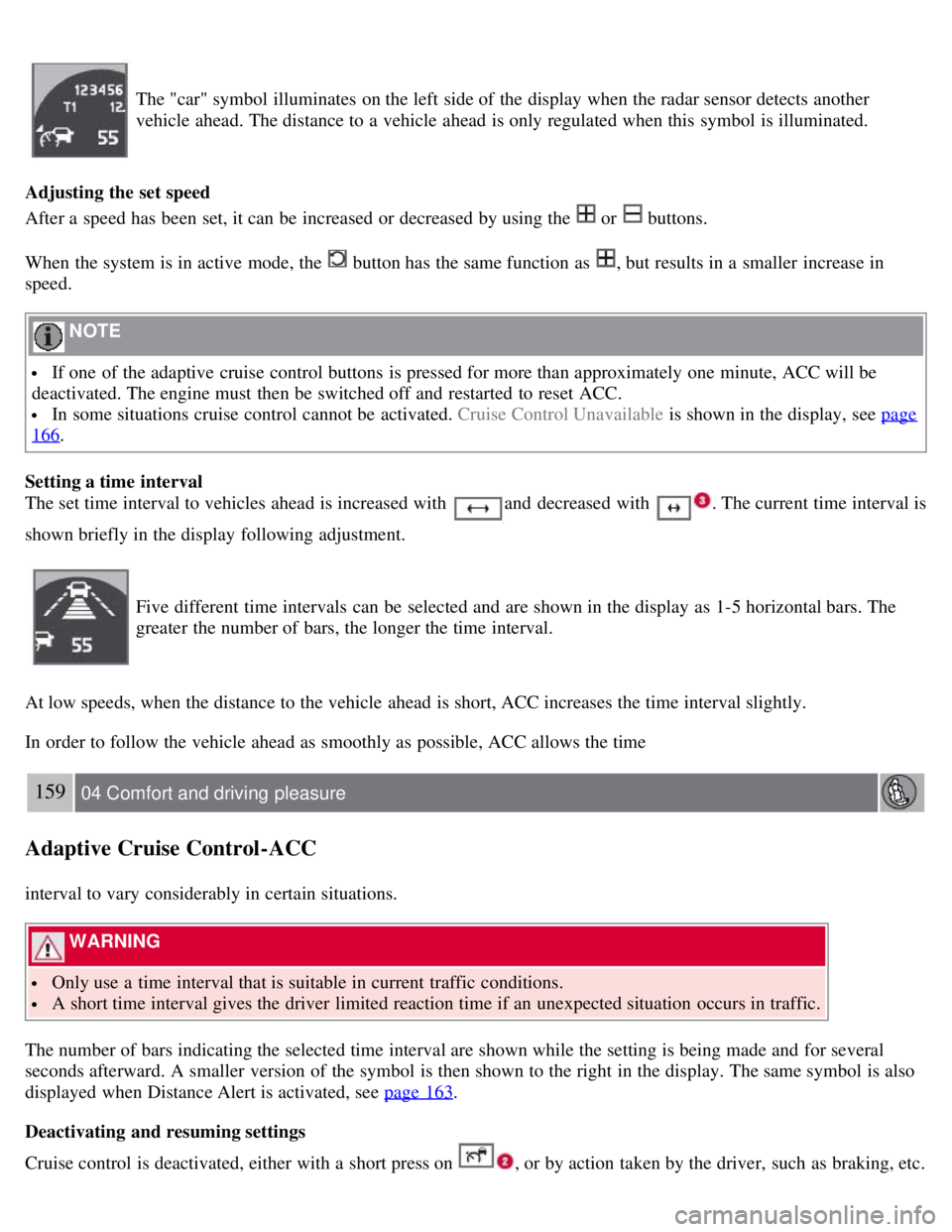
The "car" symbol illuminates on the left side of the display when the radar sensor detects another
vehicle ahead. The distance to a vehicle ahead is only regulated when this symbol is illuminated.
Adjusting the set speed
After a speed has been set, it can be increased or decreased by using the
or buttons.
When the system is in active mode, the
button has the same function as , but results in a smaller increase in
speed.
NOTE
If one of the adaptive cruise control buttons is pressed for more than approximately one minute, ACC will be
deactivated. The engine must then be switched off and restarted to reset ACC.
In some situations cruise control cannot be activated. Cruise Control Unavailable is shown in the display, see page
166.
Setting a time interval
The set time interval to vehicles ahead is increased with
and decreased with . The current time interval is
shown briefly in the display following adjustment.
Five different time intervals can be selected and are shown in the display as 1-5 horizontal bars. The
greater the number of bars, the longer the time interval.
At low speeds, when the distance to the vehicle ahead is short, ACC increases the time interval slightly.
In order to follow the vehicle ahead as smoothly as possible, ACC allows the time
159 04 Comfort and driving pleasure
Adaptive Cruise Control-ACC
interval to vary considerably in certain situations.
WARNING
Only use a time interval that is suitable in current traffic conditions.
A short time interval gives the driver limited reaction time if an unexpected situation occurs in traffic.
The number of bars indicating the selected time interval are shown while the setting is being made and for several
seconds afterward. A smaller version of the symbol is then shown to the right in the display. The same symbol is also
displayed when Distance Alert is activated, see page 163
.
Deactivating and resuming settings
Cruise control is deactivated, either with a short press on , or by action taken by the driver, such as braking, etc.
Page 157 of 275
The set speed, for example 55 mph, is then shown in parentheses. Speed and time interval are resumed by pressing .
WARNING
There may be a significant increase in speed after the
button has been pressed.
A short press on
in standby mode or a long press in active mode deactivates ACC.
The set speed is then cleared and cannot be resumed.
When ACC is activated, the vehicle's speed increases by approximately 1 mph (1 km/h) each additional time
is
pressed.
Deactivation due to action by the driver
ACC is deactivated:
when the brakes are applied
if the gear selector is moved to N
if the accelerator pedal is depressed for an extended period.
NOTE
If the accelerator pedal is only depressed for a short time, such as when passing another vehicle, ACC is deactivated
temporarily and is reactivated when the pedal is released.
Automatic deactivation
Adaptive cruise control is linked to other systems such as ABS, the stability and traction control system (DSTC) and
the Distance Alert system. If any of these systems are not functioning properly, adaptive cruise control is automatically
deactivated.
In the event of automatic deactivation a signal will sound and the message Cruise Control Canceled is shown in the
display. The driver must then intervene and adapt the vehicle's speed to the surrounding traffic.
Automatic deactivation may be caused if:
the vehicle's speed falls below 20 mph (30 km/h)
the wheels lose traction or if the anti-lock brake system (ABS) is activated
brake temperature is high
engine speed (rpm) is too low
the radar sensor is obstructed by, for example, wet snow or rain.
160 04 Comfort and driving pleasure
Adaptive Cruise Control-ACC
The radar sensor and its limitations
The radar sensor is used by both Adaptive Cruise Control and the Collision Warning System with Auto-brake (see
page 166
). It is designed to detect cars or larger vehicles driving in the same direction as your vehicle.
WARNING
Page 158 of 275
Accessories or other objects must not be installed in front of the grille.
Modification of the radar sensor could make its use illegal.
The radar sensor's capacity to detect vehicles ahead is impeded:
if the radar sensor is obstructed and cannot detect other vehicles, for example in heavy rain, or if snow or other
objects are obscuring the radar sensor.
NOTE
Keep the area in front of the radar sensor clean.
if the speed of vehicles ahead is significantly different from your own speed.
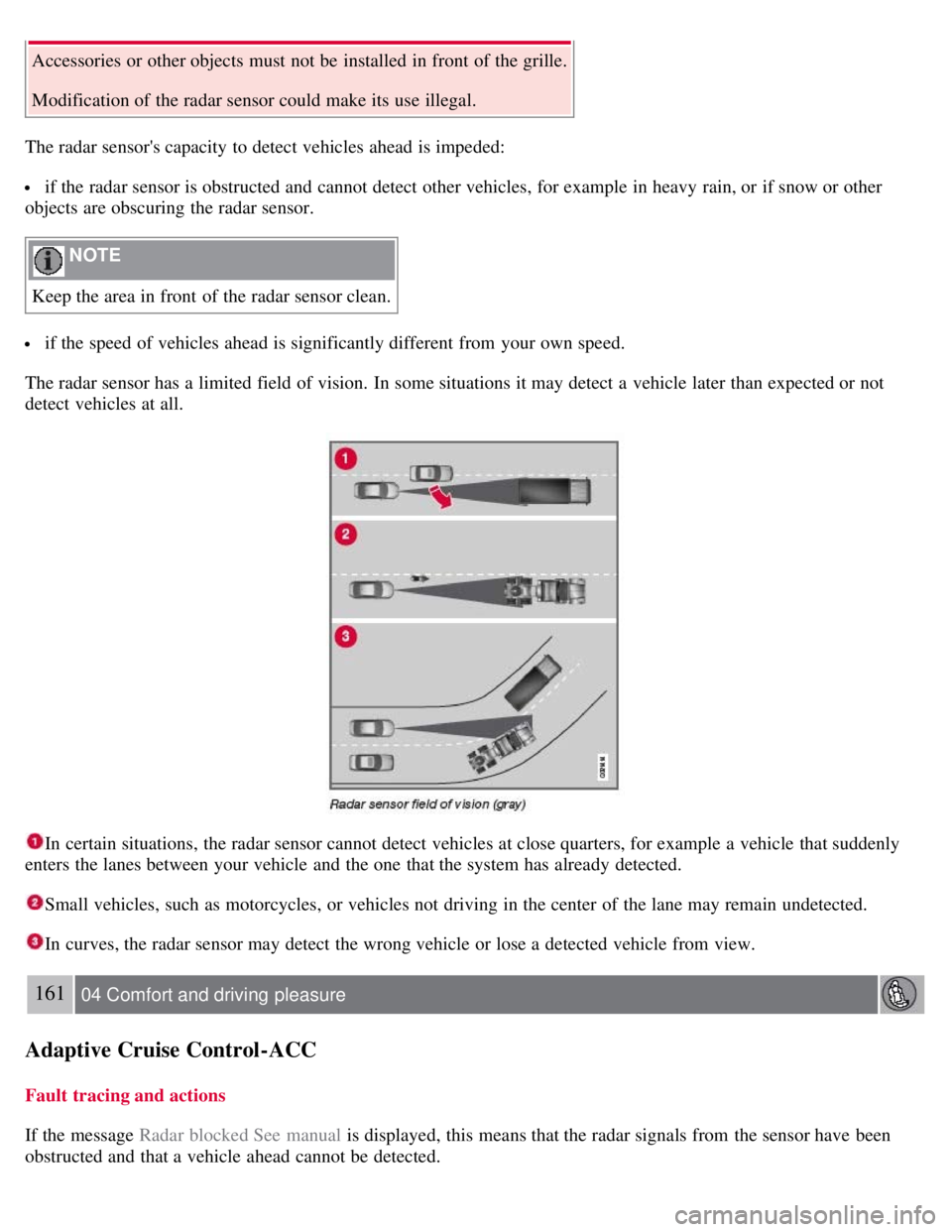
The radar sensor has a limited field of vision. In some situations it may detect a vehicle later than expected or not
detect vehicles at all.
In certain situations, the radar sensor cannot detect vehicles at close quarters, for example a vehicle that suddenly
enters the lanes between your vehicle and the one that the system has already detected.
Small vehicles, such as motorcycles, or vehicles not driving in the center of the lane may remain undetected.
In curves, the radar sensor may detect the wrong vehicle or lose a detected vehicle from view.
161 04 Comfort and driving pleasure
Adaptive Cruise Control-ACC
Fault tracing and actions
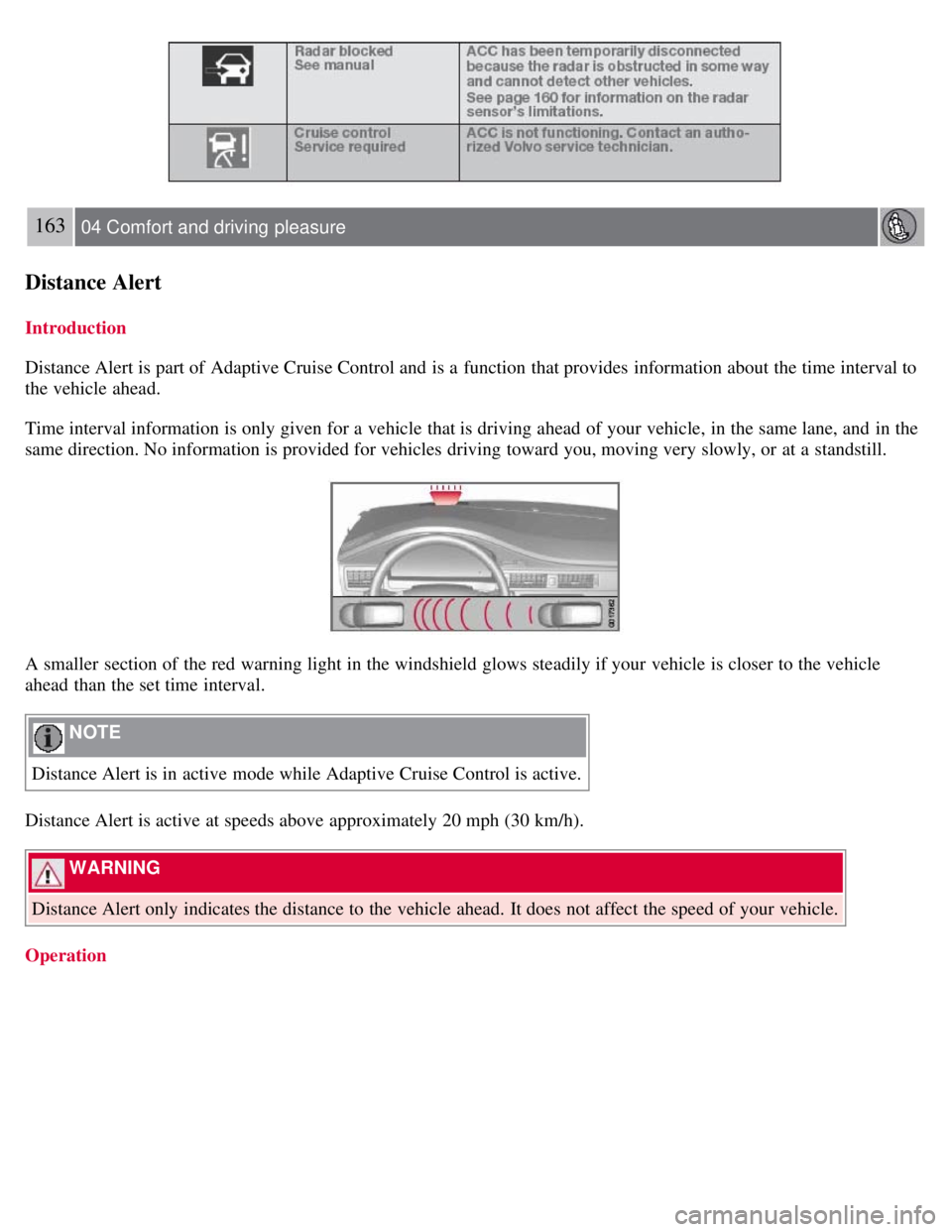
If the message Radar blocked See manual is displayed, this means that the radar signals from the sensor have been
obstructed and that a vehicle ahead cannot be detected.
Page 159 of 275
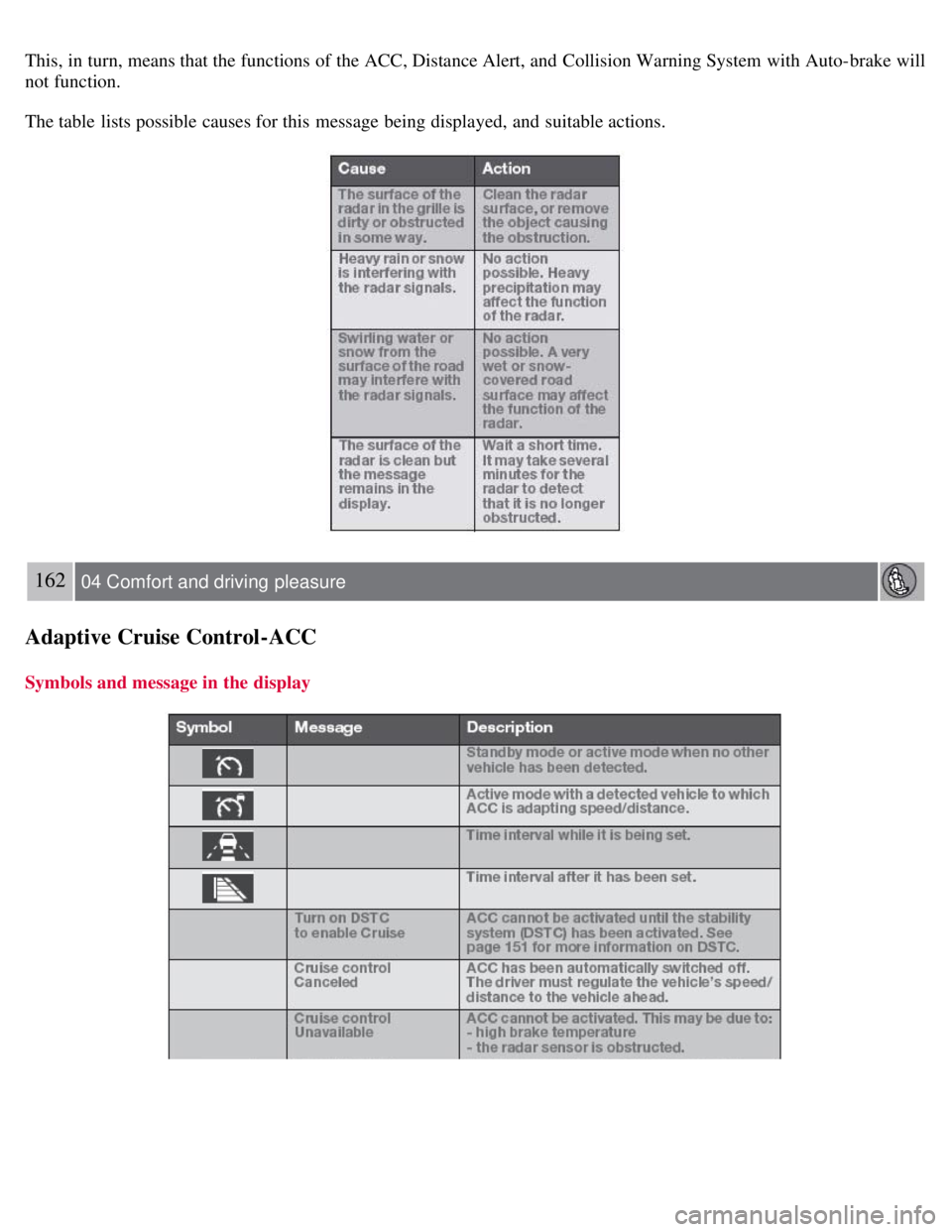
This, in turn, means that the functions of the ACC, Distance Alert, and Collision Warning System with Auto-brake will
not function.
The table lists possible causes for this message being displayed, and suitable actions.
162 04 Comfort and driving pleasure
Adaptive Cruise Control-ACC
Symbols and message in the display
Page 160 of 275
163 04 Comfort and driving pleasure
Distance Alert
Introduction
Distance Alert is part of Adaptive Cruise Control and is a function that provides information about the time interval to
the vehicle ahead.
Time interval information is only given for a vehicle that is driving ahead of your vehicle, in the same lane, and in the
same direction. No information is provided for vehicles driving toward you, moving very slowly, or at a standstill.
A smaller section of the red warning light in the windshield glows steadily if your vehicle is closer to the vehicle
ahead than the set time interval.
NOTE
Distance Alert is in active mode while Adaptive Cruise Control is active.
Distance Alert is active at speeds above approximately 20 mph (30 km/h).
WARNING
Distance Alert only indicates the distance to the vehicle ahead. It does not affect the speed of your vehicle.
Operation
Page 161 of 275
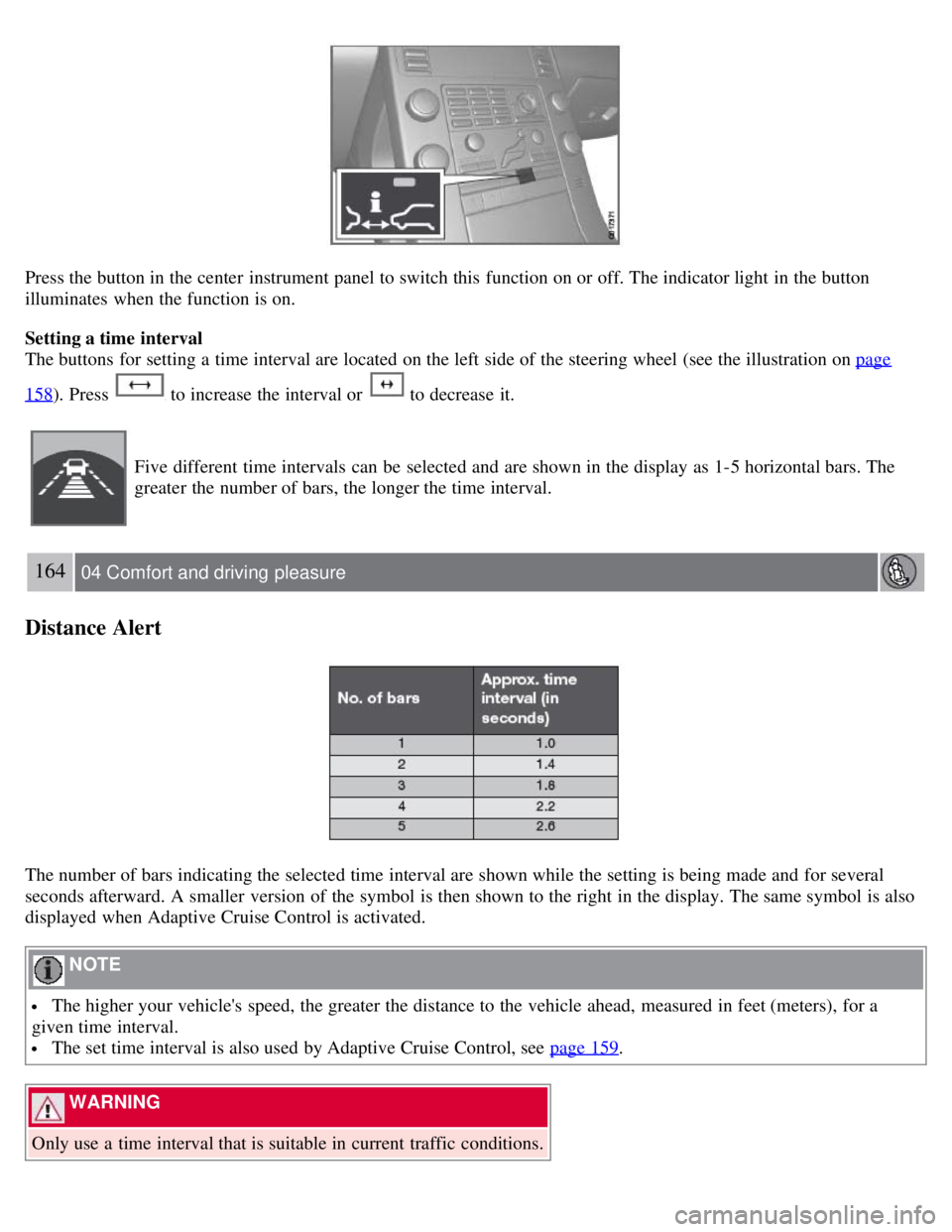
Press the button in the center instrument panel to switch this function on or off. The indicator light in the button
illuminates when the function is on.
Setting a time interval
The buttons for setting a time interval are located on the left side of the steering wheel (see the illustration on page
158). Press to increase the interval or to decrease it.
Five different time intervals can be selected and are shown in the display as 1-5 horizontal bars. The
greater the number of bars, the longer the time interval.
164 04 Comfort and driving pleasure
Distance Alert
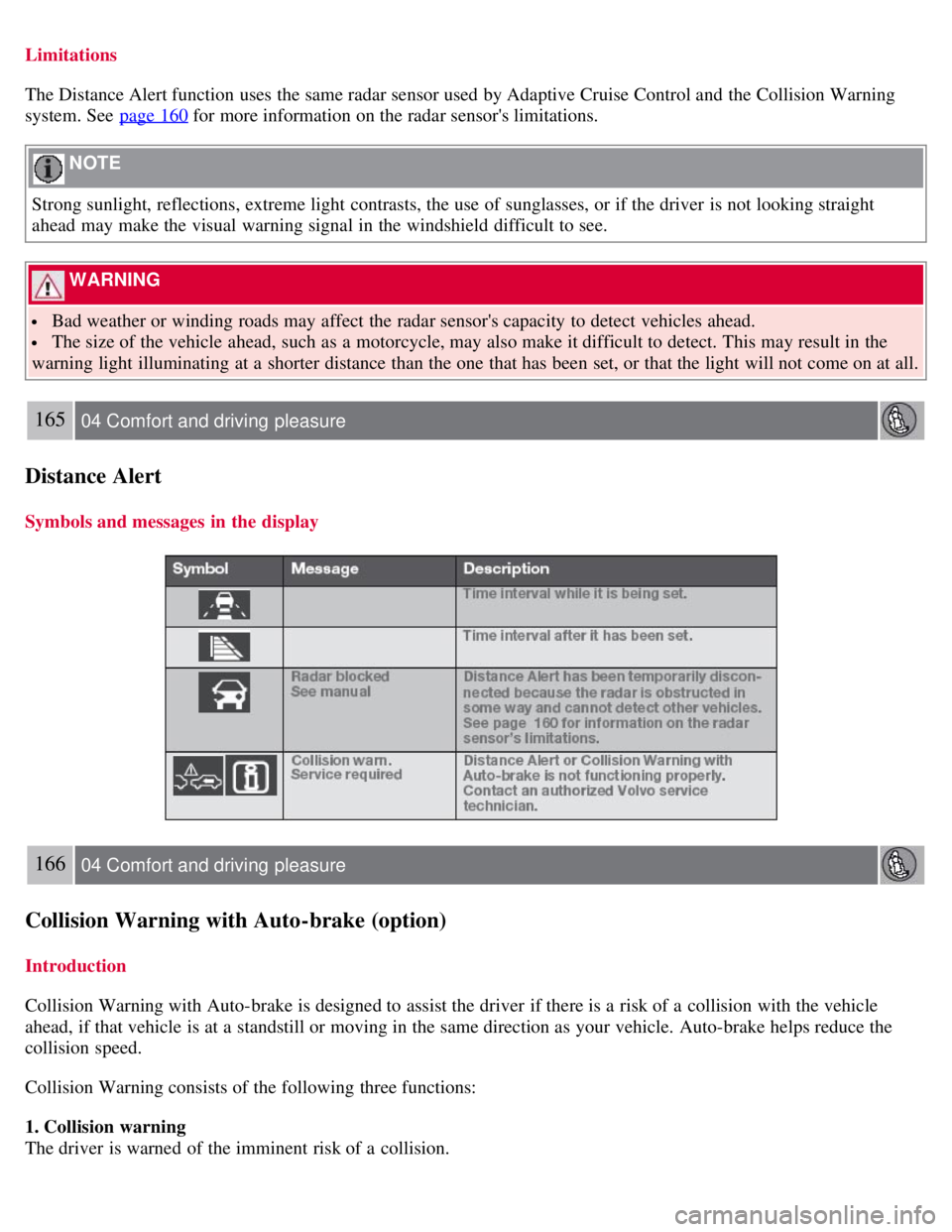
The number of bars indicating the selected time interval are shown while the setting is being made and for several
seconds afterward. A smaller version of the symbol is then shown to the right in the display. The same symbol is also
displayed when Adaptive Cruise Control is activated.
NOTE
The higher your vehicle's speed, the greater the distance to the vehicle ahead, measured in feet (meters), for a
given time interval.
The set time interval is also used by Adaptive Cruise Control, see page 159.
WARNING
Only use a time interval that is suitable in current traffic conditions.
Page 162 of 275
Limitations
The Distance Alert function uses the same radar sensor used by Adaptive Cruise Control and the Collision Warning
system. See page 160
for more information on the radar sensor's limitations.
NOTE
Strong sunlight, reflections, extreme light contrasts, the use of sunglasses, or if the driver is not looking straight
ahead may make the visual warning signal in the windshield difficult to see.
WARNING
Bad weather or winding roads may affect the radar sensor's capacity to detect vehicles ahead.
The size of the vehicle ahead, such as a motorcycle, may also make it difficult to detect. This may result in the
warning light illuminating at a shorter distance than the one that has been set, or that the light will not come on at all.
165 04 Comfort and driving pleasure
Distance Alert
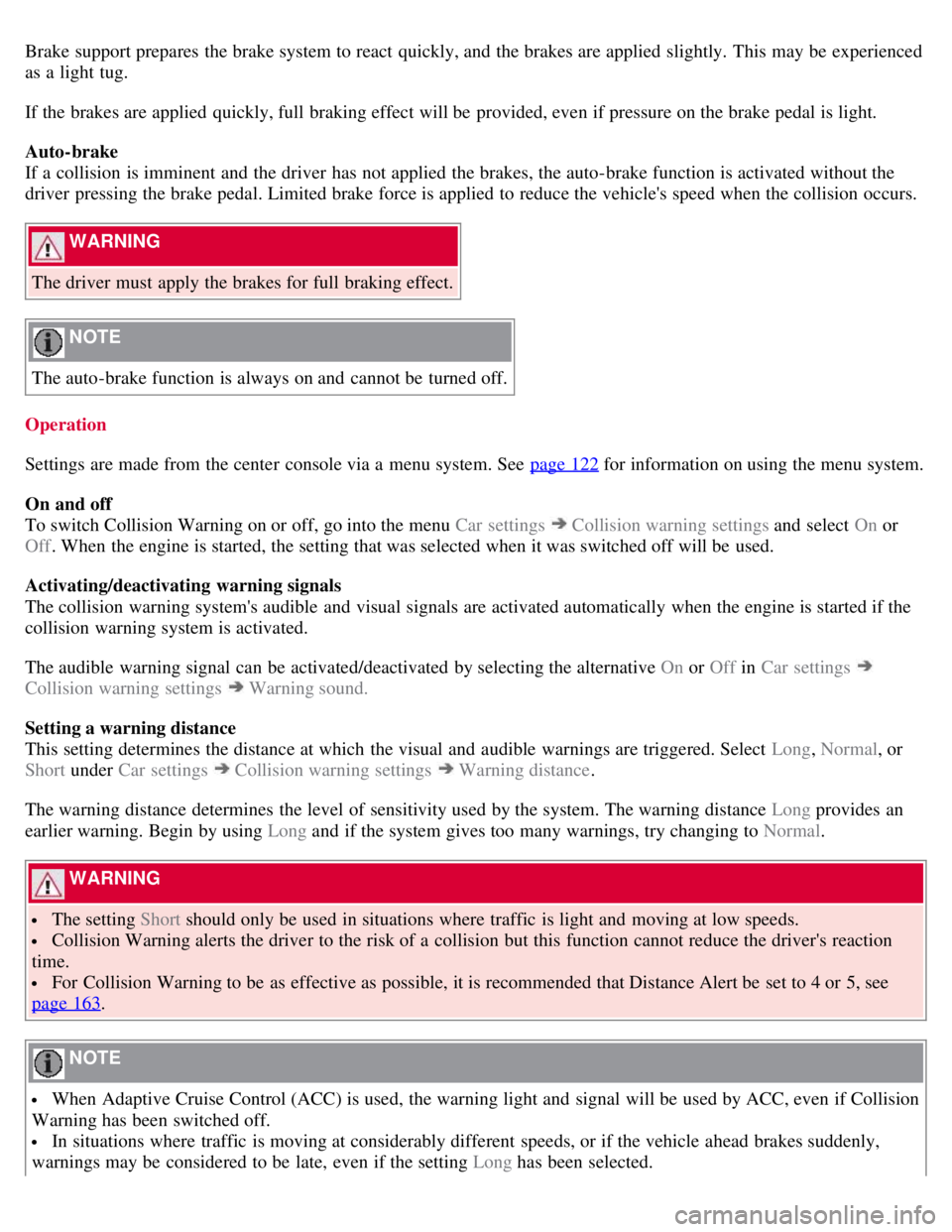
Symbols and messages in the display
166 04 Comfort and driving pleasure
Collision Warning with Auto-brake (option)
Introduction
Collision Warning with Auto-brake is designed to assist the driver if there is a risk of a collision with the vehicle
ahead, if that vehicle is at a standstill or moving in the same direction as your vehicle. Auto-brake helps reduce the
collision speed.
Collision Warning consists of the following three functions:
1. Collision warning
The driver is warned of the imminent risk of a collision.
Page 164 of 275
Brake support prepares the brake system to react quickly, and the brakes are applied slightly. This may be experienced
as a light tug.
If the brakes are applied quickly, full braking effect will be provided, even if pressure on the brake pedal is light.
Auto-brake
If a collision is imminent and the driver has not applied the brakes, the auto-brake function is activated without the
driver pressing the brake pedal. Limited brake force is applied to reduce the vehicle's speed when the collision occurs.
WARNING
The driver must apply the brakes for full braking effect.
NOTE
The auto-brake function is always on and cannot be turned off.
Operation
Settings are made from the center console via a menu system. See page 122
for information on using the menu system.
On and off
To switch Collision Warning on or off, go into the menu Car settings
Collision warning settings and select On or
Off . When the engine is started, the setting that was selected when it was switched off will be used.
Activating/deactivating warning signals
The collision warning system's audible and visual signals are activated automatically when the engine is started if the
collision warning system is activated.
The audible warning signal can be activated/deactivated by selecting the alternative On or Off in Car settings
Collision warning settings Warning sound.
Setting a warning distance
This setting determines the distance at which the visual and audible warnings are triggered. Select Long , Normal, or
Short under Car settings
Collision warning settings Warning distance .
The warning distance determines the level of sensitivity used by the system. The warning distance Long provides an
earlier warning. Begin by using Long and if the system gives too many warnings, try changing to Normal .
WARNING
The setting Short should only be used in situations where traffic is light and moving at low speeds.
Collision Warning alerts the driver to the risk of a collision but this function cannot reduce the driver's reaction
time.
For Collision Warning to be as effective as possible, it is recommended that Distance Alert be set to 4 or 5, see
page 163
.
NOTE
When Adaptive Cruise Control (ACC) is used, the warning light and signal will be used by ACC, even if Collision
Warning has been switched off.
In situations where traffic is moving at considerably different speeds, or if the vehicle ahead brakes suddenly,
warnings may be considered to be late, even if the setting Long has been selected.
Page 165 of 275
Checking settings
The current Collision Warning settings can be checked by going into the menu system at
168 04 Comfort and driving pleasure
Collision Warning with Auto-brake (option)
Car settings Collision warning settings. See page 122 for more information on the menu system.
Limitations
Strong sunlight, reflections, extreme light contrasts, the use of sunglasses, or if the driver is not looking straight ahead
may make the visual warning signal in the windshield difficult to see. For this reason, always activate the audible
warning signal in such conditions.
NOTE
The visual warning signal may be temporarily disengaged in the event of high passenger compartment temperature
due to strong sunlight, etc. If this occurs, the audible warning signal will be used, even if it has been deactivated in
the menu system.
Warnings may not appear if the distance to the vehicle ahead is very small or if steering wheel and pedal movements
are great, for example, due to a very active driving style.
WARNING
In certain situations, the system cannot provide warnings or warning may be delayed if traffic conditions or other
external factors make it impossible for the radar sensor or camera to detect the vehicle ahead.
Warnings may not be provided if the distance to the vehicle ahead is short, or if movements of the steering
wheel/brake pedal are great, such as during active driving.
The sensor system has a limited range for stationary or slow-moving vehicles and may therefore give delayed or
no warnings if your vehicle's speed is above approximately 45 mph (70 km/h).
Warnings for stationary or slow-moving vehicles may not be provided in dark conditions.
The Collision Warning system uses the same radar sensors as Adaptive Cruise Control. For more information on the
radar sensor and its limitations, see page 160
.
If no warning is given, or if a warning is delayed, Auto-brake will also not be provided or will be delayed.
NOTE
If warnings are given too frequently, the warning distance can be reduced (see "Setting a warning distance" on page
167). This causes the system to provide later warnings, which decreases the total number of warnings provided.
The camera's limitations
The camera is used by Collision Warning with Auto-brake, Driver Alert Control (see page 171
), and Lane Departure
Warning (see page 174
).
NOTE
Keep the section of the windshield in front of the camera clean and free of ice, snow, or condensation.
Page 264 of 275
2 0 0 8
VOLVO S80
278 Index
12-volt sockets 185
A
Accessory installation warning7
Active Bi -Xenon® headlights90
Active chassis system153
Active yaw control151
Adaptive cruise control156-159
Air conditioning130
Air distribution127
Air distribution table133
Air vents128
Airbags
disconnecting the front passenger's side 22-24
front19- 21
inflatable curtain27
side impact25
Alarm system 67-69
All Wheel Drive112
Anti-freeze190, 214
Anti-lock brake system113
warning light75
Approach lighting 54, 94
Audio system
audio functions 137
CD player/changer138, 138
menu control135
overview134
radio functions141
Sirius satellite radio143- 146
sound settings137
steering wheel keypad134
Auto-dim rearview mirror 100
Automatic locking63
Automatic locking retractor33
Automatic transmission