door lock VOLVO S80 2008 Owners Manual
[x] Cancel search | Manufacturer: VOLVO, Model Year: 2008, Model line: S80, Model: VOLVO S80 2008Pages: 275, PDF Size: 7.17 MB
Page 26 of 275
Safety in the passenger compartment
Modifications
If you are considering modifying your vehicle in any way to accommodate a disability, for example by altering or
adapting the driver's or front passenger's seat(s) and/or airbag systems, please contact Volvo at:
In the USA:
Volvo Cars of North America, LLC
Customer Care Center
P.O. Box 914 Rockleigh, New Jersey 07647-0914
1-800-458-1552
In Canada :
Volvo Cars of Canada Corp.
National Customer Service
175 Gordon Baker Road
North York, Ontario M2H 2N7
1-800-663-8255
WARNING
No objects that add to the total weight on the seat should be placed on the front passenger's seat. If a child is
seated in the front passenger's seat with any additional weight, this extra weight could cause the OWS system to
enable the airbag, which might cause it to deploy in the event of a collision, thereby injuring the child.
The seat belt should never be wrapped around an object on the front passenger's seat. This could interfere with the
OWS system's function.
The front passenger's seat belt should never be used in a way that exerts more pressure on the passenger than
normal. This could increase the pressure exerted on the weight sensor by a child, and could result in the airbag being
enabled, which might cause it to deploy in the event of a collision, thereby injuring the child.
WARNING
Keep the following points in mind with respect to the OWS system. Failure to follow these instructions could
adversely affect the system's function and result in serious injury to the occupant of the front passenger's seat:
The full weight of the front seat passenger should always be on the seat cushion. The passenger should never lift
him/herself off the seat cushion using the armrest in the door or the center console, by pressing the feet on the floor,
by sitting on the edge of the seat cushion, or by pressing against the backrest in a way that reduces pressure on the
seat cushion. This could cause OWS to disable the front, passenger's side airbag.
Do not place any type of object on the front passenger's seat in such a way that jamming, pressing, or squeezing
occurs between the object and the front seat, other than as a direct result of the correct use of the Automatic Locking
Retractor/Emergency Locking Retractor (ALR/ELR) seat belt (see page 33
).
No objects should be placed under the front passenger's seat. This could interfere with the OWS system's function.
25 01 Safety
Safety in the passenger compartment
Side impact protection (SIPS) airbags
Page 33 of 275
the standard or regulation, or instructions for infant restraints, typically provide this information.
In using any child restraint system, we urge you to carefully look over the instructions that are provided with the
restraint. Be sure you understand them and can use the device properly and safely in this vehicle. A misused child
restraint system can result in increased injuries for both the infant or child and other occupants in the vehicle.
When a child has outgrown the child safety seat, you should use the rear seat with the standard seat belt fastened. The
best way to help protect the child here is to place the child on a cushion so that the seat belt is properly located on the
hips (see the illustration on page 41
). Legislation in your state or province may mandate the use of a child seat or
cushion in combination with the seat belt, depending on the child's age and/or size. Please check local regulations.
A specially designed and tested booster cushion (not available in Canada) can be obtained from your Volvo retailer for
children weighing 33 - 80 lb. (15 - 36 kg) and 38-54 inches (97 - 137 cm) in height.
32 01 Safety
Child safety
WARNING
Do not use child safety seats or child booster cushions/backrests in the front passenger's seat. We also recommend
that children under 4 feet 7 inches (140 cm) in height who have outgrown these devices sit in the rear seat with the
seat belt fastened.
Keep vehicle doors and trunk locked and keep remote controls out of a child's reach. Unsupervised children could
lock themselves in an open trunk and risk injury. Children should be taught not to play in vehicles.
On hot days, the temperature in the trunk or vehicle interior can rise very quickly. Exposure to these high
temperatures for even a short period of time can cause heat-related injury or death. Small children are particularly at
risk.
33 01 Safety
Child safety
Automatic Locking Retractor/Emergency Locking Retractor (ALR/ELR)
To make child seat installation easier, each seat belt (except for the driver's belt) is equipped with a locking mechanism
to help keep the seat belt taut.
When attaching the seat belt to a child seat:
1. Attach the seat belt to the child seat according to the child seat manufacturer's instructions.
2. Pull the seat belt out as far as possible.
3. Insert the seat belt latch plate into the buckle (lock) in the usual way.
4. Release the seat belt and pull it taut around the child seat.
A sound from the seat belt retractor will be audible at this time and is normal. The belt will now be locked in place.
This function is automatically disabled when the seat belt is unlocked and the belt is fully retracted.
WARNING
Page 46 of 275
work should be performed by a trained and qualified Volvo service technician only
48 01 Safety
Child safety locks
Child safety locks
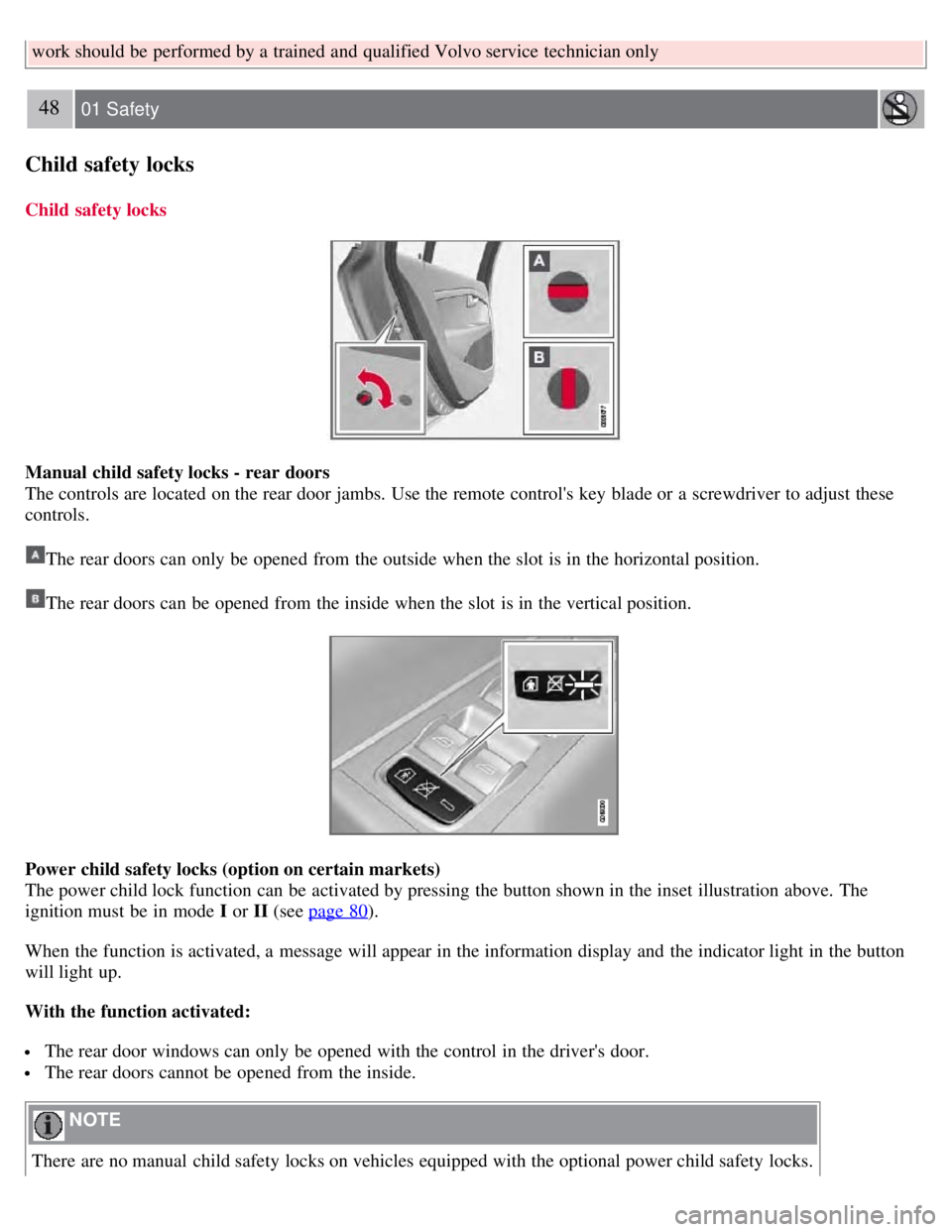
Manual child safety locks - rear doors
The controls are located on the rear door jambs. Use the remote control's key blade or a screwdriver to adjust these
controls.
The rear doors can only be opened from the outside when the slot is in the horizontal position.
The rear doors can be opened from the inside when the slot is in the vertical position.
Power child safety locks (option on certain markets)
The power child lock function can be activated by pressing the button shown in the inset illustration above. The
ignition must be in mode I or II (see page 80
).
When the function is activated, a message will appear in the information display and the indicator light in the button
will light up.
With the function activated:
The rear door windows can only be opened with the control in the driver's door.
The rear doors cannot be opened from the inside.
NOTE
There are no manual child safety locks on vehicles equipped with the optional power child safety locks.
Page 47 of 275
WARNING
Remember, in the event of an accident, the rear seat passengers cannot open the doors from the inside with the
controls in position A (manual child safety locks) or if the power child safety lock function is activated.
49 01 Safety
This page left intentionally blank.
Contents | Top of Page
Page 48 of 275
2 0 0 8
VOLVO S80
50 02 Locks and alarm
Remote key and key blade 52
Keyless drive60
Locks63
Alarm67
51 02 Locks and alarm
52 02 Locks and alarm
Remote key and key blade
Introduction
Two remote keys or optional Personal Car Communicators (PCC) are provided with your vehicle. They enable you to
unlock the doors and trunk, and also function as ignition keys to start the vehicle or operate electrical components. The
remote keys contain detachable metal key blades for manually locking or unlocking the driver's door, trunk, and the
glove compartment. Up to six remotes can be programmed for use on the same vehicle.
The PCCs have enhanced functionality compared with the standard remote control.
NOTE
In the remainder of this chapter, all references to the remote key also pertain to the PCC unless otherwise stated.
WARNING
Never leave the remote key in the ignition if children are to remain in the vehicle.
Detachable key blade
Each remote key or PCC contains a detachable metal key blade for mechanically locking or unlocking the driver's
door, trunk, and the glove compartment, and to enable the valet locking function. See page 57 for more information on
Page 49 of 275
the key blade and page 58 for information on the valet locking function. The key blades have a unique code, which is
used if new ones need to be produced. This code is available at an authorized Volvo retailer.
Loss of a remote key
If a remote key is lost, the other one must be taken with the vehicle to a trained and qualified Volvo service
technician. As an anti-theft measure, the code of the lost remote must be erased from the system.
The number of registered keys for the vehicle can be found in the vehicle's menu. under Car settings
Car key
memory
Number of keys . See page 123 for a description of the menu system.
USA -5WK49264
FCC ID:KR55WK49264 + Siemens VDO
5WK49236
FCC ID:KR55WK49236, 5WK49266 FCC
ID:KR55WK49266 + Siemens VDO
5WK49233
FCC ID:KR55WK49233
This device complies with part 15 of the FCC rules and RSS-210. Operation is subject to the following conditions:
(1) This device may not cause harmful interference, and (2) this device must accept any interference received,
including interference that may cause undesired operation.
Canada-5WK49264 IC:267T-5WK49264
+ Siemens VDO 5WK49236
IC:267T-5WK49236, 5WK49266
IC:267T-5WK49266 + Siemens VDO
5WK49233 IC:267T-5WK49233
Operation is subject to the following conditions: (1) this device may not cause interference, and (2) this device must
accept any interference, including interference that may cause undesired operation of the device.
53 02 Locks and alarm
Remote key and key blade
Key memory - door mirrors and driver's seat
The position of the side door mirrors and optional power driver's seat are stored in the remote keys when the vehicle is
locked. The next time the driver's door is unlocked with the same remote key and the door is opened within 2 minutes,
the power driver's seat and side door mirrors will automatically move to the position that they were in when the doors
were most recently locked with the same remote key. See page 83
for more information.
This feature can be activated or deactivated in the vehicle's menu under Car settings
Car key memory Seat &
mirror positions . See page 123
for a description of the menu system.
See also page 60
for information regarding vehicles with the optional keyless drive.
Confirmation when locking/unlocking the vehicle
When the vehicle is locked with a remote key, the turn signals will flash once to confirm that this has been completed
correctly.
When the vehicle is locked, confirmation will only be given if all of the locks are locked after the doors have been
closed.
Page 50 of 275
NOTE
If you do not receive confirmation when locking the vehicle, check whether a door or the trunk is ajar, or if this
feature has been turned off in the menu.
This function can be activated or deactivated under Car settings
Light settings Lock confirmation, light , or Car
settings
Light settings Unlock confirmation, light . See page 123 for a description of the menu system.
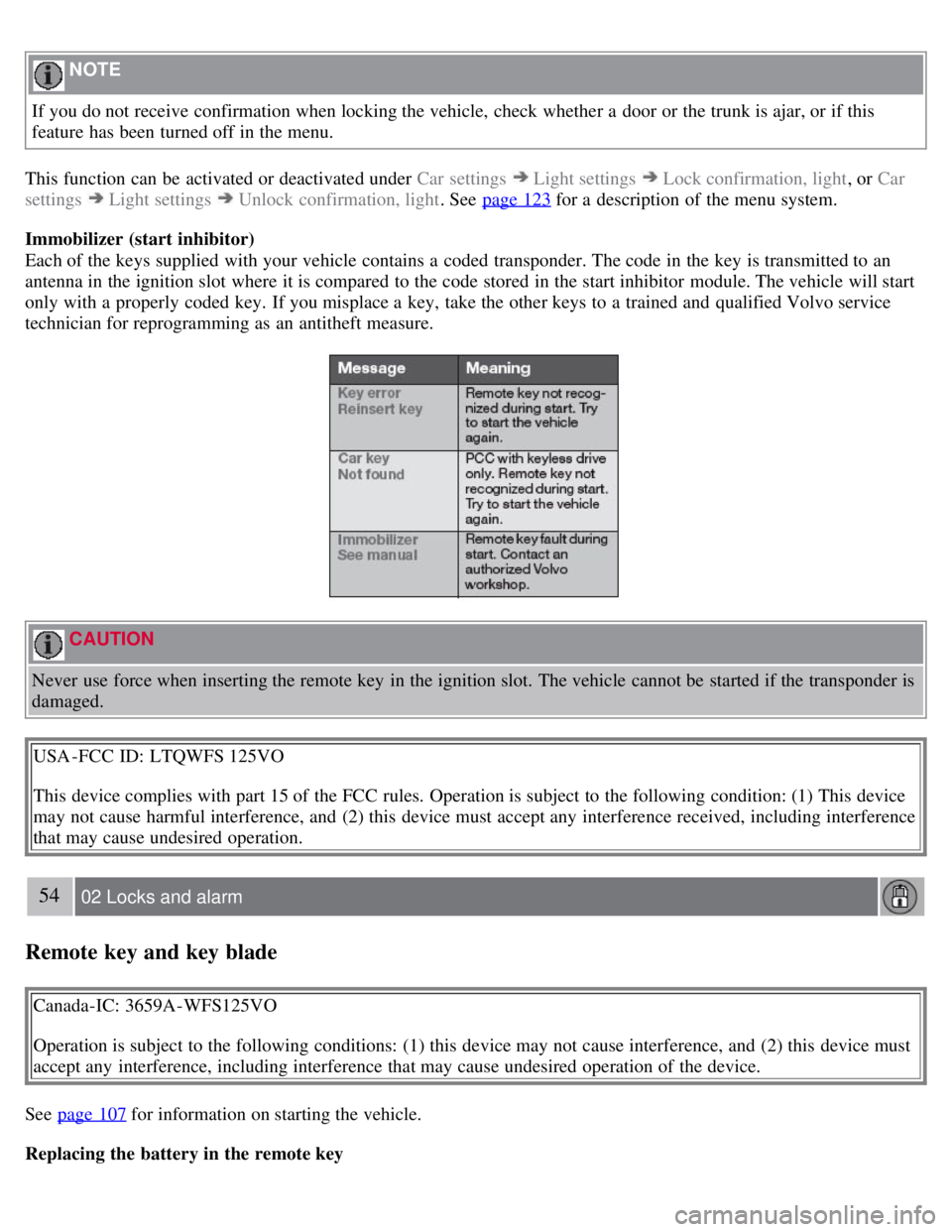
Immobilizer (start inhibitor)
Each of the keys supplied with your vehicle contains a coded transponder. The code in the key is transmitted to an
antenna in the ignition slot where it is compared to the code stored in the start inhibitor module. The vehicle will start
only with a properly coded key. If you misplace a key, take the other keys to a trained and qualified Volvo service
technician for reprogramming as an antitheft measure.
CAUTION
Never use force when inserting the remote key in the ignition slot. The vehicle cannot be started if the transponder is
damaged.
USA -FCC ID: LTQWFS 125VO
This device complies with part 15 of the FCC rules. Operation is subject to the following condition: (1) This device
may not cause harmful interference, and (2) this device must accept any interference received, including interference
that may cause undesired operation.
54 02 Locks and alarm
Remote key and key blade
Canada-IC: 3659A-WFS125VO
Operation is subject to the following conditions: (1) this device may not cause interference, and (2) this device must
accept any interference, including interference that may cause undesired operation of the device.
See page 107
for information on starting the vehicle.
Replacing the battery in the remote key
Page 51 of 275
The batteries should be replaced if:
The information symbol illuminates and Replace car key battery is shown in the display and/or
if the locks do not react after several attempts to unlock or lock the vehicle.
NOTE
The remote key's range is normally approximately 60 ft (20 m) from the vehicle.
See page 59
for information on replacing the battery.
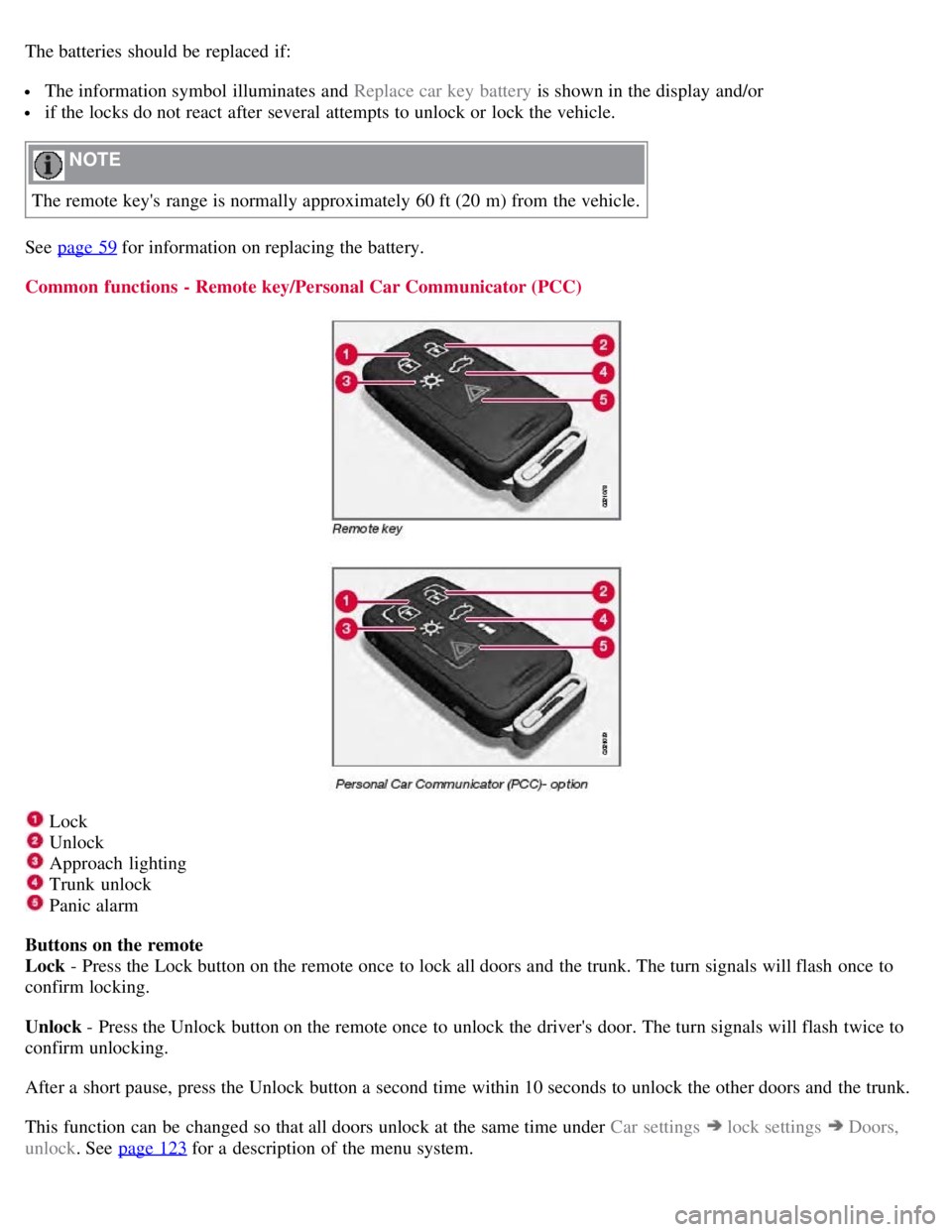
Common functions - Remote key/Personal Car Communicator (PCC)
Lock
Unlock
Approach lighting
Trunk unlock
Panic alarm
Buttons on the remote
Lock - Press the Lock button on the remote once to lock all doors and the trunk. The turn signals will flash once to
confirm locking.
Unlock - Press the Unlock button on the remote once to unlock the driver's door. The turn signals will flash twice to
confirm unlocking.
After a short pause, press the Unlock button a second time within 10 seconds to unlock the other doors and the trunk.
This function can be changed so that all doors unlock at the same time under Car settings
lock settings Doors,
unlock . See page 123
for a description of the menu system.
Page 52 of 275
Approach lighting - As you approach the vehicle, press button on the remote control to light the interior lighting,
parking lights, license plate lighting and the lights in the door mirrors (option).
55 02 Locks and alarm
Remote key and key blade
These lights will switch off automatically after 30, 60 or 90 seconds. See page 123 for more information.
Unlock/open trunk
Press once: This unlocks but does not open the trunk. If the trunk is not opened within two minutes it will
automatically relock and the alarm will be rearmed.
Press twice: This both unlocks the trunk and pops it open several inches.
NOTE
Any excess weight (snow, etc.) on the trunk lid may prevent it from opening.
Press the button once to disarm the alarm system and optional movement sensor (the alarm indicator light on the
dashboard will go out), and unlock only the trunk. See also page 65
for information on opening the trunk from the
inside.
NOTE
As an added safety precaution, the parking lights will come on automatically for a short period when the trunk has
been opened.
After closing, the trunk will not automatically relock. Press Lock to relock it and rearm the alarm.
Panic alarm - This button can be used to attract attention during emergency situations.
To activate the panic alarm, press and hold button
for at least 3 seconds or press it twice within 3 seconds. The turn
signals and horn will be activated. The panic alarm will stop automatically after 2 minutes and 45 seconds.
To deactivate, wait approximately 5 seconds and press the button again.
Range
The remote key has a range of approximately 60 ft. (20 m) from the vehicle.
NOTE
This button will not unlock the vehicle.
Buildings or other obstacles may interfere with the function of the remote key. The vehicle can also be locked or
unlocked with the key blade, see page 57
.
Functions - PCC
Page 54 of 275
Flashing red lights (Heartbeat sensor): if the two heartbeat sensor lights flash, this indicates that someone may be
inside the vehicle. These lights are only activated if the alarm has been triggered.
Range
The PCC's lock and unlock functions have a range of approximately 60 ft. (20 m) from the vehicle.
NOTE
The approach lighting, panic alarm, and the functions controlled by the information button have a range of
approximately 300 ft (100 m) from the vehicle.
Buildings or other obstacles may interfere with the function of the PCC.
Outside of the PCC's range
If the PCC is more than approximately 300 ft (100 m) from the vehicle when the information button is pressed, no new
information will be received. The PCC most recently used to lock or unlock the vehicle will show the vehicle's most
recently received status. The indicator lights will not flash when the information button is pressed while the PCC is out
of range.
NOTE
If none of the indicator lights illuminate when the information button is pressed, this may be because the most recent
transmission between the vehicle and the PCC was interrupted or impeded by buildings or other objects.
Heartbeat Sensor
The heartbeat sensor function
is a complement to the vehicle's standard alarm, and indicates at a distance of up to
300 ft (100 m) that someone may be in the vehicle. The heartbeat sensor only functions if the alarm has been triggered.
NOTE
The heartbeat sensor registers a person's heartbeat in the form of vibrations in the vehicle's chassis. For this reason,
the sensor's function may be impaired in areas with high levels of noise or vibrations.
Keyless drive
Vehicles equipped with the optional Personal Car Communicator have the keyless drive function. See page 60
for
detailed information.
57 02 Locks and alarm
Remote key and key blade
Detachable key blade
The key blade can be removed from the remote control. When removed, the key blade can be used as follows:
To lock/unlock the driver's door
To lock/unlock the trunk (see page 65)
To lock/unlock the glove compartment (see page 64)
To enable/disable the valet locking function (see page 58)
Unlocking the doors with the detached key blade
Insert the key blade as far as possible in the driver's door lock. Turn the key blade clockwise approximately one -