headlight bulb VOLVO S80 2008 Owners Manual
[x] Cancel search | Manufacturer: VOLVO, Model Year: 2008, Model line: S80, Model: VOLVO S80 2008Pages: 275, PDF Size: 7.17 MB
Page 206 of 275
marks. For capacities and recommended fluid grade, see page 275.
WARNING
If a problem should occur in the power steering system or if the vehicle has no electrical current and must be towed,
it is still possible to steer the vehicle. However, keep in mind that greater effort will be required to turn the steering
wheel.
CAUTION
Keep the area around the power steering fluid reservoir clean when checking.
216 06 Maintenance and specifications
Replacing bulbs
Introduction
All bulb specifications are listed on page 223
. The following bulbs should only be replaced by a trained and qualified
Volvo service technician:
Dome lighting
Reading lights
Glove compartment lighting
Turn signals in the door mirror
Approach lighting in the door mirror
Brake lights
Active Bi -Xenon® and LED bulbs
WARNING
Active Bi -Xenon® headlights (option) - due to the high voltage used by these headlights, these bulbs should only
be replaced by a trained and qualified Volvo service technician.
Turn off the lights and remove the remote key from the ignition before changing any bulbs.
Headlight housing
Page 207 of 275
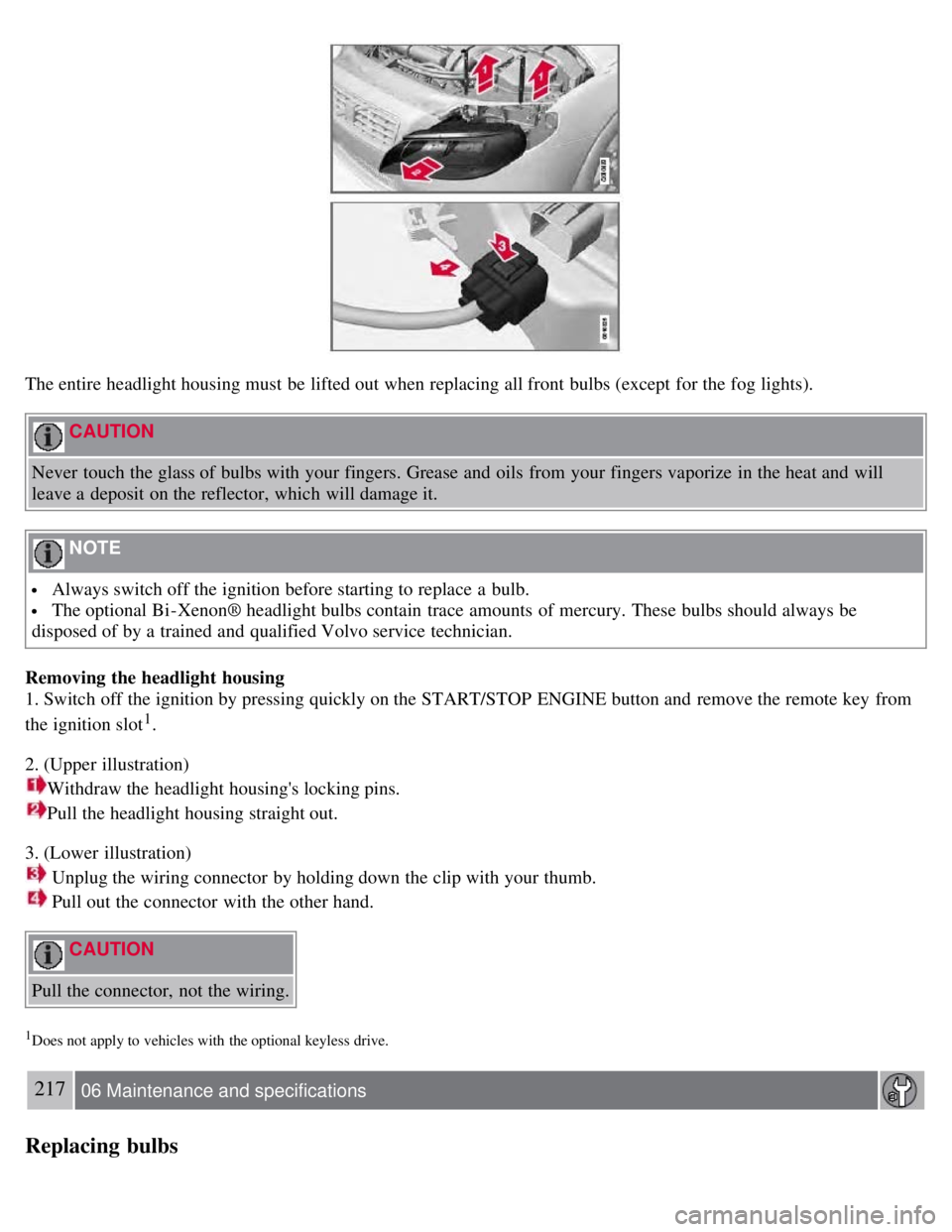
The entire headlight housing must be lifted out when replacing all front bulbs (except for the fog lights).
CAUTION
Never touch the glass of bulbs with your fingers. Grease and oils from your fingers vaporize in the heat and will
leave a deposit on the reflector, which will damage it.
NOTE
Always switch off the ignition before starting to replace a bulb.
The optional Bi -Xenon® headlight bulbs contain trace amounts of mercury. These bulbs should always be
disposed of by a trained and qualified Volvo service technician.
Removing the headlight housing
1. Switch off the ignition by pressing quickly on the START/STOP ENGINE button and remove the remote key from
the ignition slot
1.
2. (Upper illustration)
Withdraw the headlight housing's locking pins.
Pull the headlight housing straight out.
3. (Lower illustration)
Unplug the wiring connector by holding down the clip with your thumb.
Pull out the connector with the other hand.
CAUTION
Pull the connector, not the wiring.
1Does not apply to vehicles with the optional keyless drive.
217 06 Maintenance and specifications
Replacing bulbs
Page 208 of 275
4. Lift out the housing and place it on a soft surface to avoid scratching the lens.
5. Replace the defective bulb(s), see page 223
.
Reinserting the headlight housing
1. Plug in the connector until it clicks into place.
2. Reinstall the headlight housing and locking pins. Check that they are correctly inserted. The headlight housing must
be properly inserted and secured in place before the lighting is switched on or the remote key is inserted into the
ignition slot.
3. Check that the lights function properly.
Removing the cover to access the headlights and parking lights
NOTE
Before starting to replace a bulb, see page 216
.
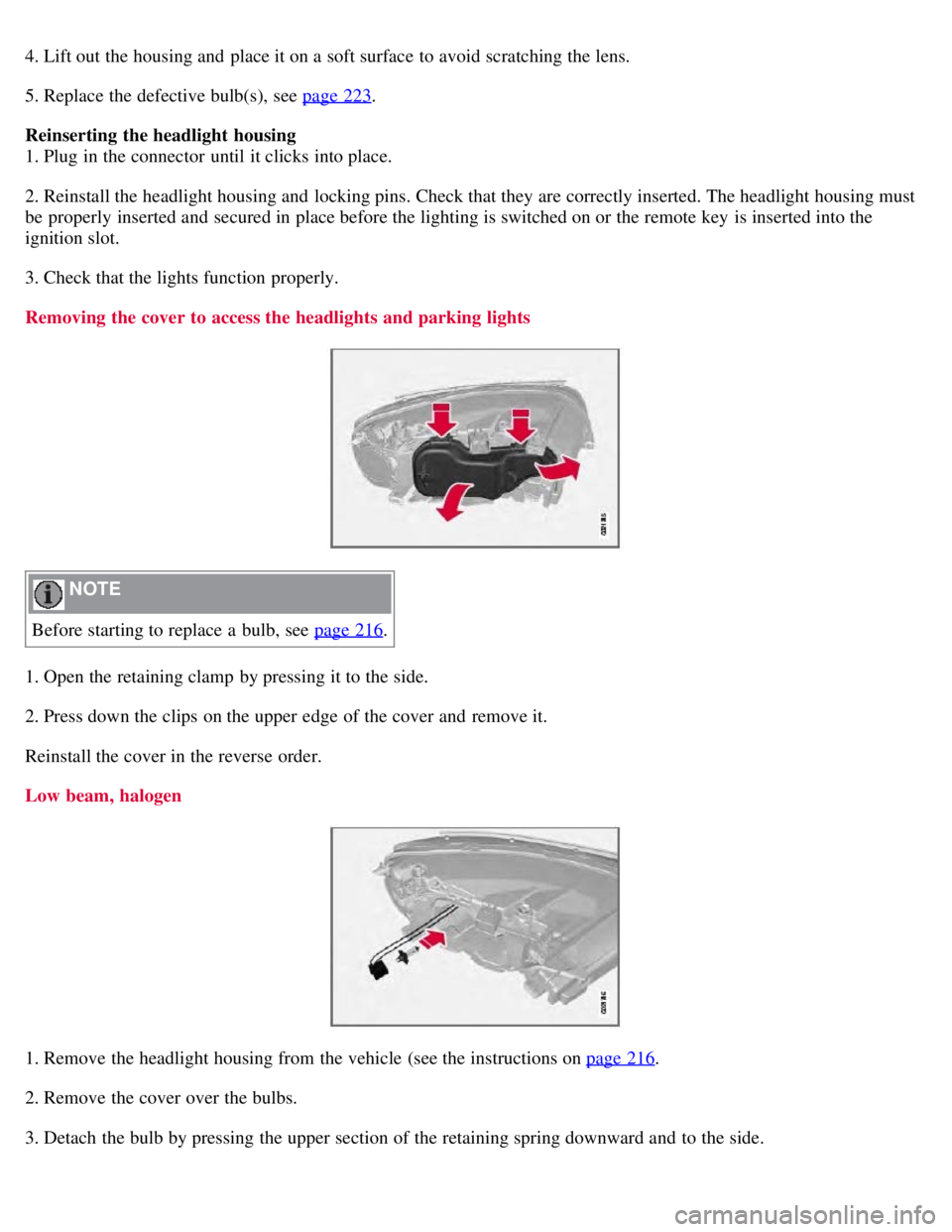
1. Open the retaining clamp by pressing it to the side.
2. Press down the clips on the upper edge of the cover and remove it.
Reinstall the cover in the reverse order.
Low beam, halogen
1. Remove the headlight housing from the vehicle (see the instructions on page 216.
2. Remove the cover over the bulbs.
3. Detach the bulb by pressing the upper section of the retaining spring downward and to the side.
Page 209 of 275
4. Unplug the connector from the bulb.
5. Replace the bulb and reinsert it into the headlight housing.
6. Put the cover back into position and reinstall the headlight housing.
218 06 Maintenance and specifications
Replacing bulbs
High beam, Halogen
1. Remove the headlight housing from the vehicle (see the instructions on page 216).
2. Remove the cover over the bulbs (see page 217
).
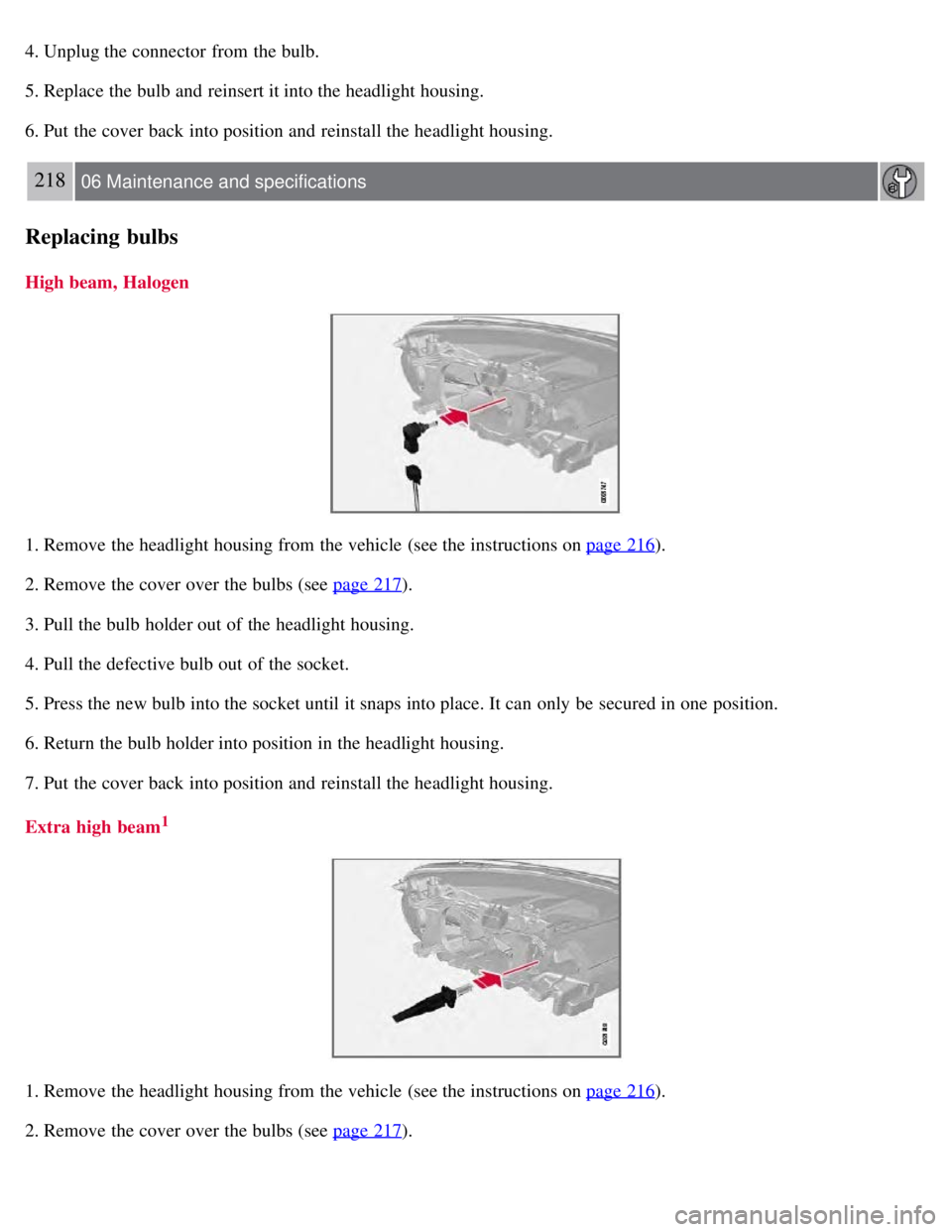
3. Pull the bulb holder out of the headlight housing.
4. Pull the defective bulb out of the socket.
5. Press the new bulb into the socket until it snaps into place. It can only be secured in one position.
6. Return the bulb holder into position in the headlight housing.
7. Put the cover back into position and reinstall the headlight housing.
Extra high beam
1
1. Remove the headlight housing from the vehicle (see the instructions on page 216).
2. Remove the cover over the bulbs (see page 217
).
Page 210 of 275
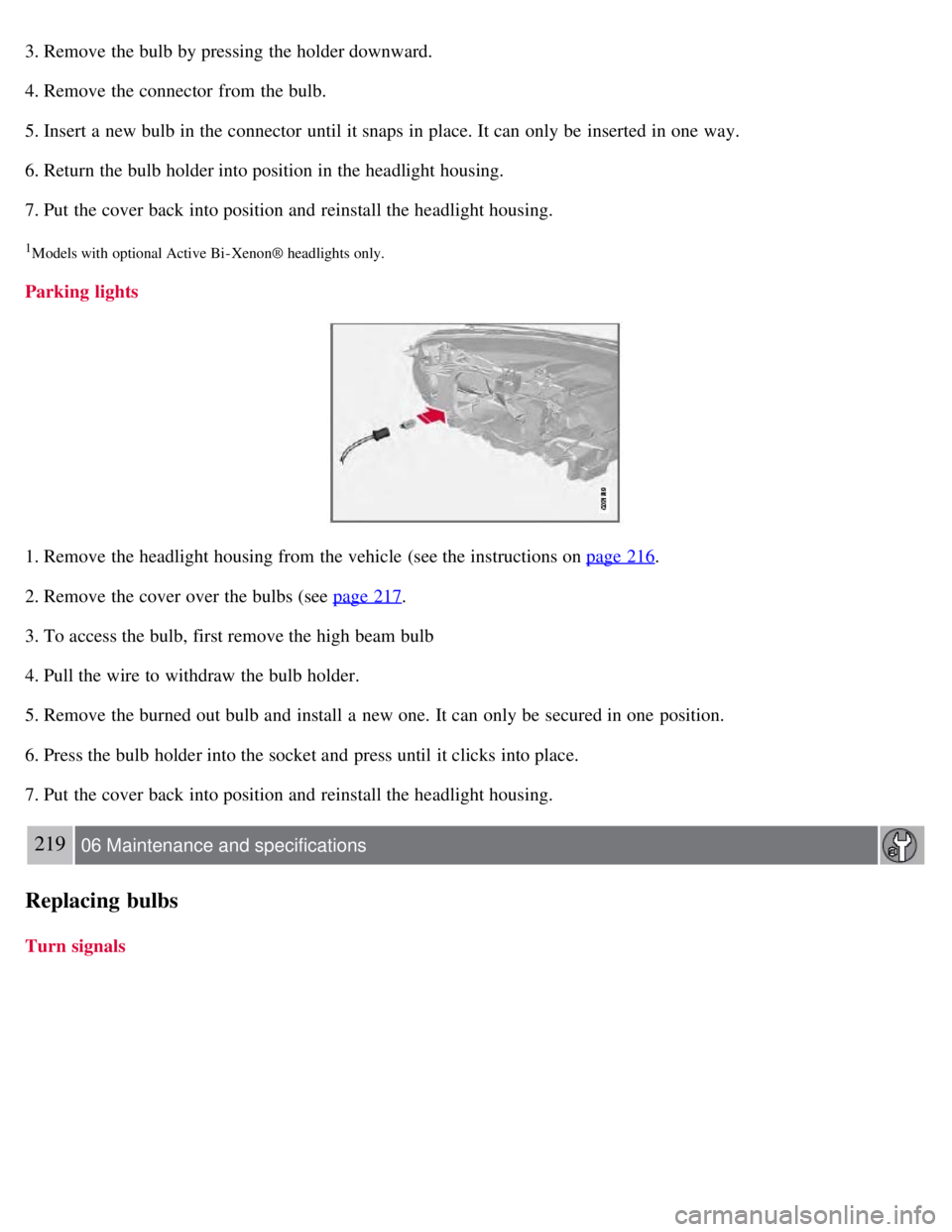
3. Remove the bulb by pressing the holder downward.
4. Remove the connector from the bulb.
5. Insert a new bulb in the connector until it snaps in place. It can only be inserted in one way.
6. Return the bulb holder into position in the headlight housing.
7. Put the cover back into position and reinstall the headlight housing.
1Models with optional Active Bi - Xenon® headlights only.
Parking lights
1. Remove the headlight housing from the vehicle (see the instructions on page 216.
2. Remove the cover over the bulbs (see page 217
.
3. To access the bulb, first remove the high beam bulb
4. Pull the wire to withdraw the bulb holder.
5. Remove the burned out bulb and install a new one. It can only be secured in one position.
6. Press the bulb holder into the socket and press until it clicks into place.
7. Put the cover back into position and reinstall the headlight housing.
219 06 Maintenance and specifications
Replacing bulbs
Turn signals
Page 211 of 275
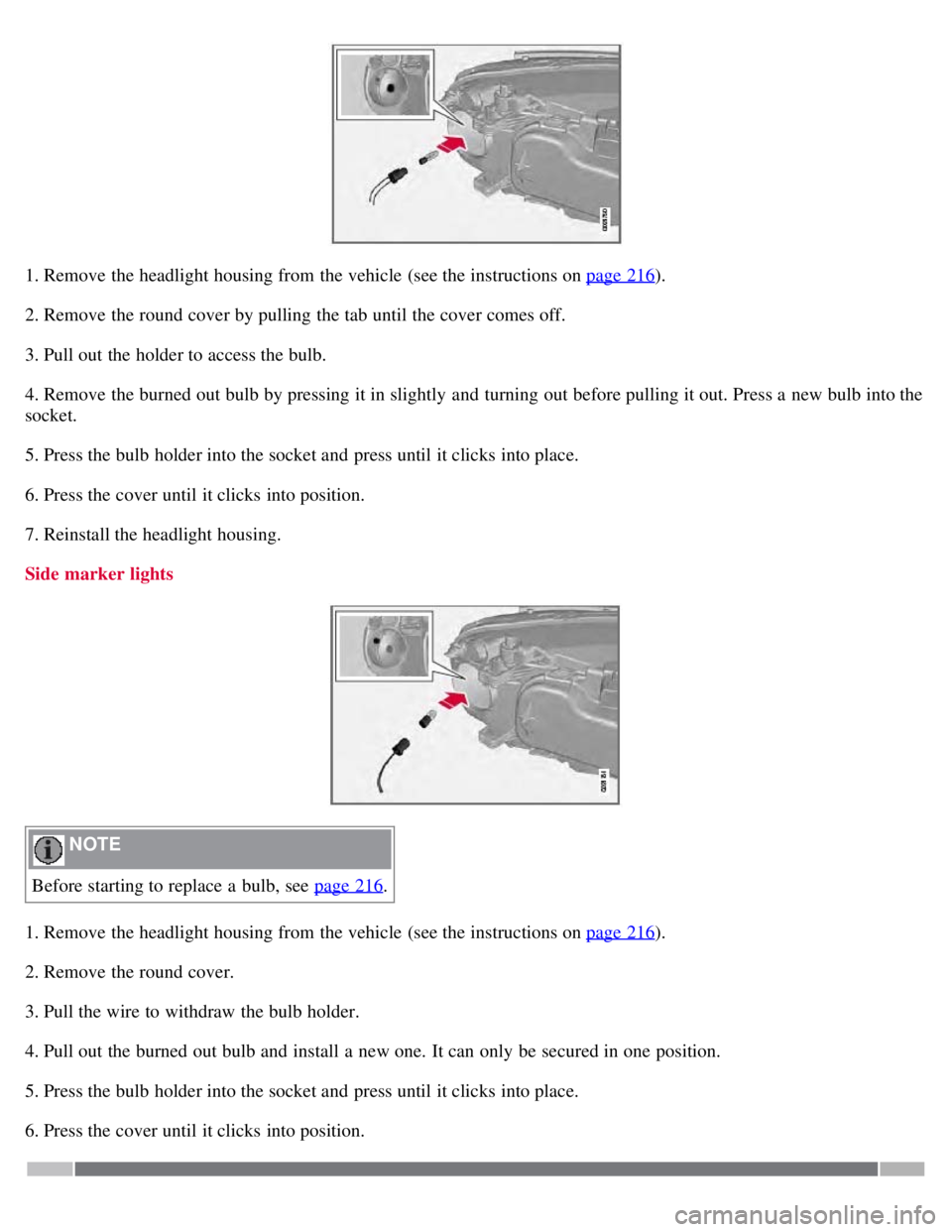
1. Remove the headlight housing from the vehicle (see the instructions on page 216).
2. Remove the round cover by pulling the tab until the cover comes off.
3. Pull out the holder to access the bulb.
4. Remove the burned out bulb by pressing it in slightly and turning out before pulling it out. Press a new bulb into the
socket.
5. Press the bulb holder into the socket and press until it clicks into place.
6. Press the cover until it clicks into position.
7. Reinstall the headlight housing.
Side marker lights
NOTE
Before starting to replace a bulb, see page 216
.
1. Remove the headlight housing from the vehicle (see the instructions on page 216
).
2. Remove the round cover.
3. Pull the wire to withdraw the bulb holder.
4. Pull out the burned out bulb and install a new one. It can only be secured in one position.
5. Press the bulb holder into the socket and press until it clicks into place.
6. Press the cover until it clicks into position.
Page 265 of 275
Geartronic110-111
general description110- 111
oil275
shiftlock override111
Axle weight 247
B
Battery
changing 227-228
maintenance227
remote control, replacing59
specifications276
warning symbols226
Black box 6, 208
Blind Spot Information System(BLIS)179-181
Booster cushion, integrated45-47
Booster cushions41
Brake lights91
emergency brake lights91
Brake support 166
Brake system
checking fluid level 215
emergency brake assistance114
fluid275
general information113
warning light77
Bulbs
footwell lighting 222
headlights216- 218
introduction216
license plate lights221
side marker lights219
specifications223
taillight219- 221
trunk lighting222
C
Capacity weight 247
Catalytic converter196
CD player/changer138-139
Central locking system, introduction52
Chains250
Check engine light75
Child restraint systems34-35
booster cushions41
convertible seats38- 40
Page 268 of 275
Fuel filler cap196
Fuel filler door
opening automatically 194
opening manually194
Fuel level warning light 76
Fuel requirements192-193
Fuel tank volume275
Fuses230-234
G
Gas tank volume275
Gasoline requirements193
Gauges74
Geartronic automatic transmission110-111
General warnings7
Generator warning light77
Glossary of tire terminology246
Glove compartment
locking 64
Grocery bag holder 199
Gross vehicle weight247
H
Hazard warning flashers92
Headlight washers96
Headlights
active bi-xenon® lights 90
changing bulbs217- 218
high beam flash89
high/low beams89
switch89
Heartbeat sensor (alarm system) 56
Heated front seats129
Heated oxygen sensors197
Heated rear seats129
High beams89
indicator light76
Home safe lighting 94
HomeLink universal transceiver103-106
Hood211
Horn88
I
Ignition modes80
Immobilizer53
Important information6
Indicator lights74-77