ABS VOLVO S80 2013 Owner´s Manual
[x] Cancel search | Manufacturer: VOLVO, Model Year: 2013, Model line: S80, Model: VOLVO S80 2013Pages: 372, PDF Size: 6.45 MB
Page 123 of 372
03 Your driving environment
Brakes
03
121
NOTE
•When the EBA system is activated, the
brake pedal will go down and pressure
in the brake system immediately increa-
ses to the maximum level. You must
maintain full pressure on the brake
pedal in order to utilize the system com-
pletely. There will be no braking effect if
the pedal is released. EBA is automati-
cally deactivated when the brake pedal
is released.
•When the vehicle has been parked for
some time, the brake pedal may sink
more than usual when the engine is
started. This is normal and the pedal will
return to its usual position when it is
released.
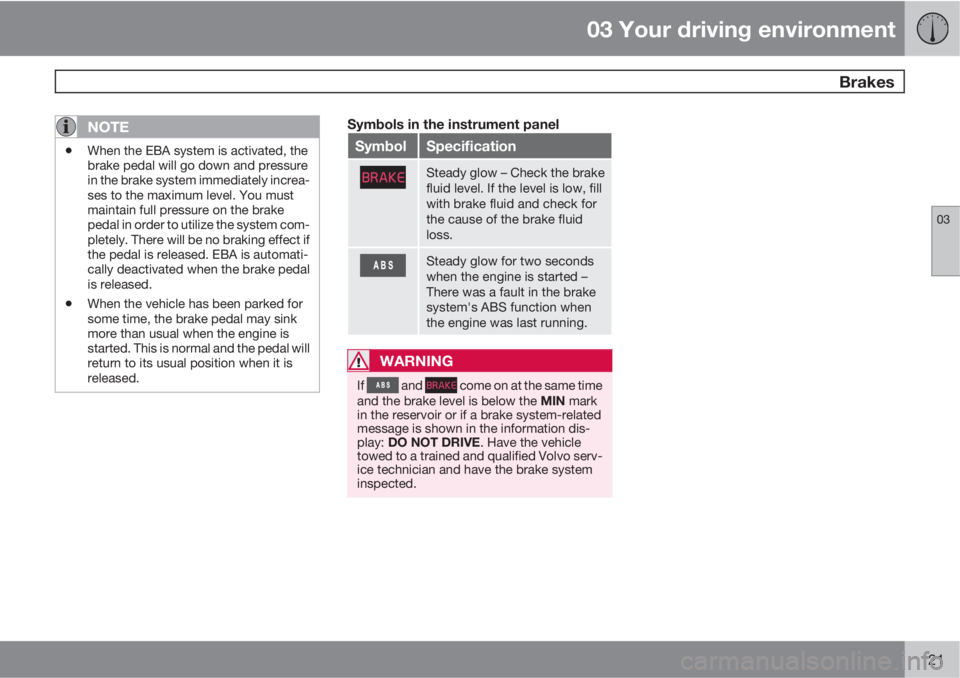
Symbols in the instrument panel
SymbolSpecification
Steady glow – Check the brake
fluid level. If the level is low, fill
with brake fluid and check for
the cause of the brake fluid
loss.
Steady glow for two seconds
when the engine is started –
There was a fault in the brake
system's ABS function when
the engine was last running.
WARNING
If and come on at the same time
and the brake level is below the MIN mark
in the reservoir or if a brake system-related
message is shown in the information dis-
play: DO NOT DRIVE. Have the vehicle
towed to a trained and qualified Volvo serv-
ice technician and have the brake system
inspected.
Page 159 of 372
04 Driver support
Collision warning with Full Auto-brake and Pedestrian Detection*
04
* Option/accessory, for more information, see Introduction.157
capacity to avoid a collision. In these condi-
tions, the ABS and DSTC systems provide the
best possible braking effect while helping to
maintain stability.
NOTE
The visual warning signal may be temporar-
ily disengaged in the event of high passen-
ger compartment temperature due to strong
sunlight, etc. If this occurs, the audible
warning signal will be used, even if it has
been deactivated in the menu system.
WARNING
•In certain situations, the system cannot
provide warnings or warnings may be
delayed if traffic conditions or other
external factors make it impossible for
the radar sensor or camera to detect a
pedestrian or a vehicle ahead.
•Warnings may not be provided if the
distance to the vehicle ahead is short,
or if movements of the steering wheel/
brake pedal are great, such as during
active driving.
•The sensor system has a limited range
for pedestrians and provides warnings
and braking effect most effectively at
speeds up to 30 mph (50 km/h). For sta-
tionary or slow-moving vehicles, the
system functions best if your vehicle’s
speed is below approximately 45 mph
(70 km/h).
•Warnings for stationary or slow-moving
vehicles may not be provided in dark
conditions or in poor visibility.
The Collision Warning system uses the same
radar sensors as Adaptive Cruise Control. For
more information on the radar sensor and its
limitations, see page 140.
NOTE
If warnings are given too frequently, the
warning distance can be reduced (see
page 156). This causes the system to pro-
vide later warnings, which decreases the
total number of warnings provided.
WARNING
•The system is not activated at speeds
under approx. 2 mph (4 km/h). There-
fore, it will not brake your vehicle if you
approach a vehicle ahead at very low
speed, such as when parking.
•The driver's actions always have high-
est priority and override the Collision
Warning system. This means that the
system will not intervene in situations
where the driver is actively steering,
braking or pressing the accelerator
pedal, even if a collision is imminent.
•When Auto-brake has prevented a col-
lision with a stationary object, your vehi-
cle will remain at a standstill for approx.
1.5 seconds. If your vehicle has been
braked for a moving vehicle ahead, your
vehicle's speed will be reduced to the
same speed as that vehicle's.
Page 204 of 372
05 Comfort and driving pleasure
Active chassis system–Four C*
05
202* Option/accessory, for more information, see Introduction.
Active chassis (Four C)
Active chassis, Four-C (Continuously Con-
trolled Chassis Concept), regulates the cha-
racteristics of the shock absorbers so that the
car's driving characteristics can be adjusted.
There are three settings: Comfort, Sport and
Advanced.
ComfortComfort mode offers a somewhat softer ride
and the transmission shifts gears at lower rpm.
This mode is particularly suitable for long-dis-
tance highway driving. The indicator light in the
button will be on when this mode is selected.
SportIn this mode, the vehicle's body sway is
reduced during cornering and steering
response is more immediate. The transmission
shifts up at higher rpm for sportier driving. The
indicator light in the button will be on to indi-
cate that Sport mode has been selected.
AdvancedIn this mode, body sway in curves is minimal
and steering response is very direct. Gear shift-
ing is done at high rpm in each gear for
dynamic and active driving.
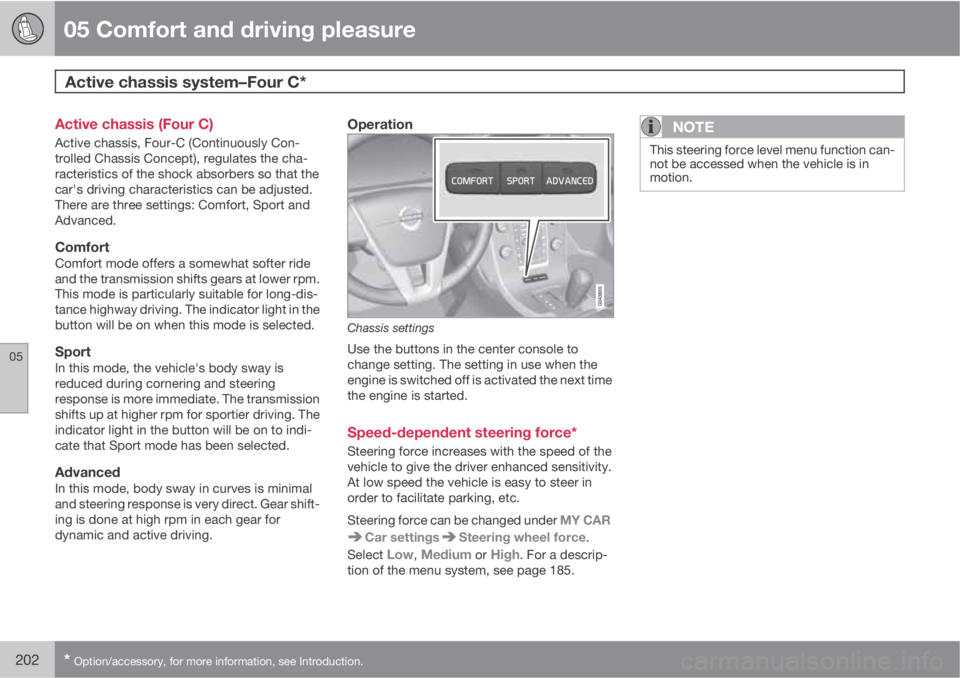
Operation
Chassis settings
Use the buttons in the center console to
change setting. The setting in use when the
engine is switched off is activated the next time
the engine is started.
Speed-dependent steering force*
Steering force increases with the speed of the
vehicle to give the driver enhanced sensitivity.
At low speed the vehicle is easy to steer in
order to facilitate parking, etc.
Steering force can be changed under MY CAR
Car settingsSteering wheel force.
Select
Low, Medium or High. For a descrip-
tion of the menu system, see page 185.
NOTE
This steering force level menu function can-
not be accessed when the vehicle is in
motion.
Page 267 of 372
07 During your trip
Driving recommendations
07
265
Driving through water
•The vehicle can be driven through water up
to a depth of approximately 10 in. (25 cm),
at a maximum speed of 6 mph (10 km/h).
•Take particular care when driving through
flowing water.
•Clean the electrical connections for trailer
wiring after driving in mud or water.
•When driving through water, maintain low
speed and do not stop in the water.
WARNING
After driving through water, press lightly on
the brake pedal to ensure that the brakes
are functioning normally. Water or mud can
make the brake linings slippery, resulting in
delayed braking effect.
CAUTION
•Engine damage will occur if water is
drawn into the air cleaner.
•If the vehicle is driven through water
deeper than 10 in (25 cm), water may
enter the differential and the transmis-
sion. This reduces the oil's lubricating
capacity and may shorten the service
life of these components.
•Do not allow the vehicle to stand in
water up to the door sills longer than
absolutely necessary. This could result
in electrical malfunctions.
•If the engine has been stopped while the
vehicle is in water, do not attempt to
restart it. Have the vehicle towed out of
the water.
Engine and cooling systemUnder special conditions, for example when
driving in hilly terrain, extreme heat or with
heavy loads, there is a risk that the engine and
cooling system will overheat. Proceed as fol-
lows to avoid overheating the engine.
•Maintain a low speed when driving with a
trailer up long, steep hills.
•Do not turn the engine off immediately
when stopping after a hard drive.
WARNING
The cooling fan may start or continue to
operate (for up to 6 minutes) after the engine
has been switched off.
•Remove any auxiliary lights from in front of
the grille when driving in hot weather con-
ditions.
•Do not exceed engine speeds of 4500 rpm
if driving with a trailer in hilly terrain. The oil
temperature could become too high.
Conserving electrical currentKeep the following in mind to help minimize
battery drain:
•When the engine is not running, avoid
using ignition mode II. Many electrical sys-
tems (the audio system, the optional navi-
gation system, power windows, etc) will
function in ignition modes 0 and I. These
modes reduce drain on the battery.
•Please keep in mind that using systems,
accessories, etc., that consume a great
deal of current when the engine is not run-
ning could result in the battery being com-
pletely drained. Driving or having the
engine running for approximately
15 minutes will help keep the battery
charged.
Page 277 of 372
07 During your trip
Towing a trailer
07
275 Introduction
Volvo recommends the use of Volvo trailer
hitches that are specially designed for the vehi-
cle.
NOTE
See page 351 for the maximum trailer and
tongue weights recommended by Volvo.
•Observe the legal requirements of the
state/province in which the vehicles are
•All Volvo models are equipped with
energy-absorbing shock-mounted bump-
ers. Trailer hitch installation should not
interfere with the proper operation of this
bumper system.
Trailer towing does not normally present any
particular problems, but take into considera-
tion:
•Increase tire pressure to recommended full
pressure. See the tire inflation table on
page 289.
•When your vehicle is new, avoid towing
heavy trailers during the first 620 miles
(1,000 km).
•Maximum speed when towing a trailer:
50 mph (80 km/h).
•Engine and transmission are subject to
increased loads. Therefore, engine coolant
temperature should be closely watchedwhen driving in hot climates or hilly terrain.
Use a lower gear and turn off the air con-
ditioner if the temperature gauge needle
enters the red range.
•If the automatic transmission begins to
overheat, a message will be displayed in
the text window.
•Avoid overload and other abusive opera-
tion.
•Hauling a trailer affects handling, durabil-
ity, and economy.
•It is necessary to balance trailer brakes
with the towing vehicle brakes to provide a
safe stop (check and observe state/local
regulations).
•Do not connect the trailer's brake system
directly to the vehicle's brake system.
•More frequent vehicle maintenance is
required.
•Remove the ball holder when the hitch is
not being used.
•Volvo recommends the use of synthetic
engine oil when towing a trailer over long
distances or in mountainous areas.
WARNING
•Bumper-attached trailer hitches must
not be used on Volvos, nor should
safety chains be attached to the
bumper.
•Trailer hitches attaching to the vehicle
rear axle must not be used.
•Never connect a trailer's hydraulic
brake system directly to the vehicle
brake system, nor a trailer's lighting
system directly to the vehicle lighting
system. Consult your nearest author-
ized Volvo retailer for correct installa-
tion.
•When towing a trailer, the trailer's safety
wire must be correctly fastened to the
hole or hook provided in the trailer hitch
on the vehicle. The safety wire should
never be fastened to or wound around
the drawbar ball.
Page 336 of 372
09 Maintenance and specifications
Fuses 09
334* Option/accessory, for more information, see Introduction.
Engine compartment, upper
Engine compartment, front
Engine compartment, lower
PositionsThese fuses are all located in the engine com-
partment box. Fuses in
are located under
.
NOTE
•Fuses 16 – 33 and 35 – 41 may be
changed at any time when necessary.
•Fuses 1 – 15, 34 and 42 – 44 are relays/
circuit breakers and should only be
removed or replaced by a trained and
qualified Volvo service technician.
•There is a special fuse removal tool on
the underside of the cover.
PosFunctionA
Circuit breaker50
Circuit breaker50
Circuit breaker60
Circuit breaker60
PosFunctionA
Circuit breaker60
–
–
Headlight washers*20
Windshield wipers30
–
Climate system blower40
–
ABS pump40
ABS valves20
–
Active Bending Lights-
headlight leveling*10
Central electrical module20
ABS5
Speed-dependent steering
force*5
PosFunctionA
Engine Control Module
(ECM), transmission, SRS10
Heated washer nozzles*10
-
Lighting panel5
-
-
-
Relay - engine compart-
ment box5
Auxiliary lights*20
Horn15
Engine Control Module
(ECM)10
Control module - automatic
transmission15
A/C compressor15
Relay-coils5
Page 344 of 372
09 Maintenance and specifications
Vehicle care 09
342
Leather careVolvo's leather upholstery is manufactured
with a protectant to repel soiling. Over time,
sunlight, grease and dirt can break down the
protection. Staining, cracking, scuffing, and
fading can result.
Volvo offers an easy-to-use, non-greasy
leather care kit formulated to clean and beau-
tify your vehicle's leather, and to renew the
protective qualities of its finish. The cleaner
removes dirt and oil buildup. The light cream
protectant restores a barrier against soil and
sunlight.
Volvo also offers a special leather softener that
should be applied after the cleaner and pro-
tectant. It leaves leather soft and smooth, and
reduces friction between leather and other fin-
ishes in the vehicle.
Volvo recommends cleaning, protecting and
conditioning your vehicle's leather two to four
times a year. Ask your Volvo retailer about
Leather Care Kit 951 0251 and Leather Soft-
ener 943 7429.
Cleaning leather upholstery1. Pour leather cleaner on a damp sponge
and squeeze it until the cleaner foams.
2. Apply the foam to the stain by moving the
sponge with circular movements.3. Dampen the stain thoroughly with the
sponge. Let the sponge absorb the stain,
do not rub.
4. Dry the stain with soft paper towels or a
towel, and allow the leather to dry com-
pletely.
Protecting leather upholstery1. Put a small amount of protectant cream on
a cloth and apply a thin coating of cream
to the upholstery with light circular move-
ments.
2. Allow the leather to dry for 20 minutes.
This will help the leather resist staining and
protect against sunlight's harmful UV rays.
CAUTION
•Under no circumstances should gaso-
line, naphtha or similar cleaning agents
be used on the plastic or the leather
since these can cause damage.
•Take extra care when removing stains
such as ink or lipstick since the coloring
can spread.
•Use solvents sparingly. Too much sol-
vent can damage the seat padding.
•Start from the outside of the stain and
work toward the center.
•Sharp objects (e.g. pencils or pens in a
pocket) or Velcro fasteners on clothing
may damage the textile upholstery.
•Clothing that is not colorfast, such as
new jeans or suede garments, may stain
the upholstery.
Cleaning a leather-covered steering
wheel
•Remove soil, dust, etc., with a damp
sponge and a neutral soap solution.
•Leather should be allowed to breath. Never
cover the steering wheel with a plastic pro-
tector.
•Volvo recommends cleaning, protecting
and conditioning the steering wheel with
Volvo's Leather Care Kit 951 0251 and
Leather Softener 943 7429.
Page 345 of 372
09 Maintenance and specifications
Vehicle care09
343
If there are stains on the steering wheel:
Type 1 (ink, wine, coffee, milk, sweat or blood)
–Use a soft cloth or sponge. Wipe the wheel
with a solution with 5% ammonia. For
blood stains, mix approx. 1 cup (2 dl) of
water and one ounce (25g) of salt and wipe
the stain.
Type 2 (fat, oil, sauces, or chocolate)
1. Same procedure as for type I stains.
2. Finish by rubbing the wheel with absorbent
paper or a towel.
Type 3 (dry soil or dust)
1. Remove the soil/dust with a soft brush.
2. Same procedure as for type I stains.
CAUTION
Sharp objects, such as rings, could damage
the leather on the steering wheel.
Cleaning the seat beltsClean only with lukewarm water and a mild
soap solution.
Cleaning floor matsThe floor mats should be vacuumed or brushed
clean regularly, especially during winter whenthey should be taken out for drying. Spots on
textile mats can be removed with a mild deter-
gent. For best protection in winter, Volvo rec-
ommends the use of Volvo rubber floor mats.
Consult your Volvo retailer.
Spots on interior plastic, metal, or wood
surfaces
Cleaning interior plastic components should
be done with a cleaning agent specially
designed for this purpose. Consult your Volvo
retailer.
Touching up paintwork
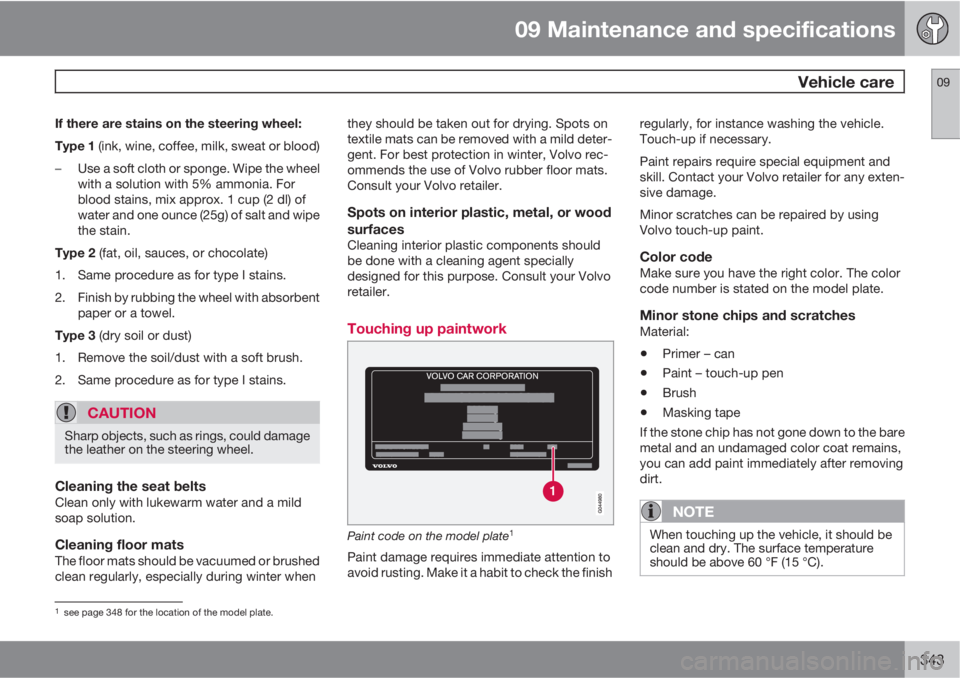
Paint code on the model plate1
Paint damage requires immediate attention to
avoid rusting. Make it a habit to check the finishregularly, for instance washing the vehicle.
Touch-up if necessary.
Paint repairs require special equipment and
skill. Contact your Volvo retailer for any exten-
sive damage.
Minor scratches can be repaired by using
Volvo touch-up paint.
Color codeMake sure you have the right color. The color
code number is stated on the model plate.
Minor stone chips and scratchesMaterial:
•Primer – can
•Paint – touch-up pen
•Brush
•Masking tape
If the stone chip has not gone down to the bare
metal and an undamaged color coat remains,
you can add paint immediately after removing
dirt.
NOTE
When touching up the vehicle, it should be
clean and dry. The surface temperature
should be above 60 °F (15 °C).
1see page 348 for the location of the model plate.
Page 358 of 372
10 Specifications
Overview of information and warning symbols
10
356* Option/accessory, for more information, see Introduction.
Introduction
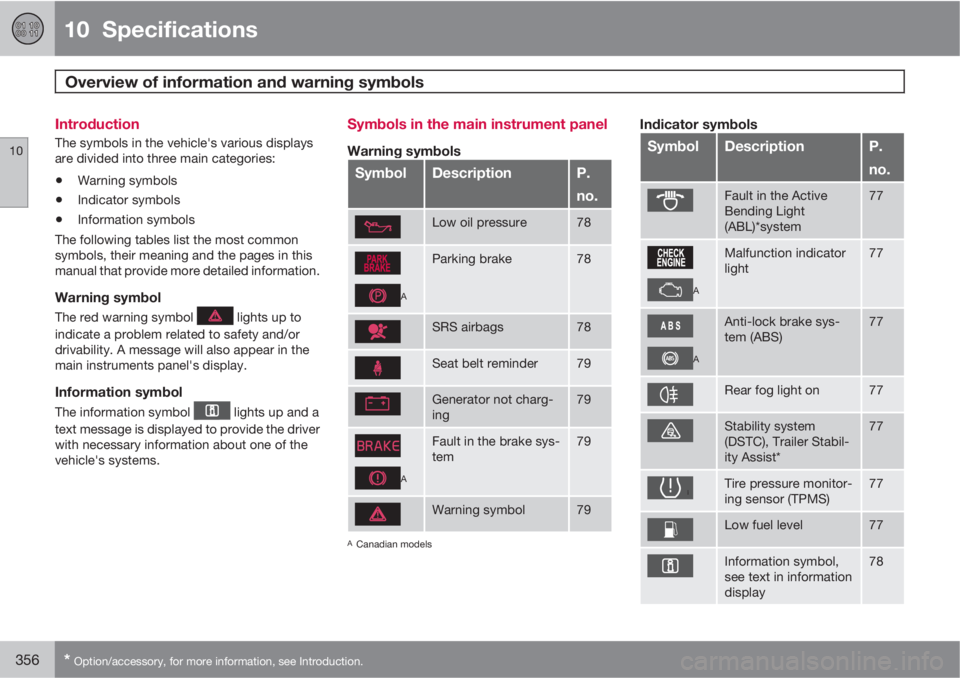
The symbols in the vehicle's various displays
are divided into three main categories:
•Warning symbols
•Indicator symbols
•Information symbols
The following tables list the most common
symbols, their meaning and the pages in this
manual that provide more detailed information.
Warning symbol
The red warning symbol lights up to
indicate a problem related to safety and/or
drivability. A message will also appear in the
main instruments panel's display.
Information symbol
The information symbol lights up and a
text message is displayed to provide the driver
with necessary information about one of the
vehicle's systems.
Symbols in the main instrument panel
Warning symbols
SymbolDescriptionP.
no.
Low oil pressure78
A
Parking brake78
SRS airbags78
Seat belt reminder79
Generator not charg-
ing79
A
Fault in the brake sys-
tem79
Warning symbol79
ACanadian models
Indicator symbols
SymbolDescriptionP.
no.
Fault in the Active
Bending Light
(ABL)*system77
A
Malfunction indicator
light77
A
Anti-lock brake sys-
tem (ABS)77
Rear fog light on77
Stability system
(DSTC), Trailer Stabil-
ity Assist*77
Tire pressure monitor-
ing sensor (TPMS)77
Low fuel level77
Information symbol,
see text in information
display78
Page 362 of 372
11 Index
11
360
1, 2, 3 ...
12-volt sockets........................................ 205
A
ABS (anti-lock brake system).................. 120
Accessory installation warning.................. 13
Active chassis system.............................202
Active high beams..................................... 93
Active yaw control................................... 128
Adaptive brake lights............................... 119
Adaptive cruise control.................... 134, 136
Airbags
disconnecting the front passenger’s
side.................................................26, 27
front...................................................... 22
inflatable curtain................................... 32
side impact........................................... 30
Air conditioning........................................ 196
Air distribution.......................................... 192
Air distribution table................................. 198
Air vents................................................... 193
All Wheel Drive......................................... 118Anti-freeze.......................................266, 318
Anti-lock brake system
warning light......................................... 76
Anti-lock Brake System (ABS)................. 120
Approach lighting................................55, 98
Audio system
AUX/USB sockets............................... 234
BluetoothŸ devices............................. 237
BluetoothŸ hands-free system........... 239
Bluetooth streaming audio................. 237
getting started.................................... 211
HD digital radio................................... 223
introduction......................................... 210
media player....................................... 230
overview.............................................. 210
radio functions.................................... 221
Rear seat entertainment..................... 251
SiriusXM
E satellite radio.................... 225
sound settings.................................... 216
steering wheel keypad........................ 212
voice control....................................... 247
Auto-dim rearview mirror......................... 104
Automatic locking retractor....................... 37
Automatic transmission
Geartronic........................................... 117
general description.....................116, 117oil........................................................ 354
shiftlock override................................ 118
Axle weight.............................................. 293
B
Battery
changing..................................... 330, 331
maintenance....................................... 330
remote key, replacing........................... 58
specifications...................................... 355
warning symbols................................. 329
Blind Spot Information System
(BLIS)....................................... 176, 177, 178
Bluetooth cell phone connection............. 239
Booster cushions....................................... 45
Brake lights.............................................. 119
Brake system
ABS..................................................... 120
Brake pad inspection.......................... 119
checking fluid level............................. 318
emergency brake assistance.............. 120
fluid..................................................... 354
general information............................. 119
warning light......................................... 78