change time VOLVO S80 2013 Owner´s Manual
[x] Cancel search | Manufacturer: VOLVO, Model Year: 2013, Model line: S80, Model: VOLVO S80 2013Pages: 372, PDF Size: 6.45 MB
Page 139 of 372
04 Driver support
Adaptive Cruise Control (ACC)*
04
* Option/accessory, for more information, see Introduction.137
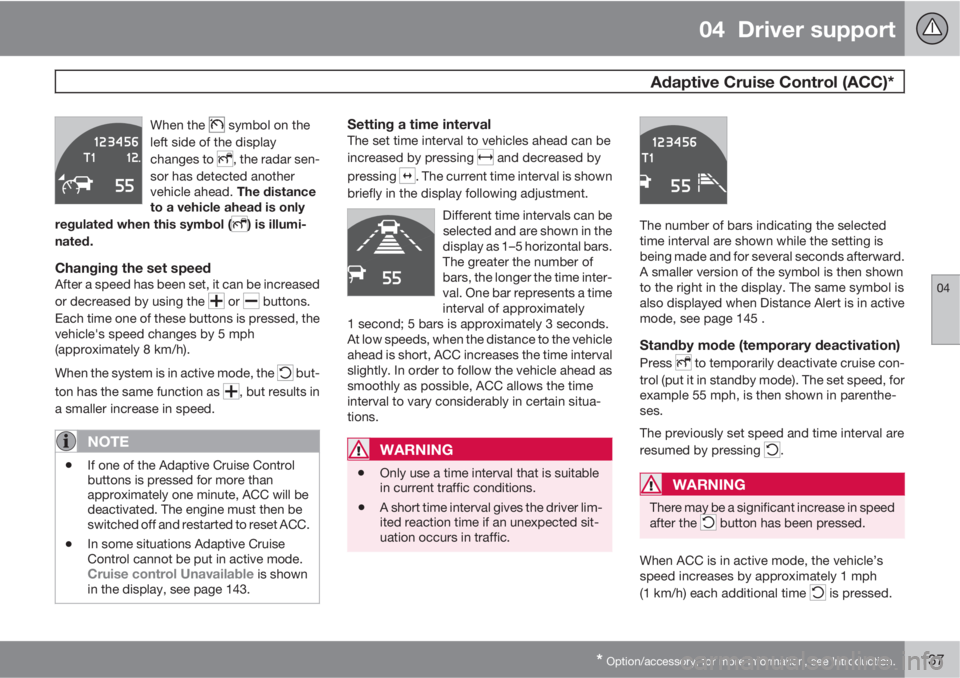
When the symbol on the
left side of the display
changes to
, the radar sen-
sor has detected another
vehicle ahead. The distance
to a vehicle ahead is only
regulated when this symbol (
) is illumi-
nated.
Changing the set speedAfter a speed has been set, it can be increased
or decreased by using the
or buttons.
Each time one of these buttons is pressed, the
vehicle's speed changes by 5 mph
(approximately 8 km/h).
When the system is in active mode, the
but-
ton has the same function as
, but results in
a smaller increase in speed.
NOTE
•If one of the Adaptive Cruise Control
buttons is pressed for more than
approximately one minute, ACC will be
deactivated. The engine must then be
switched off and restarted to reset ACC.
•In some situations Adaptive Cruise
Control cannot be put in active mode.
Cruise control Unavailable is shown
in the display, see page 143.
Setting a time intervalThe set time interval to vehicles ahead can be
increased by pressing
and decreased by
pressing
. The current time interval is shown
briefly in the display following adjustment.
Different time intervals can be
selected and are shown in the
display as 1–5 horizontal bars.
The greater the number of
bars, the longer the time inter-
val. One bar represents a time
interval of approximately
1 second; 5 bars is approximately 3 seconds.
At low speeds, when the distance to the vehicle
ahead is short, ACC increases the time interval
slightly. In order to follow the vehicle ahead as
smoothly as possible, ACC allows the time
interval to vary considerably in certain situa-
tions.
WARNING
•Only use a time interval that is suitable
in current traffic conditions.
•A short time interval gives the driver lim-
ited reaction time if an unexpected sit-
uation occurs in traffic.
The number of bars indicating the selected
time interval are shown while the setting is
being made and for several seconds afterward.
A smaller version of the symbol is then shown
to the right in the display. The same symbol is
also displayed when Distance Alert is in active
mode, see page 145 .
Standby mode (temporary deactivation)
Press to temporarily deactivate cruise con-
trol (put it in standby mode). The set speed, for
example 55 mph, is then shown in parenthe-
ses.
The previously set speed and time interval are
resumed by pressing
.
WARNING
There may be a significant increase in speed
after the button has been pressed.
When ACC is in active mode, the vehicle’s
speed increases by approximately 1 mph
(1 km/h) each additional time
is pressed.
Page 140 of 372
04 Driver support
Adaptive Cruise Control (ACC)*
04
138* Option/accessory, for more information, see Introduction.
Standby mode due to action by the driverACC is temporarily deactivated and put in
standby mode:
•if the brakes are applied
•if the gear selector is moved to N
•if the driver drives at a speed higher than
the set speed for more than 1 minute.
In this happens, the driver will have to regulate
the vehicle's speed.
NOTE
If the accelerator pedal is only depressed for
a short time, such as when passing another
vehicle, ACC is deactivated temporarily and
is reactivated when the pedal is released.
Automatic standby modeAdaptive cruise control is linked to other sys-
tems such as the stability and traction control
system (DSTC). If this system is not functioning
properly, adaptive cruise control is automati-
cally deactivated and will go into standby
mode.
In the event of automatic deactivation, an audi-
ble signal will sound and the message
Cruise
control Cancelled is shown in the display.
The driver must then intervene and adapt thevehicle's speed to the surrounding traffic and
regulate the distance to the vehicle ahead.
An automatic switch to standby mode may be
caused if:
•engine speed (rpm) is too high/low
•the vehicle's speed goes below 18 mph
(30 km/h)3
•the wheels lose traction
•brake temperature is high
•the radar sensor is obstructed by, for
example, wet snow or rain.
Resuming the set speedIf ACC is in standby mode, it can be reactivated
by pressing the
button on the steering
wheel keypad. The vehicle will return to the
most recently set speed.
WARNING
The vehicle may accelerate quickly after has been pressed if its current speed is
considerably lower than the set speed.
Passing another vehicleIf your vehicle’s speed is being regulated by
ACC and the driver indicates that he/she would
like to pass the vehicle ahead by using theleft turn signal, ACC can assist by accelerating
briefly.
This function is active at speeds above approx-
imately 45 mph (70 km/h).
WARNING
Please be aware that this function will also
cause the vehicle to accelerate briefly in
certain situations other than passing
another vehicle, for example using the left
turn signal to indicate a lane change or a
turn toward a highway exit at speeds above
approximately 45 mph (70 km/h).
Queue AssistQueue Assist is an added ACC feature that is
linked to your vehicle's automatic transmis-
sion.
Queue Assist consists of the following func-
tions:
•Enhanced speed interval (including when
the vehicle is at a complete stop or is mov-
ing at speed below 18 mph (30 km/h))
•Automatic standby mode when ACC
changes target vehicles
•No automatic braking when at a standstill
•The parking brake is applied automatically
3Does not apply to vehicles equipped with the optional Queue Assist
Page 141 of 372
04 Driver support
Adaptive Cruise Control (ACC)*
04
* Option/accessory, for more information, see Introduction.139
Please note that the lowest speed that can be
set is 18 mph (30 km/h), although ACC can
maintain a set speed/distance to a vehicle
ahead down to a standstill. Queue Assist con-
sists of the following features:
Enhanced speed interval
NOTE
The driver's door must be closed and the
driver's seat belt must be fastened before
ACC can be put in active mode. If the driv-
er's seat belt is taken off or if the driver's
door is opened, ACC will return to standby
mode.
Your vehicle can maintain the set time interval
to the vehicle ahead at any permissible speed,
including a complete stop.
In order to activate ACC at speeds below
18 mph (30 km/h):
•The vehicle ahead must be within a rea-
sonable distance (not farther away than
approx. 100 ft/30 meters)
•The lowest speed that can be selected is
18 mph (30 km/h), although ACC will also
help maintain the set time interval to the
vehicle ahead at lower speeds, including a
complete stop.During short stops (less than approximately
3 seconds) in slow-moving traffic, your vehicle
will begin moving again automatically as soon
as the vehicle ahead begins to move.
If it takes more than 3 seconds for the vehicle
ahead to begin moving, ACC will be automati-
cally go into standby mode.
The driver will then have to reactivate ACC in
one of the following ways:
•By pressing
•By accelerating up to at least 3 mph
(4 km/h). ACC will then resume following
the vehicle ahead.
Your vehicle will then resume following the
vehicle ahead at the set time interval.
NOTE
ACC can remain active and keep your vehi-
cle at a standstill for up to 4 minutes. After
4 minutes have elapsed, the parking brake
will be engaged and ACC will go into
standby mode.
To reactivate ACC, the driver must release
the parking brake (see page 123).
Automatic standby mode when ACC
changes target vehicles
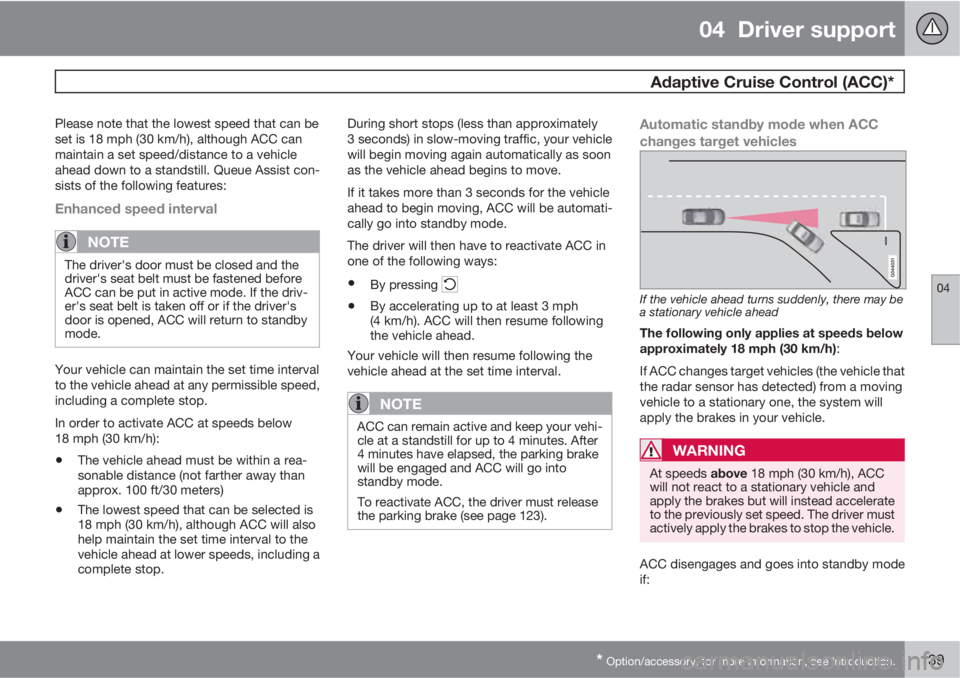
If the vehicle ahead turns suddenly, there may be
a stationary vehicle ahead
The following only applies at speeds below
approximately 18 mph (30 km/h):
If ACC changes target vehicles (the vehicle that
the radar sensor has detected) from a moving
vehicle to a stationary one, the system will
apply the brakes in your vehicle.
WARNING
At speeds above 18 mph (30 km/h), ACC
will not react to a stationary vehicle and
apply the brakes but will instead accelerate
to the previously set speed. The driver must
actively apply the brakes to stop the vehicle.
ACC disengages and goes into standby mode
if:
Page 156 of 372
04 Driver support
Collision warning with Full Auto-brake and Pedestrian Detection*
04
154* Option/accessory, for more information, see Introduction.
Introduction
Collision Warning with Full Auto-brake and
Pedestrian Detection is designed to assist the
driver if there is a risk of a collision with a
pedestrian, a vehicle ahead that is at a stand-
still or one that is moving in the same direction
as your vehicle.
Collision Warning consists of the following
three functions:
•Collision Warning warns the driver of a
potential collision situation.
•Brake Support helps the driver brake effi-
ciently in a critical situation.
•Auto-brake brakes the vehicle automati-
cally if a collision with a pedestrian or
another vehicle cannot be avoided and the
driver does not apply the brakes in time or
steer around the person/vehicle. Auto-
brake can help prevent a collision or
reduce the speed at which a collision
occurs.
Since Collision Warning with Full Auto-brake
and Pedestrian Detection is activated in cir-
cumstances where the driver should have
begun braking much sooner, the system will
not be able to assist the driver in all situations.
This system is designed to activate as late as
possible to help avoid unnecessary interven-
tion.The system should not be used in such a way
that the driver changes his/her way of operat-
ing the vehicle. If the driver relies entirely on the
system, the chances of an accident eventually
occurring increase considerably.
The Collision Warning and City Safety™ sys-
tems supplement each other. See page 148 for
detailed information about City Safety™.
WARNING
No automatic system can be guaranteed to
function 100% correctly in all situations. For
that reason, never test the Auto-brake sys-
tem by driving toward a person or object.
This could result in serious injury or death.
WARNING
•Collision Warning does not work in all
driving, traffic, weather and road condi-
tions. It does not react to vehicles not
traveling in the same direction as your
vehicle.
•Collision Warning does not react to ani-
mals.
•Warnings are only provided when the
risk of collision is high. The "Function"
section provides information about lim-
itations that the driver must be aware of
before using Collision Warning.
•Collision Warning will not provide a
warning or brake the vehicle for pedes-
trians at speeds above 50 mph
(80 km/h).
Page 168 of 372
04 Driver support
Driver Alert System*
04
166* Option/accessory, for more information, see Introduction.
Settings
Settings for Lane Departure Warning can be
made in the menu system by pressing My
Car. Go to Settings
Car settingsDriver
support systems
Lane Departure
Warning.
There are two alternatives:
On at start-up: This selection switches LDW
on each time the engine is started. Otherwise,the system will be in the mode that it was in
when the engine was switched off.
Increased sensitivity: This selection increa-
ses the function’s sensitivity. Warnings will be
given at an earlier stage and fewer limitations
apply. When this setting is being used, the sys-
tem only needs to monitor lane marker lines on
one side of the vehicle to change status to
Lane Depart Warn Available.
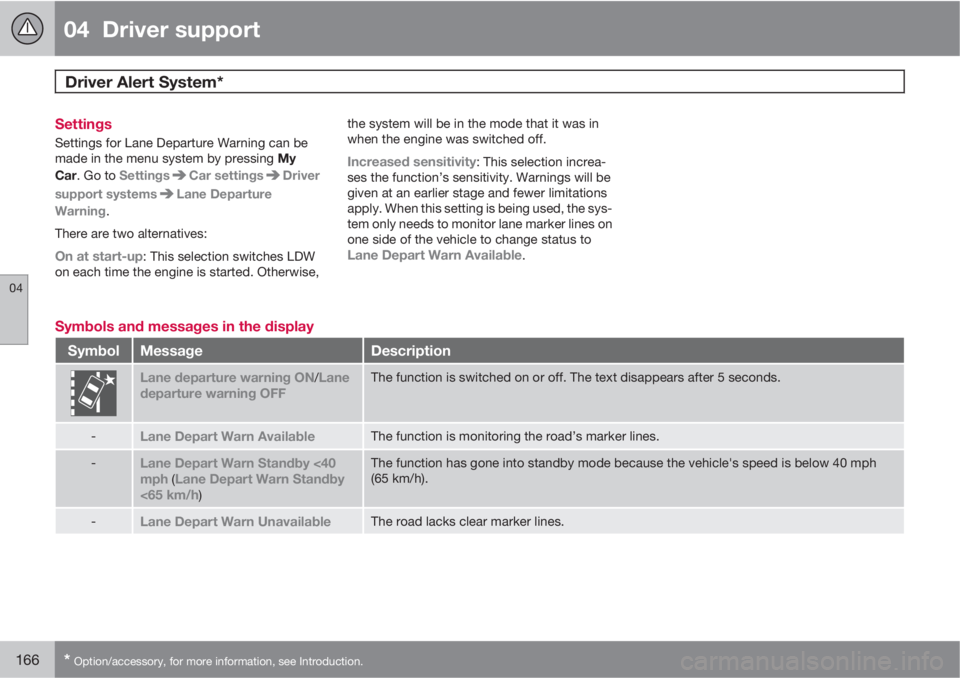
Symbols and messages in the display
SymbolMessageDescription
Lane departure warning ON/Lane
departure warning OFFThe function is switched on or off. The text disappears after 5 seconds.
-Lane Depart Warn AvailableThe function is monitoring the road’s marker lines.
-Lane Depart Warn Standby <40
mph (Lane Depart Warn Standby
<65 km/h)
The function has gone into standby mode because the vehicle's speed is below 40 mph
(65 km/h).
-Lane Depart Warn UnavailableThe road lacks clear marker lines.
Page 176 of 372
04 Driver support
Rear Park Assist Camera (PAC)*
04
174* Option/accessory, for more information, see Introduction.
WARNING
Keep in mind that the image on the screen
only shows the area behind the vehicle. The
driver must always watch for people, ani-
mals, other vehicles, etc., near the sides of
the vehicle when turning while backing up.
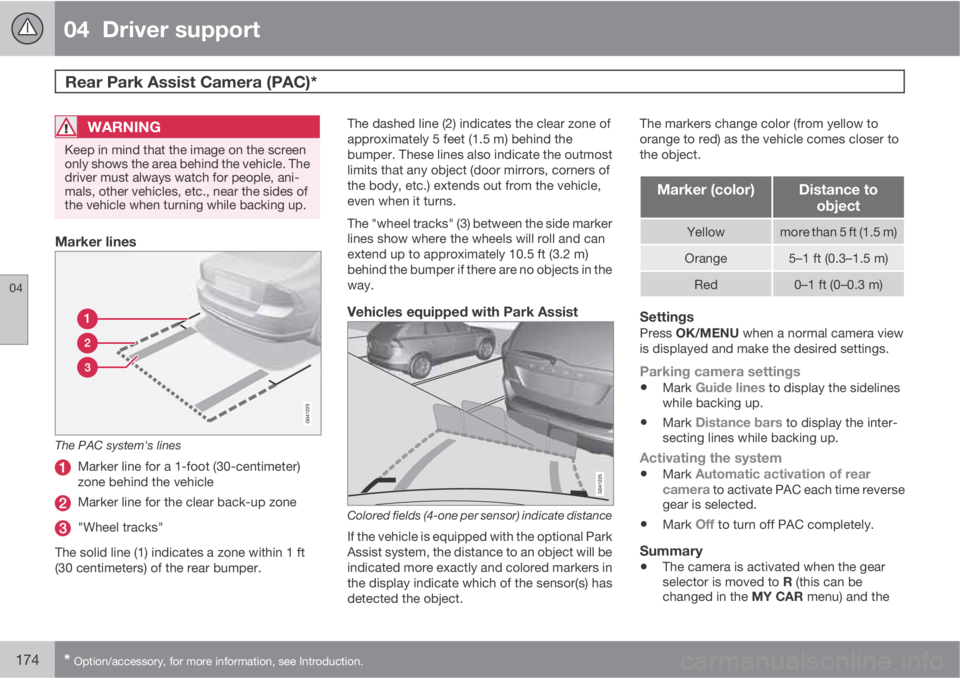
Marker lines
The PAC system's lines
Marker line for a 1-foot (30-centimeter)
zone behind the vehicle
Marker line for the clear back-up zone
"Wheel tracks"
The solid line (1) indicates a zone within 1 ft
(30 centimeters) of the rear bumper.The dashed line (2) indicates the clear zone of
approximately 5 feet (1.5 m) behind the
bumper. These lines also indicate the outmost
limits that any object (door mirrors, corners of
the body, etc.) extends out from the vehicle,
even when it turns.
The "wheel tracks" (3) between the side marker
lines show where the wheels will roll and can
extend up to approximately 10.5 ft (3.2 m)
behind the bumper if there are no objects in the
way.
Vehicles equipped with Park Assist
Colored fields (4-one per sensor) indicate distance
If the vehicle is equipped with the optional Park
Assist system, the distance to an object will be
indicated more exactly and colored markers in
the display indicate which of the sensor(s) has
detected the object.The markers change color (from yellow to
orange to red) as the vehicle comes closer to
the object.
Marker (color)Distance to
object
Yellowmore than 5 ft (1.5 m)
Orange5–1 ft (0.3–1.5 m)
Red0–1 ft (0–0.3 m)
SettingsPress OK/MENU when a normal camera view
is displayed and make the desired settings.
Parking camera settings
•Mark Guide lines to display the sidelines
while backing up.
•Mark Distance bars to display the inter-
secting lines while backing up.
Activating the system
•Mark Automatic activation of rear
camera to activate PAC each time reverse
gear is selected.
•Mark Off to turn off PAC completely.
Summary
•The camera is activated when the gear
selector is moved to R (this can be
changed in the MY CAR menu) and the
Page 177 of 372
04 Driver support
Rear Park Assist Camera (PAC)*
04
* Option/accessory, for more information, see Introduction.175
image is shown on the center console dis-
play.
•When backing up, two solid lines are pro-
jected on the screen to show the path that
the vehicle's rear wheels will take. These
lines are affected by movements of the
steering wheel. The vehicle's approximate
outer dimension are shown by two dashed
lines.
•The graphic lines will not be displayed
when backing up with a trailer that is con-
nected to the vehicle's electrical system.
•Objects on the ground that are closer than
1 ft (30 centimeters) cannot be detected by
the camera.
•The camera is active for approx.
5 seconds after the gear selector is moved
to R or until the vehicle's speed exceeds
6 mph (10 km/h).
•The optional Park Assist sensors and the
parking camera work together and infor-
mation from the sensors is shown graphi-
cally on the display.
•The graphic lines shown on the screen
when the vehicle backs up can be disabled
in the settings menu.
•Manual zoom can be selected in the MY
CAR menu.
•The system can be switched off by press-
ing CAM. By default, the system is acti-
vated when the gear selector is moved toR. This setting can be changed in the MY
CAR menu.
•If there are two cameras installed on the
vehicle*, to switch between cameras, turn
TUNE (at least one of the cameras has to
be active), press CAM repeatedly or use
the center console controls. If the front
camera is on, it overrides the optional park
assist system's visual indicator but there
will still be an audible signal.
Limitations
Even if a fairly small section of the screen image
appears to be obstructed, this may mean that
a relatively large area behind the vehicle is hid-
den and objects there may not be detected
until they are very near the vehicle.
NOTE
Bicycle carriers or other accessories moun-
ted on the trunk may obstruct the camera's
field of view.
Keep in mind
•Keep the camera's lens free of dirt, ice and
snow. Remove ice and snow carefully to
avoid scratching the lens.
•Clean the lens regularly with warm water
and a suitable car washing detergent.
Page 178 of 372
04 Driver support
Blind Spot Information System*
04
176* Option/accessory, for more information, see Introduction.
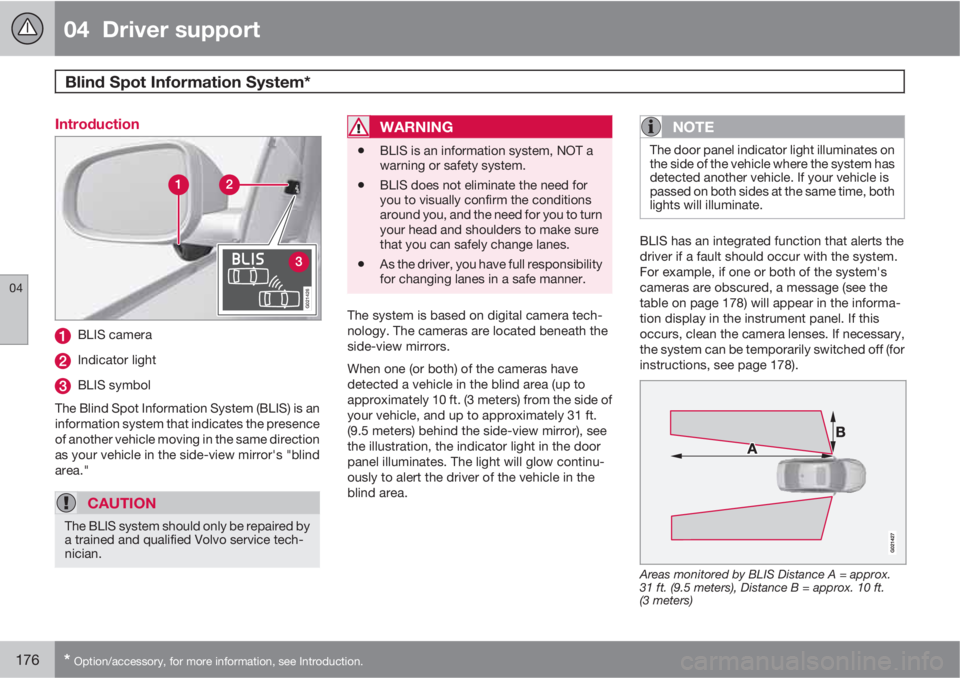
Introduction
G021426
BLIS camera
Indicator light
BLIS symbol
The Blind Spot Information System (BLIS) is an
information system that indicates the presence
of another vehicle moving in the same direction
as your vehicle in the side-view mirror's "blind
area."
CAUTION
The BLIS system should only be repaired by
a trained and qualified Volvo service tech-
nician.
WARNING
•BLIS is an information system, NOT a
warning or safety system.
•BLIS does not eliminate the need for
you to visually confirm the conditions
around you, and the need for you to turn
your head and shoulders to make sure
that you can safely change lanes.
•As the driver, you have full responsibility
for changing lanes in a safe manner.
The system is based on digital camera tech-
nology. The cameras are located beneath the
side-view mirrors.
When one (or both) of the cameras have
detected a vehicle in the blind area (up to
approximately 10 ft. (3 meters) from the side of
your vehicle, and up to approximately 31 ft.
(9.5 meters) behind the side-view mirror), see
the illustration, the indicator light in the door
panel illuminates. The light will glow continu-
ously to alert the driver of the vehicle in the
blind area.
NOTE
The door panel indicator light illuminates on
the side of the vehicle where the system has
detected another vehicle. If your vehicle is
passed on both sides at the same time, both
lights will illuminate.
BLIS has an integrated function that alerts the
driver if a fault should occur with the system.
For example, if one or both of the system's
cameras are obscured, a message (see the
table on page 178) will appear in the informa-
tion display in the instrument panel. If this
occurs, clean the camera lenses. If necessary,
the system can be temporarily switched off (for
instructions, see page 178).
Areas monitored by BLIS Distance A = approx.
31 ft. (9.5 meters), Distance B = approx. 10 ft.
(3 meters)
Page 190 of 372
05 Comfort and driving pleasure
The MY CAR menus
05
188
Calibrate tire pressure
See page 307 for more information. This sys-
tem is optional in Canada.
Steering wheel force
High
Medium
Low
See page 202 for more information.
Reset car settings
This feature returns the "Car settings" menu to
the original factory settings.
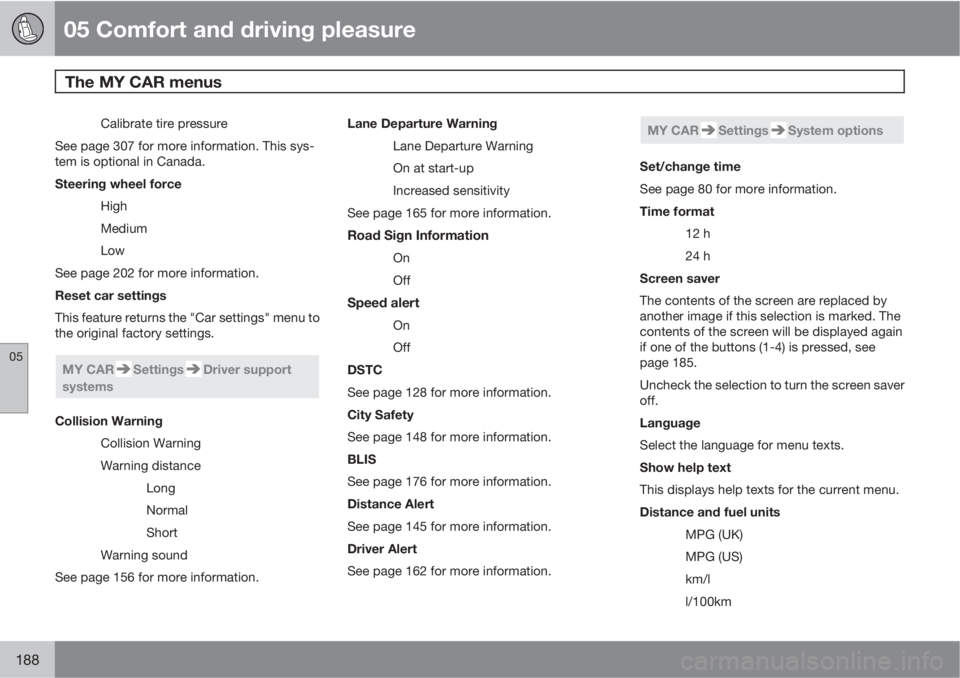
MY CARSettingsDriver support
systems
Collision Warning
Collision Warning
Warning distance
Long
Normal
Short
Warning sound
See page 156 for more information.Lane Departure Warning
Lane Departure Warning
On at start-up
Increased sensitivity
See page 165 for more information.
Road Sign Information
On
Off
Speed alert
On
Off
DSTC
See page 128 for more information.
City Safety
See page 148 for more information.
BLIS
See page 176 for more information.
Distance Alert
See page 145 for more information.
Driver Alert
See page 162 for more information.
MY CARSettingsSystem options
Set/change time
See page 80 for more information.
Time format
12 h
24 h
Screen saver
The contents of the screen are replaced by
another image if this selection is marked. The
contents of the screen will be displayed again
if one of the buttons (1-4) is pressed, see
page 185.
Uncheck the selection to turn the screen saver
off.
Language
Select the language for menu texts.
Show help text
This displays help texts for the current menu.
Distance and fuel units
MPG (UK)
MPG (US)
km/l
l/100km
Page 194 of 372
05 Comfort and driving pleasure
Climate system
05
192
tioning system contains 1.8 lbs (820 g) of
R134a. The systems uses PAG oil.
Passenger compartment filterReplace the cabin air filter with a new one at
the recommended intervals. Please refer to
your Warranty and Service Records Informa-
tion booklet, or consult a trained and qualified
Volvo service technician for these intervals.
The filter should be replaced more often when
driving under dirty and dusty conditions. The
filter cannot be cleaned and therefore should
always be replaced with a new one.
NOTE
There are different types of cabin air filters.
Ensure that the correct type is installed.
Interior Air Quality System (IAQS)A multifilter helps reduce gases and particles
in the incoming air, thereby reducing the levels
of odors and contaminants entering the vehi-
cle. The air quality sensor detects increased
levels of contaminants in the outside air. When
the air quality sensor detects contaminated
outside air, the air intake closes and the air
inside the passenger compartment is recircu-
lated, i.e. no outside air enters the vehicle. The
filter also cleans recirculated passenger com-
partment air.
NOTE
Contact your Volvo retailer for IAQS air filter
replacement intervals.
Materials used in the cabinThe materials used in the cabin have been
developed to help minimize the amount of dust
and make the cabin easier to keep clean. All
floor mats can be easily removed for cleaning.
Use car cleaning products recommended by
Volvo. See also the information beginning on
page 341.
Menu settingsThe default settings for four of the climate sys-
tem's functions can be changed in the menu
system.
•Blower speed in automatic mode.
•Recirculation timer for passenger com-
partment air.
•Automatic rear window defrosting.
•The optional Interior Air Quality System
(IAQS).
The functions can also be returned to factory
settings in the menu system.
See page 185 for a description of the menu
system.
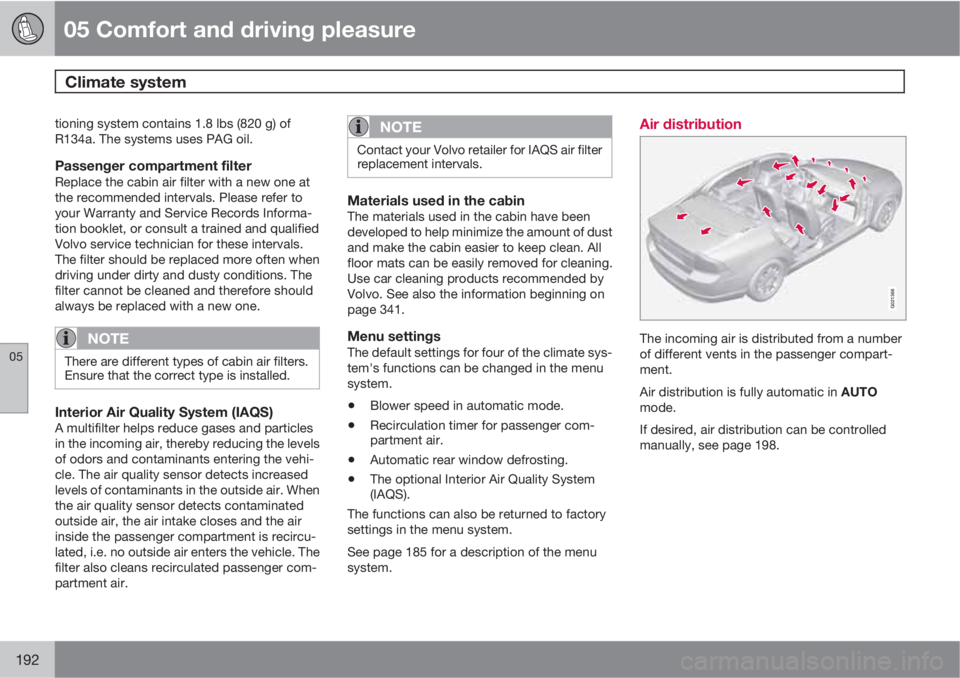
Air distribution
G021366
The incoming air is distributed from a number
of different vents in the passenger compart-
ment.
Air distribution is fully automatic in AUTO
mode.
If desired, air distribution can be controlled
manually, see page 198.