warning VOLVO S80 2013 Owner´s Manual
[x] Cancel search | Manufacturer: VOLVO, Model Year: 2013, Model line: S80, Model: VOLVO S80 2013Pages: 372, PDF Size: 6.45 MB
Page 82 of 372
03 Your driving environment
Instruments and controls
03
80
Reminder – doors not closedIf one of the doors, the hood or trunk lid is not
closed properly, the information or warning
symbol comes on together with an explanatory
text message in the instrument panel. Stop the
vehicle in a safe place as soon as possible and
close the door, hood or trunk.
If the vehicle is driven at a speed
lower than approximately 5 mph
(7 km/h), the information symbol comes on.
If the vehicle is driven at a speed
higher than approximately 5 mph
(7 km/h), the warning symbol comes on.
Road Sign Information (RSI)Road Sign Information (RSI) is a feature that
helps the driver see road signs with information
such as current speed. See page 130 for
detailed information.
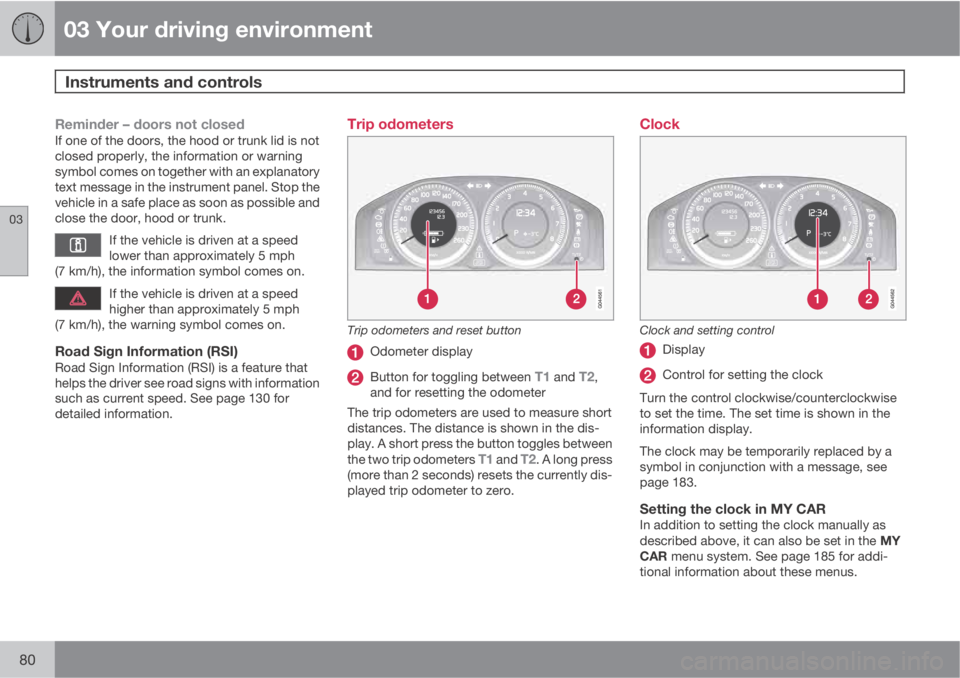
Trip odometers
Trip odometers and reset button
Odometer display
Button for toggling between T1 and T2,
and for resetting the odometer
The trip odometers are used to measure short
distances. The distance is shown in the dis-
play. A short press the button toggles between
the two trip odometers
T1 and T2. A long press
(more than 2 seconds) resets the currently dis-
played trip odometer to zero.
Clock
Clock and setting control
Display
Control for setting the clock
Turn the control clockwise/counterclockwise
to set the time. The set time is shown in the
information display.
The clock may be temporarily replaced by a
symbol in conjunction with a message, see
page 183.
Setting the clock in MY CARIn addition to setting the clock manually as
described above, it can also be set in the MY
CAR menu system. See page 185 for addi-
tional information about these menus.
Page 84 of 372
03 Your driving environment
Ignition modes
03
82* Option/accessory, for more information, see Introduction.
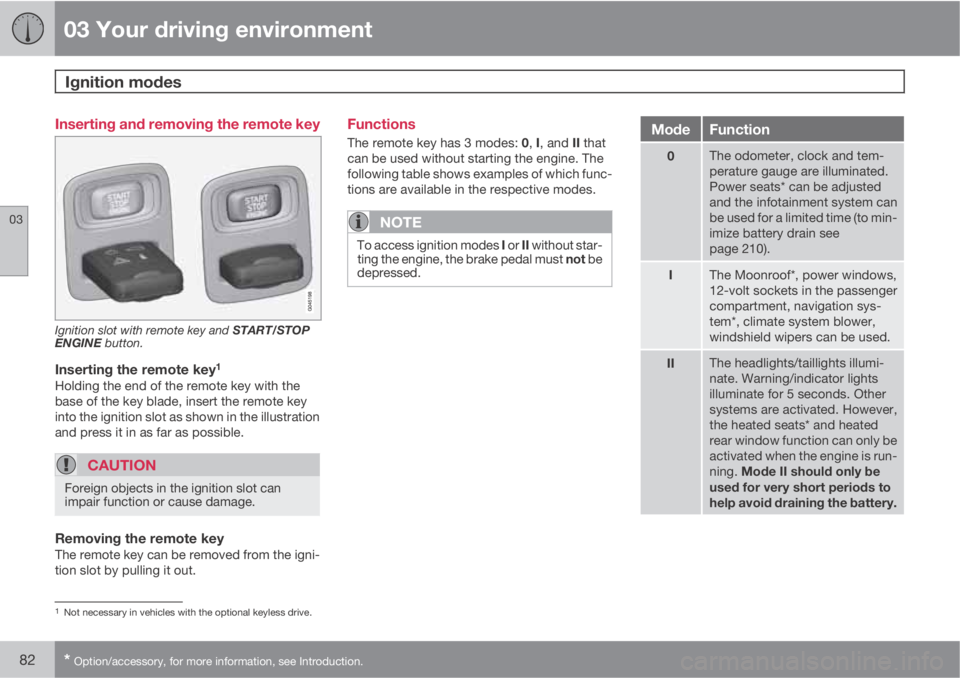
Inserting and removing the remote key
Ignition slot with remote key and START/STOP
ENGINE button.
Inserting the remote key1
Holding the end of the remote key with the
base of the key blade, insert the remote key
into the ignition slot as shown in the illustration
and press it in as far as possible.
CAUTION
Foreign objects in the ignition slot can
impair function or cause damage.
Removing the remote keyThe remote key can be removed from the igni-
tion slot by pulling it out.
Functions
The remote key has 3 modes: 0, I, and II that
can be used without starting the engine. The
following table shows examples of which func-
tions are available in the respective modes.
NOTE
To access ignition modes I or II without star-
ting the engine, the brake pedal must not be
depressed.
ModeFunction
0The odometer, clock and tem-
perature gauge are illuminated.
Power seats* can be adjusted
and the infotainment system can
be used for a limited time (to min-
imize battery drain see
page 210).
IThe Moonroof*, power windows,
12-volt sockets in the passenger
compartment, navigation sys-
tem*, climate system blower,
windshield wipers can be used.
IIThe headlights/taillights illumi-
nate. Warning/indicator lights
illuminate for 5 seconds. Other
systems are activated. However,
the heated seats* and heated
rear window function can only be
activated when the engine is run-
ning. Mode II should only be
used for very short periods to
help avoid draining the battery.
1Not necessary in vehicles with the optional keyless drive.
Page 86 of 372
03 Your driving environment
Seats
03
84* Option/accessory, for more information, see Introduction.
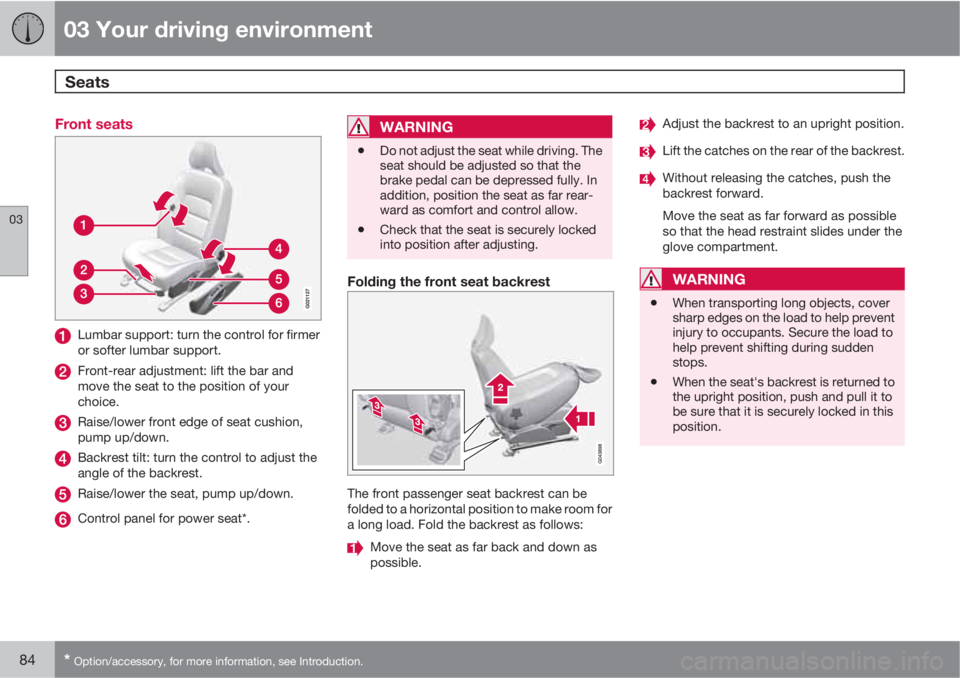
Front seats
Lumbar support: turn the control for firmer
or softer lumbar support.
Front-rear adjustment: lift the bar and
move the seat to the position of your
choice.
Raise/lower front edge of seat cushion,
pump up/down.
Backrest tilt: turn the control to adjust the
angle of the backrest.
Raise/lower the seat, pump up/down.
Control panel for power seat*.
WARNING
•Do not adjust the seat while driving. The
seat should be adjusted so that the
brake pedal can be depressed fully. In
addition, position the seat as far rear-
ward as comfort and control allow.
•Check that the seat is securely locked
into position after adjusting.
Folding the front seat backrest
The front passenger seat backrest can be
folded to a horizontal position to make room for
a long load. Fold the backrest as follows:
Move the seat as far back and down as
possible.
Adjust the backrest to an upright position.
Lift the catches on the rear of the backrest.
Without releasing the catches, push the
backrest forward.
Move the seat as far forward as possible
so that the head restraint slides under the
glove compartment.
WARNING
•When transporting long objects, cover
sharp edges on the load to help prevent
injury to occupants. Secure the load to
help prevent shifting during sudden
stops.
•When the seat's backrest is returned to
the upright position, push and pull it to
be sure that it is securely locked in this
position.
Page 89 of 372
03 Your driving environment
Seats
03
* Option/accessory, for more information, see Introduction.87
NOTE
•The seat will move to this position even
if someone else has moved it to a dif-
ferent position and locked the vehicle
with a different remote key.
•This feature will work in the same way
with all of the remote keys that you use
with your vehicle.
Emergency stop
WARNING
•Because the driver's seat can be
adjusted with the ignition off, children
should never be left unattended in the
vehicle.
•Movement of the seat can be STOPPED
at any time by pressing any button on
the power seat control panel.
•Do not adjust the seat while driving. The
seat should be adjusted so that the
brake pedal can be depressed fully. In
addition, position the seat as far rear-
ward as comfort and control allow.
•The seat rails on the floor must not be
obstructed in any way when the seat is
in motion.
Heated/ventilated seats*See page 194.
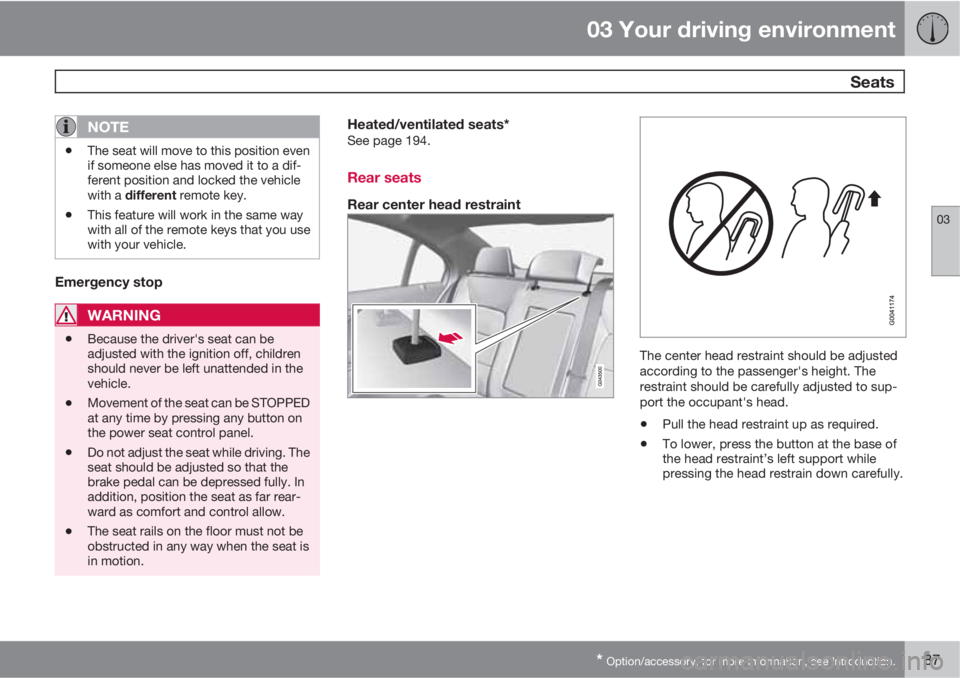
Rear seats
Rear center head restraint
The center head restraint should be adjusted
according to the passenger's height. The
restraint should be carefully adjusted to sup-
port the occupant's head.
•Pull the head restraint up as required.
•To lower, press the button at the base of
the head restraint’s left support while
pressing the head restrain down carefully.
Page 90 of 372

03 Your driving environment
Seats
03
88
WARNING
The center rear seat head restraint should
only be in its lowest position when this seat
is NOT occupied. When the center position
is occupied, the head restraint should be
correctly adjusted to the passenger’s
height. The upper edge of the head restraint
should be at least on a level with the upper-
most point of the seat occupant's ear.
Automatically folding down the rear
seat’s outboard head restraints
1.
The ignition must be in mode II.
2. Press the button to lower the rear head
restraints for improved visibility.
NOTE
•The head restraint must be returned to
the upright position manually.
•The outboard head restraints cannot be
folded down on models that are not
equipped with this button.
CAUTION
The rear head restraints should not be kept
folded down for prolonged periods. This
could result in pressure marks in leather
upholstery.
WARNING
For safety reasons, no one should be
allowed to sit in the outboard rear seat posi-
tions if the head restraints are folded down.
If these positions are occupied, the head
restraints should be in the upright (fixed)
position.
Folding down the rear seat backrests
The rear seat backrests are split and can be folded
down together or separately
1. Pull the release control handle(s).
2. Fold the backrest forward. Adjust the cen-
ter seat head restraint if necessary.
NOTE
When the backrests are folded down, move
the outboard head restraints forward
slightly so that they do not catch on the seat
cushion.
Page 91 of 372
03 Your driving environment
Seats
03
89
CAUTION
To help avoid damage to the upholstery,
there should be no objects on the rear seat
and the seat belt should not be buckled
when the backrest is folded down.
WARNING
•Keep vehicle doors and trunk locked
and keep keys out of a child’s reach.
Unsupervised children could lock them-
selves in an open trunk and risk injury.
Children should be taught not to play in
vehicles.
•On hot days, the temperature in the
trunk or vehicle interior can rise very
quickly. Exposure of people to these
high temperatures for even a short
period of time can cause heat-related
injury or death. Small children are par-
ticularly at risk.
WARNING
•When one or more sections of the back-
rest is returned to the upright position,
check that it is properly locked in place
by pushing and pulling it. The red indi-
cators should also not be visible.
•Return the outboard head restraints to
the upright position.
•Long loads should always be securely
anchored to help avoid injury in the
event of a sudden stop.
•Always turn the engine off and apply the
parking brake when loading/unloading
the vehicle.
•Place the transmission in the Park (P)
position to help prevent inadvertent
movement of the gear selector.
•On hot days, the temperature in the
vehicle interior can rise very quickly.
Exposure of people to these high tem-
peratures for even a short period of time
can cause heat-related injury or death.
Small children are particularly at risk.
Page 92 of 372
03 Your driving environment
Steering wheel
03
90* Option/accessory, for more information, see Introduction.
Adjusting
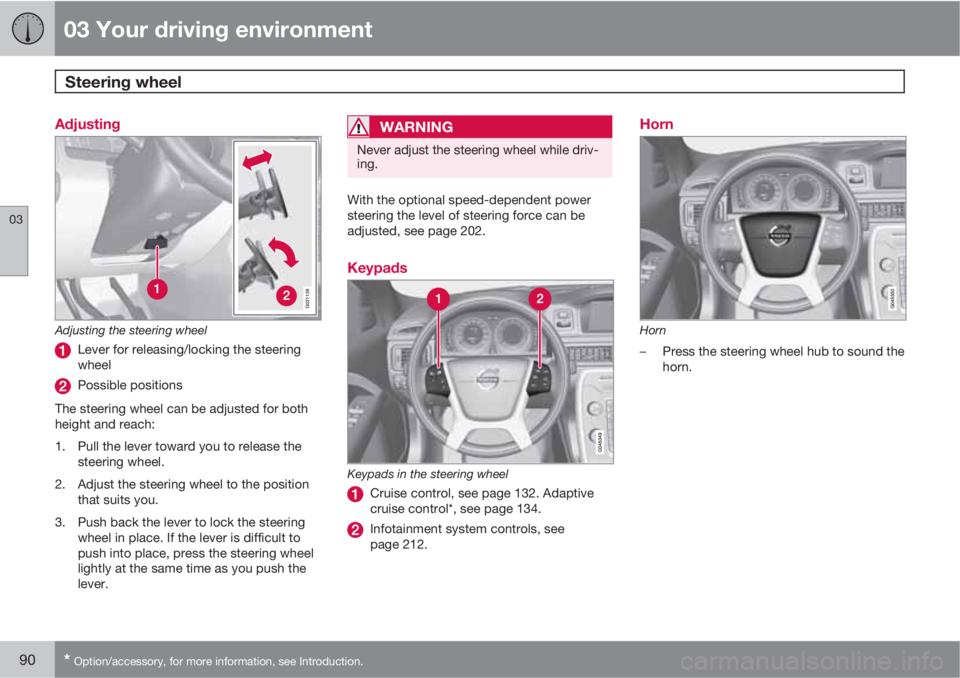
G021138
Adjusting the steering wheel
Lever for releasing/locking the steering
wheel
Possible positions
The steering wheel can be adjusted for both
height and reach:
1. Pull the lever toward you to release the
steering wheel.
2. Adjust the steering wheel to the position
that suits you.
3. Push back the lever to lock the steering
wheel in place. If the lever is difficult to
push into place, press the steering wheel
lightly at the same time as you push the
lever.
WARNING
Never adjust the steering wheel while driv-
ing.
With the optional speed-dependent power
steering the level of steering force can be
adjusted, see page 202.
Keypads
Keypads in the steering wheel
Cruise control, see page 132. Adaptive
cruise control*, see page 134.
Infotainment system controls, see
page 212.
Horn
Horn
–Press the steering wheel hub to sound the
horn.
Page 98 of 372
03 Your driving environment
Lighting
03
96
Rear fog light
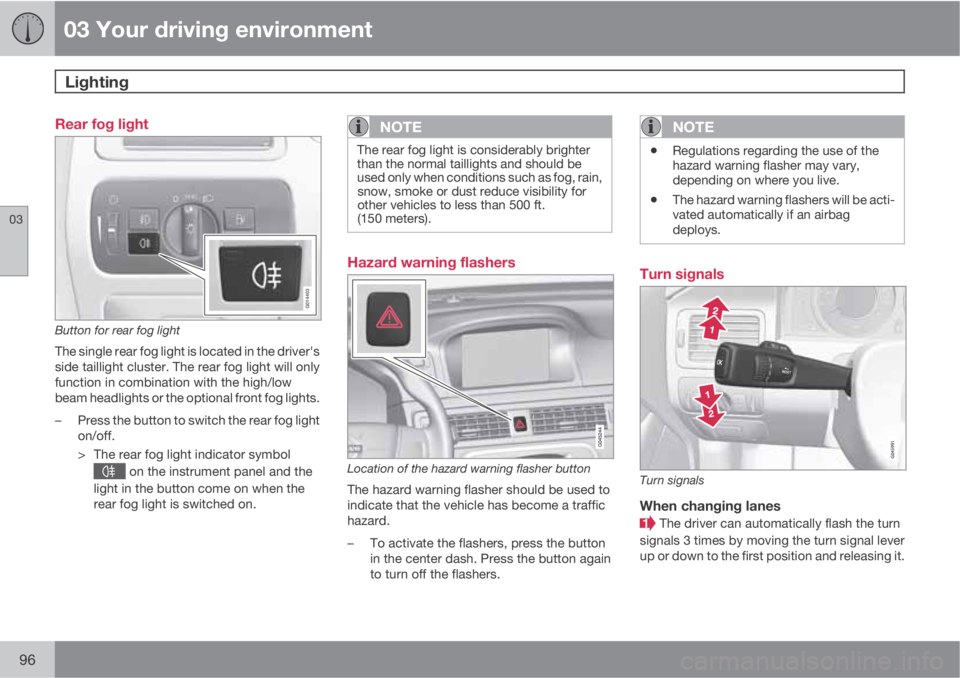
G014403
Button for rear fog light
The single rear fog light is located in the driver's
side taillight cluster. The rear fog light will only
function in combination with the high/low
beam headlights or the optional front fog lights.
–Press the button to switch the rear fog light
on/off.
> The rear fog light indicator symbol
on the instrument panel and the
light in the button come on when the
rear fog light is switched on.
NOTE
The rear fog light is considerably brighter
than the normal taillights and should be
used only when conditions such as fog, rain,
snow, smoke or dust reduce visibility for
other vehicles to less than 500 ft.
(150 meters).
Hazard warning flashers
Location of the hazard warning flasher button
The hazard warning flasher should be used to
indicate that the vehicle has become a traffic
hazard.
–To activate the flashers, press the button
in the center dash. Press the button again
to turn off the flashers.
NOTE
•Regulations regarding the use of the
hazard warning flasher may vary,
depending on where you live.
•The hazard warning flashers will be acti-
vated automatically if an airbag
deploys.
Turn signals
Turn signals
When changing lanes
The driver can automatically flash the turn
signals 3 times by moving the turn signal lever
up or down to the first position and releasing it.
Page 103 of 372
03 Your driving environment
Power windows
03
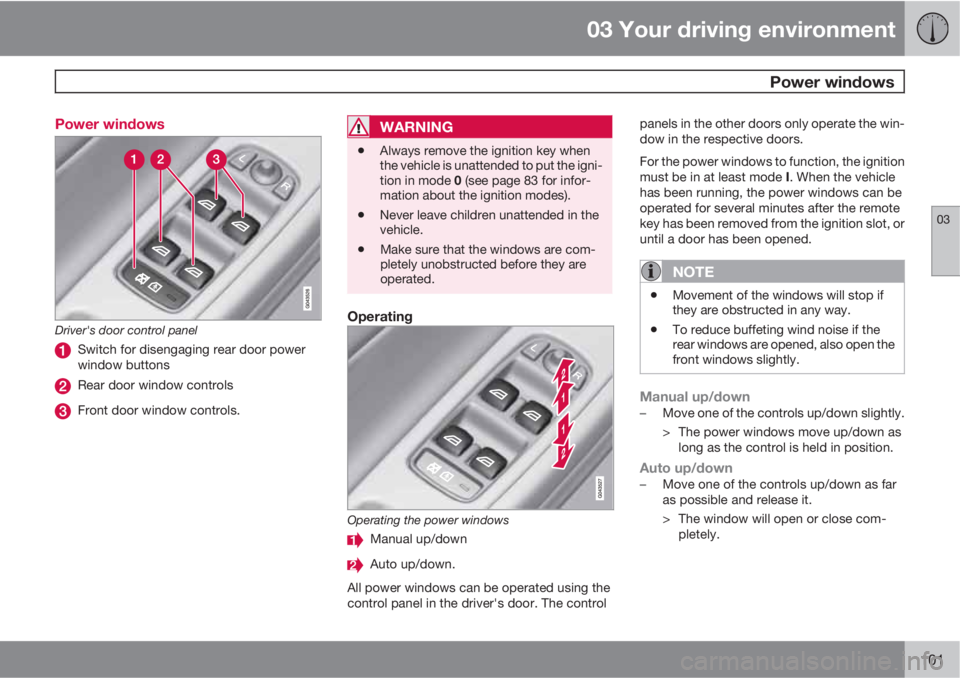
101 Power windows
Driver's door control panel
Switch for disengaging rear door power
window buttons
Rear door window controls
Front door window controls.
WARNING
•Always remove the ignition key when
the vehicle is unattended to put the igni-
tion in mode 0 (see page 83 for infor-
mation about the ignition modes).
•Never leave children unattended in the
vehicle.
•Make sure that the windows are com-
pletely unobstructed before they are
operated.
Operating
Operating the power windows
Manual up/down
Auto up/down.
All power windows can be operated using the
control panel in the driver's door. The controlpanels in the other doors only operate the win-
dow in the respective doors.
For the power windows to function, the ignition
must be in at least mode I. When the vehicle
has been running, the power windows can be
operated for several minutes after the remote
key has been removed from the ignition slot, or
until a door has been opened.
NOTE
•Movement of the windows will stop if
they are obstructed in any way.
•To reduce buffeting wind noise if the
rear windows are opened, also open the
front windows slightly.
Manual up/down–Move one of the controls up/down slightly.
> The power windows move up/down as
long as the control is held in position.
Auto up/down–Move one of the controls up/down as far
as possible and release it.
> The window will open or close com-
pletely.
Page 105 of 372
03 Your driving environment
Mirrors
03
* Option/accessory, for more information, see Introduction.103 Power door mirrors
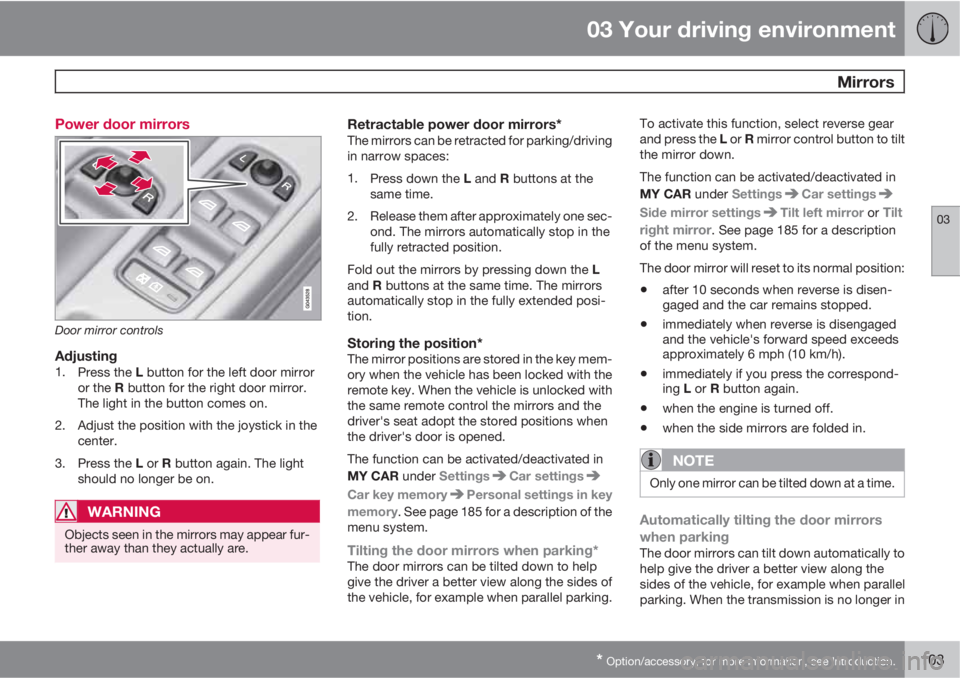
Door mirror controls
Adjusting1.
Press the L button for the left door mirror
or the R button for the right door mirror.
The light in the button comes on.
2. Adjust the position with the joystick in the
center.
3.
Press the L or R button again. The light
should no longer be on.
WARNING
Objects seen in the mirrors may appear fur-
ther away than they actually are.
Retractable power door mirrors*The mirrors can be retracted for parking/driving
in narrow spaces:
1.
Press down the L and R buttons at the
same time.
2. Release them after approximately one sec-
ond. The mirrors automatically stop in the
fully retracted position.
Fold out the mirrors by pressing down the L
and R buttons at the same time. The mirrors
automatically stop in the fully extended posi-
tion.
Storing the position*The mirror positions are stored in the key mem-
ory when the vehicle has been locked with the
remote key. When the vehicle is unlocked with
the same remote control the mirrors and the
driver's seat adopt the stored positions when
the driver's door is opened.
The function can be activated/deactivated in
MY CAR under Settings
Car settings
Car key memoryPersonal settings in key
memory. See page 185 for a description of the
menu system.
Tilting the door mirrors when parking*The door mirrors can be tilted down to help
give the driver a better view along the sides of
the vehicle, for example when parallel parking.To activate this function, select reverse gear
and press the L or R mirror control button to tilt
the mirror down.
The function can be activated/deactivated in
MY CAR under Settings
Car settings
Side mirror settingsTilt left mirror or Tilt
right mirror
. See page 185 for a description
of the menu system.
The door mirror will reset to its normal position:
•after 10 seconds when reverse is disen-
gaged and the car remains stopped.
•immediately when reverse is disengaged
and the vehicle's forward speed exceeds
approximately 6 mph (10 km/h).
•immediately if you press the correspond-
ing L or R button again.
•when the engine is turned off.
•when the side mirrors are folded in.
NOTE
Only one mirror can be tilted down at a time.
Automatically tilting the door mirrors
when parking
The door mirrors can tilt down automatically to
help give the driver a better view along the
sides of the vehicle, for example when parallel
parking. When the transmission is no longer in