key VOLVO S80 2013 Owner´s Manual
[x] Cancel search | Manufacturer: VOLVO, Model Year: 2013, Model line: S80, Model: VOLVO S80 2013Pages: 372, PDF Size: 6.45 MB
Page 214 of 372
06 Infotainment
Introduction
06
212* Option/accessory, for more information, see Introduction.
recent source in the selected mode (e.g.,
FM1) will be displayed. The location of
these buttons on the center console may
vary slightly from model to model.
OK/MENU: confirm a menu selection. This
leads to the selected mode’s (RADIO,
MEDIA) menu view. Arrows at the right of
the screen indicate submenus.
TUNE: turn to scroll among tracks/folders,
radio stations, phone contacts or to navi-
gate among the alternatives shown on the
screen.
EXIT: short press - go upward in the menu
system, cancel a current function, reject an
incoming phone call or erase characters
that have been entered on the screen.
Press and hold - from a mode’s main view
to come to the infotainment system's main
view, see page 214.
# INFO: if more information is available
than is currently displayed on the screen,
press # INFO to display the remaining
information.
Keypad (for preset stations, entering let-
ters or numbers, etc).
* FAV: this button can be used to store a
shortcut to a commonly used function in
AM/FM/SIRIUS/DISC, etc. See the section"* FAV—storing a shortcut" on page 216
for information on using this button.
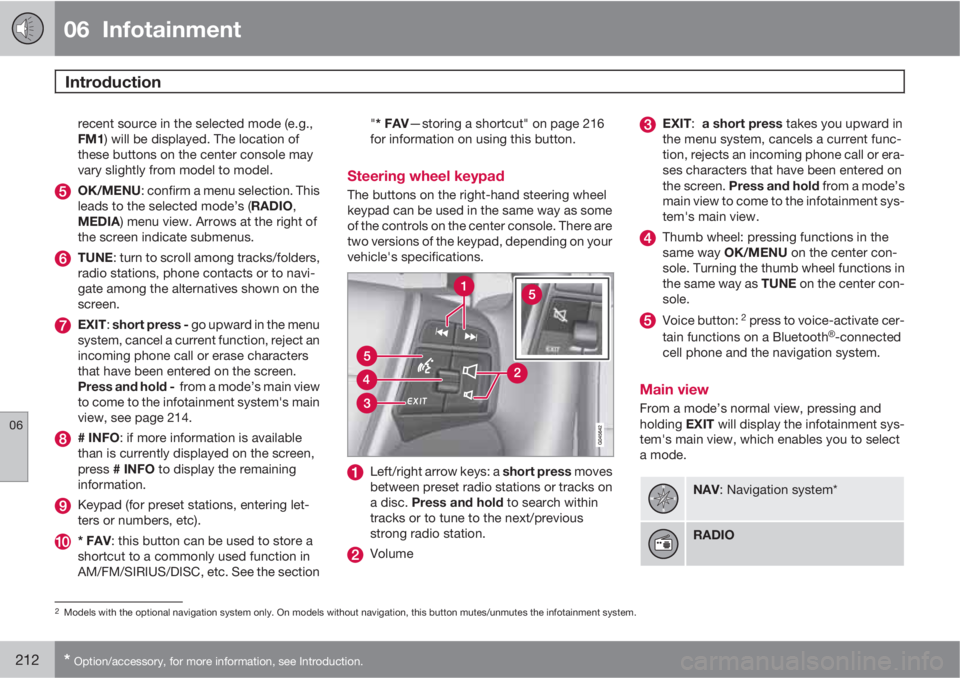
Steering wheel keypad
The buttons on the right-hand steering wheel
keypad can be used in the same way as some
of the controls on the center console. There are
two versions of the keypad, depending on your
vehicle's specifications.
Left/right arrow keys: a short press moves
between preset radio stations or tracks on
a disc. Press and hold to search within
tracks or to tune to the next/previous
strong radio station.
Volume
EXIT: a short press takes you upward in
the menu system, cancels a current func-
tion, rejects an incoming phone call or era-
ses characters that have been entered on
the screen. Press and hold from a mode’s
main view to come to the infotainment sys-
tem's main view.
Thumb wheel: pressing functions in the
same way OK/MENU on the center con-
sole. Turning the thumb wheel functions in
the same way as TUNE on the center con-
sole.
Voice button: 2 press to voice-activate cer-
tain functions on a BluetoothŸ-connected
cell phone and the navigation system.
Main view
From a mode’s normal view, pressing and
holding EXIT will display the infotainment sys-
tem's main view, which enables you to select
a mode.
NAV: Navigation system*
RADIO
2Models with the optional navigation system only. On models without navigation, this button mutes/unmutes the infotainment system.
Page 219 of 372
06 Infotainment
Introduction
06
217
•DPL II centre level/3 channel centre
level4: Volume for the center speaker.
•DPL II surround level4/5: Surround level.
Advanced sound settings
EqualizerSound levels for different frequencies can be
adjusted separately using this feature.
To do so:
1.
Press OK/MENU to access
Audio
settings and select Equalizer
2.
Turn TUNE to select one of the frequencies
and press OK/MENU.
3.
Turn TUNE to adjust the sound setting and
confirm the change by pressing OK/
MENU. Do the same for the other frequen-
cies.
4. When you have finished making your set-
tings, press EXIT to save and return to nor-
mal view.
For general information regarding menu navi-
gation, see page 214 and menu overview see
page 218.
Sound stage6
The sound experience can be optimized for the
driver's seat, both front seats or the rear seat.
If the front and rear seats are occupied, the
sound stage setting
Front seats is recom-
mended. Select one of the options under
Audio settings
Sound stage.
Audio volume and automatic volume
control
The infotainment system compensates for dis-
rupting noises in the passenger compartment
by increasing the volume according to the
speed of the vehicle. The level of sound com-
pensation can be set at low, medium, high or
off. Select the level under Audio settings
Volume compensation.
External audio source volumeIf an external device such as an MP3 player or
an iPod Ÿ is connected to the AUX socket, the
device's volume may be different than the vol-
ume of the internal sound sources such as the
disc player or the radio. If the external sound
source's volume is too high, the quality of the
sound may be impaired. To help prevent this,adjust the input volume of the external audio
source:
NOTE
Sound quality may be affected if the MP3
player is being charged while the system is
in AUX mode. To help prevent this, avoid
charging the MP3 player in a 12-volt socket
while it is being played.
1.
Press MEDIA and turn TUNE to AUX.
Press OK/MENU or the thumb wheel on
the steering wheel keypad.
2.
Press OK/MENU and turn TUNE to
AUX
input volume. Confirm by pressing OK/
MENU.
3.
Turn TUNE to adjust the volume.
Optimal sound reproductionThe infotainment system is pre-calibrated for
optimal sound reproduction using digital signal
processing.
This calibration takes into account factors such
as the speakers, amplifier, cabin acoustics, the
listeners' seating positions, etc., for each com-
bination of vehicle/infotainment system.
4Premium Sound Multimedia only5Only when Surround is on.6Premium Sound Multimedia only
Page 223 of 372
06 Infotainment
Radio
06
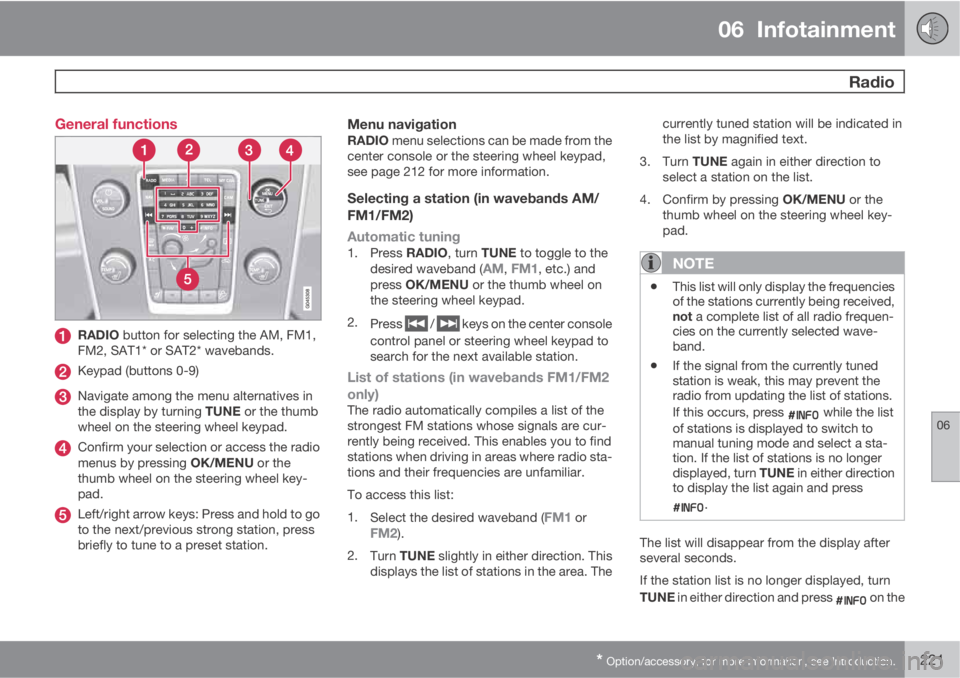
* Option/accessory, for more information, see Introduction.221 General functions
RADIO button for selecting the AM, FM1,
FM2, SAT1* or SAT2* wavebands.
Keypad (buttons 0-9)
Navigate among the menu alternatives in
the display by turning TUNE or the thumb
wheel on the steering wheel keypad.
Confirm your selection or access the radio
menus by pressing OK/MENU or the
thumb wheel on the steering wheel key-
pad.
Left/right arrow keys: Press and hold to go
to the next/previous strong station, press
briefly to tune to a preset station.
Menu navigationRADIO menu selections can be made from the
center console or the steering wheel keypad,
see page 212 for more information.
Selecting a station (in wavebands AM/
FM1/FM2)
Automatic tuning
1.
Press RADIO, turn TUNE to toggle to the
desired waveband (AM, FM1, etc.) and
press OK/MENU or the thumb wheel on
the steering wheel keypad.
2.
Press
/ keys on the center console
control panel or steering wheel keypad to
search for the next available station.
List of stations (in wavebands FM1/FM2
only)
The radio automatically compiles a list of the
strongest FM stations whose signals are cur-
rently being received. This enables you to find
stations when driving in areas where radio sta-
tions and their frequencies are unfamiliar.
To access this list:
1.
Select the desired waveband (
FM1 orFM2).
2.
Turn TUNE slightly in either direction. This
displays the list of stations in the area. Thecurrently tuned station will be indicated in
the list by magnified text.
3.
Turn TUNE again in either direction to
select a station on the list.
4.
Confirm by pressing OK/MENU or the
thumb wheel on the steering wheel key-
pad.
NOTE
•This list will only display the frequencies
of the stations currently being received,
not a complete list of all radio frequen-
cies on the currently selected wave-
band.
•If the signal from the currently tuned
station is weak, this may prevent the
radio from updating the list of stations.
If this occurs, press
while the list
of stations is displayed to switch to
manual tuning mode and select a sta-
tion. If the list of stations is no longer
displayed, turn TUNE in either direction
to display the list again and press
.
The list will disappear from the display after
several seconds.
If the station list is no longer displayed, turn
TUNE in either direction and press
on the
Page 224 of 372
06 Infotainment
Radio
06
222
keypad on the center console to switch to
manual tuning (or to switch back from manual
tuning to the "list of stations" function).
Manual tuningBy default, the list of stations of the strongest
stations in the area will be displayed when you
turn TUNE (see the preceding section, "List of
stations"). While the list of stations is displayed,
press
on the center console keypad to
switch to manual tuning, which enables you to
select a frequency from the complete list of all
radio frequencies available on the currently
selected waveband. In other words, in manual
tuning mode, turning TUNE one step will
change from e.g., 93.3 to 93.5, etc.).
To manually tune a station:
1.
Press RADIO. Turn TUNE to scroll to the
desired waveband (
AM, FM1, etc.) and
press OK/MENU or the thumb wheel on
the steering wheel keypad to confirm.
2.
Turn TUNE or the thumb wheel to select a
frequency.
NOTE
The radio is initially set to automatically
search for stations in the area in which you
are driving (see the preceding section, "List
of stations").
However, if you have switched to manual
tuning (by pressing
on the keypad on
the center console while the list of stations
is displayed), the radio will remain in manual
tuning mode the next time it is switched on.
To switch back to "list of stations" mode,
turn TUNE one step (to display the full list of
stations) and press
.
Please note that if you press
when the
list of stations is not displayed, this will acti-
vate the INFO function.
Storing preset stationsTen preset stations can be stored for each
waveband (AM, FM1, etc.).
Stored preset stations are selected using the
buttons on the keypad on the center console.
Manually storing preset stations1. Tune to a station (see "Selecting a station"
on page 221).
2. Press and hold one of the number key but-
tons.
> The sound will be muted for several sec-
onds and when it returns, the station hasbeen stored on the number key button
used.
A list of preset stations can be displayed. This
function can be activated/deactivated in AM/
FM mode in FM menu
Show presets or in
AM menu
Show presets
ScanThe function automatically searches the cur-
rent waveband for radio stations. When a sta-
tion is found, it is played for several seconds
before scanning is resumed. While the station
is playing it can be stored as a preset in the
usual way (see "Manually storing preset sta-
tions").
–To start scanning in AM/FM mode, go to
FM menu
Scan or in AM menu
Scan.
Stop station scanning by pressing EXIT.
NOTE
Storing a station interrupts the SCAN func-
tion.
Radio textSome stations transmit information on pro-
gram content, artists, etc. This information can
be shown on the display.
Page 225 of 372
06 Infotainment
Radio
06
223
Activate/deactivate in FM mode under Show
radio text.
HD Radio
E
Ereception (U.S. models
only)
Introduction
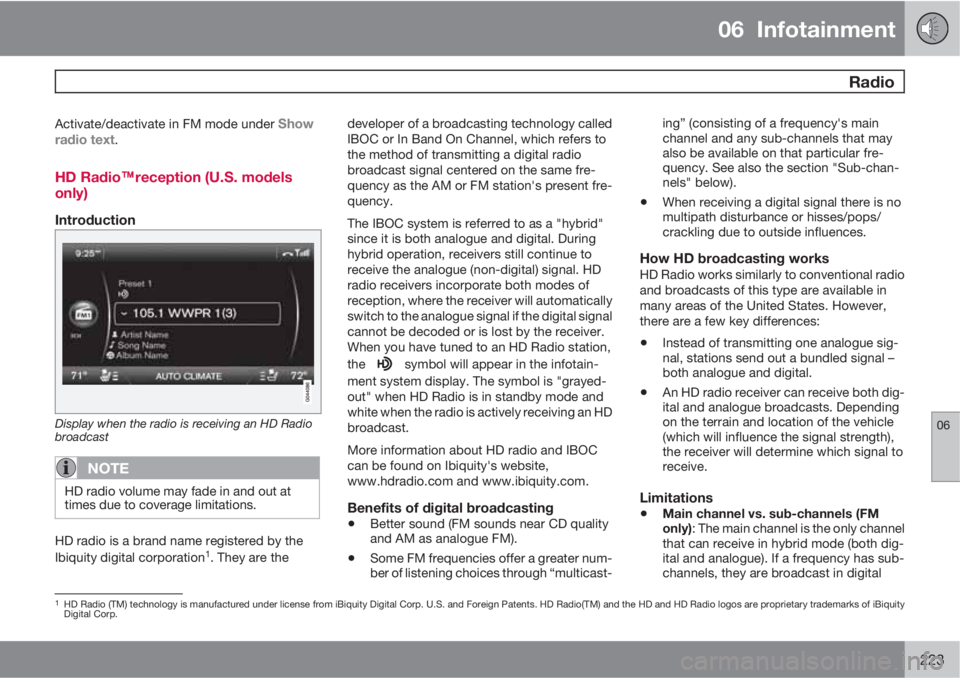
Display when the radio is receiving an HD Radio
broadcast
NOTE
HD radio volume may fade in and out at
times due to coverage limitations.
HD radio is a brand name registered by the
Ibiquity digital corporation1. They are thedeveloper of a broadcasting technology called
IBOC or In Band On Channel, which refers to
the method of transmitting a digital radio
broadcast signal centered on the same fre-
quency as the AM or FM station's present fre-
quency.
The IBOC system is referred to as a "hybrid"
since it is both analogue and digital. During
hybrid operation, receivers still continue to
receive the analogue (non-digital) signal. HD
radio receivers incorporate both modes of
reception, where the receiver will automatically
switch to the analogue signal if the digital signal
cannot be decoded or is lost by the receiver.
When you have tuned to an HD Radio station,
the
symbol will appear in the infotain-
ment system display. The symbol is "grayed-
out" when HD Radio is in standby mode and
white when the radio is actively receiving an HD
broadcast.
More information about HD radio and IBOC
can be found on Ibiquity's website,
www.hdradio.com and www.ibiquity.com.
Benefits of digital broadcasting
•Better sound (FM sounds near CD quality
and AM as analogue FM).
•Some FM frequencies offer a greater num-
ber of listening choices through “multicast-ing” (consisting of a frequency's main
channel and any sub-channels that may
also be available on that particular fre-
quency. See also the section "Sub-chan-
nels" below).
•When receiving a digital signal there is no
multipath disturbance or hisses/pops/
crackling due to outside influences.
How HD broadcasting worksHD Radio works similarly to conventional radio
and broadcasts of this type are available in
many areas of the United States. However,
there are a few key differences:
•Instead of transmitting one analogue sig-
nal, stations send out a bundled signal –
both analogue and digital.
•An HD radio receiver can receive both dig-
ital and analogue broadcasts. Depending
on the terrain and location of the vehicle
(which will influence the signal strength),
the receiver will determine which signal to
receive.
Limitations
•Main channel vs. sub-channels (FM
only): The main channel is the only channel
that can receive in hybrid mode (both dig-
ital and analogue). If a frequency has sub-
channels, they are broadcast in digital
1HD Radio (TM) technology is manufactured under license from iBiquity Digital Corp. U.S. and Foreign Patents. HD Radio(TM) and the HD and HD Radio logos are proprietary trademarks of iBiquity
Digital Corp.
Page 227 of 372
06 Infotainment
Radio
06
* Option/accessory, for more information, see Introduction.225
In many cases, a main HD Radio station (FM
wavebands only) will also have sub-channels
offering additional types of programming or
music.
In such cases, the “-” symbol will be displayed
to the left of the frequency number and a num-
ber will be displayed to the right of the fre-
quency number indicating that the currently
tuned frequency has at least one sub-channel.
Selecting sub-channelsTo listen to a station's sub-channel(s), press
and hold the right arrow key on the center con-
sole or on the steering wheel keypad for
approximately 1 second. To go back to the
main channel, press and hold the left arrow key
on the center console or on the steering wheel
keypad for approximately 1 second. To go to
subchannel 2 (if available), press and hold the
right arrow key on the center console or on the
steering wheel keypad for approximately
1 second.
If you are currently tuned to a frequency's main
channel, pressing and holding the left arrow
key for approximately 1 second will tune to the
next lower radio frequency.
NOTE
•When the radio has gone into HD mode,
it may take several seconds before the
">" symbol (if the current frequency has
any sub-channels) is displayed to the
left of the frequency. Pressing and hold-
ing the arrow keys for approximately
1 second before the main-/sub-channel
icon is displayed will cause the radio to
tune to the next available radio station,
not to the current station's sub-chan-
nels.
•When you are no longer in broadcasting
range of the currently tuned sub-chan-
nel,
No reception will be displayed.
The radio will then be muted and it will
be necessary to tune to or search for a
new radio station.
Sub-channels can also be stored as presets,
see page 222 for information on storing sta-
tions.
If you press a sub-channel's preset button, it
may take up to 6 seconds before the channel
becomes audible. If you press this button while
you are out of digital range of the transmitter,
No reception will be displayed.
SiriusXM
E satellite radio*
Listening to satellite radio
The SiriusXM
E satellite system consists of a
number of high elevation satellites in geosyn-
chronous orbit.
NOTE
•The digital signals from the satellites are
line-of-sight, which means that physical
obstructions such as bridges, tunnels,
etc, may temporarily interfere with sig-
nal reception.
•Avoid any obstructions, such as metal-
lic objects transported on roof racks or
in a ski box, or other antennas that may
impede signals from the SiriusXM
E
satellites.
Selecting SiriusXM
E radio mode1. With the infotainment system switched on,
press RADIO.
2.
Turn TUNE or the thumb wheel on the
steering wheel keypad to scroll to the
desired waveband (
SAT1 or SAT2) and
press OK/MENU or the thumb wheel on
the steering wheel keypad.
Activating SiriusXM
E radio1. Tune to a satellite channel that has no
audio, which means that the channel is
Page 228 of 372
06 Infotainment
Radio
06
226
unsubscribed and the text Subscription
update needed is displayed (see also
"Selecting a channel").
2.
Call SiriusXM
E at 1-888-539-SIRIUS
(7474).
3. If you tune to an unsubscribed channel, the
SiriusXM
E ID will be displayed. The Sir-
iusXM
E ID can also be accessed from the
menu (press OK/MENU, turn TUNE to
scroll to the
Advanced settings menu,
press OK/MENU, scroll to SIRIUS ID and
press OK/MENU to display the number).
4.
Updating subscription will be displayed
while the subscription is being updated,
after which the display will return to the
normal view.
SiriusXM
E
E ID
The SiriusXM
E ID (sometimes referred to as
the Electronic Serial Number or ESN) is
required when contacting the SiriusXM
E Call
Center. It is used to activate your account and
when making any account transactions.
Selecting a channel category1.
Turn TUNE to display a list of channels.
2.
Press EXIT.3.
Turn TUNE to scroll through the list of cat-
egories and press OK/MENU to make a
selection.
> The channels in the selected category
are displayed.
NOTE
•The category All is default, which ena-
bles you to scroll through the entire list
of available satellite channels.
•The channel categories are automati-
cally updated several times a year. This
takes approximately two minutes and
will interrupt normal broadcasting. A
message will be displayed while updat-
ing is in progress. Information on chan-
nel or feature updates is available at
www.siriusxm.com.
Selecting a channelThere are three ways of tuning in a channel:
•Using the left and right arrow keys to go to
the next channel. Skipped channels (see
page 228) will be excluded.
•By turning the TUNE control and selecting
a channel from the list
•Through direct channel entry.
NOTE
•The numbers of skipped or locked
channels will not be displayed.
•If a channel is locked, the access code
must be entered before the channel can
be selected. See "Unlocking a channel"
on page 228.
Direct channel entry
The SiriusXM
E satellite channels are in numer-
ical order throughout all of the categories. To
access a channel directly:
1.
Turn TUNE to access the channel list.
2. Use the keypad buttons to enter the chan-
nel's number.
3.
Press OK/MENU. The radio will tune to this
channel, even if it belongs to a category
other than the currently selected one.
Scanning
Scan automatically searches through the list of
satellite channels. The search will only be car-
ried out in the selected category, see
page 222 for more detailed information on the
scan function.
Storing a channelA total of 20 satellite channels can be stored;
10 channels each for SAT1 and SAT2, see
Page 229 of 372
06 Infotainment
Radio
06
227
page 222 for detailed information on storing
channels.
•A long press on one of the number keys
stores the currently tuned channel on that
key.
•A short press on a number key while the
radio is in SAT1 or SAT2 mode will tune to
the preset satellite channel stored on that
button, regardless of the currently selected
channel category.
Searching for and storing songs
The Song Seek function provides notification
when SiriusXM
E is broadcasting the songs
selected in song memory.
Song memory ena-
bles you to store the name of the song for
future advance notification when that song is
being played.
Song seekWhen a satellite radio channel plays one of the
songs stored in the song memory while the
Song seek feature is activated, the listener will
be alerted by a text message and an audible
signal.
Press OK/MENU to listen to the song or EXIT
to cancel.
To activate/deactivate the song seek function:
1.
Press OK/MENU.2.
Turn TUNE to scroll to
Song memory and
press OK/MENU.
3.
Turn TUNE to scroll to
Song Seek and
press OK/MENU to activate or deactivate
the function.
NOTE
When the song has ended, the radio will
remain tuned to the channel on which the
song was played.
Song memoryUp to ten songs can be saved in the system's
memory.
To add the currently playing song to the list:
1.
Press OK/MENU.
2.
Scroll to
Song memory and press OK/
MENU.
3.
Scroll to
Add current song to song
memory and press OK/MENU.
If a new song is selected when the memory is
full, you will be prompted to delete a song from
the list. To do so:
1.
Press OK/MENU.
2.
Turn TUNE to scroll through the list of
songs. Select a song and press OK/
MENU to delete it from the list.
Radio textThis text provides information about the song
that is currently playing. To turn this feature on
or off, press OK/MENU and scroll to
Show
radio text and press OK/MENU to toggle
between on or off.
Advanced SiriusXM
E settings
This menu function enables you to make set-
tings on certain SiriusXM
E satellite radio func-
tions. To access this menu:
1.
Press OK/MENU.
2.
Scroll to the
Advanced settings menu
and press OK/MENU.
WARNING
Settings should be made when the vehicle
is at a standstill.
The following settings can be made in the sat-
ellite menus:
•Channel skip settings can be made
•Channel lock settings can be made
•The channel access code can be displayed
or changed (see also "Locking a channel"
on page 228)
•Your SiriusXM
E ID can be displayed
•Reset SiriusXM
E settings
Page 230 of 372
06 Infotainment
Radio
06
228
Skip optionsThis function is used to remove a channel from
the list of available channels.
Skipping a channel1.
Press OK/MENU.
2.
Scroll to the
Advanced settings menu.
3.
Press OK/MENU to enter the
Skip
options menu.
4.
Press OK/MENU to enter
Channel skip
list.
5.
Press OK/MENU to select
All categoriesor turn TUNE to scroll to a category and
press OK/MENU to select it.
6.
Press OK/MENU to select
Skip all
channels in the category or turn TUNE
to scroll to a channel and press OK/
MENU to select or deselect it. Multiple
channels can be selected.
Unskip all channelsThis removes all channels from the skip list and
makes them available for selection.
Temporary unskip all channelsThis function will temporarily unskip all chan-
nels and make them available for selection. The
channels remain on the skip list and will againbe skipped the next time the ignition is
switched on.
Channel lockAccess to specific channels can be restricted
(locked). A locked channel will not provide
audio, song titles, or artist information.
NOTE
All channels are initially unlocked.
Locking a channel1.
Press OK/MENU.
2.
Scroll to the
Advanced settings menu.
3.
Press OK/MENU and turn TUNE to scroll
to the
Lock options menu and press OK/
MENU.
4. Use the keypad in the central control panel
to enter the channel access code
2 and
press OK/MENU.
5.
Press OK/MENU to enter the
Channel
lock list.
6.
Press OK/MENU to select
All categoriesor turn TUNE to scroll to a category and
press OK/MENU to select it.7.
Press OK/MENU to select
Lock all
channels in the category or turn TUNE
to scroll to a channel and press OK/
MENU to select it. Multiple channels can
be selected.
The selected channel is now locked and a
checked box will be displayed to indicate this.
It will be necessary to enter the channel access
code
2 in order to listen to a locked channel.
Unlocking a channel
A channel's access code2 is required to unlock
a channel.
Unlock all channelsThis permanently removes all channels from
the locked list and makes them available for
selection.
Temporarily unlock all channelsThis function will temporarily unlock all chan-
nels and make them available for selection. The
channels remain on the locked list and will
again be locked the next time the ignition is
switched on.
CHANGE CODEThis function makes it possible to change the
channel access code. The default code is
0000.
To change the code:
2The default code is 0000. If you have changed the code and forgotten it, see the section "If you have forgotten the access code."
Page 232 of 372
06 Infotainment
Media player
06
230
CD/DVD1 functions
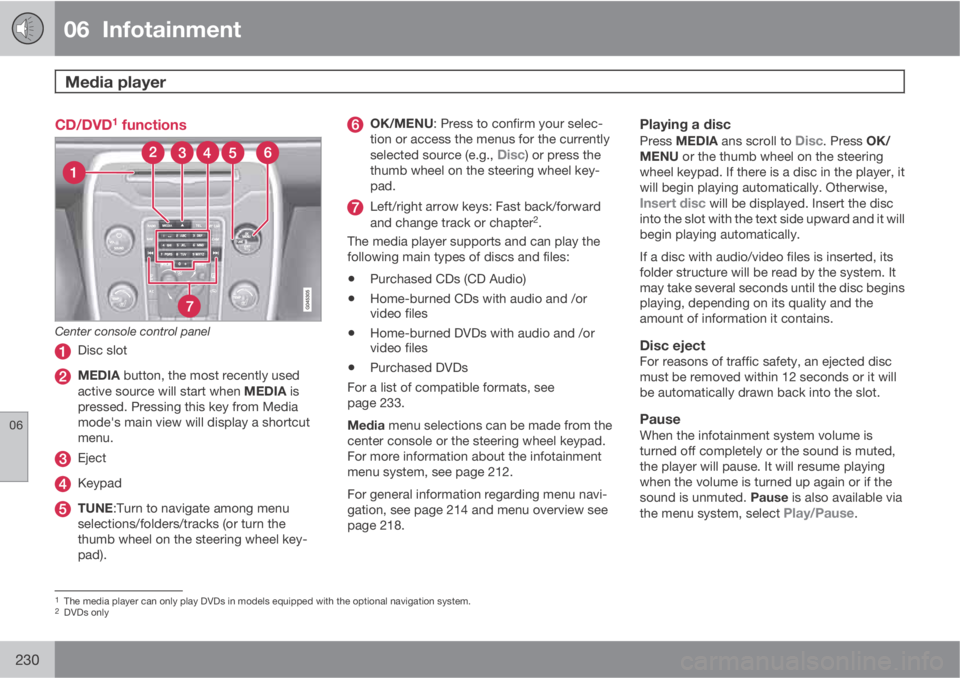
Center console control panel
Disc slot
MEDIA button, the most recently used
active source will start when MEDIA is
pressed. Pressing this key from Media
mode's main view will display a shortcut
menu.
Eject
Keypad
TUNE:Turn to navigate among menu
selections/folders/tracks (or turn the
thumb wheel on the steering wheel key-
pad).
OK/MENU: Press to confirm your selec-
tion or access the menus for the currently
selected source (e.g.,
Disc) or press the
thumb wheel on the steering wheel key-
pad.
Left/right arrow keys: Fast back/forward
and change track or chapter2.
The media player supports and can play the
following main types of discs and files:
•Purchased CDs (CD Audio)
•Home-burned CDs with audio and /or
video files
•Home-burned DVDs with audio and /or
video files
•Purchased DVDs
For a list of compatible formats, see
page 233.
Media menu selections can be made from the
center console or the steering wheel keypad.
For more information about the infotainment
menu system, see page 212.
For general information regarding menu navi-
gation, see page 214 and menu overview see
page 218.
Playing a disc
Press MEDIA ans scroll to Disc. Press OK/
MENU or the thumb wheel on the steering
wheel keypad. If there is a disc in the player, it
will begin playing automatically. Otherwise,
Insert disc will be displayed. Insert the disc
into the slot with the text side upward and it will
begin playing automatically.
If a disc with audio/video files is inserted, its
folder structure will be read by the system. It
may take several seconds until the disc begins
playing, depending on its quality and the
amount of information it contains.
Disc ejectFor reasons of traffic safety, an ejected disc
must be removed within 12 seconds or it will
be automatically drawn back into the slot.
PauseWhen the infotainment system volume is
turned off completely or the sound is muted,
the player will pause. It will resume playing
when the volume is turned up again or if the
sound is unmuted. Pause is also available via
the menu system, select
Play/Pause.
1The media player can only play DVDs in models equipped with the optional navigation system.2DVDs only