light VOLVO S80 2014 Owner´s Manual
[x] Cancel search | Manufacturer: VOLVO, Model Year: 2014, Model line: S80, Model: VOLVO S80 2014Pages: 380, PDF Size: 10.83 MB
Page 313 of 380
08 Wheels and tires
Tire Pressure Monitoring System (TPMS)
08
311
Introduction
NOTE
USA – FCC ID: KR5S122780002 This device complies with part 15 of the FCC rules. Operation is subject to the fol-lowing conditions: (1) This device may notcause harmful interference, and (2) thisdevice must accept any interferencereceived, including interference that maycause undesired operation.
The tire pressure monitoring system1
uses
sensors mounted in the tire valves to check inflation pressure levels. When the vehicle ismoving at a speed of approximately 20 mph(30 km/h) or faster, these sensors transmitinflation pressure data to a receiver located inthe vehicle. When low inflation pressure is detected or if a sensor is not functioning properly, TPMS will light up the tire pressure warning light (
)
(also referred to as a telltale) in the instrument panel and will display one of the following messages in the text window:
Tire pressure
low or
Tire needs air now.
NOTE
If a fault occurs in TPMS, the tire pressure warning light will flash for approximately 1 minute and
Tire press. syst Service
required will be displayed.
Each tire, including the spare (if provided), should be checked monthly when cold andinflated to the inflation pressure recom-mended by the vehicle manufacturer on thevehicle placard or tire inflation pressure label.(If your vehicle has tires of a different sizethan the size indicated on the vehicle placardor tire inflation pressure label, you shoulddetermine the proper tire inflation pressure forthose tires.) As an added safety feature, your vehicle has been equipped with a tire pressure monitor-ing system (TPMS) that illuminates a low tirepressure telltale when one or more of yourtires is significantly under-inflated. Accord-ingly, when the low tire pressure telltale illu-minates, you should stop and check yourtires as soon as possible, and inflate them tothe proper pressure. Driving on a significantlyunder-inflated tire causes the tire to overheatand can lead to tire failure. Under-inflationalso reduces fuel efficiency and tire tread life, and may affect the vehicle's handling andstopping ability. Please note that the TPMS is not a substitute for proper tire maintenance, and it is the driv-er's responsibility to maintain correct tirepressure, even if under-inflation has notreached the level to trigger illumination of theTPMS low tire pressure telltale. Your vehicle has also been equipped with a TPMS malfunction indicator to indicate whenthe system is not operating properly. TheTPMS malfunction indicator is combined withthe low tire pressure telltale. When the sys-tem detects a malfunction, the telltale willflash for approximately one minute and thenremain continuously illuminated. Thissequence will continue upon subsequentvehicle start-ups as long as the malfunctionexists. When the malfunction indicator is illu-minated, the system may not be able todetect or signal low tire pressure as intended.TPMS malfunctions may occur for a variety ofreasons, including the installation of replace-ment or alternate tires or wheels on the vehi-cle that prevent the TPMS from functioningproperly. Always check the TPMS malfunc-tion telltale after replacing one or more tiresor wheels on your vehicle to ensure that thereplacement or alternate tires and wheels
1
Not available in all markets or in all models.
Page 314 of 380
08 Wheels and tires
Tire Pressure Monitoring System (TPMS)
08
312
allow the TPMS to continue to function prop- erly.
NOTE
TPMS indicates low tire pressure but does not replace normal tire maintenance. Forinformation on correct tire pressure, pleaserefer to the tire inflation pressure table inthis chapter or consult your Volvo retailer.
Erasing warning messagesWhen a low tire pressure warning message has been displayed, and the tire pressurewarning light has come on:
1. Use a tire pressure gauge to check theinflation pressure of all four tires.
2. Re-inflate the tire(s) to the correct pres- sure (consult the tire pressure placard or the inflation pressure table on page 293.
3. In certain cases, it may be necessary to drive the vehicle for several minutes at aspeed of 20 mph (30 km/h) or faster. Thiswill erase the warning text and the warn-ing light will go out.
WARNING
Incorrect inflation pressure could lead to tire failure, resulting in a loss of control ofthe vehicle.
Changing wheels with TPMSPlease note the following when changing or replacing the factory installed TPMS wheels/tires on the vehicle:
• Only the factory-mounted wheels are equipped with TPMS sensors in thevalves.
• If the vehicle is equipped with a tempo-rary spare tire, this tire does not have aTPMS sensor.
• If wheels without TPMS sensors are mounted on the vehicle,
TIRE PRESS
SYST SERVICE REQUIRED will be dis-
played each time the vehicle is driven above 25 mph (40 km/h) for 10 minutes ormore.
• Once TPMS sensors are properly instal-led, the warning message should notreappear. If the message is still displayed,drive the vehicle for several minutes at aspeed of 20 mph (30 km/h) or faster toerase the message.
• Volvo recommends that TPMS sensorsbe fitted on all wheels used on the vehi-cle. Volvo does not recommend movingsensors back and forth between sets ofwheels.
CAUTION
When inflating tires with TPMS valves, press the pump's mouthpiece straightonto the valve to help avoid bending orotherwise damaging the valve.
CAUTION
• After pumping the tires, always rein- stall the valve cap to help avoid dam-age to the valve from dirt, gravel, etc.
• Use plastic valve caps only. Metalcaps could corrode and become diffi-cult to remove.
Page 321 of 380
09 Maintenance and specifications
Maintaining your car09
319
Owner maintenance
Periodic maintenance requirements and inter- vals are described in your vehicle's Warrantyand Service Records Information booklet. The following points can be carried out between the normally scheduled maintenanceservices.
Each time the car is refueled:
•Check the engine oil level.
• Clean the windshield, windshield wipers, headlights, and taillights.
Monthly:
• Check cold tire pressure in all tires.Inspect the tires for wear.
• Check that engine coolant and other fluidlevels are between the indicated "min"and "max" markings.
• Clean interior glass surfaces with a glasscleaner and soft paper towels.
• Wipe driver information displays with asoft cloth.
• Visually inspect battery terminals for cor-rosion. Corrosion may indicate a looseterminal connector, or a battery near theend of its useful service life. Consult yourVolvo retailer for additional information.
As needed:Wash the car, including the undercarriage, to reduce wear that can be caused by a buildupof dirt, and corrosion that can be caused bysalt residues. Clean leaves and twigs from air intake vents at the base of the windshield, and from otherplaces where they may collect.
NOTE
Complete service information for qualified technicians is available online for purchaseor subscription at www.volvotechinfo.com.
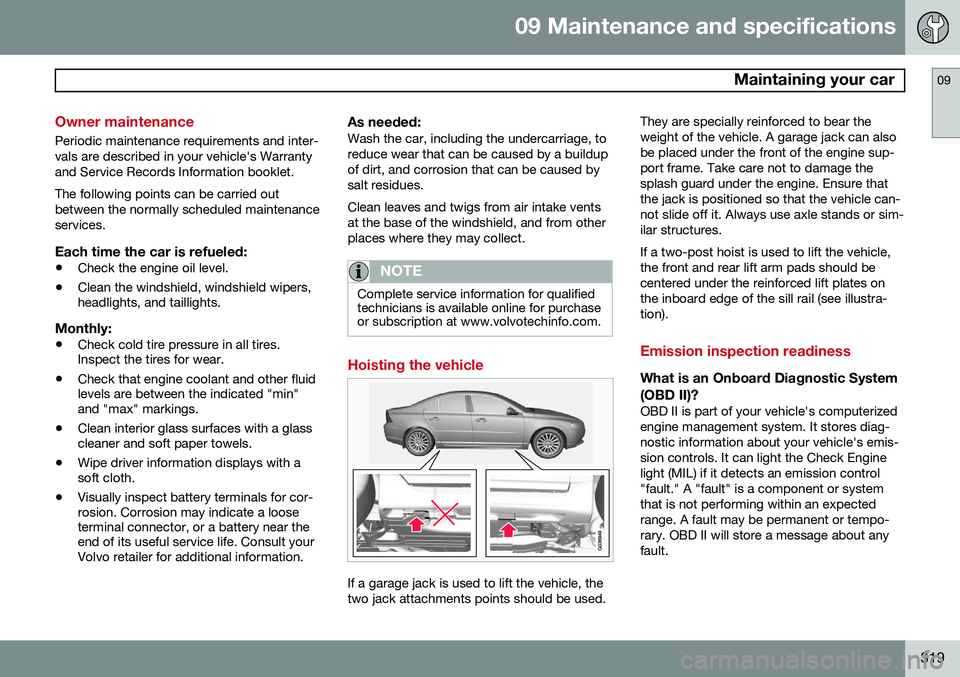
Hoisting the vehicle
If a garage jack is used to lift the vehicle, the two jack attachments points should be used. They are specially reinforced to bear theweight of the vehicle. A garage jack can alsobe placed under the front of the engine sup-port frame. Take care not to damage thesplash guard under the engine. Ensure thatthe jack is positioned so that the vehicle can-not slide off it. Always use axle stands or sim-ilar structures. If a two-post hoist is used to lift the vehicle, the front and rear lift arm pads should becentered under the reinforced lift plates onthe inboard edge of the sill rail (see illustra-tion).
Emission inspection readiness
What is an Onboard Diagnostic System
(OBD II)?
OBD II is part of your vehicle's computerized engine management system. It stores diag-nostic information about your vehicle's emis-sion controls. It can light the Check Enginelight (MIL) if it detects an emission control"fault." A "fault" is a component or systemthat is not performing within an expectedrange. A fault may be permanent or tempo-rary. OBD II will store a message about anyfault.
Page 322 of 380
09 Maintenance and specifications
Maintaining your car 09
320
How do states use OBD II for emission
inspections?
Many states connect a computer directly to a vehicle's OBD II system. The inspector canthen read "faults." In some states, this type ofinspection has replaced the tailpipe emissiontest.
How can my vehicle fail OBD II emission inspection?
Your vehicle can fail OBD II emission inspec-tion for any of the following reasons.
• If your Check Engine (MIL) light is lit, your vehicle may fail inspection.
• If your vehicle's Check Engine light waslit, but went out without any action onyour part, OBD II will still have a recordedfault. Your vehicle may pass or fail,depending on the inspection practices inyour area.
• If you had recent service that requireddisconnecting the battery, OBD II diag-nostic information may be incompleteand "not ready" for inspection. A vehiclethat is not ready may fail inspection.
How can I prepare for my next OBD II
emission inspection?
• If your Check Engine (MIL) light is lit – orwas lit but went out without service, have your vehicle diagnosed and, if necessary,serviced by a qualified Volvo technician.
• If you recently had service for a lit CheckEngine light, or if you had service thatrequired disconnecting the battery, aperiod of driving is necessary to bring theOBD II system to "ready" for inspection.A half-hour trip of mixed stop-and-go/highway driving is typically needed toallow OBD II to reach readiness. YourVolvo retailer can provide you with moreinformation on planning a trip.
• Maintain your vehicle in accordance withyour vehicle's maintenance schedule.
Page 323 of 380
09 Maintenance and specifications
Hood and engine compartment09
321
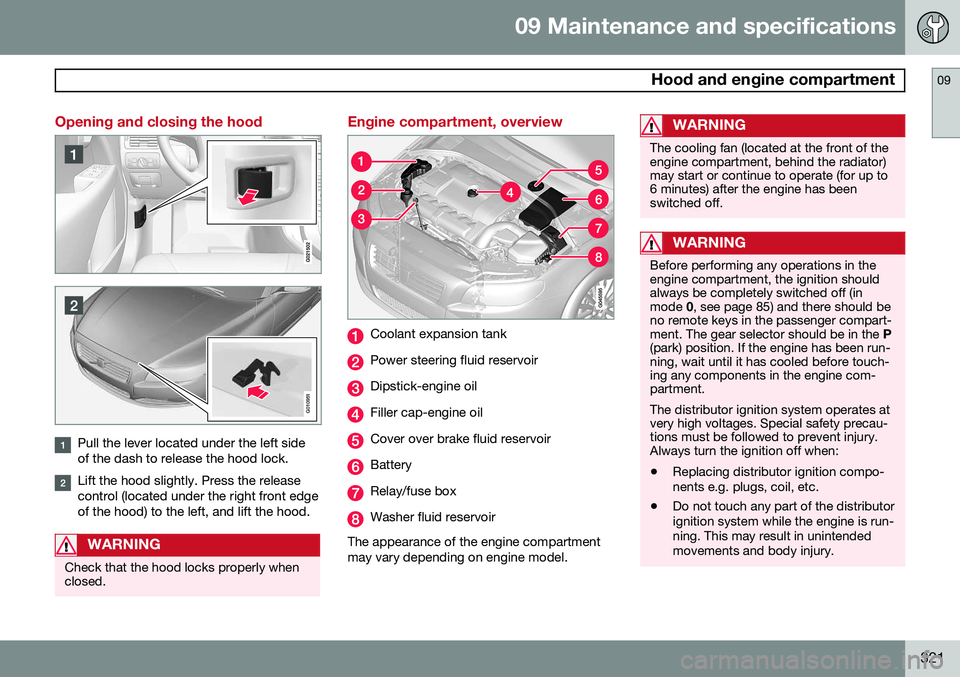
Opening and closing the hood
G010951
Pull the lever located under the left side of the dash to release the hood lock.
Lift the hood slightly. Press the release control (located under the right front edgeof the hood) to the left, and lift the hood.
WARNING
Check that the hood locks properly when closed.
Engine compartment, overview
Coolant expansion tank
Power steering fluid reservoir
Dipstick-engine oil
Filler cap-engine oil
Cover over brake fluid reservoir
Battery
Relay/fuse box
Washer fluid reservoir
The appearance of the engine compartment may vary depending on engine model.
WARNING
The cooling fan (located at the front of the engine compartment, behind the radiator)may start or continue to operate (for up to6 minutes) after the engine has beenswitched off.
WARNING
Before performing any operations in the engine compartment, the ignition shouldalways be completely switched off (inmode 0, see page 85) and there should be
no remote keys in the passenger compart-ment. The gear selector should be in the P
(park) position. If the engine has been run-ning, wait until it has cooled before touch-ing any components in the engine com-partment. The distributor ignition system operates at very high voltages. Special safety precau-tions must be followed to prevent injury.Always turn the ignition off when:
• Replacing distributor ignition compo- nents e.g. plugs, coil, etc.
• Do not touch any part of the distributorignition system while the engine is run-ning. This may result in unintendedmovements and body injury.
Page 328 of 380
09 Maintenance and specifications
Replacing bulbs 09
326* Option/accessory, for more information, see Introduction.
Introduction
All bulb specifications are listed on page 332. The following bulbs should only be replacedby a trained and qualified Volvo service tech-nician:
• Active Bending Lights
• Front parking lights
• Daytime running lights
• Turn signals in the door mirrors
• Approach lighting in the door mirrors
• Interior lighting
• Glove compartment lighting
• Rear parking lights
• Rear side marker lights
• Brake lights
• LED bulbsNOTE
• For information regarding any bulbs not mentioned in this section, pleasecontact your Volvo retailer or a trainedand authorized Volvo service techni-cian.
• Always switch off the ignition beforestarting to replace a bulb.
• If an error message remains in the dis-play after a faulty bulb has beenreplaced, contact an authorized Volvoworkshop.
• Condensation may form temporarily onthe inside of the lenses of exteriorlights such as headlights, fog lights, ortaillights. This is normal and the lightsare designed to withstand moisture.Normally, condensation will dissipateafter the lights have been on for ashort time.
• The optional Active Bending Lightbulbs contain trace amounts of mer-cury. These bulbs should always bedisposed of by a trained and qualifiedVolvo service technician.
CAUTION
Never touch the glass of bulbs with your fingers. Grease and oils from your fingersvaporize in the heat and will leave adeposit on the reflector, which will damageit.
WARNING
•The engine should not be running when changing bulbs.
• If the engine has been running justprior to replacing bulbs in the head-light housing, please keep in mind thatcomponents in the engine compart-ment will be hot.
WARNING
•Active Bending Lights* – due to the high voltage used by these headlights,these bulbs should only be replacedby a trained and qualified Volvo serv-ice technician.
• Turn off the lights and remove theremote key from the ignition beforechanging any bulbs.
Page 329 of 380
09 Maintenance and specifications
Replacing bulbs09
327
Headlight housing
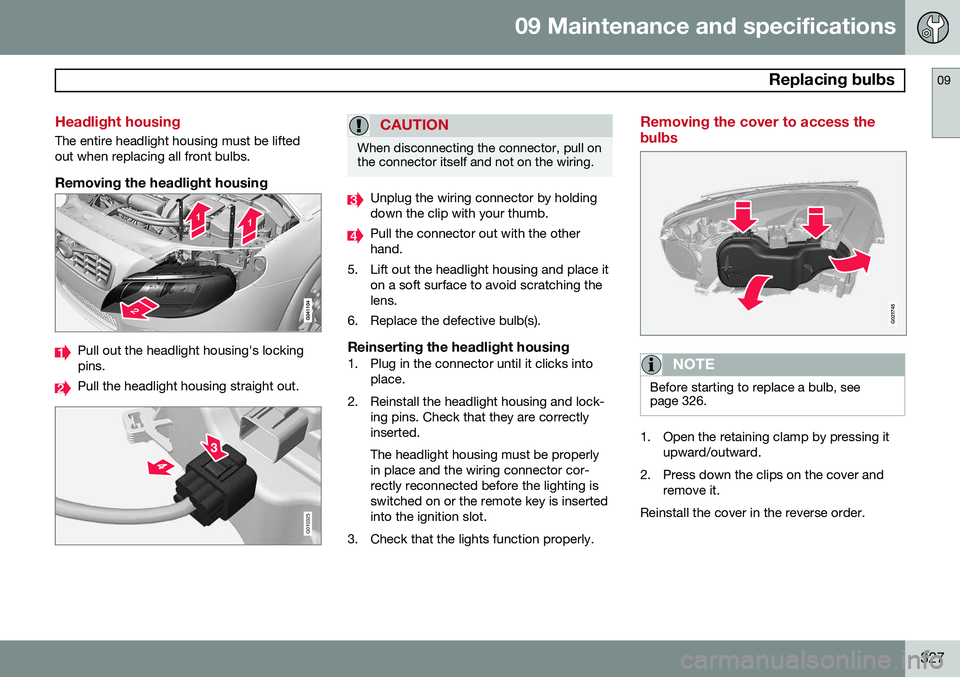
The entire headlight housing must be lifted out when replacing all front bulbs.
Removing the headlight housing
Pull out the headlight housing's locking pins.
Pull the headlight housing straight out.
G010325
CAUTION
When disconnecting the connector, pull on the connector itself and not on the wiring.
Unplug the wiring connector by holding down the clip with your thumb.
Pull the connector out with the other hand.
5. Lift out the headlight housing and place it on a soft surface to avoid scratching thelens.
6. Replace the defective bulb(s).
Reinserting the headlight housing1. Plug in the connector until it clicks into place.
2. Reinstall the headlight housing and lock- ing pins. Check that they are correctlyinserted. The headlight housing must be properly in place and the wiring connector cor-rectly reconnected before the lighting isswitched on or the remote key is insertedinto the ignition slot.
3. Check that the lights function properly.
Removing the cover to access the bulbs
G021745
NOTE
Before starting to replace a bulb, see page 326.
1. Open the retaining clamp by pressing it upward/outward.
2. Press down the clips on the cover and remove it.
Reinstall the cover in the reverse order.
Page 330 of 380
09 Maintenance and specifications
Replacing bulbs 09
328
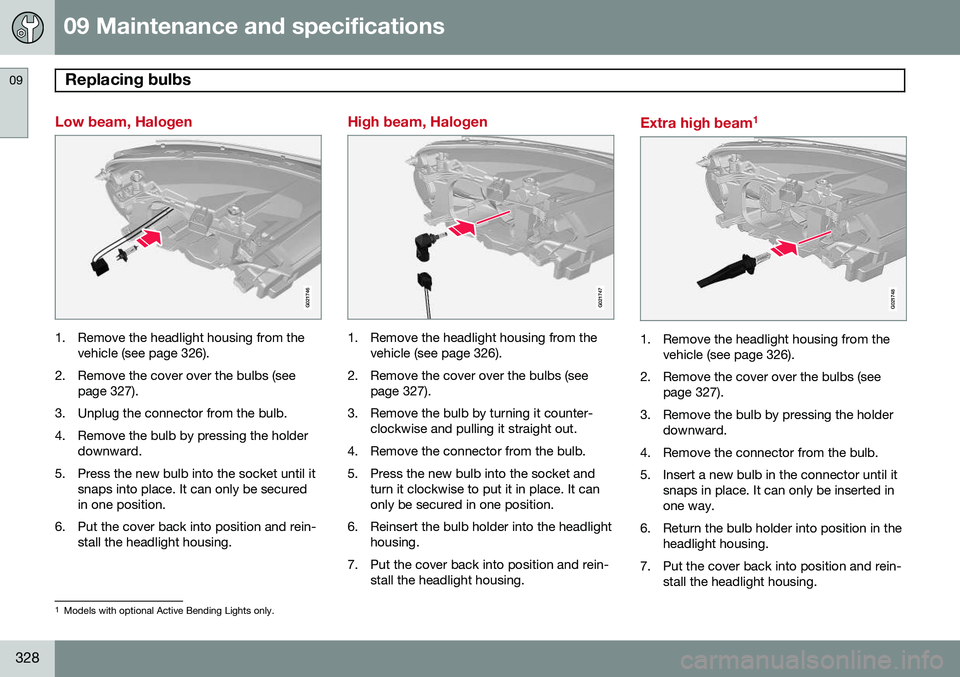
Low beam, Halogen
G021746
1. Remove the headlight housing from thevehicle (see page 326).
2. Remove the cover over the bulbs (see page 327).
3. Unplug the connector from the bulb.
4. Remove the bulb by pressing the holder downward.
5. Press the new bulb into the socket until it snaps into place. It can only be secured in one position.
6. Put the cover back into position and rein- stall the headlight housing.
High beam, Halogen
G021747
1. Remove the headlight housing from thevehicle (see page 326).
2. Remove the cover over the bulbs (see page 327).
3. Remove the bulb by turning it counter- clockwise and pulling it straight out.
4. Remove the connector from the bulb.
5. Press the new bulb into the socket and turn it clockwise to put it in place. It can only be secured in one position.
6. Reinsert the bulb holder into the headlight housing.
7. Put the cover back into position and rein- stall the headlight housing.
Extra high beam 1
G021748
1. Remove the headlight housing from the
vehicle (see page 326).
2. Remove the cover over the bulbs (see page 327).
3. Remove the bulb by pressing the holder downward.
4. Remove the connector from the bulb.
5. Insert a new bulb in the connector until it snaps in place. It can only be inserted in one way.
6. Return the bulb holder into position in the headlight housing.
7. Put the cover back into position and rein- stall the headlight housing.
1Models with optional Active Bending Lights only.
Page 331 of 380
09 Maintenance and specifications
Replacing bulbs09
329
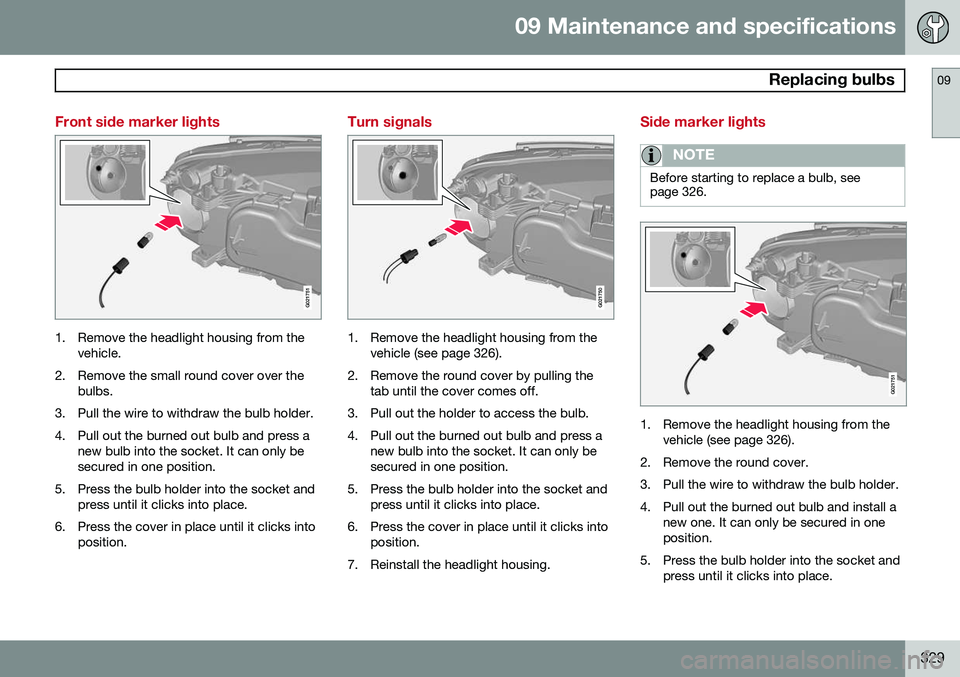
Front side marker lights
G021751
1. Remove the headlight housing from thevehicle.
2. Remove the small round cover over the bulbs.
3. Pull the wire to withdraw the bulb holder.
4. Pull out the burned out bulb and press a new bulb into the socket. It can only be secured in one position.
5. Press the bulb holder into the socket and press until it clicks into place.
6. Press the cover in place until it clicks into position.
Turn signals
G021750
1. Remove the headlight housing from thevehicle (see page 326).
2. Remove the round cover by pulling the tab until the cover comes off.
3. Pull out the holder to access the bulb.
4. Pull out the burned out bulb and press a new bulb into the socket. It can only be secured in one position.
5. Press the bulb holder into the socket and press until it clicks into place.
6. Press the cover in place until it clicks into position.
7. Reinstall the headlight housing.
Side marker lights
NOTE
Before starting to replace a bulb, see page 326.
G021751
1. Remove the headlight housing from the vehicle (see page 326).
2. Remove the round cover.
3. Pull the wire to withdraw the bulb holder.
4. Pull out the burned out bulb and install a new one. It can only be secured in one position.
5. Press the bulb holder into the socket and press until it clicks into place.
Page 332 of 380
09 Maintenance and specifications
Replacing bulbs 09
330
6. Press the cover until it clicks into posi-tion.
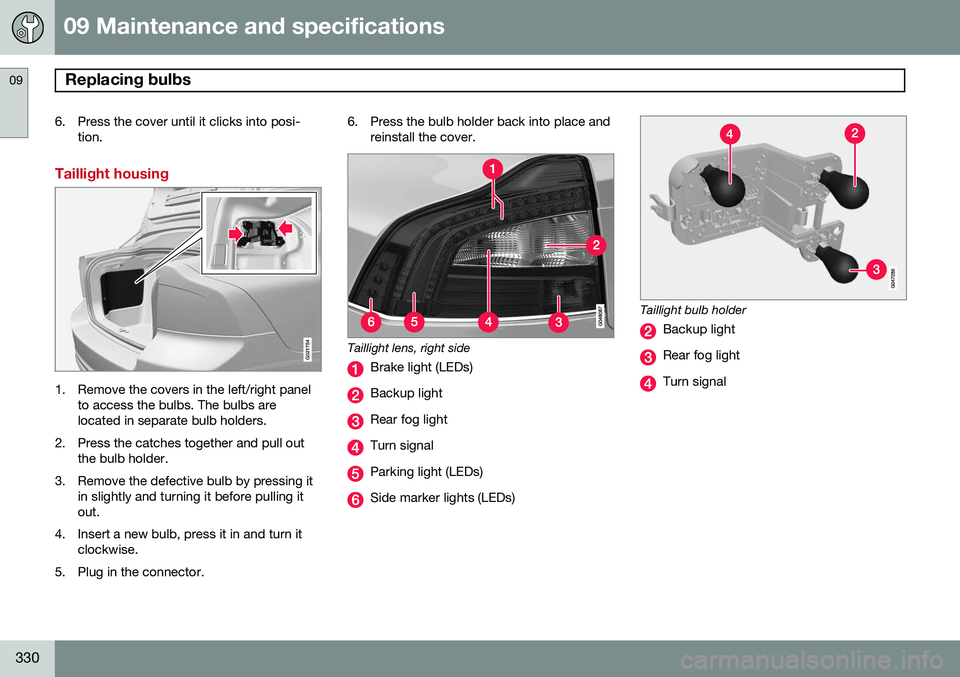
Taillight housing
G021754
1. Remove the covers in the left/right panel to access the bulbs. The bulbs are located in separate bulb holders.
2. Press the catches together and pull out the bulb holder.
3. Remove the defective bulb by pressing it in slightly and turning it before pulling itout.
4. Insert a new bulb, press it in and turn it clockwise.
5. Plug in the connector. 6. Press the bulb holder back into place and
reinstall the cover.
Taillight lens, right side
Brake light (LEDs)
Backup light
Rear fog light
Turn signal
Parking light (LEDs)
Side marker lights (LEDs)
Taillight bulb holder
Backup light
Rear fog light
Turn signal