infotainment VOLVO S80 2014 Owner´s Manual
[x] Cancel search | Manufacturer: VOLVO, Model Year: 2014, Model line: S80, Model: VOLVO S80 2014Pages: 380, PDF Size: 10.83 MB
Page 228 of 380
06 Infotainment
Introduction
06
226* Option/accessory, for more information, see Introduction.
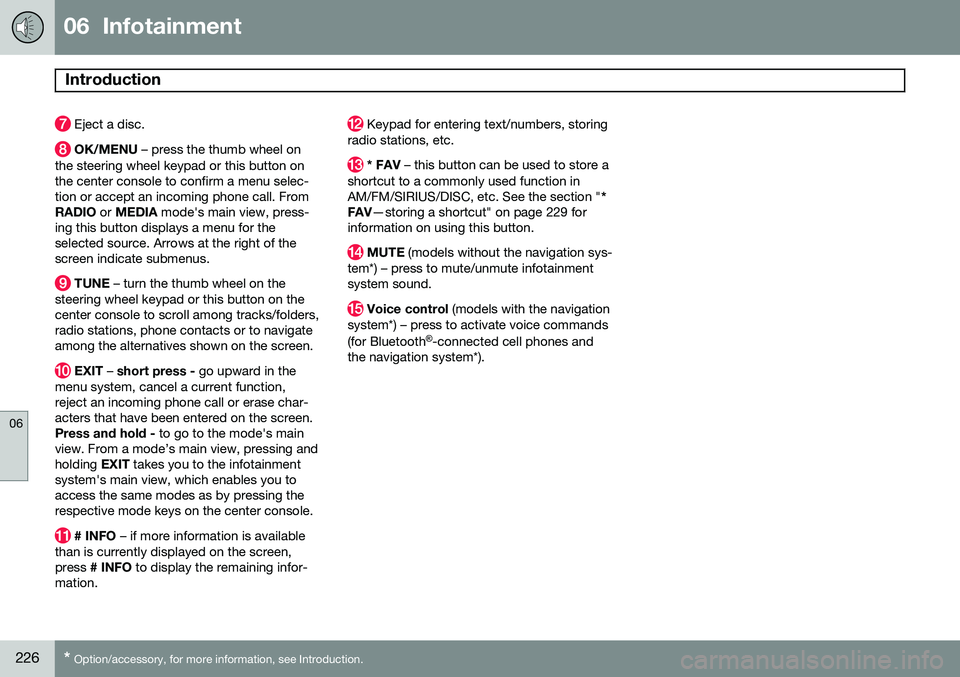
Eject a disc.
OK/MENU – press the thumb wheel on
the steering wheel keypad or this button on the center console to confirm a menu selec-tion or accept an incoming phone call. FromRADIO or MEDIA mode's main view, press-
ing this button displays a menu for theselected source. Arrows at the right of thescreen indicate submenus.
TUNE – turn the thumb wheel on the
steering wheel keypad or this button on the center console to scroll among tracks/folders,radio stations, phone contacts or to navigateamong the alternatives shown on the screen.
EXIT – short press - go upward in the
menu system, cancel a current function, reject an incoming phone call or erase char-acters that have been entered on the screen.Press and hold - to go to the mode's main
view. From a mode’s main view, pressing andholding EXIT takes you to the infotainment
system's main view, which enables you toaccess the same modes as by pressing therespective mode keys on the center console.
# INFO – if more information is available
than is currently displayed on the screen, press # INFO to display the remaining infor-
mation.
Keypad for entering text/numbers, storing
radio stations, etc.
* FAV – this button can be used to store a
shortcut to a commonly used function in AM/FM/SIRIUS/DISC, etc. See the section " *
FAV —storing a shortcut" on page 229 for
information on using this button.
MUTE (models without the navigation sys-
tem*) – press to mute/unmute infotainment system sound.
Voice control (models with the navigation
system*) – press to activate voice commands (for Bluetooth ®
-connected cell phones and
the navigation system*).
Page 229 of 380
06 Infotainment
Introduction
06
}}
227
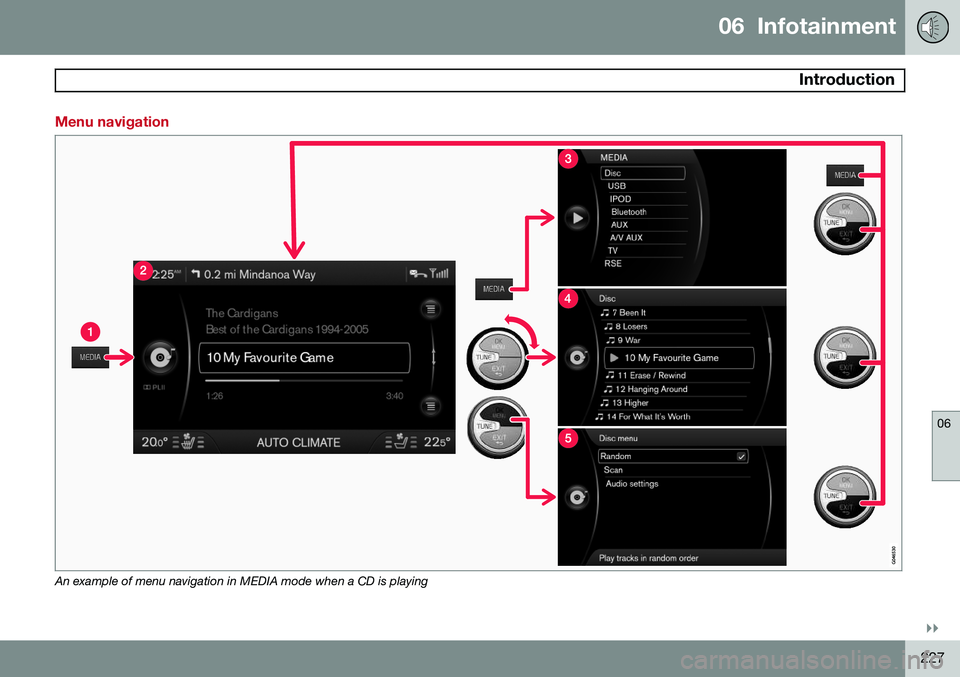
Menu navigation
An example of menu navigation in MEDIA mode when a CD is playing
Page 230 of 380
06 Infotainment
Introduction
06
228* Option/accessory, for more information, see Introduction.
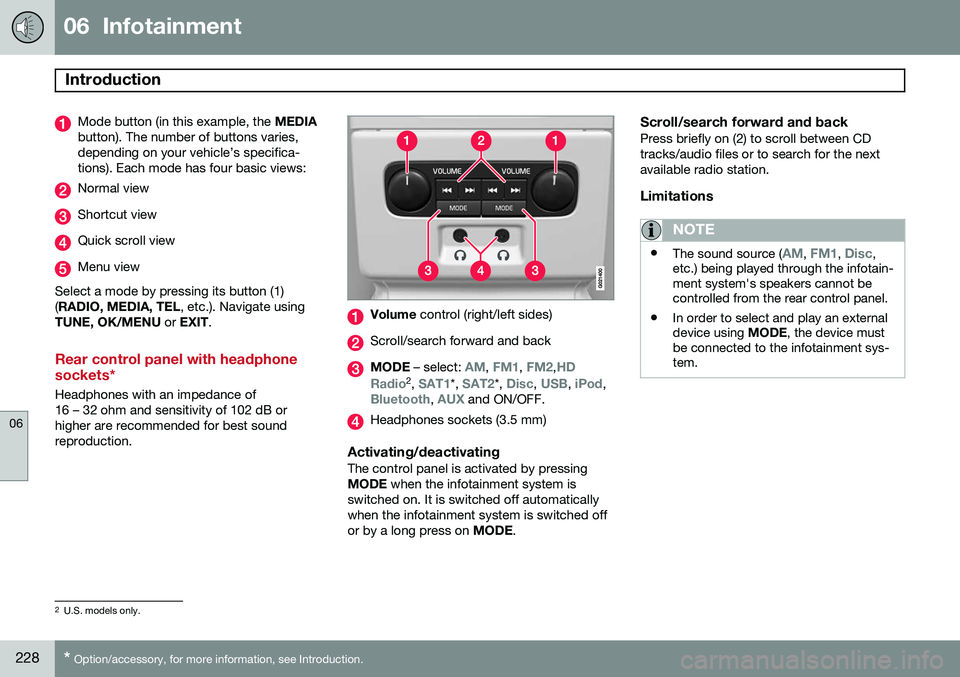
Mode button (in this example, the MEDIA
button). The number of buttons varies, depending on your vehicle’s specifica-tions). Each mode has four basic views:
Normal view
Shortcut view
Quick scroll view
Menu view
Select a mode by pressing its button (1) ( RADIO, MEDIA, TEL , etc.). Navigate using
TUNE, OK/MENU or EXIT .
Rear control panel with headphone sockets*
Headphones with an impedance of 16 – 32 ohm and sensitivity of 102 dB orhigher are recommended for best soundreproduction.
Volume control (right/left sides)
Scroll/search forward and back
MODE – select: AM, FM1, FM2,HD
Radio2 , SAT1*, SAT2*, Disc, USB, iPod,Bluetooth, AUX and ON/OFF.
Headphones sockets (3.5 mm)
Activating/deactivatingThe control panel is activated by pressing MODE when the infotainment system is
switched on. It is switched off automaticallywhen the infotainment system is switched offor by a long press on MODE.
Scroll/search forward and backPress briefly on (2) to scroll between CDtracks/audio files or to search for the nextavailable radio station.
Limitations
NOTE
•The sound source (AM, FM1, Disc,
etc.) being played through the infotain- ment system's speakers cannot becontrolled from the rear control panel.
• In order to select and play an externaldevice using
MODE, the device must
be connected to the infotainment sys-tem.
2 U.S. models only.
Page 231 of 380
06 Infotainment
Introduction
06
}}
* Option/accessory, for more information, see Introduction.229
* FAV—storing a shortcut
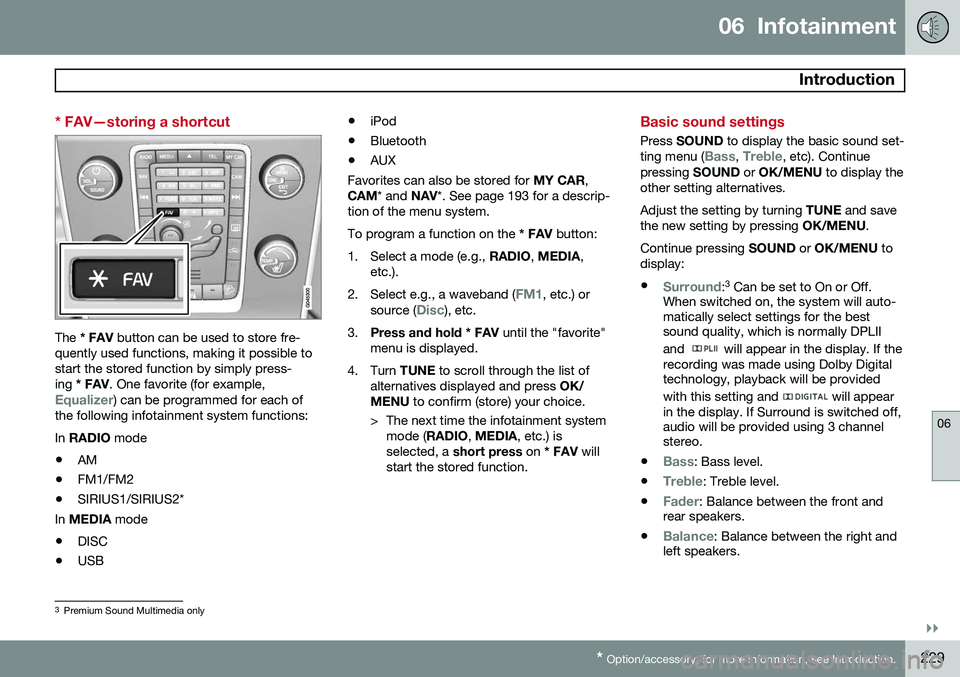
The * FAV button can be used to store fre-
quently used functions, making it possible to start the stored function by simply press-ing * FAV . One favorite (for example,
Equalizer) can be programmed for each of
the following infotainment system functions: In RADIO mode
• AM
• FM1/FM2
• SIRIUS1/SIRIUS2*
In MEDIA mode
• DISC
• USB •
iPod
• Bluetooth
• AUX
Favorites can also be stored for MY CAR,
CAM * and NAV*. See page 193 for a descrip-
tion of the menu system.To program a function on the * FAV button:
1. Select a mode (e.g., RADIO, MEDIA ,
etc.).
2. Select e.g., a waveband (
FM1, etc.) or
source (Disc), etc.
3. Press and hold * FAV until the "favorite"
menu is displayed.
4. Turn TUNE to scroll through the list of
alternatives displayed and press OK/
MENU to confirm (store) your choice.
> The next time the infotainment system mode ( RADIO , MEDIA , etc.) is
selected, a short press on * FAV will
start the stored function.
Basic sound settings
Press SOUND to display the basic sound set-
ting menu (Bass, Treble, etc). Continue
pressing SOUND or OK/MENU to display the
other setting alternatives. Adjust the setting by turning TUNE and save
the new setting by pressing OK/MENU.
Continue pressing SOUND or OK/MENU to
display: •
Surround: 3
Can be set to On or Off.
When switched on, the system will auto- matically select settings for the bestsound quality, which is normally DPLII and
will appear in the display. If the
recording was made using Dolby Digital technology, playback will be provided with this setting and
will appear
in the display. If Surround is switched off, audio will be provided using 3 channelstereo.
•
Bass: Bass level.
•
Treble: Treble level.
•
Fader: Balance between the front and
rear speakers.
•
Balance: Balance between the right and
left speakers.
3 Premium Sound Multimedia only
Page 232 of 380
06 Infotainment
Introduction
06
230
•DPL II centre level/3 channel centre
level3 : Volume for the center speaker.
•
DPL II surround level3 /4
: Surround level.
Advanced sound settings
EqualizerSound levels for different frequencies can be adjusted separately using this feature. To do so:1. Press OK/MENU to access
Audio
settings and select Equalizer
2. Turn TUNE to select one of the frequen-
cies and press OK/MENU.
3. Turn TUNE to adjust the sound setting
and confirm the change by pressing OK/
MENU . Do the same for the other fre-
quencies.
4. When you have finished making your set- tings, press EXIT to save and return to
normal view.
For general information regarding menu navi- gation, see page 227 and menu overview seepage 231.
Sound stage 5The sound experience can be optimized forthe driver's seat, both front seats or the rearseat. If the front and rear seats are occupied, the sound stage setting
Front seats is rec-
ommended. Select one of the options under
Audio settingsSound stage.
Audio volume and automatic volume
control
The infotainment system compensates for disrupting noises in the passenger compart-ment by increasing the volume according tothe speed of the vehicle. The level of soundcompensation can be set at low, medium,high or off. Select the level under
Audio
settings
Volume compensation.
External audio source volumeIf an external device such as an MP3 player or an iPod ®
is connected to the AUX socket,
the device's volume may be different than the volume of the internal sound sources such asthe disc player or the radio. If the externalsound source's volume is too high, the qualityof the sound may be impaired. To help pre-vent this, adjust the input volume of the exter-nal audio source:
NOTE
Sound quality may be affected if the MP3 player is being charged while the system isin AUX mode. To help prevent this, avoidcharging the MP3 player in a 12-voltsocket while it is being played.
1. Press MEDIA and turn TUNE to AUX.
Press OK/MENU or the thumb wheel on
the steering wheel keypad.
2. Press OK/MENU and turn TUNE to
AUX
input volume. Confirm by pressing OK/
MENU .
3. Turn TUNE to adjust the volume.
Optimal sound reproductionThe infotainment system is pre-calibrated for optimal sound reproduction using digital sig-nal processing. This calibration takes into account factors such as the speakers, amplifier, cabin acous-tics, the listeners' seating positions, etc., foreach combination of vehicle/infotainmentsystem.
3
Premium Sound Multimedia only
4 Only when Surround is on.
5Premium Sound Multimedia only
Page 233 of 380
06 Infotainment
Introduction
06
}}
* Option/accessory, for more information, see Introduction.231
There is also a dynamic calibration that takes into consideration the volume level, radioreception, and the speed of the vehicle. The settings that are described in this man- ual, (
Bass, Treble, Equalizer etc.) are only
intended to enable the user to adapt sound reproduction to his/her personal tastes.
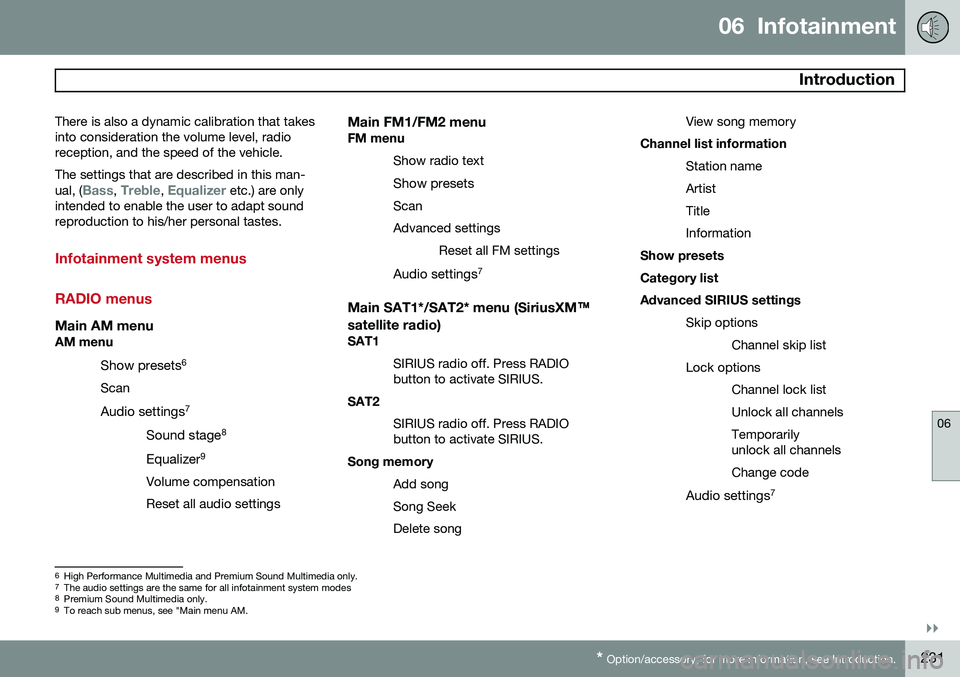
Infotainment system menus RADIO menus
Main AM menuAM menu
Show presets 6
Scan
Audio settings 7
Sound stage 8
Equalizer 9
Volume compensation Reset all audio settings
Main FM1/FM2 menuFM menu Show radio text
Show presets
ScanAdvanced settings Reset all FM settings
Audio settings 7
Main SAT1*/SAT2* menu (SiriusXM™
satellite radio)
SAT1
SIRIUS radio off. Press RADIO button to activate SIRIUS.
SAT2
SIRIUS radio off. Press RADIObutton to activate SIRIUS.
Song memory
Add song Song SeekDelete song View song memory
Channel list information
Station nameArtistTitleInformation
Show presetsCategory listAdvanced SIRIUS settings
Skip optionsChannel skip list
Lock options Channel lock listUnlock all channelsTemporarily unlock all channels Change code
Audio settings 7
6
High Performance Multimedia and Premium Sound Multimedia only.
7 The audio settings are the same for all infotainment system modes
8 Premium Sound Multimedia only.
9 To reach sub menus, see "Main menu AM.
Page 234 of 380
06 Infotainment
Introduction
06
232
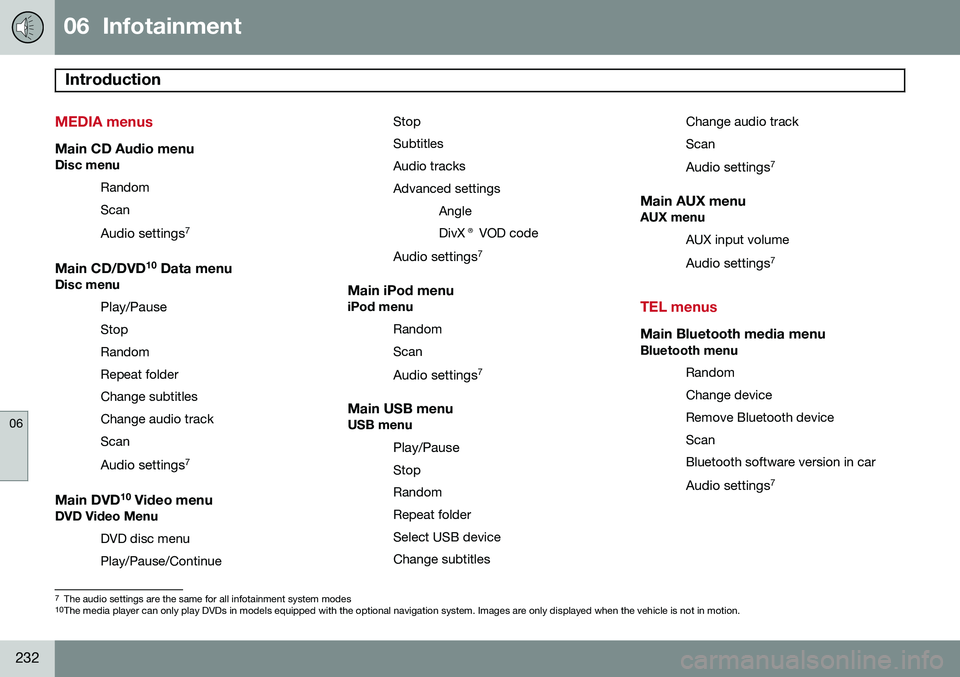
MEDIA menus
Main CD Audio menuDisc menuRandom Scan
Audio settings 7
Main CD/DVD 10
Data menuDisc menu
Play/Pause
StopRandomRepeat folderChange subtitlesChange audio trackScan
Audio settings 7
Main DVD10
Video menuDVD Video Menu
DVD disc menuPlay/Pause/Continue StopSubtitlesAudio tracksAdvanced settings
AngleDivX® VOD code
Audio settings 7
Main iPod menuiPod menu
RandomScan
Audio settings 7
Main USB menuUSB menu
Play/Pause
StopRandomRepeat folderSelect USB deviceChange subtitles Change audio trackScan
Audio settings 7
Main AUX menuAUX menu
AUX input volume
Audio settings 7
TEL menus
Main Bluetooth media menuBluetooth menu
Random Change deviceRemove Bluetooth deviceScanBluetooth software version in car
Audio settings 7
7
The audio settings are the same for all infotainment system modes10
The media player can only play DVDs in models equipped with the optional navigation system. Images are only displayed when the vehicle is not in motion.
Page 235 of 380
06 Infotainment
Introduction
06
233
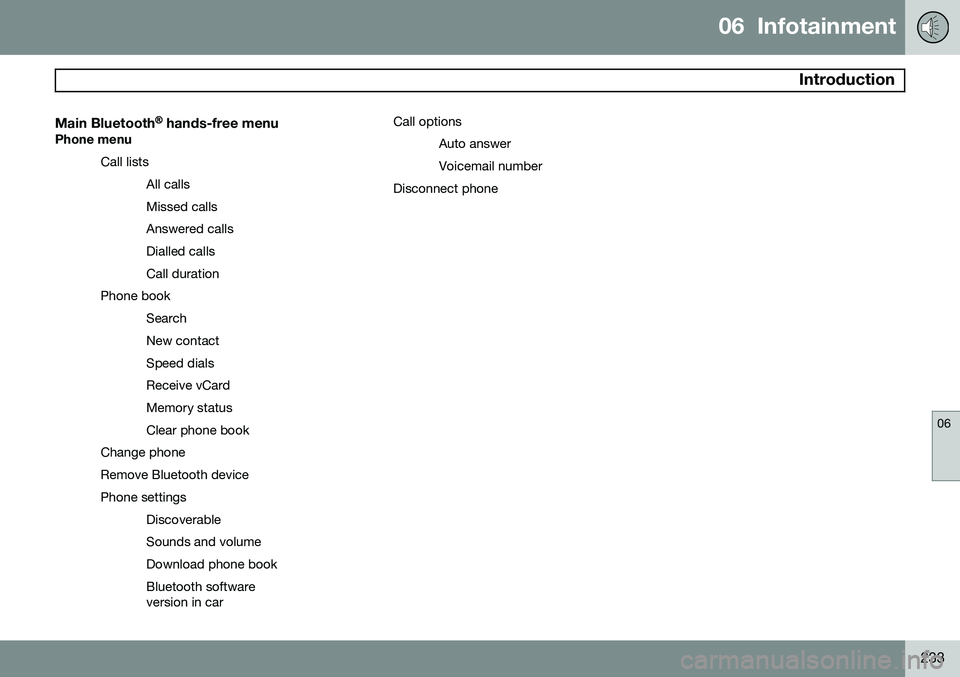
Main Bluetooth® hands-free menu
Phone menu
Call listsAll calls Missed callsAnswered callsDialled callsCall duration
Phone book SearchNew contactSpeed dialsReceive vCardMemory statusClear phone book
Change phoneRemove Bluetooth devicePhone settings DiscoverableSounds and volumeDownload phone bookBluetooth software version in car Call options
Auto answer Voicemail number
Disconnect phone
Page 236 of 380
06 Infotainment
Radio
06
234* Option/accessory, for more information, see Introduction.
General functions
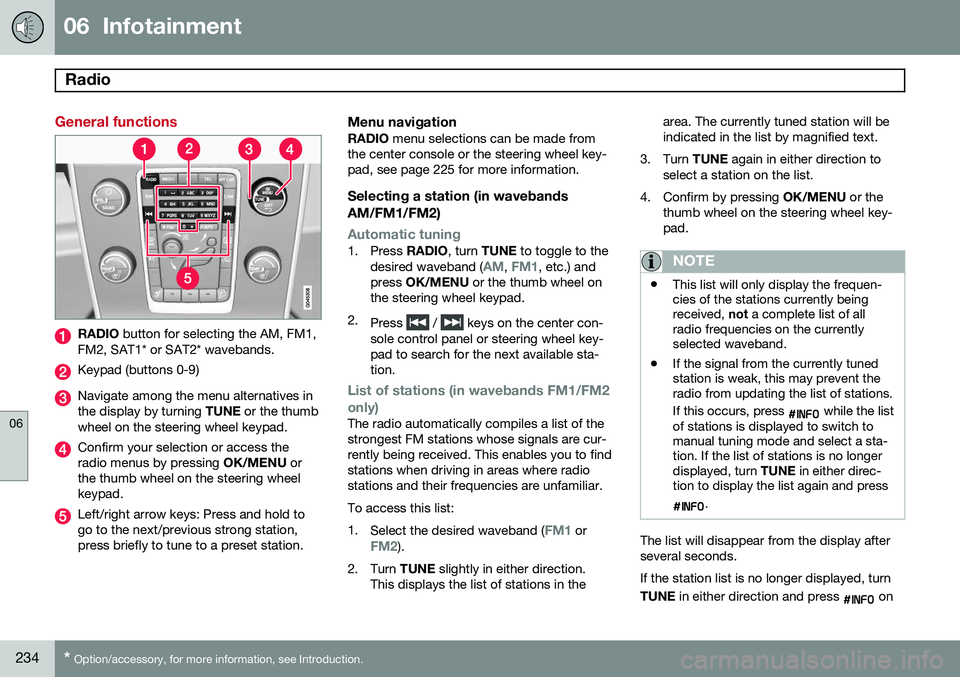
RADIO button for selecting the AM, FM1,
FM2, SAT1* or SAT2* wavebands.
Keypad (buttons 0-9)
Navigate among the menu alternatives in the display by turning TUNE or the thumb
wheel on the steering wheel keypad.
Confirm your selection or access the radio menus by pressing OK/MENU or
the thumb wheel on the steering wheelkeypad.
Left/right arrow keys: Press and hold to go to the next/previous strong station,press briefly to tune to a preset station.
Menu navigationRADIO menu selections can be made from
the center console or the steering wheel key-pad, see page 225 for more information.
Selecting a station (in wavebands AM/FM1/FM2)
Automatic tuning1. Press RADIO, turn TUNE to toggle to the
desired waveband (AM, FM1, etc.) and
press OK/MENU or the thumb wheel on
the steering wheel keypad.
2. Press
/ keys on the center con-
sole control panel or steering wheel key- pad to search for the next available sta-tion.
List of stations (in wavebands FM1/FM2 only)
The radio automatically compiles a list of the strongest FM stations whose signals are cur-rently being received. This enables you to findstations when driving in areas where radiostations and their frequencies are unfamiliar. To access this list:1. Select the desired waveband (
FM1 orFM2).
2. Turn TUNE slightly in either direction.
This displays the list of stations in the area. The currently tuned station will be indicated in the list by magnified text.
3. Turn TUNE again in either direction to
select a station on the list.
4. Confirm by pressing OK/MENU or the
thumb wheel on the steering wheel key-pad.
NOTE
• This list will only display the frequen- cies of the stations currently beingreceived,
not a complete list of all
radio frequencies on the currentlyselected waveband.
• If the signal from the currently tunedstation is weak, this may prevent theradio from updating the list of stations. If this occurs, press
while the list
of stations is displayed to switch to manual tuning mode and select a sta-tion. If the list of stations is no longerdisplayed, turn TUNE in either direc-
tion to display the list again and press
.
The list will disappear from the display after several seconds. If the station list is no longer displayed, turn TUNE in either direction and press
on
Page 237 of 380
06 Infotainment
Radio
06
235
the keypad on the center console to switch to manual tuning (or to switch back from manualtuning to the "list of stations" function).
Manual tuningBy default, the list of stations of the strongest stations in the area will be displayed whenyou turn
TUNE (see the preceding section,
"List of stations"). While the list of stations is displayed, press
on the center console
keypad to switch to manual tuning, which enables you to select a frequency from thecomplete list of all radio frequencies availa-
ble on the currently selected waveband. Inother words, in manual tuning mode, turningTUNE one step will change from e.g., 93.3 to
93.5, etc.). To manually tune a station:
1. Press RADIO. Turn TUNE to scroll to the
desired waveband (
AM, FM1, etc.) and
press OK/MENU or the thumb wheel on
the steering wheel keypad to confirm.
2. Turn TUNE or the thumb wheel to select
a frequency.
NOTE
The radio is initially set to automatically search for stations in the area in which youare driving (see the preceding section,"List of stations"). However, if you have switched to manual tuning (by pressing
on the keypad
on the center console while the list of sta- tions is displayed), the radio will remain inmanual tuning mode the next time it isswitched on. To switch back to "list of sta-tions" mode, turn TUNE one step (to dis-
play the full list of stations) and press
.
Please note that if you press
when
the list of stations is not displayed, this will activate the INFO function.
Storing preset stationsTen preset stations can be stored for each waveband (AM, FM1, etc.).
Stored preset stations are selected using the buttons on the keypad on the center console.
Manually storing preset stations1. Tune to a station (see "Selecting a sta- tion" on page 234).
2. Press and hold one of the number key buttons. > The sound will be muted for several
seconds and when it returns, the sta- tion has been stored on the numberkey button used.
A list of preset stations can be displayed. Thisfunction can be activated/deactivated in AM/FM mode in
FM menuShow presets
or in AM menuShow presets
ScanThe function automatically searches the cur- rent waveband for radio stations. When a sta-tion is found, it is played for several secondsbefore scanning is resumed. While the stationis playing it can be stored as a preset in theusual way (see "Manually storing preset sta-tions").
–To start scanning in AM/FM mode, go to
FM menuScan or in AM menuScan.
Stop station scanning by pressing EXIT.
NOTE
Storing a station interrupts the SCAN func- tion.