audio VOLVO S80 2014 Owner´s Manual
[x] Cancel search | Manufacturer: VOLVO, Model Year: 2014, Model line: S80, Model: VOLVO S80 2014Pages: 380, PDF Size: 10.83 MB
Page 251 of 380
06 Infotainment
AUX/USB sockets
06
249
The
/ buttons on the center console
or steering wheel keypad can also be used to change tracks/files. The following symbols are used in the dis- play: •
- audio files
•
- video files
•
- folders
When a file has been played, the player will continue to play the rest of the files (of thesame type) in the current folder. When all ofthe files in the folder have been played, the player will automatically go to the next folder 1
(unless
Repeat folder is activated) and play
the files in it. The system automatically detects and changes settings if a device containing onlyaudio or only video files is connected to theUSB socket and will play these files. How-ever, the system will not change settings ifthe device contains both audio and video filesand will continue to play the current type offile.
Fast forward/reverse 1For information, see page 244.
Scan1For information, see page 244.
Random
1For information, see page 245.
Search1The keypad in the center console can beused to search for a file in the currentlyselected folder. Start the search by either turning
TUNE (to
access the folders) or by pressing one of the character keys to enter a letter/number. Pos-sible search results will be displayed as char-acters are entered. Play the file by pressing OK/MENU.
Repeat2This function makes it possible to play files in a folder repeatedly. When the last file hasbeen played, the first file will begin again. Forinformation, see page 245.
PauseWhen the infotainment system volume isturned off completely or the sound is muted,the player will pause. It will resume playingwhen the volume is turned up again or if the sound is unmuted.
Pause is also available via
the menu system, select
Play/Pause.
External sound sources
USB flash driveTo simplify the use of a USB flash drive, it is advisable to only store music files on thedrive. It will take considerably longer for thesystem to index the files on the drive if it con-tains anything other than compatible musicfiles.
NOTE
• The system supports removable media that uses the USB 2.0 standard andthe FAT32 file system. It can index upto 1,000 folders and a maximum of254 sub-folders/files for each folder.However, the highest folder level cansupport up to 1,000 sub-folders/files.
• When using a longer type of USBdevice, connecting it with a USBadapter cable will help reducemechanical wear on the USB socketand on the device.
1
USB and iPod ®
only2 USB only
Page 252 of 380
06 Infotainment
AUX/USB sockets
06
250
USB hubA USB hub can be connected to the USB socket, making it possible to connect severalUSB devices at the same time. To select one of the devices, go to the menu
USB menuSelect USB device
MP3 playerMany MP3 players have a file indexing sys- tem that is not supported by the vehicle'sinfotainment system. In order to use an MP3 player, the system must be set to
USB
Removable device/Mass Storage Device.
iPod®
An iPod ®
receives current and its battery is
charged through the USB cable. The system will only play audio files from an iPod ®
.
NOTE
When an iPod ®
is used as a sound source,
the vehicle's infotainment system has a menu structure similar to the one in the iPod ®
. See the iPod's manual for detailed
information.
Compatible file formats via the USB socket
The following audio and video files are sup- ported by the system when playing a deviceconnected to the USB socket.
Audio formatsmp3, wma, aac, m4a
Video formatsdivx, avi, asf
Page 253 of 380
06 Infotainment
Bluetooth® media
06
251
Introduction
The vehicle's media player is equipped with Bluetooth ®
and can play streaming audio files
from a Bluetooth ®
device such as a cell
phone or mp3 player. Navigation and control of the device can be done through the vehi-cle's center console control panel or thesteering wheel keypad. On certain externaldevices, it is also possible to change tracksfrom the device.
NOTE
Any Bluetooth cell phones used must sup- port Audio/Video Remote Control Profile(AVRCP) and Advanced Audio DistributionProfile (A2DP). The phone must useAVRCP version 1.3 and A2DP 1.2. If olderversions of these standards are used, cer-tain features (e.g., scan or random) maynot function. Not all cell phones are fully compatible with the vehicle's Bluetooth system. A listof compatible phones is available at youVolvo retailer or at www.volvocars.us.
Menu navigation
Choices can be made in the Bluetoothmenus from the center console control panel or the steering wheel keypad. For additionalinformation about navigating the variousmenus, see page 225. The vehicle's media player can only play audio files through the Bluetooth
®
function.
Overview
Center console control panel
VOL : Volume control
MEDIA button, the most recently used
active source will start when MEDIA is
pressed. Pressing this key from Media mode's main view will display a shortcutmenu.
TUNE : Turn to navigate among menu
alternatives and folders shown in the dis- play.
OK/MENU : Press to confirm your selec-
tion or access the menus.
EXIT : Press to go back in the menu
structure or cancel a function.
Left/right arrow keys: Short press:
change tracks. Long press: fast forward/
reverse within a track. The arrow keys on the steering wheel keypad can be used inthe same way.
Pairing and connecting an external device
Before an external device can be connected, it must be paired to the infotainment system.The procedure for connecting an externaldevice varies, depending whether or not thedevice has previously been paired to the info-tainment system. A maximum of 10 externaldevices can be paired and each device onlyneeds to be paired once. To pair a device,see page 254.
Automatic connection
When the Bluetooth ®
function is active and
the most recently used device is within range, it is automatically connected. When the info-tainment system searches for the mostrecently used device, its name is shown in thedisplay. To connect another paired device,press EXIT. See the following section for
information about switching to anotherdevice.
Page 254 of 380
06 Infotainment
Bluetooth® media
06
252
Switching to another device
It is possible to switch among paired Bluetooth ®
devices that are in the vehicle. To
do so: 1. Press MEDIA ,scroll to
Bluetooth and
press the thumb wheel on the steering wheel keypad or OK/MENU.
2. Be sure the Bluetooth ®
device is discov-
erable (refer to its user manual if neces-sary).
3. Press the thumb wheel or OK/MENU.
4. Turn the thumb wheel or TUNE to
Change device and confirm by pressing
the thumb wheel or OK/MENU.
> After several seconds, the names of any paired external devices will be dis- played.
5. Scroll to the device to be connected and press the thumb wheel or OK/MENU.
> The device will be connected.
Audio files can now be selected using the
/ buttons in the center console or on
the steering wheel keypad.
Disconnecting an external device
The external device is automatically discon- nected from the infotainment system if it ismoved out of range.
Removing a paired device
1. In Bluetooth mode, press OK/MENU.
2. Scroll to
Remove Bluetooth device and
press the thumb wheel or OK/MENU.
3. Scroll to the device to be removed by turning the thumb wheel or TUNE and
confirm by pressing the thumb wheel or OK/MENU .
> A question asking if you would like to remove the device will be displayed.
4. Press the thumb wheel or OK/MENU to
confirm or EXIT to cancel.
Random 1
This function plays the audio files on the external device in random order (shuffle). Thisfunction can be activated/deactivated under:
Bluetooth menuRandom
Press the / buttons on the center
console or steering wheel keypad to change tracks.
Scanning audio files on an external device 1
This function plays the first ten seconds of each audio file. This function can be acti- vated/deactivated under:
Bluetooth menuScan. Scanning can be canceled by pressing
EXIT.
Bluetooth® version information
This feature offers information about the Bluetooth ®
version installed in the vehicle's
infotainment system. This information can be found under
Bluetooth menuBluetooth
software version in car.
1 Function is not supported on all cell phones.
Page 271 of 380
07 During your trip
Driving recommendations
07
269
or maximum permissible axle loads are not exceeded.
Driving through water
•
The vehicle can be driven through water up to a depth of approximately 10 in.(25 cm), at a maximum speed of 6 mph(10 km/h).
• Take particular care when driving throughflowing water.
• Clean the electrical connections for trailerwiring after driving in mud or water.
• When driving through water, maintain lowspeed and do not stop in the water.
WARNING
•Avoid driving through standing or rushing water. Doing so can be dan-gerous and it may also be difficult todetermine the actual depth of thewater.
• If water cannot be avoided, after driv-ing through the water, press lightly onthe brake pedal to ensure that thebrakes are functioning normally. Wateror mud can make the brake liningsslippery, resulting in delayed brakingeffect.
CAUTION
•Engine damage will occur if water is drawn into the air cleaner.
• If the vehicle is driven through waterdeeper than 10 in (25 cm), water mayenter the differential and the transmis-sion. This reduces the oil's lubricatingcapacity and may shorten the servicelife of these components.
• Do not allow the vehicle to stand inwater up to the door sills longer thanabsolutely necessary. This could resultin electrical malfunctions.
• If the engine has been stopped whilethe vehicle is in water, do not attemptto restart it. Have the vehicle towedout of the water.
Engine and cooling systemUnder special conditions, for example when driving in hilly terrain, extreme heat or withheavy loads, there is a risk that the engineand cooling system will overheat. Proceed asfollows to avoid overheating the engine. •
Maintain a low speed when driving with a trailer up long, steep hills.
• Do not turn the engine off immediatelywhen stopping after a hard drive.
WARNING
The cooling fan may start or continue to operate (for up to 6 minutes) after theengine has been switched off.
• Remove any auxiliary lights from in front of the grille when driving in hot weatherconditions.
• Do not exceed engine speeds of4500 rpm if driving with a trailer in hillyterrain. The oil temperature could becometoo high.
Conserving electrical currentKeep the following in mind to help minimize battery drain:
• When the engine is not running, avoid using ignition mode
II. Many electrical
systems (the audio system, the optionalnavigation system, power windows, etc)will function in ignition modes 0 and I.
These modes reduce drain on the battery.
• Please keep in mind that using systems,accessories, etc., that consume a greatdeal of current when the engine is notrunning could result in the battery beingcompletely drained. Driving or having theengine running for approximately15 minutes will help keep the batterycharged.
Page 367 of 380
10 Specifications
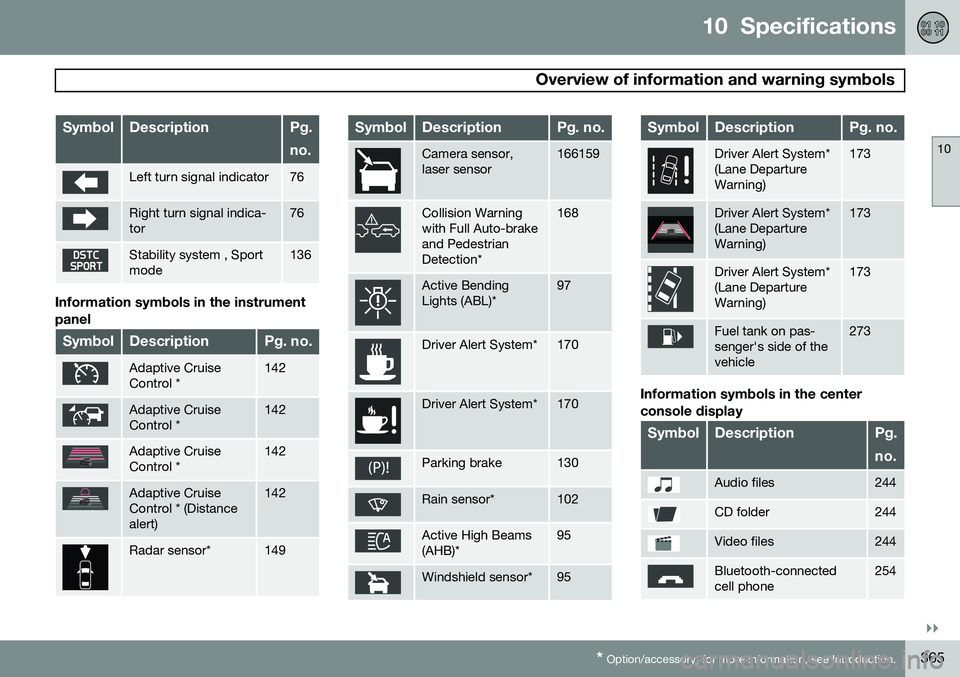
Overview of information and warning symbols
10
}}
* Option/accessory, for more information, see Introduction.365
SymbolDescriptionPg. no.
Left turn signal indicator76
Right turn signal indica- tor76
Stability system , Sport mode136
Information symbols in the instrument panel
SymbolDescriptionPg. no.
Adaptive Cruise Control *142
Adaptive Cruise Control *142
Adaptive Cruise Control *142
Adaptive Cruise Control * (Distancealert)142
Radar sensor*149
SymbolDescriptionPg. no.
Camera sensor, laser sensor166159
Collision Warning with Full Auto-brakeand PedestrianDetection*168
Active Bending Lights (ABL)*97
Driver Alert System*170
Driver Alert System*170
Parking brake130
Rain sensor*102
Active High Beams (AHB)*95
Windshield sensor*95
SymbolDescriptionPg. no.
Driver Alert System* (Lane DepartureWarning)173
Driver Alert System* (Lane DepartureWarning)173
Driver Alert System* (Lane DepartureWarning)173
Fuel tank on pas- senger's side of thevehicle273
Information symbols in the center console display
SymbolDescriptionPg. no.
Audio files244
CD folder244
Video files244
Bluetooth-connected cell phone254
Page 370 of 380
11 Index
11
368
1, 2, 3 ...
12-volt sockets........................................ 219
A
ABS (anti-lock brake system).................. 128
Accessory installation warning.................. 13
Active chassis system............................. 216
Active high beams..................................... 95Active yaw control................................... 136
Adaptive brake lights............................... 127
Adaptive cruise control.................... 142, 144 queue assist........................................ 147
Airbags disconnecting the front passenger’s
side................................................. 26, 27
front...................................................... 22
inflatable curtain................................... 32
side impact........................................... 30
Air conditioning........................................ 204
Air distribution.......................................... 200
Air distribution table................................. 207
Air vents................................................... 201 All Wheel Drive......................................... 124
Ambient temperature sensor..................... 82
Anti-freeze....................................... 270, 324Anti-lock brake system
warning light................................... 77, 79
Anti-lock Brake System (ABS)................. 128
Approach lighting.............................. 57, 101Audio system AUX/USB sockets............................... 248 Bluetooth ®
devices............................. 251
Bluetooth ®
hands-free system........... 253
Bluetooth streaming audio................. 251
getting started.................................... 225
HD digital radio................................... 236
introduction......................................... 224
media player....................................... 243
overview.............................................. 224
radio functions.................................... 234SiriusXM ™ satellite radio.................... 238
sound settings.................................... 229
steering wheel keypad........................ 225
voice control....................................... 262
Auto-dim rearview mirror......................... 107
Automatic locking retractor....................... 38 Automatic transmission
Geartronic........................................... 122
general description..................... 121, 122
oil........................................................ 362
shiftlock override................................ 124
Axle weight.............................................. 297
B
Battery changing..................................... 336, 337
maintenance....................................... 336
remote key, replacing........................... 61
specifications...................................... 363
warning symbols................................. 335
Blind Spot Information System (BLIS) 184, 185, 186
Bluetooth cell phone connection............. 253
Booster cushions....................................... 46
Brake lights.............................................. 127Brake system ABS..................................................... 128
Brake pad inspection.......................... 127
checking fluid level............................. 324
emergency brake assistance.............. 128
fluid..................................................... 362
general information............................. 127
Page 373 of 380
11 Index
11
371
Headlights
Active Bending Lights........................... 97
active high beams................................. 95
changing bulbs........................... 327, 328
daytime running lights.......................... 94
high/low beams.................................... 95
high beam flash.................................... 95
tunnel detection.................................... 97
Headlight washers................................... 103
Head restraints, rear seat.......................... 89
Heated front seats................................... 202
Heated oxygen sensors........................... 275
Heated rear seats.................................... 203
Heated steering wheel............................... 93
Heated windshield........................... 107, 205
High beams................................................ 95 active.................................................... 95
Hill Start Assist (HSA).............................. 121
Hoisting the vehicle................................. 319 HomeLink ®
Wireless Control System...... 113
Home safe lighting................................... 100
Hood, opening/closing............................ 321
Horn........................................................... 92
I
Ignition modes........................................... 84
Immobilizer................................................ 56
Important information.................................. 6
Indicator lights............................... 75, 77, 79 Infant seats................................................ 42
Inflatable Curtain........................................ 32
Inflation pressure..................................... 291
Inflation pressure table............................ 293Information and warning symbols, table
of.............................................................. 364
Information lights........................... 75, 77, 79Infotainment Menu navigation................................. 227
Infotainment system................................ 224 AUX/USB sockets............................... 248 Bluetooth ®
devices............................. 251
Bluetooth ®
hands-free system........... 253
getting started.................................... 225
media player....................................... 243
menus......................................... 225, 227
radio functions.................................... 234
sound settings.................................... 229
voice control....................................... 262 Inspection readiness................................ 319
Instrument lighting..................................... 97
"theater" lighting................................... 97
Instrument overview............................ 74, 75
Instrument panel................................ 75, 191
Interior Air Quality System....................... 200
Interior lighting................................... 99, 100iPod ® connector (audio system)............. 248
ISOFIX/LATCH anchors............................. 47
J
Jack attaching............................................. 308
location of........................................... 308
Jump starting........................................... 119