lights VOLVO S80 2014 Owner´s Manual
[x] Cancel search | Manufacturer: VOLVO, Model Year: 2014, Model line: S80, Model: VOLVO S80 2014Pages: 380, PDF Size: 10.83 MB
Page 330 of 380
09 Maintenance and specifications
Replacing bulbs 09
328
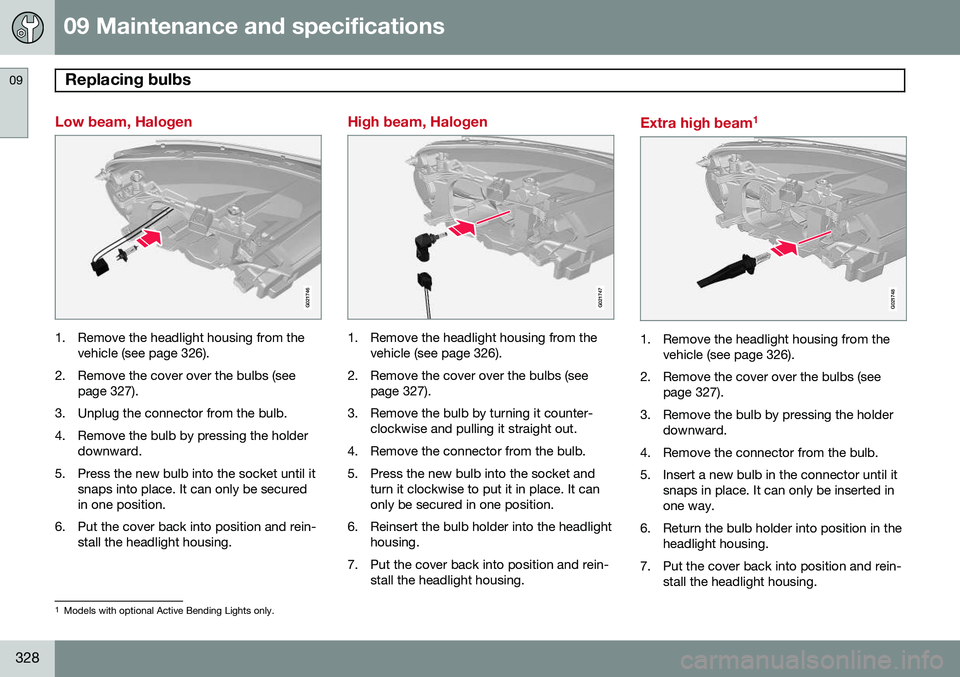
Low beam, Halogen
G021746
1. Remove the headlight housing from thevehicle (see page 326).
2. Remove the cover over the bulbs (see page 327).
3. Unplug the connector from the bulb.
4. Remove the bulb by pressing the holder downward.
5. Press the new bulb into the socket until it snaps into place. It can only be secured in one position.
6. Put the cover back into position and rein- stall the headlight housing.
High beam, Halogen
G021747
1. Remove the headlight housing from thevehicle (see page 326).
2. Remove the cover over the bulbs (see page 327).
3. Remove the bulb by turning it counter- clockwise and pulling it straight out.
4. Remove the connector from the bulb.
5. Press the new bulb into the socket and turn it clockwise to put it in place. It can only be secured in one position.
6. Reinsert the bulb holder into the headlight housing.
7. Put the cover back into position and rein- stall the headlight housing.
Extra high beam 1
G021748
1. Remove the headlight housing from the
vehicle (see page 326).
2. Remove the cover over the bulbs (see page 327).
3. Remove the bulb by pressing the holder downward.
4. Remove the connector from the bulb.
5. Insert a new bulb in the connector until it snaps in place. It can only be inserted in one way.
6. Return the bulb holder into position in the headlight housing.
7. Put the cover back into position and rein- stall the headlight housing.
1Models with optional Active Bending Lights only.
Page 331 of 380
09 Maintenance and specifications
Replacing bulbs09
329
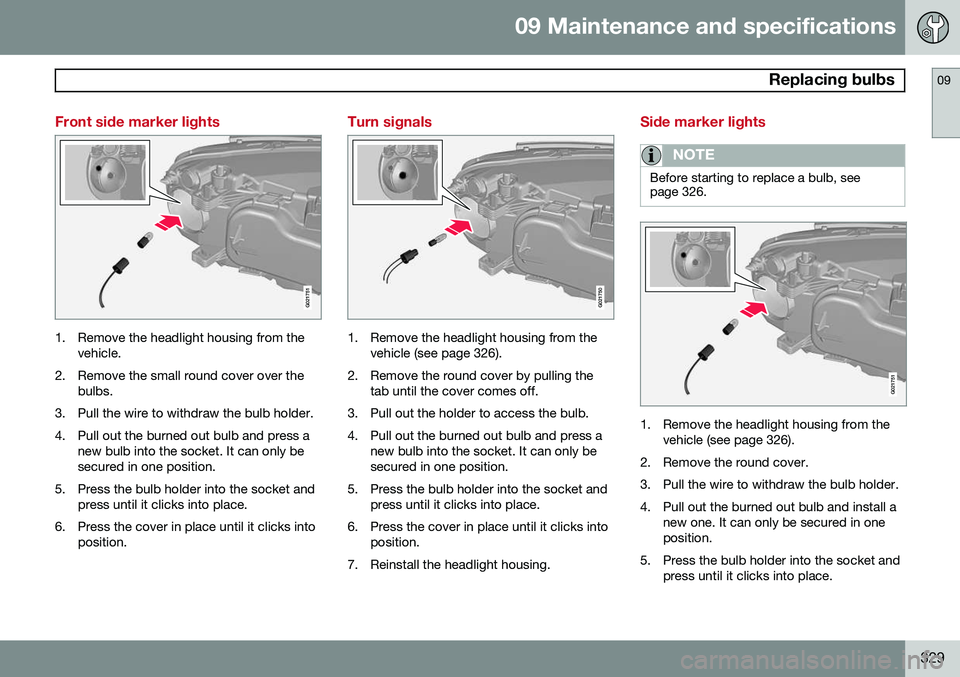
Front side marker lights
G021751
1. Remove the headlight housing from thevehicle.
2. Remove the small round cover over the bulbs.
3. Pull the wire to withdraw the bulb holder.
4. Pull out the burned out bulb and press a new bulb into the socket. It can only be secured in one position.
5. Press the bulb holder into the socket and press until it clicks into place.
6. Press the cover in place until it clicks into position.
Turn signals
G021750
1. Remove the headlight housing from thevehicle (see page 326).
2. Remove the round cover by pulling the tab until the cover comes off.
3. Pull out the holder to access the bulb.
4. Pull out the burned out bulb and press a new bulb into the socket. It can only be secured in one position.
5. Press the bulb holder into the socket and press until it clicks into place.
6. Press the cover in place until it clicks into position.
7. Reinstall the headlight housing.
Side marker lights
NOTE
Before starting to replace a bulb, see page 326.
G021751
1. Remove the headlight housing from the vehicle (see page 326).
2. Remove the round cover.
3. Pull the wire to withdraw the bulb holder.
4. Pull out the burned out bulb and install a new one. It can only be secured in one position.
5. Press the bulb holder into the socket and press until it clicks into place.
Page 332 of 380
09 Maintenance and specifications
Replacing bulbs 09
330
6. Press the cover until it clicks into posi-tion.
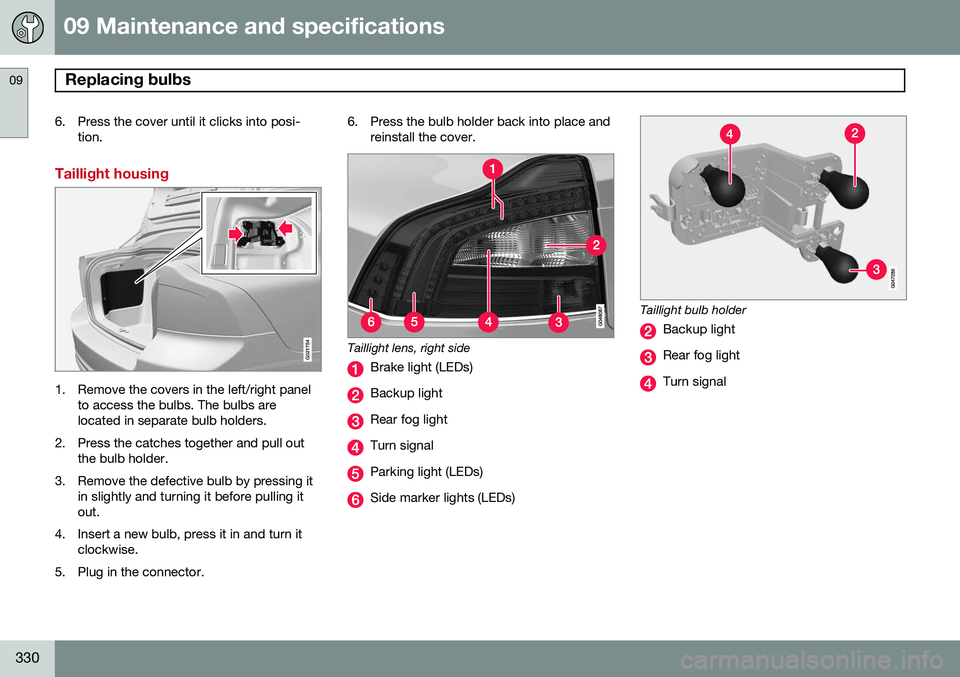
Taillight housing
G021754
1. Remove the covers in the left/right panel to access the bulbs. The bulbs are located in separate bulb holders.
2. Press the catches together and pull out the bulb holder.
3. Remove the defective bulb by pressing it in slightly and turning it before pulling itout.
4. Insert a new bulb, press it in and turn it clockwise.
5. Plug in the connector. 6. Press the bulb holder back into place and
reinstall the cover.
Taillight lens, right side
Brake light (LEDs)
Backup light
Rear fog light
Turn signal
Parking light (LEDs)
Side marker lights (LEDs)
Taillight bulb holder
Backup light
Rear fog light
Turn signal
Page 334 of 380
09 Maintenance and specifications
Replacing bulbs 09
332* Option/accessory, for more information, see Introduction.
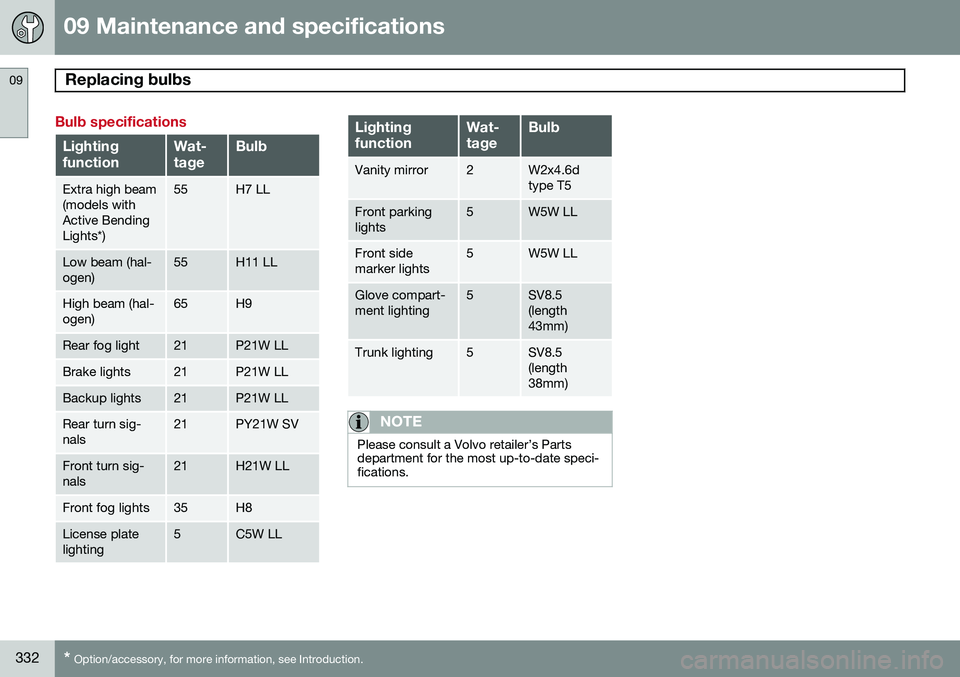
Bulb specifications
Lighting functionWat- tageBulb
Extra high beam (models withActive BendingLights*)55H7 LL
Low beam (hal- ogen)55H11 LL
High beam (hal- ogen)65H9
Rear fog light21P21W LL
Brake lights21P21W LL
Backup lights21P21W LL
Rear turn sig- nals21PY21W SV
Front turn sig- nals21H21W LL
Front fog lights35H8
License plate lighting5C5W LL
Lighting functionWat- tageBulb
Vanity mirror2W2x4.6d type T5
Front parking lights5W5W LL
Front side marker lights5W5W LL
Glove compart- ment lighting5SV8.5 (length43mm)
Trunk lighting5SV8.5 (length38mm)
NOTE
Please consult a Volvo retailer’s Parts department for the most up-to-date speci-fications.
Page 343 of 380
09 Maintenance and specifications
Fuses09
* Option/accessory, for more information, see Introduction.341
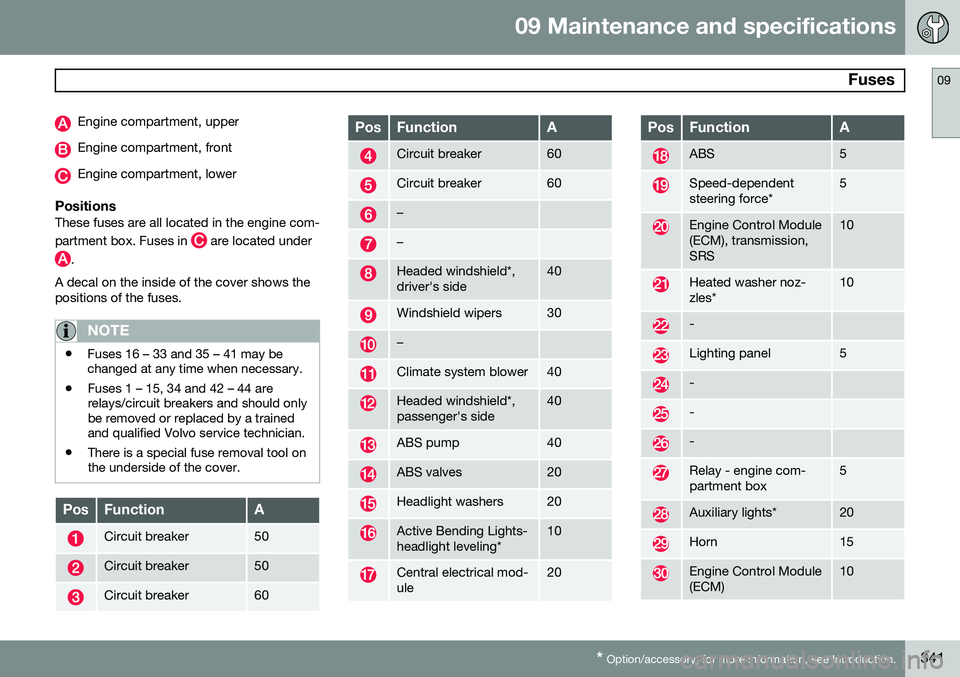
Engine compartment, upper
Engine compartment, front
Engine compartment, lower
PositionsThese fuses are all located in the engine com- partment box. Fuses in
are located under
.
A decal on the inside of the cover shows the positions of the fuses.
NOTE
• Fuses 16 – 33 and 35 – 41 may be changed at any time when necessary.
• Fuses 1 – 15, 34 and 42 – 44 arerelays/circuit breakers and should onlybe removed or replaced by a trainedand qualified Volvo service technician.
• There is a special fuse removal tool onthe underside of the cover.
PosFunctionA
Circuit breaker50
Circuit breaker50
Circuit breaker60
PosFunctionA
Circuit breaker60
Circuit breaker60
–
–
Headed windshield*, driver's side40
Windshield wipers30
–
Climate system blower40
Headed windshield*, passenger's side40
ABS pump40
ABS valves20
Headlight washers20
Active Bending Lights- headlight leveling*10
Central electrical mod- ule20
PosFunctionA
ABS5
Speed-dependent steering force*5
Engine Control Module (ECM), transmission,SRS10
Heated washer noz- zles*10
-
Lighting panel5
-
-
-
Relay - engine com- partment box5
Auxiliary lights*20
Horn15
Engine Control Module (ECM)10
Page 347 of 380
09 Maintenance and specifications
Fuses09
}}
* Option/accessory, for more information, see Introduction.345
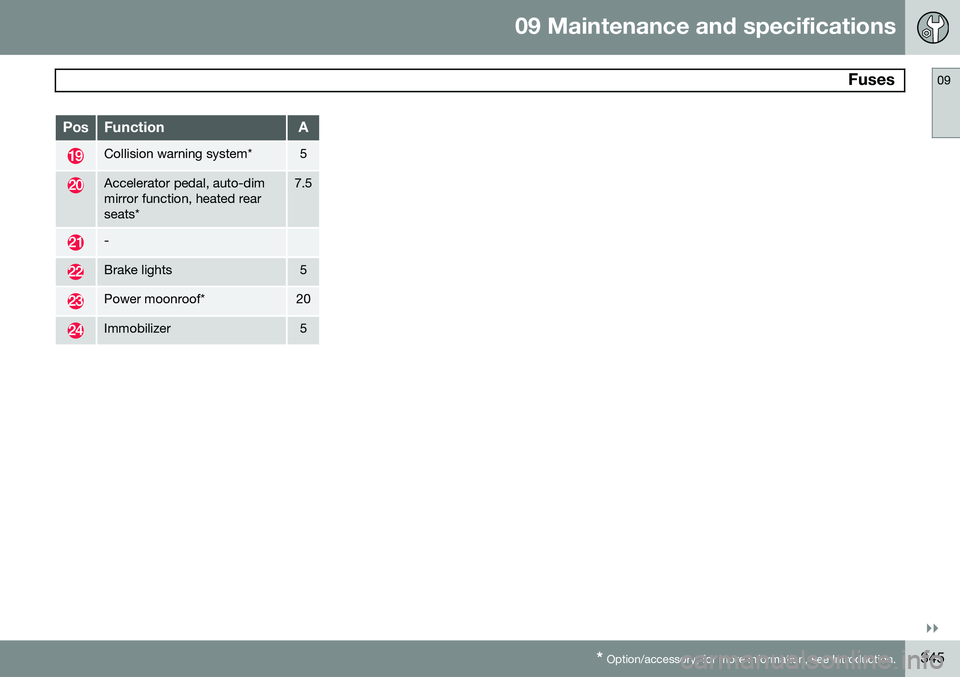
PosFunctionA
Collision warning system*5
Accelerator pedal, auto-dim mirror function, heated rearseats*7.5
-
Brake lights5
Power moonroof*20
Immobilizer5
Page 350 of 380
09 Maintenance and specifications
Vehicle care 09
348
Washing the car
The following points should be kept in mind when washing and cleaning the car: •The car should be washed at regular intervals since dirt, dust, insects and tarspots adhere to the paint and may causedamage. To help prevent corrosion, it isparticularly important to wash the car fre-quently in the wintertime.
• Avoid washing your car in direct sunlight.Doing so may cause detergents and waxto dry out and become abrasive. To avoidscratching, use lukewarm water to softenthe dirt before you wash with a softsponge, and plenty of sudsy water.
• Bird droppings
: Remove from paintwork
as soon as possible. Otherwise the finishmay be permanently damaged.
• A detergent can be used to facilitate thesoftening of dirt and oil.
• Dry the car with a clean chamois andremember to clean the drain holes in thedoors and rocker panels.
• Tar spots can be removed with tarremover after the car has been washed.
• A stiff-bristle brush and lukewarm soapywater can be used to clean the wiperblades. Frequent cleaning of the wind-shield and wiper blades improves visibility considerably and also helps prolong theservice life of the wiper blades.
• Wash off the dirt from the underside(wheel housings, fenders, etc).
• In areas of high industrial fallout, morefrequent washing is recommended.
NOTE
When washing the car, remember to remove dirt from the drain holes in thedoors and sills.
CAUTION
• During high pressure washing, the spray mouthpiece must never becloser to the vehicle than 13" (30 cm).Do not spray into the locks.
• Dirt, snow, etc., on the headlights canreduce lighting capacity considerably.Clean the headlights regularly, forexample when refueling.
Special moonroof cautions:
• Always close the moonroof and sunshade before washing your vehicle.
• Never use abrasive cleaning agents onthe moonroof.
• Never use wax on the rubber sealsaround the moonroof.
Exterior componentsVolvo recommends the use of special clean- ing products, available at your Volvo retailer,for cleaning colored plastic, rubber, or orna-mental components such as chromed stripson the exterior of your vehicle. The instruc-tions for using these products should be fol-lowed carefully. Solvents or stain removersshould not be used.
CAUTION
•Avoid waxing or polishing plastic or rubber components
• Polishing chromed strips can wearaway or damage the surface
• Polishes containing abrasive sub-stances should not be used
Automatic car wash
•
We do NOT recommend washing your car in an automatic wash during the firstfew months (because the paint will nothave hardened sufficiently).
• An automatic wash is a simple and quickway to clean your car, but it is worthremembering that it may not be as thor-ough as when you yourself go over thecar with sponge and water. Keeping theunderbody clean is most important, espe-cially in the winter. Some automatic
Page 351 of 380
09 Maintenance and specifications
Vehicle care09
349
washers do not have facilities for washing the underbody.
NOTE
Condensation may form temporarily on the inside of the lenses of exterior lights suchas headlights, fog lights, or taillights. Thisis normal and the lights are designed towithstand moisture. Normally, condensa-tion will dissipate after the lights have beenon for a short time.
CAUTION
•
Before driving into an automatic car wash, turn off the optional rain sensorto avoid damaging the windshield wip-ers.
• Make sure that side view mirrors, aux-iliary lamps, etc, are secure, and thatany antenna(s) are retracted orremoved. Otherwise there is risk of themachine dislodging them.
• Chromed wheels:
Clean chrome-
plated wheels using the same deter-gents used for the body of the vehicle.Aggressive wheel-cleaning agents canpermanently stain chrome-platedwheels.
WARNING
• When the vehicle is driven immediately after being washed, apply the brakes,including the parking brake, severaltimes in order to remove any moisturefrom the brake linings.
• Engine cleaning agents should not beused when the engine is warm. Thisconstitutes a fire risk.
Polishing and waxing
•
Normally, polishing is not required during the first year after delivery, however, wax-ing may be beneficial.
• Before applying polish or wax the vehiclemust be washed and dried. Tar spots canbe removed with kerosene or tar remover.Difficult spots may require a fine rubbingcompound.
• After polishing use liquid or paste wax.
• Several commercially available productscontain both polish and wax.
• Waxing alone does not substitute for pol-ishing a dull surface.
• A wide range of polymer-based waxescan be purchased today. These waxesare easy to use and produce a long-last-ing, high-gloss finish that protects the bodywork against oxidation, road dirt andfading.
• Do not polish or wax your vehicle in directsunlight (the surface of the vehicle shouldnot be warmer than 113 °F (45 °C).
CAUTION
Volvo does not recommend the use of long-life or durable paint protection coat-ings, some of which may claim to preventpitting, fading, oxidation, etc. These coat-ings have not been tested by Volvo forcompatibility with your vehicle's clear coat.Some of them may cause the clear coat tosoften, crack, or cloud. Damage caused byapplication of paint protection coatingsmay not be covered under your vehicle'spaint warranty.
Cleaning the interior
Only use cleaning agents and car care prod- ucts recommended by Volvo. Clean regularlyand follow the instructions included with thecar care product.
Upholstery care
FabricClean with soapy water or a detergent. For more difficult spots caused by oil, ice cream,shoe polish, grease, etc., use a clothing/
Page 366 of 380
10 Specifications
Overview of information and warning symbols
10
364* Option/accessory, for more information, see Introduction.
Introduction
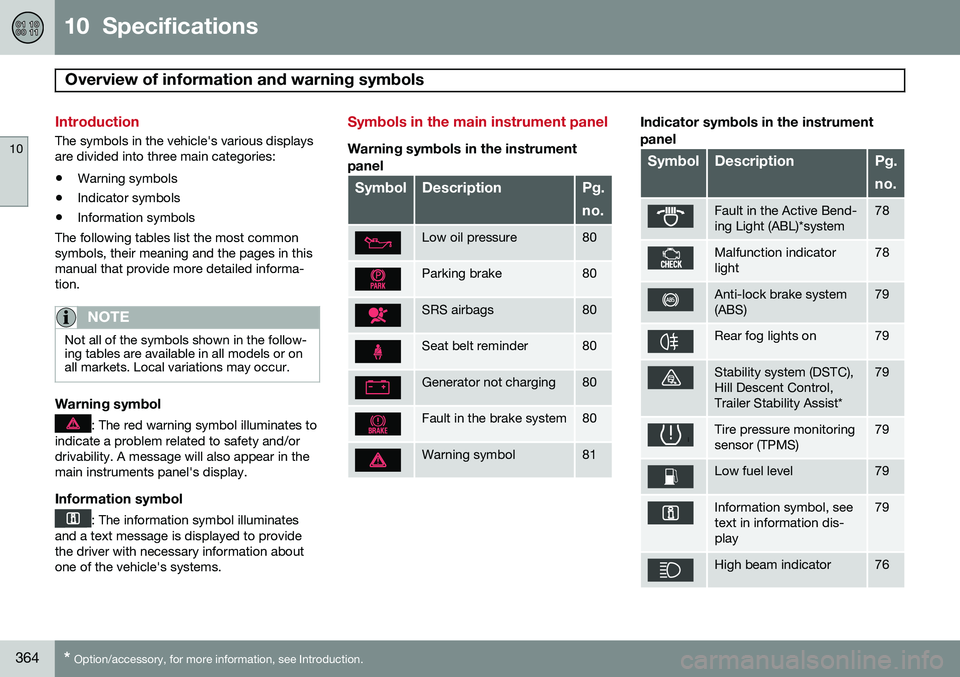
The symbols in the vehicle's various displays are divided into three main categories:
• Warning symbols
• Indicator symbols
• Information symbols
The following tables list the most commonsymbols, their meaning and the pages in thismanual that provide more detailed informa-tion.
NOTE
Not all of the symbols shown in the follow- ing tables are available in all models or onall markets. Local variations may occur.
Warning symbol
: The red warning symbol illuminates to
indicate a problem related to safety and/or drivability. A message will also appear in themain instruments panel's display.
Information symbol
: The information symbol illuminates
and a text message is displayed to provide the driver with necessary information aboutone of the vehicle's systems.
Symbols in the main instrument panel
Warning symbols in the instrument
panel
SymbolDescriptionPg. no.
Low oil pressure80
Parking brake80
SRS airbags80
Seat belt reminder80
Generator not charging80
Fault in the brake system80
Warning symbol81
Indicator symbols in the instrument panel
SymbolDescriptionPg. no.
Fault in the Active Bend- ing Light (ABL)*system78
Malfunction indicator light78
Anti-lock brake system (ABS)79
Rear fog lights on79
Stability system (DSTC), Hill Descent Control,Trailer Stability Assist*79
Tire pressure monitoring sensor (TPMS)79
Low fuel level79
Information symbol, see text in information dis-play79
High beam indicator76
Page 367 of 380
10 Specifications
Overview of information and warning symbols
10
}}
* Option/accessory, for more information, see Introduction.365
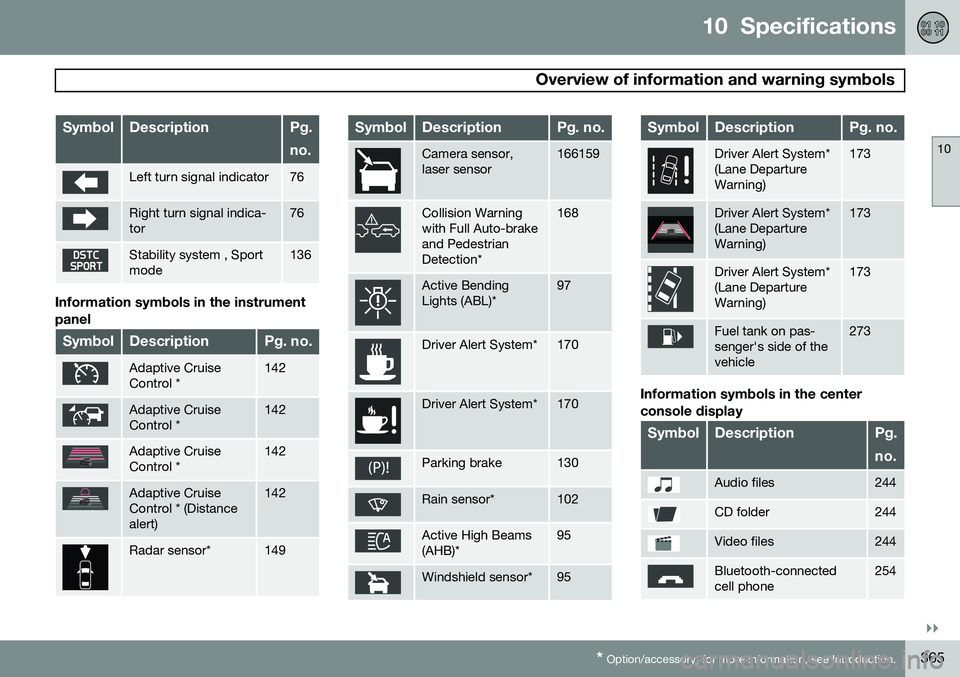
SymbolDescriptionPg. no.
Left turn signal indicator76
Right turn signal indica- tor76
Stability system , Sport mode136
Information symbols in the instrument panel
SymbolDescriptionPg. no.
Adaptive Cruise Control *142
Adaptive Cruise Control *142
Adaptive Cruise Control *142
Adaptive Cruise Control * (Distancealert)142
Radar sensor*149
SymbolDescriptionPg. no.
Camera sensor, laser sensor166159
Collision Warning with Full Auto-brakeand PedestrianDetection*168
Active Bending Lights (ABL)*97
Driver Alert System*170
Driver Alert System*170
Parking brake130
Rain sensor*102
Active High Beams (AHB)*95
Windshield sensor*95
SymbolDescriptionPg. no.
Driver Alert System* (Lane DepartureWarning)173
Driver Alert System* (Lane DepartureWarning)173
Driver Alert System* (Lane DepartureWarning)173
Fuel tank on pas- senger's side of thevehicle273
Information symbols in the center console display
SymbolDescriptionPg. no.
Audio files244
CD folder244
Video files244
Bluetooth-connected cell phone254