display VOLVO S80 2014 Owner´s Manual
[x] Cancel search | Manufacturer: VOLVO, Model Year: 2014, Model line: S80, Model: VOLVO S80 2014Pages: 380, PDF Size: 10.83 MB
Page 166 of 380
04 Driver support
Collision warning with Full Auto-brake and Pedestrian Detection*
04
164* Option/accessory, for more information, see Introduction.
Operation
Settings are made by pressing MY CAR on
the center console control panel and using the menus displayed.
Activating/deactivating both warning
signals
To switch Collision Warning's audible and
visual signals on or off at the same time,
press MY CAR on the center console control
panel and go to
SettingsCar settings
Driver support systemsCollision
Warning. If Collision Warning is on, the sys-
tem will perform a self-test each time the engine is started by briefly illuminating thewarning light. See page 193 for a descriptionof the menu system. When the engine is switched on, the Collision Warning setting that was being used when itwas switched off will be the default setting.
NOTE
The auto-brake and pedestrian detection features are always on, even if the audibleand visual warning signals have beendeactivated.
Activating/deactivating the audible warning signal only
The audible warning signal can be activated/ deactivated by pressing MY CAR on the cen-
ter console control panel and going to
SettingsCar settingsDriver support
systems
Warning sound if risk of
collision.
Setting a warning distanceThis setting determines the distance at which the visual and audible warnings are triggered. Select
Long, Normal or Short by pressing
MY CAR on the center console control panel
and going to
SettingsCar settings
Driver support systemsCollision
Warning
Warning distance.
The warning distance determines the level of sensitivity used by the system. The warning distance
Long provides an earlier warning.
Begin by using Long and if the system gives
too many warnings, try changing to Normal.
WARNING
• The setting Short should only be used
in situations where traffic is light and moving at low speeds.
• Collision Warning alerts the driver tothe risk of a collision but this functioncannot reduce the driver’s reactiontime.
• For Collision Warning to be as effec-tive as possible, it is recommendedthat Distance Alert be set to 4 or 5, seepage 153.
NOTE
•When Adaptive Cruise Control is used, the warning light and signal will beused by that function, even if thewarnings provided by Collision Warn-ing have been deactivated by thedriver.
• In situations where traffic is moving atconsiderably different speeds, or if thevehicle ahead brakes suddenly, warn-ings may be considered to be late, even if the setting
Long has been
selected.
Checking settingsThe current Collision Warning settings can be checked by pressing MY CAR on the center
Page 169 of 380
04 Driver support
Collision warning with Full Auto-brake and Pedestrian Detection*
04
* Option/accessory, for more information, see Introduction.167
Pedestrians
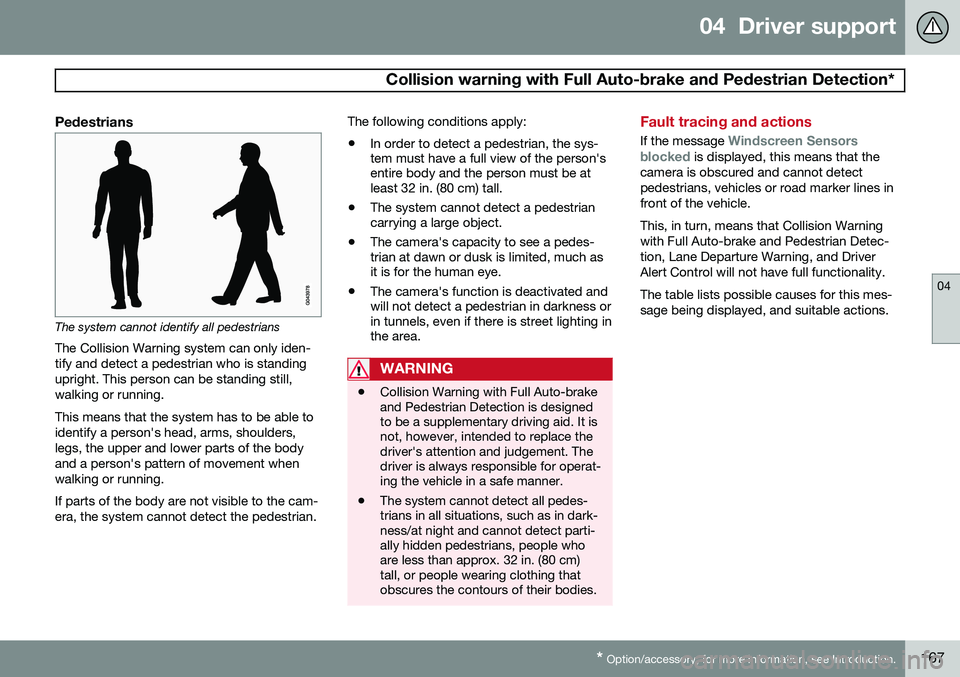
The system cannot identify all pedestrians
The Collision Warning system can only iden- tify and detect a pedestrian who is standingupright. This person can be standing still,walking or running. This means that the system has to be able to identify a person's head, arms, shoulders,legs, the upper and lower parts of the bodyand a person's pattern of movement whenwalking or running. If parts of the body are not visible to the cam- era, the system cannot detect the pedestrian. The following conditions apply:
• In order to detect a pedestrian, the sys- tem must have a full view of the person'sentire body and the person must be atleast 32 in. (80 cm) tall.
• The system cannot detect a pedestriancarrying a large object.
• The camera's capacity to see a pedes-trian at dawn or dusk is limited, much asit is for the human eye.
• The camera's function is deactivated andwill not detect a pedestrian in darkness orin tunnels, even if there is street lighting inthe area.
WARNING
• Collision Warning with Full Auto-brake and Pedestrian Detection is designedto be a supplementary driving aid. It isnot, however, intended to replace thedriver's attention and judgement. Thedriver is always responsible for operat-ing the vehicle in a safe manner.
• The system cannot detect all pedes-trians in all situations, such as in dark-ness/at night and cannot detect parti-ally hidden pedestrians, people whoare less than approx. 32 in. (80 cm)tall, or people wearing clothing thatobscures the contours of their bodies.
Fault tracing and actions
If the message Windscreen Sensors
blocked is displayed, this means that the
camera is obscured and cannot detect pedestrians, vehicles or road marker lines infront of the vehicle. This, in turn, means that Collision Warning with Full Auto-brake and Pedestrian Detec-tion, Lane Departure Warning, and DriverAlert Control will not have full functionality. The table lists possible causes for this mes- sage being displayed, and suitable actions.
Page 170 of 380
04 Driver support
Collision warning with Full Auto-brake and Pedestrian Detection*
04
168* Option/accessory, for more information, see Introduction.
CauseAction
The surface of the windshield in front of the camera is dirty or covered with ice or snow.Clean or clear the section of the windshield in front of the camera.
Fog, heavy rain or snow is interfering with the function of the camera.No action possible. Heavy precipitation may affect the function of the camera.
The surface of the windshield is clean but the message remains in the display.Wait a short time. It may take several minutes for the camera to regis- ter visibility.
The surface between the inside of the windshield and the camera is dirty.Contact an authorized Volvo retailer or service technician to have this surface cleaned.
Symbols and messages in the display
SymbolMessageDescription
Collision Warning OffCollision Warning is switched off. This message is displayed when the engine is started and will disappear after approx. 5 seconds. It can also be erased by pressing the OK button.
Collision Warning UnavailableCollision Warning cannot be activated. This message is displayed when the driver attempts to activate the function. It will disappear after approx. 5 seconds or can be erased by pressing the OK button.
Auto braking was activatedAuto-braking has been active. This message can be erased by pressing the OK button.
Windscreen Sen- sors blockedThe camera is temporarily not functioning. This message is displayed if the camera is obstructed by snow, ice, dirt, etc., on the windshield. Clean the area of the windshield in front of the camera, see page 166 formore information on the camera’s limitations.
Page 171 of 380
04 Driver support
Collision warning with Full Auto-brake and Pedestrian Detection*
04
* Option/accessory, for more information, see Introduction.169
SymbolMessageDescription
Radar blocked See manualCollision Warning and Auto-brake are temporarily not functioning. The radar sensor is blocked, for example by heavy rain or snow that has accumulated in front of the sensor, and cannot detect other vehicles, seepage 149 for more information on the radar sensor’s limitations.
Collision warn. Service requiredCollision Warning and Auto-brake are partially or completely not functioning. Contact a trained and qualified Volvo service technician if the message remains in the display.
Page 173 of 380
04 Driver support
Driver Alert System*
04
* Option/accessory, for more information, see Introduction.171
Operating DAC
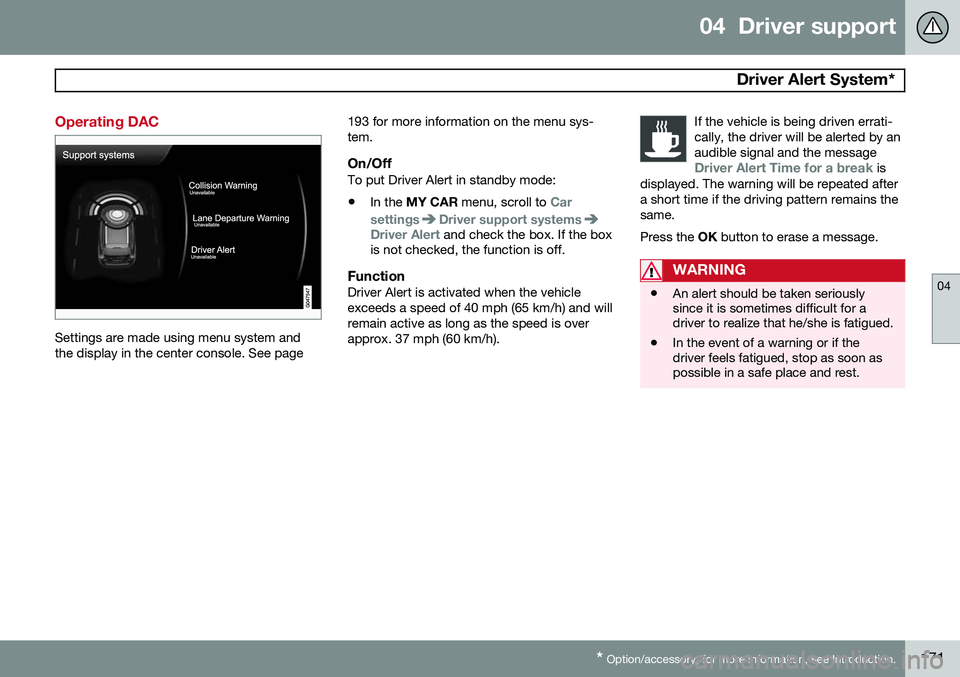
Settings are made using menu system and the display in the center console. See page 193 for more information on the menu sys-tem.
On/OffTo put Driver Alert in standby mode:
• In the
MY CAR menu, scroll to
Car
settings
Driver support systemsDriver Alert and check the box. If the box
is not checked, the function is off.
FunctionDriver Alert is activated when the vehicle exceeds a speed of 40 mph (65 km/h) and willremain active as long as the speed is overapprox. 37 mph (60 km/h). If the vehicle is being driven errati-cally, the driver will be alerted by anaudible signal and the message
Driver Alert Time for a break is
displayed. The warning will be repeated after a short time if the driving pattern remains thesame.
Press the OK button to erase a message.
WARNING
• An alert should be taken seriously since it is sometimes difficult for adriver to realize that he/she is fatigued.
• In the event of a warning or if thedriver feels fatigued, stop as soon aspossible in a safe place and rest.
Page 174 of 380
04 Driver support
Driver Alert System*
04
172* Option/accessory, for more information, see Introduction.
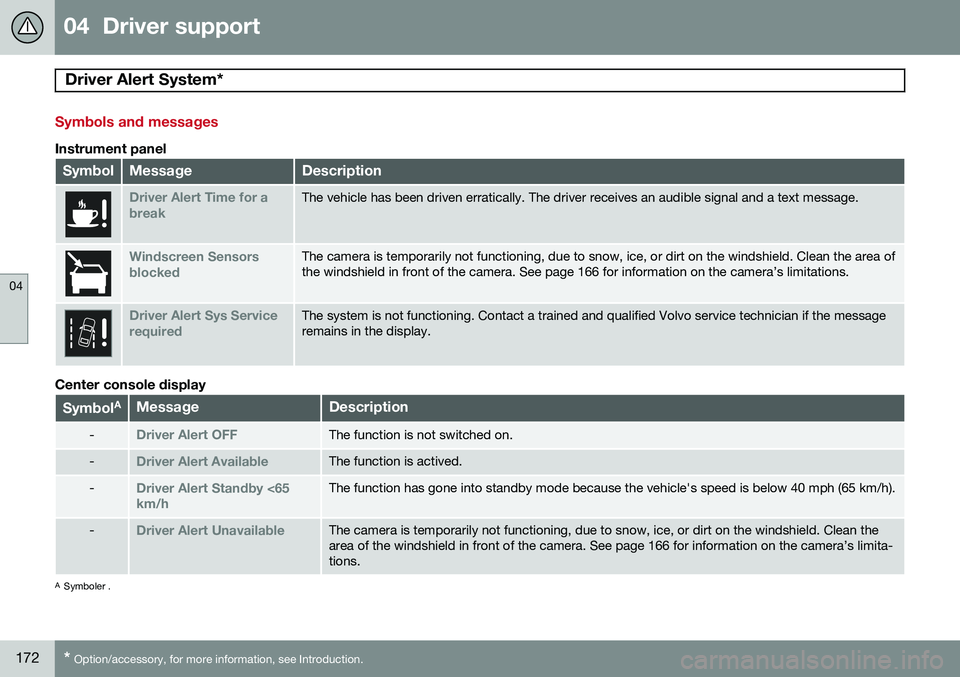
Symbols and messages
Instrument panel
SymbolMessageDescription
Driver Alert Time for a breakThe vehicle has been driven erratically. The driver receives an audible signal and a text message.
Windscreen Sensors blockedThe camera is temporarily not functioning, due to snow, ice, or dirt on the windshield. Clean the area of the windshield in front of the camera. See page 166 for information on the camera’s limitations.
Driver Alert Sys Service requiredThe system is not functioning. Contact a trained and qualified Volvo service technician if the message remains in the display.
Center console display
Symbol AMessageDescription
-Driver Alert OFFThe function is not switched on.
-Driver Alert AvailableThe function is actived.
-Driver Alert Standby <65 km/hThe function has gone into standby mode because the vehicle's speed is below 40 mph (65 km/h).
-Driver Alert UnavailableThe camera is temporarily not functioning, due to snow, ice, or dirt on the windshield. Clean the area of the windshield in front of the camera. See page 166 for information on the camera’s limita-tions.
A
Symboler .
Page 175 of 380
04 Driver support
Driver Alert System*
04
}}
* Option/accessory, for more information, see Introduction.173
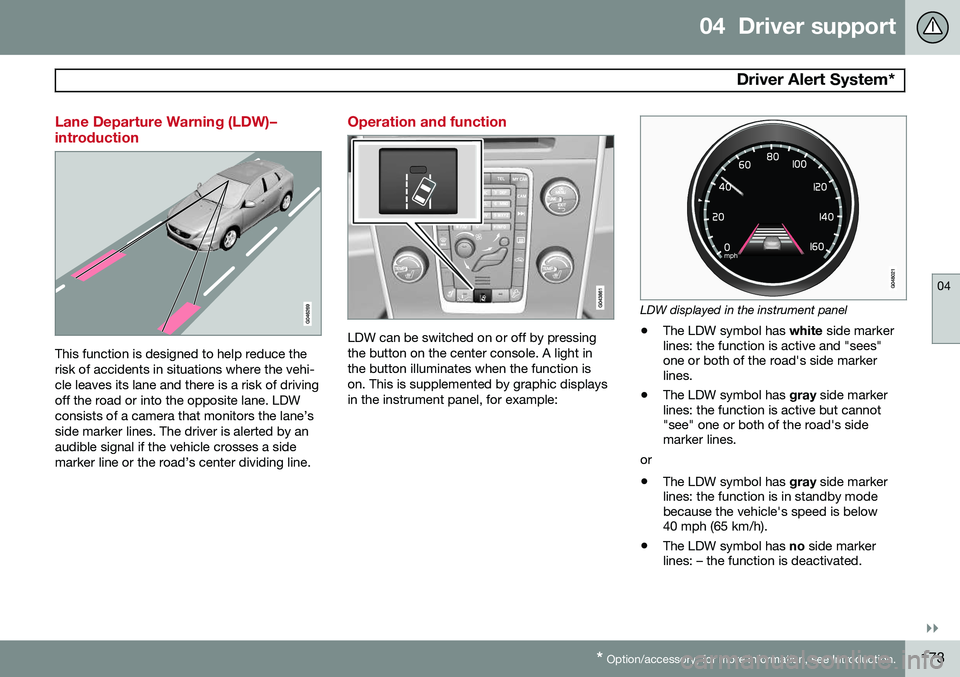
Lane Departure Warning (LDW)– introduction
This function is designed to help reduce the risk of accidents in situations where the vehi-cle leaves its lane and there is a risk of drivingoff the road or into the opposite lane. LDWconsists of a camera that monitors the lane’sside marker lines. The driver is alerted by anaudible signal if the vehicle crosses a sidemarker line or the road’s center dividing line.
Operation and function
LDW can be switched on or off by pressing the button on the center console. A light inthe button illuminates when the function ison. This is supplemented by graphic displaysin the instrument panel, for example:
LDW displayed in the instrument panel
• The LDW symbol has
white side marker
lines: the function is active and "sees" one or both of the road's side markerlines.
• The LDW symbol has
gray side marker
lines: the function is active but cannot"see" one or both of the road's sidemarker lines.
or
• The LDW symbol has
gray side marker
lines: the function is in standby modebecause the vehicle's speed is below40 mph (65 km/h).
• The LDW symbol has
no side marker
lines: – the function is deactivated.
Page 177 of 380
04 Driver support
Driver Alert System*
04
* Option/accessory, for more information, see Introduction.175
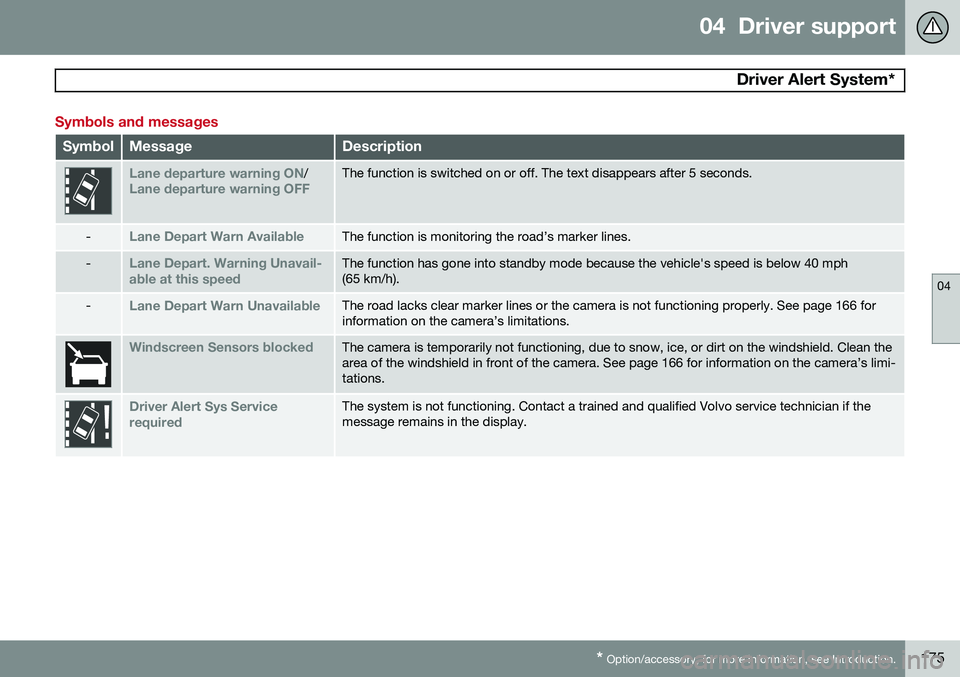
Symbols and messages
SymbolMessageDescription
Lane departure warning ON/Lane departure warning OFFThe function is switched on or off. The text disappears after 5 seconds.
-Lane Depart Warn AvailableThe function is monitoring the road’s marker lines.
-Lane Depart. Warning Unavail-
able at this speedThe function has gone into standby mode because the vehicle's speed is below 40 mph (65 km/h).
-Lane Depart Warn UnavailableThe road lacks clear marker lines or the camera is not functioning properly. See page 166 for information on the camera’s limitations.
Windscreen Sensors blockedThe camera is temporarily not functioning, due to snow, ice, or dirt on the windshield. Clean the area of the windshield in front of the camera. See page 166 for information on the camera’s limi-tations.
Driver Alert Sys Service requiredThe system is not functioning. Contact a trained and qualified Volvo service technician if the message remains in the display.
Page 178 of 380
04 Driver support
Park assist*
04
176* Option/accessory, for more information, see Introduction.
Introduction
The park assist system is designed to assist you when driving into parking spaces,garages, etc. It utilizes ultrasound sensors inthe front bumper and rear bumper(s) to meas-ure the distance to a vehicle or an object thatmay be close to the front or rear of your vehi-cle. An audible signal and symbols in theaudio system’s display indicate the distanceto the object.
NOTE
A trailer hitch whose wiring is integrated with the vehicle's electrical system will beincluded in the measurement of the availa-ble space behind the vehicle.
WARNING
Park Assist is an information system, NOT a safety system. This system is designedto be a supplementary aid when parkingthe vehicle. It is not, however, intended toreplace the driver's attention and judge-ment.
Function
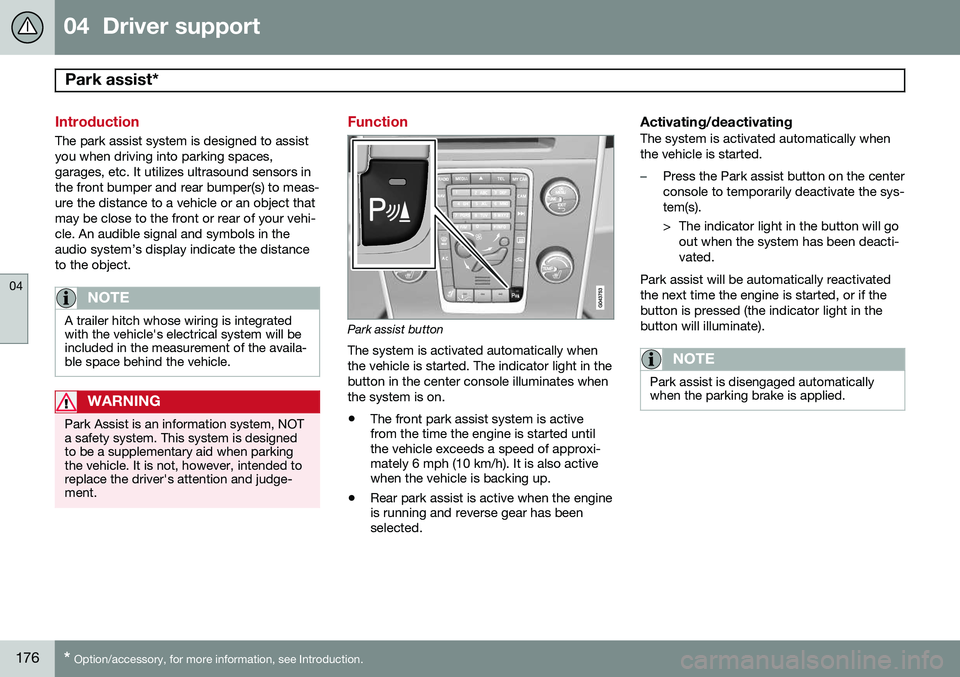
Park assist button
The system is activated automatically when the vehicle is started. The indicator light in thebutton in the center console illuminates whenthe system is on.
• The front park assist system is active from the time the engine is started untilthe vehicle exceeds a speed of approxi-mately 6 mph (10 km/h). It is also activewhen the vehicle is backing up.
• Rear park assist is active when the engineis running and reverse gear has beenselected.
Activating/deactivatingThe system is activated automatically when the vehicle is started.
–Press the Park assist button on the center console to temporarily deactivate the sys-tem(s).
> The indicator light in the button will go
out when the system has been deacti- vated.
Park assist will be automatically reactivatedthe next time the engine is started, or if thebutton is pressed (the indicator light in thebutton will illuminate).
NOTE
Park assist is disengaged automatically when the parking brake is applied.
Page 179 of 380
04 Driver support
Park assist*
04
* Option/accessory, for more information, see Introduction.177
Signals from the park assist system
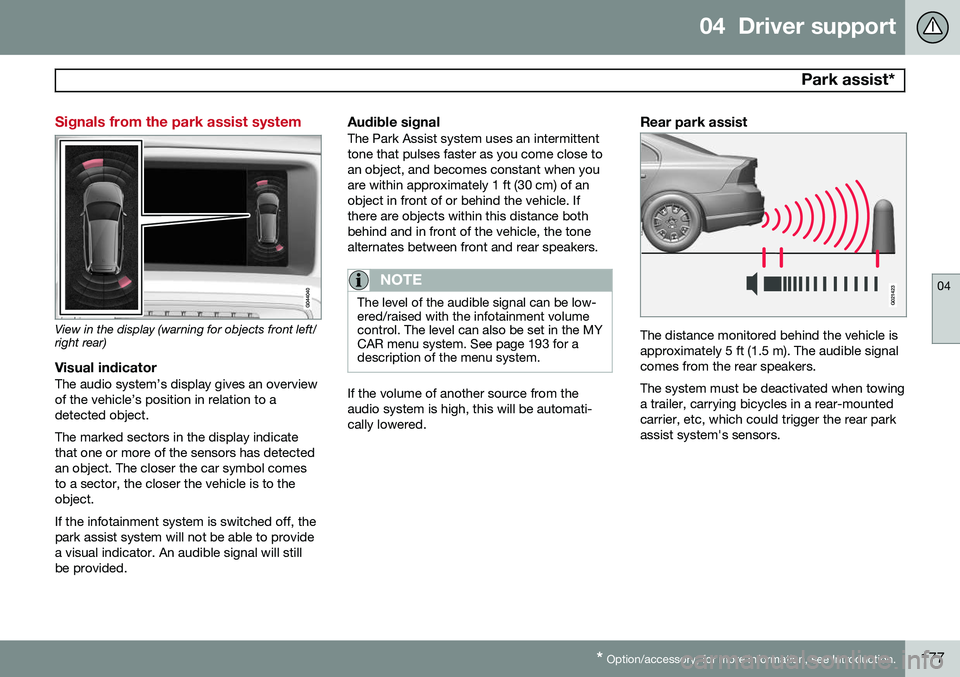
View in the display (warning for objects front left/ right rear)
Visual indicatorThe audio system’s display gives an overview of the vehicle’s position in relation to adetected object. The marked sectors in the display indicate that one or more of the sensors has detectedan object. The closer the car symbol comesto a sector, the closer the vehicle is to theobject. If the infotainment system is switched off, the park assist system will not be able to providea visual indicator. An audible signal will stillbe provided.
Audible signalThe Park Assist system uses an intermittenttone that pulses faster as you come close toan object, and becomes constant when youare within approximately 1 ft (30 cm) of anobject in front of or behind the vehicle. Ifthere are objects within this distance bothbehind and in front of the vehicle, the tonealternates between front and rear speakers.
NOTE
The level of the audible signal can be low- ered/raised with the infotainment volumecontrol. The level can also be set in the MYCAR menu system. See page 193 for adescription of the menu system.
If the volume of another source from the audio system is high, this will be automati-cally lowered.
Rear park assist
G021423
The distance monitored behind the vehicle is approximately 5 ft (1.5 m). The audible signalcomes from the rear speakers. The system must be deactivated when towing a trailer, carrying bicycles in a rear-mountedcarrier, etc, which could trigger the rear parkassist system's sensors.