CD player VOLVO S80 2015 Owner´s Manual
[x] Cancel search | Manufacturer: VOLVO, Model Year: 2015, Model line: S80, Model: VOLVO S80 2015Pages: 392, PDF Size: 10.66 MB
Page 258 of 392
06 Infotainment
AUX/USB sockets
06
256
Connecting external devices
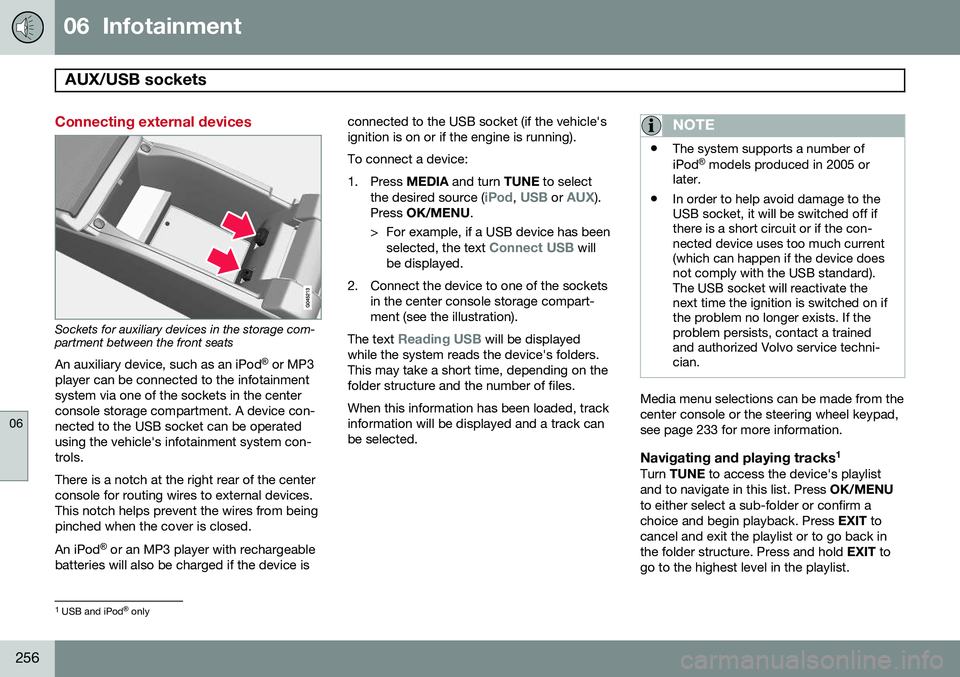
Sockets for auxiliary devices in the storage com- partment between the front seatsAn auxiliary device, such as an iPod ®
or MP3
player can be connected to the infotainment system via one of the sockets in the centerconsole storage compartment. A device con-nected to the USB socket can be operatedusing the vehicle's infotainment system con-trols. There is a notch at the right rear of the center console for routing wires to external devices.This notch helps prevent the wires from beingpinched when the cover is closed. An iPod ®
or an MP3 player with rechargeable
batteries will also be charged if the device is connected to the USB socket (if the vehicle's ignition is on or if the engine is running). To connect a device:
1. Press
MEDIA and turn TUNE to select
the desired source (
iPod, USB or AUX).
Press OK/MENU .
> For example, if a USB device has been selected, the text
Connect USB will
be displayed.
2. Connect the device to one of the sockets in the center console storage compart- ment (see the illustration).
The text
Reading USB will be displayed
while the system reads the device's folders. This may take a short time, depending on thefolder structure and the number of files. When this information has been loaded, track information will be displayed and a track canbe selected.
NOTE
• The system supports a number of iPod ®
models produced in 2005 or
later.
• In order to help avoid damage to the USB socket, it will be switched off ifthere is a short circuit or if the con-nected device uses too much current(which can happen if the device doesnot comply with the USB standard).The USB socket will reactivate thenext time the ignition is switched on ifthe problem no longer exists. If theproblem persists, contact a trainedand authorized Volvo service techni-cian.
Media menu selections can be made from the center console or the steering wheel keypad,see page 233 for more information.
Navigating and playing tracks 1Turn
TUNE to access the device's playlist
and to navigate in this list. Press OK/MENU
to either select a sub-folder or confirm achoice and begin playback. Press EXIT to
cancel and exit the playlist or to go back inthe folder structure. Press and hold EXIT to
go to the highest level in the playlist.
1 USB and iPod ®
only
Page 259 of 392
06 Infotainment
AUX/USB sockets
06
}}
257
The
/ buttons on the center console
or steering wheel keypad can also be used to change tracks/files. The following symbols are used in the dis- play: •
- audio files
•
- video files
•
- folders
When a file has been played, the player will continue to play the rest of the files (of thesame type) in the current folder. When all ofthe files in the folder have been played, the player will automatically go to the next folder 1
(unless
Repeat folder is activated) and play
the files in it. The system automatically detects and changes settings if a device containing onlyaudio or only video files is connected to theUSB socket and will play these files. How-ever, the system will not change settings ifthe device contains both audio and video filesand will continue to play the current type offile.
Fast forward/reverse 1For information, see page 252.
Scan1For information, see page 252.
Random
1For information, see page 253.
Search1The keypad in the center console can beused to search for a file in the currentlyselected folder. Start the search by either turning
TUNE (to
access the folders) or by pressing one of the character keys to enter a letter/number. Pos-sible search results will be displayed as char-acters are entered. Play the file by pressing OK/MENU.
Repeat2This function makes it possible to play files in a folder repeatedly. When the last file hasbeen played, the first file will begin again. Forinformation, see page 253.
PauseWhen the infotainment system volume isturned off completely or the sound is muted,the player will pause. It will resume playingwhen the volume is turned up again or if the sound is unmuted.
Pause is also available via
the menu system, select
Play/Pause.
External sound sources
USB flash driveTo simplify the use of a USB flash drive, it is advisable to only store music files on thedrive. It will take considerably longer for thesystem to index the files on the drive if it con-tains anything other than compatible musicfiles.
NOTE
• The system supports removable media that uses the USB 2.0 standard andthe FAT32 file system. It can index upto 1,000 folders and a maximum of254 sub-folders/files for each folder.However, the highest folder level cansupport up to 1,000 sub-folders/files.
• When using a longer type of USBdevice, connecting it with a USBadapter cable will help reducemechanical wear on the USB socketand on the device.
1
USB and iPod ®
only2 USB only
Page 260 of 392
06 Infotainment
AUX/USB sockets
06
258
USB hubA USB hub can be connected to the USB socket, making it possible to connect severalUSB devices at the same time. To select one of the devices, go to the menu
USB menuSelect USB device.
MP3 playerMany MP3 players have a file indexing sys- tem that is not supported by the vehicle'sinfotainment system. In order to use an MP3 player, the system must be set to
USB
Removable device/Mass Storage Device.
iPod®
An iPod ®
receives current and its battery is
charged through the USB cable. The system will only play audio files from an iPod ®
.
NOTE
When an iPod ®
is used as a sound source,
the vehicle's infotainment system has a menu structure similar to the one in the iPod ®
. See the iPod's manual for detailed
information.
Compatible file formats via the USB socket
The following audio and video files are sup- ported by the system when playing a deviceconnected to the USB socket.
Audio formatsmp3, wma, aac, m4a
Video formatsdivx, avi, asf
Page 261 of 392
06 Infotainment
Bluetooth® media
06
}}
259
Introduction
The vehicle's media player is equipped with Bluetooth ®
and can play streaming audio files
from a Bluetooth ®
device such as a cell
phone or mp3 player. Navigation and control of the device can be done through the vehi-cle's center console control panel or thesteering wheel keypad. On certain externaldevices, it is also possible to change tracksfrom the device.
NOTE
Any Bluetooth cell phones used must sup- port Audio/Video Remote Control Profile(AVRCP) and Advanced Audio DistributionProfile (A2DP). The phone must useAVRCP version 1.3 and A2DP 1.2. If olderversions of these standards are used, cer-tain features (e.g., scan or random) maynot function. Not all cell phones are fully compatible with the vehicle's Bluetooth system. A listof compatible phones is available at youVolvo retailer or at www.volvocars.us.
Menu navigation
Choices can be made in the Bluetoothmenus from the center console control panel or the steering wheel keypad. For additionalinformation about navigating the variousmenus, see page 233. The vehicle's media player can only play audio files through the Bluetooth
®
function.
Overview
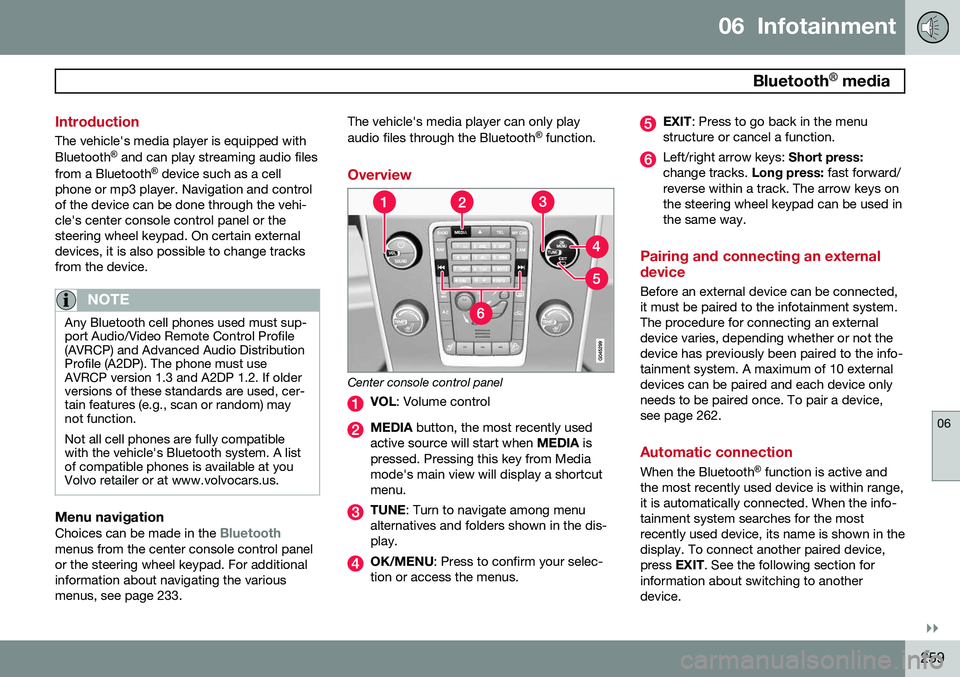
Center console control panel
VOL : Volume control
MEDIA button, the most recently used
active source will start when MEDIA is
pressed. Pressing this key from Media mode's main view will display a shortcutmenu.
TUNE : Turn to navigate among menu
alternatives and folders shown in the dis- play.
OK/MENU : Press to confirm your selec-
tion or access the menus.
EXIT : Press to go back in the menu
structure or cancel a function.
Left/right arrow keys: Short press:
change tracks. Long press: fast forward/
reverse within a track. The arrow keys on the steering wheel keypad can be used inthe same way.
Pairing and connecting an external device
Before an external device can be connected, it must be paired to the infotainment system.The procedure for connecting an externaldevice varies, depending whether or not thedevice has previously been paired to the info-tainment system. A maximum of 10 externaldevices can be paired and each device onlyneeds to be paired once. To pair a device,see page 262.
Automatic connection
When the Bluetooth ®
function is active and
the most recently used device is within range, it is automatically connected. When the info-tainment system searches for the mostrecently used device, its name is shown in thedisplay. To connect another paired device,press EXIT. See the following section for
information about switching to anotherdevice.
Page 382 of 392
11 Index
11
380
1, 2, 3 ...
12-volt sockets........................................ 227
A
ABS (anti-lock brake system).................. 136
Accessory installation warning.................. 13
Active chassis system............................. 224
Active high beams..................................... 95Active yaw control................................... 144
Adaptive brake lights............................... 135
Adaptive cruise control.................... 150, 152 queue assist........................................ 155
Airbags disconnecting the front passenger’s
side................................................. 26, 27
front...................................................... 22
inflatable curtain................................... 32
side impact........................................... 30
Air conditioning........................................ 212
Air distribution.......................................... 208
Air distribution table................................. 216
Air vents................................................... 209 All Wheel Drive......................................... 124
Ambient temperature sensor..................... 81
Anti-freeze....................................... 278, 332Anti-lock brake system
warning light......................................... 79
Anti-lock Brake System (ABS)................. 136
Approach lighting.............................. 57, 101Audio system AUX/USB sockets............................... 256 Bluetooth ®
devices............................. 259
Bluetooth ®
hands-free system........... 261
Bluetooth streaming audio................. 259
getting started.................................... 233
HD digital radio................................... 244
introduction......................................... 232
media player....................................... 251
overview.............................................. 232
radio functions.................................... 242SiriusXM ™ satellite radio.................... 246
sound settings.................................... 237
steering wheel keypad........................ 233
voice control....................................... 270
Auto-dim rearview mirror......................... 107
Automatic locking retractor....................... 38 Automatic transmission
Eco (driving function).......................... 128
Geartronic........................................... 122
general description..................... 121, 122
oil........................................................ 373
shiftlock override................................ 124
Axle weight.............................................. 304
B
Battery maintenance....................................... 344
remote key, replacing........................... 61
replacing..................................... 344, 345
specifications...................................... 373
warning symbols................................. 343
Blind Spot Information System (BLIS)..... 192
Bluetooth cell phone connection............. 261
Booster cushions....................................... 47
Brake lights.............................................. 135Brake system ABS..................................................... 136
Brake pad inspection.......................... 135
checking fluid level............................. 332
emergency brake assistance.............. 136
Page 385 of 392
11 Index
11
383
Glossary of tire terminology..................... 303
Grocery bag holder.................................. 285
Gross vehicle weight............................... 304
H
Hazard warning flashers............................ 99
HD digital radio........................................ 244Headlights Active Bending Lights........................... 97
active high beams................................. 95
changing bulbs........................... 335, 336
daytime running lights.......................... 94
high/low beams.................................... 95
high beam flash.................................... 95
tunnel detection.................................... 97
Headlight washers................................... 103
Head restraints, rear seat.......................... 89
Heated front seats................................... 210
Heated oxygen sensors........................... 283
Heated rear seats.................................... 211
Heated steering wheel............................... 93
Heated windshield........................... 107, 213 High beams................................................ 95
active.................................................... 95
Hill Start Assist (HSA).............................. 121
Hoisting the vehicle................................. 326 HomeLink ®
Wireless Control System...... 113
Home safe lighting................................... 100
Hood, opening/closing............................ 328
Horn........................................................... 92
I
Ignition modes........................................... 84
Immobilizer................................................ 56
Important information.................................. 6
Indicator lights............................... 75, 77, 79
Infant seats................................................ 42
Inflatable Curtain........................................ 32
Inflation pressure..................................... 297
Inflation pressure table............................ 300Information and warning symbols, table
of.............................................................. 375
Information lights........................... 75, 77, 79 Infotainment
Menu navigation................................. 235
Infotainment system................................ 232 AUX/USB sockets............................... 256 Bluetooth ®
devices............................. 259
Bluetooth ®
hands-free system........... 261
getting started.................................... 233
media player....................................... 251
menus......................................... 233, 235
radio functions.................................... 242
sound settings.................................... 237
voice control....................................... 270
Inspection readiness................................ 326
Instrument lighting..................................... 97 "theater" lighting................................... 97
Instrument overview............................ 74, 75
Instrument panel................................ 75, 199
Interior Air Quality System....................... 208
Interior lighting................................... 99, 100iPod ® connector (audio system)............. 256
ISOFIX/LATCH anchors............................. 48
Page 386 of 392
11 Index
11
384
J
Jackattaching............................................. 315
location of........................................... 315
Jump starting........................................... 119
K
Key blade................................. 54, 60, 63, 64 private locking...................................... 63
valet locking.......................................... 63
Keyless drive general description............................... 64
starting the vehicle............................. 116
L
Labelslist of................................................... 367
location of........................................... 366
Lane Departure Warning (LDW)............... 182
LATCH anchors......................................... 48
Leather care............................................. 360
Lighting panel............................................ 94 Load anchoring eyelets........................... 284
Loading the vehicle.......................... 284, 304
roof loads............................................ 286
Locking...................................................... 67
Locking the vehicle.................................... 57
Locks, child safety..................................... 51
Low beams................................................ 95
Low oil pressure warning light................... 79
M
Main instrument panel............................. 199
Maintenance............................................ 324 hoisting the vehicle............................. 326
performed by the owner..................... 325
Malfunction indicator light......................... 78
Media player (infotainment system)......... 251
Menu........................................................ 201
Messages in the instrument panel........... 199Mirrors defroster............................................. 107
power door......................................... 106
rearview, auto-dim function................ 107 retractable........................................... 106
vanity.................................................. 227
Moonroof................................................. 111 Motor oil checking............................................. 330
volumes.............................................. 372
MY CAR................................................... 201
O
Occupant safety........................................ 16
Occupant weight sensor...................... 26, 27
Octane recommendations....................... 280
Odometer, trip........................................... 82Oil checking............................................. 330
volumes.............................................. 372
Oil quality................................................. 371
OK button................................................ 199
On Call Roadside Assistance.................. 378
Outside temperature sensor...................... 81
Overhead courtesy lighting................ 99, 100
Overheating, engine................................... 80
Oxygen sensors, heated.......................... 283